Microprocessor Design/Print Version
 |
This is the print version of Microprocessor Design You won't see this message or any elements not part of the book's content when you print or preview this page. |
This book serves as an introduction to the field of microprocessor design and implementation. It is intended for students in computer science or computer or electrical engineering who are in the third or fourth years of an undergraduate degree. While the focus of this book will be on Microprocessors, many of the concepts will apply to other ASIC design tasks as well.
The reader should have prior knowledge in Digital Circuits and possibly some background in Semiconductors although it isn't strictly necessary. The reader also should know at least one Assembly Language. Knowledge of higher-level languages such as C or C++ may be useful as well, but are not required. Sections about soft-core design will require prior knowledge of Programmable Logic, and a prior knowledge of at least one HDL.
Introduction
About This Book
Computers and computer systems are a pervasive part of the modern world. Aside from just the common desktop PC, there are a number of other types of specialized computer systems that pop up in many different places. The central component of these computers and computer systems is the microprocessor, or the CPU. The CPU (short for "Central Processing Unit") is essentially the brains behind the computer system, it is the component that "computes". This book is going to discuss what microprocessor units do, how they do it, and how they are designed.
This book is going to discuss the design of microprocessor units, but it will not discuss the design of complete computer systems nor the design of other computer components or peripherals. Some microprocessor designs will be implemented and synthesized in Hardware Description Languages, such as Verilog or VHDL. The book will be organized to discuss simple designs and concepts first, and expand the initial designs to include more complicated concepts as the book progresses.
This book will attempt to discuss the basic concepts and theory of microprocessor design from an abstract level, and give real-world examples as necessary. This book will not focus on studying any particular processor architecture, although several of the most common architectures will appear frequently in examples and notes.
How Will This Book Be Organized?
The first section of the book will review computer architecture, and will give a brief overview of the components of a computer, the components of a microprocessor, and some of the basic architectures of modern microprocessors.
The second section will discuss in some detail the individual components of a microcontroller, what they do, and how they are designed.
The third section will focus in on the ALU and FPU, and will discuss implementation of particular mathematical operations.
The fourth section will discuss the various design paradigms, starting with the most simple single cycle machine to more complicated exotic architectures such as vector and VLIW machines.
Additional chapters will serve as extensions and support chapters for concepts discussed in the first four sections.
Prerequisites
This book will rely on some important background information that is currently covered in a number of other local wikibooks. Readers of this book will find the following prerequisites important to understand the material in this book:
All readers must be familiar with binary numbers and also hexadecimal numbers. These notations will be used throughout the book without any prior explanation. Readers of this book should be familiar with at least one assembly language, and should also be familiar with a hardware description language. This book will use both types of languages in the main narrative of the text without offering explanation beforehand. Appendices might be included that contain primers on this material.
Readers of this book will also find some pieces of software helpful in examples. Specifically, assemblers and assembly language simulators will help with many of the examples. Likewise, HDL compilers and simulators will be useful in the design examples. If free versions of these software programs can be found, links will be added in an appendix.
Who Is This Book For?
This book is designed to accompany an advanced undergraduate or graduate study in the field of microprocessor design. Students in the areas of Electrical Engineering, Computer Engineering, or Computer Science will likely find this book to be the most useful. The basic subjects in this field will be covered, and more advanced topics will be included depending on the proficiencies of the authors. Many of the topics considered in this book will apply to the design of many different types of digital hardware, including ASICs. However, the main narrative of the book, and the ultimate goals of the book will be focused on microcontrollers and microprocessors, not other ASICs.
What This Book Will Not Cover
This book is about the design of micro-controllers and microprocessors only. This book will not cover the following topics in any detail, although some mention might be made of them as a matter of interest:
- Transistor mechanics, semiconductors, or integrated circuit fabrication (Microtechnology)
- Digital Circuit Logic, Design or Layout (Programmable Logic)
- Design or interfacing with other computer components or peripherals (Embedded Systems)
- Design or implementation of communication protocols used to communicate between computer components (Serial Programming)
- Design or creation of computer software (Computer Programming)
- Design of System-on-a-Chip hardware or any device with an integrated micro-controller
- How to select an off-the-shelf CPU (How To Assemble A Desktop PC/Choosing the parts/CPU)
Terminology
Throughout the book, the words "Microprocessor", "Microcontroller", "Processor", and "CPU" will all generally be used interchangeably to denote a digital processing element capable of performing arithmetic and quantitative comparisons. We may differentiate between these terms in individual sections, but an explanation of the differences will always be provided.
Microprocessor Basics
Microprocessors
Microprocessors
Microprocessors are the devices in a computer which make things happen. Microprocessors are capable of performing basic arithmetic operations, moving data from place to place, and making basic decisions based on the quantity of certain values.

Types of Processors

The vast majority of microprocessors can be found in embedded high microcontrollers. The second most common type of processors are common desktop processors, such as Intel's Pentium or AMD's Athlon. Less common are the extremely powerful processors used in high-end servers, such as Sun's SPARC, IBM's Power, or Intel's Itanium.
Historically, microprocessors and microcontrollers have come in "standard sizes" of 8 bits, 16 bits, 32 bits, and 64 bits. These sizes are common, but that does not mean that other sizes are not available. Some microcontrollers (usually specially designed embedded chips) can come in other "non-standard" sizes such as 4 bits, 12 bits, 18 bits, or 24 bits. The number of bits represent how much physical memory can be directly addressed by the CPU. It also represents the amount of bits that can be read by one read/write operation. In some circumstances, these are different; for instance, many 8 bit microprocessors have an 8 bit data bus and a 16 bit address bus.
- 8 bit processors can read/write 1 byte at a time and can directly address 256 bytes
- 16 bit processors can read/write 2 bytes at a time, and can address 65,536 bytes (64 Kilobytes)
- 32 bit processors can read/write 4 bytes at a time, and can address 4,294,967,295 bytes (4 Gigabytes)
- 64 bit processors can read/write 8 bytes at a time, and can address 18,446,744,073,709,551,616 bytes (16 Exabytes)
General Purpose Versus Specific Use
Microprocessors that are capable of performing a wide range of tasks are called general purpose microprocessors. General purpose microprocessors are typically the kind of CPUs found in desktop computer systems. These chips typically are capable of a wide range of tasks (integer and floating point arithmetic, external memory interface, general I/O, etc). We will discuss some of the other types of processor units available:
- General Purpose
- A general purpose processing unit, typically referred to as a "microprocessor" is a chip that is designed to be integrated into a larger system with peripherals and external RAM. These chips can typically be used with a very wide array of software.
- DSP
- A Digital Signal Processor, or DSP for short, is a chip that is specifically designed for fast arithmetic operations, especially addition and multiplication. These chips are designed with processing speed in mind, and don't typically have the same flexibility as general purpose microprocessors. DSPs also have special address generation units that can manage circular buffers, perform bit-reversed addressing, and simultaneously access multiple memory spaces with little to no overhead. They also support zero-overhead looping, and a single-cycle multiply-accumulate instruction. They are not typically more powerful than general purpose microprocessors, but can perform signal processing tasks using far less power (as in watts).
- Embedded Controller
- Embedded controllers, or "microcontrollers" are microprocessors with additional hardware integrated into a single chip. Many microcontrollers have RAM, ROM, A/D and D/A converters, interrupt controllers, timers, and even oscillators built into the chip itself. These controllers are designed to be used in situations where a whole computer system isn't available, and only a small amount of simple processing needs to be performed.
- Programmable State Machines
- The most simplistic of processors, programmable state machines are a minimalist microprocessor that is designed for very small and simple operations. PSMs typically have very small amount of program ROM available, limited scratch-pad RAM, and they are also typically limited in the type and number of instructions that they can perform. PSMs can either be used stand-alone, or (more frequently) they are embedded directly into the design of a larger chip.
- Graphics Processing Units
- Computer graphics are so complicated that functions to process the visuals of video and game applications have been offloaded to a special type of processor known as a GPU. GPUs typically require specialized hardware to implement matrix multiplications and vector arithmetic. GPUs are typically also highly parallelized, performing shading calculations on multiple pixels and surfaces simultaneously.
Types of Use
Microcontrollers and Microprocessors are used for a number of different types of applications. People may be the most familiar with the desktop PC, but the fact is that desktop PCs make up only a small fraction of all microprocessors in use today. We will list here some of the basic uses for microprocessors:
- Signal Processing
- Signal processing is an area that demands high performance from microcontroller chips to perform complex mathematical tasks. Signal processing systems typically need to have low latency, and are very deadline driven. An example of a signal processing application is the decoding of digital television and radio signals.
- Real Time Applications
- Some tasks need to be performed so quickly that even the slightest delay or inefficiency can be detrimental. These applications are known as "real time systems", and timing is of the utmost importance. An example of a real-time system is the anti-lock braking system (ABS) controller in modern automobiles.
- Throughput and Routing
- Throughput and routing is the use of a processor where data is moved from one particular input to an output, without necessarily requiring any processing. An example is an internet router, that reads in data packets and sends them out on a different port.
- Sensor monitoring
- Many processors, especially small embedded processors are used to monitor sensors. The microprocessor will either digitize and filter the sensor signals, or it will read the signals and produce status outputs (the sensor is good, the sensor is bad). An example of a sensor monitoring processor is the processor inside an antilock brake system: This processor reads the brake sensor to determine when the brakes have locked up, and then outputs a control signal to activate the rest of the system.
- General Computing
- A general purpose processor is like the kind of processor that is typically found inside a desktop PC. Names such as Intel and AMD are typically associated with this type of processor, and this is also the kind of processor that the public is most familiar with.
- Graphics
- Processing of digital graphics is an area where specialized processor units are frequently employed. With the advent of digital television, graphics processors are becoming more common. Graphics processors need to be able to perform multiple simultaneous operations. In digital video, for instance, a million pixels or more will need to be processed for every single frame, and a particular signal may have 60 frames per second! To the benefit of graphics processors, the color value of a pixel is typically not dependent on the values of surrounding pixels, and therefore many pixels can typically be computed in parallel.
Abstraction Layers
Computer systems are developed in layers known as layers of abstraction. Layers of abstraction allow people to develop computer components (hardware and software) without having to worry about the internal design of the other layers in the system. At the highest level are the user-interface programs that people use on their computers. At the lowest level are the transistor layouts of the individual computer components. Some of the layers in a computer system are (listed from highest to lowest):
- Application
- Operating System
- Firmware
- Instruction Set Architecture
- Microprocessor Control Logic
- Physical Circuit Layout
This book will be mostly concerned with the Instruction Set Architecture (ISA), and the Microprocessor Control Logic but we will also describe the Operating System (OS) in brief. Topics above these are typically the realm of computer programmers. The bottom layer, the Physical Circuit Layout is the job of hardware and VLSI engineers.
Operating System
Operating System is a program which acts as an interface between the system user and the computer hardware and controls the execution of application programs. It is the program running at all times on the computer, usually called the Kernel.
ISA
The Instruction Set Architecture is a long name for the assembly language of a particular machine, and the associated machine code for that assembly language. We will discuss this below.
Assembly Language
An assembly language is a small language that contains a short word or "mnemonic" for each individual command that a microcontroller can follow. Each command gets a single mnemonic, and each mnemonic corresponds to a single machine command. Assembly language gets converted (by a program called an "assembler") into the binary machine code. The machine code is specific to each different type of machine.
Common ISAs
Some of the most common ISAs, listed in order of popularity (most popular first) are:
- ARM
- IA-32 (Intel x86)
- MIPS
- Motorola 68K
- PowerPC
- Hitachi SH
- SPARC
- RISC-V
Moore's Law
A common law that governs the world of microprocessors is Moore's Law. Moore's Law, originally by Dr. Carver Mead at Caltech, and summarized famously by Intel Founder Gordon Moore. Moore's Law states that the number of transistors on a single chip at the same price will double every 18 to 24 months. This law has held without fail since it was originally stated in 1965. Current microprocessor chips contain millions of transistors and the number is growing rapidly. Here is Moore's summarization of the law from Electronics Magazine in 1965:
The complexity for minimum component costs has increased at a rate of roughly a factor of two per year...Certainly over the short term this rate can be expected to continue, if not to increase. Over the longer term, the rate of increase is a bit more uncertain, although there is no reason to believe it will not remain nearly constant for at least 10 years. That means by 1975, the number of components per integrated circuit for minimum cost will be 65,000. I believe that such a large circuit can be built on a single wafer.—Gordon Moore
Moore's Law has been used incorrectly to calculate the speed of an integrated circuit, or even to calculate its power consumption, but neither of these interpretations are true. Also, Moore's law is talking about the number of transistors on a chip for a "minimum component cost", which means that the number of transistors on a chip, for the same price, will double. This goes to show that chips for less price can have fewer transistors, and that chips at a higher price can have more transistors. On an economic note, a consequence of Moore's Law is that companies need to continue to innovate and integrate more transistors onto a single chip, without being able to increase prices.
Moore's Law does not require that the speed of the chip increase along with the number of transistors on the chip. However, the two measurements are typically related. Some points to keep in mind about transistors and Moore's Law are:
- Smaller Transistors typically switch faster than larger transistors.
- To get more transistors on a single chip, the chip needs to be made larger, or the transistors need to be made smaller. Typically, the transistors get smaller.
- Transistors tend to leak electrical current as they get smaller. This means that smaller transistors require more power to operate, and they generate more heat.
- Transistors tend to generate heat as a function of frequencies. Higher clock rates tend to generate more heat.

Moore's law is occasionally misinterpreted to mean that the speed of processors, in hertz will double every 18 months. This is not strictly true, although the speed of processors does tend to increase as transistors are made smaller and more compact. With the advent of multi-core processors, some people have used Moore's law to mean that processor throughput increases with time, which is not strictly the case either (although it is a likely side effect of Moore's law).
Clock Rates
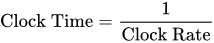
Microprocessors are typically discussed in terms of their clock speed. The clock speed is measured in hertz (or megahertz, or gigahertz). A hertz is a "cycle per second". Each cycle, a microprocessor will perform certain tasks, although the amount of work performed in a single cycle will be different for different types of processors. The amount of work that a processor can complete in a single cycle is measured in "instructions per cycle" . For some systems, such as MIPS, there is 1 instruction per cycle. For other systems, such as modern x86 chips, there are typically very many instructions per cycle. The clock rate is equated as such:
This means that the amount of time for a cycle is inversely proportional to the clock rate. A computer with a 1MHz clock rate will have a clock time of 1 microsecond. A modern desktop computer with a 3.2 GHz processor will have a clock time of approximately 3× 10⁻¹⁰ seconds, or 300 picoseconds. 300 picoseconds is an incredibly small amount of time, and there is a lot that needs to happen inside the processor in each clock cycle.
Basic Elements of a Computer
There are a few basic elements that are common to all computers. These elements are:
- CPU
- Memory
- Input Devices
- Output Devices
Depending on the particular computer architecture, these elements may be available in various sizes, and they may be accompanied by additional elements.
Computer Architecture
Von Neumann Architecture
Early on in the days of computer science, computer programs were hard-wired, only using memory to store data. Reprogramming computers involved changing hardware switches manually, taking ridiculous amounts of time and having a high potential for coding errors. As a workaround to these problems, mathematician and computer scientist John von Neumann proposed what is now known as the von Neumann architecture, which stores programs in memory, thereby avoiding the need to hard-wire them.
Microprocessor Execution
In a von Neumann architecture, a circuit called a microprocessor is used to process program instructions and execute them. To execute a program, the microprocessor first fetches a programs' instructions from memory and the data necessary to run them. Then, the microprocessor decodes and separates the instructions and data and activates the necessary components and pathways needed to run the program. Finally, the microprocessor executes the program, running through the instructions, manipulating the data, and storing the results.
Control Units and Datapaths
This three-step process of fetching, decoding, and executing is typically implemented with two hardware components: a control unit and a datapath. If data is thought of as water, then the datapath acts as a canal with many branches, and the control unit acts as a series of locks. The control unit reads instructions fetched from memory and uses them to direct where data flows in the datapath. Along the way, different branches of the datapath will contain different mechanisms for modifying and transforming the data flowing through it. These mechanisms are termed Arithmetic Logic Units (ALUs) (discussed in more depth later on), and they perform arithmetic operations (such as addition, subtraction, shifting, and inverting) and logic operations (such as AND and OR) on data flowing through the datapath.
A more nuanced discussion of control units and datapaths will be had in a later section, conveniently titled Control and Datapath.
Harvard Architecture
In a Harvard Architecture machine, the computer system's memory is separated into two discrete parts: data and instructions. In a pure Harvard system, the two different memories occupy separate memory modules, and instructions can only be executed from the instruction memory.
Many DSPs are modified Harvard architectures, designed to simultaneously access three distinct memory areas: the program instructions, the signal data samples, and the filter coefficients (often called the P, X, and Y memories).
In theory, such three-way Harvard architectures can be three times as fast as a Von Neumann architecture that is forced to read the instruction, the data sample, and the filter coefficient, one at a time.
Modern Computers
Modern desktop computers, especially computers based on the Intel x86 ISA are not Harvard computers, although the newer variants have features that are "Harvard-Like". All information, program instructions, and data are stored in the same RAM areas. However, a modern feature called "paging" allows the physical memory to be segmented into large blocks of memory called "pages". Each page of memory can either be instructions or data, but not both.
Modern embedded computers, however, are typically based on a Harvard architecture. Instructions are stored in a different addressable memory block than the data is, and there is no way for the microprocessor to interchange data and instructions.
RISC and CISC and DSP
Historically, the first type of ISA (Instruction Set Architecture) was the complex instruction set computers (CISC), and the second type was the reduced instruction set computers (RISC). It is a common misunderstanding that RISC systems typically have a small ISA (fewer instructions) but make up for it with faster hardware. RISC system actually have "reduced instructions", in the sense that each instruction does so little that it takes very little time to execute it. It is a common misunderstanding that CISC systems have more instructions, but typically pay a steep performance penalty for the added versatility. CISC systems actually have "complex instructions", in the sense that at least one instruction takes a long time to execute -- for example, the "double indirect" addressing mode inherently requires two memory cycles to execute, and a few CPUs have a "string copy" instruction that may require hundreds of memory cycles to execute. MIPS and SPARC are examples of RISC computers. Intel x86 is an example of a CISC computer.
Some people group stack machines with the RISC machines; others[8] group stack machines with the CISC machines; some people [9], [10] describe stack machines as neither RISC nor CISC.
Other ISA types include DSPs, stack machines, VLIW machines, MISC machines, TTA architectures, massively parallel processor arrays, etc.
We will discuss these terms and concepts in more detail later.
Microprocessor Components
Some of the common components of a microprocessor are:
- Control Unit
- I/O Units
- Arithmetic Logic Unit (ALU)
- Registers
- Cache
A brief introduction to these components is placed below.
Control processer Unit
The control processer unit, as described above, reads the instructions, and generates the necessary digital signals to operate the other components. An instruction to add two numbers together would cause the Control Unit to activate the addition module, for instance.
I/O Units
The processor needs to be able to communicate with the rest of the computer system. This communication occurs through the I/O ports. The I/O ports will interface with the system memory (RAM), and also the other peripherals of a computer.
ALU
The Arithmetic Logic Unit, or ALU is the part of the microprocessor that performs arithmetic operations. ALUs can typically add, subtract, divide, multiply, and perform the logical operations of two numbers (and, or, nor, not, etc).
ALU will be discussed in far more detail in a later chapter, ALU.
Registers
There are different kinds of registers. Hopefully it will be obvious which kind of register we are talking about from the context.
The most general meaning is a "hardware register": anything that can be used to store bits of information, in a way that all the bits of the register can be written to or read out simultaneously. Since registers outside of a CPU are also outside the scope of the book, this book will only discuss processor registers, which are hardware registers that happen to be inside a CPU. But usually we will refer to a more specific kind of register.
Registers are mentioned in far more detail in a later chapter, Register File.
programmer-visible registers
The programmer-visible registers, also called the user-accessible registers, also called the architectural registers, often simply called "the registers", are the registers that are directly encoded as part of at least one instruction in the instruction set.
The registers are the fastest accessible memory locations, and because they are so fast, there are typically very few of them. In most processors, there are fewer than 32 registers. The size of the registers defines the size of the computer. For instance, a "32 bit computer" has registers that are 32 bits long. The length of a register is known as the word length of the computer.
There are several factors limiting the number of registers, including:
- It is very convenient for a new CPU to be software-compatible with an old CPU. This requires the new chip to have exactly the same number of programmer-visible registers as the old chip.
- Doubling the number general-purpose registers requires adding another bit to each instruction that selects a particular register. Each 3-operand instruction (that specify 2 source operands and a destination operand) would expand by 3 bits. Modern chip manufacturing processes could put a million registers on a chip; that would make each and every 3-operand instruction require 60 bits just to select the registers, not counting the bits required to specify what to do with those operands.
- Adding more registers adds more wires to the critical path, adding capacitance, which reduces the maximum clock speed of the CPU.
- Historically, CPUs were designed with few registers, because each additional register increased the cost of the CPU significantly. But now that modern chip manufacturing can put tens of millions of bits of storage on a single commodity CPU chip, this is less of an issue.
Microprocessors typically contain a large number of registers, but only a small number of them are accessible by the programmer. The registers that can be used by the programmer to store arbitrary data, as needed, are called general purpose registers. Registers that cannot be accessed by the programmer directly are known as reserved registers[citation needed].
Some computers have highly specialized registers -- memory addresses always came from the program counter or "the" index register or "the" stack pointer; one ALU input was always hooked to data coming from memory, the other ALU input was always hooked to "the" accumulator; etc.
Other computers have more general-purpose registers -- any instruction that access memory can use any address register as a index register or as a stack pointer; any instruction that uses the ALU can use any data register.
Other computers have completely general-purpose registers -- any register can be used as data or an address in any instruction, without restriction.
microarchitectural registers
Besides the programmer-visible registers, all CPUs have other registers that are not programmer-visible, called "microarchitectural registers" or "physical registers".
These registers include:
- memory address register
- memory data register
- instruction register
- microinstruction register
- microprogram counter
- pipeline registers
- extra physical registers to support register renaming
- the prefetch input queue
- writable control stores (We will discuss the control store in the Microprocessor Design/Control Unit and Microprocessor Design/Microcode)
- Some people consider on-chip cache to be part of the microarchitectural registers; others consider it "outside" the CPU.
There are a wide variety of ways to implement any one instruction set. The vast majority of these microarchitectural registers are technically not "necessary". A designer could choose to design a CPU that had almost no physical registers other than the programmer-visible registers. However, many designers choose to design a CPU with lots of physical registers, using them in ways that make the CPU execute the same given instruction set much faster than a CPU that lacks those registers.
Cache
Most CPUs manufactured do not have any cache.
Cache is memory that is located on the chip, but that is not considered registers. The cache is used because reading external memory is very slow (compared to the speed of the processor), and reading a local cache is much faster. In modern processors, the cache can take up as much as 50% or more of the total area of the chip. The following table shows the relationship between different types of memory:
| smallest | largest | |
| Registers | cache | RAM |
| fastest | slowest |
Cache typically comes in 2 or 3 "levels", depending on the chip. Level 1 (L1) cache is smaller and faster than Level 2 (L2) cache, which is larger and slower. Some chips have Level 3 (L3) cache as well, which is larger still than the L2 cache (although L3 cache is still much faster than external RAM).
We discuss cache in far more detail in a later chapter, Cache.
Endian
Different computers order their multi-byte data words (i.e., 16-, 32-, or 64-bit words) in different ways in RAM. Each individual byte in a multi-byte word is still separately addressable. Some computers order their data with the most significant byte of a word in the lowest address, while others order their data with the most significant byte of a word in the highest address. There is logic behind both approaches, and this was formerly a topic of heated debate.
This distinction is known as endianness. Computers that order data with the least significant byte in the lowest address are known as "Little Endian", and computers that order the data with the most significant byte in the lowest address are known as "Big Endian". It is easier for a human (typically a programmer) to view multi-word data dumped to a screen one byte at a time if it is ordered as Big Endian. However it makes more sense to others to store the LS data at the LS address.
When using a computer this distinction is typically transparent; that is that the user cannot tell the difference between computers that use the different formats. However, difficulty arises when different types of computers attempt to communicate with one another over a network.
With a big-endian 68K sort of machine,
       address increases > ------ >
       data   : 74 65 73 74 00 00 00 05
is the string "test" followed by the 32-bit integer 5. The little-endian x86 sort of machine would interpret the last part as the integer 0x0500_0000.
When communicating over a network composed of both big-endian and little-endian machines, the network hardware (should) apply the Address Invariance principle, to avoid scrambling text (avoiding the NUXI problem). High-level software (should) format packets of data to be transmitted over the network in Network Byte Order. High-level software (should) be written as "endian clean" -- always reading and writing 16 bit integers as whole 16 bit integers, 32 bit integers as whole 32 bit integers, etc. -- so no changes are needed to re-compile it for big-endian or little-endian machines. Software that is not "endian clean" -- software that writes integers, but then reads them out as 8 bit octets or integers of some other length -- usually fails when re-compiled for another computer.
A few computers -- including nearly all DSPs -- are "neither-endian". They always read and write complete aligned words, and don't have any hardware for dealing with individual bytes. Systems build on top of such computers often *do* have a particular endianness -- but that endianness is written into the software, and can be switched by re-compiling for the opposite endianness.
Stack
A stack is a block of memory that is used as a scratchpad area. The stack is a sequential set of memory locations that is set to act like a LIFO (last in, first out) buffer. Data is added to the top of the stack in a "push" operation, and the top data item is removed from the stack during a "pop" operation. Most computer architectures include at least a register that is usually reserved for the stack pointer.
Some microprocessors include a small hardware stack built into the CPU, independent from the rest of the RAM.
Some people claim that a processor must have a hardware stack in order to run C programs.[1]
Most computer architectures have hardware support for a recursive "call" instruction in their Assembly Language. Some architectures (such as the ARM, the Freescale RS08, etc.) implement "call" like this:
- the "call" instruction pushes a return address into a link register and jumps to the subroutine. A separate instruction near the beginning of the subroutine pushes the contents of the link register to a stack in main memory, to free up the link register so that subroutine can then recursively call other subroutines.
Some architectures (such as the 6502, the x86, etc.) implement "call" like this:
- the "call" instruction pushes a return address onto the stack in main memory and jumps to the subroutine.
A few architectures (such as the PIC16, the RISC I processor, the Novix NC4016, many LISP machines, etc.) implement "call" like this:
- The "call" instruction pushes a return address into a dedicated return stack, separate from main memory, and jumps to the subroutine.
further reading
Instruction Set Architectures
ISAs
The instruction set or the instruction set architecture (ISA) is the set of basic instructions that a processor understands. The instruction set is a portion of what makes up an architecture.
Historically, the first two philosophies to instruction sets were: reduced (RISC) and complex (CISC). The merits and argued performance gains by each philosophy are and have been thoroughly debated.
CISC
Complex Instruction Set Computer (CISC) is rooted in the history of computing. Originally there were no compilers and programs had to be coded by hand one instruction at a time. To ease programming more and more instructions were added. Many of these instructions are complicated combination instructions such as loops. In general, more complicated or specialized instructions are inefficient in hardware, and in a typically CISC architecture the best performance can be obtained by using only the most simple instructions from the ISA.
The most well known/commoditized CISC ISAs are the Motorola 68k and Intel x86 architectures.
RISC
Reduced Instruction Set Computer (RISC) was realized in the late 1970s by IBM. Researchers discovered that most programs did not take advantage of all the various address modes that could be used with the instructions. By reducing the number of address modes and breaking down multi-cycle instructions into multiple single-cycle instructions several advantages were realized:
- compilers were easier to write (easier to optimize).
- performance is increased for programs that did simple operations.
- the clock rate can be increased since the minimum cycle time was determined by the longest running instruction.
The most well known/commoditized RISC ISAs are the PowerPC, ARM, MIPS and SPARC architectures.
VLIW
We will discuss VLIW processors in a later section.
Vector processors
We will discuss Vector processors in a later section.
Computational RAM
Computational RAM (C-RAM) is semiconductor random access memory with processors incorporated into the design to build an inexpensive massively-parallel computer.
Memory arrangement
Instructions are typically arranged sequentially in memory. Each instruction occupies 1 or more computer words. The Program Counter (PC) is a register inside the microprocessor that contains the address of the current instruction.[2] During the fetch cycle, the instruction from the address indicated by the program counter is read from memory into the instruction register (IR), and the program counter is incremented by n, where n is the word length of the machine (in bytes).
In addition to fetches of the executable instructions, many (but not all) instructions also fetch data values from memory ("load") into a data register, or write data values from a data register to memory ("store"). The address of the particular memory word accessed in such a load or store instruction is called the "effective address". In the simplest instruction sets, the effective address always contained in some address register. Other instruction sets have more complex "effective address" calculations — we will discuss such "addressing modes" later.
Common instructions
Move, Load, Store
Move instructions cause data from one register to be moved or copied to another register. Load instructions put data from an external source, such as memory, into a register. Store instructions move data from a register to an external destination.
Instructions that move (or copy) data from one place to another are the #1 most-frequently-used instructions in most programs.[3]
Branch and Jump
Branching and Jumping is the ability to load the PC register with a new address that is not the next sequential address. In general, a "jump" or "call" occurs unconditionally, and a "branch" occurs on a given condition. In this book we will generally refer to both as being branches, with a "jump" being an unconditional branch.
A "call" instruction is a branch instruction with the additional effect of storing the current address in a specific location, e.g. pushing it on the stack, to allow for easy return to continue execution. A "call" instruction is generally matches with a "return" instruction which retrieves the stored address and resumes execution where it left off.
An "interrupt" instruction is a call to a preset location, generally one encoded somehow in the instruction itself. This is often used to reach commonly-used resources such as the operating system. Generally, a routine entered via an interrupt instruction is left via an interrupt return instruction, which, similarly to the return instruction, retrieves the stored address and resumes execution.
In many programs, "call" is the second-most-frequently used instruction (after "move").[3]
Arithmetic instructions
The Arithmetic Logic Unit (ALU) is used to perform arithmetic and logical instructions. The capability of the ALU typically is greater with more advanced central processors, but RISC machines' ALUs are deliberately kept simple and so have only some of these functions. An ALU will, at minimum, perform addition, subtraction, NOT, AND, OR, and XOR, and usually also single-bit rotates and shifts. Many CISC machine ALUs can also perform multi-bit rotates and shifts (with a barrel shifter) and integer multiplication and division. While many modern CPUs can also do floating point mathematical operations, these are usually handled by the FPU, a different part of the machine. We describe the ALU in more detail in the ALU design chapter.
Input / Output
Input instructions fetch data from a specified input port, while output instructions send data to a specified output port. There is very little distinction between input/output space and memory space, the microprocessor presents an address and then either accepts data from, or sends data to, the data bus, but the sort of operations available in the input/output space are typically more limited than those available in memory space.
NOP
NOP, short for "no operation" is an instruction that produces no result and causes no side effects. NOPs are useful for timing and preventing hazards.
Instruction length
There are several different ways people balance the various advantages and disadvantages of various instruction lengths.

Fixed-length instructions are less complicated for a CPU to handle than variable-width instructions for several reasons, and are therefore somewhat easier to optimize for speed. Such reasons include: CPUs with variable-length instructions have to check whether each instruction straddles a cache line or virtual memory page boundary; CPUs with fixed-length instructions can skip all that.[4]
There simply are not enough bits in a 16-bit instruction to accommodate 32 general-purpose registers, and also do "Ra = Rb (op) Rc"Template:Snd i.e., independently select 2 source and 1 destination register out of a general purpose register bank of 32 registers, and also independently select one of several ALU operations.
And so people who design instruction sets must make one or more of the following compromises:
- sacrifice code density and use longer fixed-width instructions, typically 32-bit, such as the MIPS and DLX and ARM.
- sacrifice fixed-width instructions, requiring a more complicated decoder to handle both short 16-bit instructions and longer 3-operand instructions, such as ARM Thumb.
- sacrifice 3-operands, using no more than 2 operands in all instructions for everything, such as the Atmel AVR. 3-operand instructions allow better reuse of data;[4] without 3-operand instructions, programs occasionally require extra copy instructions when both variable input operands to some ALU operation need to be preserved for some later instruction(s).
- sacrifice registers, so only 16 or 8 programmer-visible registers.
- sacrifice the concept of general purpose register -- perhaps only 16 or 8 "data registers" are visible to 3-operand ALU instructions, as in the 68000, or the destination is restricted to one or two "accumulators", but other registers (such as "address registers") are visible to other instructions.
Instruction format
Any one particular machine-language instruction for any one particular CPU can typically be divided up into fields. For example, certain bits in a "ADD" instruction indicate the operation -- that this is actually an "ADD" rather than a "XOR" or "subtract" instruction. Other bits indicate which register is the source, other bits indicate which register is the destination, etc.
A few processors not only have fixed instruction widths but also have single instruction format -- a fixed set of fields that is the same for every instruction.
Many processors have fixed instruction widths but have several instruction formats. The actual bits stored in a special fixed-location "instruction type" field (that is in the same place in every instruction for that CPU) indicates which of those instruction format is used by this specific instruction -- which particular field layout is used by this instruction. For example, the MIPS processors have R-type, I-type, J-type, FR-type, and FI-type instruction formats.[5] For example, the J1 processor has 3 instruction formats: Literal, Branch, and ALU.[6] For example, the Microchip PIC mid-range has 4 instruction formats: byte-oriented register operations, bit-oriented register operations, 8-bit literal operations, and branch instructions with an 11-bit literal.[7]
Occasionally some new CPU has a different instruction set formats from some other CPU, making it "not binary-compatible" with that other CPU. However, sometimes this new CPU can be designed to have "source code backward-compatibility" with some other CPU -- it is "assembly-language compatible but not binary-compatible" with programs written some other CPU. (Such as, for example, the 8080 which was source-compatible but not binary-compatible with the 8008, or the 8086 which was source-compatible but not binary-compatible with programs written for the 8085, the 8080, and the 8008 [citation needed]).
Further reading
- ↑ Walter Banks. "The Stack Controversy". 2009.
- ↑ Practically all modern CPUs maintain the illusion of a program counter sequentially walking through code one instruction at a time. However, a few complex modern CPUs internally execute several instructions simultaneously (superscalar), or execute instructions out-of-order, or even speculatively pre-execute instructions down the "wrong" path, then back up and take the right path. When designing and testing such internal structures, the concept of "the" PC is a bit fuzzy. Some processor architectures, for instance the CDP1802, do not have a single Program Counter; instead, one of the general purpose registers is used as a program counter, and which register that is can be changed under program control.
- ↑ a b Peter Kankowski. "x86 Machine Code Statistics"
- ↑ a b The evolution of RISC technology at IBM by John Cocke – IBM Journal of R&D, Volume 44, Numbers 1/2, p.48 (2000)
- ↑ MIPS Assembly/Instruction Formats
- ↑ Victor Yurkovsky. "HOMEBREW CPUS: MESSING AROUND WITH A J1"
- ↑ "PICmicro MID-RANGE MCU FAMILY: Section 29. Instruction Set" Section 29.2 Instruction Formats.
Memory
Memory is a fundamental aspect of microcontroller design, and a good understanding of memory is necessary to discuss a processor system.
Memory Hierarchy
Memory suffers from the dichotomy that it can be either large or it can be fast. As memory becomes more large, it becomes less fast, and vice-versa. Because of this trade-off, computer systems typically have a hierarchy of memory types, where faster (and smaller) memories are closer to the processor, and slower (but larger) memories are further from the processor.
Hard Disk Drives
Hard Disk Drives (HDD) and solid-state drives (SSD) are occasionally known as secondary memory or nonvolatile memory. HDD typically stores data magnetically (although some newer models use flash), and data is maintained even when the computer is turned off or removed from power. HDD is several orders of magnitude slower than all other memory devices, and a computer system will be more efficient when the number of interactions with the HDD are minimized.
Because most HDDs are mechanical and have moving parts, they tend to wear out and fail after time.

RAM
Random Access Memory (RAM), also known as main memory, is a volatile storage that holds data for the processor. Unlike HDD storage, RAM typically only has a capacity of a few gigabytes. There are two primary forms of RAM, and many variants on these.
SRAM
Static RAM (SRAM) is a type of memory storage that uses 6 transistors to store data. These transistors store data so long as power is supplied to the RAM and do not need to be refreshed.

SRAM is typically used in processor caches because of its faster speed, but not in main memory because it takes up more space.
DRAM
Dynamic RAM (DRAM) is a type of RAM that contains a single transistor and a capacitor. DRAM is smaller than SRAM, and therefore can store more data in a smaller area. Because of the charge and discharge times of the capacitor, however, DRAM tends to be slower than SRAM. Many modern types of Main Memory are based on DRAM design because of the high memory densities. Because DRAM is simpler than SRAM, it is typically cheaper to produce.
A popular type of RAM, SDRAM, is a variant of DRAM and is not related to SRAM.
As digital circuits continue to grow smaller and faster as per Moore's Law, the speed of DRAM is not increasing as rapidly. This means that as time goes on, the speed difference between the processor and the RAM units (so long as the RAM is based on DRAM or variants) will continue to increase, and communications between the two units becomes more inefficient.
Other RAM
Cache
Cache is memory that is smaller and faster than main memory and resides closer to the processor. RAM runs on the system bus clock, but Cache typically runs on the processor speed which can be 10 times faster or more. Cache is frequently divided into multiple levels: L1, L2, and L3, with L1 being the smallest and fastest, and L3 being the largest and slowest.
Registers
Registers are the smallest and fastest memory storage elements. A modern processor may have anywhere from 4 to 256 registers. We will discuss registers in much more detail in a later chapter, Microprocessor Design/Register File.
Control and Datapath
Most processors and other complicated hardware circuits are typically divided into two components: a datapath and a control unit. The datapath contains all the hardware necessary to perform all the necessary operations. In many cases, these hardware modules are parallel to one another, and the final result is determined by multiplexing all the partial results.
The control unit determines the operation of the datapath, by activating switches and passing control signals to the various multiplexers. In this way, the control unit can specify how the data flows through the datapath.
The width of the data path ...
There is only one mistake that can be made in a computer design that is difficult to recover from: not providing enough address bits for memory addressing and memory management.—Gordon Bell and Bill Strecker, 1975[1]
Almost any shortcoming in a computer architecture can be overcome except too small an address space; this is the reason that DEC was finally forced to design the VAX ("virtual address extension") as a replacement for the PDP-11.—Hollingsworth, Sachs, and Smith. 1987.[2]
For good code density, you want the ALU datapath width to be at least as wide as the address bus width. Then every time you need to increment an address, you can do it in a single instruction, rather than requiring multiple instructions to manipulate an address one piece at a time.[3][4]
After a person has designed the data path, that person finds all the control signal inputs to that datapath -- all the control signals that are needed to specify how data flows through that datapath.
- Each general-purpose register needs at least one control signal to control whether it maintains the current value or loads a new value from elsewhere.
- The ALU needs some control signals to tell it whether to add, subtract, etc.
- The program counter section needs control signals to tell it whether the program counter gets reloaded with an incremented version of the previous value, or with some completely different branch value.
- etc.
Once we know what control signals we need to generate, we need to design an Microprocessor Design/Instruction Decoder to generate those signals.
References
- ↑ Engineering Education "Today in History" PDP-11 minicomputer introduced by Gordon Bell 2009; referring to "What we learned from the PDP-11" by Gordon Bell and Bill Strecker, 1975. Early version of the PDP-11 had a 16-bit address space. ... also quoted in the book "Electronics"
- ↑ Hollingsworth, Sachs, and Smith. "The Fairchild Clipper: Instruction set architecture and processor implementation". Section 9.4: "Address Space Size". 1987.
- ↑ "It seems that the 16-bit ISA hits somehow the "sweet spot" for the best code density, perhaps because the addresses are also 16-bit wide and are handled in a single instruction. In contrast, 8-bitters need multiple instructions to handle 16-bit addresses." -- "Insects of the computer world" by Miro Samek 2009.
- ↑ "it just really sucks if the largest datum you can manipulate is smaller than your address size. This means that the accumulator needs to be the same size as the PC -- 16-bits." -- Allen "Opcode considerations"
Performance
 |
A Wikibookian suggests that Microprocessor Design/Performance Metrics be merged into this chapter because: Discuss whether or not this merger should happen on the discussion page. |
Clock Cycles
The clock signal is a 1-bit signal that oscillates between a "1" and a "0" with a certain frequency. When the clock transitions from a "0" to a "1" it is called the positive edge, and when the clock transitions from a "1" to a "0" it is called the negative edge.
The time it takes to go from one positive edge to the next positive edge is known as the clock period, and represents one clock cycle.
The number of clock cycles that can fit in 1 second is called the clock frequency. To get the clock frequency, we can use the following formula:

Clock frequency is measured in units of cycles per second.
Cycles per Instruction
In many microprocessor designs, it is common for multiple clock cycles to transpire while performing a single instruction. For this reason, it is frequently useful to keep a count of how many cycles are required to perform a single instruction. This number is known as the cycles per instruction, or CPI of the processor.
Because all processors may operate using a different CPI, it is not possible to accurately compare multiple processors simply by comparing the clock frequencies. It is more useful to compare the number of instructions per second, which can be calculated as such:

One of the most common units of measure in modern processors is the "MIPS", which stands for millions of instructions per second. A processor with 5 MIPS can perform 5 million instructions every second. Another common metric is "FLOPS", which stands for floating point operations per second. MFLOPS is a million FLOPS, GFLOPS is a billion FLOPS, and TFLOPS is a trillion FLOPS.
Instruction count
The "instruction count" in microprocessor performance measurement is the number of instructions executed during the run of a program. Typical benchmark programs have instruction counts in the millions or billions -- even though the program itself may be very short, those benchmarks have inner loops that are repeated millions of times.
Some microprocessor designers have the freedom to add instructions to or remove instructions from the instruction set. Typically the only way to reduce the instruction count is to add instructions such that those inner loops can be re-written in a way that does the necessary work using fewer instructions -- those instructions do "more work" per instruction.
Sometimes, counter-intuitively, we can improve overall CPU performance (i.e., reduce CPU time) in a way that increases the instruction count, by using instructions in that inner loop that may do "less work" per instruction, but those instructions finish in less time.
CPU Time
CPU Time is the amount of time it takes the CPU to complete a particular program. CPU time is a function of the amount of time it takes to complete instructions, and the number of instructions in the program:

Sometimes we can improve one of the 3 components alone, reducing CPU time. But quite often we find a tradeoff -- say, a technique that increases instruction count, but reduces the clock cycle time -- and we have to measure the total CPU time to see if that technique makes the overall performance better or worse.
Performance
Amdahls Law
Amdahl's Law is a law concerned with computer performance and optimization. Amdahl's law states that an improvement in the speed of a single processor component will have a comparatively small effect on the performance of the overall processor unit.
In the most general sense, Amdahl's Law can be stated mathematically as follows:
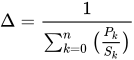
where:
- Δ is the factor by which the program is sped up or slowed down,
- Pk is a percentage of the instructions that can be improved (or slowed),
- Sk is the speed-up multiplier (where 1 is no speed-up and no slowing),
- k represents a label for each different percentage and speed-up, and
- n is the number of different speed-up/slow-downs resulting from the system change.
For instance, if we make a speed improvement in the memory module, only the instructions that deal directly with the memory module will experience a speedup. In this case, the percentage of load and store instructions in our program will be P0, and the factor by which those instructions are sped up will be S0. All other instructions, which are not affected by the memory unit will be P1, and the speed up will be S1 Where:


We set S1 to 1 because those instructions are not sped up or slowed down by the change to the memory unit.
Benchmarking
- SpecInt
- SpecFP
- "Maxim/Dallas APPLICATION NOTE 3593" benchmarking
- "Mod51 Benchmarks"
- EEMBC, the Embedded Microprocessor Benchmark Consortium
Assembly Language
Assemblers
Assemblers take in human-readable assembly code and produce machine code.

Assembly Language Constructs
There are a number of different assembly languages in existence, but all of them have a few things in common. They all map directly to the underlying hardware CPU instruction sets.
- CPU instruction set
- is a set of binary code/instruction that the CPU understands. Based on the CPU, the instruction can be one byte, two bytes or longer. The instruction code is usually followed by one or two operands.
| Instruction Code | operand 1 | operand 2 |
How many instructions there are depends on the CPU.
Because binary code is difficult to remember, each instruction has as its name a so-called mnemonic. For example 'MOV' can be used for moving instructions.
MOV A, 0x0020
The above instruction moves the value of register A to the specified address.
A simple assembler will translate the 'MOV A' to its CPU's instruction code.
Assembly languages cannot be assumed to be directly portable to other CPU's. Each CPU has its own assembly language, though CPU's within the same family may support limited portability
Load and Store
These instructions tell the CPU to move data from memory to a CPU's register, or move data from one of the CPU's register to memory.
- register
- is a special memory located inside the CPU, where arithmetic operations can be performed.
Arithmetic
Arithmetic operations can be performed using the CPU's registers:
- Increment the value of one of the CPU's registers
- Decrement the value of one of the CPU's registers
- Add a value to the register
- Subtract value from the register
- Multiply the register value
- Divide the register value
- Shift the register value
- Rotate the register value
Jumping
During a jump instruction, the program counter is loaded with a new address that is not necessarily the address of the next sequential instruction. After a jump, the program execution continues from the new location in memory.
- Relative jump
- the instruction's operand tells how many bytes the program counter should be increased or decreased.
- Absolute jump
- the instruction's operand is copied to the program counter; the operand is an absolute memory address where the execution should continue.
Branching
During a branch, the program counter is loaded with one of multiple new values, depending on some specified condition. A branch is a series of conditional jumps.
Some CPUs have skipping instructions. If a register is zero, the following instruction is skipped, if not then the following instruction is executed, which can be a jumping instruction. So Branching can be done by using skipping and jumping instructions together.
Further reading
Design Steps
When designing a new microprocessor or microcontroller unit, there are a few general steps that can be followed to make the process flow more logically. These few steps can be further sub-divided into smaller tasks that can be tackled more easily. The general steps to designing a new microprocessor are:
- Determine the capabilities the new processor should have.
- Lay out the datapath to handle the necessary capabilities.
- Define the machine code instruction format (ISA).
- Construct the necessary logic to control the datapath.
We will discuss each of these steps below:
Determine Machine Capabilities
Before you start to design a new processor element, it is important to first ask why you are designing it at all. What new thing will your processor do that existing processors cannot? Keep in mind that it is always less expensive to utilize an existing chip than to design and manufacture a new one.
Some questions to start:
- Is this chip an embedded chip, a general-purpose chip, or a different type entirely?
- What, if any, are the limitations in terms of resources, price, power, or speed?
With that in mind, we need to ask what our chip will do:
- Does it have integer, floating-point, or fixed point arithmetic, or a combination of all three?
- Does it have scalar or vector operation abilities?
- Is it self-contained, or must it interface with a number of external peripherals?
- Will it support interrupts? If so, How much interrupt latency is tolerable? How much interrupt-response jitter is tolerable?
We also need to ask ourselves whether the machine will support a wide array of instructions, or if it will have a limited set of instructions. More instructions make the design more difficult, but make programming and using the chip easier. On the other hand, having fewer instructions is easier to design, but can be harder and more costly to program.
Lay out the basic arithmetic operations you want your chip to have:
- Addition/Subtraction
- Multiplication
- Division
- Shifting and Rotating
- Logical Operations: AND, OR, XOR, NOR, NOT, etc.
List other capabilities that your machine has:
- Unconditional jumps
- Conditional Jumps (and what conditions?)
- Stack operations (Push, pop)
Once we know what our chip is supposed to do, it is easier to lay out the framework for our datapath
Design the Datapath
Right off the bat we need to determine what ALU architecture that our processor will use:
- Accumulator
- Stack
- Register
- A combination of the above 3
This decision, more than any other, is going to have the largest effect on your final design. Do not proceed in the design process until you have made this decision. Once you have your ALU architecture, you create your memory element (stack or register file), and you can lay out your ALU.
Create ISA
Once we have our basic datapath, we can start to design our ISA. There are a few things that we need to consider:
- Is this processor RISC, CISC, or VLIW?
- How long is a machine word?
- How do you deal with immediate values? What kinds of instructions can accept immediate values?
Once we have our machine code basics, we frequently need to determine whether our processor will be compatible with higher-level languages. Specifically, are there any instructions that can be used for function call and return?
Determining the length of the instruction word in a RISC is a very important matter, and one that is worth a considerable amount of thought. For additional flexibility you can utilize a variable-length instruction set instead — like most CISC machines — at the expense of additional—and more complicated—instruction decode logic. If the instruction word is too long, programmers will be able to fit fewer instructions into memory. If the instruction word is too small, there will not be enough room for all the necessary information. On a desktop PC with several megabytes or even gigabytes of RAM, large instruction words are not a big problem. On an embedded system however, with limited program ROM, the length of the instruction word will have a direct effect on the size of potential programs, and the usefulness of the chips.
Each instruction should have an associated opcode, and typically the length of the opcode field should be constant for all instructions, to reduce complexity of the decoder. The length of the opcode field will directly impact the number of distinct instructions that can be implemented. if the opcode field is too small, you won't have enough room to designate all your instructions. If your opcode is too large, you will be wasting precious bits in your instruction word.
Some instructions will need to be larger than others. For instance, instructions that deal with an immediate value, a memory location, or a jump address are typically larger than instructions that only deal with registers. Instructions that deal only with registers, therefore, will have additional space left over that can be used as an extension to the opcode field.
Example: MIPS R-Type
In the MIPS architecture, instructions that only deal with registers are called R type instructions. With 32 registers, a register address is only 5 bits wide. The MIPS opcode is 6 bits wide. With the opcode and the three register addresses (two source and 1 destination register), an R-type instruction only uses 21 out of the 32 bits available.
The additional 11 bits are broken into two additional fields: Shamt, a 5 bit immediate value that controls the amount of places shifted by a shift or rotate instruction, and Func. Func is a 6 bit field that contains additional information about R-Type instructions. Because of the availability of the Func field, all R-Type instructions share an opcode of 0.
Instruction set design
Picking a particular set of instructions is often more an art than a science.
Historically there have been different perspectives on what makes a "good" instruction set.
- The early CISC years focused on making instruction sets that expert assembly language programmers enjoyed programming -- " code density" was a common metric.
- the early RISC years focused on making instruction sets that ran a few benchmark programs in C, when compiled with relatively primitive compilers, really, really fast -- "cycles per instruction", and later "instructions per cycle" was recognized as an important part of achieving low "time to run the benchmark".
- The rise of multitasking operating systems (and shared-memory parallel processors) lead to the discovery of non-blocking synchronization and the instructions necessary to support it.
- CPUs dedicated to a single application (ASICs or FPGAs) led to the idea of customizing the CPU for one particular application[1]
- The rise of viruses and other malware led to the recognition of the Popek and Goldberg virtualization requirements.
Build Control Logic
Once we have our datapath and our ISA, we can start to construct the logic of our primary control unit. These units are typically implemented as a finite state machine, and we can try to map the ISA to the control unit in a logical way.
We go into much more detail on control unit design in the following sections, Microprocessor Design/Control and Datapath and Microprocessor Design/Instruction Decoder.
Design the Address Path
If a simple virtual==physical address path is adequate for your CPU, you can skip this section.
Most processors have a very simple address path -- address bits come from the PC or some other programmer-visible register, or directly from some instruction, and they are directly applied to the address bus.
Many general-purpose processors have a more complex address path: user-level programs run as if they have a simple address path, but the physical address applied to the address bus is significantly different than the programmer-visible address. This enables virtual memory, memory protection, and other desirable features.
We talk more about the benefits and drawbacks of an MMU, and how to implement it, in
Verify the design
People who design a CPU often spend more time on functional verification than all other steps combined.
Further reading
- Kong and Patterson. "Instruction set design". 1995.[11]
References
- ↑ "Generating instruction sets and microarchitectures from applications" by Ing-Jer Huang, and Alvin M. Despain
Microprocessor Components
Basic Components
Basic Components
There are a number of components in a common microprocessor that designers should be familiar with before attempting a design. For an overview of these components, see Digital Circuits.
Registers
A register is a storage element typically composed of an array of smaller, 1-bit storage elements called flip-flops. The number of bits that the register is composed of equals the number of bits that the register can store at any given time. For example, a 1-bit register can store 1 bit, and a 32-bit register can hold 32 bits, etc. Registers can be any length.
A register has two inputs, a data input and a clock input. The clock input is typically called the "enable". When the enable signal is high, the register stores the data input. When the clock signal is low, the register value stays the same.
Register File
A register file is a whole collection of registers, typically all of which are the same length. A register file takes three inputs, an index address value, a data value, and an enable signal. A signal decoder is used to pass the data value from the register file input to the particular register with the specified address. We talk more about register files in a later section of this book, Register File.
Multiplexers

A multiplexer is an input selector. A multiplexer has an output, a control input, and several data inputs. For ease, we number multiplexer inputs from zero, at the top. If the control signal is "0", the 0th input is moved to the output. If the control signal is "3", the 3rd input is moved to the output.
A multiplexer with N control signal bits can support 2N inputs. For example, a multiplexer with 3 control signals can support 23 = 8 inputs.
Multiplexers are typically abbreviated as "MUX", and will be abbreviated as such throughout the rest of this book.
 |
 |
| A 4 input Multiplexer with 2 control signal wires | An 8 input Multiplexer with 3 control signal wires |
|---|---|
 | |
| A 16 input Multiplexer with 4 control wires | |
There can be decoders implemented in the components.
Decoder ( inverse functionality of Encoder) can have multiple inputs and depending upon the inputs one of the output signals can go high.
For a 2 input decoder there will be 4 output signals.
       /|- O0
 i0---| |- O1
 i1---| |- O2
       \|- O3
 suppose input i is having value 00  then output signal O0 will go high and remaining other three lines O1 to O3 will be low.
  In same fashion if i is having value 2 then output O2 will be high and remaining other three lines will be low.
Adder
Program Counter
The Program Counter (PC) is a register structure that contains the address pointer value of the current instruction. Each cycle, the value at the pointer is read into the instruction decoder and the program counter is updated to point to the next instruction. For RISC computers updating the PC register is as simple as adding the machine word length (in bytes) to the PC. In a CISC machine, however, the length of the current instruction needs to be calculated, and that length value needs to be added to the PC.
Updating the PC
The PC can be updated by making the enable signal high. After each instruction cycle the PC needs to be updated to point to the next instruction in memory. It is important to know how the memory is arranged before constructing your PC update circuit.
Harvard-based systems tend to store one machine word per memory location. This means that every cycle the PC needs to be incremented by 1. Computers that share data and instruction memory together typically are byte addressable, which is to say that each byte has its own address, as opposed to each machine word having its own address. In these situations, the PC needs to be incremented by the number of bytes in the machine word.

In this image, the letter M is being used as the amount by which to update the PC each cycle. This might be a variable in the case of a CISC machine.
Example: MIPS
The MIPS architecture uses a byte-addressable instruction memory unit. MIPS is a RISC computer, and that means that all the instructions are the same length: 32-bits. Every cycle, therefore, the PC needs to be incremented by 4 (32 bits = 4 bytes).
Example: Intel IA32
The Intel IA32 (better known by some as "x86") is a CISC architecture, which means that each instruction can be a different length. The Intel memory is byte-addressable. Each cycle the instruction decoder needs to determine the length of the instruction, in bytes, and it needs to output that value to the PC. The PC unit increments itself by the value received from the instruction decoder.
Branching
Branching occurs at one of a set of special instructions known collectively as "branch" or "jump" instructions
. In a branch or a jump, control is moved to a different instruction at a different location in instruction memory.
During a branch, a new address for the PC is loaded, typically from the instruction or from a register. This new value is loaded into the PC, and future instructions are loaded from that location.
Non-Offset Branching
A non-offset branch, frequently referred to as a "jump" is a branch where the previous PC value is discarded and a new PC value is loaded from an external source.

In this image, the PC value is either loaded with an updated version of itself, or else it is loaded with a new Branch Address. For simplification we do not show the control signals to the MUX.
Offset Branching
An offset branch is a branch where a value is added (or subtracted) to the current PC value to produce the new value. This is typically used in systems where the PC value is larger then a register value or an immediate value, and it is not possible to load a complete value into the PC. It is also commonly used to support relocatable binaries which may be loaded at an arbitrary base address.

In this image there is a second ALU unit. Notice that we could simplify this circuit and remove the second ALU unit if we use the configuration below:

These are just two possible configurations for this circuit.
Offset and Non-Offset Branching
Many systems have capabilities to use both offset and non-offset branching. Some systems may differentiate between the two as "near jump" and "far jump" respectively, although this terminology is archaic.

Instruction Decoder
The Instruction Decoder reads the next instruction in from memory, and sends the component pieces of that instruction to the necessary destinations.
For each machine-language instruction, the control unit produces the sequence of pulses on each control signal line required to implement that instruction (and to fetch the next instruction).
If you are lucky, when you design a processor you will find that many of those control signals can be "directly decoded" from the instruction register. For example, sometimes a few output bits from the instruction register IR can be directly wired to the "which function" inputs of the ALU. Even if those bits mean something completely unrelated in non-ALU instructions, it's OK if the ALU performs, say, a bogus SUBTRACT, while the rest of the processor is executing a STORE instruction.
The remaining control signals that cannot be decoded from the instruction register -- if you are unlucky, all the control signals -- are generated by the control unit, which is implemented as a [Moore machine][2] or a [Mealy machine][3]. There are many different ways to implement the control unit.
If you design a processor with a Princeton architecture -- your processor normally pulls instructions from the same single-ported memory used to read and write data -- then you are forced to have at least LOAD and STORE take more than one clock cycle to execute. (One cycle for the data, and another cycle to read the next instruction). (Many processors are designed with "single-cycle execution", either very simple Harvard architecture processors, or complicated high-performance processors with a separate instruction cache).
RISC Instruction Decoder
The philosophy behind a RISC machine is that instruction execution is kept extremely fast and simple. Thus the instruction decoder, such as there is one must be as streamlined as possible. The tradeoff is that more instructions must be executed to perform the more complex machine functions. All low-level abstraction must be provided in the machine code compiler.
There are generally two variations to a RISC decoder.
In the first variant the bits of the instruction code are fed directly to the hardware components so there really is no decoder at all. All timing requirements must be met by careful programming of the machine code and there is no delay in execution from an instruction decoder. The necessary control line 'waveforms' are created directly by the sequence of instructions. As soon as the instruction is presented the hardware begins to respond. The bits in the instruction set directly represent the actual physical controls of the hardware components.
The second variant includes a simple (fast) decoder between the instruction code and the hardware components. This decoding is usually implemented by discrete logic gates. The primary purpose of this decoder is to allow a 'cleaner' instruction set representation. As with the direct variant, each instruction still represents a single machine function but the use of a decoder will often significantly reduce the number of bits needed in the machine code word. This in turn may allow several hardware functions to be initiated in a single machine instruction.
CISC Instruction Decoder
Decoding a CISC instruction word is much more difficult than the RISC case, and the increased complexity of the decoder is a common reason people cite when they choose to use RISC over CISC in their designs.
A CISC decoder commonly uses a state machine set up as a random length sequencer. The machine reads the opcode field to determine what type of instruction it is, and where the other data values are as needed. The instruction word may even be read in piece by piece, so decisions may be made at each stage as to how the remainder of the instruction word and any included data will be read.
This decoder sequences through a number of states of the machine hardware as opposed to the case of the RISC decoder. The instruction code selects which sequence is to be executed and the sequencer controls the timing of this performance. One 'step' in this performace may include fetching more input from the instruction code, whether this input is further instructions or needed data values.
Perhaps the easiest way to understand this decoder type is to conceive it as a very wide control store ROM. The program in this ROM is the microcode for the decoder/sequencer. A part of the instruction register is used to form part of the address to this ROM. Several bits of the address are feedback from the ROM itself. Most of the ROM's outputs are used to control the system hardware.
The feedback address portion forms a loop that will step through a random sequence as programmed into the ROM. This loop operates as fast as the access time of the ROM allows and is typically a single system clock. The feedback address is usually programmed to increment by 1 for each successive state of the sequencer. The number of feedback bits determines the maximum length of the microcoded sequence.
A pipeline register latches all the output bits of the control store ROM every clock cycle.
Each clock cycle the pipeline register latches a new set of bits.
The output of the sequencer has 2 components:
Control bits that go out to the hardware components of the processor. The "microPC" that feeds back to some of the address inputs of the control store ROM. Some people hardwire the carry flag to one of the address inputs of the control store ROM.
Every time a new opcode is fetched from main memory, typically the high bits of the microPC are loaded with the opcode, and the low bits of the microPC reset to zero. (To make things easier to debug, some designers load the opcode into both a separate instruction register IR as well as the microPC register, at least in the initial prototypes. Once the design is debugged, it might turn out that some or all the bits from the IR or the microPC register or both are never used, and so can be left out of the final design). During execution of the instruction, each clock cycle the pipeline register loads a new microPC address from the control store and a new set of control bits from the control store. Typically the person who writes the microprogram -- burned into the control store ROM -- designs the next-address output bits of that ROM to sequentially increment for the first few cycles of the implementation of that opcode. Then the microprogram for every "normal" opcode eventually jumps to one common section of the control store ROM that handles fetch-next-instruction.
Register File
Registers are temporary storage locations inside the CPU that hold data and addresses.
The register file is the component that contains all the general purpose registers of the microprocessor. A few CPUs also place special registers such as the PC and the status register in the register file. Other CPUs keep them separate.
When designing a CPU, some people distinguish between "architectural features" and the "implementation details". The "architectural features" are the programmer visible parts; if someone makes a new system where any of these parts are different from the old CPU, then suddenly all the old software won't work on the new CPU. The "implementation details" are the parts that, although we put even more time and effort into getting them to work, one can make a new system that has a different way of implementing them, and still keep software compatibility -- some programs may run a little faster, other programs may run a little slower, but they all produce the same results as on the earlier machine.
The programmer-visible register set has more impact on software compatibility than any other part of the datapath, and perhaps more than any other part in the entire computer.
The architectural features of the programmer-visible register set are the number of registers, the number of bits in each register, and the logical organization of the registers.
Assembly language programmers like to have many registers.
Early microprocessors had painfully few registers, limited by the area of the chip.
Today, many chips have room for huge numbers of registers, so the number of programmer-registers is limited by other constraints:
More programmer-visible registers requires bigger operand fields.
More programmer-visible registers requires more time saving and restoring registers on an interrupt or context switch.
Software compatibility requires keeping exactly the same number, size, and organization of programmer-visible registers.
Assembly language programmers like a "flat" address space, where the full address of any location in (virtual) memory fits in a single address register.
And so the amount of (virtual) memory desired by an architect sets a minimum width to each address register.
[1]
The idea of "general registers" -- a group of registers, any one of which can, at different times, operate as a stack pointer, index register, accumulator, program counter, etc. was invented around 1971.[2]
While registers can be implemented as a bank of flip-flop registers, SRAM-based full-custom register files use less area and power.[3][4]
The overall performance of many single-chip CPUs is limited by the speed of the read operation of the register file.[3]
Register File
A simple register file is a set of registers and a decoder. The register file requires an address and a data input.

However, this simple register file isn't useful in a modern processor design, because there are some occasions when we don't want to write a new value to a register. Also, we typically want to read two values at once and write one value back in a single cycle. Consider the following equation:

To perform this operation, we want to read two values from the register file, A and B. We also have one result that we want to write back to the register file when the operation has completed. For cases where we do not want to write any value to the register file, we add a control signal called Read/Write. When the control signal is high, the data is written to a register, and when the control signal is low, no new values are written.

In this case, it is likely advantageous for us to specify a third address port for the write address:

Many people choose to use a 3-port register file for their pipelined microprocessor so it can execute such an ALU instructions every cycle. Every cycle the CPU reads values from 2 registers in the register file to prepare for operating on them as directed by one instruction, and simultaneously the CPU writes the results from some previous instruction into some other register in the register file. (Superscalar Processors and VLIW require a register file with 6 or more ports).
(Does a microprocessor with operand forwarding ever read from a register and write to the same register during the same clock cycle?)
Full-custom register files often start with a SRAM design. Like SRAM chips, SRAM-based register files include a differential pair of bit-lines for each port -- but instead of a single SRAM read/write port, register files typically have at least one dedicated write port and several dedicated read ports. A typical register file repeats this process every instruction cycle: First, the two bit-lines of a differential pair of each read port are shorted to each other and charged to Vdd/2 during a pre-charge phase. Then the word-line connects one bit cell to those lines -- slightly imbalancing the charge on those long bit lines. Finally, the CPU enables the sense amplifier which magnifies the slight imbalance to normal digital logic levels.[5][3][6][4]
More registers than you can shake a stick at
Consider a situation where the machine word is very small, and therefore the available address space for registers is very limited. If we have a machine word that can only accommodate 2 bits of register address, we can only address 4 registers. However, register files are small to implement, so we have enough space for 32 registers. There are several solutions to this dilemma -- several ways of increasing performance by using many registers, even though we don't quite have enough bits in the instruction word to directly address all of them.
Some of those solutions include:
- special-purpose registers that are always used for some specific instruction, and so that instruction doesn't need any bits to specify that register.
- In almost every CPU, the program counter PC and the status register are treated differently than the other registers, with their own special set of instructions.
- separating registers into two groups, "address registers" and "data registers", so an instruction that uses an address needs enough bits to select one out of all the address registers, which is 1 less bit than one out of every register.
- register windowing as on SPARC
[1] and
- using a "register bank".
Register Bank
The term "register bank" is used in two different senses.[7] Some CPUs have several different groups (or "banks") of registers, rather than one monolithic register file.
One kind of "register banking" is similar to (main memory) bank switching. Because this kind is visible to the assembly language programmer, in this chapter we'll call it "architectural banked registers". Other kinds of "register banking" allow a CPU to run exactly the same software as a single-bank implementation (invisible to the assembly language programmer), so in in this chapter we'll call them "microarchitectural banked registers" -- these implementation options have various advantages over a monolithic register file implementation.
architectural banked registers
Consider a situation where the machine word is very small, and therefore the available address space for registers is very limited. If we have a machine word that can only accommodate 2 bits of register address, we can only address 4 registers. However, register files are small to implement, so we have enough space for 32 registers. The solution to this dilemma is to utilize a register bank which consists of a series of register files combined together.
A register bank contains a number of register files or pages. Only one page can be active at a time, and there are additional instructions added to the ISA to switch between the available register pages. Data values can only be written to and read from the currently active register page, but instructions can exist to move data from one page to another.

As can be seen in this image, the gray box represents the current page, and the page can be moved up and down on the register bank.
If the register bank has N registers, and a page can only show M registers (with N > M), we can address registers with two values, n and m respectively. We can define these values as:

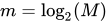
In other words, n and m are the number of bits required to address N and M registers, respectively. We can break down the address into a single value as such:

Where p is the number of bits reserved to specify the current register page. As we can see from this graphic, the current register address is simply the concatenation of the page address and the register address.
microarchitectural banked registers
There are several techniques that divide up the physical registers into several physical register files ("banks"), using control logic to make the CPU as a whole still software-compatible to other implementations of the same CPU architecture that only use one monolithic register file. In modern high-performance CPU, such techniques are used to build software-compatible CPUs that run at higher speed, use less power, and require less area than implementing the same CPU architecture with a single conventional multiported register file.[8][9]
Replicating the entire register file, as in the POWER2 and the Alpha 21264 and the Alpha 21464,[8][7] is the simplest kind of microarchitectural register banking. These CPUs implemented their register file internally with 2 copies of the entire (architectural) register file, and connect half the functional units to each copy. This requires each register file to have the same number of write ports as a monolithic register file (since all writes are sent to *both* copies to keep them in sync), but each register file requires only half the number of read ports as a monolithic register file.
References
- ↑ a b "Computer architecture: fundamentals and principles of computer design" by Joseph D. Dumas 2006 page 111.
- ↑ "general registers" were invented by C. Gordon Bell and Allen Newell as they were working on their book, Computer Structures: Readings and Examples (1971). -- Frederik Nebeker. "More Treasured Texts" article. "IEEE Spectrum" 2003 July.
- ↑ a b c Larry R. Fenstermaker. "Current mode sense amplifiers applied to dual port register files by Larry R. Fenstermaker". 1998.
- ↑ a b Akshay Vijayashekar and Hasan Ali. "Optimized Register File Implementation". quote: "The purpose of this thesis is to implement a full custom, low power and area efficient register file for an Atmel 32-bit microcontroller. ... The size of the register file is 32 words of 32 bits each with two write ports and four read ports."
- ↑ Norman P. Jouppi and Jeffrey Y. F. Tang "A 20-MIPS Sustained 32-bit CMOS Microprocessor with High Ratio of Sustained to Peak Performance". doi:10.1.1.85.988. 1989. Section "4.2. The Register File Sense Amplifier". p. 10-12.
- ↑ Robert Reese. "Register Files". 1999.
- ↑ a b "What does banking mean when applied to registers?"
- ↑ a b Jessica H. Tseng, and Krste Asanović. "Banked Multiported Register Files for High-Frequency Superscalar Microprocessors". 2003.
- ↑ Il Park, Michael D. Powell, and T. N. Vijaykumar. "Reducing Register Ports for Higher Speed and Lower Energy". 2002.
Memory Unit
Microprocessors rely on memory for storing the instructions and the data used by software programs. The memory unit is responsible for communicating with the system memory.
Memory Unit

Actions of the Memory Unit
All von Neumann CPUs store their instructions in memory.
In a Harvard architecture, the data memory unit and the instruction memory unit are two different units. However, in a Princeton architecture the two memory units are combined into a single module. Most modern PC computer systems are Princeton, not Harvard, so the memory unit must handle all instruction and data transactions. This can serve as a bottleneck in the design.
Timing Issues
The memory unit is typically one of the slowest components of a microcontroller, because the external interface with RAM is typically much slower than the speed of the processor.
ALU

Microprocessors tend to have a single module that performs arithmetic operations on integer values. This is because many of the different arithmetic and logical operations can be performed using similar (if not identical) hardware. The component that performs the arithmetic and logical operations is known as the Arithmetic Logic Unit, or ALU. [1]
The ALU is one of the most important components in a microprocessor, and is typically the part of the processor that is designed first. Once the ALU is designed, the rest of the microprocessor is implemented to feed operands and control codes to the ALU.
Tasks of an ALU
ALU units typically need to be able to perform the basic logical operations (AND, OR) and the addition operation. The inclusion of inverters on the inputs enables the same ALU hardware to perform the subtraction operation (adding an inverted operand), and the operations NAND and NOR.
A basic ALU design involves a collection of "ALU Slices", which each can perform the specified operation on a single bit. There is one ALU slice for every bit in the operand.
ALU Slice
Example: 2-Bit ALU
This is an example of a basic 2-bit ALU. The boxes on the right hand side of the image are multiplexers and are used to select between various operations: OR, AND, XOR, and addition.

Notice that all the operations are performed in parallel, and the select signal ("OP") is used to determine which result to pass on to the rest of the datapath. Notice that the carry signal, which is only used for addition, is generated and passed out of the ALU for every operation, so it is important that if we aren't performing addition that we ignore the carry flag.
Example: 4-Bit ALU
Here is a circuit diagram of a 4 bit ALU.

Additional Operations
Logic and addition are some of the easiest, but also the most common operations. For this reason, typical ALUs are designed to handle these operations specially, and other operations, such as multiplication and division, are handled in a separate module.
Notice also that the ALU units that we are discussing here are only for integer datatypes, not floating-point data. Luckily, once integer ALU and multiplier units have been designed, those units can be used to create floating-point units (FPU).
ALU Configurations
Once an ALU is designed, we need to define how it interacts with the rest of the processor. We can choose any one of a number of different configurations, all with advantages and disadvantages. Each category of instruction set architecture (ISA) -- stack, accumulator, register-memory, or register-register-load-store -- requires a different way of connecting the ALU. [2] In all images below, the orange represents memory structures internal to the CPU (registers), and the purple represents external memory (RAM).
Accumulator

An accumulator machine has one special register, called the accumulator. The accumulator stores the result of every ALU operation, and is also one of the operands to every instruction. This means that our ISA can be less complicated, because instructions only need to specify one operand, instead of two operands and a destination. Accumulator architectures have simple ISAs and are typically very fast, but additional software needs to be written to load the accumulator with proper values. Unfortunately, accumulator machines are difficult to pipeline.
One example of a type of computer system that is likely to use an accumulator is a common desk calculator.
Register-to-Register

One of the more common architectures is a Register-to-register architecture, also called a 3 register operand machine. In this configuration, the programmer can specify both source operands, and a destination register. Unfortunately, the ISA needs to be expanded to include fields for both source operands and the destination operands. This requires longer instruction word lengths, and it also requires additional effort (compared to the accumulator) to write results back to the register file after execution. This write-back step can cause synchronization issues in pipelined processors (we will discuss pipelining later).
Register Stack

A register stack is like a combination of the Register-to-Register and the accumulator structures. In a register stack, the ALU reads the operands from the top of the stack, and the result is pushed onto the top of the stack. Complicated mathematical operations require decomposition into Reverse-Polish form, which can be difficult for programmers to use. However, many computer language compilers can produce reverse-polish notation easily because of the use of binary trees to represent instructions internally. Also, hardware needs to be created to implement the register stack, including PUSH and POP operations, in addition to hardware to detect and handle stack errors (pushing on a full stack, or popping an empty stack).
The benefit comes from a highly simplified ISA. These machines are called "0-operand" or "zero address machines" because operands don't need to be specified, because all operations act on specified stack locations.
In the diagram at right, "SP" is the pointer to the top of the stack. This is just one way to implement a stack structure, although it might be one of the easiest.
Register-and-Memory

One complicated structure is a Register-and-Memory structure, like that shown at left. In this structure, one operand comes from a register file, and the other comes from external memory. In this structure, the ISA is complicated because each instruction word needs to be able to store a complete memory address, which can be very long. In practice, this scheme is not used directly, but is typically integrated into another scheme, such as a Register-to-Register scheme, for flexibility.
Some CISC architectures have the option of specifying one of the operands to an instruction as a memory address, although they are typically specified as a register address.
Complicated Structures
There are a number of other structures available, some of which are novel, and others are combinations of the types listed above. It is up to the designer to decide exactly how to structure the microprocessor, and feed data into the ALU.
Example: IA-32
The Intel IA-32 ISA (x86 processors) use a register stack architecture for the floating point unit, but it uses a modified Register-to-Register structure for integer operations. All integer operations can specify a register as the first operand, and a register or memory location as the second operand. The first operand acts as an accumulator, so that the result is stored in the first operand register. The downside to this is that the instruction words are not uniform in length, which means that the instruction fetch and decode modules of the processor need to be very complex.
A typical IA-32 instruction is written as:
ADD AX, BX
Where AX and BX are the names of the registers. The resulting equation produces AX = AX + BX, so the result is stored back into AX.
Example: MIPS
MIPS uses a Register-to-Register structure. Each operation can specify two register operands, and a third destination register. The downside is that memory reads need to be made in separate operations, and the small format of the instruction words means that space is at a premium, and some tasks are difficult to perform.
An example of a MIPS instruction is:
ADD R1, R2, R3
Where R1, R2 and R3 are the names of registers. The resulting equation looks like: R1 = R2 + R3.
References
- ↑ CPU designers have used a variety of names for the arithmetic logic unit, including "ALU", "integer execution unit", and "E-box". Paul V. Bolotoff. "Functional Principles of Cache Memory" 2007.
- ↑ "Instruction Set Principles: Basic ISA Classes" by Dr. Sofiène Tahar
FPU
Similar to the ALU is the Floating-Point Unit, or FPU. The FPU performs arithmetic operations on floating point numbers.
An FPU is complicated to design, although the IEEE 754 standard helps to answer some of the specific questions about implementation. It isn't always necessary to follow the IEEE standard when designing an FPU, but it certainly does help.
Floating point numbers
This section is just going to serve as a brief refresher on floating point numbers. For more information, see the Floating Point book.
Floating point numbers are specified in two parts: the exponent (e), and the mantissa (m). The value of a floating point number, v, is generally calculated as:

IEEE 754
IEEE 754 format numbers are calculated as:

The mantissa, m, is "normalized" in this standard, so that it falls between the numbers 1.0 and 2.0.

Floating Point Multiplication
Multiplying two floating point numbers is done as such:

Likewise, division can be performed by:
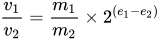
To perform floating point multiplication then, we can follow these steps:
- Separate out the mantissa from the exponent
- Multiply (or divide) the mantissa parts together
- Add (or subtract) the exponents together
- Combine the two results into the new value
- Normalize the result value (optional).
Floating Point Addition
Floating point addition—and by extension, subtraction— is more difficult than multiplication. The only way that floating point numbers can be added together is if the exponents of both numbers are the same. This means that when we add two numbers together, we need first to scale the numbers so that they have the same exponent. Here is the algorithm:
- Separate the mantissa from the exponent of each number
- Compare the two exponents, and determine the difference between them.
- Add the difference to the smaller exponent, to make both exponents the same.
- Logically right-shift the mantissa of the number with the smaller exponent a number of spaces equal to the difference.
- Add the two mantissas together
- Normalize the result value (optional).
Floating Point Unit Design
As we have seen from the two algorithms above, an FPU needs the following components:
- For addition/Subtraction
- A comparator (subtractor) to determine the difference between exponents, and to determine the smaller of the two exponents.
- An adder unit to add that difference to the smaller exponent.
- A shift unit, to shift the mantissa the specified number of spaces.
- An adder to add the mantissas together
- For multiplication/division
- A multiplier (or a divider) for the mantissa part
- An adder for the exponent parts.
Both operation types require a complex control unit.
Both algorithms require some kind of addition/subtraction unit for the exponent part, so it seems likely that we can use just one component to perform both tasks (since both addition and multiplication won't be happening at the same time in the same unit). Because the exponent is typically a smaller field than the mantissa, we will call this the "Small ALU". We also need an ALU and a multiplier unit to handle the operations on the mantissa. If we combine the two together, we can call this unit the "Large ALU". We can also integrate the fast shifter for the mantissa into the large ALU.
Once we have an integer ALU designed, we can copy those components almost directly into our FPU design.
Further Reading
Control Unit
The control unit reads the opcode and instruction bits from the machine code instruction, and creates a series of control codes to activate and operate the various components to perform the desired task.
Simple Control Unit
In its most simple form, a control unit can take the form of a lookup table. The machine word opcode is used as the index into the table, and the various control signals are output to the respective destinations.
Complex Control Unit
A more complex version of a control unit is implemented as a finite state machine (FSM). Multi-cycle, pipelined, and other advanced processor designs may require an FSM-based control unit.
Further reading
- Electronics/Control Unit
- Digital Circuits/Finite State Machines
- IB/Group 4/Computer Science/Computer Organisation
ALU Design
Add and Subtract Blocks
Addition and Subtraction
Addition and subtraction are similar algorithms. Taking a look at subtraction, we can see that:

Using this simple relationship, we can see that addition and subtraction can be performed using the same hardware. Using this setup, however, care must be taken to invert the value of the second operand if we are performing subtraction. Note also that in twos-compliment arithmetic, the value of the second operand must not only be inverted, but 1 must be added to it. For this reason, when performing subtraction, the carry input into the LSB should be a 1 and not a zero.

Our goal on this page, then, is to find suitable hardware for performing addition.
Bit Adders
Half Adder
A half adder is a circuit that performs binary addition on two bits. A half adder does not explicitly account for a carry input signal.

In SystemVerilog, a half-adder can be implemented as follows:
module half_adder(input logic a, b, output logic carry_out, sum);
  assign {carry_out, sum} = a + b;
endmodule
Full Adder
Full adder circuits are similar to the half-adder, except that they do account for a carry input and a carry output. Full adders can be treated as a 3-bit adder with a 2-bit result, or they can be treated as a single stage (a 3:2 compressor) in a larger adder.


As can be seen below, the number of gate delays in a full-adder circuit is 3:

We can use verilog to implement a full adder module:
module full_adder(a, b, cin, cout, s);
   input a, b, cin;
   output cout, s;
   wire temp;
   temp = a ^ b;
   s = temp ^ cin;
   cout = (cin & temp) | (a & b);
endmodule
Serial Adder

A serial adder is a kind of ALU that calculates each bit of the output, one at a time, re-using one full adder (total). This image shows a 2-bit serial adder, and the associated waveforms.
Serial adders have the benefit that they require the least amount of hardware of all adders, but they suffer by being the slowest.
Parallel Adder
A parallel adder is a kind of ALU that calculates every bit of the output more or less simultaneously, using one full adder for each output bit. The 1947 Whirlwind computer was the first computer to use a parallel adder.
In many CPUs, the CPU latches the final carry-out of the parallel adder in an external "carry flag" in a "status register".
In a few CPUs, the latched value of the carry flag is always wired to the first carry-in of the parallel adder; this gives "Add with carry" with 2s' complement addition. (In a very few CPUs, an end-around carry -- the final carry-out of the parallel adder is directly connected to the first carry-in of the same parallel adder -- gives 1's complement addition).
Ripple Carry Adder

Numbers of more than 1 bit long require more then just a single full adder to manipulate using arithmetic and bitwise logic instructions[citation needed]. A simple way of operating on larger numbers is to cascade a number of full-adder blocks together into a ripple-carry adder, seen above. Ripple Carry adders are so called because the carry value "ripples" from one block to the next, down the entire chain of full adders. The output values of the higher-order bits are not correct, and the arithmetic is not complete, until the carry signal has completely propagated down the chain of full adders.
If each full adder requires 3 gate delays for computation, then an n-bit ripple carry adder will require 3n gate delays. For 32 or 64 bit computers (or higher) this delay can be overwhelmingly large.
Ripple carry adders have the benefit that they require the least amount of hardware of all adders (except for serial adders), but they suffer by being the slowest (except for serial adders).
With the full-adder verilog module we defined above, we can define a 4-bit ripple-carry adder in Verilog. The adder can be expanded logically:
wire [4:0] c;
wire [3:0] s;
full_adder fa1(a[0], b[0], c[0], c[1], s[0]);
full_adder fa2(a[1], b[1], c[1], c[2], s[1]);
full_adder fa3(a[2], b[2], c[2], c[3], s[2]);
full_adder fa4(a[3], b[3], c[3], c[4], s[3]);
At the end of this module, s contains the 4 bit sum, and c[4] contains the final carry out.
This "ripple carry" arrangement makes "add" and "subtract" take much longer than the other operations of an ALU (AND, NAND, shift-left, divide-by-two, etc). A few CPUs use a ripple carry ALU, and require the programmer to insert NOPs to give the "add" time to settle.[1] A few other CPUs use a ripple carry adder, and simply set the clock rate slow enough that there is plenty of time for the carry bits to ripple through the adder. A few CPUs use a ripple carry adder, and make the "add" instruction take more clocks than the "XOR" instruction, in order to give the carry bits more time to ripple through the adder on an "add", but without unnecessarily slowing down the CPU during a "XOR". However, it makes pipelining much simpler if every instruction takes the same number of clocks to execute.
Carry Skip Adder
Carry Lookahead Adder

Carry-lookahead adders use special "look ahead" blocks to compute the carry from a group of 4 full-adders, and passes this carry signal to the next group of 4 full adders. Lookahead units can also be cascaded, to minimize the number of gate delays to completely propagate the carry signal to the end of the chain. Carry lookahead adders are some of the fastest adder circuits available, but they suffer from requiring large amounts of hardware to implement. The number of transistors needed to implement a carry-lookahead adder is proportional to the number of inputs cubed.
The addition of two 1-digit inputs A and B is said to generate if the addition will always carry, regardless of whether there is an input carry (equivalently, regardless of whether any less significant digits in the sum carry). For example, in the decimal addition 52 + 67, the addition of the tens digits 5 and 6 generates because the result carries to the hundreds digit regardless of whether the ones digit carries (in the example, the ones digit clearly does not carry).
In the case of binary addition, generates if and only if both A and B are 1. If we write to represent the binary predicate that is true if and only if generates, we have:



The addition of two 1-digit inputs A and B is said to propagate if the addition will carry whenever there is an input carry (equivalently, when the next less significant digit in the sum carries). For example, in the decimal addition 37 + 62, the addition of the tens digits 3 and 6 propagate because the result would carry to the hundreds digit if the ones were to carry (which in this example, it does not). Note that propagate and generate are defined with respect to a single digit of addition and do not depend on any other digits in the sum.
In the case of binary addition, propagates if and only if at least one of A or B is 1. If we write to represent the binary predicate that is true if and only if propagates, we have:


Cascading Adders
The power of carry-lookahead adders is that the bit-length of the adder can be expanded without increasing the propagation delay too much. By cascading lookahead modules, and passing "propagate" and "generate" signals to the next level of the lookahead module. For instance, once we have 4 adders combined into a simple lookahead module, we can use that to create a 16-bit and a 64-bit adder through cascading:


Generalized Cascading


Sources
Shift and Rotate Blocks
Shift and Rotate
Shift and rotate blocks are essential elements in most processors. They are useful on their own, but they also are used in multiplication and division modules. In a binary computer, a left shift has the same effect as a multiplication by 2, and a right shift has the same effect as a division by 2. Since shift and rotate operations perform much more quickly than multiplication and division, they are useful as a tool in program optimization.
Logical Shift

|

|
| A left logical shift | A right logical shift |
|---|
In a logical shift, the data is shifted in the appropriate direction, and a zero is shifted into the new location.
Arithmetic shift

|
| A right arithmetic shift |
|---|
In an arithmetic shift, the data is shifted right so that the sign of the data item is preserved. This means that the MSB is the value that is shifted into the new position. An arithmetic left shift is the same as a logical left shift, and is therefore not shown here.
Rotations

|

|
| A left rotation | A right rotation |
|---|
A rotation is like a shift, except the bit shifted off the end of the register is then shifted into the new spot.
Fast Shift Implementations
The above images in each section help to indicate a method to shift a register more quickly, at the expense of requiring additional hardware. Instead of having one register that attempts to shift in place, we have two registers in parallel, with wires connecting the various blocks together. When a shift is indicated, gates open that allow the data to pass from one register to the next, the proper number of spaces forward or backward.
In practice, fast shift blocks are implemented as a "barrel shifter". The barrel shifter includes several "levels" of multiplexers, each connected to the previous one by straight wires (wires that transfer the data without a shift), and wires that cause a shift by successive powers of two. For instance, the first level of shift would be 4 spaces, the next level would be 2 spaces, and the last level would be 1 space. In this way, the value of each shift level corresponds to the binary representation of the number of spaces to shift. This implementation makes for very fast shifters that can shift an arbitrary number of spaces in a single clock cycle.
Further reading
32-Bit Barrel Shifter Implementation Using 74-Series Integrated Circuits
Multiply and Divide Blocks
Multiply and Divide Problems
Multiplication and Division operations are significantly more complicated than addition or subtraction operations. This additional complexity leads to more hardware, more complicated hardware, and longer processing time.
In hardware, multiplication and division are performed by a series of sequential additions and arithmetic shifts. for this reason, it is imperative that we have efficient adders and shifters at our disposal.
Multipliers and dividers are composed of shifters and adders. It is typically not possible, or not desirable to use the main adder and shifter units of the ALU, so a microprocessor will typically have multiple ALU units (a primary unit for addition and subtraction, and units embedded in the multiplication and division units). These are other good reasons why our ALU and shifters need to be small and fast.
Multiplication Algorithms
Booth's Algorithm
Cascaded Multiplication
Wallace tree
The Wallace tree, a specialized structure for performing multiplication, has been called one of the most important advances in computing.[1]
A Wallace tree using many identical 3:2 compressors (aka full adders), such as the TI 74x275 chip, or the TI 74x183 chip, is one popular way to implement single-cycle multiplication. The datasheets for the TI 74x261 and 74x284 describe some practical details of implementing multiplication with a Wallace tree. The Dadda multiplier uses the same 3:2 compressors in a slightly more efficient arrangement.
Division Algorithm
Multiply and Accumulate
Multiply and accumulate (MAC) operations perform a multiplication and an addition in a single instruction. For instance, the instruction:
MAC A, B, C
Would perform the operation:
A = A + (B × C)
This is valuable for math-intensive processors, such as graphics processors and DSPs.
An MAC tends to have a long critical path, so if your processor has an MAC operation it is probably possible to include other complicated arithmetic operations.
In a processor with an accumulator architecture, MAC operations will use the accumulator as the destination register, so the instruction:
MAC B, C
Will perform the operation:
ACC = ACC + (B × C)
Fused Multiply-Add
A fused multiply-add operation is a floating-point operation that is similar to the MAC. However, in the fused operation, the floating-point values are not rounded between the multiply and the add, they are rounded afterwards. For more information about floating-point rounding, see Floating Point.
ALU Flags
For a number of reasons, it can be important to export a number of status codes from the ALU, for detecting errors, and for making decisions.
Comparisons
Comparisons between two values are typically performed by subtracting them. We can determine the relationship between the two values by examining the difference:
- If the first is larger than the second, the result will be positive
- If the second is larger than the first, the result will be negative
- If the two are equal, the result will be zero.
Zero Flag
Determining whether two values are equal requires the ALU to determine whether the result is zero. This can be accomplished by feeding each bit of the result into a NOR gate. The beauty of this is that a single multi-port NOR gate requires less hardware than an entire array of equivalent 2-port gates.
Overflow Flag
It is good to know when the result of an addition or multiplication is larger than the maximum result size. Likewise, it is also good to know if the result of a subtraction or a division is smaller than possible, and thus creates underflow. Either two separate flags can be used for these conditions, or one flag can be interpreted in different ways, depending on the input operation.
Carry/Borrow flag
This flag indicates when an operation results in a value larger than the accumulator can represent (carry/overflow) or smaller than the accumulator can represent (borrow/underflow). It can be used by software to implement arbitrary-width arithmetic, such as a "bignum" library.
Latch ALU flags or not?
Some instruction sets refer to the ALU flags from some previous instruction:
 CMP R1,R2 // compare
 ...
 BEQ equal_routine // branch if equal
Such instruction sets force the CPU designer to latch those ALU flags in some sort of "status register", and to be very careful to make sure it is possible to preserve those flags during an interrupt routine.
Other instruction sets never refer to previous ALU flags -- they always use the results from the ALU in the same instruction that they are calculated:
BEQ R1,R2,equal_routine // compare and branch if equal
or
 SKEQ R1,R2 // compare and skip next instruction if equal
   JMP equal_routine
Some CPU designers prefer such instruction sets that never refer to previous ALU flags. Such instruction sets make out-of-order execution much simpler. Many of Chuck Moore's CPU designs never refer to the ALU flags from any previous instruction.
Design Paradigms
Single Cycle Processors
Single-cycle processors are what we have been studying so far: an instruction is fetched from memory, it is executed, and the results are stored all in a single clock cycle.
The benefits of single-cycle processors is that they tend to be the most simple in terms of hardware requirements, and they are easy to design. Unfortunately, they tend to have poor data throughput, and require long clock cycles (slow clock rate) in order to perform all the necessary computations in time.
Cycle Times
The length of the cycle must be long enough to accommodate the longest possible propagation delay in the processor. This means that some instructions (typically the arithmetic instructions) will complete quickly, and time will be wasted each cycle. Other instructions (typically memory read or write instructions) will have a much longer propagation delay.

As this image shows, an instruction is not over until all 5 components have acted. This means that the length of the cycle must be the length of the longest instruction. The longest path from one end of the processor to the other is called the critical path and is used to determine the cycle time.
Redundant Hardware
Single cycle processors typically require a number of ALUs (or a single master ALU, and smaller ALUs) to handle the increment operations on the instruction pointer, and the memory address calculations for the data memory. When resources are at a premium, having multiple ALU units in your design can be costly and pointless. It requires nearly as many resources to construct an adder that adds a constant value as it does to construct a more general purpose adder unit.
Single Cycle Designs
It is very rare, if not completely unheard of, for a modern processor unit to have a single-cycle design. The reasons for this are the long cycle times, the wasted resources, and the large amount of wasted time in each cycle. What the single-cycle lacks in timing and efficiency, it makes up for in simplicity and elegance. It is for this reason that single-cycle processors work as a good teaching tool, but are not often employed in actual designs.
Multi Cycle Processors
Single-cycle processors suffer from poor speed performance. Control and data signals must propagate completely through the processor in a single cycle, which means that cycle times need to be long, and many parts of the hardware tend to be dormant for much of the cycle.
Multi-Cycle Stages
Multi-cycle processors break up the instruction into its fundamental parts, and executes each part of the instruction in a different clock cycle. Since signals have less distance to travel in a single cycle, the cycle times can be sped up considerably.
Typically, an instruction is executed over at least 5 cycles, which are named as such:
- IF
- Fetch the instruction from memory
- ID
- Decode the instruction, and generate the necessary control signals
- EX
- Feed the necessary control signals into the ALU and produce a result
- MEM
- Read from memory, if specified
- WB
- Write the result back to the register file or to memory.
This is just a textbook example, and modern processors tend to use much more steps than this to execute an instruction.
Example: MicroChip PIC16 Microcontroller
The PIC Microcontroller, manufactured by MicroChip Technology Inc, is a family of embedded microcontrollers. The PIC units vary, but execute an instruction every 2-4 clock cycles. All instructions typically execute in the same number of cycles, except for branch instructions.
Hardware Reuse
The primary benefit to a multicycle design is to be able to share hardware elements, specifically the ALU, among various tasks. In a multicycle processor, a single ALU can be used to update the instruction pointer (in the IF cycle), perform the operation (in the EX cycle), and calculate a necessary memory address (in the MEM cycle). Multicycle processors also allow computers that have a single memory unit, instead of the two separate instruction and data memory units of the traditional harvard machine. This is because the instructions are loaded on one cycle, and the data memory is interfaced on another cycle.
Multi-cycle processors are typically used in applications where resources are at a premium, and speed is not as important.
Pipelined Processors
Pipelining Introduction
Let us break down our microprocessor into 5 distinct activities, which generally correspond to 5 distinct pieces of hardware:
- Instruction fetch (IF)
- Instruction Decode (ID)
- Execution (EX)
- Memory Read/Write (MEM)
- Result Writeback (WB)
Any given instruction will only require one of these modules at a time, generally in this order. The following timing diagram of the multi-cycle processor will show this in more detail:
This is all fine and good, but at any moment, 4 out of 5 units are not active, and could likely be used for other things.
Pipelining Philosophy
Pipelining is concerned with the following tasks:
- Use multi-cycle methodologies to reduce the amount of computation in a single cycle.
- Shorter computations per cycle allow for faster clock cycles.
- Overlapping instructions allows all components of a processor to be operating on a different instruction.
- Throughput is increased by having instructions complete more frequently.
We will talk about how to make these things happen in the remainder of the chapter.
Pipelining Hardware
Given our multicycle processor, what if we wanted to overlap our execution, so that up to 5 instructions could be processed at the same time? Let's contract our timing diagram a little bit to show this idea:

As this diagram shows, each element in the processor is active in every cycle, and the instruction rate of the processor has been increased by 5 times! The question now is, what additional hardware do we need in order to perform this task? We need to add storage registers between each pipeline state to store the partial results between cycles, and we also need to reintroduce the redundant hardware from the single-cycle CPU. We can continue to use a single memory module (for instructions and data), so long as we restrict memory read operations to the first half of the cycle, and memory write operations to the second half of the cycle (or vice-versa). We can save time on the memory access by calculating the memory addresses in the previous stage.

The registers would need to hold the data from the pipeline at that point, and also the necessary control codes to operate the remainder of the pipeline.
Our resultant processor design will look similar to this:

If we have 5 instructions, we can show them in our pipeline using different colors. In the diagram below, white corresponds to a NOP, and the different colors correspond to other instructions in the pipeline. Each stage, the instructions shift forward through the pipeline.

Pipelined processors generate the same results as a one-instruction-at-a-time processor does when running the same software -- they just generate those results much more quickly. People who build pipelined processors sometimes add special hardware -- operand forwarding; pipeline interlocks; etc. -- in order to get the same results "as if" each instruction is fetched, evaluated, and its results committed before the next instruction is fetched (non-overlapped) -- even though pipelined processors actually overlap instructions.
The throughput of a processor is the number of instructions that complete in a span of time. Many processors are designed to have a typical throughput of one instruction per clock cycle, even though any one particular instruction requires many cycles -- one cycle per pipeline stage -- from the time it is fetched to the time it completes.
Superpipeline
Superpipelining is the technique of raising the pipeline depth in order to increase the clock speed and reduce the latency of individual stages. If the ALU takes three times longer than any other module, we can divide the ALU into three separate stages, which will reduce the amount of time wasted on shorter stages. The problem here is that we need to find a way to subdivide our stages into shorter stages, and we also need to construct more complicated control units to operate the pipeline and prevent all the possible hazards.
It is not uncommon for modern high-end processors to have more than 20 pipeline stages.

Resources
- Jim Plusquellic. "CMSC 611: Advanced Computer Architecture". "Introduction to Pipelining".
- Jon "Hannibal" Stokes. "Pipelining: An Overview (Part I)".
- Jon Stokes. "Pipelining: An Overview (Part II)".
Superscalar Processors
In a superscalar design, the processor actually has multiple datapaths, and multiple instructions can be executed simultaneously, one in each datapath. It is not uncommon for a superscalar CPU to have multiple ALU and FPU units, for each datapath.

In this image, all the stages highlighted in green are executing simultaneously. As we can see from this image, there are two execution cores operating simultaneously.
VLIW Processors
Very Long Instruction Words (VLIW) can be used to simultaneously specify multiple instructions in parallel with one another.
VLIW Vs Superscalar
In a superscalar design, the microprocessor will have multiple independent execution units. An instruction scheduler determines which instructions will be executed on which execution unit, at what time. This scheduler unit requires large amounts of additional hardware complexity.
VLIW is similar to the superscalar architecture except that instead of using scheduling hardware to map instructions to available execution units, instructions for all units are provided in every instruction word. The scheduling is performed by the compiler at compile time.
The term VLIW comes from the fact that multiple instructions typically requires large instruction words. If each instruction is 32 bits (including opcode, source and destination registers, etc), and the processor has 4 execution cores, then the total instruction word length is 128 bits long!
Multi-Issue
Similar to the VLIW design, a multi-issue processor will issue an unfixed number of instructions per cycle, and each will be executed simultaneously.
Vector Processors
Vector processors, or SIMD processors are microprocessors that are specialized for operating on vector or matrix data elements. These processors have specialized hardware for performing vector operations such as vector addition, vector multiplication, and other operations.
Modern graphics processors and GPUs tend to be vector-based processors. Modern Intel-based chips also have SIMD capabilities known as SSE or MMX operations.
Parallel Execution
Vector processors which perform an instruction on all data elements simultaneously are said to execute in parallel.

Each EX in this image shows a separate execution core (typically an ALU) operating in parallel with one another.
Non-Parallel Execution
Vector processors which reuse a single ALU for a vector operation look like this:

As this diagram shows, each EX stage is a new set of data from the first instruction being loaded into the execution core. The next instruction will not be fetched until all the data has been acted upon.
Multicore Processors
Taking the idea of superscalar operations to the next level, it is possible (and frequently desirable) to put multiple microprocessor cores onto a single chip, and have the cores operate in parallel with one another.
Symmetric Multi-core
A symmetric multi-core processor is one that has multiple cores on a single chip, and all of those cores are identical.
Example: Intel Core 2:
The Intel Core 2 is an example of a symmetric multi-core processor. The Core 2 can have either 2 cores on chip ("Core 2 Duo") or 4 cores on chip ("Core 2 Quad"). Each core in the Core 2 chip is symmetrical, and can function independently of one another. It requires a mixture of scheduling software and hardware to farm tasks out to each core.
Example: Parallax Propeller:
The Parallax Propeller is an example of a symmetric multi-core processor. The Parallax Propeller has 8 cores on chip, each one a 32-bit RISC processor. Each core in the Parallax Propeller chip is symmetrical, and can function independently of one another.
Asymmetric Multi-core
An asymmetric multi-core processor is one that has multiple cores on a single chip, but those cores might be different designs. For instance, there could be 2 general purpose cores and 2 vector cores on a single chip.
Example: Cell Processor
IBM's Cell processor, used in the Sony PlayStation 3 video game console is an asymmetrical multi-core processor. The Cell has 9 processor cores on board, one general purpose processor, and 8 data-processing cores. The one multipurpose core, known as the Power Processor Element (PPE) controls the communication between the other cores, and distributes computing tasks to the other cores for processing. The other 8 cores are known as Synergistic Processor Elements (SPE), and are specially designed to have high floating-point throughput, especially with vector operations.
Example: Kilocore
Rapport's Kilocore processor, is an asymmetrical multi-core processor. The Kilocore has one general purpose processor, a PowerPC processing core, and either 256 or 1024 data processing cores on-chip. The cores are designed to run at extremely low power, so the overall chip is faster and yet uses less power than typical desktop CPUs[2].
Symmetric Multicore
-0322.jpg)
A symmetric multi-core processor is a processor which has multiple cores that are all exactly the same. Every single core has the same architecture and the same capabilities. An example of a symmetric multi-core system is the Intel Core 2 Duo processor.
Each core has the same capabilities, so it requires that there is an arbitration unit to give each core a specific task. Software that uses techniques like multithreading makes the best use of a multi-core processor like the Intel Core 2.
Asymmetric Multi-core
In an asymmetric multi-core processor, the chip has multiple cores on-board, but the cores might be different designs. Each core will have different capabilities.
Example: IBM Cell Processor
An example of an asymmetric multi-core processor is the IBM Cell processor.
.png) |
.png) |
| Block diagrams of the IBM Cell processor. The Cell processor has 8 SPE cores (left) and 1 PPE core (right). The PPE core is the primary core, and controls the behavior of the SPE cores. | |
The IBM Cell processor has 1 PPE that controls the chip, and 8 SPEs that are designed for high mathematical throughput. The IBM Cell processor is designed as follows:

Notice how the SPE cores only connect to the PPE, and not to each other. Notice also that the PPE core is much larger than the individual SPE cores.
further reading
- ↑ DTACK Grounded, The Journal of Simple 68000/16081 Systems Issue # 29 - March 1984 p. 6.
- ↑ Tom's hardware: "IBM says Kilocore technology will outrun today's mobile processors" 2006
Execution Problems
Exceptions
Exceptions, are situations where the processor needs to stop executing the current code because of an error. In these cases, the processor typically begins running an exception handling routine to resolve the error, and then returns to the normal program flow. For instance, if the ALU attempts to divide by zero, or if an addition causes overflow, an exception might be triggered. The processor needs to stop operation and fix the error before the program can be resumed.
Some common examples of exceptions are arithmetic overflow or underflow, division by zero, or attempting to access a memory location that does not exist.
Interrupts
An interrupt is a condition that causes the microprocessor to temporarily work on a different task, and then later return to its previous task. Interrupts can be internal or external. Internal interrupts, or "software interrupts," are triggered by a software instruction and operate similarly to a jump or branch instruction. An external interrupt, or a "hardware interrupt," is caused by an external hardware module. As an example, many computer systems use interrupt driven I/O, a process where pressing a key on the keyboard or clicking a button on the mouse triggers an interrupt. The processor stops what it is doing, it reads the input from the keyboard or mouse, and then it returns to the current program.
The image below shows conceptually how an interrupt happens:

The grey bars represent the control flow. The top line is the program that is currently running, and the bottom bar is the interrupt service routine (ISR). Notice that when the interrupt (Int) occurs, the program stops executing and the microcontroller begins to execute the ISR. Once the ISR is complete, the microcontroller returns to processing the program where it left off.
Interrupt performance depends on both hardware and software. The two most important properties of interrupt performance are the IRQ latency and throughput.[1]
Modern hardware and software systems are often so complicated that it's practically impossible to deduce interrupt latency ahead of time by looking at source code and datasheets, so often it is directly measured by experiment.[1][2]
Some processors have instructions that take many cycles to execute, making latency worse. Some people suggest avoiding such high-latency instructions.[3]
Other processors are specifically designed to give predictable and lower latency response times.[4]
Interrupting an interrupt
What happens when external hardware requests another interrupt while the processor is already in the middle of executing the ISR for a previous interrupt request?
When the first interrupt was requested, hardware in the processor causes it to finish the current instruction, disable further interrupts, and jump to the interrupt handler.
The processor ignores further interrupts until it gets to the part of the interrupt handler that has the "return from interrupt" instruction, which re-enables interrupts.
If an interrupt request occurs while interrupts were turned off, some processors will immediately jump to that interrupt handler as soon as interrupts are turned back on. With this sort of processor, an interrupt storm "starves" the main loop background task. Other processors execute at least one instruction of the main loop before handling the interrupt,[5][6][7] so the main loop may execute extremely slowly, but at least it never "starves".
A few processors have an interrupt controller that supports "round robin scheduling", which can be used to prevent a different kind of "starvation" of low-priority interrupt handlers.[8]
Instead of a "disable interrupt" instruction that defers interrupts indefinitely, some processors have a "lock" instruction that temporarily defers interrupts for exactly 16 machine instructions, after which deferred interrupts (if any) are automatically taken.[9]
Often novice firmware programmers write interrupt service routines that leave interrupts completely turned off far too long, leading to difficult-to-debug problems when the processor misses interrupts from the same hardware peripheral or unrelated hardware. There are several approaches to writing "interrupt handlers that can be interrupted",[10] including second-level interrupt handlers and nested interrupts.
second-level interrupt handlers
Many modern general-purpose OSes, including RTOSes, have "second-level interrupt handlers" that run like normal user-level processes -- with interrupts turned on, so not only can they be interrupted by any external hardware interrupt request, they can also be interrupted by the timer that the pre-emptive OS uses to know when to cycle through all the runnable processes.
The first-level interrupt handler is directly triggered by the hardware interrupt, and should be crafted to minimize the time it keeps interrupts turned off before it returns. The FLIH typically stores some data in a buffer and sets some flag that tells the OS to run the corresponding second-level interrupt handler on the data in that buffer.
More details in other Wikibooks: Operating System Design/Scheduling Processes/Preemption#interrupt latency and Embedded_Systems/Interrupts.
nested interrupts
A few processors support "nested interrupts". The first part of the interrupt handler should be crafted to minimize the time it keeps interrupts turned off, and then it turns interrupts back on as quickly as possible.[2] The rest of the routine, similar to second-level interrupt handlers, doesn't hurt latency because it runs with interrupts turned on. However, this introduces the potential for the same interrupt routine to be triggered again, which requires re-entrant interrupt handlers, which may make interrupt latency worse.[11]
interrupt latency
From large-scale distributed systems to tiny embedded computers, predictably low latency interrupt handling is important.[12]
Hard real-time systems require deterministic (low-jitter) interrupt handling.[13]
Further Reading
Hazards
A hazard is an error in the operation of the microcontroller, caused by the simultaneous execution of multiple stages in a pipelined processor.
There are three types of hazards: Data hazards, control hazards, and structural hazards.
Data Hazards
Data hazards are caused by attempting to access data or modify data simultaneously. In the MIPS design, the result is written back to the register file at the same time that another instruction decode stage is reading the register file. There are three basic types of data hazards:
- Read After Write (RAW)
- In these hazards, the read process happens after the write process, although both processes happen in the same clock cycle. If the write process takes a long time, it may not complete by the time the read occurs, which will produce incorrect data.
- Write After Read (WAR)
- In a WAR hazard, the write from a previous instruction will not complete before the successive read instruction. This means that the next value read will be a previous value, not the correct current value.
- Write After Write (WAW)
- WAW hazards occur when two processes try to write to a data storage element at the same time. If this occurs in a single clock cycle, there will be no time in between to read the intermediate value. If the instructions execute out of order, the incorrect value may be left in the register.
Race Conditions
If data hazards are not explicitly accounted for, a race condition can arise where the proper execution of the processor is a matter of timing. If things occur in the proper times and the proper sequence, there might be no problems. However, In a race condition it is frequently likely that things will occur out of order, or at different time intervals, and this will cause a problem.
Control Hazards
Control hazards occur when a branch instruction is processed. While the branch instruction is traveling through the pipeline, the instruction fetch module will continue to read sequential instructions from the instruction memory. The problem is that because of the branch, the next instructions might execute out of order, which will cause problems.
Structural Hazards
A structural hazard occurs when two separate instructions attempt to access a particular hardware module at the same time.
Fixing Hazards
There are a number of ways to avoid or eliminate hazards.
Stall
A stall, or a "bubble" in the pipeline occurs when the control unit detects that a hazard will occur. When this happens, the control unit stops the instruction fetch mechanism and puts NOPs into the pipeline instead. In this way, the sensitive instructions will be forced to occur alone, without any other instructions being processed at the same time.

In this image we can see "bubbles" drawn where data hazards occur. A bubble signifies that the instruction has stalled in the pipeline until a previous instruction completes. Once the previous instruction has completed, the stalled instruction continues moving.
Notice in this image that the yellow instruction stops at the ID stage for 2 cycles, while the red instruction continues.
Forwarding
When a result from one instruction is to be used as the input to the ALU in the next instruction, we can use forwarding to move data directly from the ALU output into the ALU input of the next cycle, before that data has been written to the register. In this way, we can avoid the need for a stall in these situations, but at the expense of adding an additional forwarding unit to control this mechanism.
Register renaming
Instead of having fixed numbers for registers, registers can be renamed or renumbered. Consider the following ADD instruction:
add R1, R2, R1
We are adding the values in R1 and R2, and we are storing the result back in R1. What if the name "R1" pointed to two different physical storage areas, that is the value is read from one location, the "old R1", and is written to a new storage area, the "new R1".
Register renaming can be used to prevent hazards caused by out-of-order execution (OOOE).
Speculative execution
During a branch, it is frequently possible to "guess" about the outcome of the branch. By guessing about the destination, instructions can be executed speculatively. If the guess is wrong, the pipeline will need to be emptied, which takes the same amount of time as a stall. However, if the guess is right, no time is wasted and the processor continues operation as normal.
The process of guessing which way the branch will take is a complicated subject and is beyond the current scope of this book.
Branch delay
A branch delay is an instruction written in the assembly source code after the branch, that is designed to execute whether the branch is taken or not. If there are no instructions that can be executed without a dependency on the branch, then a NOP should be inserted instead. Some assemblers are capable of rearranging code in this fashion, although other assemblers that use this technique require the programmer to handle branch delays manually.
Branch Predication
In a branch predication scheme, all instructions, or most instructions in the ISA may be conditionally executed based on some condition. In other words, the instruction will be loaded from memory, decoded, and then the processor will determine whether or not to execute it. In the event of a branch, for instance, the instructions in the pipeline after the branch can be turned off if the branch went the other direction. Branch predication is very closely related to speculative execution.
Branch Prediction
Branch Prediction is the act of guessing about the direction a branch instruction will take. Typically, branch predictors base these decisions off register values, and past branch history. In a large loop, for instance, a particular program may branch back to the top of the loop many many times before the loop terminates. Consider this high-level pseudo code:
while(condition)
    do this
end
Which roughly translates to this assembly pseudo code:
top of loop:
compare condition and 0.
branch to end of loop if equal
do this
branch to top of loop
bottom of loop:
This loop will continue to repeat until the condition flag is 0. This code will likely loop many times before the one time that it exits. In a while structure like this, it takes the branch every time except for the last time, and it only doesn't take the branch once. It makes good sense to assume, therefore, that every branch that we come to will be taken, which can increase the accuracy of our speculative execution.
Example: Loop Optimization
In modern processors, branch prediction will frequently look at the history of recent branches to determine how to guess the outcome of a future branch. Consider the following loop structure with a nested conditional:
while(loop condition)
   if(branch condition)
      do this
   else
      do that
 end
If we know statistically that the branch condition will be false (0) 90% of the time, and that the loop condition will be true (1) nearly 100% of the time. We can decompose this into assembly pseudo code:
1) compare loop condition and 0
2) branch to end of loop if equal
3) compare branch condition and 0
4) branch to branch true if not equal
5) do that
6) branch to end of if
7) branch true
8) do this
9) end of if
10)branch to top of loop
If we look at this loop structure, we can see that the branch on line 10 is taken most of the time. We can also see that the branch on line 4 only occurs if the branch condition is 1. We know that the branch condition is true only 10% of the time, so this loop will have bad branch prediction. A better loop in this case would be:
while(loop condition)
   if(not branch condition)
      do this
   else
      do that
 end
so that the branch in the conditional is taken 90% of the time, so that the branch predictor will be more accurate.
A branch predictor typically acts like a counter. Every time a branch is taken, the counter is incremented, and every time a branch is not taken, the counter is decremented. Consider a 2-bit predictor. If the predictor is 0 or 1, the branch is not taken, but if the predictor is 2 or 3, the branch is taken.

We can treat a branch predictor like a finite-state-machine (FSM) like in the diagram above. This FSM has 4 stages, corresponding to the following "guesses":
- q0:Strong Take
- q1:Weak Take
- q2:Weak Not Take
- q3:Strong Not Take
The zeros in this diagram refer to a branch not being taken, and a 1 corresponds to a branch being taken. If many branches are taken, the state moves towards the right. If branches are not taken, the stage moves towards the left.
Benchmarking and Optimization
Performance Metrics
 |
A Wikibookian suggests that this book or chapter be merged into Microprocessor Design/Performance because: it's hard to talk about measuring performance (performance metrics) without talking about performance Please discuss whether or not this merge should happen on the discussion page. |
Performance Metrics
Performance metrics are measurements of a microprocessor that help to determine how well a microprocessor performs.
For many years, computers were excruciatingly slow. Much time and effort were dedicated to finding ways of getting typical batch programs to run faster -- to reduce runtime or, in other words, to improve throughput. In the process, many other things were sacrificed.
Runtime
Runtime is the time it takes to run a program.
We will discuss some of the subtleties of accurately measuring runtime in a later Benchmarking section.
For now, let us note that, for any program running on any computer,
time per program = clock period * cycles per instruction * instructions executed per program
You see there are 3 different factors involved in the total time. If you can reduce any one of those factors, then the time will be shorter, making your users happier.
Alas, all too often attempts at making one factor shorter result in making some other factor larger. Sometimes a CPU designer will focusing on only one factor, trying to make it as small as possible, and hoping that the resulting increases in the other factors will be small enough that there is still a net improvement.
Clock rate
Clock rate (often called "clock speed") is one of the easiest to measure performance metrics, and the most over-emphasized.
As of 2008, clock rate of most CPUs is measured in MHz. A typical FPGA soft processor runs at about 10 MHz (a clock period of 100 ns), but later in this book we will explain techniques for increasing the clock rate of a FPGA soft processor to over 100 MHz (a clock period of less than 10 ns).
Cycles per Instruction
Historically, all early computers used many clock cycles during the execution of even the simplest instruction. During the RISC revolution, many designers focused on reducing this factor closer to the apparent minimum of 1 cycle per instruction. We will discuss some of the techniques used later in this book. Since then, CPUs that use techniques such as superscalar execution and multicore computing have reduced this even further. Such CPUs can (on average) use less than 1 cycle per instruction.
"CPI" is a throughput measure of how many instructions are completed (on average) for a given number of clocks. A CPU that can complete, on average, 2 instructions per cycle (a CPI of 0.5) may have a 20 stage pipeline, which inevitably causes a 20 cycle latency between an instruction fetch to the completion of that instruction. We ignore those 20 cycles when we calculate CPI.
instructions executed per program
If the program you need to run is a binary executable, this number can't be changed.
However, some CPU designers have the freedom of designing a new instruction set (or at least adding a few instructions to an old instruction set).
Early CPU designers attempted to reduce this number by adding new, more complicated instructions, that did more work. (Later this idea was retroactively called "CISC"). When a given program (perhaps a benchmark program) is re-compiled for this new instruction set and executed, it requires fewer total executed instructions to finish. Alas, these more complicated instructions often require more cycles to execute -- or worse, a longer clock period, which slows down every instruction -- so the net benefit was not as great as was hoped. In a surprising number of cases, such "RICH" instructions actually made the runtime worse (longer). Benchmarking is required to see if such changes to the instruction set are worthwhile.
Some examples where it did turn out to be worthwhile:
More complicated instructions that do more work include the "load multiple" and "store multiple" instructions of the ARM processors, the "multimedia extensions" of other processors, the MAC instructions used by most DSPs, etc.
Sometimes a CPU can be tweaked in ways that fewer instructions need to be executed in a program, without adding complexity -- the "every instruction is conditional" technique used by ARM processors (the "conditional logic" was needed anyway for conditional branches); the "add more registers" and "register windowing" ideas, each of which attempts to reduce the number of register spill/reload instructions; widening the width of the data bus, so more data can be transferred per "load" or "store" instruction (also enabling wider instructions); etc.
There are a few chips that do things in a few cycles of a single "instruction" that any von Neumann CPU would require hundreds of cycles to implement -- such as content-addressible RAM.
Processor Time
MIPS/$
When building a computer cluster, the raw MIPS of any one chip is irrelevant. When someone needs a teraflop of performance, no one chip can do it. The person is forced to keep adding CPUs until he gets the performance he wants. There are many tricks (that we will discuss later) that slightly reduce the runtime of one program on one CPU, but make that CPU much more expensive. Rather than build a teraflop system out of a few of the lowest-runtime chips, usually people build such a system out of CPUs that take slightly longer to perform any particular task, but then these people simply use a lot more of them.
In such systems is useful if the CPUs are specifically designed to coordinate their work and synchronize rapidly.
Latency
In hard real-time systems, low latency is critical.
MIPS/mW
Most CPUs in mobile electronics -- PDAs, cell phones, laptops, wireless keyboards, MP3 players, etc. -- are underclocked.
Why do people deliberately clock them at a rate far below their potential runtime performance? Because clocking them any faster squanders battery life.
Every clock tick to a particular CPU uses up (approximately) some fixed amount of energy. If it takes (hypothetically) 900,000 clock ticks on that CPU to decode one second worth of MP3, then we maximize battery life by clocking the CPU at 0.9 MHz while playing MP3s.
Say we have some other CPU that requires 4,000,000 clock ticks to decode one second worth of MP3. Which CPU should we use? The absolute fastest MIPS rating at the maximum speed is irrelevant. The "clock ticks required to decode one second worth of MP3" is irrelevant. The better CPU for a MP3 player is the one that gives the maximum battery life, assuming we are smart enough to underclock each CPU to give its maximum battery life. Or in other words (since the amount of "work" done decoding an MP3 is fixed, and the amount of energy stored in a battery is fixed), the better CPU is the one with more MIPS/mW.
Further reading
- ↑ a b Oliver Horst; Johannes Wiesböck; Raphael Wild; Uwe Baumgarten. "Quantifying the Latency and Possible Throughput of External Interrupts on Cyber-Physical Systems".
- ↑ a b Jack Ganssle. "Interrupt Latency".
- ↑ David Kleidermacher. "Minimizing Interrupt Response Time".
- ↑ Peter Harris. "latency measurement".
- ↑ Q. "AVR Guide: Interrupts".
- ↑ G. C. Hill. "ATmega interrupt processing" p. 9
- ↑ Nick Gammon. "Do interrupts interrupt other interrupts on Arduino?". quote: "the processor is designed to guarantee that when it transitions from interrupts not enabled, to interrupts enabled, one more instruction is always executed."
- ↑ "AVR1503: Xplain training - XMEGA Programmable Multi Interrupt Controller".
- ↑ "System 801 Principles of Operation". 1976. p. 59.
- ↑ Michael B. Jones; Stefan Saroiu. "Predictable Scheduling for a Soft Modem".
- ↑ Jim Harrison. "Real Time: Some Notes on Microcontroller Interrupt Latency". quote: "This avoids the need for re-entrant interrupt handlers, which have a negative effect on interrupt latency."
- ↑ Benedict Herzog; Luis Gerhorst; Bernhard Heinloth; Stefan Reif; Timo Hönig; Wolfgang Schröder-Preikschat. "INTspect: Interrupt Latencies in the Linux Kernel". doi:10.1109/SBESC.2018.00021
- ↑ Jonatan Lövgren. "Increasing Performance and Predictability of a Real-Time Kernel Using Hardware Acceleration". 2016.
- ↑ "CISC, RISC, and DSP Microprocessors" by Douglas L. Jones 2000 "Most quoted numbers for DSP uPs not MIPS, but MIPS/$$, MIPS/mW" "Why have RISC/CISC converged?"
Benchmarking
Benchmarks
Common Benchmarks
- block move
- Eratosthenes sieve
- matrix multiply
- MINC/Benchmarks
- "AN910: ST7 and ST9 performance benchmarking" describes a collection of short benchmark programs that measure interrupt latency and execution time and code size, and discusses architectural features that affect the scores. Eratosthenes sieve, Ackermann function, string search, block move, block translation, etc.
- "Benchmarks and Case Studies of Forth Kernels" describes some very frequently used, very short code fragments.
- Wikipedia: benchmark (computing)
- Wikipedia: EEMBC Embedded Microprocessor Benchmark Consortium
- MIPS/Watt benchmarks; "Philips Challenges 8-bit MCUs"; "Innovative Techniques for Extremely Low Power Consumption with 8-bit Microcontrollers"
- real-time benchmark: "the number of voices of MIDI-driven OPL2-style FM synthesis (at a 48k sample rate) that each chip can perform ... the clock required for sample output has the potential to test
interrupt latency ... it scales down to the lowest PICs ... and up to the scary fast GPUs ..." -- Gwenhwyfaer 2008 [12]
Benchmark Problems
Further reading
Optimizations
Once the microprocessor is designed, there is typically a large amount of room for that design to be made more efficient through optimization. The control unit specifically can be subject to logical minimizations.
As the specific requirements of each component are understood better, through simulation and prototyping, the clock speed of the system can be increased to reduce waste.
The most common operations, memory loads, memory stores, and basic arithmetic can be laid out in such a way that they can be performed quickly and easily.
The word "optimization" is likely a misnomer because it is unlikely that the best possible solution will ever be found to the complex problems that arise during microcontroller or microprocessor design. However, there are typically ways to make things better, even if they can't be made optimal.
Parallel Processing
Multi-Core Systems
Taking the idea of superscalar operations to the next level, it is possible (and frequently desirable) to put multiple microprocessor cores onto a single chip, and have the cores operate in parallel with one another.
Symmetric Multi-core
A symmetric multi-core processor is one that has multiple cores on a single chip, and all of those cores are identical.
Example: Intel Core 2:
The Intel Core 2 is an example of a symmetric multi-core processor. The Core 2 can have either 2 cores on chip ("Core 2 Duo") or 4 cores on chip ("Core 2 Quad"). Each core in the Core 2 chip is symmetrical, and can function independently of one another. It requires a mixture of scheduling software and hardware to farm tasks out to each core.
Example: Parallax Propeller:
The Parallax Propeller is an example of a symmetric multi-core processor. The Parallax Propeller has 8 cores on chip, each one a 32-bit RISC processor. Each core in the Parallax Propeller chip is symmetrical, and can function independently of one another.
Asymmetric Multi-core
An asymmetric multi-core processor is one that has multiple cores on a single chip, but those cores might be different designs. For instance, there could be 2 general purpose cores and 2 vector cores on a single chip.
Example: Cell Processor
IBM's Cell processor, used in the Sony PlayStation 3 video game console is an asymmetrical multi-core processor. The Cell has 9 processor cores on board, one general purpose processor, and 8 data-processing cores. The one multipurpose core, known as the Power Processor Element (PPE) controls the communication between the other cores, and distributes computing tasks to the other cores for processing. The other 8 cores are known as Synergistic Processor Elements (SPE), and are specially designed to have high floating-point throughput, especially with vector operations.
Example: Kilocore
Rapport's Kilocore processor, is an asymmetrical multi-core processor. The Kilocore has one general purpose processor, a PowerPC processing core, and either 256 or 1024 data processing cores on-chip. The cores are designed to run at extremely low power, so the overall chip is faster and yet uses less power than typical desktop CPUs[1].
Symmetric Multicore
A symmetric multi-core processor is a processor which has multiple cores that are all exactly the same. Every single core has the same architecture and the same capabilities. An example of a symmetric multi-core system is the Intel Core 2 Duo processor.
Each core has the same capabilities, so it requires that there is an arbitration unit to give each core a specific task. Software that uses techniques like multithreading makes the best use of a multi-core processor like the Intel Core 2.
Asymmetric Multi-core
In an asymmetric multi-core processor, the chip has multiple cores on-board, but the cores might be different designs. Each core will have different capabilities.
Example: IBM Cell Processor
An example of an asymmetric multi-core processor is the IBM Cell processor.
|
|
| Block diagrams of the IBM Cell processor. The Cell processor has 8 SPE cores (left) and 1 PPE core (right). The PPE core is the primary core, and controls the behavior of the SPE cores. | |
The IBM Cell processor has 1 PPE that controls the chip, and 8 SPEs that are designed for high mathematical throughput. The IBM Cell processor is designed as follows:
Notice how the SPE cores only connect to the PPE, and not to each other. Notice also that the PPE core is much larger than the individual SPE cores.
further reading
Memory-Level Parallelism
Template:Microprocessor Parallelism Microprocessor performance is largely determined by the degree of organization of parallel work of various units. Different ways of microprocessor parallelization are considered. For parallel processing of commands, the pipeline method is used; for parallel data processing, the SIMD (Single Instruction - Many Data) architecture is applied. The implemented method of thread-level parallelism was the basis for creation of multicore microprocessors. A multicore microprocessor is one of more powerful processors that are surrounded by a multitude of auxiliary engines, which are designed for more efficient processing of complex multimedia applications in the multithreaded mode. Architectures with support of chip-level multiprocessing represent the future of microprocessors, because such architecture can achieve huge productivity levels with more acceptable frequencies through parallel execution of many operations.
Memory-Level Parallelism
Memory-Level Parallelism (MLP) is the ability to perform multiple memory transactions at once. In many architectures, this manifests itself as the ability to perform both a read and write operation at once, although it also commonly exists as being able to perform multiple reads at once. It is rare to perform multiple write operations at once, because of the risk of potential conflicts (trying to write two different values to the same location).
Notice that this is not the same as vectorized memory operations, such as reading 4 separate but contiguous 8-bit values in a single 32-bit read.
Out Of Order Execution
In a superscalar or similar processor design, there are multiple execution units that can be used to process pieces of data simultaneously. However, these execution units are not always used at the same time, and some processing power is lost. Sometimes, it is possible to feed instructions to all the execution units if we take the instructions out of their original order. Out of order execution (OOOE) is when a processor is capable of executing instructions out of their original order, in an attempt to do more work in parallel, and execute programs more quickly.
The Tomasulo scheduling algorithm is a OOOE algorithm that supports function units with variable latency, including data-dependent latency.[1]
Hazards
OOOE comes with some significant hazards, and the hazard detection units in these processors are not trivial. The dependencies of all instructions need to be determined, and instructions cannot execute before or at the same time as instructions on which they are dependent.
Example: Intel Hyperthreading
Hyperthreading is the name for a technology developed by Intel for use in the Pentium 4 chip. Hyperthreading works by duplicating some architectural components of the processor, such as the status flags, the control registers, and the general purpose registers. Hyperthreading does not, however, duplicate any of the execution units.
In a hyperthreaded system, it appears to the operating system that there are two separate processors, when there is only one processor. The OOOE engine feeds instructions from the two separate execution threads to the execution cores, to try and keep all of the cores simultaneously busy. In general hyperthreading increases performance, although in some instances this additional complexity actually decreased performance.
Support Software
Assembler
Simply having a new microprocessor is not much of a benefit, unless you have a way to program it. The most simple and direct way to program a microprocessor is through the use of an assembler. An assembler converts mnemonics into corresponding machine code instructions. Once you have an ISA, it's a trivial task to map mnemonics to the various instruction opcodes.
Once an ISA is finalized, the design work can usually be split into two teams: a hardware team to design the datapath and control units, and a software team to write an assembler and other programs, such as a simulator and a compiler. This is not the way it is always done, however, as a single group of people is perfectly capable of doing both sets of tasks.
Simulator
Simulators are software programs that have grown in popularity among design groups in recent years. Once an ISA is finalized, and the basics of the datapath are mapped out (especially the timing and delays), a simulator can be a very valuable project to work on.
A simulator allows software for your new microprocessor to be tested on a separate computer. This means that people can write and test software for your new processor even before you have finished designing it!
Simulators have lead to a fascinating new realm of productivity known as hardware software co-design.
Compiler
With an assembler written, it is typically a good idea (although not always) to write a high-level language compiler for your new processor. Typically the high-level language in these situations is C because of its small number of built in constructions, and the close relationship that C shares with the underlying assembly language.
Compilers help to speed up the development process, so that more complicated software can be written without the tedium of writing large assembly language programs. Another benefit to this is that there are a number of pre-existing tools for use with higher-level languages, such as simulators and debuggers that can increase the efficiency of your software team.
Further reading
- Compiler Construction discusses how to write a compiler from scratch
Microprocessor Production
FPGA
.jpg)
Field-Programmable Gate Arrays (FPGA) are programmable logic elements. FPGAs can be designed using a hardware description language (HDL) such as Verilog or VHDL, and that design can be mapped to a hardware design by the HDL synthesizer. FPGAs are the successors of their previous similar components, PLAs and PALs, used at the first steps of the programmable logic era.
FPGAs are quick to design, and because they are reprogrammable, troubleshooting is quick and easy.
FPGAs are useful for designing microcontrollers, which is why we have discussed HDL implementations of various components in the text of this book. In this chapter we will will discuss the implementation of a microcontroller in HDL, and some of the consequences of that implementation.
Dozens of FPGA CPU designs are available for download and tinkering. An appendix to this book, Microprocessor Design/Resources, lists details on how to get them.
Photolithography

The current state-of-the-art process for manufacturing processors and small ICs in general is to use photolithography. Photolithography is a complicated multi-step process.
Wafers
A wafer is a large circular disk, typically made of doped silicon. Each wafer can hold multiple chips arranged like tiles. The number of chips per wafer is known as the yield.
Basic Photolithography

In photolithography, there are typically two important chemicals: an acid and a resist. A photo-negative of the design is exposed to light, and the pattern is projected onto the wafer. Resist is applied to the wafer, and it sticks to the portions of the wafer that are exposed to light. Once the resist is applied to the wafer, it is dipped in the acid. The acid eats away a layer of everything that is not covered in resist. After the top layer has been disolved, the wafer is washed (to remove any remaining acid and resist), and a new layer of doped silicon is applied to the top of the wafer. Once the new layer of silicon has been applied, the process is repeated again.
The first two applications of resist are used to convert thin, carefully shaped regions of the base silicon wafer into n-type and p-type w:doping (semiconductor) (no net material is added or taken away after these steps). Wait up -- I thought doping occurred after the polysilicon was added? Is that an additional doping stage, or is doping not really the first 2 stages?
After that, layers of polysilicon, silicon oxide, and metal are added, coating the entire wafer. After each layer of desired material is added, resist and acid are used to "pattern" the layer, keeping the desired regions and removing the undesired regions of that layer.
Packaging
After all the layers specified by the design have been applied, the wafer is "diced" into individual rectangular "die". Then each die packaged.
... does testing happen before the wafer is diced? Before and after? ...
further reading
- MOSIS (Metal Oxide Semiconductor Implementation Service) is probably the oldest (1981) integrated circuit (IC) foundry service. Many VLSI students have sent their chips to MOSIS for fabrication.
Sockets and interfacing
Form Factors

A matter that is peripheral to the subject of microprocessor design, but not wholely unrelated is the subject of form factors, sockets, and interfacing. When it comes to microprocessors and microcontrollers there is no standard size or shape, no standard connectors, etc. An Intel Pentium chip cannot plug into the same socket as an AMD Athlon chip, even though they are both IA32 chips, and both of them can run the same software. The size, shape, number of connectors and orientation of the connectors are known collectively as the form factor of the chip. Each separate form factor requires a specific interface for the chip to connect to called a socket.
Connectors

Sockets

Advanced Topics
Microcodes
RISC units are typically faster and more efficient than CISC units. For this reason, many CISC processors have complicated instruction decoders that actually convert the CISC machine code into a RISC-like set of internal instructions known as microcodes. These microcodes are then fed into the internal core of the processor, which is based on the RISC design.
The most common way[citation needed] to implement memory-memory architecture CPUs (even with single-chip microprocessors, not just wire-wrapped machines) uses a small "control store" ROM. The output data bits of the control store are latched in the microinstruction register[2][3][4][5][6] (reminiscent of the way instructions fetched from RAM are latched in the instruction register). The clock signal determining the cycle time of the system primarily clocks the microinstruction register. The bits stored in the microinstruction register directly control everything that goes on in the CPU. (In some processors, the microinstruction register is the only thing connected to the clock signal. Later we will discuss "pipelining", a technique involving pipeline registers connected to the clock signal).
Some of the bits in the microinstruction register do nothing but drive some of the address bits of the control store. Those bits -- that sub-field of the pipeline register -- is sometimes called the "microprogram counter", even though it is merely a latch -- typically the control store is programmed such that those bits increment on every clock cycle, and reset to zero when a new instruction is loaded into the instruction register. The instruction register directly drives some of the address lines of the control store ROM. A few more address lines of the control store ROM are driven by status bits such as the Z flag and the C flag.
Some CPUs, such as the ECOMIPS[7], the Intel Core 2 and the Intel Xeon,[8] use "writable microcode" -- rather than storing the microcode in ROM or hard-wired logic, the microcode is stored in a RAM called a Writable Control Store or WCS.
Further Reading
- "Viktor's Amazing 4-bit Processor" has microcode that he says *could* have been implemented with about 90 diodes in a traditional diode matrix; but instead he implemented microcode with a Flash memory chip he can re-program in-circuit using manual switches.
- MT15 by Dieter Mueller uses transistors instead of diodes in a big AND-OR PLA (programmable logic array) matrix to implement the microcode.
References
- ↑ Daniel Kröning. "Design and Evaluation of a RISC Processor with a Tomasulo Scheduler". Section "2.2 The Tomasulo Scheduling Algorithm". 1999.
- ↑ US Patent 5050073. "Microinstruction execution system for reducing execution time for calculating microinstruction". 1987.
- ↑ Jonathan G. Campbell. "The Central Processing Unit (CPU)" 2000.
- ↑ Patrick R. Schaumont. "A Practical Introduction to Hardware/Software Codesign". 2010.
- ↑ Govindarajalu. "Computer Architecture and Organization: Design Principles and Applications". 2004.
- ↑ B. Govindarajalu. "Computer Architecture and Organization, 2E" 2010.
- ↑ "ECOMIPS: An Economic MIPS CPU Design on FPGA" by Xizhi Li and Tiecai Li
- ↑ Wikipedia: microcode#Writable_control_stores
Register Renaming
Introduction
In a register machine, programs are composed of instructions which operate on values. The instructions must name these values in order to distinguish them from one another. A typical instruction might say, "add X and Y and put the result in Z." In this instruction, X, Y, and Z are the names of storage locations.
In order to have a compact instruction encoding, most processor instruction sets have a small set of special locations which can be directly named. For example, the x86 instruction set architecture has 8 integer registers, the x86-64 set architecture has 16, many RISC microprocessors have 32, and the IA-64 instruction set architecture has 128. In smaller processors, the names of these locations correspond directly to elements of a register file.
Different instructions may take different amounts of time; for example, a processor may be able to execute hundreds of instructions while a single load from the main memory is in progress. Shorter instructions executed while the load is outstanding will finish first, thus the instructions will be finishing out of the original program order. Out-of-order execution has been used in most recent high-performance CPU's to achieve some of their speed gains.
When possible, an assembly language compiler will try to assign distinct instructions to different registers. However, there is a finite number of register names that can be used in assembly code, as limited by the specific microprocessor architecture. Many high performance CPU's have more physical registers than may be named directly in the instruction set, so they rename registers in hardware to achieve additional parallelism.
Data hazards
When more than one instruction references a particular location for an operand, either reading it (as an input) or writing to it (as an output), executing those instructions in an order different from the original program order can lead to three kinds of data hazards:
- Read-after-write (RAW) Error
- A read from a register or memory location must return the value placed there by the last write in program order, not some other write. This is referred to as a true dependency or flow dependency, and requires the instructions to execute in program order.
- Write-after-write (WAW) Error
- Successive writes to a particular register or memory location must leave that location containing the result of the second write. This can be resolved by squashing (synonyms: cancelling, annulling, mooting) the first write if necessary. WAW dependencies are also known as output dependencies.
- Write-after-read (WAR) Error
- A read from a register or memory location must return the last prior value written to that location, and not one written programmatically after the read. This is a sort of false dependency that can be resolved by register renaming. WAR dependencies are also known as anti-dependencies.
Instead of delaying the write until all reads are completed, two copies of the location can be maintained: the old value and the new value. If reads precede in program order, the write of the new value can be provided with the old value, even while other reads that follow the write are provided with the new value. The false dependency is broken and additional opportunities for out-of-order execution are created. When all reads that need the old value have been satisfied, it can be discarded. This is the essential concept behind register renaming.
Anything that is read and written can be renamed. While the general-purpose and floating-point registers are discussed the most, flag and status registers or even individual status bits are commonly renamed as well. Memory locations can also be renamed, although it is not commonly done to the extent practiced in register renaming. An example is the Transmeta Crusoe processor's gated store buffer, which is a form of memory renaming.
If programs refrained from reusing registers immediately, there would be no need for register renaming. Some instruction sets (e.g., IA-64) specify very large numbers of registers for specifically this reason. However, there are limitations to this approach:
- It is very difficult for the compiler to avoid reusing registers without large code size increases. In loops, for instance, successive iterations would have to use different registers, which requires replicating the code in a process called loop unrolling (but see register rotation).
- Large numbers of registers require more bits for specifying a register as an operand in an instruction, resulting in increased code size.
- Many instruction sets historically specified smaller numbers of registers and cannot be changed now.
Code size increases are important because, when the program code is larger, the instruction cache misses more often and the processor stalls waiting for new instructions.
Architectural vs physical registers
Machine language programs specify reads and writes to a limited set of registers specified by the instruction set architecture (ISA). For instance, the DEC Alpha ISA specifies 32 integer registers, each 64 bits wide, and 32 floating-point registers, each 64 bits wide. These are the architectural registers. Programs written for processors running the Alpha instruction set will specify operations reading and writing those 64 registers. If a programmer stops the program in a debugger, they can observe the contents of these 64 registers (and a few status registers) to determine the progress of the machine.
One particular processor which implements this ISA, the Alpha 21264, has 80 integer and 72 floating-point physical registers. There are, on an Alpha 21264 chip, 80 physically separate locations which can store the results of integer operations, and 72 locations which can store the results of floating point operations.[1]
The following text describes two styles of register renaming, which are distinguished by the circuit which holds the data ready for an execution unit.
In all renaming schemes, the machine converts the architectural registers referenced in the instruction stream into tags. Where the architectural registers might be specified by 3 to 5 bits, the tags are usually a 6 to 8 bit number. The rename file must have a read port for every input of every instruction renamed every cycle, and a write port for every output of every instruction renamed every cycle. Because the size of a register file generally grows as the square of the number of ports, the rename file is usually physically large and consumes significant power.
In the tag-indexed register file style, there is one large register file for data values, containing one register for every tag. For example, if the machine has 80 physical registers, then it would use 7 bit tags. 48 of the possible tag values in this case are unused.
In this style, when an instruction is issued to an execution unit, the tags of the source registers are sent to the physical register file, where the values corresponding to those tags are read and sent to the execution unit.
In the reservation station style, there are many small associative register files, usually one at the inputs to each execution unit. Each operand of each instruction in an issue queue has a place for a value in one of these register files.
In this style, when an instruction is issued to an execution unit, the register file entries corresponding to the issue queue entry are read and forwarded to the execution unit.
- Architectural Register File or Retirement Register File (RRF)
- The committed register state of the machine. RAM indexed by logical register number. Typically written into as results are retired or committed out of a reorder buffer.
- Future File
- The most speculative register state of the machine. RAM indexed by logical register number.
- Active Register File
- The Intel P6 group's term for Future File.
- History Buffer
- Typically used in combination with a future file. Contains the "old" values of registers that have been overwritten. If the producer is still in flight it may be RAM indexed by history buffer number. After a branch misprediction must use results from the history buffer—either they are copied, or the future file lookup is disabled and the history buffer is indexed by logical register number in "content-addressable memory" (CAM).
- Reorder Buffer (ROB)
- A structure that is sequentially (circularly) indexed on a per-operation basis, for instructions in flight. It differs from a history buffer because the reorder buffer typically comes after the future file (if it exists) and before the architectural register file.
Reorder buffers can be data-less or data-ful.
In Willamette's ROB, the ROB entries point to registers in the physical register file (PRF), and also contain other book keeping. This was also the first Out of Order design done by Andy Glew, at Illinois with HaRRM.
In the P6's ROB, the ROB entries contain data; there is no separate PRF. Data values from the ROB are copied from the ROB to the RRF at retirement.
There is, however, one small detail: if there is temporal locality in ROB entries (i.e., if instructions close together in the von Neumann instruction sequence write back close together in time, it may be possible to perform write combining on ROB entries and so have fewer ports than a separate ROB/PRF would). It is not clear if it makes a difference, since a PRF should be banked.
ROBs usually don't have associative logic, and certainly none of the ROBs designed by Andy Glew have CAM (see above). However, designer Keith Diefendorff has, for many years, insisted that ROBs have complex associative logic. The first ROB proposal, on the other hand, may have utilized CAM.
Tag-indexed register file scheme
In the renaming stage, every architectural register referenced (for read or write) is looked up in an architecturally-indexed remap file. This file returns a tag and a ready bit. The tag is non-ready if there is a queued instruction which will write to it that has not yet executed. For read operands, this tag takes the place of the architectural register in the instruction. For every register write, a new tag is pulled from a free tag FIFO, and a new mapping is written into the remap file, so that future instructions reading the architectural register will refer to this new tag. The tag is marked as unready, because the instruction has not yet executed. The previous physical register allocated for that architectural register is saved with the instruction in the reorder buffer, which is a FIFO that holds the instructions in program order between the decode and graduation stages.
The instructions are then placed in various issue queues. As instructions are executed, the tags for their results are broadcast, and the issue queues match these tags against the tags of their non-ready source operands. A match means that the operand is ready. The remap file also matches these tags, so that it can mark the corresponding physical registers as ready. When all the operands of an instruction in an issue queue are ready, that instruction is ready to issue. The issue queues pick ready instructions to send to the various functional units each cycle. Non-ready instructions stay in the issue queues. This unordered removal of instructions from the issue queues can make them large and power-consuming.
Issued instructions are read from a tag-indexed physical register file (bypassing just-broadcast operands) and then execute. Execution results are written to tag-indexed physical register file, as well as broadcast to the bypass network preceding each functional unit. Graduation puts the previous tag for the written architectural register into the free queue so that it can be reused for a newly decoded instruction.
An exception or branch misprediction causes the remap file to back up to the remap state at last valid instruction via combination of state snapshots and cycling through the previous tags in the in-order pre-graduation queue. Since this mechanism is required, and since it can recover any remap state (not just the state before the instruction currently being graduated), branch mispredictions can be handled before the branch reaches graduation, potentially hiding the branch misprediction latency. This is the renaming style used in the MIPS R10000, the Alpha 21264, and the FP section of the AMD Athlon.
Reservation stations scheme
In the renaming stage, every architectural register referenced for reads is looked up in both the architecturally-indexed future file and the rename file. The future file read gives the value of that register, if there is no outstanding instruction yet to write to it (i.e., it's ready). When the instruction is placed in an issue queue, the values read from the future file are written into the corresponding entries in the reservation stations. Register writes in the instruction cause a new, non-ready tag to be written into the rename file. The tag number is usually serially allocated in instruction order—no free tag FIFO is necessary.
Just as with the tag-indexed scheme, the issue queues wait for non-ready operands to see matching tag broadcasts. Unlike the tag-indexed scheme, matching tags cause the corresponding broadcast value to be written into the issue queue entry's reservation station.
Issued instructions read their arguments from the reservation station, bypass just-broadcast operands, and then execute. As mentioned earlier, the reservation station register files are usually small, with perhaps eight entries.
Execution results are written to the reorder buffer, to the reservation stations (if the issue queue entry has a matching tag), and to the future file if this is the last instruction to target that architectural register (in which case register is marked ready).
Graduation copies the value from the reorder buffer into the architectural register file. The sole use of the architectural register file is to recover from exceptions and branch mispredictions.
Exceptions and branch mispredictions, recognised at graduation, cause the architectural file to be copied to the future file, and all registers marked as ready in the rename file. There is usually no way to reconstruct the state of the future file for some instruction intermediate between decode and graduation, so there is usually no way to do early recovery from branch mispredictions. This is the style used in the integer section of the AMD K7 and K8 designs.
Comparison between the schemes
In both schemes, instructions are inserted in-order into the issue queues, but are removed out-of-order. If the queues do not collapse empty slots, then they will either have many unused entries, or require some sort of variable priority encoding for when multiple instructions are simultaneously ready to go. Queues that collapse holes have simpler priority encoding, but require simple but large circuitry to advance instructions through the queue.
Reservation stations have better latency from rename to execute, because the rename stage finds the register values directly, rather than finding the physical register number, and then using that to find the value. This latency shows up as a component of the branch misprediction latency.
Reservation stations also have better latency from instruction issue to execution, because each local register file is smaller than the large central file of the tag-indexed scheme. Tag generation and exception processing are also simpler in the reservation station scheme, as discussed below.
The physical register files used by reservation stations usually collapse unused entries in parallel with the issue queue they serve, which makes these register files larger in aggregate, and consume more power, and more complicated than the simpler register files used in a tag-indexed scheme. Worse yet, every entry in each reservation station can be written by every result bus, so that a reservation-station machine with, e.g., 8 issue queue entries per functional unit will typically have 9 times as many bypass networks as an equivalent tag-indexed machine. Result forwarding thus consumes much more power and area than in a tag-indexed design.
Furthermore, the reservation station scheme has four places (Future File, Reservation Station, Reorder Buffer and Architectural File) where a result value can be stored, whereas the tag-indexed scheme has just one (the physical register file). Because the results from the functional units, broadcast to all these storage locations, must reach a much larger number of locations in the machine than in the tag-indexed scheme, this function consumes more power, area, and time. Still, in machines equipped with very accurate branch prediction schemes and if execute latencies are a major concern, reservation stations can work remarkably well.
Footnotes
- ↑ In fact, there are even more locations than that, but those extra locations are not germane to the register renaming operation.)
Cache
Cache
A cache is a small amount of memory which operates more quickly than main memory. Data is moved from the main memory to the cache, so that it can be accessed faster. Modern chip designers put several caches on the same die as the processor; designers often allocate more die area to caches than the CPU itself. Increasing chip performance is typically achieved by increasing the speed and efficiency of chip cache.
The cache memory performance is the most significant factor in achieving high processor performance.[1]
Cache works by storing a small subset of the external memory contents, typically out of it's original order. Data and instructions that are being used frequently, such as a data array or a small instruction loop, are stored in the cache and can be read quickly without having to access the main memory. Cache runs at the same speed as the rest of the processor, which is typically much faster than the external RAM operates at. This means that if data is in the cache, accessing it is faster than accessing memory.
Cache helps to speed up processors because it works on the principle of locality.
In this chapter, we will discuss several possible cache arrangements, in increasing order of complexity:
- No cache, single-CPU, physical addressing
- Single cache, single-CPU, physical addressing
- Cache hierarchy: L1, L2, L3, etc.
- cache replacement policies: associativity, random replacement, LRU, etc.
- Split cache: I-cache and D-cache, on top of a unified cache hierarchy
- caching with multiple CPUs
- cache hardware that supports virtual memory addressing
- the TLB as a kind of cache
- how single-address-space virtual memory addressing interacts with cache hardware
- how per-process virtual memory addressing interacts with cache hardware
No cache
Most processors today, such as the processors inside standard keyboards and mice, don't have any cache. Many historically important computers, such as Cray supercomputers, don't have any cache.[1] The vast majority of software neither knows nor cares about the specific details of the cache, or if there is even a cache at all.
Processors without a cache are usually limited in performance by the main memory access time. Without a cache, the processor fetches each instruction, one at a time, from main memory, and every LOAD or STORE goes to main memory before executing the next instruction.
One way to improve performance is to substitute faster main memory. Alas, that usually has a financial limit: hardly anyone is willing to pay a penny a bit for a gigabyte of really fast main memory.
Even if money is no object, eventually one reaches physical limits to main memory access time. Even with the fastest possible memory money can buy, the memory access time for a unified 1 gigabyte main memory is limited by the time it takes a signal to get from the CPU to the most distant part of the memory and back.
Single cache
Using exactly the same technology, it takes less time for a signal to traverse a small block of memory than a large block of memory.
The performance of a processor with a cache is no longer limited by the main memory access time. The performance of a processor with a cache is usually limited in performance by the (much faster) cache memory access time: if the cache access time of a processor could be decreased, the processor would have higher performance. [1] However, cache memory is generally much easier to speed up than main memory: really fast memory is much more affordable when we only buy small amounts of it. If it will improve the performance of a system significantly, lots of people are willing to pay a penny a bit for a kilobyte of really fast cache memory.
Principle of Locality
There are two types of locality, spatial and temporal. Modern computer programs are typically loop-based, and therefore we have two rules about locality:
- Spatial Locality
- When a data item is accessed, it is likely that data items in sequential memory locations will also be accessed. Consider the traversal of an array, or the act of storing local variables on a stack. In these cases, when one data item is accessed, it is a good idea to load the surrounding memory area into the cache at the same time.
- Temporal Locality
- When data item is accessed, it is likely that the same data item will be accessed again. For instance, variables are typically read and written to in rapid succession. It is a good idea to keep recently used items in the cache, and not over-write data that has been recently used.
Hit or Miss
A hit when talking about cache is when the processor finds data in the cache that it is looking for. A miss is when the processor looks for data in the cache, but the data is not available. In the event of a miss, the cache controller unit must gather the data from the main memory, which can cost more time for the processor.
Measurements of "the hit ratio" are typically performed on benchmark applications. The actual hit ratio varies widely from one application to another. In particular, video and audio streaming applications often have a hit ratio close to zero, because each bit of data in the stream is read once for the first time (a compulsory miss), used, and then never read or written again. Even worse, many cache algorithms (in particular, LRU) allow this streaming data fill the cache, pushing out of the cache information that will be used again soon (cache pollution).[2]
Cache performance
A processor with a cache first looks in the cache for data (or instructions). On a miss, the processor then fetches the data (or instructions) from main memory. On a miss, this process takes *longer* than an equivalent processor without a cache.
There are three ways a cache gives better net performance than a processor without a cache:
- A hit (read from the cache) is faster than the time it takes a processor without a cache to fetch from main memory. The trick is to design the cache so we get hits often enough that their increase in performance more than makes up for the loss in performance on the occasional miss. (This requires a cache that is faster than main memory).
- Multiprocessor computers with a shared main memory often have a bottleneck accessing main memory. When a local cache succeeds in satisfying memory operations without going all the way to main memory, main memory bandwidth is freed up for the other processors, and the local processor doesn't need to wait for the other processors to finish their memory operations.[1]
- Many systems are designed so the processor often read multiple items from cache simultaneously -- either 3 separate caches for instruction, data, and TLB; or a multiported cache; or both -- which takes less time than reading the same items from main memory one at a time.
The last two ways improve overall performance even if the cache is no faster than main memory.
A processor without a cache has a constant memory reference time T of

A processor with a cache has an average memory access time of[1]

where
- m is the miss ratio
- Tm is the time to make a main memory reference
- Th is the time to make a cache reference on a hit
- E accounts for various secondary factors (memory refresh time, multiprocessor contention, etc.)
Flushing the Cache
When the processor needs data, it looks in the cache. If the data is not in the cache, it will then go to memory to find the data. Data from memory is moved to the cache and then used by the processor. Sometimes the entire cache contains useless or old data, and it needs to be flushed. Flushing occurs when the cache controller determines that the cache contains more potential misses than hits. Flushing the cache takes several processor cycles, so much research has gone into developing algorithms to keep the cache up to date.
Cache Hierarchy
Cache is typically divided between multiple levels. The most common levels are L1, L2, and L3. L1 is the smallest but the fastest. L3 is the largest but the slowest. Many chips do not have L3 cache. Some chips that do have an L3 cache actually have an external L3 module that exists on the motherboard between the microprocessor and the RAM.
Inclusive, exclusive, and other cache hierarchy
When there are several levels of cache, and a copy of the data in some location in main memory has been cached in the L1 cache, is there another copy of that data in the L2 cache?
- No. Some systems are designed to have strictly exclusive cache levels: any particular location in main memory is cached in at most one cache level.
- Yes. Other systems are designed to have a strictly inclusive cache levels: whenever some location in main memory is cached in any one level, the same location is also cached in all higher levels. All the data in the L2 cache can also be found in L3 (and also in main memory).
All the data in a L1 cache can also be found in L2 and L3 (and also in main memory).
- Maybe. In some systems, such as the Intel Pentium 4, some data in the L1 cache is also in the L2 cache, while other data in the L1 cache is not in the L2 cache. This kind of cache policy does not yet have a popular name.
Size of Cache

There are a number of factors that affect the size of cache on a chip:
- Moore's law provides an increasing number of transistors per chip. After around 1989, more transistors are available per chip than a designer can use to make a CPU. These extra transistors are easily converted to large caches.
- Processor components become smaller as transistors become smaller. This means there is more area on the die for additional cache.
- More cache means fewer delays in accessing data, and therefore better performance.
Because of these factors, chip caches tend to get larger and larger with each generation of chip.
Cache Tagging
Cache can contain non-sequential data items in no particular order. A block of memory in the cache might be empty and contain no data at all. In order for hardware to check the validity of entries in the cache, every cache entry needs to maintain the following pieces of information:
- A status bit to determine if the block is empty or full
- The memory address of the data in the block
- The data from the specified memory address (a "block in the cache", also called a "line in the cache"[1])
When the processor looks for data in the cache, it sends a memory address to the cache controller. the cache controller checks the address against all the address fields in the cache. If there is a hit, the cache controller returns the data. If there is a miss, the cache controller must pass the request to the next level of cache or to the main memory unit.
The cache controller splits an effective memory address (MSB to LSB) into the tag, the index, and the block offset.[3][4] Some authors refer to the block offset as simply the "offset"[5] or the "displacement".[6][7]

The memory address of the data in the cache is known as the tag.
Memory Stall Cycles
If the cache misses, the processor will need to stall the current instruction until the cache can fetch the correct data from a higher level. The amount of time lost by the stall is dependent on a number of factors. The number of memory accesses in a particular program is denoted as Am; some of those accesses will hit the cache, and the rest will miss the cache. The rate of misses, equal to the probability that any particular access will miss, is denoted rm. The average amount of time lost for each miss is known as the miss penalty, and is denoted as Pm. We can calculate the amount of time wasted because of cache miss stalls as:

Likewise, if we have the total number of instructions in a program, N, and the average number of misses per instruction, MPI, we can calculate the lost time as:

If instead of lost time we measure the miss penalty in the amount of lost cycles, the calculation will instead produce the number of cycles lost to memory stalls, instead of the amount of time lost to memory stalls.
Read Stall Times
To calculate the amount of time lost to cache read misses, we can perform the same basic calculations as above:

Ar is the average number of read accesses, rr is the miss rate on reads, and Pr is the time or cycle penalty associated with a read miss.
Write Stall Times
Determining the amount of time lost to write stalls is similar, but an additional additive term that represents stalls in the write buffer needs to be included:

Where Twb is the amount of time lost because of stalls in the write buffer. The write buffer can stall when the cache attempts to synchronize with main memory.
Hierarchy Stall Times
In a hierarchical cache system, miss time penalties can be compounded when data is missed in multiple levels of cache. If data is missed in the L1 cache, it will be looked for in the L2 cache. However, if it also misses in the L2 cache, there will be a double-penalty. The L2 needs to load the data from the main memory (or the L3 cache, if the system has one), and then the data needs to be loaded into the L1. Notice that missing in two cache levels and then having to access main memory takes longer than if we had just accessed memory directly.
Design Considerations
L1 cache is typically designed with the intent of minimizing the time it takes to make a hit. If hit times are sufficiently fast, a sizable miss rate can be accepted. Misses in the L1 will be redirected to the L2 and that is still significantly faster than accesses to main memory. L1 cache tends to have smaller block sizes, but benefits from having more available blocks for the same amount of space. In order to make L1 hit times minimal, L1 are typically direct-mapped or even narrowly 2-way set associative.
L2 cache, on the other hand, needs to have a lower miss rate to help avoid accesses to main memory. Accesses to L2 cache are much faster than accesses to memory, so we should do everything possible to ensure that we maximize our hit rate. For this reason, L2 cache tends to be fully associative with large block sizes. This is because memory is typically read and written in sequential memory cells, so large block sizes can take advantage of that sequentiality.
L3 cache further continues this trend, with larger block sizes, and minimized miss rate.
block size
A very small cache block size increases the miss ratio, since a miss will fetch less data at a time. A very large cache block size also increases the miss ratio, since it causes the system to fetch a bunch of extra information that is used less than the data it displaces in the cache. [1]
Associativity
In order to increase the read speed in a cache, many cache designers implement some level of associativity. An associative cache creates a relationship between the original memory location and the location in the cache where that data is stored. The relationship between the address in main memory and the location where the data is stored is known as the mapping of the cache. In this way, if the data exists in the cache at all, the cache controller knows that it can only be in certain locations that satisfy the mapping.
Direct-Mapped
A direct-mapped system uses a hashing algorithm to assign an identifier to a memory address. A common hashing algorithm for this purpose is the modulo operation. The modulo operation divides the address by a certain number, p, and takes the remainder r as the result. If a is the main memory address, and n is an arbitrary non-negative integer, then the hashing algorithm must satisfy the following equation:

If p is chosen properly by the designer, data will be evenly distributed throughout the cache.

In a direct-mapped system, each memory address corresponds to only a single cache location, but a single cache location can correspond to many memory locations. The image above shows a simple cache diagram with 8 blocks. All memory addresses therefore are calculated as n mod 8, where n is the memory address to read into the cache. Memory addresses 0, 8, and 16 will all map to block 0 in the cache. Cache performance is worst when multiple data items with the same hash value are read, and performance is best when data items are close together in memory (such as a sequential block of program instructions, or a sequential array).
Most external caches (located on the motherboard, but external to the CPU) are direct-mapped or occasionally 2-way set associative, because it's complicated to build higher-associativity caches out of standard components.[8] If there is such a cache, typically there is only one external cache on the motherboard, shared between all CPUs.
The replacement policy for a direct-mapped cache is the simplest possible replacement policy: the new data must go in the one and only one place in the cache it corresponds to. (The old data at the location in the cache, if its dirty bit is set, must be written to main memory first).
2-Way Set Associative
In a 2-way set associative cache system, the data value is hashed, but each hash value corresponds to a set of cache blocks. Each block contains multiple data cells, and a data value that is assigned to that block can be inserted anywhere in the block. The read speeds are quick because the cache controller can immediately narrow down its search area to the block that matches the address hash value.
The LRU replacement policy for a 2-way set associative cache is one of the simplest replacement policies: The new data must go in one of a set of 2 possible locations. Those 2 locations share a LRU bit that is updated whenever either one is read or written, indicating which one of the two entries in the set was the most-recently used. The new data goes in the *other* location (the least-recently used location). (The old data at that LRU location in the cache, if its dirty bit is set, must be written to main memory first).
2 way skewed associative
The 2-way skewed associative cache is "the best tradeoff for .... caches whose sizes are in the range 4K-8K bytes" -- André SeznecAndré Seznec. "A Case for Two-Way Skewed-Associative Caches". Retrieved 2007-12-13.[9]
Fully Associative
In a fully-associative cache, hash algorithms are not employed and data can be inserted anywhere in the cache that is available. A typical algorithm will write a new data value over the oldest unused data value in the cache. This scheme, however, requires the time an item is loaded or accessed to be stored, which can require lots of additional storage.
Cache Misses
There are three basic types of misses in a cache:
- Conflict Misses
- Compulsory Misses
- Capacity Misses
Conflict Misses

A conflict miss occurs in a direct-mapped and 2-way set associative cache when two data items are mapped to the same cache locations. In a data miss, a recently used data item is overwritten with a new data item.
Compulsory Misses

The image above shows the difference between a conflict miss and a compulsory miss. A compulsory miss is an instance where the cache must miss because it does not contain any data. For instance, when a processor is first powered-on, there is no valid data in the cache and the first few reads will always miss.
The compulsory miss demonstrates the need for a cache to differentiate between a space that is empty and one that is full. Consider when we turn the processor on, and we reset all the address values to zero, an attempt to read a memory location with a hash value of zero will hit. We do not want the cache to hit if the blocks are empty.
Capacity Misses
Capacity misses occur when the cache block is not large enough to hold the data item.
Cache Write Policy
Data writes require the same time delay as a data read. For this reason, caching systems typically will write data to the cache as well. However, when writing to the cache, it is important to ensure that the data is also written to the main memory, so it is not overwritten by the next cache read. If data in the cache is overwritten without being stored in main memory, the data will be lost.
It is imperative that caches write data to the main memory, but exactly when that data is written to the main memory is called the write policy. There are two write policies: write through and write back.
Write operations take as long to perform as read operations in main memory. Many cached processors therefore will perform write operations on the cache as well as read operations.
Write Through
When data is written to memory, a write request is sent simultaneously to the main memory and to the cache. This way, the result data is available in the cache before it can be written (and then read again) from the main memory. When writing to the cache, it's important to make sure the main memory and the cache are synchronized and they contain the same data.
In a write through system, data that is written to the cache is immediately written to the main memory as well. If many writes need to occur is sequential instructions, the write buffer may get backed up and cause a stall.
Write Back
In a write back system, the cache controller keeps track of which data items have been synchronized to main memory. The data items which have not been synchronized are called "dirty", and the cache controller prevents dirty data from being overwritten.
The cache controller will synchronize data during processor cycles where no other data is being written to the cache.
Write bypass
Some processors send writes directly to main memory, bypassing the cache. If that location is *not* already cached, then nothing more needs to be done. If that location *is* already cached, then the old data in the cache(s) needs to be marked "invalid" ("stale") so if the CPU ever reads that location, the CPU will read the latest value from main memory rather than some earlier value(s) in the cache(s).
Stale Data
It is possible for the data in main memory to be changed by a component besides the microcontroller. For instance, many computer systems have memory-mapped I/O, or a DMA controller that can alter the data. Some computer systems have several CPUs connected to a common main memory. It is important that the cache controller check that data in the cache is correct. Data in the cache that is old and may be incorrect is called "stale".
The three most popular[citation needed] approaches to dealing with stale data ("cache coherency protocols") are:
- Use simple cache hardware that ignores what the other CPUs are doing.
- Set all caches to write-through all STOREs (write-through policy). Use additional cache hardware to listen in ("snoop") whenever some other device writes to main memory, and invalidate local cache line whenever some other device writes to the corresponding cached location in main memory.
- Design caches to use the MESI protocol.
With simple cache hardware that ignores what the other CPUs are doing, cache coherency is maintained by the OS software. The OS sets up each page in memory as either (a) exclusive to one particular CPU (which is allowed to read, write, and cache it); all other CPUs are not allowed to read or write or cache that page; (b) shared read/write between CPUs, and set to "non-cacheable", in the same way that memory-mapped I/O devices are set to non-cacheable; or (c) shared read-only; all CPUs are allowed to cache but not write that page.
Split cache
High-performance processors invariably have 2 separate L1 caches, the instruction cache and the data cache (I-cache and D-cache). This "split cache" has several advantages over a unified cache:[8]
- Wiring simplicity: the decoder and scheduler are only hooked to the I-cache; the registers and ALU and FPU are only hooked to the D-cache.
- Speed: the CPU can be reading data from the D-cache, while simultaneously loading the next instruction(s) from the I-cache.
Multi-CPU systems typically have a separate L1 I-cache and L1 D-cache for each CPU, each one direct-mapped for speed.
Open question: To speed up running Java applications in a JVM (and similar interpreters and CPU emulators), would it help to have 3 separate caches -- a machine instruction cache indexed by the program counter PC, a byte code cache indexed by the VM's instruction pointer IP, and a data cache ?
On the other hand, in a high-performance processor, other levels of cache, if any -- L2, L3, etc. -- as well as main memory -- are typically unified, although there are several exceptions (such as the Itanium 2 Montecito). The advantages of a unified cache (and a unified main memory) are:[8]
- Some programs spend most of their time in a small part of the program processing lots of data. Other programs run lots of different subroutines against a small amount of data. A unified cache automatically balances the proportion of the cache used for instructions and the proportion used for data -- to get the same performance on a split cache would require a larger cache.
- when instructions are written to memory -- by an OS loading an executable file from storage, or from a just-in-time compiler translating bytecode to executable code -- a split cache requires the CPU to flush and reload the instruction cache; a unified cache doesn't require that.
Error detection
Each cache row entry may have error detection bits. Since the cache only holds a copy of information in the main memory (except for the write-back queue), when an error is detected, the desired data can be re-fetched from the main memory -- treated as a kind of miss-on-invalid -- and the system can continue as if no error occurred. A few computer systems use Hamming error correction to correct single-bit errors in the "data" field of the cache without going all the way back to main memory.[10]
Specialized cache features
Many CPUs use exactly the same hardware for the instruction cache and the data cache. (And, of course, the same hardware is used for instructions as for data in a unified cache. The revolutionary idea of a Von Neumann architecture is to use the same hardware for instructions and for data in the main memory itself). For example, the Fairchild CLIPPER used 2 identical CAMMU chips, one for the instruction cache and one for the data cache.[1]
Because the various caches are used slightly differently, some CPU designers customize each cache in different ways.
- Some CPU designers put the "branch history bits" used for branch prediction in the instruction cache. There's no point to adding such information to a data-only cache.
- Many instruction caches are designed in such a way that the only way to deal with stale instructions is to invalidate the entire cache and reload. Data caches are typically designed with more fine-grained response, with extra hardware that can invalidate and reload only the particular cache lines that have gone stale.
- The virtual-to-physical address translation process often has a lot of specialized hardware associated with it to make it go faster -- the TLB cache, hardware page-walkers, etc. We will discuss this in more detail in the next chapter, Virtual Memory.
References
- ↑ a b c d e f g h Alan Jay Smith. "Design of CPU Cache Memories". Proc. IEEE TENCON, 1987. [1] [2]
- ↑ Paul V. Bolotoff. "Functional Principles of Cache Memory". 2007.
- ↑ John L. Hennessy, David A. Patterson. "Computer Architecture: A Quantitative Approach". 2011. ISBN 012383872X, ISBN 9780123838728. page B-9. [3]
- ↑ David A. Patterson, John L. Hennessy. "Computer organization and design: the hardware/software interface". 2009. ISBN 0123744938, ISBN 9780123744937 "Chapter 5: Large and Fast: Exploiting the Memory Hierarchy". p. 484. [4]
- ↑ Gene Cooperman. "Cache Basics". 2003. [5]
- ↑ Ben Dugan. "Concerning Caches". 2002. [6]
- ↑ Harvey G. Cragon. "Memory systems and pipelined processors". 1996. ISBN 0867204745, ISBN 9780867204742. "Chapter 4.1: Cache Addressing, Virtual or Real" p. 209 [7]
- ↑ a b c Paul V. Bolotoff. "Functional Principles of Cache Memory". 2007.
- ↑ Micro-Architecture "Skewed-associative caches have ... major advantages over conventional set-associative caches."
- ↑ Paul V. Bolotoff. Functional Principles of Cache Memory. 2007.
Further reading
- Parallel Computing and Computer Clusters/Memory
- simulators available for download at University of Maryland: Memory-Systems Research: "Computational Artifacts" can be used to measure cache performance and power dissipation for a microprocessor design without having to actually build it. This makes it much quicker and cheaper to explore various tradeoffs involved in cache design. ("Given a fixed size chip, if I sacrifice some L2 cache in order to make the L1 cache larger, will that make the overall performance better or worse?" "Is it better to use an extremely fast cycle time cache with low associativity, or a somewhat slower cycle time cache with high associativity giving a better hit rate?")
Virtual Memory

Virtual Memory is a computer concept where the main memory is broken up into a series of individual pages. Those pages can be moved in memory as a unit, or they can even be moved to secondary storage to make room in main memory for new data. In essence, virtual memory allows a computer to use more RAM than it has available.
If a simple virtual==physical address path is adequate for your CPU, you don't need virtual memory.
Most processors have a very simple address path -- address bits come from the PC or some other programmer-visible register, or directly from some instruction, and they are directly applied to the address bus.
Many general-purpose processors have a more complex address path: user-level programs run as if they have a simple address path, but the physical address applied to the address bus is significantly different than the programmer-visible address. This enables virtual memory, memory protection, and other desirable features.
If your CPU needs to do this, then you need something to translate user-visible addresses to physical address -- either design the CPU to connect to some off-chip bank register or MMU (such as the 8722 MMU or the 68851 MMU) or design in an on-chip bank register or MMU.
You may want to do this in order to:
- support various debug tools that trap on reads or writes to selected addresses.
- allow access to more RAM (wider physical address) than the user-level address seems to support (banking)
- support many different programs all in RAM at the same time at different physical RAM locations, even though they were all compiled to run at location 0x300.
- allow a program to successfully read and write a large block of data using normal LOAD and STORE instructions as if it were all in RAM, even though the machine doesn't have that much RAM (paging with virtual memory)
- support a "protected" supervisor-level system that can run buggy or malicious user-level code in an isolated sandbox at full speed without damaging other user-level programs or the supervisor system itself -- Popek and Goldberg virtualization, W xor X memory protection, etc.
- or some combination of the above.
Implementation
Virtual memory can be implemented both in hardware and (to a lesser degree) in software, although many modern implementations have both hard and soft components. We discuss virtual memory here because many modern PC and server processors have virtual memory capabilities built in.
Paging systems are designed to be transparent, that is, the (user-mode) programs running on the microprocessor do not need to be explicitly aware of the paging mechanism to operate correctly.
Many processor systems give pages certain qualifiers to specify what kinds of data can be stored in the page. For instance, many new processors specify whether a page contains instructions or data, so that data pages cannot be executed as instructions, and instructions cannot be corrupted by data writes (see W^X).
The hardware part of virtual memory is called the memory management unit (MMU).
Most MMUs have a granularity of one page.
A few CPU designs use a more fine-grained access control to detect and prevent buffer overflow bugs, a common security vulnerability.[1]
Memory Accessing
Memory addresses correspond to a particular page, and an offset within that page. If a page is 212 bytes in a 32-bit computer, then the first 20 bits of the memory address are the page address, and the lower 12 bits are the offset of the data inside that page. The top 20 bits in this case will be separated from the address, and they will be replaced with the current physical address of that page. If the page does not exist in main memory, the processor (or the paging software) will retrieve the page from secondary storage, which can cause a significant delay.
Pages
A page is a basic unit of memory, typically several kilobytes or larger. A page may be moved in memory to different locations, or if it is not being used, it can frequently be moved to secondary storage instead. The area in the secondary storage is typically known as the page file, the "scratchpad", or something similar.
Page Table
The addresses of the various pages are stored in a paging table. The paging table itself can be stored in a memory unit inside the processor, or it can reside in a dedicated area of main memory.
Page Faults
A page fault occurs when the processor cannot find a page in the page table.
Translation Look-Aside Buffer
The translation look-aside buffer (TLB) is a small structure, similar to a cache, that stores the addresses of the most recently used pages. Looking up a page in the TLB is much faster than searching for the page in the page table. When the processor cannot find a particular page in the TLB, it is known as a "TLB Miss". When the TLB misses, the processor looks for the page in the page table. If the page is not in the table either, there is a page fault.
Notice that even though the TLB can be considered a kind of cache, caching part of the page table stored in main memory, it is a physically separate structure than the instruction cache or the data cache, and has several features not found in those caches.
TLB entry
The SRAM in the TLB can be seen as entirely composed of TLB entries. The format of the TLB entries in the TLB SRAM is fixed by the TLB hardware. The paging supervisor -- part of the operating system -- typically maintains a page table in main memory which stores the page table entries in exactly the same format as TLB entries. Each TLB entry contains:
- the virtual address of a page (analogous to the "tag" in a cache)
- the physical address of a page (analogous to the "data" in a cache)
While not essential, some TLB hardware has many other optional control and protection fields and flags in the TLB, including:
- the no-execute bit (NX bit), used to implement W^X ("Write XOR Execute")
- a "dirty bit" (also called the "modified bit"), set whenever there is a STORE written into that page, and typically cleared when the modified page is written to the backing store.
- the writable bit, used to implement PaX, sometimes cleared and later set by the OS in order to implement copy-on-write (COW)
- which virtual address space a physical page belongs to (unnecessary on a single address space operating system)
- the supervisor bit
- statistics on which TLB entries were most recently or most frequently used, used to decide which TLB entry to discard when loading a new TLB entry from main memory
- statistics on which page was most recently or most frequently used, used to support LRU or more sophisticated page-replacement algorithms that decide which page currently in main memory to "page out" to the backing store when the OS needs to load some other page from the backing store into physical memory
The page table entries may include additional per-page fields that are not copied into the TLB entries, such as
- the "pinned bit" (aka "fixed flag") that indicates that a page must stay in main memory -- the paging supervisor marks as pinned pages that must stay in main memory, including the paging supervisor executable code itself, the device drivers for the secondary storage devices on which pages are swapped out; interrupt handler executable code. Some data buffers are also pinned during I/O transactions during the time that devices outside the CPU read or write those buffers (direct memory access and I/O channel hardware).
- a "present" bit (clear when that particular virtual page does not currently exist in physical main memory)
Further reading
- Thomas W. Barr, Alan L. Cox, Scott Rixner. "Translation Caching: Skip, Don’t Walk (the Page Table)". describes the Intel x86-64 MMU cache, the AMD Page Walk Cache, 3 other MMU cache arrangements, and compares their performance.
- B. Jacob, and T. Mudge. "Virtual memory in contemporary microprocessors". IEEE Micro 1998 July.
Power Dissipation
In addition to power and performance, another useful metric for examining processors is in terms of the amount of power used. Power is a valuable commodity, especially in mobile or embedded environments, and in server farms. Processors that utilize less power are more highly prized in these areas than processors with more capability and better performance.
The primary problem in server farms like the ones used by Google is power.[2]
Reducing the amount of energy used, without reducing the performance of the computer system, is one of the Grand Challenges in computer science.[3]
Gene's Law
Less well known then Moore's law is Gene's Law, named after Gene Frantz. According to Gene's law, the power dissipation in embedded DSP processors will decrease by half every 18 months.
Two reasons to reduce power
The power used by a microprocessor causes 2 problems. Some techniques reduce only peak power; some other techniques reduce only average power.
The peak power problem
- All the power used by a microprocessor is eventually converted to heat energy. If too much heat energy is allowed to build up inside the microprocessor, the temperature will rise high enough to destroy the microprocessor.
This problem is solved by the cooling system, which replaces that problem with another problem:
- The higher the peak power used by a microprocessor, the more expensive the up-front cost of the cooling system necessary to keep that processor from destroying itself.
The average power problem
- The higher the average power used by a microprocessor, the higher the cost to the person who uses that microprocessor. That person must not only pay for the electric power going into the microprocessor, but also pay for cooling to pump waste heat energy all the way from the microprocessor to the outside environment.
In some situations, there are other reasons to reduce power:
- Laptop designers want a small, lightweight laptop. The higher the average power used by a microprocessor, the heavier the battery must be for a given runtime.
Heat
In microprocessors, power is mostly dissipated as heat energy. This conversion to heat energy is a function of the size of the wires and transistors, and the operating frequency of the processor.
As transistors get smaller, the depletion region gets smaller, and current leaks through the transistor even when it is off. This leakage produces additional heat, and wastes additional power.
Heat can also cause materials to expand, which can alter the electrical characteristics of the tiny transistors and wires.
Many small microcontrollers don't need to worry about heat because they generate so little, but larger modern general purpose processors typically need to be accompanied by heat sinks and fans to help cool the processor. If a processor is running too hot, typically it can be slowed down to a lower clock rate to help prevent heat build up.
As power is a function of the square of the voltage, approximately, if you can reduce the power supply voltage by half, you can reduce the power dissipation by possibly three quarters. Because of this, microprocessor chips are quite often designed to run at what were once considered impossibly low voltages. The initial microprocessor chips, the Intel 8080 and the Motorola MC6800, were designed to run at 5.0 volts. More modern microprocessors, like the AMD Athlon K7 chips, are designed to run at 1.65 volts or even lower.
It should be noted that, in order to prevent uncontrollable heat buildup, many modern general-purpose microprocessors dynamically turn off parts of the chip. A computer that is being used for purely integer calculations does not need its floating point unit, and so power to the entire FPU, except possibly the register stack, is turned off. Major sections of the microprocessor, then, can be turned on and off several times per millisecond. While this does cut down average power draw and heat dissipation, it does put extraordinary demands on the power supply for the chip, which can see power requirements that jump 50% in microseconds.
Further reading
- How To Assemble A Desktop PC/Silencing describes some of the problems caused cooling fans, which wouldn't be necessary if CPUs generated less heat.
- ↑ Albert Kwon, Udit Dhawan, Jonathan M. Smith, Thomas F. Knight, Jr., and André DeHon. "Low-Fat Pointers: Compact Encoding and Efficient Gate-Level Implementation of Fat Pointers for Spatial Safety and Capability-based Security". 2013.
- ↑ Cade Metz. "How Google Spawned The 384-Chip Server". 2012.
- ↑ "Revitalizing Computer Architecture Research: Grand Research Challenges in Computer Science and Engineering" edited by Mary Jane Irwin, John Paul Shen, 2005.
Resources
- Frantz, G., "Digital signal processor trends", IEEE Micro, Vol.20, Iss.6, Nov/Dec 2000, Pages:52-59
Resources
Further Reading
Related Wikibooks
- Chip Design Made Easy
- MIPS Assembly
- SPARC Assembly
- Programmable Logic
- Semiconductors
- Digital Circuits
- Parallel Computing and Computer Clusters
- Floating Point
- Embedded Control Systems Design/Processors
- Embedded Systems/Microprocessor Architectures
- Floating Point/Floating Point Hardware
Wikipedia Articles
- Wikipedia:Microprocessor
- Wikipedia:CPU design
- Wikipedia:Instruction set
- Apollo Guidance Computer
- Wikipedia:Soft microprocessor discusses FPGA CPUs
Wikiversity Courses
Commons Image Categories
External Links
- "homebrew CPU".
- Knowledge and Concepts of VLSI Chip Design and Development
- "Great moments in microprocessor history" by W. Warner 2004
- c2:AlternativeMicroprocessorDesign
- c2:DoMicroprocessorsLoveCee
- [13]]www.engineersgarage.com
- [14]www.howstuffworks.com
- [15]www.webopedia.com
- [16]www.slideshare.net
- Daniel J. Sorin has some good notes online for classes he's taught: "ECE 152: Introduction to Computer Architecture" and "ECE 252 / CPS 220: Advanced Computer Architecture I".
- Jacob Nelson has some information online about his microprocessor designs: "An FPGA-based Custom Computer" and "The uToad Proof of Concept", both reminiscent of the PDP-10.
- OpenCores has many open-hardware FPGA and CPLD designs under development, including dozens of microprocessors. These include entirely new processors such as "JOP: a Java Optimized Processor", "ZPU - the worlds smallest 32 bit CPU with GCC toolchain", the "OpenRISC 1000", "MCPU ... fits into a 32 Macrocell CPLD". These also include processors designed to be software compatible with ("clean-room re-implementations of") several older proprietary processors -- MIPS, ARM, x86, AVR, PIC, 68HC11, 68000, Alpha, etc.
- The Am1601 is a stack based CPU implemented in a FPGA. It is designed to be radiation tolerant.
- VHDL Source Code for Simple 8-bit CPU
- "Microprocessor Architectures" has a "Java based simulator of a pipelined processor. ... The Java code is written in a style to simplify the process of converting the processor into a ... a FPGA implementation."
- "CPU Design HOW-TO" by Alavoor Vasudevan 2002
- The Advanced Processor Technologies Group at Manchester has microprocessor design and synthesis tools you can download and use.
- "The “high-level CPU” challenge" and "“High-level CPU”: follow-up" by Yossi Kreinin (and attached comments by a variety of other people) has some interesting ideas on CPU design.
- YASEP means "Yet Another Small Embedded Processor" by Yann Guidon: RTL source code is in VHDL, currently targeting the Actel ProASIC3 FPGA; simulator, an assembler, a disassembler, a manual, a development tool, all available for download (open source).
- StackOverflow: How does an assembly instruction turn into voltage changes on the CPU? -- good book recommendations, and an attempt to briefly summarize what this book is all about.
- Stackexchange: "A fun book to learn computer architecture" lists a few books on computer architecture and CPU design.
- Stackexchange: "Readable and educational implementations of a CPU in a HDL"
- Non-Von1 in a Spartan3E-1200 FPGA board
- Homebrew Cray-1A on a Xilinx Spartan-3E 1600 FPGA development board: built into a 1/10 scale model.
- fpga-cpu : FPGA CPU and SoC discussion list: list is for discussion of the design and implementation of field-programmable gate array based processors and integrated systems. It is also for discussion and community support of the XSOC Project.
- "Elementary Microprocessor ... The EM is intended as a simple microprocessor for educational purposes for those of us who are interested in learning not just what a CPU does, but *exactly how* a CPU works"[17]
- The original EM was designed on the open-source Logisim digital logic simulator[18].
- Michael A. Morris. "M65C02 Microprocessor Core". An implementation in Verilog that supports the full instruction set of the W65C02.
- Steve Chamberlin. "Tiny CPU in a CPLD". Originally designed to fit into two very small CPLD chips -- both Altera EPM7128, which has 128 macrocells -- but actually constructed with a single Altera Max II EPM570 CPLD, which has roughly 440 macrocells, on a custom PCB. The program counter and "absolute" addresses are 10 bits, but bank switching allows programs and data to share a full uniform 64 KByte address space. Verilog source code available.
- Zach Metzinger. "The Toro Clock Project". Built in 1997. A clock based on an 8-bit CPLD-implemented custom CPU. The TORO processor was originally intended to fit on 5 PALCE22V10s; this implementation of the processor uses one 22V10 (instruction decoder) and one MACH211 (roughly equivalent to 4 22V10; ALU, program counter, and the accumulator); a multiplexed address and data bus ... bank switching ...
- HORNET is a highly configurable, cycle-level multicore simulator with support for power and thermal modeling. HORNET software uses several cores when run on multicore host hardware, and it supports simulating chips with over 100 cores. Mieszko Lis, Pengju Ren, Myong Hyon Cho, Keun Sup Shim, Christopher W. Fletcher, Omer Khan and Srinivas Devadas, "Scalable, accurate multicore simulation in the 1000-core era".[19]
Books
- Patterson and Hennessy, Computer Organization and Design, 3rd Edition, Morgan Kaufmann, 2005. ISBN 1558606041
- ... should we list the other design books recommended by John Doran ? ...
- Nisan and Schocken. "The Elements of Computing Systems: Building a Modern Computer from First Principles". 2005. ISBN 978-0262640688. [20]
- Shimon Schocken. "From NAND to Tetris in 12 steps: building a modern computer from first principles" [21] is an overview of the Nisan and Schocken book.
- Hamacher, Vranesic, Zaky, Manjikian. "Computer Organization and Embedded Systems". ISBN 978-0073380650
David Winkel and Franklin Prosser. "The Art of Digital Design". ISBN 0-13-046607-7. Published by Prentice-Hall, 1987. "build a PDP-8 using registers and microcode."
Licensing
License
 |
Permission is granted to copy, distribute and/or modify this document under the terms of the GNU Free Documentation License, Version 1.2 or any later version published by the Free Software Foundation; with no Invariant Sections, no Front-Cover Texts, and no Back-Cover Texts. A copy of the license is included in the section entitled "GNU Free Documentation License." |
Images
Most images are located on Wikimedia Commons, and the licensing information for each individual image is available on that site.
GNU Free Documentation License
 | As of July 15, 2009 Wikibooks has moved to a dual-licensing system that supersedes the previous GFDL only licensing. In short, this means that text licensed under the GFDL only can no longer be imported to Wikibooks, retroactive to 1 November 2008. Additionally, Wikibooks text might or might not now be exportable under the GFDL depending on whether or not any content was added and not removed since July 15. |
Version 1.3, 3 November 2008 Copyright (C) 2000, 2001, 2002, 2007, 2008 Free Software Foundation, Inc. <http://fsf.org/>
Everyone is permitted to copy and distribute verbatim copies of this license document, but changing it is not allowed.
0. PREAMBLE
The purpose of this License is to make a manual, textbook, or other functional and useful document "free" in the sense of freedom: to assure everyone the effective freedom to copy and redistribute it, with or without modifying it, either commercially or noncommercially. Secondarily, this License preserves for the author and publisher a way to get credit for their work, while not being considered responsible for modifications made by others.
This License is a kind of "copyleft", which means that derivative works of the document must themselves be free in the same sense. It complements the GNU General Public License, which is a copyleft license designed for free software.
We have designed this License in order to use it for manuals for free software, because free software needs free documentation: a free program should come with manuals providing the same freedoms that the software does. But this License is not limited to software manuals; it can be used for any textual work, regardless of subject matter or whether it is published as a printed book. We recommend this License principally for works whose purpose is instruction or reference.
1. APPLICABILITY AND DEFINITIONS
This License applies to any manual or other work, in any medium, that contains a notice placed by the copyright holder saying it can be distributed under the terms of this License. Such a notice grants a world-wide, royalty-free license, unlimited in duration, to use that work under the conditions stated herein. The "Document", below, refers to any such manual or work. Any member of the public is a licensee, and is addressed as "you". You accept the license if you copy, modify or distribute the work in a way requiring permission under copyright law.
A "Modified Version" of the Document means any work containing the Document or a portion of it, either copied verbatim, or with modifications and/or translated into another language.
A "Secondary Section" is a named appendix or a front-matter section of the Document that deals exclusively with the relationship of the publishers or authors of the Document to the Document's overall subject (or to related matters) and contains nothing that could fall directly within that overall subject. (Thus, if the Document is in part a textbook of mathematics, a Secondary Section may not explain any mathematics.) The relationship could be a matter of historical connection with the subject or with related matters, or of legal, commercial, philosophical, ethical or political position regarding them.
The "Invariant Sections" are certain Secondary Sections whose titles are designated, as being those of Invariant Sections, in the notice that says that the Document is released under this License. If a section does not fit the above definition of Secondary then it is not allowed to be designated as Invariant. The Document may contain zero Invariant Sections. If the Document does not identify any Invariant Sections then there are none.
The "Cover Texts" are certain short passages of text that are listed, as Front-Cover Texts or Back-Cover Texts, in the notice that says that the Document is released under this License. A Front-Cover Text may be at most 5 words, and a Back-Cover Text may be at most 25 words.
A "Transparent" copy of the Document means a machine-readable copy, represented in a format whose specification is available to the general public, that is suitable for revising the document straightforwardly with generic text editors or (for images composed of pixels) generic paint programs or (for drawings) some widely available drawing editor, and that is suitable for input to text formatters or for automatic translation to a variety of formats suitable for input to text formatters. A copy made in an otherwise Transparent file format whose markup, or absence of markup, has been arranged to thwart or discourage subsequent modification by readers is not Transparent. An image format is not Transparent if used for any substantial amount of text. A copy that is not "Transparent" is called "Opaque".
Examples of suitable formats for Transparent copies include plain ASCII without markup, Texinfo input format, LaTeX input format, SGML or XML using a publicly available DTD, and standard-conforming simple HTML, PostScript or PDF designed for human modification. Examples of transparent image formats include PNG, XCF and JPG. Opaque formats include proprietary formats that can be read and edited only by proprietary word processors, SGML or XML for which the DTD and/or processing tools are not generally available, and the machine-generated HTML, PostScript or PDF produced by some word processors for output purposes only.
The "Title Page" means, for a printed book, the title page itself, plus such following pages as are needed to hold, legibly, the material this License requires to appear in the title page. For works in formats which do not have any title page as such, "Title Page" means the text near the most prominent appearance of the work's title, preceding the beginning of the body of the text.
The "publisher" means any person or entity that distributes copies of the Document to the public.
A section "Entitled XYZ" means a named subunit of the Document whose title either is precisely XYZ or contains XYZ in parentheses following text that translates XYZ in another language. (Here XYZ stands for a specific section name mentioned below, such as "Acknowledgements", "Dedications", "Endorsements", or "History".) To "Preserve the Title" of such a section when you modify the Document means that it remains a section "Entitled XYZ" according to this definition.
The Document may include Warranty Disclaimers next to the notice which states that this License applies to the Document. These Warranty Disclaimers are considered to be included by reference in this License, but only as regards disclaiming warranties: any other implication that these Warranty Disclaimers may have is void and has no effect on the meaning of this License.
2. VERBATIM COPYING
You may copy and distribute the Document in any medium, either commercially or noncommercially, provided that this License, the copyright notices, and the license notice saying this License applies to the Document are reproduced in all copies, and that you add no other conditions whatsoever to those of this License. You may not use technical measures to obstruct or control the reading or further copying of the copies you make or distribute. However, you may accept compensation in exchange for copies. If you distribute a large enough number of copies you must also follow the conditions in section 3.
You may also lend copies, under the same conditions stated above, and you may publicly display copies.
3. COPYING IN QUANTITY
If you publish printed copies (or copies in media that commonly have printed covers) of the Document, numbering more than 100, and the Document's license notice requires Cover Texts, you must enclose the copies in covers that carry, clearly and legibly, all these Cover Texts: Front-Cover Texts on the front cover, and Back-Cover Texts on the back cover. Both covers must also clearly and legibly identify you as the publisher of these copies. The front cover must present the full title with all words of the title equally prominent and visible. You may add other material on the covers in addition. Copying with changes limited to the covers, as long as they preserve the title of the Document and satisfy these conditions, can be treated as verbatim copying in other respects.
If the required texts for either cover are too voluminous to fit legibly, you should put the first ones listed (as many as fit reasonably) on the actual cover, and continue the rest onto adjacent pages.
If you publish or distribute Opaque copies of the Document numbering more than 100, you must either include a machine-readable Transparent copy along with each Opaque copy, or state in or with each Opaque copy a computer-network location from which the general network-using public has access to download using public-standard network protocols a complete Transparent copy of the Document, free of added material. If you use the latter option, you must take reasonably prudent steps, when you begin distribution of Opaque copies in quantity, to ensure that this Transparent copy will remain thus accessible at the stated location until at least one year after the last time you distribute an Opaque copy (directly or through your agents or retailers) of that edition to the public.
It is requested, but not required, that you contact the authors of the Document well before redistributing any large number of copies, to give them a chance to provide you with an updated version of the Document.
4. MODIFICATIONS
You may copy and distribute a Modified Version of the Document under the conditions of sections 2 and 3 above, provided that you release the Modified Version under precisely this License, with the Modified Version filling the role of the Document, thus licensing distribution and modification of the Modified Version to whoever possesses a copy of it. In addition, you must do these things in the Modified Version:
- Use in the Title Page (and on the covers, if any) a title distinct from that of the Document, and from those of previous versions (which should, if there were any, be listed in the History section of the Document). You may use the same title as a previous version if the original publisher of that version gives permission.
- List on the Title Page, as authors, one or more persons or entities responsible for authorship of the modifications in the Modified Version, together with at least five of the principal authors of the Document (all of its principal authors, if it has fewer than five), unless they release you from this requirement.
- State on the Title page the name of the publisher of the Modified Version, as the publisher.
- Preserve all the copyright notices of the Document.
- Add an appropriate copyright notice for your modifications adjacent to the other copyright notices.
- Include, immediately after the copyright notices, a license notice giving the public permission to use the Modified Version under the terms of this License, in the form shown in the Addendum below.
- Preserve in that license notice the full lists of Invariant Sections and required Cover Texts given in the Document's license notice.
- Include an unaltered copy of this License.
- Preserve the section Entitled "History", Preserve its Title, and add to it an item stating at least the title, year, new authors, and publisher of the Modified Version as given on the Title Page. If there is no section Entitled "History" in the Document, create one stating the title, year, authors, and publisher of the Document as given on its Title Page, then add an item describing the Modified Version as stated in the previous sentence.
- Preserve the network location, if any, given in the Document for public access to a Transparent copy of the Document, and likewise the network locations given in the Document for previous versions it was based on. These may be placed in the "History" section. You may omit a network location for a work that was published at least four years before the Document itself, or if the original publisher of the version it refers to gives permission.
- For any section Entitled "Acknowledgements" or "Dedications", Preserve the Title of the section, and preserve in the section all the substance and tone of each of the contributor acknowledgements and/or dedications given therein.
- Preserve all the Invariant Sections of the Document, unaltered in their text and in their titles. Section numbers or the equivalent are not considered part of the section titles.
- Delete any section Entitled "Endorsements". Such a section may not be included in the Modified version.
- Do not retitle any existing section to be Entitled "Endorsements" or to conflict in title with any Invariant Section.
- Preserve any Warranty Disclaimers.
If the Modified Version includes new front-matter sections or appendices that qualify as Secondary Sections and contain no material copied from the Document, you may at your option designate some or all of these sections as invariant. To do this, add their titles to the list of Invariant Sections in the Modified Version's license notice. These titles must be distinct from any other section titles.
You may add a section Entitled "Endorsements", provided it contains nothing but endorsements of your Modified Version by various parties—for example, statements of peer review or that the text has been approved by an organization as the authoritative definition of a standard.
You may add a passage of up to five words as a Front-Cover Text, and a passage of up to 25 words as a Back-Cover Text, to the end of the list of Cover Texts in the Modified Version. Only one passage of Front-Cover Text and one of Back-Cover Text may be added by (or through arrangements made by) any one entity. If the Document already includes a cover text for the same cover, previously added by you or by arrangement made by the same entity you are acting on behalf of, you may not add another; but you may replace the old one, on explicit permission from the previous publisher that added the old one.
The author(s) and publisher(s) of the Document do not by this License give permission to use their names for publicity for or to assert or imply endorsement of any Modified Version.
5. COMBINING DOCUMENTS
You may combine the Document with other documents released under this License, under the terms defined in section 4 above for modified versions, provided that you include in the combination all of the Invariant Sections of all of the original documents, unmodified, and list them all as Invariant Sections of your combined work in its license notice, and that you preserve all their Warranty Disclaimers.
The combined work need only contain one copy of this License, and multiple identical Invariant Sections may be replaced with a single copy. If there are multiple Invariant Sections with the same name but different contents, make the title of each such section unique by adding at the end of it, in parentheses, the name of the original author or publisher of that section if known, or else a unique number. Make the same adjustment to the section titles in the list of Invariant Sections in the license notice of the combined work.
In the combination, you must combine any sections Entitled "History" in the various original documents, forming one section Entitled "History"; likewise combine any sections Entitled "Acknowledgements", and any sections Entitled "Dedications". You must delete all sections Entitled "Endorsements".
6. COLLECTIONS OF DOCUMENTS
You may make a collection consisting of the Document and other documents released under this License, and replace the individual copies of this License in the various documents with a single copy that is included in the collection, provided that you follow the rules of this License for verbatim copying of each of the documents in all other respects.
You may extract a single document from such a collection, and distribute it individually under this License, provided you insert a copy of this License into the extracted document, and follow this License in all other respects regarding verbatim copying of that document.
7. AGGREGATION WITH INDEPENDENT WORKS
A compilation of the Document or its derivatives with other separate and independent documents or works, in or on a volume of a storage or distribution medium, is called an "aggregate" if the copyright resulting from the compilation is not used to limit the legal rights of the compilation's users beyond what the individual works permit. When the Document is included in an aggregate, this License does not apply to the other works in the aggregate which are not themselves derivative works of the Document.
If the Cover Text requirement of section 3 is applicable to these copies of the Document, then if the Document is less than one half of the entire aggregate, the Document's Cover Texts may be placed on covers that bracket the Document within the aggregate, or the electronic equivalent of covers if the Document is in electronic form. Otherwise they must appear on printed covers that bracket the whole aggregate.
8. TRANSLATION
Translation is considered a kind of modification, so you may distribute translations of the Document under the terms of section 4. Replacing Invariant Sections with translations requires special permission from their copyright holders, but you may include translations of some or all Invariant Sections in addition to the original versions of these Invariant Sections. You may include a translation of this License, and all the license notices in the Document, and any Warranty Disclaimers, provided that you also include the original English version of this License and the original versions of those notices and disclaimers. In case of a disagreement between the translation and the original version of this License or a notice or disclaimer, the original version will prevail.
If a section in the Document is Entitled "Acknowledgements", "Dedications", or "History", the requirement (section 4) to Preserve its Title (section 1) will typically require changing the actual title.
9. TERMINATION
You may not copy, modify, sublicense, or distribute the Document except as expressly provided under this License. Any attempt otherwise to copy, modify, sublicense, or distribute it is void, and will automatically terminate your rights under this License.
However, if you cease all violation of this License, then your license from a particular copyright holder is reinstated (a) provisionally, unless and until the copyright holder explicitly and finally terminates your license, and (b) permanently, if the copyright holder fails to notify you of the violation by some reasonable means prior to 60 days after the cessation.
Moreover, your license from a particular copyright holder is reinstated permanently if the copyright holder notifies you of the violation by some reasonable means, this is the first time you have received notice of violation of this License (for any work) from that copyright holder, and you cure the violation prior to 30 days after your receipt of the notice.
Termination of your rights under this section does not terminate the licenses of parties who have received copies or rights from you under this License. If your rights have been terminated and not permanently reinstated, receipt of a copy of some or all of the same material does not give you any rights to use it.
10. FUTURE REVISIONS OF THIS LICENSE
The Free Software Foundation may publish new, revised versions of the GNU Free Documentation License from time to time. Such new versions will be similar in spirit to the present version, but may differ in detail to address new problems or concerns. See http://www.gnu.org/copyleft/.
Each version of the License is given a distinguishing version number. If the Document specifies that a particular numbered version of this License "or any later version" applies to it, you have the option of following the terms and conditions either of that specified version or of any later version that has been published (not as a draft) by the Free Software Foundation. If the Document does not specify a version number of this License, you may choose any version ever published (not as a draft) by the Free Software Foundation. If the Document specifies that a proxy can decide which future versions of this License can be used, that proxy's public statement of acceptance of a version permanently authorizes you to choose that version for the Document.
11. RELICENSING
"Massive Multiauthor Collaboration Site" (or "MMC Site") means any World Wide Web server that publishes copyrightable works and also provides prominent facilities for anybody to edit those works. A public wiki that anybody can edit is an example of such a server. A "Massive Multiauthor Collaboration" (or "MMC") contained in the site means any set of copyrightable works thus published on the MMC site.
"CC-BY-SA" means the Creative Commons Attribution-Share Alike 3.0 license published by Creative Commons Corporation, a not-for-profit corporation with a principal place of business in San Francisco, California, as well as future copyleft versions of that license published by that same organization.
"Incorporate" means to publish or republish a Document, in whole or in part, as part of another Document.
An MMC is "eligible for relicensing" if it is licensed under this License, and if all works that were first published under this License somewhere other than this MMC, and subsequently incorporated in whole or in part into the MMC, (1) had no cover texts or invariant sections, and (2) were thus incorporated prior to November 1, 2008.
The operator of an MMC Site may republish an MMC contained in the site under CC-BY-SA on the same site at any time before August 1, 2009, provided the MMC is eligible for relicensing.
How to use this License for your documents
To use this License in a document you have written, include a copy of the License in the document and put the following copyright and license notices just after the title page:
- Copyright (c) YEAR YOUR NAME.
- Permission is granted to copy, distribute and/or modify this document
- under the terms of the GNU Free Documentation License, Version 1.3
- or any later version published by the Free Software Foundation;
- with no Invariant Sections, no Front-Cover Texts, and no Back-Cover Texts.
- A copy of the license is included in the section entitled "GNU
- Free Documentation License".
If you have Invariant Sections, Front-Cover Texts and Back-Cover Texts, replace the "with...Texts." line with this:
- with the Invariant Sections being LIST THEIR TITLES, with the
- Front-Cover Texts being LIST, and with the Back-Cover Texts being LIST.
If you have Invariant Sections without Cover Texts, or some other combination of the three, merge those two alternatives to suit the situation.
If your document contains nontrivial examples of program code, we recommend releasing these examples in parallel under your choice of free software license, such as the GNU General Public License, to permit their use in free software.