C++ Programming
About the book
Foreword
This book covers the C++ programming language, its interactions with software design and real life use of the language. It is presented as an introductory to advance course but can be used as a reference book.
If you are familiar with programming in other languages you may just skim the Getting Started Chapter. You should not skip the Programming Paradigms Section, because C++ does have some particulars that should be useful even if you already know another Object Oriented Programming language.
The Language Comparisons Section provides comparisons for some language(s) you may already know, which may be useful for veteran programmers.
If this is your first contact with programming then read the book from the beginning. Bear in mind that the Programming Paradigms section can be hard to digest if you lack some experience. Do not despair, the relevant points will be extended as other concepts are introduced. That section is provided so to give you a mental framework, not only to understand C++, but to let you easily adapt to (and from) other languages that may share concepts.
Guide to readers
This book is a Wikibook (en.wikibooks.org), an up-to-date copy of the work is hosted there.
It is organized into different parts, but as this is a work that is always evolving, things may be missing or just not where they should be, you are free to become a writer and contribute to fix things up...
Reader comments
If you have comments about the technical accuracy, content, or organization of this document, please tell us (e.g. by using the "discussion" pages or by email). Be sure to include the section/title of the document with your comments and the date of your copy of the book. If you are really convinced of your point, information or correction then become a writer (at Wikibooks) and do it, it can always be rolled back if someone disagrees.
Copyright Notice
Authors
The following people are authors to this book:
You can verify who has contributed to this book by examining the history logs at Wikibooks (http://en.wikibooks.org/).
Acknowledgment is given for using some contents from other works like Wikipedia, the wikibooks Java Programming and C Programming and the C++ Reference, as from the authors Scott Wheeler, Stephen Ferg and Ivor Horton.
   |
This work is licensed under the Creative Commons Attribution-Share Alike 3.0 Unported license. In short: you are free to share and to make derivatives of this work under the conditions that you appropriately attribute it, and that you only distribute it under the same, similar or a compatible license. Any of the above conditions can be waived if you get permission from the copyright holder. |
C++ a multi-paradigm language
Introducing C++

C++ (pronounced "see plus plus") is a general-purpose, multi-paradigm, statically typed, free-form programming language, supporting procedural; object-oriented; generic; and (more recently) functional programming paradigms, and is well-known for facilitating low-cost abstractions in code. If any of the preceding concepts are unfamiliar to you, do not worry, they will be introduced in subsequent sections.
During the 1990s C++ grew to become one of the most popular computer programming languages, and it is still the fourth most popular language, according to the TIOBE index.[1] C++ was first designed with a focus on systems programming, but its features also make it an attractive language for creating end-user applications, especially those with resource constraints, or that require very high performance. C++ is extensively used in game development, web clients/server side, back office of financial applications and robotics.
History and standardization

Bjarne Stroustrup, a Computer Scientist from Bell Labs, was the designer and original implementer of C++ (originally named "C with Classes") during the 1980s, as an enhancement to the C programming language. C, which had also been created at Bell Labs for the purpose of implementing the Unix operating system by Dennis Ritchie, gave users great control over hardware at a higher conceptual level than assembly language (ASM), but still with limited expressivity. Stroustrup decided to combine features for program organization from the object-oriented Simula language with C's efficient use of hardware resources. Enhancements started with the addition of object-oriented concepts like classes and virtual functions, followed by, among many features, namespaces, operator overloading, templates, and exception handling. These and other features are covered in detail in this book. Several features of C++ were later adopted by C, including the const keyword for creating immutable values in a program, inline functions, declarations in for loops , and C++-style comments (using the // symbol).
The C++ programming language is a standard recognized by the ANSI (The American National Standards Institute), BSI (The British Standards Institute), DIN (The German national standards organization), and several other national standards bodies, and was ratified in 1998 by the ISO (The International Standards Organization) as ISO/IEC 14882:1998, though more commonly referred to as C++98 or simply C++. The standard consists of two parts: the Core Language and the Standard Library; the latter includes the Standard Template Library and the Standard C Library (ANSI C 89).
The 2003 version, ISO/IEC 14882:2003, referred to as C++03, redefined the standard language as a single item. The STL ("Standard Template Library") that pre-dated the standardization of C++ (and was originally implemented in Ada) became an integral part of the standard, and a requirement for a compliant implementation of the same.
From 2004, the standards committee (which includes Bjarne Stroustrup) worked out the details of a new revision of the standard, with C++11 (previously called C++0x) approved on 12 August 2011. C++11 made the language more efficient, easier to use, and added more functionality to the Standard Library. The specification for C++14 was released on 15 December 2014, with smaller changes compared to C++11, and compiler support for this standard has followed quickly. Several tables of compiler support for so-called modern C++ features are available.

Many other C++ libraries exist which are not part of the Standard, a popular example being Boost. Also, non-Standard libraries written in C can generally be used by C++ programs.
- C++ source code example
// 'Hello World!' program

#include <iostream>

int main()
{
  std::cout << "Hello World!" << std::endl;
  return 0;
}
Traditionally, the first program people write in a new language is called "Hello World", because all it does is simply display the words Hello World, while revealing basic information about the language in the process. Hello World Explained (in the Examples Appendix) offers a detailed explanation of this code, in which can be seen several elements of C++ mentioned here, including C-like syntax and use of the Standard Library.
Overview
Before you begin your journey to understand how to write programs using C++, it is important to understand a few key concepts that you may encounter. These concepts are not unique to C++, but are helpful to understanding computer programming in general. Readers who have experience in another programming language may wish to skim through this section, or skip it entirely.
There are many different kinds of programs in use today. From the operating system you use that makes sure everything works as it should, to the video games and music applications you use for entertainment, programs can fulfill many different purposes. What all programs (also called software or applications) have in common, is that they all are made up of a sequence of instructions written, in some form or another, in a programming language. These instructions tell a computer what to do, and generally how to do it. Programs can contain anything from instructions to solve math problems, to how to behave when a video game character is shot in a game. The computer will follow the instructions of a program one instruction at a time from start to finish.
Another thing true of all computer programs (or most programs, rather) is that they solve problems and perform tasks. Say hello to the world. Paint a button on the screen. Calculate 26*78. Drive the car. Fortunately or not, computers must be taught how to perform these tasks. In other words, they must be programmed.
Why learn C++?
Why not? This is the most clarifying approach to the decision to learn anything. Although learning is always good, selecting what you learn is more important as it is how you will prioritize tasks. Another side of this problem is that you will be investing some time in getting a new skill set. You must decide how this will benefit you. Check your objectives and compare similar projects or see what the programming market is in need of. In any case, the more programming languages you know, the better.
C++ is not the ideal first language. However, if you are willing to dedicate a more than passing interest in C++, then you can even learn it as your first language. Make sure to dedicate some time understanding the different paradigms and why C++ is a multi-paradigm, or hybrid, language.
If you are approaching the learning process only to add another notch under your belt, that is, willing only to dedicate enough effort to understand its major quirks and learn something about its dark corners, then you would be best served in learning two other languages first. This will clarify what makes C++ special in its approach to programming. You should select one imperative and one object-oriented language. C will probably be the best choice for the former, as it has a good market value and a direct relation to C++, although a good substitute would be ASM. For the latter, Java is a good choice, mostly because it shares much of its syntax with C++ but it does not support imperative programming. Read the language comparison section for better understanding the relations.
Although learning C is not a requirement for understanding C++, you must know how to use an imperative language. C++ will not make it easy for you to understand some of these deeper concepts, since in it you, the programmer, are given the greater range of freedom. There are many ways of doing things in C++. Understanding which options to choose will become the cornerstone of mastering the language.
You should not learn C++ if you are solely interested in learning Object-oriented Programming. C++ offers some support for objects, but is still not truly Object-oriented, and consequently the nomenclature used and the approaches taken to solve problems will make it more difficult to learn and master those concepts. If you are truly interested in Object-oriented programming, you should learn Smalltalk.
As with all languages, C++ has a specific scope of application where it can truly shine. C++ is harder to learn than C and Java but more powerful than both. C++ enables you to abstract from the little things you have to deal with in C or other lower level languages but will grant you more control and responsibility than Java. As it will not provide the default features you can obtain in similar higher level languages, you will have to search and examine several external implementations of those features and freely select those that best serve your purposes (or implement your own solution).
What is a programming language?
In the most basic terms, a "programming language" is a means of communication between a human being (programmer) and a computer. A programmer uses this means of communication in order to give the computer instructions. These instructions are called "programs".
Like the many natural languages we use to communicate with each other, there are many languages that a programmer can use to communicate with a computer. Each programming language has its own set of words and rules, called the syntax of that language. If you're going to write a program, you have to follow the syntax of the language you're using, otherwise you won't be understood.
Programming languages can generally be divided in two categories: Low-Level and High-level, both concepts will be introduced to you and their relevance to C++.
Low-level

The lower level in computer "languages" are:
Machine code (also called binary) is the lowest form of a low-level language. Machine code consists of a string of 0s and 1s, which combine to form meaningful instructions that computers can take action on. If you look at a page of binary it becomes apparent why binary is never a practical choice for writing programs; what kind of person would actually be able to remember what a bunch of strings of 1 and 0 mean?
Assembly language (also called ASM), is just above machine code on the scale from low level to high level. It is a human-readable translation of the machine language instructions the computer executes. For example, instead of referring to processor instructions by their binary representation (0s and 1s), the programmer refers to those instructions using a more memorable (mnemonic) form. These mnemonics are usually short collections of letters that symbolize the action of the respective instruction, such as "ADD" for addition, and "MOV" for moving values from one place to another.
You do not have to understand assembly language to program in C++, but it does help to have an idea of what's going on "behind-the-scenes". Learning about assembly language will also allow you to have more control as a programmer and help you in debugging and understanding code.
The advantages of writing in a high-level language format far outweigh any drawbacks, due to the size and complexity of most programming tasks, those advantages include:
- Advanced program structure: loops, functions, and objects all have limited usability in low-level languages, as their existence is already considered a "high" level feature; that is, each structure element must be further translated into low-level language.
- Portability: high-level programs can run on different kinds of computers with few or no modifications. Low-level programs often use specialized functions available on only certain processors, and have to be rewritten to run on another computer.
- Ease of use: many tasks that would take many lines of code in assembly can be simplified to several function calls from libraries in high-level programming languages. For example, Java, a high-level programming language, is capable of painting a functional window with about five lines of code, while the equivalent assembly language would take at least four times that amount.
High-level
High-level languages do more with less code, although there is sometimes a loss in performance and less freedom for the programmer. They also attempt to use English language words in a form which can be read and generally interpreted by the average person with little to no programming experience. A program written in one of these languages is sometimes referred to as "human-readable code". In general, abstraction makes learning a programming language easier.
No programming language is written in what one might call a natural language like "plain English" though, (although BASIC and COBOL come close and someone is working hard at it in the Osmosian Order's Plain English compiler and Integrated Development Environment, which is written entirely in Plain English, being plain English then open to debate regarding its definition). Anyhow, because of this necessity for reduction and control regarding written expression that results in the use of programming languages (constructed and formal languages) the text for the program is sometimes referred to as "code" or more specifically as "source code." This is discussed in more detail in The Code Section of the book.
The important bits to retain is that while some words (instructions) are in English (mostly for ease) the language used is different (with generally good reasons why, otherwise someone will create a new programming language), beyond that the rest of above paragraph may only be of importance when you start building parsers, languages and compilers. The Higher-level a language is, the harder it works to solve the problem of abstraction to the hardware (CPU, co-processors, number of registers etc...) by supporting portability on code and higher human intelligibility via added complexity in expression and constructs.
Keep in mind that this classification scheme is evolving. C++ is still considered a high-level language, but with the appearance of newer languages (Java, C#, Ruby etc...), C++ is beginning to be grouped with lower level languages like C.
Translating programming languages
Since a computer is only capable of understanding machine code, human-readable code must be either interpreted or translated into machine code.
An Interpreter is a program (often written in a lower level language) that interprets the instructions of a program one instruction at a time into commands that are to be carried out by the interpreter as it happens. Typically each instruction consists of one line of text or provides some other clear means of telling each instruction apart and the program must be reinterpreted again each time the program is run.
A Compiler is a program used to translate the source code, one instruction at a time, into machine code. The translation into machine code may involve splitting one instruction understood by the compiler into multiple machine instructions. The instructions are only translated once and after that the machine can understand and follow the instructions directly whenever it is instructed to do so. A complete examination of the C++ compiler is given in the Compiler Section of the book.
The tools with which to instruct a computer may differ, however no matter which statements are used, just about every programming language will support constructs that accomplish the following:
- Input
- Input is the act of getting information from a device such as a keyboard or mouse, or sometimes another program.
- Output
- Output is the opposite of input; it gives information to the computer monitor or another display device or program.
- Math/Algorithm
- All computer processors (the brain of the computer), have the ability to perform basic mathematical computation, and every programming language has some way of telling it to do so.
- Testing
- Testing involves telling the computer to check for a certain condition and to do something when that condition is true or false. Conditionals are one of the most important concepts in programming, and all languages have some method of testing conditions.
- Repetition
- Perform some action repeatedly, usually with some variation.
Further examination and analysis of C++ language constructs is provided on the Statements Section of the book.
Believe it or not, that's pretty much all there is to it. Every program you have ever used, no matter how simple or complex, is made up of functions that function more or less like these. Therefore, one way to describe computer programming is the process of breaking a large, complex task up into smaller and smaller sub-tasks until eventually each sub-task is simplified enough to be performed with one of these functions.
C++ is mostly compiled rather than interpreted (there are some C++ interpreters), and then "executed" later. As complicated as this may seem, further on you will see how easy it can be.
So as we have seen in the Introducing C++ Section, C++ evolved from C by adding some levels of abstraction (so we can correctly state that C++ is of a higher level than C). We will learn the particulars of those differences in the Programming Paradigms Section of the book and for some of you that already know some other languages should look into Programming Languages Comparisons Section.
Programming paradigms
A programming paradigm is a model of programming based on distinct concepts that shapes the way programmers design, organize and write programs. A multi-paradigm programming language allows programmers to choose a specific single approach or mix parts of different programming paradigms. C++ as a multi-paradigm programming language supports single or mixed approaches using Procedural or Object-oriented programming and mixing in utilization of Generic and even Functional programming concepts.
Procedural programming
Procedural programming can be defined as a subtype of imperative programming as a programming paradigm based upon the concept of procedure calls, in which statements are structured into procedures (also known as subroutines or functions). Procedure calls are modular and are bound by scope. A procedural program is composed of one or more modules. Each module is composed of one or more subprograms. Modules may consist of procedures, functions, subroutines or methods, depending on the programming language. Procedural programs may possibly have multiple levels or scopes, with subprograms defined inside other subprograms. Each scope can contain names which cannot be seen in outer scopes.
Procedural programming offers many benefits over simple sequential programming since procedural code:
- is easier to read and more maintainable
- is more flexible
- facilitates the practice of good program design
- allows modules to be used again in the form of code libraries.
Statically typed
Typing refers to how a computer language handles its variables, how they are differentiated by type. Variables are values that the program uses during execution. These values can change; they are variable, hence their name. Static typing usually results in compiled code that executes more quickly. When the compiler knows the exact types that are in use, it can produce machine code that does the right thing easier. In C++, variables need to be defined before they are used so that compilers know what type they are, and hence is statically typed. Languages that are not statically typed are called dynamically typed.
Static typing usually finds type errors more reliably at compile time, increasing the reliability of compiled programs. Simply put, it means that "A round peg won't fit in a square hole", so the compiler will report it when a type leads to ambiguity or incompatible usage. However, programmers disagree over how common type errors are and what proportion of bugs that are written would be caught by static typing. Static typing advocates believe programs are more reliable when they have been type checked, while dynamic typing advocates point to dynamic code that has proved reliable and to small bug databases. The value of static typing, then, presumably increases as the strength of the type system is increased.
A statically typed system constrains the use of powerful language constructs more than it constrains less powerful ones. This makes powerful constructs harder to use, and thus places the burden of choosing the "right tool for the problem" on the shoulders of the programmer, who might otherwise be inclined to use the most powerful tool available. Choosing overly powerful tools may cause additional performance, reliability or correctness problems, because there are theoretical limits on the properties that can be expected from powerful language constructs. For example, indiscriminate use of recursion or global variables may cause well-documented adverse effects.
Static typing allows construction of libraries which are less likely to be accidentally misused by their users. This can be used as an additional mechanism for communicating the intentions of the library developer.
Type checking
Type checking is the process of verifying and enforcing the constraints of types, which can occur at either compile-time or run-time. Compile time checking, also called static type checking, is carried out by the compiler when a program is compiled. Run time checking, also called dynamic type checking, is carried out by the program as it is running. A programming language is said to be strongly typed if the type system ensures that conversions between types must be either valid or result in an error. A weakly typed language on the other hand makes no such guarantees and generally allows automatic conversions between types which may have no useful purpose. C++ falls somewhere in the middle, allowing a mix of automatic type conversion and programmer defined conversions, allowing for almost complete flexibility in interpreting one type as being of another type. Converting variables or expression of one type into another type is called type casting.
Object-oriented programming
Object-oriented programming can be seen as an extension of procedural programming in which programs are made up of collections of individual units called objects that have a distinct purpose and function with limited or no dependencies on implementation. For example, a car is like an object; it gets you from point A to point B with no need to know what type of engine the car uses or how the engine works. Object-oriented languages usually provide a means of documenting what an object can and cannot do, like instructions for driving a car.
Objects and Classes
An object is composed of members and methods. The members (also called data members, characteristics, attributes, or properties) describe the object. The methods generally describe the actions associated with a particular object. Think of an object as a noun, its members as adjectives describing that noun, and its methods as the verbs that can be performed by or on that noun.
For example, a sports car is an object. Some of its members might be its height, weight, acceleration, and speed. An object's members just hold data about that object. Some of the methods of the sports car could be "drive", "park", "race", etc. The methods really do not mean much unless associated with the sports car, and the same goes for the members.
The "blueprint" that lets us build our sports car object is called a class. A class does not tell us how fast our sports car goes, or what color it is, but it does tell us that our sports car will have a member representing speed and color, and that they will be say, a number and a word, respectively. The class also lays out the methods for us, telling the car how to park and drive, but these methods can not take any action with just the blueprint - they need an object to have an effect.
Class in C++ is the same as structure in C; The difference is that class users can hide data through the private option. In C++, an object is an instance of a class which is treated like a built-in variable which holds many values.
Encapsulation
Encapsulation, the principle of information hiding (from the user), is the process of hiding the data structures of the class and allowing changes in the data through a public interface where the incoming values are checked for validity, and so not only it permits the hiding of data in an object but also of behavior. This prevents clients of an interface from depending on those parts of the implementation that are likely to change in future, thereby allowing those changes to be made more easily, that is, without changes to clients. In modern programming languages, the principle of information hiding manifests itself in a number of ways, including encapsulation and polymorphism.
Inheritance
Inheritance describes a relationship between two (or more) types, or classes, of objects in which one is said to be a "subtype" or "child" of the other; as a result, the "child" object is said to inherit features of the parent, allowing for shared functionality. This lets programmers re-use or reduce code and simplifies the development and maintenance of software.
Inheritance is also commonly held to include subtyping, whereby one type of object is defined to be a more specialized version of another type (see Liskov substitution principle), though non sub-typing inheritance is also possible.
Inheritance is typically expressed by describing classes of objects arranged in an inheritance hierarchy (also referred to as inheritance chain), a tree-like structure created by their inheritance relationships.
For example, one might create a variable class "Mammal" with features such as eating, reproducing, etc.; then define a subtype "Cat" that inherits those features without having to explicitly program them, while adding new features like "chasing mice". This allows commonalities among different kinds of objects to be expressed once and reused multiple times.
In C++ we can then have classes that are related to other classes (a class can be defined by means of an older, pre-existing, class ). This leads to a situation in which a new class has all the functionality of the older class, and additionally introduces its own specific functionality. Instead of composition, where a given class contains another class, we mean here derivation, where a given class is another class.
This OOP property will be explained further when we talk about Classes (and Structures) inheritance in the Classes Inheritance Section of the book.
If one wants to use more than one totally orthogonal hierarchy simultaneously, such as allowing "Cat" to inherit from "Cartoon character" and "Pet" as well as "Mammal" we are using multiple inheritance.
Multiple inheritance
Multiple inheritance is the process by which one class can inherit the properties of two or more classes (variously known as its base classes, parent classes, ancestor classes, or super-classes).
This is shown in more detail in the C++ Classes Inheritance Section of the book.
Polymorphism
Polymorphism allows a single name to be reused for several related but different purposes. The purpose of polymorphism is to allow one name to be used for a general class. Depending on the type of data, a specific instance of the general case is executed.
The concept of polymorphism is wider. Polymorphism exists every time we use two functions that have the same name, but differ in the implementation. They may also differ in their interface, e.g., by taking different arguments. In that case the choice of which function to make is via overload resolution, and is performed at compile time, so we refer to this as static polymorphism.
Dynamic polymorphism will be covered deeply in the Classes Section where we will address its use on redefining the method in the derived class.
Generic programming
Generic programming or polymorphism is a programming style that emphasizes techniques that allow one value to take on different types as long as certain contracts such as subtypes and signature are kept. In simpler terms generic programming is based in finding the most abstract representations of efficient algorithms. Templates popularized the notion of generics. Templates allow code to be written without consideration of the type with which it will eventually be used. Templates are defined in the Standard Template Library (STL), where generic programming was introduced into C++.
Free-form
Free-form refers to how the programmer crafts the code. Basically, there are no rules on how you choose to write your program, save for the semantic rules of C++. Any C++ program should compile as long as it is legal C++.
The free-form nature of C++ is used (or abused, depending on your point of view) by some programmers in crafting obfuscated C++ (code that is purposefully written to be difficult to understand). In the right context this can also be seen as a show of craftsmanship (non functional but artful control over the language) but in general the use for obfuscation is seen only useful as a source security mechanism, ensuring that the source code is more intentionally difficult to analyze, replicate or use by third parties. With enough understanding about the compilers, source code can also be designed to preserve "water marks" in its compiled form that will permit tracing it to the original source.
Language comparisons
There is not a perfect language. It all depends on the resources (tools, people, and even available time) and the objective. For a broader look on other languages and their evolution, a subject that falls outside of the scope of this book, there are many other works available, including the Computer Programming wikibook.
This section is provided as a quick jump-start for people that already had some experience in them, a way to edify notions about C++ language's special characteristics, and as a demonstration of what makes it distinct.
Ideal language
The ideal language depends on the specific problem. All programming languages are designed to be general mechanisms for expressing problem-solving algorithms. In other words, it is a language - rather than simply an expression - because it is capable of expressing solutions to more than one specific problem.
The level of generality in a programming language varies. There are domain-specific languages (DSLs) such as regular expression syntax which is designed specifically for pattern matching and string manipulation problems. There are also general-purpose programming languages such as C++.
Ultimately, there is no perfect language. There are some languages that are more suited to specific classes of problems than others. Each language makes trade-offs, favoring efficiency in one area for inefficiencies in other areas. Furthermore, efficiency may not only mean runtime performance but also includes factors such as development time, code maintainability, and other considerations that affect software development. The best language is dependent on the specific objectives of the programmers.
Furthermore, another very practical consideration when selecting a language is the number and quality of tools available to the programmer for that language. No matter how good a language is in theory, if there is no set of reliable tools on the desired platform, that language is not the best choice.
The optimal language (in terms of run-time performance) is machine code but machine code (binary) is the least efficient programming language in terms of coder time. The complexity of writing large systems is enormous with high-level languages, and beyond human capabilities with machine code. In the next sections C++ will be compared with other closely related languages like C, Java, C#, C++/CLI and D.
The quote above is shown to indicate that no programming language at present can translate directly concepts or ideas into useful code, there are solutions that will help. We will cover the use of Computer-aided software engineering (CASE) tools that will address part of this problem but its use does require planning and some degree of complexity.
The intention of these sections is not to promote one language above another; each has its applicability. Some are better in specific tasks, some are simpler to learn, others only provide a better level of control to the programmer. This all may depend also on the level of control the programmer has of a given language.
Garbage collection
In C++ garbage collection is optional rather than required. In the Garbage Collection Section of this book we will cover this issue deeply.
Why no finally keyword?
As we will see in the Resource Acquisition Is Initialization (RAII) Section of the book, RAII can be used to provide a better solution for most issues. When finally is used to clean up, it has to be written by the clients of a class each time that class is used (for example, clients of a fileClass class have to do I/O in a try/catch/finally block so that they can guarantee that the fileClass is closed). With RAII, the destructor of the fileClass can make that guarantee. Now the cleanup code has to be coded only once — in the destructor of fileClass; the users of the class don't need to do anything.
Mixing languages
By default, the C++ compiler normally "mangles" the names of functions in order to facilitate function overloading and generic functions. In some cases, you need to gain access to a function that wasn't created in a C++ compiler. For this to occur, you need to use the extern keyword to declare that function as external:
extern "C" void LibraryFunction();
C 89/99
C was essentially the core language of C++ when Bjarne Stroustrup decided to create a "better C". Many of the syntax conventions and rules still hold true, so we can even state that C was a subset of C++. Most recent C++ compilers can also compile C code, taking into consideration the small incompatibilities, since C99 and C++ 2003 are not compatible any more. You can also check more information about the C language on the C Programming Wikibook.
C++ as defined by the ANSI standard in 1998 (called C++98 at times) is very nearly, but not quite, a superset of the C language as it was defined by its first ANSI standard in 1989 (known as C89). There are a number of ways in which C++ is not a strict superset, in the sense that not all valid C89 programs are valid C++ programs, but the process of converting C code to valid C++ code is fairly trivial (avoiding reserved words, getting around the stricter C++ type checking with casts, declaring every called function, and so on).
In 1999, C was revised and many new features were added to it. As of 2004, most of these new "C99" features are not in C++. Some (including Stroustrup himself) have argued that the changes brought about in C99 have a philosophy distinct from what C++98 adds to C89, and hence these C99 changes are directed towards increasing incompatibility between C and C++.
The merging of the languages seems a dead issue, as coordinated actions by the C and C++ standards committees leading to a practical result did not happen and it can be said that the languages started to diverge.
Some of the differences are:
- C++ supports function overloading, this is absent in C, especially in C89 (it can be argued, depending on how loosely function overloading is defined, that it is possible to some degree to emulate these capabilities using the C99 standard).
- C++ supports inheritance and polymorphism.
- C++ adds keyword class, but keeps struct from C, with compatible semantics.
- C++ supports access control for class members.
- C++ supports generic programming through the use of templates.
- C++ extends the C89 standard library with its own standard library.
- C++ and C99 offer different complex number facilities.
- C++ has bool and wchar_t as primitive types, while in C they are typedefs.
- C++ comparison operators returns bool, while C returns int.
- C++ supports overloading of operators.
- C++ character constants have type char, while C character constants have type int.
- C++ has specific cast operators (static_cast, dynamic_cast, const_cast and reinterpret_cast).
- C++ adds mutable keyword to address the imperfect match between physical and logical constness.
- C++ extends the type system with references.
- C++ supports member functions, constructors and destructors for user-defined types to establish invariants and to manage resources.
- C++ supports runtime type identification (RTTI), via typeid and dynamic_cast.
- C++ includes exception handling.
- C++ has std::vector as part of its standard library instead of variable-length arrays as in C.
- C++ treats sizeof operator as compile time operation, while C allows it be a runtime operation.
- C++ has new and delete operators, while C uses malloc and free library functions.
- C++ supports object-oriented programming without extensions.
- C++ does not require use of macros, unlike C, that uses them for careful information-hiding and abstraction (especially important for C code portability).
- C++ supports per-line comments denoted by //. (C99 started official support for this comment system, and most compilers support this as an extension.)
- C++ register keyword is semantically different to C's implementation.
Choosing C or C++
It is fairly common to find someone recommending the use of C instead of C++ (or vice versa), or complaining about some features of these languages. There is no decisive reason to prefer one language over the other in general. Most scientific studies that attempt to measure programmer productivity as a function of programming language rank C and C++ as essentially equal. C may be a better choice for some situations, for example kernel programming, like hardware drivers, or a relational database, which do not lend themselves well to object oriented programming. Another consideration is that C compilers are more ubiquitous so C programs can run on more platforms. Although both languages are still evolving, any new features added still maintain a high level of compatibility with old code, making the use of those new constructs a programmer's decision. It is not uncommon to establish rules in a project to limit the use of parts of a language (such as RTTI, exceptions, or virtual-functions in inner loops), depending on the proficiency of the programmers or the needs of the project. It is also common for new hardware to support lower level languages first. Due to C being simpler and lower level than C++, it is easier to check and comply with industry guidelines. Another benefit of C is that it is easier for the programmer to do low level optimizations, though most C++ compilers can guarantee nearly perfect optimizations automatically.
Ultimately it is the programmer's choice to decide what tool is the best for the job. It would be hard to justify selecting C++ for a project if the available programmers only know C. Even though in the reverse case it might be expected for a C++ programmer to produce functional C code, the mindset and experience needed are not the same. The same rationale is valid for C programmers and ASM. This is due to the close relations that exist in the language's structure and historical evolution.
One might think that using only the C subset of C++ compiled with a C++ compiler is the same as just using C, but in reality it can generate slightly different results depending on the compiler used. The Java programming language and C++ share many common traits. A comparison of the two languages follows here. For a more in-depth look at Java, see the Java Programming WikiBook.
Java
Java was initially created to support network computing on embedded systems. Java was designed to be extremely portable, secure, multi-threaded and distributed, none of which were design goals for C++. Java has a syntax familiar to C programmers, but direct compatibility with C was not maintained. Java was also specifically designed to be simpler than C++, but continues to evolve above that simplification.
During the decade between 1999 and 2009, especially in the part of the programming industry dedicated to enterprise solutions, “Coffee-based” languages, which rely on "virtual machines" that are familiar in Smalltalk, grew in prominence. This was a trade between performance and productivity, something that made perfect sense at the time where computing power and the need of simplified and more streamlined language that permitted not only easy adoption but a lower learning curve. There is enough similitude between the languages that the proficient C++ programmers can easily adapt to Java, that is still today in ways less complex and even in comparison more consistent in the adopted paradigms than C++.
This shift in interest has however decreased, mostly due to the evolution of the languages. C++ and Java evolution has merged much of the gap about the problems and limitations of both languages, the software requirements today have also shifted and fragmented more. Now we have specific requirements for mobile, data-center and desktop computing this makes the programming language selection an even more central issue.
C++ Java Compatibility backwards compatible, including C backwards compatibility with previous versions Focus execution efficiency developer productivity Freedom trusts the programmer imposes some constraints to the programmer Memory Management arbitrary memory access possible memory access only through objects Code concise expression explicit operation Type Safety type casting is restricted greatly only compatible types can be cast Programming Paradigm procedural or object-oriented object-oriented Operators operator overloading meaning of operators immutable Preprocessor yes no Main Advantage powerful capabilities of language feature-rich, easy to use standard library
Differences between C++ and Java are:
- C++ parsing is somewhat more complicated than with Java; for example,
Foo<1>(3);is a sequence of comparisons if Foo is a variable, but it creates an object if Foo is the name of a class template. - C++ allows namespace level constants, variables, and functions. All such Java declarations must be inside a class or interface.
constin C++ indicates data to be 'read-only,' and is applied to types.finalin Java indicates that the variable is not to be reassigned. For basic types such asconst intvsfinal intthese are identical, but for complex classes, they are different.- C++ didn't support constructor delegation until the C++11 standard, and only very recent compilers support this.
- C++ generates machine code that runs on the hardware, Java generates bytecode that runs on a virtual machine so with C++ you have greater power at the cost of portability.
- C++, int main() is a function by itself, without a class.
- C++ access specification (public, private) is done with labels and in groups.
- C++ access to class members default to private, in Java it is package access.
- C++ classes declarations end in a semicolon.
- C++ lacks language level support for garbage collection while Java has built-in garbage collection to handle memory deallocation.
- C++ supports goto statements; Java does not, but its labeled break and labeled continue statements provide some structured goto-like functionality. In fact, Java enforces structured control flow, with the goal of code being easier to understand.
- C++ provides some low-level features that Java lacks. In C++, pointers can be used to manipulate specific memory locations, a task necessary for writing low-level operating system components. Similarly, many C++ compilers support inline assembler. In Java, assembly code can still be accessed as libraries, through the Java Native Interface. However, there is significant overhead for each call.
- C++ allows a range of implicit conversions between native types, and also allows the programmer to define implicit conversions involving compound types. However, Java only permits widening conversions between native types to be implicit; any other conversions require explicit cast syntax. C++11 disallows narrowing conversions from initializer lists.
- A consequence of this is that although loop conditions (
if,whileand the exit condition in for) in Java and C++ both expect a boolean expression, code such asif(a = 5)will cause a compile error in Java because there is no implicit narrowing conversion from int to boolean. This is handy if the code were a typo forif(a == 5), but the need for an explicit cast can add verbosity when statements such asif (x)are translated from Java to C++.
- A consequence of this is that although loop conditions (
- For passing parameters to functions, C++ supports both true pass-by-reference and pass-by-value. As in C, the programmer can simulate by-reference parameters with by-value parameters and indirection. In Java, all parameters are passed by value, but object (non-primitive) parameters are reference values, meaning indirection is built-in.
- Generally, Java built-in types are of a specified size and range; whereas C++ types have a variety of possible sizes, ranges and representations, which may even change between different versions of the same compiler, or be configurable via compiler switches.
- In particular, Java characters are 16-bit Unicode characters, and strings are composed of a sequence of such characters. C++ offers both narrow and wide characters, but the actual size of each is platform dependent, as is the character set used. Strings can be formed from either type.
- The rounding and precision of floating point values and operations in C++ is platform dependent. Java provides a strict floating-point model that guarantees consistent results across platforms, though normally a more lenient mode of operation is used to allow optimal floating-point performance.
- In C++, pointers can be manipulated directly as memory address values. Java does not have pointers—it only has object references and array references, neither of which allow direct access to memory addresses. In C++ one can construct pointers to pointers, while Java references only access objects.
- In C++ pointers can point to functions or member functions (function pointers or functors). The equivalent mechanism in Java uses object or interface references. C++11 has library support for function objects.
- C++ features programmer-defined operator overloading. The only overloaded operators in Java are the "
+" and "+=" operators, which concatenate strings as well as performing addition. - Java features standard API support for reflection and dynamic loading of arbitrary new code.
- Java has generics. C++ has templates.
- Both Java and C++ distinguish between native types (these are also known as "fundamental" or "built-in" types) and user-defined types (these are also known as "compound" types). In Java, native types have value semantics only, and compound types have reference semantics only. In C++ all types have value semantics, but a reference can be created to any object, which will allow the object to be manipulated via reference semantics.
- C++ supports multiple inheritance of arbitrary classes. Java supports multiple inheritance of types, but only single inheritance of implementation. In Java, a class can derive from only one class, but a class can implement multiple interfaces.
- Java explicitly distinguishes between interfaces and classes. In C++ multiple inheritance and pure virtual functions makes it possible to define classes that function just as Java interfaces do.
- Java has both language and standard library support for multi-threading. The
synchronizedkeyword in Java provides simple and secure mutex locks to support multi-threaded applications. C++11 provides similar capabilities. While mutex lock mechanisms are available through libraries in previous versions of C++, the lack of language semantics makes writing thread safe code more difficult and error prone.
Memory management
- Java requires automatic garbage collection. Memory management in C++ is usually done by hand, or through smart pointers. The C++ standard permits garbage collection, but does not require it; garbage collection is rarely used in practice. When permitted to relocate objects, modern garbage collectors can improve overall application space and time efficiency over using explicit deallocation.
- C++ can allocate arbitrary blocks of memory. Java only allocates memory through object instantiation. (Note that in Java, the programmer can simulate allocation of arbitrary memory blocks by creating an array of bytes. Still, Java arrays are objects.)
- Java and C++ use different idioms for resource management. Java relies mainly on garbage collection, while C++ relies mainly on the RAII (Resource Acquisition Is Initialization) idiom. This is reflected in several differences between the two languages:
- In C++ it is common to allocate objects of compound types as local stack-bound variables that are destructed when they go out of scope. In Java compound types are always allocated on the heap and collected by the garbage collector (except in virtual machines that use escape analysis to convert heap allocations to stack allocations).
- C++ has destructors, while Java has finalizers. Both are invoked prior to an object's deallocation, but they differ significantly. A C++ object's destructor must be implicitly (in the case of stack-bound variables) or explicitly invoked to deallocate the object. The destructor executes synchronously at the point in the program at which the object is deallocated. Synchronous, coordinated uninitialization and deallocation in C++ thus satisfy the RAII idiom. In Java, object deallocation is implicitly handled by the garbage collector. A Java object's finalizer is invoked asynchronously some time after it has been accessed for the last time and before it is actually deallocated, which may never happen. Very few objects require finalizers; a finalizer is only required by objects that must guarantee some clean up of the object state prior to deallocation—typically releasing resources external to the JVM. In Java safe synchronous deallocation of resources is performed using the try/finally construct.
- In C++ it is possible to have a dangling pointer – a reference to an object that has been destructed; attempting to use a dangling pointer typically results in program failure. In Java, the garbage collector won't destruct a referenced object.
- In C++ it is possible to have an object that is allocated, but unreachable. An unreachable object is one that has no reachable references to it. An unreachable object cannot be destructed (deallocated), and results in a memory leak. By contrast, in Java an object will not be deallocated by the garbage collector until it becomes unreachable (by the user program). (Note: weak references are supported, that work with the Java garbage collector to allow for different strengths of reachability.) Garbage collection in Java prevents many memory leaks, but leaks are still possible under some circumstances.
Libraries
- C++ standard library provides a limited set of basic and relatively general purpose components. Java has a considerably larger standard library. This additional functionality is available for C++ by (often free) third party libraries, but third party libraries do not provide the same ubiquitous cross-platform functionality as standard libraries.
- C++ is mostly backward compatible with C, and C libraries (such as the APIs of most operating systems) are directly accessible from C++. In Java, the richer functionality of its standard library provides cross-platform access to many features typically only available in platform-specific libraries. Direct access from Java to native operating system and hardware functions requires the use of the Java Native Interface.
Runtime
- C++ is normally compiled directly to machine code that is then executed directly by the operating system. Java is normally compiled to byte-code that the Java virtual machine (JVM) then either interprets or JIT compiles to machine code and then executes.
- Due to the lack of constraints in the use of some C++ language features (e.g. unchecked array access, raw pointers), programming errors can lead to low-level buffer overflows, page faults, and segmentation faults. The Standard Template Library, however, provides higher-level abstractions (like vector, list and map) to help avoid such errors. In Java, such errors either simply cannot occur or are detected by the JVM and reported to the application in the form of an exception.
- In Java, bounds checking is implicitly performed for all array access operations. In C++, array access operations on native arrays are not bounds-checked, and bounds checking for random-access element access on standard library collections like std::vector and std::deque is optional.
Miscellaneous
- Java and C++ use different techniques for splitting up code in multiple source files. Java uses a package system that dictates the file name and path for all program definitions. In Java, the compiler imports the executable class files. C++ uses a header file source code inclusion system for sharing declarations between source files.
- Templates and macros in C++, including those in the standard library, can result in duplication of similar code after compilation. Second, dynamic linking with standard libraries eliminates binding the libraries at compile time.
- C++ compilation features a textual preprocessing phase, while Java does not. Java supports many optimizations that mitigate the need for a preprocessor, but some users add a preprocessing phase to their build process for better support of conditional compilation.
- In Java, arrays are container objects that you can inspect the length of at any time. In both languages, arrays have a fixed size. Further, C++ programmers often refer to an array only by a pointer to its first element, from which they cannot retrieve the array size. However, C++ and Java both provide container classes (std::vector and java.util.ArrayList respectively) that are re-sizable and store their size. C++11's std::array provides fixed-size arrays with a similar efficiency to classic arrays, functions to return the size, and optional bounds-checking.
- Java's division and modulus operators are well defined to truncate to zero. C++ does not specify whether or not these operators truncate to zero or "truncate to -infinity". -3/2 will always be -1 in Java, but a C++ compiler may return either -1 or -2, depending on the platform. C99 defines division in the same fashion as Java. Both languages guarantee that
(a/b)*b + (a%b) == afor all a and b (b != 0). The C++ version will sometimes be faster, as it is allowed to pick whichever truncation mode is native to the processor. - The sizes of integer types is defined in Java (int is 32-bit, long is 64-bit), while in C++ the size of integers and pointers is compiler-dependent. Thus, carefully-written C++ code can take advantage of the 64-bit processor's capabilities while still functioning properly on 32-bit processors. However, C++ programs written without concern for a processor's word size may fail to function properly with some compilers. In contrast, Java's fixed integer sizes mean that programmers need not concern themselves with varying integer sizes, and programs will run exactly the same. This may incur a performance penalty since Java code cannot run using an arbitrary processor's word size. C++11 offers types such as uint32_t with guaranteed sizes, but compilers are not forced to provide them on hardware which has no native support for the size.
Performance
Computing performance is a measure of resource consumption when a system of hardware and software performs a piece of computing work such as an algorithm or a transaction. Higher performance is defined to be 'using fewer resources'. Resources of interest include memory, bandwidth, persistent storage and CPU cycles. Because of the high availability of all but the latter on modern desktop and server systems, performance is colloquially taken to mean the least CPU cycles; which often converts directly into the least wall clock time. Comparing the performance of two software languages requires a fixed hardware platform and (often relative) measurements of two or more software subsystems. This section compares the relative computing performance of C++ and Java on common operating systems such as Windows and Linux.
Early versions of Java were significantly outperformed by statically compiled languages such as C++. This is because the program statements of these two closely related languages may compile to a small number of machine instructions with C++, while compiling into a larger number of byte codes involving several machine instructions each when interpreted by a Java JVM. For example:
| Java/C++ statement | C++ generated code | Java generated byte code |
|---|---|---|
| vector[i]++; | mov edx,[ebp+4h] mov eax,[ebp+1Ch] |
aload_1 iload_2 |
While this may still be the case for embedded systems because of the requirement for a small footprint, advances in just in time (JIT) compiler technology for long-running server and desktop Java processes has closed the performance gap and in some cases given the performance advantage to Java. In effect, Java byte code is compiled into machine instructions at run time, in a similar manner to C++ static compilation, resulting in similar instruction sequences.
C++ is still faster in most operations than Java at the moment, even at low-level and numeric computation. For in-depth information you could check Performance of Java versus C++. It's a bit pro-Java but very detailed.
Comparing Imports vs Includes
There can be some confusion among C and C++ programmers about how imports work, and conversely among Java programmers, for example, about the proper use of include files. In a comparison between Symbol-table imports in modern Programming languages with the use of #includes, like in C and C++. Although, both of these techniques are solutions to the same problem, namely compiling across multiple source files, they are vastly different techniques. Since nearly all modern Compilers consist of essentially the same stages of compilation, the biggest difference can be explained by the fact that includes occur in the Lexical-analysis stage of compilation, whereas imports are not done until the semantic analysis stage.
Advantages of imports
- Imports do not duplicate any lexical analysis effort, which generally results in faster compilation for larger projects.
- Imports do not require splitting code into separate files for declaration/implementation.
- Imports better facilitate distribution of Object code, rather than Source code.
- Imports can allow circular dependencies between source files.
- Imports implicitly carry a mechanism for resolving symbol collisions when more than one symbol table defines the same symbol.
Disadvantages of imports
- When an importable module is altered, since there is no separation of definition and implementation, all dependent modules must be recompiled, which can entail significant compilation times in large projects.
- Imports require a standard mechanism for defining a symbol table in object code. Whether this limitation is truly a weakness is debatable, as a standard symbol table is useful for a number of other reasons.
- Imports require a method for discovering symbol tables at compile time (such as the classpath in Java). When, however, there exists a standard method for doing this, this is not necessarily any more complicated than specifying the locations of include files.
- When circular dependencies are allowed, semantic analysis of several interdependent source files may need to be interleaved.
- Unless the language includes support for Partial types, languages with imports instead of includes require all source code for a class to be in a single source file.
Advantages of includes
- With includes, there is no interdependence between source files at the semantic analysis stage. This means that at this stage, each source file can be compiled as an independent unit.
- Separating definition and implementation into header and source files reduce dependencies and allows recompilation of only the affected source file, and no other files, when implementation details are altered.
- Include files, used in combination with other Preprocessor features, allow for nearly arbitrary lexical processing.
- Although the practice is not widespread, includes can provide rudimentary support for several modern language features (such as Mixins and aspects) if the language itself does not support them.
- Includes are not part of the syntax of the underlying language, but rather part of a preprocessor syntax. There are disadvantages to this (another language to learn), but there are also advantages. The preprocessor syntax, and in some cases include files themselves, may be shared among several different languages.
Disadvantages of includes
- Includes and the requisite preprocessor can require more passes in the lexical-analysis stage of compilation.
- Repeated compilation of header files included multiple times in a large project can be notoriously slow. This can be mitigated, however, through the use of Pre-compiled headers.
- Proper use of header files, particularly declarations of global variables, can be tricky for beginners.
- Because includes generally require the location of the included file to be specified in the source code, environment variables are often needed to provide part of the include file path. Even worse, this functionality is not supported in a standard way across all compilers.
A comparing example that compares C++ with Java exists here.
C#
C# (pronounced "See Sharp") is a multi-purpose computer programming language catering to all development needs using Microsoft .NET Framework.
We already covered Java. C# is very similar, in that it takes the basic operators and style of C++ but forces programs to be type safe, in that it executes the code in a controlled sandbox called the virtual machine. As such, all code must be encapsulated inside an object, among other things. C# provides many additions to facilitate interaction with Microsoft's Windows, COM, and Visual Basic. C# is a ECMA and ISO standard.
C# was a response from Microsoft to the (then Sun-developed) Java language that was beginning to have a major impact in the enterprise. After their failed attempt to push J++ into the market and in legal confrontation with Sun, Microsoft shifted their focus to managed languages, even as a way to maintain the relevance of Visual Basic with a large developer base, and so with the announcement of Windows "Longhorn" project (which became Windows Vista) the push to managed languages and its integration with the Windows Operating System began, with the belief that from there on "all new Windows APIs would be managed".
Today however, Microsoft seems to have finally realized that managed languages, even looking on the adoption of Java, lack the requirements to develop an Operating System. Microsoft even started a C#-based OS to test the premise, but came to a realization that all major software projects, even utilities that come with the Windows OS, are mostly C or C++ based. Even if managed code still has a place, C and C++ have finally been accepted as the core languages of the software industry for the foreseeable future. In Windows, this is being seen as the "C++ Renaissance" after the long age of darkness that the marketing machine had engulfed developers with.
- Some similarities between C# and C++
- They both are Object-Oriented languages, meaning that they use classes, inheritance, and polymorphism (though with different syntaxes). This could be considered a difference here, as C# is considered a purely object-oriented language while C++ supports various other paradigms.
- Both C# and C++ are compiled languages, meaning that source code must be converted to a binary format before it can be run.
- Some differences between C# and C++
- C++ compiles into machine code, whereas C# compiles to an intermediate representation which is run on the Common Language Runtime (CLR) virtual machine.
- C# does not typically use pointers while in C++ they are used frequently. C# only permits the usage of pointers in unsafe mode.
- C# is mostly used by Windows which is not the most convenient, but C++ can be used on any platform with no problems.
- C++ can make stand-alone applications whereas C# cannot.
- C# supports foreach loops but C++ does not.
- C++ supports multiple inheritances but C# does not support multiple inheritances
- C# has two additional modifiers besides private, public and protected which are internal and protected internal.
- C++ is more used for application development because there is a direct interaction with hardware and better performance requirement but C# programming is mostly used in web and desktop applications which performance is not as important.
- Disadvantages of C# compared to C++
- Limitation: With C#, features like multiple inheritance from classes (C# implements a different approach called Multiple Implementation, where a class can implement more than one interface), declaring objects on the stack, deterministic destruction (allowing for RAII) and allowing default arguments as function parameters (in C# versions < 4.0) will not be available.
- Performance (speed and size): Applications built in C# may not perform as well when compared with native C++. C# has an intrusive garbage collector, reference tracking and other overheads with some of the framework services. The .NET framework alone has a big runtime footprint (~30 Mb of memory), and requires that several versions of the framework be installed.
- Flexibility: Due to the dependency on the .NET framework, operating system level functionality (system level APIs) is buffered by a generic set of functions that will reduce some freedoms.
- Runtime Redistribution: Programs need to be distributed with the .NET framework (pre-Windows XP or non-Windows machines), similar to the issue with the Java language, with all the normal upgrade requirements attached.
- Portability: The .NET complete framework is only available on the Windows OS, but there are open-source versions that provide most of the core functionality, that also support the GNU-Linux OS, like MONO and Portable.NET http://www.gnu.org/software/dotgnu/pnet.html. There are ECMA and ISO .NET standards for example for C# and the CLI extension to C++.
- Advantages of C# compared to C++
There are several shortcomings to C++ that are resolved in C#:
- One of the more subtle ones is the use of reference variables as function arguments. When a code maintainer is looking at C++ source code, if a called function is declared in a header somewhere, the immediate code does not provide any indication that an argument to a function is passed as a non-const reference. An argument passed by reference could be changed after calling the function whereas an argument passed by value or passed as const cannot be changed. A maintainer unfamiliar with the function and looking for the location of an unexpected value change of a variable would additionally need to examine the header file for the function in order to determine whether or not that function could have changed the value of the variable. C# insists that the ref keyword be placed in the function call (in addition to the function declaration), thereby cluing the maintainer in that the value could be changed by the function.
- Another one is the memory management, C# runs in a virtual machine which has the ability to handle memory management but in C++ the developer needs the handle the memory themselves. C# has a garbage collector that de-allocates memory pointed by objects which are not in use.
An example comparing C++ with C# can be found here.
Managed C++ (C++/CLI)
Managed C++ is a shorthand notation for Managed Extensions for C++, which are part of the .NET framework from Microsoft. This extension of the C++ language was developed to add functionality like automatic garbage collection and heap management, automatic initialization of arrays, and support for multidimensional arrays, simplifying all those details of programming in C++ that would otherwise have to be done by the programmer.
Managed C++ is not compiled to machine code. Rather, it is compiled to Common Intermediate Language, which is an object-oriented machine language and was formerly known as MSIL.
#include<iostream.h>
#include<math.h>
 void main()
 {
	int choose;
	double Area,Length,Width,Radius,Base,Height;
	cout<<"circle(1)";
	cout<<"Square(2)";
	cout<<"Rectangle(3)";
	cout<<"Triangle(4)";
	cout<<"select 1,2,3,4:";
 loop:
	cin>>choose;
 if(choose=='1')
  {
		double Radius;
		const double pi=3.142;
		cout<<"Enter Radius";
		cin>>Radius;
		Area=pi*pow(Radius,2);
  }
  else if(choose=='2')
  {
		double Length;
		cout<<"Enter Length:";
		cin>>Length;
		Area= pow(1,2);
  }
  else if (choose=='3')
  {
		double Length,Width;
		cout<<"Enter Length:";
		cin>>Length;
		cout<<"Enter Width:";
		cin>>Width;
		Area=Length*Width;
  }
  else if(choose=='4')
  {
		double Base,Height;
		cout<<"Enter Base:";
		cin>>Base;
		cout<<"Enter Height:";
		cin>>Height;
		Area=Height*Base/2;
  }
  else
  {
		cout<<"Select only 1,2,3,4:";
		goto loop;
  }
  cout<<"Area:"<<Area;
 }
D
The D programming language, was developed in-house by Digital Mars, a small US software company, also known for producing a C compiler (known over time as Datalight C compiler, Zorland C and Zortech C), the first C++ compiler for Windows (originally known as Zortech C++, renamed to Symantec C++, and now Digital Mars C++ (DMC++) and various utilities (such as an IDE for Windows that supports the MFC library).
Originally designed by Walter Bright it has, since 2006, had the collaboration of Andrei Alexandrescu and other contributors. While D originated as a re-engineering of C++ and is predominantly influenced by it, D is not a variant of C++. D has redesigned some C++ features and has been influenced by concepts used in other programming languages, such as Java, C# and Eiffel. As such, D is an evolving open-source system programming language, supporting multiple programming paradigms.
It supports the procedural, generic, functional and object-oriented paradigms. Most notably it provides very powerful, yet simple to use, compile-time meta-programming facilities.
It is designed to offer a pragmatic combination of efficiency, control, and modeling power, with safety and programmer productivity. Another of its goals is to be easy to use for beginners and to offer advanced capabilities when experienced programmers need them.
Supported platforms
D is officially supported on Windows, Linux, OSX and FreeBSD on x86 and x86_64. Support in other platforms (Android, iOS and Solaris) and hardware (ARM, MIPS and Power-PC) is work-in-progress.
Compilers
There 3 production ready compilers: DMD, GDC and LDC.
- DMD is the reference implementation. The other two compilers share DMD's frontend. It offers very fast compilation, useful at development-time.
- GDC uses GCC's backend for code-generation. It integrates well with the GNU toolchain.
- LDC uses LLVM's backend. It can integrate well with other parts of the LLVM toolchain.
Interfacing with C and C++
D can link directly with C and C++ (*) static and shared libraries without any wrappers or additional overhead (compared to C and C++). Supported subset of C++ platform specific ABI (e.g. GCC and MSVC):
- C++ name mangling conventions, like namespaces, function names and other
- C++ function calling conventions
- C++ virtual function table layout for single inheritance
Generally D uses the platform linker on each platform (ld.bfd, ld.gold, etc. on Linux), the exception being Windows, where Optlink is used by default. MSVC link.exe is also supported, but the Windows SDK must be first downloaded.
D features missing from C and C++
Some the new features that a C/C++ programmer will find are:
- Design by introspection - one can design a templated class or struct to inspect its template arguments at compile-time for different capabilities and then adapts to them. For example, a composable allocator design can check if the parent allocator provides reallocation and efficiently delegate to it, or fallback to implementing reallocation with malloc() and free(), or not offer it at all. The benefit of doing this at compile-time is that the user of the said allocator can know if he should use reallocate(), instead of getting mysterious run-time errors.
- True modules
- Order of declaration and imports (
#include-s in C++ terms) is insignificant. There is no need to pre-declare anything. You can rearrange things without change in meaning - Faster compilation - C++'s compilation model is inherently slow. Additionally compilers like DMD have further optimizations
- More powerful conditional compilation without preprocessor
purefunctions - side-effect free functions that are allowed to have internal mutation- Immutability - it is guaranteed that variables declared as immutable can be accessed safely from multiple threads (without locking and race-conditions)
- Design by contract
- Universal function call syntax (UFCS) - allow the free function
void copyTo(T)(T[] src, T[] dst)to be called like this:sourceArray.copyTo(destinationArray) - Built-in unit testing
- Garbage collection (optional)
scopecontrol flow statement (partially emulated in C++ with theScopeGuardidiom)
First class:
- Dynamic arrays
int[] array; //declare empty array variable
array ~= 42; //append 42 to the array; array.equals([ 42 ]) == true
array.length = 5; //set the length to 5; will reallocate if needed
int[] other = new int[5]; // declare an array of five elements
other[] = 18; // fill the array with 18; other.equals([18, 18, 18, 18, 18]) == true
array[] = array[] * other[]; //array[i] becomes array[i] * other[i]
array[$ - 1] = -273; // set the last element to -273; when indexing an array the $ context variable is translated to array.length
int[] s = array[2 .. $]; // s points to the last 3 elements of array (no copying occurs).
- Unicode strings
string s1 = "Hello "; // array of immutable UTF8 chars
immutable(char)[] s2 = "World "; // `s2` has the same type as `s1`
string s3 = s1 ~ s2; // set `s3` to point to the result of concatenating `s1` with `s2`
char[] s4 = s3.dup; // `s4` points to the mutable array "Hello World "
s4[$-1] = '!'; // change the last character in the string
s4 ~= "<-> Здравей, свят!"; // append Cyrillic characters that don't fit in a single UTF-8 code-unit

import std.conv : to;
wstring ws = s4.to!wstring; //convert s4 to an array of immutable UTF16 chars

foreach (dchar character; ws) // iterate over ws; 'character' is an automatically transcoded UTF32 code-point
{
    import std.stdio : writeln; // scoped selective imports
    character.writeln(); //write each character on a new line
}
You can find a runnable example at dpaste.dzfl.pl - online compiler and collaboration tool dedicated to D.
- Associative arrays
struct Point { uint x; uint y; } // toHash is automatically generated by the compiler, if not user provided
Point[string] table; // hashtable string -> Data
table["Zero"] = Point(0, 0);
table["BottomRight"] = Point(uint.max, uint.max);
- Nested functions
- Closures (C++11 added lambda functions, but lambda functions that capture variables by reference are not allowed to escape the function they were created in).
- Inner classes
C++ features missing from D
- Preprocessor
- Polymorphic types with non-virtual destructor
- Polymorphic value-types - in D
struct-s are value types without support for inheritance and virtual functions andclass-es are reference types that support inheritance and virtual functions - Multiple inheritance - D classes offers only Java and C# style multiple implementation of interfaces. Instead, for code reuse D favors composition,
mixins andalias this
See the D Programming book for more details.
Chapter summary
- Introducing C++
- Programming languages
- Programming paradigms - the versatility of C++ as a multi-paradigm language, concepts of object-oriented programming (objects and classes, inheritance, polymorphism).
- Comparisons - to other languages, relation to other computer science constructs and idioms.
- with C
- with Java
- with C#
- with Managed C++ (C++/CLI)
- with D


Fundamentals for getting started
The code
Code is the string of symbols interpreted by a computer in order to execute a given objective. As with natural languages, code is the result of all the conventions and rules that govern a language. It is what permits implementation of projects in a standard, compilable way. Correctly written code is used to create projects that serve as intermediaries for natural language in order to express meanings and ideas. This, theoretically and actually, allows a computer program to solve any explicitly-defined problem.
- undefined behavior
It is also important to note that the language standard leaves some items undefined. Undefined items are not unique to the C++ language, but can confuse unaware newcomers if they produce inconsistent results. The undefined nature of these items becomes most evident in cross-platform development that requires the use of multiple compilers, since the specific implementation of these items is the result of the choices made by each compiler.
Programming
The task of programming, while not easy in its execution, is actually fairly simple in its goals. A programmer will envision, or be tasked with, a specific goal. Goals are usually provided in the form of "I want a program that will perform...fill in the blank..." The job of the programmer then is to come up with a "working model" (a model that may consist of one or more algorithms). That "working model" is sort of an idea of how a program will accomplish the goal set out for it. It gives a programmer an idea of what to write in order to turn the idea into a working program.
Once the programmer has an idea of the structure their program will need to take in order to accomplish the goal, they set about actually writing the program itself, using the selected programming language(s) keywords, functions and syntax. The code that they write is what actually implements the program, or causes it to perform the necessary task, and for that reason, it is sometimes called "implementation code".
What is a program?
To restate the definition, a program is just a sequence of instructions, written in some form of programming language, that tells a computer what to do, and generally how to do it. Everything that a typical user does on a computer is handled and controlled by programs. Programs can contain anything from instructions to solve math problems or send emails, to how to behave when a character is shot in a video game. The computer will follow the instructions of a program one line at a time from the start to the end.
Types of programs
There are all kinds of different programs used today, for all types of purposes. All programs are written with some form of programming language and C++ can be used for in any type of application. Examples of different types of programs, (also called software), include:
- Operating Systems
- An operating system is responsible for making sure that everything on a computer works the way that it should. It is especially concerned with making certain that your computer's "hardware", (i.e. disk drives, video card and sound card, and etc.) interfaces properly with other programs you have on your computer. Microsoft Windows and Linux are examples of PC operating systems. An example of an open source operating system written in C++ with source code available online is Genode.
- Office Programs
- This is a general category for a collection of programs that allow you to compose, view, print or otherwise display different kinds of documents. Often such "suites" come with a word processor for composing letters or reports, a spreadsheet application and a slide-show creator of some kind among other things. Popular examples of office suites are Microsoft Office and Apache OpenOffice, whose source code can be found at OpenOffice.org.
- Web Browsers & Email Clients
- A web-browser is a program that allows you to type in an Internet address and then displays that page for you. An email client is a program that allows you to send, receive and compose email messages outside of a web-browser. Often email clients have some capability as a web-browser as well, and some web-browsers have integrated email clients. Well-known web-browsers are Internet Explorer and Firefox, and Email Clients include Microsoft Outlook and Thunderbird. Most are programmed using C++, you can access some as Open-source projects, for instance (http://www.mozilla.org/projects/firefox/) will help you download and compile Firefox.
- Audio/Video Software
- These types of software include media players, sound recording software, burning/ripping software, DVD players, etc. Many applications such as Windows Media Player, a popular media player programmed by Microsoft, are examples of audio/video software. VLC media player is an example of an open source media player whose source code is available online.
- Computer Games
- There are countless software titles that are either games or designed to assist with playing games. The category is so wide that it would be impossible to get in to a detailed discussion of all the different kinds of game software without creating a different book! Gaming is one of the most popular activities to engage in on a computer.
Network Security
Network security software is a key component of modern computer enterprises. Software and programming are key components that allow encryption of personal, financial, and other important and sensitive types of information. Network security software is an important part of protecting a user's online life.
- Development Software
- Development software is software used specifically for programming. It includes software for composing programs in a computer language (sometimes as simple as a text editor like Notepad), for checking to make sure that code is stable and correct (called a debugger), and for compiling that source code into executable programs that can be run later (these are called compilers). Oftentimes, these three separate programs are combined in to one bigger program called an IDE (Integrated Development Environment). There are all kinds of IDEs for every programming language imaginable. A popular C++ IDE for Windows and Linux is the Code::Blocks IDE (Free and Open Source). The one type of software that you will learn the most about in this book is Development Software.
Types of instructions
As mentioned already, programs are written in many different languages, and for every language, the words and statements used to tell the computer to execute specific commands are different. No matter what words and statements are used though, just about every programming language will include statements that will accomplish the following:
- Input
- Input is the act of getting information from a keyboard or mouse, or sometimes another program.
- Output
- Output is the opposite of input; it gives information to the computer monitor or another device or program.
- Math/Algorithm
- All computer processors (the brain of the computer), have the ability to perform basic mathematical computation, and every programming language has some way of telling it to do so.
- Testing
- Testing involves telling the computer to check for a certain condition and to do something when that condition is true or false. Conditionals are one of the most important concepts in programming, and all languages have some method of testing conditions.
- Repetition
- Perform some action repeatedly, usually with some variation.
Believe it or not, that's pretty much all there is to it. Every program you've ever used, no matter how complicated, is made up of functions that look more or less like these. Thus, one way to describe programming is the process of breaking a large, complex task up into smaller and smaller subtasks until eventually the subtasks are simple enough to be performed with one of these simple functions.
Program execution
Execution starts on main function, the entry point of any (standard-compliant) C++ program. We will cover it when we introduce functions.
Execution control or simply control, means the process and the location of execution of a program, this has a direct link to procedural programming. You will note the mention of control as we proceed, as it is necessary concept to explain the order of execution of code and its interpretation by the computer.
Core vs Standard Library
The Core Library consists of the fundamental building blocks of the language itself. Made up of the basic statements that the C++ compiler inherently understands. This includes basic looping constructs such as the if..else, do..while, and for.. statements. The ability to create and modify variables, declare and call functions, and perform basic arithmetic. The Core Library does not include I/O functionality.
The Standard Library is a set of modules that add extended functionality to the language through the use of library or header files. Features such as Input/Output routines, advanced mathematics, and memory allocation functions fall under this heading. All C++ compilers are responsible for providing a Standard Library of functions as outlined by the ANSI/ISO C++ guidelines. Deeper understanding about each module will be provided on the Standard C Library, Standard input/output streams library and Standard Template Library (STL) sections of this book.
Program organization
How the instructions of a program are written out and stored is generally not a concept determined by a programming language. Punch cards used to be in common use, however under most modern operating systems the instructions are commonly saved as plain text files that can be edited with any text editor. These files are the source of the instructions that make up a program and so are sometimes referred to as source files but a more exclusive definition is source code.
When referring to source code or just source, you are considering only the files that contain code, the actual text that makes up the functions (actions) for computer to execute. By referring to source files you are extending the idea to not only the files with the instructions that make up the program but all the raw files resources that together can build the program. The File Organization Section will cover the different files used in C++ programming and best practices on handling them.
Keywords and identifiers
Identifiers are names given to variables, functions, objects, etc. to refer to them in the program. C++ identifiers must start with a letter or an underscore character "_", possibly followed by a series of letters, underscores or digits. None of the C++ programming language keywords can be used as identifiers. Identifiers with successive underscores are reserved for use in the header files or by the compiler for special purpose, e.g. name mangling.
Some keywords exists to directly control the compiler's behavior, these keywords are very powerful and must be used with care, they may make a huge difference on the program's compile time and running speed. In the C++ Standard, these keywords are called Specifiers.
Special considerations must be given when creating your own identifiers, this will be covered in Code Style Conventions Section.
ISO C++ keywords
The C++98 standard recognized the following keywords:
|
Specific compilers may (in a non-standard compliant mode) also treat some other words as keywords, including cdecl, far, fortran, huge, interrupt, near, pascal, typeof. Old compilers may recognize the overload keyword, an anachronism that has been removed from the language.
The current revision of C++, known as C++11, added some keywords:
|
|
|
|
C++11 also added two special words which act like keywords in some contexts, but can be used as ordinary identifiers most of the time:
finaloverride
It would be bad practice to use these as identifiers when writing new code.
The C++98 keywords auto, default, delete and using have additional or changed uses in C++11.
Some old C++98 compilers may not recognize some or all of the following keywords:
|
|
|
|
C++ reserved identifiers
Some "nonstandard" identifiers are reserved for distinct uses, to avoid conflicts on the naming of identifiers by vendors, library creators and users in general.
Reserved identifiers include keywords with two consecutive underscores (__), all that start with an underscore followed by an uppercase letter and some other categories of reserved identifiers carried over from the C library specification.
A list of C reserved identifiers can be found at the Internet Wayback Machine archived page: http://web.archive.org/web/20040209031039/http://oakroadsystems.com/tech/c-predef.htm#ReservedIdentifiers
- Source code
Source code is the halfway point between human language and machine code. As mentioned before, it can be read by people to an extent, but it can also be parsed (converted) into machine code by a computer. The machine code, represented by a series of 1's and 0's, is the only code that the computer can directly understand and act on.
In a small program, you might have as little as a few dozen lines of code at the most, whereas in larger programs, this number might stretch into the thousands or even millions. For this reason, it is sometimes more practical to split large amounts of code across many files. This makes it easier to read, as you can do it bit by bit, and it also reduces compile time of each source file. It takes much less time to compile a lot of small source files than it does to compile a single massive source file.
Managing size is not the only reason to split code, though. Often, especially when a piece of software is being developed by a large team, source code is split. Instead of one massive file, the program is divided into separate files, and each individual file contains the code to perform one particular set of tasks for the overall program. This creates a condition known as Modularity. Modularity is a quality that allows source code to be changed, added to, or removed a piece at a time. This has the advantage of allowing many people to work on separate aspects of the same program, thereby allowing it to move faster and more smoothly. Source code for a large project should always be written with modularity in mind. Even when working with small or medium-sized projects, it is good to get in the habit of writing code with ease of editing and use in mind.
C++ source code is case sensitive. This means that it distinguishes between lowercase and capital letters, so that it sees the words "hello," "Hello," and "HeLlO" as being totally different things. This is important to remember and understand, it will be discussed further in the Coding style conventions Section.
File organization
Most operating systems require files to be designated by a name followed by a specific extension. The C++ standard does not impose any specific rules on how files are named or organized.
The specific conventions for the file organizations have both technical reasons and organizational benefits, very similar to the code style conventions we will examine later. Most of the conventions governing files derive from historical preferences and practices, that are especially related with lower level languages that preceded C++. This is especially true when we take into consideration that C++ was built over the C89 ANSI standard, with compatibility in mind, this has led to most practices remaining static, except for the operating system's improved support for files and greater ease of management of file resources.
One of the evolutions when dealing with filenames on the language standard was that the default include files would have no extension. Most implementations still provide the old C-style headers that use C's file extension ".h" for the C Standard Library, but C++-specific header filenames that were terminated in the same fashion now have no extension (e.g. iostream.h is now iostream). This change to old C++ headers was simultaneous with the implementation of namespaces, in particular the std namespace.
File names
Selecting a file name shares the same issues to naming variables, functions and in general all things. A name is an identifier that eases not only communication but how things are structured and organized.
Most of the considerations in naming files are commonsensical:
- Names should share the same language: in this, internationalization of the project should be a factor.
- Names should be descriptive, and shared by the related header, the extension will provide the needed distinction.
- Names will be case sensitive, remember to be consistent.
- Do not reuse a standard header file name
As you will see later, the C++ Standard defines a list of headers. The behavior is undefined if a file with the same name as a standard header is placed in the search path for included source files.
Extensions
The extension serves one purpose: to indicate to the Operating System, the IDE or the compiler what resides within the file. By itself an extension will not serve as a guarantee for the content.
Since the C language sources usually have the extension ".c" and ".h", in the beginning it was common for C++ source files to share the same extensions or use a distinct variation to clearly indicate the C++ code file. Today this is the practice, most C++ implementation files will use the ".cpp" extension and ".h" for the declaration of header files (the last one is still shared across most assembler and C compilers).
There are other common extensions variations, such as, ".cc", ".C", ".cxx", and ".c++" for "implementation" code. For header files, the same extension variations are used, but the first letter of the extension is usually replaced with an "h" as in, ".hh", ".H", ".hxx", ".hpp", ".h++" etc...
Header files will be discussed with more detail later in the Preprocessor Section when introducing the #include directive and the standard headers, but in general terms a header file is a special kind of source code file that is included (by the preprocessor) by way of the #include directive, traditionally used at the beginning of a ".cpp" file.
Source code
C++ programs would be compilable even if using a single file, but any complex project will benefit from being split into several source files in order to be manageable and permit re-usability of the code. The beginning programmer sees this as an extra complication, where the benefits are obscure, especially since most of the first attempts will probably result in problems. This section will cover not only the benefits and best practices but also explain how a standardized method will avoid and reduce complexity.
- Why split code into several files?
Simple programs will fit into a single source file or at least two, other than that programs can be split across several files in order to:
- Increase organization and better code structure.
- Promote code reuse, on the same project and across projects.
- Facilitate multiple and often simultaneous edits.
- Improve compilation speed.
- Source file types
Some authors will refer to files with a .cpp extension as "source files" and files with the .h extension as "header files". However, both of those qualify as source code. As a convention for this book, all code, whether contained within a .cpp extension (where a programmer would put it), or within a .h extension (for headers), will be called source code. Any time we're talking about a .cpp file, we'll call it an "implementation file", and any time we're referring to a header file, we'll call it a "declaration file". You should check the editor/IDE or alter the configuration to a setup that best suits you and others that will read and use this files.
- Declaration vs Definition
In general terms a declaration specifies for the linker, the identifier, type and other aspects of language elements such as variables and functions. It is used to announce the existence of the element to the compiler which require variables to be declared before use.
The definition assigns values to an area of memory that was reserved during the declaration phase. For functions, definitions supply the function body. While a variable or function may be declared many times, it is typically defined once.
This is not of much importance for now but is a particular characteristic that impacts how the source code is distributed in files and how it is processed by the compiler subsystems. It is covered in more detail after we introduce you to variable types.
.cpp
An implementation file includes the specific details, that is the definitions, for what is done by the program. While the header file for the light declared what a light could do, the light's .cpp file defines how the light acts.
We will go into much more detail on class definition later; here is a preview:

#include "light.h"

Light::Light () : on(false) {
}

void Light::toggle() {
  on = (!on);
}

bool Light::isOn() const {
  return on;
}
.h
Header files mostly contains declarations to be used in the rest of the program. The skeleton of a class is usually provided in a header file, while an accompanying implementation file provides the definitions to put the meat on the bones of it. Header files are not compiled, but rather provided to other parts of the program through the use of #include.

A typical header file looks like the following:
// Inside sample.h
#ifndef SAMPLE_H
#define SAMPLE_H

// Contents of the header file are placed here.

#endif /* SAMPLE_H */
Since header files are included in other files, problems can occur if they are included more than once. This often results in the use of "header guards" using the preprocessor directives (#ifndef, #define, and #endif). #ifndef checks to see if SAMPLE_H has appeared already, if it has not, the header becomes included and SAMPLE_H is defined. If SAMPLE_H was originally defined, then the file has already been included, and is not included again.
Classes are usually declared inside header files. We will go into much more detail on class declaration later; here is a preview:
// Inside light.h
#ifndef LIGHT_H
#define LIGHT_H

// A light which may be on or off.
class Light {
  private:
    bool on;

  public:
    Light ();       // Makes a new light.
    void toggle (); // If light is on, turn it off, if off, turn it on
    bool isOn();    // Is the light on?
};

#endif /* LIGHT_H - comment indicating which if this goes with */
This header file "light.h" declares that there is going to be a light class, and gives the properties of the light, and the methods provided by it. Other programmers can now include this file by typing #include "light.h" in their implementation files, which allows them to use this new class. Note how these programmers do not include the actual .cpp file that goes with this class that contains the details of how the light actually works. We'll return to this case study after we discuss implementation files.
Object files
An object file is a temporary file used by the compiler as an intermediate step between the source code and the final executable file. All other source files that are not or resulted from source code, the support data needed for the build (creation) of the program. The extensions of these files may vary from system to system, since they depend on the IDE/Compiler and necessities of the program, they may include graphic files, or raw data formats.
Object code
The compiler produces machine code equivalent (object code) of the source code, contain the binary language (machine language) instruction to be used by the computer to do as was instructed in the source code, that can then be linked into the final program. This step ensures that the code is valid and will sequence into an executable program. Most object files have the file extension (.o) with the same restrictions explained above for the (.cpp/.h) files.
Libraries
Libraries are commonly distributed in binary form, using the (.lib) extension and header (.h) that provided the interface for its utilization. Libraries can also be dynamically linked and in that case the extension may depend on the target OS, for instance windows libraries as a rule have the (.dll) extension, this will be covered later on in the book in the libraries section of this book.
Makefiles
It is common for source code to come with a specific script file named "Makefile" (without a standard extension or a standard interpreter). This type of script files is not covered by the C++ Standard, even though it is in common use.
In some projects, especially if dealing with a high level of external dependencies or specific configurations, like supporting special hardware, there is need to automate a vast number of incompatible compile sequences. These scripts are intended to alleviate the task. Explaining in detail the myriad of variations and of possible choices a programmer may make in using (or not) such a system goes beyond the scope of this book. You should check the documentation of the IDE, make tool or the information available on the source you are attempting to compile.
Statements
Most, if not all, programming languages share the concept of a statement, also referred to as an expression. A statement is a command the programmer gives to the computer.
// Example of a single statement
cout << "Hi there!";
Each valid C++ statement is terminated by a semicolon (;). The above statement will be examined in detail later on, for now consider that this statement has a subject (the noun "cout"), a verb ("<<", meaning "write to"), and, in the sense of English grammar, an object (what to print). In this case, the subject "cout" means "the standard character output device", and the verb "<<" means "output the object" — in other words, the command "cout <<" means "send to the standard output stream," (in this case we assume the default, the console).
The programmer either enters the statement directly to the computer (by typing it while running a special program, called interpreter), or creates a text file with the command in it (you can use any text editor for that), that is latter used with a compiler. You could create a file called "hi.txt", put the above command in it, and save that file on the computer.
If one were to write multiple statements, it is recommended that each statement be entered on a separate line.
cout << "Hi there!";                   // a statement
cout << "Strange things are afoot..."; // another statement
However, there is no problem writing the code this way:
cout << "Hi there!"; cout << "Strange things are afoot...";
The former code gathers appeal in the developer circles. Writing statements as in the second example only makes your code look more complex and incomprehensible. We will speak of this deeply in the Coding style conventions Section of the book.
If you have more than one statement in the file, each will be performed in order, top to bottom.
The computer will perform each of these statements sequentially. It is invaluable to be able to "play computer" when programming. Ask yourself, "If I were the computer, what would I do with these statements?" If you're not sure what the answer is, then you are very likely to write incorrect code. Stop and check the language standards and the specific compiler depended implementation if the standard declares it as undefined.
In the above case, the computer will look at the first statement, determine that it is a cout statement, look at what needs to be printed, and display that text on the computer screen. It'll look like this:
Hi there!
Note that the quotation marks are not there. Their purpose in the program is to tell the computer where the text begins and ends, just like in English prose. The computer will then continue to the next statement, perform its command, and the screen will look like this:
Hi there!Strange things are afoot...
When the computer gets to the end of the text file, it stops. There are many different kinds of statements, depending on which programming language is being used. For example, there could be a beep statement that causes the computer to output a beep on its speaker, or a window statement that causes a new window to pop up.
Also, the way statements are written will vary depending on the programming language. These differences are fairly superficial. The set of rules like the first two is called a programming language's syntax. The set of verbs is called its library.
cout << "Hi there!";
Compound statement
Also referred to as statement blocks or code blocks, consist of one or more statements or commands that are contained between a pair of curly braces { }. Such a block of statements can be named or be provided a condition for execution. Below is how you'd place a series of statements in a block.
// Example of a compound statement
{
  int a = 10;
  int b = 20;
  int result = a + b;
}
Blocks are used primarily in loops, conditionals and functions. Blocks can be nested inside one another, for instance as an if structure inside of a loop inside of a function.
- Program Control Flow
As seen above the statements are evaluated in the order as they occur (sequentially). The execution of flow begins at the top most statement and proceed downwards till the last statement is encountered. Any single statement can be substituted by a compound statement. There are special statements that can redirect the execution flow based on a condition, those statements are called branching statements, described in detail in the Control Flow Construct Statements Section of the book.
Coding style conventions
The use of a guide or set of convention gives programmers a set of rules for code normalization or coding style that establishes how to format code, name variables, place comments or any other non language dependent structural decision that is used on the code. This is very important, as you share a project with others. Agreeing to a common set of coding standards and recommendations saves time and effort, by enabling a greater understanding and transparency of the code base, providing a common ground for undocumented structures, making for easy debugging, and increasing code maintainability. These rules may also be referred to as Source Code Style, Code Conventions, Coding Standards or a variation of those.
Many organizations have published C++ style guidelines. A list of different approaches can be found on the C++ coding conventions Reference Section. The most commonly used style in C++ programming is ANSI or Allman while much C programming is still done in the Kernighan and Ritchie (K&R) style. You should be warned that this should be one of the first decisions you make on a project and in a democratic environment, a consensus can be very hard to achieve.
Video of the presentation of Bjarne Stroustrup about Style Conventions (not only C++14) https://github.com/isocpp/CppCoreGuidelines and link to the guidelines: https://github.com/isocpp/CppCoreGuidelines%7CCppCoreGuidelines Video of the presentation of Herb Sutter about Style Conventions (not only C++14) https://www.youtube.com/watch?v=hEx5DNLWGgA link for GSL (Guidelines Support Library) https://github.com/Microsoft/GSL
Programmers tend to stick to a coding style, they have it automated and any deviation can be very hard to conform with, if you don't have a favorite style try to use the smallest possible variation to a common one or get as broad a view as you can get, permitting you to adapt easily to changes or defend your approach. There is software that can help to format or beautify the code, but automation can have its drawbacks. As seen earlier, indentation and the use of white spaces or tabs are completely ignored by the compiler. A coding style should vary depending on the lowest common denominator of the needs to standardize.
Another factor, even if yet to a minimal degree, for the selection of a coding style convention is the IDE (or the code editor) and its capabilities, this can have for instance an influence in determining how verbose code should be, the maximum length of lines, etc. Some editors now have extremely useful features like word completion, refactoring functionalities and other that can make some specifications unnecessary or outright outdated. This will make the adoption of a coding style dependent also on the target code user available software.
Field impacted by the selection of a Code Style are:
- Re-usability
- Self documenting code
- Internationalization
- Maintainability
- Portability
- Optimization
- Build process
- Error avoidance
- Security
- Standardization is important
No matter which particular coding style you pick, once it is selected, it should be kept throughout the same project. Reading code that follows different styles can become very difficult. In the next sections we try to explain why some of the options are common practice without forcing you to adopt a specific style.
25 lines 80 columns
This rule is a commonly recommended, but often countered with argument that the rule is outdated. The rule originates from the time when text-based computer terminals and dot-matrix printers often could display at most 80 columns of text. As such, greater than 80-column text would either inconveniently wrap to the next line, or worse, not display at all.
The physical limitations of the devices asides, this rule often still suggested under the argument that if you are writing code that will go further than 80 columns or 25 lines, it's time to think about splitting the code into functions. Smaller chunks of encapsulated code helps in reviewing the code as it can be seen all at once without scrolling up or down. This modularizes, and thus eases, the programmer mental representation of the project. This practice will save you precious time when you have to return to a project you haven't been working on for 6 months.
For example, you may want to split long output statements across multiple lines:
    fprintf(stdout,"The quick brown fox jumps over the lazy dog. "
                   "The quick brown fox jumps over the lazy dog.\n"
                   "The quick brown fox jumps over the lazy dog - %d", 2);
This recommended practice relates also to the 0 means success convention for functions, that we will cover on the Functions Section of this book.
Whitespace and indentation
Conventions followed when using whitespace to improve the readability of code is called an indentation style. Every block of code and every definition should follow a consistent indention style. This usually means everything within { and }. However, the same thing goes for one-line code blocks.
Use a fixed number of spaces for indentation. Recommendations vary; 2, 3, 4, 8 are all common numbers. If you use tabs for indention you have to be aware that editors and printers may deal with, and expand, tabs differently. The K&R standard recommends an indentation size of 4 spaces.
The use of tab is controversial, the basic premise is that it reduces source code portability, since the same source code loaded into different editors with distinct setting will not look alike. This is one of the primary reasons why some programmers prefer the consistency of using spaces (or configure the editor to replace the use of the tab key with the necessary number of spaces).
For example, a program could as well be written using as follows:
// Using an indentation size of 2
if ( a > 5 )  { b=a; a++; }
However, the same code could be made much more readable with proper indentation:
// Using an indentation size of 2
if ( a > 5 )  {
  b = a;
  a++;
}

// Using an indentation size of 4
if ( a > 5 )
{
    b = a;
    a++;
}
Placement of braces (curly brackets)
As we have seen early on the Statements Section, compound statements are very important in C++, they also are subject of different coding styles, that recommend different placements of opening and closing braces ({ and }). Some recommend putting the opening brace on the line with the statement, at the end (K&R). Others recommend putting these on a line by itself, but not indented (ANSI C++). GNU recommends putting braces on a line by itself, and indenting them half-way. We recommend picking one brace-placement style and sticking with it.
Examples:
if (a > 5) {
  // This is K&R style
}

if (a > 5)
{
  // This is ANSI C++ style
}

if (a > 5)
  {
    // This is GNU style
  }
Comments
Comments are portions of the code ignored by the compiler which allow the user to make simple notes in the relevant areas of the source code. Comments come either in block form or as single lines.
- Single-line comments (informally, C++ style), start with
//and continue until the end of the line. If the last character in a comment line is a\the comment will continue in the next line. - Multi-line comments (informally, C style), start with
/*and end with*/.
We will now describe how a comment can be added to the source code, but not where, how, and when to comment; we will get into that later.
C style comments
If you use C style comments, try to use it like this:
Comment single line:
/*void EventLoop(); /**/
Comment multiple lines:
/*
void EventLoop();
void EventLoop();
/**/
This allows you to easily uncomment. For example:
Uncomment single line:
void EventLoop(); /**/
Uncomment multiple lines:
void EventLoop();
void EventLoop();
/**/
... by removing only the start of comment and so activating the next one, you did re-activate the commented code, because if you start a comment this way it will be valid until it finds the close of comment */.
C++ style comments
Examples:
// This is a single one line comment
or
if (expression) // This needs a comment
{
  statements;
}
else
{
  statements;
}
The backslash is a continuation character and will continue the comment to the following line:
// This comment will also comment the following line \
std::cout << "This line will not print" << std::endl;
- Using comments to temporarily ignore code
Comments are also sometimes used to enclose code that we temporarily want the compiler to ignore. This can be useful in finding errors in the program. If a program does not give the desired result, it might be possible to track which particular statement contains the error by commenting out code.
- Example with C style comments
/* This is a single line comment */
or
/*
   This is a multiple line comment
*/
- C and C++ style
Combining multi-line comments (/* */) with c++ comments (//) to comment out multiple lines of code:
Commenting out the code:
/*
void EventLoop();
void EventLoop();
void EventLoop();
void EventLoop();
void EventLoop();
//*/
uncommenting the code chunk
//*
void EventLoop();
void EventLoop();
void EventLoop();
void EventLoop();
void EventLoop();
//*/
This works because a //* is still a c++ comment. And //*/ acts as a c++ comment and a multi-line comment terminator. However this doesn't work if there are any multi-line comments are used for function descriptions.
- Note on doing it with preprocessor statements
Another way (considered bad practice) is to selectively enable disable sections of code:
#if(0)   // Change this to 1 to uncomments.
void EventLoop();
#endif
this is considered a bad practice because the code often becomes illegible when several #if's are mixed, if you use them don't forget to add a comment at the #endif saying what #if it correspond
#if (FEATURE_1 == 1)
do_something;
#endif //FEATURE_1 == 1
you can prevent illegibility by using inline functions (often considered better than macros for legibility with no performance cost) containing only 2 sections in #if #else #endif
inline do_test()
  {
    #if (Feature_1 == 1)
      do_something
    #endif  //FEATURE_1 == 1
  }
and call
do_test();
in the program
Naming identifiers
C++'s restriction about the names of identifiers and its keywords have already been covered, on the Code Section. They leave a lot of freedom in naming, one could use specific prefixes or suffixes, start names with an initial upper or lower case letter, keep all the letters in a single case or, with compound words, use a word separator character like "_" or flip the case of the first letter of each component word.
Hungarian notation
Hungarian notation, now also referred to as Apps Hungarian, was invented by Charles Simonyi (a programmer who worked at Xerox PARC circa 1972-1981, and who later became Chief Architect at Microsoft); and has been until recently the preeminent naming convention used in most Microsoft code. It uses prefixes (like "m_" to indicate member variables and "p" to indicate pointers), while the rest of the identifier is normally written out using some form of mixed capitals. We mention this convention because you will very probably find it in use, even more probable if you do any programming in Windows, if you are interested on learning more you can check Wikipedia's entry on this notation.
This notation is considered outdated, since it is highly prone to errors and requires some effort to maintain without any real benefit in today's IDEs. Today refactoring is an everyday task, the IDEs have evolved to provide help with identifier pop-ups and the use of color schemes. All these informational aids reduce the need for this notation.
Leading underscores
In most contexts, leading underscores are better avoided. They are reserved for the compiler or internal variables of a library, and can make your code less portable and more difficult to maintain. Those variables can also be stripped from a library (i.e. the variable is not accessible anymore, it is hidden from external world) so unless you want to override an internal variable of a library, do not do it.
Reusing existing names
Do not use the names of standard library functions and objects for your identifiers as these names are considered reserved words and programs may become difficult to understand when used in unexpected ways.
Sensible names
Always use good, unabbreviated, correctly-spelled meaningful names.
Prefer the English language (since C++ and most libraries already use English) and avoid short cryptic names. This will make it easier to read and to type a name without having to look it up.
Names indicate purpose
An identifier should indicate the function of the variable/function/etc. that it represents, e.g. foobar is probably not a good name for a variable storing the age of a person.
Identifier names should also be descriptive. n might not be a good name for a global variable representing the number of employees. However, a good medium between long names and lots of typing has to be found. Therefore, this rule can be relaxed for variables that are used in a small scope or context. Many programmers prefer short variables (such as i) as loop iterators.
Capitalization
Conventionally, variable names start with a lower case character. In identifiers which contain more than one natural language words, either underscores or capitalization is used to delimit the words, e.g. num_chars (K&R style) or numChars (Java style). It is recommended that you pick one notation and do not mix them within one project.
Constants
When naming #defines, constant variables, enum constants. and macros put in all uppercase using '_' separators; this makes it very clear that the value is not alterable and in the case of macros, makes it clear that you are using a construct that requires care.
Functions and member functions
The name given to functions and member functions should be descriptive and make it clear what it does. Since usually functions and member functions perform actions, the best name choices typically contain a mix of verbs and nouns in them such as CheckForErrors() instead of ErrorCheck() and dump_data_to_file() instead of data_file(). Clear and descriptive names for functions and member functions can sometimes make guessing correctly what functions and member functions do easier, aiding in making code more self documenting. By following this and other naming conventions programs can be read more naturally.
People seem to have very different intuitions when using names containing abbreviations. It is best to settle on one strategy so the names are absolutely predictable. Take for example NetworkABCKey. Notice how the C from ABC and K from key are confused. Some people do not mind this and others just hate it so you'll find different policies in different code so you never know what to call something.
Prefixes and suffixes are sometimes useful:
- Min - to mean the minimum value something can have.
- Max - to mean the maximum value something can have.
- Cnt - the current count of something.
- Count - the current count of something.
- Num - the current number of something.
- Key - key value.
- Hash - hash value.
- Size - the current size of something.
- Len - the current length of something.
- Pos - the current position of something.
- Limit - the current limit of something.
- Is - asking if something is true.
- Not - asking if something is not true.
- Has - asking if something has a specific value, attribute or property.
- Can - asking if something can be done.
- Get - get a value.
- Set - set a value.
Examples
In most contexts, leading underscores are also better avoided. For example, these are valid identifiers:
iloop valuenumberOfCharactersnumber of charactersnumber_of_charsnumber of charactersnum_charsnumber of charactersget_number_of_characters()get the number of charactersget_number_of_chars()get the number of charactersis_character_limit()is this the character limit?is_char_limit()is this the character limit?character_max()maximum number of a charactercharMax()maximum number of a characterCharMin()minimum number of a character
These are also valid identifiers but can you tell what they mean?:
num1do_this()g()hxq
The following are valid identifiers but better avoided:
_numas it could be used by the compiler/system headersnum__charsas it could be used by the compiler/system headersmainas there is potential for confusioncoutas there is potential for confusion
The following are not valid identifiers:
ifas it is a keyword4numsas it starts with a digitnumber of charactersas spaces are not allowed within an identifier
Explicitness or implicitness
This can be defended both ways. If defaulting to implicitness, this means less typing but also may create wrong assumptions on the human reader and for the compiler (depending on the situation) to do extra work, on the other hand if you write more keywords and are explicit on your intentions the resulting code will be clearer and reduces errors (enabling hidden errors to be found), or more defined (self documented) but this may also lead to added limitations to the code's evolution (like we will see with the use of const). This is a thin line where an equilibrium must be reached in accord to the projects nature, and the available capabilities of the editor, code completion, syntax coloring and hovering tooltips reduces much of the work. The important fact is to be consistent as with any other rule.
inline
The choice of using of inline even if the member function is implicitly inlined.
const
Unless you plan on modifying it, you're arguably better off using const data types. The compiler can easily optimize more with this restriction, and you're unlikely to accidentally corrupt the data. Ensure that your methods take const data types unless you absolutely have to modify the parameters. Similarly, when implementing accessors for private member data, you should in most cases return a const. This will ensure that if the object that you're operating on is passed as const, methods that do not affect the data stored in the object still work as they should and can be called. For example, for an object containing a person, a getName() should return a const data type where as walk() might be non-const as it might change some internal data in the Person such as tiredness.
typedef
It is common practice to avoid using the typedef keyword since it can obfuscate code if not properly used or it can cause programmers to accidentally misuse large structures thinking them to be simple types. If used, define a set of rules for the types you rename and be sure to document them.
volatile
This keyword informs the compiler that the variable it is qualifying as volatile (can change at anytime) is excluded from any optimization techniques. Usage of this variable should be reserved for variables that are known to be modified due to an external influence of a program (whether it's hardware update, third party application, or another thread in the application).
Since the volatile keyword impacts performance, you should consider a different design that avoids this situation: most platforms where this keyword is necessary provide an alternative that helps maintain scalable performance.
Note that using volatile was not intended to be used as a threading or synchronization primitive, nor are operations on a volatile variable guaranteed to be atomic.
Pointer declaration
Due to historical reasons some programmers refer to a specific use as:
// C code style
int *z;

// C++ code style
int* z;
The second variation is by far the preferred by C++ programmers and will help identify a C programmer or legacy code.
One argument against the C++ code style version is when chaining declarations of more than one item, like:
// C code style
int *ptrA, *ptrB;

// C++ code style
int* ptrC, ptrD;
As you can see, in this case, the C code style makes it more obvious that ptrA and ptrB are pointers to ints, and the C++ code style makes it less obvious that ptrD is an int, not a pointer to an int.
It is rare to use chains of multiple objects in C++ code with the exception of the basic types and even so it is not often used and it is extremely rare to see it used in pointers or other complex types, since it will make it harder to for a human to visually parse the code.
// C++ code style
int* ptrC;
int D;
References
Document your code
There are a number of good reasons to document your code, and a number of aspects of it that can be documented. Documentation provides you with a shortcut for obtaining an overview of the system or for understanding the code that provides a particular feature.
Why?
The purpose of comments is to explain and clarify the source code to anyone examining it (or just as a reminder to yourself). Good commenting conventions are essential to any non-trivial program so that a person reading the code can understand what it is expected to do and to make it easy to follow on the rest of the code. In the next topics some of the most How? and When? rules to use comments will be listed for you.
Documentation of programming is essential when programming not just in C++, but in any programming language. Many companies have moved away from the idea of "hero programmers" (i.e., one programmer who codes for the entire company) to a concept of groups of programmers working in a team. Many times programmers will only be working on small parts of a larger project. In this particular case, documentation is essential because:
- Other programmers may be tasked to develop your project;
- Your finished project may be submitted to editors to assemble your code into other projects;
- A person other than you may be required to read, understand, and present your code.
Even if you are not programming for a living or for a company, documentation of your code is still essential. Though many programs can be completed in a few hours, more complex programs can take longer time to complete (days, weeks, etc.). In this case, documentation is essential because:
- You may not be able to work on your project in one session;
- It provides a reference to what was changed the last time you programmed;
- It allows you to record why you made the decisions you did, including why you chose not to explore certain solutions;
- It can provide a place to document known limitations and bugs (for the latter a defect tracking system may be the appropriate place for documentation);
- It allows easy searching and referencing within the program (from a non-technical stance);
- It is considered to be good programming practice.
For the appropriate audience
Comments should be written for the appropriate audience. When writing code to be read by those who are in the initial stages of learning a new programming language, it can be helpful to include a lot of comments about what the code does. For "production" code, written to be read by professionals, it is considered unhelpful and counterproductive to include comments which say things that are already clear in the code. Some from the Extreme Programming community say that excessive commenting is indicative of code smell -- which is not to say that comments are bad, but that they are often a clue that code would benefit from refactoring. Adding comments as an alternative to writing understandable code is considered poor practice.
What?
What needs to be documented in a program/source code can be divided into what is documented before the specific program execution (that is before "main") and what is executed ("what is in main").
Documentation before program execution:
- Programmer information and license information (if applicable)
- User defined function declarations
- Interfaces
- Context
- Relevant standards/specifications
- Algorithm steps
- How to convert the source code into executable file(s) (perhaps by using make)
Documentation for code inside main:
- Statements, Loops, and Cases
- Public and Private Sectors within Classes
- Algorithms used
- Unusual features of the implementation
- Reasons why other choices have been avoided
- User defined function implementation
If used carelessly comments can make source code hard to read and maintain and may be even unnecessary if the code is self-explanatory -- but remember that what seems self-explanatory today may not seem the same six months or six years from now.
Document decisions
Comments should document decisions. At every point where you had a choice of what to do place a comment describing which choice you made and why. Archaeologists will find this the most useful information.
Comment layout
Each part of the project should at least have a single comment layout, and it would be better yet to have the complete project share the same layout if possible.
How?
Documentation can be done within the source code itself through the use of comments (as seen above) in a language understandable to the intended audience. It is good practice to do it in English as the C++ language is itself English based and English being the current lingua franca of international business, science, technology and aviation, you will ensure support for the broadest audience possible.
Comments are useful in documenting portions of an algorithm to be executed, explaining function calls and variable names, or providing reasons as to why a specific choice or method was used. Block comments are used as follows:
/*
get timepunch algorithm - this algorithm gets a time punch for use later
1. user enters their number and selects "in" or "out"
2. time is retrieved from the computer
3. time punch is assigned to user
*/
Alternately, line comments can be used as follows:
GetPunch(user_id, time, punch); //this function gets the time punch
An example of a full program using comments as documentation is:
/*
Chris Seedyk
BORD Technologies
29 December 2006
Test
*/
int main()
{
 cout << "Hello world!" << endl; //predefined cout prints stuff in " " to screen
 return 0;
}
It should be noted that while comments are useful for in-program documentation, it is also a good idea to have an external form of documentation separate from the source code as well, but remember to think first on how the source will be distributed before making references to external information on the code comments.
Commenting code is also no substitute for well-planned and meaningful variable, function, and class names. This is often called "self-documenting code," as it is easy to see from a carefully chosen and descriptive name what the variable, function, or class is meant to do. To illustrate this point, note the relatively equal simplicity with which the following two ways of documenting code, despite the use of comments in the first and their absence in the second, are understood. The first style is often encountered in very old C source by people who understood well what they were doing and had no doubt anyone else might not comprehend it. The second style is more "human-friendly" and while much easier to read is nevertheless not as frequently encountered.
// Returns the area of a triangle cast as an int
int area_ftoi(float a, float b) { return (int) a * b / 2; }

int iTriangleArea(float fBase, float fHeight)
{
   return (int) fBase * fHeight / 2;
}
Both functions perform the same task, however the second has such practical names chosen for the function and the variables that its purpose is clear even without comments. As the complexity of the code increases, well-chosen naming schemes increase vastly in importance.
Regardless of what method is preferred, comments in code are helpful, save time (and headaches), and ensure that both the author and others understand the layout and purpose of the program fully.
Automatic documentation
Various tools are available to help with documenting C++ code; Literate Programming is a whole school of thought on how to approach this, but a very effective tool is Doxygen (also supports several languages), it can even use hand written comments in order to generate more than the bare structure of the code, bringing Javadoc-like documentation comments to C++ and can generate documentation in HTML, PDF and other formats.
Comments should tell a story
Consider your comments a story describing the system. Expect your comments to be extracted by a robot and formed into a manual page. Class comments are one part of the story, method signature comments are another part of the story, method arguments another part, and method implementation yet another part. All these parts should weave together and inform someone else at another point of time just exactly what you did and why.
- Do not use comments for flowcharts or pseudo-code
You should refrain from using comments to do ASCII art or pseudo-code (some programmers attempt to explain their code with an ASCII-art flowchart). If you want to flowchart or otherwise model your design there are tools that will do a better job at it using standardized methods. See for example: UML.
Scope
In any language, scope (the context; what is the background) has a high impact on a given action or statement validity. The same is true in a programming language.
In a program we may have various constructs, may they be objects, variables or any other such. They come into existence from the point where you declare them (before they are declared they are unknown) and then, at some point, they are destroyed (as we will see there are many reasons to be so) and all are destroyed when your program terminates.
We will see that variables have a finite life-time when your program executes, that the scope of an object or variable is simply that part of a program in which the variable name exists or is visible to the compiler.
Global scope
The default scope is defined as global scope, this is commonly used to define and use global variables or other global constructs (classes, structure, functions, etc...), this makes them valid and visible to the compiler at all times.
Local scope
A local scope relates to the scope created inside a compound statement.
namespace
The namespace keyword allows you to create a new scope. The name is optional, and can be omitted to create an unnamed namespace. Once you create a namespace, you'll have to refer to it explicitly or use the using keyword. A namespace is defined with a namespace block.
- Syntax
    namespace name {
    declaration-list;
    }
In many programming languages, a namespace is a context for identifiers. C++ can handle multiple namespaces within the language. By using namespace (or the using namespace keyword), one is offered a clean way to aggregate code under a shared label, so as to prevent naming collisions or just to ease recall and use of very specific scopes. There are other "name spaces" besides "namespaces"; this can be confusing.
Name spaces (note the space there), as we will see, go beyond the concept of scope by providing an easy way to differentiate what is being called/used. As we will see, classes are also name spaces, but they are not namespaces.
- Example
namespace foo {
  int bar;
}
Within this block, identifiers can be used exactly as they are declared. Outside of this block, the namespace specifier must be prefixed (that is, it must be qualified). For example, outside of namespace foo, bar must be written foo::bar.
C++ includes another construct which makes this verbosity unnecessary. By adding the line using namespace foo; to a piece of code, the prefix foo:: is no longer needed.
unnamed namespace
A namespace without a name is called an unnamed namespace. For such a namespace, a unique name will be generated for each translation unit. It is not possible to apply the using keyword to unnamed namespaces, so an unnamed namespace works as if the using keyword has been applied to it.
- Syntax
    namespace {
    declaration-list;
    }
namespace alias
You can create new names (aliases) for namespaces, including nested namespaces.
- Syntax
namespace identifier = namespace-specifier;
using namespaces
- using
using namespace std;
This using-directive indicates that any names used but not declared within the program should be sought in the ‘standard (std)' namespace.
To make a single name from a namespace available, the following using-declaration exists:
using foo::bar;
After this declaration, the name bar can be used inside the current namespace instead of the more verbose version foo::bar. Note that programmers often use the terms declaration and directive interchangeably, despite their technically different meanings.
It is good practice to use the narrow second form (using declaration), because the broad first form (using directive) might make more names available than desired. Example:
namespace foo {
  int bar;
  double pi;
}

using namespace foo;

int* pi;
pi = &bar;  // ambiguity: pi or foo::pi?
In that case the declaration using foo::bar; would have made only foo::bar available, avoiding the clash of pi and foo::pi. This problem (the collision of identically-named variables or functions) is called "namespace pollution" and as a rule should be avoided wherever possible.
using-declarations can appear in a lot of different places. Among them are:
- namespaces (including the default namespace)
- functions
A using-declaration makes the name (or namespace) available in the scope of the declaration. Example:
namespace foo {
  namespace bar {
   double pi;
  }

  using bar::pi;
  // bar::pi can be abbreviated as pi
}

// here, pi is no longer an abbreviation. Instead, foo::bar::pi must be used.
Namespaces are hierarchical. Within the hypothetical namespace food::fruit, the identifier orange refers to food::fruit::orange if it exists, or if not, then food::orange if that exists. If neither exist, orange refers to an identifier in the default namespace.
Code that is not explicitly declared within a namespace is considered to be in the default namespace.
Another property of namespaces is that they are open. Once a namespace is declared, it can be redeclared (reopened) and namespace members can be added. Example:
namespace foo {
  int bar;
}

// ...

namespace foo {
  double pi;
}
Namespaces are most often used to avoid naming collisions. Although namespaces are used extensively in recent C++ code, most older code does not use this facility. For example, the entire standard library is defined within namespace std, and in earlier standards of the language, in the default namespace.
For a long namespace name, a shorter alias can be defined (a namespace alias declaration). Example:
namespace ultra_cool_library_for_image_processing_version_1_0 {
  int foo;
}

namespace improc1 = ultra_cool_library_for_image_processing_version_1_0;
// from here, the above foo can be accessed as improc1::foo
There exists a special namespace: the unnamed namespace. This namespace is used for names which are private to a particular source file or other namespace:
namespace {
  int some_private_variable;
}
// can use some_private_variable here
In the surrounding scope, members of an unnamed namespace can be accessed without qualifying, i.e. without prefixing with the namespace name and :: (since the namespace doesn't have a name). If the surrounding scope is a namespace, members can be treated and accessed as a member of it. However, if the surrounding scope is a file, members cannot be accessed from any other source file, as there is no way to name the file as a scope. An unnamed namespace declaration is semantically equivalent to the following construct
namespace $$$ {
  // ...
}
using namespace $$$;
where $$$ is a unique identifier manufactured by the compiler.
As you can nest an unnamed namespace in an ordinary namespace, and vice versa, you can also nest two unnamed namespaces.
namespace {

  namespace {
    // ok
  }

}
Because of space considerations, we cannot actually show the namespace command being used properly: it would require a very large program to show it working usefully. However, we can illustrate the concept itself easily.
// Namespaces Program, an example to illustrate the use of namespaces
#include <iostream>

namespace first {
  int first1;
  int x;
}

namespace second {
  int second1;
  int x;
}

namespace first {
  int first2;
}

int main(){
  //first1 = 1;
  first::first1 = 1;
  using namespace first;
  first1 = 1;
  x = 1;
  second::x = 1;
  using namespace second;

  //x = 1;
  first::x = 1;
  second::x = 1;
  first2 = 1;

  //cout << 'X';
  std::cout << 'X';
  using namespace std;
  cout << 'X';
  return 0;
}
We will examine the code moving from the start down to the end of the program, examining fragments of it in turn.
#include <iostream>
This just includes the iostream library so that we can use std::cout to print stuff to the screen.
namespace first {
  int first1;
  int x;
}

namespace second {
  int second1;
  int x;
}

namespace first {
  int first2;
}
We create a namespace called first and add to it two variables, first1 and x. Then we close it. Then we create a new namespace called second and put two variables in it: second1 and x. Then we re-open the namespace first and add another variable called first2 to it. A namespace can be re-opened in this manner as often as desired to add in extra names.
  main(){
1  //first1 = 1;
2  first::first1 = 1;
The first line of the main program is commented out because it would cause an error. In order to get at a name from the first namespace, we must qualify the variable's name with the name of its namespace before it and two colons; hence the second line of the main program is not a syntax error. The name of the variable is in scope: it just has to be referred to in that particular way before it can be used at this point. This therefore cuts up the list of global names into groups, each group with its own prefixing name.
3  using namespace first;
4  first1 = 1;
5  x = 1;
6  second::x = 1;
The third line of the main program introduces the using namespace command. This commands pulls all the names in the first namespace into scope. They can then be used in the usual way from there on. Hence the fourth and fifth lines of the program compile without error. In particular, the variable x is available now: in order to address the other variable x in the second namespace, we would call it second::x as shown in line six. Thus the two variables called x can be separately referred to, as they are on the fifth and sixth lines.
7  using namespace second;
8  //x = 1;
9  first::x = 1;
10 second::x = 1;
We then pull the declarations in the namespace called second in, again with the using namespace command. The line following is commented out because it is now an error (whereas before it was correct). Since both namespaces have been brought into the global list of names, the variable x is now ambiguous, and needs to be talked about only in the qualified manner illustrated in the ninth and tenth lines.
11 first2 = 1;
The eleventh line of the main program shows that even though first2 was declared in a separate section of the namespace called first, it has the same status as the other variables in namespace first. A namespace can be re-opened as many times as you wish. The usual rules of scoping apply, of course: it is not legal to try to declare the same name twice in the same namespace.
12 //cout << 'X';
13 std::cout << 'X';
14 using namespace std;
15 cout << 'X';
}
There is a namespace defined in the computer in special group of files. Its name is std and all the system-supplied names, such as cout, are declared in that namespace in a number of different files: it is a very large namespace. Note that the #include statement at the very top of the program does not fully bring the namespace in: the names are there but must still be referred to in qualified form. Line twelve has to be commented out because currently the system-supplied names like cout are not available, except in the qualified form std::cout as can be seen in line thirteen. Thus we need a line like the fourteenth line: after that line is written, all the system-supplied names are available, as illustrated in the last line of the program. At this point we have the names of three namespace incorporated into the program.
As the example program illustrates, the declarations that are needed are brought in as desired, and the unwanted ones are left out, and can be brought in in a controlled manner using the qualified form with the double colons. This gives the greater control of names needed for large programs. In the example above, we used only the names of variables. However, namespaces also control, equally, the names of procedures and classes, as desired.
The Compiler
A compiler is a program that translates a computer program written in one computer language (the source code) into an equivalent program written in the computer's native machine language. This process of translation, that includes several distinct steps is called compilation. Since the compiler is a program, itself written in a computer language, the situation may seem a paradox akin to the chicken and egg dilemma. A compiler may not be created with the resulting compilable language but with a previous available language or even in machine code.
Compilation
The compilation output of a compiler is the result from translating or compiling a program. The most important part of the output is saved to a file called an object file, it consists of the transformation of source files into object files.
The instructions of this compiled program can then be run (executed) by the computer if the object file is in an executable format. However, there are additional steps that are required for a compilation: preprocessing and linking.
Compile-time
Defines the time and operations performed by a compiler (i.e., compile-time operations) during a build (creation) of a program (executable or not). Most of the uses of "static" in the C++ language are directly related to compile-time information.
The operations performed at compile time usually include lexical analysis, syntax analysis, various kinds of semantic analysis (e.g., type checks, some of the type casts, and instantiation of template) and code generation.
The definition of a programming language will specify compile time requirements that source code must meet to be successfully compiled.
Compile time occurs before link time (when the output of one or more compiled files are joined together) and runtime (when a program is executed). In some programming languages it may be necessary for some compilation and linking to occur at runtime.
- Run-time
Run-time, or execution time, starts at the moment the program starts to execute and end as it exits. At this stage the compiler is irrelevant and has no control. This is the most important location in regards to optimizations (a program will only compile once but run many times) and debugging (tracing and interaction will only be possible at this stage). But it is also in run-time that some of the type casting may occur and that Run-Time Type Information (RTTI) has relevance. The concept of runtime will be mentioned again when relevant.
Lexical analysis
This is alternatively known as scanning or tokenisation. It happens before syntax analysis and converts the code into tokens, which are the parts of the code that the program will actually use. The source code as expressed as characters (arranged on lines) into a sequence of special tokens for each reserved keyword, and tokens for data types and identifiers and values. The lexical analyzer is the part of the compiler which removes whitespace and other non compilable characters from the source code. It uses whitespace to separate different tokens, and ignores the whitespace.
To give a simple illustration of the process:
int main()
{
    std::cout << "hello world" << std::endl;
    return 0;
}
Depending on the lexical rules used it might be tokenized as:
1 = string "int"
2 = string "main"
3 = opening parenthesis
4 = closing parenthesis
5 = opening brace
6 = string "std"
7 = namespace operator
8 = string "cout"
9 = << operator
10 = string ""hello world""
11 = string "endl"
12 = semicolon
13 = string "return"
14 = number 0
15 = closing brace
And so for this program the lexical analyzer might send something like:
1 2 3 4 5 6 7 8 9 10 9 6 7 11 12 13 14 12 15
To the syntactical analyzer, which is talked about next, to be parsed. It is easier for the syntactical analyzer to apply the rules of the language when it can work with numerical values and can distinguish between language syntax (such as the semicolon) and everything else, and knows what data type each thing has.
Syntax analysis
This step (also called sometimes syntax checking) ensures that the code is valid and will sequence into an executable program. The syntactical analyzer applies rules to the code, checking to make sure that each opening brace has a corresponding closing brace, and that each declaration has a type, and that the type exists, and that.... syntax analysis is more complicated than lexical analysis =).
As an example:
int main()
{
    std::cout << "hello world" << std::endl;
    return 0;
}
- The syntax analyzer would first look at the string "int", check it against defined keywords, and find that it is a type for integers.
- The analyzer would then look at the next token as an identifier, and check to make sure that it has used a valid identifier name.
- It would then look at the next token. Because it is an opening parenthesis it will treat "main" as a function, instead of a declaration of a variable if it found a semicolon or the initialization of an integer variable if it found an equals sign.
- After the opening parenthesis it would find a closing parenthesis, meaning that the function has 0 parameters.
- Then it would look at the next token and see it was an opening brace, so it would think that this was the implementation of the function main, instead of a declaration of main if the next token had been a semicolon, even though you can not declare main in c++. It would probably create a counter also to keep track of the level of the statement blocks to make sure the braces were in pairs. *After that it would look at the next token, and probably not do anything with it, but then it would see the :: operator, and check that "std" was a valid namespace.
- Then it would see the next token "cout" as the name of an identifier in the namespace "std", and see that it was a template.
- The analyzer would see the << operator next, and so would check that the << operator could be used with cout, and also that the next token could be used with the << operator.
- The same thing would happen with the next token after the ""hello world"" token. Then it would get to the "std" token again, look past it to see the :: operator token and check that the namespace existed again, then check to see if "endl" was in the namespace.
- Then it would see the semicolon and so it would see that as the end of the statement.
- Next it would see the keyword return, and then expect an integer value as the next token because main returns an integer, and it would find 0, which is an integer.
- Then the next symbol is a semicolon so that is the end of the statement.
- The next token is a closing brace so that is the end of the function. And there are no more tokens, so if the syntax analyzer did not find any errors with the code, it would send the tokens to the compiler so that the program could be converted to machine language.
This is a simple view of syntax analysis, and real syntax analyzers do not really work this way, but the idea is the same.
Here are some keywords which the syntax analyzer will look for to make sure you are not using any of these as identifier names, or to know what type you are defining your variables as or what function you are using which is included in the C++ language.
Compile speed
There are several factors that dictate how fast a compilation proceeds, like:
- Hardware
- Resources (Slow CPU, low memory and even a slow HDD can have an influence)
- Software
- The compiler itself, new is always better, but may depend on how portable you want the project to be.
- The design selected for the program (structure of object dependencies, includes) will also factor in.
Experience tells that most likely if you are suffering from slow compile times, the program you are trying to compile is poorly designed, take the time to structure your own code to minimize re-compilation after changes. Large projects will always compile slower. Use pre-compiled headers and external header guards. We will discuss ways to reduce compile time in the Optimization Section of this book.
Where to get a compiler
When you select your compiler you must take in consideration your system OS, your personal preferences and the documentation that you can get on using it.
In case you do not have, want or need a compiler installed on you machine, you can use a WEB free compiler available at http://ideone.com (or http://codepad.org but you will have to change the code not to require interactive input). You can always get one locally if you need it.
There are many compilers and even more IDEs available, some are free and open source. IDEs will often include in the installation the required compiler (being GCC the most common).
GCC
One of most mature and compatible C++ compiler is on GCC, also known as the GNU Compiler Collection. It is a free set of compilers developed by the Free Software Foundation, with Richard Stallman as one of the main architects.
There are many different pre-compiled GCC binaries on the Internet; some popular choices are listed below (with detailed steps for installation). You can easily find information on the GCC website on how to do it under another OS.
IDE (Integrated development environment)

Integrated development environment is a software development system, that often includes an editor, compiler and debugger in an integrated package that is distributed together. Some IDEs will require the user to make the integration of the components themselves, and others will refer as the IDE to the set of separated tools they use for programming.
A good IDE is one that permits the programmer to use it to abstract and accelerate some of the more common tasks and at the same time provide some help in reading and managing the code. Except for the compiler the C++ Standard has no control over the different implementations. Most IDEs are visually oriented, especially the new ones, they will offer graphical debuggers and other visual aids, but some people will still prefer the visual simplicity offered by potent text editors like Vim or Emacs.
When selecting an IDE, remember that you are also investing time to become proficient in its use. Completeness, stability and portability across OSs will be important.
For Microsoft Windows, you have also the Microsoft Visual Studio Community (latest version 2019), currently freely available and includes most features. It includes a C++ compiler that can be used from the command line or the supplied IDE.
In the book Appendix B:External References you will find references to other freely available compilers and IDEs you can use.
On Windows
Cygwin:
- Go to http://www.cygwin.com and click on the "Install Cygwin Now" button in the upper right corner of the page.
- Click "run" in the window that pops up, and click "next" several times, accepting all the default settings.
- Choose any of the Download sites ("ftp.easynet.be", etc.) when that window comes up; press "next" and the Cygwin installer should start downloading.
- When the "Select Packages" window appears, scroll down to the heading "Devel" and click on the "+" by it. In the list of packages that now displays, scroll down and find the "gcc-c++" package; this is the compiler. Click once on the word "Skip", and it should change to some number like "3.4" etc. (the version number), and an "X" will appear next to "gcc-core" and several other required packages that will now be downloaded.
- Click "next" and the compiler as well as the Cygwin tools should start downloading; this could take a while. While you are waiting, go to http://www.crimsoneditor.com and download that free programmer's editor; it is powerful yet easy to use for beginners.
- Once the Cygwin downloads are finished and you have clicked "next", etc. to finish the installation, double-click the Cygwin icon on your desktop to begin the Cygwin "command prompt". Your home directory will automatically be set up in the Cygwin folder, which now should be at "C:\cygwin" (the Cygwin folder is in some ways like a small Unix/Linux computer on your Windows machine -- not technically of course, but it may be helpful to think of it that way).
- Type "g++" at the Cygwin prompt and press "enter"; if "g++: no input files" or something like it appears you have succeeded and now have the gcc C++ compiler on your computer (and congratulations -- you have also just received your first error message!).
MinGW + DevCpp-IDE
- Go to http://www.bloodshed.net/devcpp.html ,(Severly outdated last update 2005)(http://orwelldevcpp.blogspot.com/) (Updated Branch project) choose the version you want (eventually scrolling down), and click on the appropriate download link! For the most current version, you will be redirected to http://www.bloodshed.net/dev/devcpp.html
- Scroll down to read the license and then to the download links. Download a version with Mingw/GCC. It is much easier than to do this assembling yourself. With a very short delay (only some days) you will always get the most current version of MinGW packaged with the devcpp IDE. It is absolutely the same as with manual download of the required modules.
- You get an executable that can be executed at user level under any WinNT version. If you want it to be setup for all users, however, you need admin rights. It will install devcpp and mingw in folders of your wish.
- Start the IDE and experience your first project!
You will find something mostly similar to MSVC, including menu and button placement. Of course, many things are somewhat different if you were familiar with the former, but it is as simple as a handful of clicks to let your first program run.
For DOS
DJGPP:
- Go to Delorie Software and download the GNU C++ compiler and other necessary tools. The site provides a Zip Picker in order to help identify which files you need, which is available from the main page.
- Use unzip32 or other extraction utility to place files into the directory of your choice (i.e. C:\DJGPP).
- Set the environment variables to configure DJGPP for compilation, by either adding lines to autoexec.bat or a custom batch file:
set PATH=C:\DJGPP\BIN;%PATH%set DJGPP=C:\DJGPP\DJGPP.ENV
- If you are running MS-DOS or Windows 3.1, you need to add a few lines to config.sys if they are not already present:
shell=c:\dos\command.com c:\dos /e:2048 /pfiles=40fcbs=40,0
Note: The GNU C++ compiler under DJGPP is named gpp.
For Linux
- For Gentoo, GCC C++ is part of the system core (since everything in Gentoo is compiled)
- For Redhat, get a gcc-c++ RPM, e.g. using Rpmfind and then install (as root) using rpm -ivh gcc-c++-version-release.arch.rpm
- For Fedora, install the GCC C++ compiler (as root) by using dnf install gcc-c++
- For Mandrake, install the GCC C++ compiler (as root) by using urpmi gcc-c++
- For Debian, install the GCC C++ compiler (as root) by using apt-get install g++
- For Ubuntu, install the GCC C++ compiler by using sudo apt-get install g++
- For openSUSE, install the GCC C++ compiler (as root) by using zypper in gcc-c++
- If you cannot become root, get the tarball from [1] and follow the instructions in it to compile and install in your home directory.
For Mac OS X
Xcode (IDE for Apple's OSX and iOS) above v4.1 uses Clang [2], a free and open source alternative to the GCC compiler and largely compatible with it (taking even the same command line arguments). The IDE also has an older version of the GCC C++ compiler bundled. It can be invoked from the Terminal in the same way as Linux, but can also be compiled in one of XCode's projects.
The Preprocessor
The preprocessor is either a separate program invoked by the compiler or part of the compiler itself. It performs intermediate operations that modify the original source code and internal compiler options before the compiler tries to compile the resulting source code.
The instructions that the preprocessor parses are called directives and come in two forms: preprocessor and compiler directives. Preprocessor directives direct the preprocessor on how it should process the source code, and compiler directives direct the compiler on how it should modify internal compiler options. Directives are used to make writing source code easier (by making it more portable, for instance) and to make the source code more understandable. They are also the only valid way to make use of facilities (classes, functions, templates, etc.) provided by the C++ Standard Library.
All directives start with '#' at the beginning of a line. The standard directives are:
|
|
|
Inclusion of Header Files (#include)
The #include directive allows a programmer to include contents of one file inside another file. This is commonly used to separate information needed by more than one part of a program into its own file so that it can be included again and again without having to re-type all the source code into each file.
C++ generally requires you to declare what will be used before using it. So, files called headers usually include declarations of what will be used in order for the compiler to successfully compile source code. This is further explained in the File Organization Section of the book. The standard library (the repository of code that is available with every standards-compliant C++ compiler) and 3rd party libraries make use of headers in order to allow the inclusion of the needed declarations in your source code, allowing you to make use of features or resources that are not part of the language itself.
The first lines in any source file should usually look something like this:
#include <iostream>
#include "other.h"
The above lines cause the contents of the files iostream and other.h to be included for use in your program. Usually this is implemented by just inserting into your program the contents of iostream and other.h. When angle brackets (<>) are used in the directive, the preprocessor is instructed to search for the specified file in a compiler-dependent location. When double quotation marks (" ") are used, the preprocessor is expected to search in some additional, usually user-defined, locations for the header file and to fall back to the standard include paths only if it is not found in those additional locations. Commonly when this form is used, the preprocessor will also search in the same directory as the file containing the #include directive.
The iostream header contains various declarations for input/output (I/O) using an abstraction of I/O mechanisms called streams. For example, there is an output stream object called std::cout (where "cout" is short for "console output") which is used to output text to the standard output, which usually displays the text on the computer screen.
A list of standard C++ header files is listed below:
| Standard Template Library | ||
|---|---|---|
and the
| Standard C Library | ||
|---|---|---|
Everything inside C++'s standard library is kept in the std:: namespace.
Old compilers may include headers with a .h suffix (e.g. the non-standard <iostream.h> vs. the standard <iostream>) instead of the standard headers. These names were common before the standardization of C++ and some compilers still include these headers for backwards compatibility. Rather than using the std:: namespace, these older headers pollute the global namespace and may otherwise only implement the standard in a limited way.
Some vendors use the SGI STL headers. This was the first implementation of the standard template library.
| Non-standard but somewhat common C++ libraries | ||
|---|---|---|
- ↑ Streams based on FILE* from stdio.h.
- ↑ Precursor to iostream. Old stream library mostly included for backwards compatibility even with old compilers.
- ↑ Uses char* whereas sstream uses string. Prefer the standard library sstream.
#pragma
The pragma (pragmatic information) directive is part of the standard, but the meaning of any pragma directive depends on the software implementation of the standard that is used.
Pragma directives are used within the source program.
#pragma token(s)
You should check the software implementation of the C++ standard you intend to use for a list of the supported tokens.
For example, one of the most widely used preprocessor pragma directives, #pragma once, when placed at the beginning of a header file, indicates that the file where it resides will be skipped if included several times by the preprocessor.
Macros
The C++ preprocessor includes facilities for defining "macros", which roughly means the ability to replace a use of a named macro with one or more tokens. This has various uses from defining simple constants (though const is more often used for this in C++), conditional compilation, code generation and more -- macros are a powerful facility, but if used carelessly can also lead to code that is hard to read and harder to debug!
#define and #undef
The #define directive is used to define values or macros that are used by the preprocessor to manipulate the program source code before it is compiled:
#define USER_MAX (1000)
The #undef directive deletes a current macro definition:
#undef USER_MAX
It is an error to use #define to change the definition of a macro, but it is not an error to use #undef to try to undefine a macro name that is not currently defined. Therefore, if you need to override a previous macro definition, first #undef it, and then use #define to set the new definition.
\ (line continuation)
If for some reason it is needed to break a given statement into more than one line, use the \ (backslash) symbol to "escape" the line ends. For example,
#define MULTIPLELINEMACRO \
        will use what you write here \
        and here etc...
is equivalent to
#define MULTIPLELINEMACRO will use what you write here and here etc...
because the preprocessor joins lines ending in a backslash ("\") to the line after them. That happens even before directives (such as #define) are processed, so it works for just about all purposes, not just for macro definitions. The backslash is sometimes said to act as an "escape" character for the newline, changing its interpretation.
In some (fairly rare) cases macros can be more readable when split across multiple lines. Good modern C++ code will use macros only sparingly, so the need for multi-line macro definitions will not arise often.
It is certainly possible to overuse this feature. It is quite legal but entirely indefensible, for example, to write
int ma\
in//ma/
()/*ma/
in/*/{}
That is an abuse of the feature though: while an escaped newline can appear in the middle of a token, there should never be any reason to use it there. Do not try to write code that looks like it belongs in the International Obfuscated C Code Competition.
Warning: there is one occasional "gotcha" with using escaped newlines: if there are any invisible characters after the backslash, the lines will not be joined, and there will almost certainly be an error message produced later on, though it might not be at all obvious what caused it.
Function-like Macros
Another feature of the #define command is that it can take arguments, making it rather useful as a pseudo-function creator. Consider the following code:
#define ABSOLUTE_VALUE( x ) ( ((x) < 0) ? -(x) : (x) )
// ...
int x = -1;
while( ABSOLUTE_VALUE( x ) ) {
// ...
}
Notice that in the above example, the variable "x" is always within its own set of parentheses. This way, it will be evaluated in whole, before being compared to 0 or multiplied by -1. Also, the entire macro is surrounded by parentheses, to prevent it from being contaminated by other code. If you're not careful, you run the risk of having the compiler misinterpret your code.
Macros replace each occurrence of the macro parameter used in the text with the literal contents of the macro parameter without any validation checking. Badly written macros can result in code which will not compile or creates hard to discover bugs. Because of side-effects it is considered a very bad idea to use macro functions as described above. However, as with any rule, there may be cases where macros are the most efficient means to accomplish a particular goal.
int z = -10;
int y = ABSOLUTE_VALUE( z++ );
If ABSOLUTE_VALUE() was a real function 'z' would now have the value of '-9', but because it was an argument in a macro z++ was expanded 3 times (in this case) and thus (in this situation) executed twice, setting z to -8, and y to 9. In similar cases it is very easy to write code which has "undefined behavior", meaning that what it does is completely unpredictable in the eyes of the C++ Standard.
// ABSOLUTE_VALUE( z++ ); expanded
( ((z++) < 0 ) ? -(z++) : (z++) );
and
// An example on how to use a macro correctly

#include <iostream>

#define SLICES 8
#define PART(x) ( (x) / SLICES ) // Note the extra parentheses around '''x'''

int main() {
   int b = 10, c = 6;

   int a = PART(b + c);
   std::cout << a;

   return 0;
}
-- the result of "a" should be "2" (b + c passed to PART -> ((b + c) / SLICES) -> result is "2")
# and ##
The # and ## operators are used with the #define macro. Using # causes the first argument after the # to be returned as a string in quotes. For example:
#define as_string( s ) # s
will make the compiler turn
std::cout << as_string( Hello World! ) << std::endl;
into
std::cout << "Hello World!" << std::endl;
Using ## concatenates what's before the ## with what's after it; the result must be a well-formed preprocessing token. For example:
#define concatenate( x, y ) x ## y
...
int xy = 10;
...
will make the compiler turn
std::cout << concatenate( x, y ) << std::endl;
into
std::cout << xy << std::endl;
which will, of course, display 10 to standard output.
String literals cannot be concatenated using ##, but the good news is that this is not a problem: just writing two adjacent string literals is enough to make the preprocessor concatenate them.
The dangers of macros
To illustrate the dangers of macros, consider this naive macro
#define MAX(a,b) a>b?a:b
and the code
i = MAX(2,3)+5;
j = MAX(3,2)+5;
Take a look at this and consider what the value after execution might be. The statements are turned into
int i = 2>3?2:3+5;
int j = 3>2?3:2+5;
Thus, after execution i=8 and j=3 instead of the expected result of i=j=8! This is why you were cautioned to use an extra set of parenthesis above, but even with these, the road is fraught with dangers. The alert reader might quickly realize that if a,b contains expressions, the definition must parenthesize every use of a,b in the macro definition, like this:
#define MAX(a,b) ((a)>(b)?(a):(b))
This works, provided a,b have no side effects. Indeed,
 i = 2;
 j = 3;
 k = MAX(i++, j++);
would result in k=4, i=3 and j=5. This would be highly surprising to anyone expecting MAX() to behave like a function.
So what is the correct solution? The solution is not to use macro at all. A global, inline function, like this
inline int max(int a, int b) { return a>b?a:b }
has none of the pitfalls above, but will not work with all types. A template (see below) takes care of this
template<typename T> inline max(const T& a, const T& b) { return a>b?a:b }
Indeed, this is (a variation of) the definition used in STL library for std::max(). This library is included with all conforming C++ compilers, so the ideal solution would be to use this.
std::max(3,4);
Another danger on working with macro is that they are excluded form type checking. In the case of the MAX macro, if used with a string type variable, it will not generate a compilation error.
MAX("hello","world")
It is then preferable to use an inline function, which will be type checked. Permitting the compiler to generate a meaningful error message if the inline function is used as stated above.
String literal concatenation
One minor function of the preprocessor is in joining strings together, "string literal concatenation" -- turning code like
std::cout << "Hello " "World!\n";
into
std::cout << "Hello World!\n";
Apart from obscure uses, this is most often useful when writing long messages, as a normal C++ string literal is not allowed to span multiple lines in your source code (i.e., to contain a newline character inside it). The exception to this is the C++11 raw string literal, which can contain newlines, but does not interpret any escape characters. Using string literal concatenation also helps to keep program lines down to a reasonable length; we can write
 function_name("This is a very long string literal, which would not fit "
               "onto a single line very nicely -- but with string literal "
               "concatenation, we can split it across multiple lines and "
               "the preprocessor will glue the pieces together");
Note that this joining happens before compilation; the compiler sees only one string literal here, and there's no work done at runtime, i.e., your program will not run any slower at all because of this joining together of strings.
Concatenation also applies to wide string literals (which are prefixed by an L):
L"this " L"and " L"that"
is converted by the preprocessor into
L"this and that".
Conditional compilation
Conditional compilation is useful for two main purposes:
- To allow certain functionality to be enabled/disabled when compiling a program
- To allow functionality to be implemented in different ways, such as when compiling on different platforms
It is also used sometimes to temporarily "comment-out" code, though using a version control system is often a more effective way to do so.
- Syntax:
#if condition
  statement(s)
#elif condition2
  statement(s)
...
#elif condition
  statement(s)
#else
  statement(s)
#endif

#ifdef defined-value
  statement(s)
#else
  statement(s)
#endif

#ifndef defined-value
  statement(s)
#else
  statement(s)
#endif
#if
The #if directive allows compile-time conditional checking of preprocessor values such as created with #define. If condition is non-zero the preprocessor will include all statement(s) up to the #else, #elif or #endif directive in the output for processing. Otherwise if the #if condition was false, any #elif directives will be checked in order and the first condition which is true will have its statement(s) included in the output. Finally if the condition of the #if directive and any present #elif directives are all false the statement(s) of the #else directive will be included in the output if present; otherwise, nothing gets included.
The expression used after #if can include boolean and integral constants and arithmetic operations as well as macro names. The allowable expressions are a subset of the full range of C++ expressions (with one exception), but are sufficient for many purposes. The one extra operator available to #if is the defined operator, which can be used to test whether a macro of a given name is currently defined.
#ifdef and #ifndef
The #ifdef and #ifndef directives are short forms of '#if defined(defined-value)' and '#if !defined(defined-value)' respectively. defined(identifier) is valid in any expression evaluated by the preprocessor, and returns true (in this context, equivalent to 1) if a preprocessor variable by the name identifier was defined with #define and false (in this context, equivalent to 0) otherwise. In fact, the parentheses are optional, and it is also valid to write defined identifier without them.
(Possibly the most common use of #ifndef is in creating "include guards" for header files, to ensure that the header files can safely be included multiple times. This is explained in the section on header files.)
#endif
The #endif directive ends #if, #ifdef, #ifndef, #elif and #else directives.
- Example:
 #if defined(__BSD__) || defined(__LINUX__)
 #include <unistd.h>
 #endif
This can be used for example to provide multiple platform support or to have one common source file set for different program versions. Another example of use is using this instead of the (non-standard) #pragma once.
- Example:
foo.hpp:
 #ifndef FOO_HPP
 #define FOO_HPP

  // code here...

 #endif // FOO_HPP
bar.hpp:
 #include "foo.h"

  // code here...
foo.cpp:
 #include "foo.hpp"
 #include "bar.hpp"

  // code here
When we compile foo.cpp, only one copy of foo.hpp will be included due to the use of include guard. When the preprocessor reads the line #include "foo.hpp", the content of foo.hpp will be expanded. Since this is the first time which foo.hpp is read (and assuming that there is no existing declaration of macro FOO_HPP) FOO_HPP will not yet be declared, and so the code will be included normally. When the preprocessor read the line #include "bar.hpp" in foo.cpp, the content of bar.hpp will be expanded as usual, and the file foo.h will be expanded again. Owing to the previous declaration of FOO_HPP, no code in foo.hpp will be inserted. Therefore, this can achieve our goal - avoiding the content of the file being included more than one time.
Compile-time warnings and errors
- Syntax:
 #warning message
 #error message
#error and #warning
The #error directive causes the compiler to stop and spit out the line number and a message given when it is encountered. The #warning directive causes the compiler to spit out a warning with the line number and a message given when it is encountered. These directives are mostly used for debugging.
- Example:
 #if defined(__BSD___)
 #warning Support for BSD is new and may not be stable yet
 #endif

 #if defined(__WIN95__)
 #error Windows 95 is not supported
 #endif
Source file names and line numbering macros
The current filename and line number where the preprocessing is being performed can be retrieved using the predefined macros __FILE__ and __LINE__. Line numbers are measured before any escaped newlines are removed. The current values of __FILE__ and __LINE__ can be overridden using the #line directive; it is very rarely appropriate to do this in hand-written code, but can be useful for code generators which create C++ code base on other input files, so that (for example) error messages will refer back to the original input files rather than to the generated C++ code.
Linker
The linker is a program that makes executable files. The linker resolves linkage issues, such as the use of symbols or identifiers which are defined in one translation unit and are needed from other translation units. Symbols or identifiers which are needed outside a single translation unit have external linkage. In short, the linker's job is to resolve references to undefined symbols by finding out which other object defines a symbol in question, and replacing placeholders with the symbol's address. Of course, the process is more complicated than this; but the basic ideas apply.
Linkers can take objects from a collection called a library. Depending on the library (system or language or external libraries) and options passed, they may only include its symbols that are referenced from other object files or libraries. Libraries for diverse purposes exist, and one or more system libraries are usually linked in by default. We will take a closer look into libraries on the Libraries Section of this book.
Linking
The process of connecting or combining object files produced by a compiler with the libraries necessary to make a working executable program (or a library) is called linking. Linkage refers to the way in which a program is built out of a number of translation units.
C++ programs can be compiled and linked with programs written in other languages, such as C, Fortran, assembly language, and Pascal.
- The appropriate compiler compiles each module separately. A C++ compiler compiles each ".cpp" file into a ".o" file, an assembler assembles each ".asm" file into a ".o" file, a Pascal compiler compiles each ".pas" file into a ".o" file, etc.
- The linker links all the ".o" files together in a separate step, creating the final executable file.
Linkage
Every function has either external or internal linkage.
A function with internal linkage is only visible inside one translation unit. When the compiler compiles a function with internal linkage, the compiler writes the machine code for that function at some address and puts that address in all calls to that function (which are all in that one translation unit), but strips out all mention of that function in the ".o" file. If there is some call to a function that apparently has internal linkage, but doesn't appear to be defined in this translation unit, the compiler can immediately tell the programmer about the problem (error). If there is some function with internal linkage that never gets called, the compiler can do "dead code elimination" and leave it out of the ".o" file.
The linker never hears about those functions with internal linkage, so it knows nothing about them.
A function declared with external linkage is visible inside several translation units. When a compiler compiles a call to that function in one translation unit, it does not have any idea where that function is, so it leaves a placeholder in all calls to that function, and instructions in the ".o" file to replace that placeholder with the address of a function with that name. If that function is never defined, the compiler can't possibly know that, so the programmer doesn't get a warning about the problem (error) until much later.
When a compiler compiles (the definition of) a function with external linkage (in some other translation unit), the compiler writes the machine code of that function at some address, and puts that address and the name of the function in the ".o" file where the linker can find it. The compiler assumes that the function will be called from some other translation unit (some other ".o" file), and must leave that function in this ".o" file, even if it ends up that the function is never called from any translation unit.
Most code conventions specify that header files contain only declarations, not definitions. Most code conventions specify that implementation files (".cpp" files) contain only definitions and local declarations, not external declarations.
This results in the "extern" keyword being used only in header files, never in implementation files. This results in internal linkage being indicated only in implementation files, never in header files. This results in the "static" keyword being used only in implementation files, never in header files, except when "static" is used inside a class definition inside a header file, where it indicates something other than internal linkage.
We discuss header files and implementation files in more detail later in the File Organization Section of the book.
Internal
static
The static keyword can be used in four different ways:
- to create permanent storage for local variables in a function.
- to specify internal linkage.
- to declare member functions that act like non-member functions.
- to create a single copy of a data member.
- Internal linkage
When used on a free function, a global variable, or a global constant, it specifies internal linkage (as opposed to extern, which specifies external linkage). Internal linkage limits access to the data or function to the current file.
Examples of use outside of any function or class:
static int apples = 15;
- defines a "static global" variable named apples, with initial value 15, only visible from this translation unit.
static int bananas;
- defines a "static global" variable named bananas, with initial value 0, only visible from this translation unit.
int g_fruit;
- defines a global variable named g_fruit, with initial value 0, visible from every translation unit. Such variables are often frowned on as poor style.
static const int muffins_per_pan=12;
- defines is a variable named muffins_per_pan, visible only in this translation unit. The static keyword is redundant here.
const int hours_per_day=24;
- defines a variable named hours_per_day, only visible in this translation unit. (This acts the same as ).
static const int hours_per_day=24;
static void f();
- declares that there is a function f taking no arguments and with no return value defined in this translation unit. Such a forward declaration is often used when defining mutually recursive functions.
static void f(){;}
- defines the function f() declared above. This function can only be called from other functions and members in this translation unit; it is invisible to other translation units.
External
All entities in the C++ Standard Library have external linkage.
extern
The extern keyword tells the compiler that a variable is defined in another source module (outside of the current scope). The linker then finds this actual declaration and sets up the extern variable to point to the correct location. Variables described by extern statements will not have any space allocated for them, as they should be properly defined elsewhere. If a variable is declared extern, and the linker finds no actual declaration of it, it will throw an "Unresolved external symbol" error.
Examples:
extern int i;
- declares that there is a variable named i of type int, defined somewhere in the program.
extern int j = 0;
- defines a variable j with external linkage; the
externkeyword is redundant here.
extern void f();
- declares that there is a function f taking no arguments and with no return value defined somewhere in the program;
externis redundant, but sometimes considered good style.
extern void f() {;}
- defines the function f() declared above; again, the
externkeyword is technically redundant here as external linkage is default.
extern const int k = 1;
- defines a constant int k with value 1 and external linkage; extern is required because const variables have internal linkage by default.
extern statements are frequently used to allow data to span the scope of multiple files.
When applied to function declarations, the additional "C" or "C++" string literal will change name mangling when compiling under the opposite language. That is, extern "C" int plain_c_func(int param); allows C++ code to execute a C library function plain_c_func.
Variables
Much like a person has a name that distinguishes him or her from other people, a variable assigns a particular instance of an object type, a name or label by which the instance can be referred to. The variable is the most important concept in programming, it is how the code can manipulate data. Depending on its use in the code a variable has a specific locality in relation to the hardware and based on the structure of the code it also has a specific scope where the compiler will recognize it as valid. All these characteristics are defined by a programmer.
Internal storage
We need a way to store data that can be stored, accessed and altered on the hardware by programming. Most computer systems operate using binary logic. The computer represents value using two voltage levels, usually 0V for logic 0 and either +3.3 V or +5V for logic 1. These two voltage levels represent exactly two different values and by convention the values are zero and one. These two values, coincidentally, correspond to the two digits used by the binary number system. Since there is a correspondence between the logic levels used by the computer and the two digits used in the binary numbering system, it should come as no surprise that computers employ the binary system.
- The Binary Number System
The binary number system uses base 2 which requires therefore only the digits 0 and 1.
Bits and bytes
We typically write binary numbers as a sequence of bits (bits is short for binary digits). It is also a normal convention that these bit sequences, to make binary numbers easier to read and comprehend, be added spaces in a specific relevant boundary, to be selected from the context that the number is being used. Much like we use a comma (UK and most ex-colonies) or a point to separated every three digits in larger decimal numbers. For example, the binary value 44978 could be written 1010 1111 1011 0010.
These are defined boundaries for specific bit sequences.
| Name | Size (bits) | Example |
|---|---|---|
| Bit | 1 | 1 |
| Nibble | 4 | 0101 |
| Byte | 8 | 0000 0101 |
| Word | 16 | 0000 0000 0000 0101 |
| Double Word | 32 | 0000 0000 0000 0000 0000 0000 0000 0101 |
- The bit
The smallest unit of data on a binary computer is a single bit. Since a single bit is capable of representing only two different values (typically zero or one) you may get the impression that there are a very small number of items you can represent with a single bit. Not true! There are an infinite number of items you can represent with a single bit.
With a single bit, you can represent any two distinct items. Examples include zero or one, true or false, on or off, male or female, and right or wrong. However, by using more than one bit, you will not be limited to representing binary data types (that is, those objects which have only two distinct values).
To confuse things even more, different bits can represent different things. For example, one bit might be used to represent the values zero and one, while an adjacent bit might be used to represent the colors red or black. How can you tell by looking at the bits? The answer, of course, is that you can't. But this illustrates the whole idea behind computer data structures: data is what you define it to be.
If you use a bit to represent a boolean (true/false) value then that bit (by your definition) represents true or false. For the bit to have any true meaning, you must be consistent. That is, if you're using a bit to represent true or false at one point in your program, you shouldn't use the true/false value stored in that bit to represent red or black later.
Since most items you will be trying to model require more than two different values, single bit values aren't the most popular data type. However, since everything else consists of groups of bits, bits will play an important role in your programs. Of course, there are several data types that require two distinct values, so it would seem that bits are important by themselves. however, you will soon see that individual bits are difficult to manipulate, so we'll often use other data types to represent boolean values.
- The nibble
A nibble is a collection of bits on a 4-bit boundary. It would not be a particularly interesting data structure except for two items: BCD (binary coded decimal) numbers and hexadecimal (base 16) numbers. It takes four bits to represent a single BCD or hexadecimal digit.
With a nibble, we can represent up to 16 distinct values. In the case of hexadecimal numbers, the values 0, 1, 2, 3, 4, 5, 6, 7, 8, 9, A, B, C, D, E, and F are represented with four bits.
BCD uses ten different digits (0, 1, 2, 3, 4, 5, 6, 7, 8, 9) and requires four bits. In fact, any sixteen distinct values can be represented with a nibble, but hexadecimal and BCD digits are the primary items we can represent with a single nibble.
- The byte
The byte is the smallest individual piece of data that we can access or modify on a computer, it is without question, the most important data structure used by microprocessors today. Main memory and I/O addresses in the PC are all byte addresses.
On almost all computer types, a byte consists of eight bits, although computers with larger bytes do exist. A byte is the smallest addressable datum (data item) in the microprocessor, this is why processors only works on bytes or groups of bytes, never on bits. To access anything smaller requires that you read the byte containing the data and mask out the unwanted bits.
Since the computer is a byte addressable machine, it turns out to be more efficient to manipulate a whole byte than an individual bit or nibble. For this reason, most programmers use a whole byte to represent data types that require no more than 256 items, even if fewer than eight bits would suffice. For example, we will often represent the boolean values true and false by 00000001 and 00000000 (respectively).
Probably the most important use for a byte is holding a character code. Characters typed at the keyboard, displayed on the screen, and printed on the printer all have numeric values.

A byte (usually) contains 8 bits. A bit can only have the value of 0 or 1. If all bits are set to 1, 11111111 in binary equals to 255 decimal.
The bits in a byte are numbered from bit zero (b0) through seven (b7) as follows: b7 b6 b5 b4 b3 b2 b1 b0
Bit 0 (b0) is the low order bit or least significant bit (lsb), bit 7 is the high order bit or most significant bit (msb) of the byte. We'll refer to all other bits by their number.
A byte also contains exactly two nibbles. Bits b0 through b3 comprise the low order nibble, and bits b4 through b7 form the high order nibble.
Since a byte contains eight bits, exactly two nibbles, byte values require two hexadecimal digits. It can represent 2^8, or 256, different values. Generally, we'll use a byte to represent:
- unsigned numeric values in the range 0 => 255
- signed numbers in the range -128 => +127
- ASCII character codes
- other special data types requiring no more than 256 different values. Many data types have fewer than 256 items so eight bits is usually sufficient.
In this representation of a computer byte, a bit number is used to label each bit in the byte. The bits are labeled from 7 to 0 instead of 0 to 7 or even 1 to 8, because processors always start counting at 0. It is simply more convenient to use 0 for computers as we shall see. The bits are also shown in descending order because, like with decimal numbers (normal base 10), we put the more significant digits to the left.
Consider the number 254 in decimal. The 2 here is more significant than the other digits because it represents hundreds as opposed to tens for the 5 or singles for the 4. The same is done in binary. The more significant digits are put towards the left. In binary, there are only 2 digits, instead of counting from 0 to 9, we only count from 0 to 1, but counting is done by exactly the same principles as counting in decimal. If we want to count higher than 1, then we need to add a more significant digit to the left. In decimal, when we count beyond 9, we need to add a 1 to the next significant digit. It sometimes may look confusing or different only because humans are used to counting with 10 digits.
In decimal, each digit represents multiple of a power of 10. So, in the decimal number 254.
- The 4 represents four multiples of one ( since ).
- Since we're working in decimal (base 10), the 5 represents five multiples of 10 ()
- Finally the 2 represents two multiples of 100 ()


All this is elementary. The key point to recognize is that as we move from right to left in the number, the significance of the digits increases by a multiple of 10. This should be obvious when we look at the following equation:

In binary, each digit can only be one of two possibilities (0 or 1), therefore when we work with binary we work in base 2 instead of base 10. So, to convert the binary number 1101 to decimal we can use the following base 10 equation, which is very much like the one above:

To convert the number we simply add the bit values () where a 1 shows up. Let's take a look at our example byte again, and try to find its value in decimal.

First off, we see that bit #5 is a 1, so we have in our total. Next we have bit#3, so we add . This gives us 40. Then next is bit#2, so 40 + 4 is 44. And finally is bit#0 to give 44 + 1 = 45. So this binary number is 45 in decimal.


As can be seen, it is impossible for different bit combinations to give the same decimal value. Here is a quick example to show the relationship between counting in binary (base 2) and counting in decimal (base 10).
= , = , = , =


The bases that these numbers are in are shown in subscript to the right of the number.
Carry bit

As a side note. What would happen if you added 1 to 255? No combination will represent 256 unless we add more bits. The next value (if we could have another digit) would be 256. So our byte would look like this.
But this bit (bit#8) doesn't exist. So where does it go? To be precise it actually goes into the carry bit. The carry bit resides in the processor of the computer, has an internal bit used exclusively for carry operations such as this. So if one adds 1 to 255 stored in a byte, the result would be 0 with the carry bit set in the CPU. Of course, a C++ programmer, never gets to use this bit directly. You'll would need to learn assembly to do that.

Endianness
After examining a single byte, it is time to look at ways to represent numbers larger than 255. This is done by grouping bytes together, we can represent numbers that are much larger than 255. If we use 2 bytes together, we double the number of bits in our number. In effect, 16 bits allows the representation numbers up to 65535 (unsigned), and 32 bits allows the representation of numbers above 4 billion.

Here are a few basic primitive types:
- char (1 byte (by definition), max unsigned value: at least 255)
- short int (at least 2 bytes, max unsigned value: at least 65535)
- long int (at least 4 bytes, max unsigned value: at least 4294967295)
- float (typically 4 bytes, floating point)
- double (typically 8 bytes, floating point)
All the information already given about the byte is valid for the other primitive types. The difference is simply the number of bits used is different and the msb is now bit#15 for a short and bit#31 for a long (assuming a 32-bit long type).
In a short (16-bit), one may think that in memory the byte for bits 15 to 8 would be followed by the byte for bits 7 to 0. In other words, byte #0 would be the high byte and byte #1 would be the low byte. This is true for some other systems. For example, the Motorola 68000 series CPUs do use this byte ordering. However, on PCs (with 8088/286/386/486/Pentiums) this is not so. The ordering is reversed so that the low byte comes before the high byte. The byte that represents bits 0 to 7 always comes before all other bytes on PCs. This is called little-endian ordering. The other ordering, such as on the M68000, is called big-endian ordering. This is very important to remember when doing low level byte operations that aim to be portable across systems.
For big-endian computers, the basic idea is to keep the higher bits on the left or in front. For little-endian computers, the idea is to keep the low bits in the low byte. There is no inherent advantage to either scheme except perhaps for an oddity. Using a little-endian long int as a smaller type of int is theoretically possible as the low byte(s) is/are always in the same location (first byte). With big-endian the low byte is always located differently depending on the size of the type. For example (in big-endian), the low byte is the byte in a long int and the byte in a short int. So a proper cast must be done and low level tricks become rather dangerous.


To convert from one endianness to the other, one reverses the values of the bytes, putting the highest bytes value in the lowest byte and the lowest bytes value in the highest byte, and swap all the values for the in between bytes, so that if you had a 4 byte little-endian integer 0x0A0B0C0D (the 0x signifies that the value is hexadecimal) then converting it to big-endian would change it to 0x0D0C0B0A.
Bit endianness, where the bit order inside the bytes changes, is rarely used in data storage and only really ever matters in serial communication links, where the hardware deals with it.
There are computers which don't follow a strictly big-endian or little-endian bit layout, but they're rare. An example is the PDP-11's storage of 32-bit values.
Understanding two's complement
Two's complement is a way to store negative numbers in a pure binary representation. The reason that the two's complement method of storing negative numbers was chosen is because this allows the CPU to use the same add and subtract instructions on both signed and unsigned numbers.
To convert a positive number into its negative two's complement format, you begin by flipping all the bits in the number (1's become 0's and 0's become 1's) and then add 1. (This also works to turn a negative number back into a positive number Ex: -34 into 34 or vice-versa).
Let's try to convert our number 45.

First, we flip all the bits...

And add 1.
Now if we add up the values for all the one bits, we get... 128+64+16+2+1=211? What happened here? Well, this number actually is 211. It all depends on how you interpret it. If you decide this number is unsigned, then its value is 211. But if you decide it's signed, then its value is -45. It is completely up to you how you treat the number.
If and only if you decide to treat it as a signed number, then look at the msb (most significant bit [bit#7]). If it's a 1, then it's a negative number. If it's a 0, then it's positive. In C++, using unsigned in front of a type will tell the compiler you want to use this variable as an unsigned number, otherwise it will be treated as signed number.
Now, if you see the msb is set, then you know it's negative. So convert it back to a positive number to find out its real value using the process just described above.
Let's go through a few examples.

Since this is an unsigned number, no special handling is needed. Just add up all the values where there's a 1 bit. 128+64+32+4=228. So this binary number is 228 in decimal.
Since this is now a signed number, we first have to check if the msb is set. Let's look. Yup, bit #7 is set. So we have to do a two's complement conversion to get its value as a positive number (then we'll add the negative sign afterwards).

Ok, so let's flip all the bits...

And add 1. This is a little trickier since a carry propagates to the third bit. For bit#0, we do 1+1 = 10 in binary. So we have a 0 in bit#0. Now we have to add the carry to the second bit (bit#1). 1+1=10. bit#1 is 0 and again we carry a 1 over to the bit (bit#2). 0+1 = 1 and we're done the conversion.

Now we add the values where there's a one bit. 16+8+4 = 28. Since we did a conversion, we add the negative sign to give a value of -28. So if we treat 11100100 (base 2) as a signed number, it has a value of -28. If we treat it as an unsigned number, it has a value of 228.
Let's try one last example.

First as an unsigned number. So we add the values where there's a 1 bit set. 4+1 = 5. For an unsigned number, it has a value of 5.
Now for a signed number. We check if the msb is set. Nope, bit #7 is 0. So for a signed number, it also has a value of 5.
As you can see, if a signed number doesn't have its msb set, then you treat it exactly like an unsigned number.
Floating point representation
A generic real number with a decimal part can also be expressed in binary format. For instance 110.01 in binary corresponds to:

Exponential notation (also known as scientific notation, or standard form, when used with base 10, as in ) can be also used and the same number expressed as:


When there is only one non-zero digit on the left of the decimal point, the notation is termed normalized.
In computing applications a real number is represented by a sign bit (S) an exponent (e) and a mantissa (M). The exponent field needs to represent both positive and negative exponents. To do this, a bias E is added to the actual exponent in order to get the stored exponent, and the sign bit (S), which indicates whether or not the number is negative, is transformed into either +1 or -1, giving s. A real number is thus represented as:

S, e and M are concatenated one after the other in a 32-bit word to create a single precision floating point number and in a 64-bit doubleword to create a double precision one. For the single float type, 8 bits are used for the exponent and 23 bits for the mantissa, and the exponent offset is E=127. For the double type 11 bits are used for the exponent and 52 for the mantissa, and the exponent offset is E=1023.
There are two types of floating point numbers. Normalized and denormalized. A normalized number will have an exponent e in the range 0<e<28 - 1 (between 00000000 and 11111111, non-inclusive) in a single precision float, and an exponent e in the range 0<e<211 - 1 (between 00000000000 and 11111111111, non-inclusive) for a double float. Normalized numbers are represented as sign times 1.Mantissa times 2e-E. Denormalized numbers are numbers where the exponent is 0. They are represented as sign times 0.Mantissa times 21-E. Denormalized numbers are used to store the value 0, where the exponent and mantissa are both 0. Floating point numbers can store both +0 and -0, depending on the sign. When the number isn't normalized or denormalized (it's exponent is all 1s) the number will be plus or minus infinity if the mantissa is zero and depending on the sign, or plus or minus NaN (Not a Number) if the mantissa isn't zero and depending on the sign.
For instance the binary representation of the number 5.0 (using float type) is:
0 10000001 01000000000000000000000
The first bit is 0, meaning the number is positive, the exponent is 129-127=2, and the mantissa is 1.01 (note the leading one is not included in the binary representation). 1.01 corresponds to 1.25 in decimal representation. Hence 1.25*4=5.
Floating point numbers are not always exact representations of values. a number like 1010110110001110101001101 couldn't be represented by a single precision floating point number because, disregarding the leading 1 which isn't part of the mantissa, there are 24 bits, and a single precision float can only store 23 numbers in its mantissa, so the 1 at the end would have to be dropped because it is the least significant bit. Also, there are some value which simply cannot be represented in binary which can be easily represented in decimal, E.g. 0.3 in decimal would be 0.0010011001100110011... or something. A lot of other numbers cannot be exactly represented by a binary floating point number, no matter how many bits it use for it's mantissa, just because it would create a repeating pattern like this.
Locality (hardware)
Variables have two distinct characteristics: those that are created on the stack (local variables), and those that are accessed via a hard-coded memory address (global variables).
Globals
Typically a variable is bound to a particular address in computer memory that is automatically assigned to at runtime, with a fixed number of bytes determined by the size of the object type of a variable and any operations performed on the variable effects one or more values stored in that particular memory location.
All global defined variables will have static lifetime. Only those not defined as const will permit external linkage by default.
Locals
If the size and location of a variable is unknown beforehand, the location in memory of that variable is stored in another variable instead, and the size of the original variable is determined by the size of the type of the second value storing the memory location of the first. This is called referencing, and the variable holding the other variables memory location is called a pointer.
Scope
Variables also reside in a specific scope. The scope of a variable is the most important factor to determines the life-time of a variable. Entrance into a scope begins the life of a variable and leaving scope ends the life of a variable. A variable is visible when in scope unless it is hidden by a variable with the same name inside an enclosed scope. A variable can be in global scope, namespace scope, file scope or compound statement scope.
As an example, in the following fragment of code, the variable 'i' is in scope only in the lines between the appropriate comments:
{
  int i; /*'i' is now in scope */
  i = 5;
  i = i + 1;
  cout << i;
}/* 'i' is now no longer in scope */
There are specific keywords that extend the life-time of a variable, and compound statement define their own local scope.
// Example of a compound statement defining a local scope
{

  {
    int i = 10; //inside a statement block
  }

 i = 2; //error, variable does not exist outside of the above compound statement
}
It is an error to declare the same variable twice within the same level of scope.
The only scope that can be defined for a global variable is a namespace, this deals with the visibility of variable not its validity, being the main purpose to avoid name collisions.
The concept of scope in relation to variables becomes extremely important when we get to classes, as the constructors are called when entering scope and the destructors are called when leaving scope.
Type
So far we explained that internally data is stored in a way the hardware can read as zeros and ones, bits. That data is conceptually divided and labeled in accordance to the number of bits in each set. We must explain that since data can be interpreted in a variety of sets according to established formats as to represent meaningful information. This ultimately required that the programmer is capable of differentiate to the compiler what is needed, this is done by using the different types.
A variable can refer to simple values like integers called a primitive type or to a set of values called a composite type that are made up of primitive types and other composite types. Types consist of a set of valid values and a set of valid operations which can be performed on these values. A variable must declare what type it is before it can be used in order to enforce value and operation safety and to know how much space is needed to store a value.
Major functions that type systems provide are:
- Safety - types make it impossible to code some operations which cannot be valid in a certain context. This mechanism effectively catches the majority of common mistakes made by programmers. For example, an expression "Hello, Wikipedia"/1 is invalid because a string literal cannot be divided by an integer in the usual sense. As discussed below, strong typing offers more safety, but it does not necessarily guarantee complete safety (see type-safety for more information).
- Optimization - static type checking might provide useful information to a compiler. For example, if a type says a value is aligned at a multiple of 4, the memory access can be optimized.
- Documentation - using types in languages also improves documentation of code. For example, the declaration of a variable as being of a specific type documents how the variable is used. In fact, many languages allow programmers to define semantic types derived from primitive types; either composed of elements of one or more primitive types, or simply as aliases for names of primitive types.
- Abstraction - types allow programmers to think about programs in higher level, not bothering with low-level implementation. For example, programmers can think of strings as values instead of a mere array of bytes.
- Modularity - types allow programmers to express the interface between two subsystems. This localizes the definitions required for interoperability of the subsystems and prevents inconsistencies when those subsystems communicate.
Data types
| Type | Size in Bits | Comments | Alternate Names |
|---|---|---|---|
| Primitive Types | |||
| char | ≥ 8 |
|
— |
| signed char | same as char |
|
— |
| unsigned char | same as char |
|
— |
| short | ≥ 16, ≥ size of char |
|
short int, signed short, signed short int |
| unsigned short | same as short |
|
unsigned short int |
| int | ≥ 16, ≥ size of short |
|
signed, signed int |
| unsigned int | same as int |
|
unsigned |
| long | ≥ 32, ≥ size of int |
|
long int, signed long, signed long int |
| unsigned long | same as long |
|
unsigned long int |
| bool | ≥ size of char, ≤ size of long |
|
— |
| wchar_t | ≥ size of char, ≤ size of long |
|
— |
| float | ≥ size of char |
|
— |
| double | ≥ size of float |
|
— |
| long double | ≥ size of double |
|
— |
| User Defined Types | |||
| struct or class | ≥ sum of size of each member |
|
— |
| union | ≥ size of the largest member |
|
— |
| enum | ≥ size of char |
|
— |
| typedef | same as the type being given a name |
|
— |
| template | ≥ size of char | — | — |
| Derived Types[4] | |||
| type& (reference) |
≥ size of char |
|
— |
| type* (pointer) |
≥ size of char |
|
— |
| type [integer] (array) |
≥ integer × size of type |
|
— |
| type (comma-delimited list of types/declarations) (function) |
— |
|
— |
| type aggregate_type::* (member pointer) |
≥ size of char |
|
— |
| [1] -128 can be stored in two's-complement machines (i.e. almost all machines in existence). In other memory models (e.g. 1's complement) a smaller range is possible, e.g. -127 ←→ +127. | ||
| [2] -32768 can be stored in two's-complement machines (i.e. most machines in existence). | ||
| [3] -2147483648 can be stored in two's-complement machines (i.e. most machines in existence). | ||
| [4] The precedences in a declaration are: | [], () (left associative) | — Highest |
| &, *, ::* (right associative) | — Lowest | |
Standard types
There are five basic primitive types called standard types, specified by particular keywords, that store a single value. These types stand isolated from the complexities of class type variables, even if the syntax of utilization at times brings them all in line, standard types do not share class properties (i.e.: don't have a constructor).
The type of a variable determines what kind of values it can store:
- bool - a boolean value: true; false
- int - Integer: -5; 10; 100
- char - a character in some encoding, often something like ASCII, ISO-8859-1 ("Latin 1") or ISO-8859-15: 'a', '=', 'G', '2'.
- float - floating-point number: 1.25; -2.35*10^23
- double - double-precision floating-point number: like float but more decimals
The float and double primitive data types are called 'floating point' types and are used to represent real numbers (numbers with decimal places, like 1.435324 and 853.562). Floating point numbers and floating point arithmetic can be very tricky, due to the nature of how a computer calculates floating point numbers.
Definition vs. declaration
There is an important concept, the distinction between the declaration of a variable and its definition, two separated steps involved in the use of variables. The declaration announces the properties (the type, size, etc.), on the other hand the definition causes storage to be allocated in accordance to the declaration.
Variables as function, classes and other constructs that require declarations may be declared many times, but each may only be defined one time.
This concept will be further explained and with some particulars noted (such as inline) as we introduce other components. Here are some examples, some include concepts not yet introduced, but will give you a broader view:
    int an_integer;                                 // defines an_integer
    extern const int a = 1;                         // defines a
    int function( int b ) { return b+an_integer; }  // defines function and defines b
    struct a_struct { int a; int b; };              // defines a_struct, a_struct::a, and a_struct::b
    struct another_struct {                         // defines another_struct
      int a;                                        // defines nonstatic data member a
      static int b;                                 // declares static data member b
      another_struct(): a(0) { } };                 // defines a constructor of another_struct
    int another_struct::b = 1;                      // defines another_struct::b
    enum { right, left };                           // defines right and left
    namespace FirstNamespace { int a; }             // defines FirstNamespace  and FirstNamespace::a
    namespace NextNamespace = FirstNamespace ;      // defines NextNamespace
    another_struct MySruct;                         // defines MySruct
    extern int b;                                   // declares b
    extern const int c;                             // declares c
    int another_function( int );                    // declares another_function
    struct aStruct;                                 // declares aStruct
    typedef int MyInt;                              // declares MyInt
    extern another_struct yet_another_struct;       // declares yet_another_struct
    using NextNamespace::a;                         // declares NextNamespace::a
Declaration
C++ is a statically typed language. Hence, any variable cannot be used without specifying its type. This is why the type figures in the declaration. This way the compiler can protect you from trying to store a value of an incompatible type into a variable, e.g. storing a string in an integer variable. Declaring variables before use also allows spelling errors to be easily detected. Consider a variable used in many statements, but misspelled in one of them. Without declarations, the compiler would silently assume that the misspelled variable actually refers to some other variable. With declarations, an "Undeclared Variable" error would be flagged. Another reason for specifying the type of the variable is so the compiler knows how much space in memory must be allocated for this variable.
The simplest variable declarations look like this (the parts in []s are optional):
[specifier(s)] type variable_name [ = initial_value];
To create an integer variable for example, the syntax is
int sum;
where sum is the name you made up for the variable. This kind of statement is called a declaration. It declares sum as a variable of type int, so that sum can store an integer value. Every variable has to be declared before use and it is common practice to declare variables as close as possible to the moment where they are needed. This is unlike languages, such as C, where all declarations must precede all other statements and expressions.
In general, you will want to make up variable names that indicate what you plan to do with the variable. For example, if you saw these variable declarations:
char firstLetter;
char lastLetter;
int hour, minute;
you could probably make a good guess at what values would be stored in them. This example also demonstrates the syntax for declaring multiple variables with the same type in the same statement: hour and minute are both integers (int type). Notice how a comma separates the variable names.
int a = 123;
int b (456);
Those lines also declare variables, but this time the variables are initialized to some value. What this means is that not only is space allocated for the variables but the space is also filled with the given value. The two lines illustrate two different but equivalent ways to initialize a variable. The assignment operator '=' in a declaration has a subtle distinction in that it assigns an initial value instead of assigning a new value. The distinction becomes important especially when the values we are dealing with are not of simple types like integers but more complex objects like the input and output streams provided by the iostream class.
The expression used to initialize a variable need not be constant. So the lines:
int sum;
sum = a + b;
can be combined as:
int sum = a + b;
or:
int sum (a + b);
Declare a floating point variable 'f' with an initial value of 1.5:
float f = 1.5 ;
Floating point constants should always have a '.' (decimal point) somewhere in them. Any number that does not have a decimal point is interpreted as an integer, which then must be converted to a floating point value before it is used.
For example:
double a = 5 / 2;
will not set a to 2.5 because 5 and 2 are integers and integer arithmetic will apply for the division, cutting off the fractional part. A correct way to do this would be:
double a = 5.0 / 2.0;
You can also declare floating point values using scientific notation. The constant .05 in scientific notation would be . The syntax for this is the base, followed by an e, followed by the exponent. For example, to use .05 as a scientific notation constant:

double a = 5e-2;
Below is a program storing two values in integer variables, adding them and displaying the result:
// This program adds two numbers and prints their sum.
#include <iostream>

int main()
{
  int a;
  int b;
  int sum;

  sum = a + b;

  std::cout << "The sum of " << a << " and " << b << " is " << sum << "\n";

  return 0;
}
or, if you like to save some space, the same above statement can be written as:
// This program adds two numbers and prints their sum, variation 1
#include <iostream>
#include <ostream>

using namespace std;

int main()
{
  int a = 123, b (456), sum = a + b;

  cout << "The sum of " << a << " and " << b << " is " << sum << endl;

  return 0;
}
register
The register keyword is a request to the compiler that the specified variable is to be stored in a register of the processor instead of memory as a way to gain speed, mostly because it will be heavily used. The compiler may ignore the request.
The keyword fell out of common use when compilers became better at most code optimizations than humans. Any valid program that uses the keyword will be semantically identical to one without it, unless they appear in a stringized macro (or similar context), where it can be useful to ensure that improper usage of the macro will cause a compile-time error. This keywords relates closely to auto.
register int x=99;
Modifiers
There are several modifiers that can be applied to data types to change the range of numbers they can represent.
const
A variable declared with this specifier cannot be changed (as in read only). Either local or class-level variables (scope) may be declared const indicating that you don't intend to change their value after they're initialized. You declare a variable as being constant using the const keyword. Global const variables have static linkage. If you need to use a global constant across multiple files the best option is to use a special header file that can be included across the project.
const unsigned int DAYS_IN_WEEK = 7 ;
declares a positive integer constant, called DAYS_IN_WEEK, with the value 7. Because this value cannot be changed, you must give it a value when you declare it. If you later try to assign another value to a constant variable, the compiler will print an error.
int main(){
  const int i = 10;

  i = 3;            // ERROR - we can't change "i"

  int &j = i;       // ERROR - we promised not to
                    // change "i" so we can't
                    // create a non-const reference
                    // to it

  const int &x = i; // fine - "x" is a const
                    // reference to "i"

  return 0;
}
The full meaning of const is more complicated than this; when working through pointers or references, const can be applied to mean that the object pointed (or referred) to will not be changed via that pointer or reference. There may be other names for the object, and it may still be changed using one of those names so long as it was not originally defined as being truly const.
It has an advantage for programmers over #define command because it is understood by the compiler, not just substituted into the program text by the preprocessor, so any error messages can be much more helpful.
With pointers it can get messy...
T const *p;                     // p is a pointer to a const T
T *const p;                     // p is a const pointer to T
T const *const p;               // p is a const pointer to a const T
If the pointer is a local, having a const pointer is useless. The order of T and const can be reversed:
const T *p;
is the same as
T const *p;
volatile
A hint to the compiler that a variable's value can be changed externally; therefore the compiler must avoid aggressive optimization on any code that uses the variable.
Unlike in Java, C++'s volatile specifier does not have any meaning in relation to multi-threading. Standard C++ does not include support for multi-threading (though it is a common extension) and so variables needing to be synchronized between threads need a synchronization mechanisms such as mutexes to be employed, keep in mind that volatile implies only safety in the presence of implicit or unpredictable actions by the same thread (or by a signal handler in the case of a volatile sigatomic_t object). Accesses to mutable volatile variables and fields are viewed as synchronization operations by most compilers and can affect control flow and thus determine whether or not other shared variables are accessed, this implies that in general ordinary memory operations cannot be reordered with respect to a mutable volatile access. This also means that mutable volatile accesses are sequentially consistent. This is not (as yet) part of the standard, it is under discussion and should be avoided until it gets defined.
mutable
This specifier may only be applied to a non-static, non-const member variables. It allows the variable to be modified within const member functions.
mutable is usually used when an object might be logically constant, i.e., no outside observable behavior changes, but not bitwise const, i.e. some internal member might change state.
The canonical example is the proxy pattern. Suppose you have created an image catalog application that shows all images in a long, scrolling list. This list could be modeled as:
class image {
 public:
   // construct an image by loading from disk
   image(const char* const filename);

   // get the image data
   char const * data() const;
 private:
   // The image data
   char* m_data;
}

class scrolling_images {
   image const* images[1000];
};
Note that for the image class, bitwise const and logically const is the same: If m_data changes, the public function data() returns different output.
At a given time, most of those images will not be shown, and might never be needed. To avoid having the user wait for a lot of data being loaded which might never be needed, the proxy pattern might be invoked:
class image_proxy {
  public:
   image_proxy( char const * const filename )
      : m_filename( filename ),
        m_image( 0 )
   {}
   ~image_proxy() { delete m_image; }
   char const * data() const {
      if ( !m_image ) {
         m_image = new image( m_filename );
      }
      return m_image->data();
   }
  private:
   char const* m_filename;
   mutable image* m_image;
};

class scrolling_images {
   image_proxy const* images[1000];
};
Note that the image_proxy does not change observable state when data() is invoked: it is logically constant. However, it is not bitwise constant since m_image changes the first time data() is invoked. This is made possible by declaring m_image mutable. If it had not been declared mutable, the image_proxy::data() would not compile, since m_image is assigned to within a constant function.
short
The short specifier can be applied to the int data type. It can decrease the number of bytes used by the variable, which decreases the range of numbers that the variable can represent. Typically, a short int is half the size of a regular int -- but this will be different depending on the compiler and the system that you use. When you use the short specifier, the int type is implicit. For example:
short a;
is equivalent to:
short int a;
long
The long specifier can be applied to the int and double data types. It can increase the number of bytes used by the variable, which increases the range of numbers that the variable can represent. A long int is typically twice the size of an int, and a long double can represent larger numbers more precisely. When you use long by itself, the int type is implied. For example:
long a;
is equivalent to:
long int a;
The shorter form, with the int implied rather than stated, is more idiomatic (i.e., seems more natural to experienced C++ programmers).
Use the long specifier when you need to store larger numbers in your variables. Be aware, however, that on some compilers and systems the long specifier may not increase the size of a variable. Indeed, most common 32-bit platforms (and one 64-bit platform) use 32 bits for int and also 32 bits for long int.
unsigned
The unsigned keyword is a data type specifier, that makes a variable only represent non-negative integer numbers (positive numbers and zero). It can be applied only to the char, short,int and long types. For example, if an int typically holds values from -32768 to 32767, an unsigned int will hold values from 0 to 65535. You can use this specifier when you know that your variable will never need to be negative. For example, if you declared a variable 'myHeight' to hold your height, you could make it unsigned because you know that you would never be negative inches tall.
signed
The signed specifier makes a variable represent both positive and negative numbers. It can be applied only to the char, int and long data types. The signed specifier is applied by default for int and long, so you typically will never use it in your code.
static
The static keyword can be used in four different ways:
- to create permanent storage for local variables in a function.
- to specify internal linkage.
- to declare member functions that act like non-member functions.
- to create a single copy of a data member.
Permanent storage
Using the static modifier makes a variable have static lifetime and on global variables makes them require internal linkage (variables will not be accessible from code of the same project that resides in other files).
- static lifetime
- Means that a static variable will need to be initialized in the file scope and at run time, will exist and maintain changes across until the program's process is closed, the particular order of destruction of static variables is undefined.
static variables instances share the same memory location. This means that they keep their value between function calls. For example, in the following code, a static variable inside a function is used to keep track of how many times that function has been called:
void foo() {
  static int counter = 0;
  cout << "foo has been called " << ++counter << " times\n";
}

int main() {
  for( int i = 0; i < 10; ++i ) foo();
}
Enumerated data type
In programming it is often necessary to deal with data types that describe a fixed set of alternatives. For example, when designing a program to play a card game it is necessary to keep track of the suit of an individual card.
One method for doing this may be to create unique constants to keep track of the suit. For example one could define
const int Clubs=0;
const int Diamonds=1;
const int Hearts=2;
const int Spades=3;

int current_card_suit=Diamonds;
Unfortunately there are several problems with this method. The most minor problem is that this can be a bit cumbersome to write. A more serious problem is that this data is indistinguishable from integers. It becomes very easy to start using the associated numbers instead of the suits themselves. Such as:
int current_card_suit=1;
...and worse to make mistakes that may be very difficult to catch such as a typo...
current_card_suit=11;
...which produces a valid expression in C++, but would be meaningless in representing the card's suit.
One way around these difficulty is to create a new data type specifically designed to keep track of the suit of the card, and restricts you to only use valid possibilities. We can accomplish this using an enumerated data type using the C++ enum keyword.
The enum keyword is used to create an enumerated type named name that consists of the elements in name-list. The var-list argument is optional, and can be used to create instances of the type along with the declaration.
- Syntax
enum name {name-list} var-list;
For example, the following code creates the desired data type:
enum card_suit {Clubs,Diamonds,Hearts,Spades};
card_suit first_cards_suit=Diamonds;
card_suit second_cards_suit=Hearts;
card_suit third_cards_suit=0; //Would cause an error, 0 is an "integer" not a "card_suit"
card_suit forth_cards_suit=first_cards_suit; //OK, they both have the same type.
The line of code creates a new data type "card_suit" that may take on only one of four possible values: "Clubs", "Diamonds", "Hearts", and "Spades". In general the enum command takes the form:
enum new_type_name { possible_value_1,
                     possible_value_1,
                     /* ..., */
                     possible_value_n
} Optional_Variable_With_This_Type;
While the second line of code creates a new variable with this data type and initializes it to value to Diamonds". The other lines create new variables of this new type and show some initializations that are (and are not) possible.
Internally enumerated types are stored as integers, that begin with 0 and increment by 1 for each new possible value for the data type.
enum apples { Fuji, Macintosh, GrannySmith };
enum oranges { Blood, Navel, Persian };
apples pie_filling = Navel; //error can't make an apple pie with oranges.
apples my_fav_apple = Macintosh;
oranges my_fav_orange = Navel; //This has the same internal integer value as my_favorite_apple

//Many compilers will produce an error or warning letting you know your comparing two different quantities.
if(my_fav_apple == my_fav_orange)
  std::cout << "You shouldn't compare apples and oranges" << std::endl;
While enumerated types are not integers, they are in some case converted into integers. For example, when we try to send an enumerated type to standard output.
For example:
enum color {Red, Green, Blue};
color hair=Red;
color eyes=Blue;
color skin=Green;
std::cout << "My hair color is " << hair << std::endl;
std::cout << "My eye color is " << eyes << std::endl;
std::cout << "My skin color is " << skin << std::endl;
if (skin==Green)
  std::cout << "I am seasick!" << std::endl;
Will produce the output:
My hair color is 0
My eye color is 2
My skin color is 1
I am seasick!
We could improve this example by introducing an array that holds the names of our enumerated type such as:
std::string color_names[3]={"Red", "Green", "Blue"};
enum color {Red, Green, Blue};
color hair=Red;
color eyes=Blue;
color skin=Green;
std::cout << "My hair color is " << color_names[hair] << std::endl;
std::cout << "My eye color is " << color_names[eyes] << std::endl;
std::cout << "My skin color is " << color_names[skin] << std::endl;
In this case hair is automatically converted to an integer when it is index arrays. This technique is intimately tied to the fact that the color Red is internally stored as "0", Green is internally stored as "1", and Blue is internally stored as "2". Be Careful! One may override these default choices for the internal values of the enumerated types.
This is done by simply setting the value in the enum such as:
enum color {Red=2, Green=4, Blue=6};
In fact it is not necessary to an integer for every value of an enumerated type. In the case the value, the compiler will simply increase the value of the previous possible value by one.
Consider the following example:
enum colour {Red=2, Green, Blue=6, Orange};
Here the internal value of "Red" is 2, "Green" is 3, "Blue" is 6 and "Orange is 7.
Be careful to keep in mind when using this that the internal values do not need to be unique.
Enumerated types are also automatically converted into integers in arithmetic expressions. Which makes it useful to be able to choose particular integers for the internal representations of an enumerated type.
One may have enumerated for the width and height of a standard computer screen. This may allow a program to do meaningful calculations, while still maintaining the benefits of an enumerated type.
enum screen_width {SMALL=800, MEDIUM=1280};
enum screen_height {SMALL=600, MEDIUM=768};
screen_width MyScreenW=SMALL;
screen_height MyScreenH=SMALL;
std::cout << "The number of pixels on my screen is " << MyScreenW*MyScreenH << std::endl;
It should be noted that the internal values used in an enumerated type are constant, and cannot be changed during the execution of the program.
It is perhaps useful to notice that while the enumerated types can be converted to integers for the purpose arithmetic, they cannot be iterated through.
For example:
enum month { JANUARY=1, FEBRUARY, MARCH, APRIL, MAY, JUNE, JULY, AUGUST, SEPTEMBER, OCTOBER, NOVEMBER, DECEMBER};

for( month cur_month = JANUARY; cur_month <= DECEMBER; cur_month=cur_month+1)
{
  std::cout << cur_month << std::endl;
}
This will fail to compile. The problem is with the for loop. The first two statements in the loop are fine. We may certainly create a new month variable and initialize it. We may also compare two months, where they will be compared as integers. We may not increment the cur_month variable. "cur_month+1" evaluates to an integer which may not be stored into a "month" data type.
In the code above we might try to fix this by replacing the for loop with:
for( int monthcount = JANUARY; monthcount <= DECEMBER; monthcount++)
{
  std::cout << monthcount  << std::endl;
}
This will work because we can increment the integer "monthcount".
typedef
typedef keyword is used to give a data type a new alias.
typedef existing-type new-alias;
The intent is to make it easier the use of an awkwardly labeled data type, make external code conform to the coding styles or increase the comprehension of source code as you can use typedef to create a shorter, easier-to-use name for that data type. For example:
 typedef int Apples;
 typedef int Oranges;
 Apples coxes;
 Oranges jaffa;
The syntax above is a simplification. More generally, after the word "typedef", the syntax looks exactly like what you would do to declare a variable of the existing type with the variable name of the new type name. Therefore, for more complicated types, the new type name might be in the middle of the syntax for the existing type. For example:
 typedef char (*pa)[3]; // "pa" is now a type for a pointer to an array of 3 chars
 typedef int (*pf)(float); // "pf" is now a type for a pointer to a function which
                           // takes 1 float argument and returns an int
This keyword also covered in the Coding style conventions Section.
Derived types
Type conversion
Type conversion or typecasting refers to changing an entity of one data type into another.
Implicit type conversion
Implicit type conversion, also known as coercion, is an automatic and temporary type conversion by the compiler. In a mixed-type expression, data of one or more subtypes can be converted to a supertype as needed at runtime so that the program will run correctly.
For example:
double  d;
long    l;
int     i;

if (d > i)      d = i;
if (i > l)      l = i;
if (d == l)     d *= 2;
As you can see d, l and i belong to different data types, the compiler will then automatically and temporarily converted the original types to equal data types each time a comparison or assignment is executed.
Explicit type conversion
Explicit type conversion manually converts one type into another, and is used in cases where automatic type casting doesn't occur.
double d = 1.0;

printf ("%d\n", (int)d);
In this example, d would normally be a double and would be passed to the printf function as such. This would result in unexpected behavior, since printf would try to look for an int. The typecast in the example corrects this, and passes the integer to printf as expected.
Operators
Now that we have covered the variables and data types it becomes possible to introduce operators. Operators are special symbols that are used to represent and direct simple computations. They have significant importance in programming since they serve to define actions and simple interactions with data in a direct, non-abstract way.
Since computers are mathematical devices, compilers and interpreters require a full syntactic theory of all operations in order to correctly parse formulas involving combinations of symbols. In particular, they depend on operator precedence rules just as mathematical writing depends on order of operations. Conventionally, the computing usage of operator also goes beyond the mathematical usage (for functions).
C++, like all programming languages, uses a set of operators. They are subdivided into several groups:
- arithmetic operators (like addition and multiplication).
- boolean operators.
- string operators (used to manipulate strings of text).
- pointer operators.
- named operators (operators such as sizeof, new, and delete defined by alphanumeric names rather than a punctuation character).
Most of the operators in C++ do exactly what you would expect them to do because most are common mathematical symbols. For example, the operator for adding two integers is +. C++ does allows the re-definition of some operators (operator overloading) on more complex types. This will be covered later on.
Expressions can contain both variables names and integer values. In each case the name of the variable is replaced with its value before the computation is performed.
Order of operations
When more than one operator appears in an expression, the order of evaluation depends on the rules of precedence. A complete explanation of precedence can get complicated, but just to get you started:
Multiplication and division happen before addition and subtraction. So 2*3-1 yields 5, not 4, and 2/3-1 yields -1, not 1 (remember that in integer division 2/3 is 0). If the operators have the same precedence they are evaluated from left to right. So in the expression minute*100/60, the multiplication happens first, yielding 5900/60, which in turn yields 98. If the operations had gone from right to left, the result would be 59*1 which is 59, which is wrong.
Any time you want to override the rules of precedence (or you are not sure what they are) you can use parentheses. Expressions in parentheses are evaluated first, so 2 * (3-1) is 4. You can also use parentheses to make an expression easier to read, as in (minute * 100) / 60, even though it doesn't change the result.
Precedence (Composition)
At this point we have looked at some of the elements of a programming language like variables, expressions, and statements in isolation, without talking about how to combine them.
One of the most useful features of programming languages is their ability to take small building blocks and compose them (solving big problems by taking small steps at a time). For example, we know how to multiply integers and we know how to output values. It turns out we can do both at the same time:
std::cout << 17 * 3;
Actually, we shouldn't say "at the same time," since in reality the multiplication has to happen before the output. The point is that any expression involving numbers, characters, and variables can be used inside an output statement. We've already seen one example:
std::cout << hour * 60 + minute << std::endl;
You can also put arbitrary expressions on the right-hand side of an assignment statement:
int percentage;
percentage = ( minute * 100 ) / 60;
This ability may not seem so impressive now, but we will see other examples where composition makes it possible to express complex computations neatly and concisely.
The following is illegal:
minute+1 = hour;
The exact rule for what can go on the left-hand side of an assignment expression is not so simple as it was in C; as operator overloading and reference types can complicate the picture.
Chaining
std::cout << "The sum of " << a << " and " << b << " is " << sum << "\n";
The above line illustrates what is called chaining of insertion operators to print multiple expressions. How this works is as follows:
- The leftmost insertion operator takes as its operands, std::cout and the string "The sum of ", it prints the latter using the former, and returns a reference to the former.
- Now std::cout << a is evaluated. This prints the value contained in the location a, i.e. 123 and again returns std::cout.
- This process continues. Thus, successively the expressions std::cout << " and ", std::cout << b, std::cout << " is ", std::cout << " sum ", std::cout << "\n" are evaluated and the whole series of chained values is printed.
Table of operators
Operators in the same group have the same precedence and the order of evaluation is decided by the associativity (left-to-right or right-to-left). Operators in a preceding group have higher precedence than those in a subsequent group.
| Operators | Description | Example Usage | Associativity |
|---|---|---|---|
| Scope Resolution Operator | — | ||
| :: | unary scope resolution operator for globals |
::NUM_ELEMENTS | |
| :: | binary scope resolution operator for class and namespace members |
std::cout | |
| Function Call, Member Access, Post-Increment/Decrement Operators, RTTI and C++ Casts | Left to right | ||
| () | function call operator | swap (x, y) | |
| [] | array index operator | arr [i] | |
| . | member access operator for an object of class/union type or a reference to it |
obj.member | |
| -> | member access operator for a pointer to an object of class/union type |
ptr->member | |
| ++ -- | post-increment/decrement operators | num++ | |
| typeid() | run time type identification operator for an object or type |
typeid (std::cout) typeid (std::iostream) | |
| static_cast<>() dynamic_cast<>() const_cast<>() reinterpret_cast<>() |
C++ style cast operators for compile-time type conversion See Type Casting for more info |
static_cast<float> (i) dynamic_cast<std::istream> (stream) const_cast<char*> ("Hello, World!") reinterpret_cast<const long*> ("C++") | |
| type() | functional cast operator (static_cast is preferred for conversion to a primitive type) |
float (i) | |
| also used as a constructor call for creating a temporary object, esp. of a class type |
std::string ("Hello, world!", 0, 5) | ||
| Unary Operators | Right to left | ||
| !, not | logical not operator | !eof_reached | |
| ~, compl | bitwise not operator | ~mask | |
| + - | unary plus/minus operators | -num | |
| ++ -- | pre-increment/decrement operators | ++num | |
| &, bitand | address-of operator | &data | |
| * | indirection operator | *ptr | |
| new new[] new() new()[] |
new operators for single objects or arrays |
new std::string (5, '*') new int [100] new (raw_mem) int new (arg1, arg2) int [100] | |
| delete delete[] |
delete operator for pointers to single objects or arrays |
delete ptr delete[] arr | |
| sizeof sizeof() |
sizeof operator for expressions or types |
sizeof 123sizeof (int)
| |
| (type) | C-style cast operator (deprecated) | (float)i | |
| Member Pointer Operators | Right to left | ||
| .* | member pointer access operator for an object of class/union type or a reference to it |
obj.*memptr | |
| ->* | member pointer access operator for a pointer to an object of class/union type |
ptr->*memptr | |
| Multiplicative Operators | Left to right | ||
| * / % | multiplication, division and modulus operators |
celsius_diff * 9 / 5 | |
| Additive Operators | Left to right | ||
| + - | addition and subtraction operators | end - start + 1 | |
| Bitwise Shift Operators | Left to right | ||
| << >> |
left and right shift operators | bits << shift_len bits >> shift_len | |
| Relational Inequality Operators | Left to right | ||
| < > <= >= | less-than, greater-than, less-than or equal-to, greater-than or equal-to |
i < num_elements | |
| Relational Equality Operators | Left to right | ||
| == !=, not_eq | equal-to, not-equal-to | choice != 'n' | |
| Bitwise And Operator | Left to right | ||
| &, bitand | bits & clear_mask_complement | ||
| Bitwise Xor Operator | Left to right | ||
| ^, xor | bits ^ invert_mask | ||
| Bitwise Or Operator | Left to right | ||
| |, bitor | bits | set_mask | ||
| Logical And Operator | Left to right | ||
| &&, and | arr != 0 && arr->len != 0 | ||
| Logical Or Operator | Left to right | ||
| ||, or | arr == 0 || arr->len == 0 | ||
| Conditional Operator | Right to left | ||
| ?: | size >= 0 ? size : 0 | ||
| Assignment Operators | Right to left | ||
| = | assignment operator | i = 0 | |
| += -= *= /= %= &=, and_eq |=, or_eq ^=, xor_eq <<= >>= |
shorthand assignment operators (foo op= bar represents foo = foo op bar) |
num /= 10 | |
| Exceptions | — | ||
| throw | throw "Array index out of bounds" | ||
| Comma Operator | Left to right | ||
| , | i = 0, j = i + 1, k = 0 | ||
Assignment
The most basic assignment operator is the "=" operator. It assigns one variable to have the value of another. For instance, the statement x = 3 assigns x the value of 3, and y = x assigns whatever was in x to be in y. When the "=" operator is used to assign a class or struct it acts as if the "=" operator was applied on every single element. For instance:
//Example to demonstrate default "=" operator behavior.

struct A
 {
  int i;
  float f;
  A * next_a;
 };

//Inside some function
 {
  A a1, a2;              // Create two A objects.

  a1.i = 3;              // Assign 3 to i of a1.
  a1.f = 4.5;            // Assign the value of 4.5 to f in a1
  a1.next_a = &a2;       // a1.next_a now points to a2

  a2.next_a = NULL;      // a2.next_a is guaranteed to point at nothing now.
  a2.i = a1.i;           // Copy over a1.i, so that a2.i is now 3.
  a1.next_a = a2.next_a; // Now a1.next_a is NULL

  a2 = a1;               // Copy a1 to a2, so that now a2.f is 4.5. The other two are unchanged, since they were the same.
 }
Assignments can also be chained since the assignment operator returns the value it assigns. This time the chaining is from right to left. For example, to assign the value of z to y and assign the same value (which is returned by the = operator) to x you use:
x = y = z;
When the "=" operator is used in a declaration it has special meaning. It tells the compiler to directly initialize the variable from whatever is on the right-hand side of the operator. This is called defining a variable, in the same way that you define a class or a function. With classes, this can make a difference, especially when assigning to a function call:
class A { /* ... */ };
A foo () { /* ... */ };

// In some function
 {
  A a;
  a = foo();

  A a2 = foo();
 }
In the first case, a is constructed, then is changed by the "=" operator. In the second statement, a2 is constructed directly from the return value of foo(). In many cases, the compiler can save a lot of time by constructing foo()'s return value directly into a2's memory, which makes the program run faster.
Whether or not you define can also matter in a few cases where a definition can result in different linkage, making the variable more or less available to other source files.
Arithmetic operators
Arithmetic operations that can be performed on integers (also common in many other languages) include:
- Addition, using the
+operator - Subtraction, using the
-operator - Multiplication, using the
*operator - Division, using the
/operator - Remainder, using the
%operator
Consider the next example. It will perform an addition and show the result:
#include<iostream>

using namespace std;
int main()
{
    int a = 3, b = 5;
    cout << a << '+' << b << '=' << (a+b);
    return 0;
}
The line relevant for the operation is where the + operator adds the values stored in the locations a and b. a and b are said to be the operands of +. The combination a + b is called an expression, specifically an arithmetic expression since + is an arithmetic operator.
Addition, subtraction, and multiplication all do what you expect, but you might be surprised by division. For example, the following program:
int hour, minute;
hour = 11;
minute = 59;
std::cout << "Number of minutes since midnight: ";
std::cout << hour*60 + minute << std::endl;
std::cout << "Fraction of the hour that has passed: ";
std::cout << minute/60 << std::endl;
would generate the following output:
Number of minutes since midnight: 719
Fraction of the hour that has passed: 0
The first line is what we expected, but the second line is odd. The value of the variable minute is 59, and 59 divided by 60 is 0.98333, not 0. The reason for the discrepancy is that C++ is performing integer division.
When both of the operands are integers (operands are the things operators operate on) the result must also be an integer, and by definition integer division always rounds down even in cases like this where the next integer is so close.
A possible alternative in this case is to calculate a percentage rather than a fraction:
std::cout << "Percentage of the hour that has passed: ";
std::cout << minute*100/60 << std::endl;
The result is:
Percentage of the hour that has passed: 98
Again the result is rounded down, but at least now the answer is approximately correct. In order to get an even more accurate answer we could use a different type of variable, called floating-point, that is capable of storing fractional values.
This next example:
#include<iostream>

using namespace std;
int main()
{
    int a = 33, b = 5;
    cout << "Quotient = " << a / b << endl;
    cout << "Remainder = "<< a % b << endl;
    return 0;
}
will return:
Quotient = 6
Remainder = 3
The multiplicative operators *, / and % are always evaluated before the additive operators + and -. Among operators of the same class, evaluation proceeds from left to right. This order can be overridden using grouping by parentheses, ( and ); the expression contained within parentheses is evaluated before any other neighboring operator is evaluated. But note that some compilers may not strictly follow these rules when they try to optimize the code being generated, unless violating the rules would give a different answer.
For example the following statements convert a temperature expressed in degrees Celsius to degrees Fahrenheit and vice versa:
deg_f = deg_c * 9 / 5 + 32;
deg_c = ( deg_f - 32 ) * 5 / 9;
Compound assignment
One of the most common patterns in software with regards to operators is to update a value:
a = a + 1;  //Increases a by 1
b = b * 2;  //Multiplies b by 2
c = c / 4;  //Divides c by 4
Since this pattern is used many times, there is a shorthand for it called compound assignment operators. They are a combination of an existing arithmetic operator and assignment operator:
- +=
- -=
- *=
- /=
- %=
- <<=
- >>=
- |=
- &=
- ^=
Thus the example given in the beginning of the section could be rewritten as
a += 1;  // Equivalent to (a = a + 1)
b *= 2;  // Equivalent to (b = b * 2)
c /= 4;  // Equivalent to (c = c / 4)
Pre and Post Increment
Another common pattern is to increase or decrease a value by just 1. This is often used to keep a count of how many times the code has run:
- a++
- a--
- ++a
- --a
- count++
We can again use the previous example and rewrite it as:
a++  // Equivalent to both (a = a + 1) and a += 1
a--  // Equivalent to both (a = a - 1) and a -= 1
However, while "a++" and "++a" look similar, they can result in different values. Post Increment:
a++ // Increments after processing the current statement
Pre Increment:
++a // Increments before processing the current statement
In both examples above, a will be incremented by 1. This may not seem like a big difference, however when used in practice, it may not always be equivalent. For example:
x = 2
a = x++  // a = 2 and x = 3
In the above post increment example, a is assigned to the value of x first, then x is incremented. Since we know that x is 2, a is then assigned the value of 2, afterwards, x is incremented to 3.
x = 2
a = ++x  // a = 3 and x = 3
In the above pre increment example, x is incremented and a is assigned to the incremented value. Since we know that x is 2, and it is being incremented by 1, a is assigned the value of 3, and x has been incremented to 3.
Character operators
Interestingly, the same mathematical operations that work on integers also work on characters.
char letter;
letter = 'a' + 1;
std::cout << letter << std::endl;
For the above example, outputs the letter b (on most systems -- note that C++ doesn't assume use of ASCII, EBCDIC, Unicode etc. but rather allows for all of these and other charsets). Although it is syntactically legal to multiply characters, it is almost never useful to do it.
Earlier I said that you can only assign integer values to integer variables and character values to character variables, but that is not completely true. In some cases, C++ converts automatically between types. For example, the following is legal.
int number;
number = 'a';
std::cout << number << std::endl;
On most mainstream desktop computers the result is 97, which is the number that is used internally by C++ on that system to represent the letter 'a'. However, it is generally a good idea to treat characters as characters, and integers as integers, and only convert from one to the other if there is a good reason. Unlike some other languages, C++ does not make strong assumptions about how the underlying platform represents characters; ASCII, EBCDIC and others are possible, and portable code will not make assumptions (except that '0', '1', ..., '9' are sequential, so that e.g. '9'-'0' == 9).
Automatic type conversion is an example of a common problem in designing a programming language, which is that there is a conflict between formalism, which is the requirement that formal languages should have simple rules with few exceptions, and convenience, which is the requirement that programming languages be easy to use in practice.
More often than not, convenience wins, which is usually good for expert programmers, who are spared from rigorous but unwieldy formalism, but bad for beginning programmers, who are often baffled by the complexity of the rules and the number of exceptions. In this book I have tried to simplify things by emphasizing the rules and omitting many of the exceptions.
Bitwise operators
These operators deal with a bitwise operations. Bit operations needs the understanding of binary numeration since it will deal with on one or two bit patterns or binary numerals at the level of their individual bits. On most microprocessors, bitwise operations are sometimes slightly faster than addition and subtraction operations and usually significantly faster than multiplication and division operations.
Bitwise operations especially important for much low-level programming from optimizations to writing device drivers, low-level graphics, communications protocol packet assembly and decoding.
Although machines often have efficient built-in instructions for performing arithmetic and logical operations, in fact all these operations can be performed just by combining the bitwise operators and zero-testing in various ways.
The bitwise operators work bit by bit on the operands. The operands must be of integral type (one of the types used for integers).
For this section, recall that a number starting with 0x is hexadecimal (hexa, or hex for short or referred also as base-16). Unlike the normal decimal system using powers of 10 and the digits 0123456789, hex uses powers of 16 and the symbols 0123456789abcdef. In the examples remember that Oxc equals 1100 in binary and 12 in decimal. C++ does not directly support binary notation, which would hamper readability of the code.
- NOT
- ~a
- bitwise complement of a.
- ~0xc produces the value -1-0xc (in binary, ~1100 produces ...11110011 where "..." may be many more 1 bits)
The negation operator is a unary operator which precedes the operand, This operator must not be confused with the "logical not" operator, "!" (exclamation point), which treats the entire value as a single Boolean—changing a true value to false, and vice versa. The "logical not" is not a bitwise operation.
These others are binary operators which lie between the two operands. The precedence of these operators is lower than that of the relational and equivalence operators; it is often required to parenthesize expressions involving bitwise operators.
- AND
- a & b
- bitwise boolean and of a and b
- 0xc & 0xa produces the value 0x8 (in binary, 1100 & 1010 produces 1000)
The truth table of a AND b:
| a | b | ∧ |
|---|---|---|
| 1 | 1 | 1 |
| 1 | 0 | 0 |
| 0 | 1 | 0 |
| 0 | 0 | 0 |
- OR
- a | b
- bitwise boolean or of a and b
- 0xc | 0xa produces the value 0xe (in binary, 1100 | 1010 produces 1110)
The truth table of a OR b is:
| a | b | ∨ |
|---|---|---|
| 1 | 1 | 1 |
| 1 | 0 | 1 |
| 0 | 1 | 1 |
| 0 | 0 | 0 |
- XOR
- a ^ b
- bitwise xor of a and b
- 0xc ^ 0xa produces the value 0x6 (in binary, 1100 ^ 1010 produces 0110)
The truth table of a XOR b:
| a | b | ⊕ |
|---|---|---|
| 1 | 1 | 0 |
| 1 | 0 | 1 |
| 0 | 1 | 1 |
| 0 | 0 | 0 |
- Bit shifts
- a << b
- shift a left by b (multiply a by )
- 0xc << 1 produces the value 0x18 (in binary, 1100 << 1 produces the value 11000)

- a >> b
- shift a right by b (divide a by )
- 0xc >> 1 produces the value 0x6 (in binary, 1100 >> 1 produces the value 110)
Derived types operators
There are three data types known as pointers, references, and arrays, that have their own operators for dealing with them. Those are *, &, [], ->, .*, and ->*.
Pointers, references, and arrays are fundamental data types that deal with accessing other variables. Pointers are used to pass around a variables address (where it is in memory), which can be used to have multiple ways to access a single variable. References are aliases to other objects, and are similar in use to pointers, but still very different. Arrays are large blocks of contiguous memory that can be used to store multiple objects of the same type, like a sequence of characters to make a string.
Subscript operator [ ]
This operator is used to access an object of an array. It is also used when declaring array types, allocating them, or deallocating them.
Arrays
An array stores a constant-sized sequential set of blocks, each block containing a value of the selected type under a single name. Arrays often help organize collections of data efficiently and intuitively.
It is easiest to think of an array as simply a list with each value as an item of the list. Where individual elements are accessed by their position in the array called its index, also known as subscript. Each item in the array has an index from 0 to (the size of the array) -1, indicating its position in the array.
Advantages of arrays include:
- Random access in O(1) (Big O notation)
- Ease of use/port: Integrated into most modern languages
Disadvantages include:
- Constant size
- Constant data-type
- Large free sequential block to accommodate large arrays
- When used as non-static data members, the element type must allow default construction
- Arrays do not support copy assignment (you cannot write
arraya = arrayb) - Arrays cannot be used as the value type of a standard container
- Syntax of use differs from standard containers
- Arrays and inheritance don't mix (an array of Derived is not an array of Base, but can too easily be treated like one)
For example, here is an array of integers, called List with 5 elements, numbered 0 to 4. Each element of the array is an integer. Like other integer variables, the elements of the array start out uninitialized. That means it is filled with unknown values until we initialize it by assigning something to it. (Remember primitive types in C are not initialized to 0.)
| Index | Data |
| 00 | unspecified |
| 01 | unspecified |
| 02 | unspecified |
| 03 | unspecified |
| 04 | unspecified |
Since an array stores values, what type of values and how many values to store must be defined as part of an array declaration, so it can allocate the needed space. The size of array must be a const integral expression greater than zero. That means that you cannot use user input to declare an array. You need to allocate the memory (with operator new[]), so the size of an array has to be known at compile time. Another disadvantage of the sequential storage method is that there has to be a free sequential block large enough to hold the array. If you have an array of 500,000,000 blocks, each 1 byte long, you need to have roughly 500 megabytes of sequential space to be free; Sometimes this will require a defragmentation of the memory, which takes a long time.
To declare an array you can do:
int numbers[30]; // creates an array of 30 integers
or
char letters[4]; // create an array of 4 characters
and so on...
to initialize as you declare them you can use:
int vector[6]={0,0,1,0,0,0};
this will not only create the array with 6 int elements but also initialize them to the given values.
If you initialize the array with less than the full number of elements, the remaining elements are set to a default value - zero in the case of numbers.
int vector[6]={0,0,1}; // this is the same as the example above
If you fully initialize the array as you declare it, you can allow the compiler to work out the size of the array:
int vector[]={0,0,1,0,0,0}; // the compiler can see that there are 6 elements
Assigning and accessing data
You can assign data to the array by using the name of the array, followed by the index.
For example to assign the number 200 into the element at index 2 in the array
List[2] = 200;
will give
| Index | Data |
| 00 | unspecified |
| 01 | unspecified |
| 02 | 200 |
| 03 | unspecified |
| 04 | unspecified |
You can access the data at an element of the array the same way.
std::cout << List[2] << std::endl;
This will print 200.
Basically working with individual elements in an array is no different then working with normal variables.
As you see accessing a value stored in an array is easy. Take this other example:
int x;
x = vector[2];
The above declaration will assign x the valued store at index 2 of variable vector which is 1.
Arrays are indexed starting at 0, as opposed to starting at 1. The first element of the array above is vector[0]. The index to the last value in the array is the array size minus one. In the example above the subscripts run from 0 through 5. C++ does not do bounds checking on array accesses. The compiler will not complain about the following:
char y;
int z = 9;
char vector[6] = { 1, 2, 3, 4, 5, 6 };

// examples of accessing outside the array. A compile error is not raised
y = vector[15];
y = vector[-4];
y = vector[z];
During program execution, an out of bounds array access does not always cause a run time error. Your program may happily continue after retrieving a value from vector[-1]. To alleviate indexing problems, the sizeof expression is commonly used when coding loops that process arrays.
int ix;
short anArray[]= { 3, 6, 9, 12, 15 };

for (ix=0; ix< (sizeof(anArray)/sizeof(short)); ++ix) {
  DoSomethingWith( anArray[ix] );
}
Notice in the above example, the size of the array was not explicitly specified. The compiler knows to size it at 5 because of the five values in the initializer list. Adding an additional value to the list will cause it to be sized to six, and because of the sizeof expression in the for loop, the code automatically adjusts to this change.
multidimensional arrays
You can also use multi-dimensional arrays. The simplest type is a two dimensional array. This creates a rectangular array - each row has the same number of columns. To get a char array with 3 rows and 5 columns we write...
char two_d[3][5];
To access/modify a value in this array we need two subscripts:
char ch;
ch = two_d[2][4];
or
two_d[0][0] = 'x';
example
There are also weird notations possible:
int a[100];
int i = 0;
if (a[i]==i[a])
  printf("Hello World!\n");
a[i] and i[a] point to the same location. You will understand this better after knowing about pointers.
To get an array of a different size, you must explicitly deal with memory using realloc, malloc, memcpy, etc.
Why start at 0?
Most programming languages number arrays from 0. This is useful in languages where arrays are used interchangeably with a pointer to the first element of the array. In C++ the address of an element in the array can be computed from (address of first element) + i, where i is the index starting at 0 (a[1] == *(a + 1)). Notice here that "(address of the first element) + i" is not a literal addition of numbers. Different types of data have different sizes and the compiler will correctly take this into account. Therefore, it is simpler for the pointer arithmetic if the index started at 0.
Why no bounds checking on array indexes?
C++ does allow for, but doesn't force, bounds-checking implementations, in practice little or no checking is done. It affects storage requirements (needing "fat pointers") and impacts runtime performance. However, the std::vector template class, that we mentioned and we will examine later in greater detail (a template class container, representing an array provides the at() method) which does enforce bounds checking. Also in many implementations, the standard containers include particularly complete bounds checking in debug mode. They might not support these checks in release builds, as any performance reduction in container classes relative to built-in arrays might prevent programmers from migrating from arrays to the more modern, safer container classes.
address-of operator &
To get the address of a variable so that you can assign a pointer, you use the "address of" operator, which is denoted by the ampersand & symbol. The "address of" operator does exactly what it says, it returns the "address of" a variable, a symbolic constant, or a element in an array, in the form of a pointer of the corresponding type. To use the "address of" operator, you tack it on in front of the variable that you wish to have the address of returned. It is also used when declaring reference types.
Now, do not confuse the "address of" operator with the declaration of a reference. Because use of operators is restricted to expression, the compiler knows that &sometype is the "address of" operator being used to denote the return of the address of sometype as a pointer.
References
References are a way of assigning a "handle" to a variable. References can also be thought of as "aliases"; they're not real objects, they're just alternative names for other objects.
- Assigning References
- This is the less often used variety of references, but still worth noting as an introduction to the use of references in function arguments. Here we create a reference that looks and acts like a standard variable except that it operates on the same data as the variable that it references.
int tZoo = 3;       // tZoo == 3
int &refZoo = tZoo; // tZoo == 3
refZoo = 5;         // tZoo == 5
refZoo is a reference to tZoo. Changing the value of refZoo also changes the value of tZoo.
For example say we want to have a function to swap 2 integers
void swap(int &a, int &b){
  int temp = a;
  a = b;
  b = temp;
}
int main(){
   int x = 5;
   int y = 6;
   int &refx = x;
   int &refy = y;
   swap(refx, refy); // now x = 6 and y = 5
   swap(x, y); // and now x = 5 and y = 6 again
}
References cannot be null as they refer to instantiated objects, while pointers can be null. References cannot be reassigned, while pointers can be.
int main(){
   int x = 5;
   int y = 6;
   int &refx = x;
   &refx = y; // won't compile
}
As references provide strong guarantees when compared with pointers, using references makes the code simpler. Therefore using references should usually be preferred over using pointers. Of course, pointers have to be used at the time of dynamic memory allocation (new) and deallocation (delete).
Pointers, Operator *
The * operator is used when declaring pointer types but it is also used to get the variable pointed to by a pointer.

Pointers are important data types due to special characteristics. They may be used to indicate a variable without actually creating a variable of that type. Because they can be a difficult concept to understand, some special effort should be spent on understanding the power they give to programmers.
Pointers have a very descriptive name. Pointers variables only store memory addresses, usually the addresses of other variables. Essentially, they point to another variable's memory location, a reserved location on the computer memory. You can use a pointer to pass the location of a variable to a function, this enables the function's pointer to use the variable space, so that it can retrieve or modify its data. You can even have pointers to pointers, and pointers to pointers to pointers and so on and so forth.
Declaring
Pointers are declared by adding a * before the variable name in the declaration, as in the following example:
int* x;  // pointer to int.
int * y; // pointer to int. (legal, but rarely used)
int *z;  // pointer to int.
int*i;   // pointer to int. (legal, but rarely used)
Watch out, though, because the * associates to the following declaration only:
int* i, j;  // CAUTION! i is pointer to int, j is int.
int *i, *j; // i and j are both pointer to int.
You can also have multiple pointers chained together, as in the following example:
int **i;  // Pointer to pointer to int.
int ***i; // Pointer to pointer to pointer to int (rarely used).
Assigning values
Everyone gets confused about pointers as assigning values to pointers may be a bit tricky, but if you know the basics, you can proceed more easily. By carefully going through the examples rather than a simple description, try to understand the points as they are presented to you.
- Assigning values to pointers (non-char type)
double vValue = 25.0;// declares and initializes a vValue as type double
double* pValue = &vValue;
cout << *pValue << endl;
The second statement uses "&" the reference operator and "*" to tell the compiler this is a pointer variable and assign vValue variable's address to it. In the last statement, it outputs the value from the vValue variable by de-referencing the pointer using the "*" operator.
- Assigning values to pointers (char type)
char pArray[20] = {"Name1"};
char* pValue(pArray);// or 0 in old compilers, nullptr is a part of C++0X
pValue = "Value1";
cout << pValue  << endl ;// this will return the Value1;
So as mentioned early, a pointer is a variable which stores the address of another variable, as you need to initialize an array because you can not directly assign values to it. You will need to use pointers directly or a pointer to array in a mixed context, to use pointers alone, examine the next example.
char* pValue("String1");
pValue = "String2";
cout << pValue << endl ;
Remember you can't leave the pointer alone or initialize it as nullptr cause it will case an error. The compiler thinks it is as a memory address holder variable since you didn't point to anything and will try to assign values to it, that will cause an error since it does not point to anywhere.
Dereferencing
This is the * operator. It is used to get the variable pointed to by a pointer. It is also used when declaring pointer types.
When you have a pointer, you need some way to access the memory that it points to. When it is put in front of a pointer, it gives the variable pointed to. This is an lvalue, so you can assign values to it, or even initialize a reference from it.
#include <iostream>

int main()
{
  int i;
  int * p = &i;
  i = 3;

  std::cout<<*p<<std::endl; // prints "3"

  return 0;
}
Since the result of an & operator is a pointer, *&i is valid, though it has absolutely no effect.
Now, when you combine the * operator with classes, you may notice a problem. It has lower precedence than .! See the example:
struct A { int num; };

A a;
int i;
A * p;

p = &a;
a.num = 2;

i = *p.num; // Error! "p" isn't a class, so you can't use "."
i = (*p).num;
The error happens because the compiler looks at p.num first ("." has higher precedence than "*") and because p does not have a member named num the compiler gives you an error. Using grouping symbols to change the precedence gets around this problem.
It would be very time-consuming to have to write (*p).num a lot, especially when you have a lot of classes. Imagine writing (*(*(*(*MyPointer).Member).SubMember).Value).WhatIWant! As a result, a special operator, ->, exists. Instead of (*p).num, you can write p->num, which is completely identical for all purposes. Now you can write MyPointer->Member->SubMember->Value->WhatIWant. It's a lot easier on the brain!
Null pointer
The null pointer is a special status of pointers. It means that the pointer points to absolutely nothing. It is an error to attempt to dereference (using the * or -> operators) a null pointer. A null pointer can be referred to using the constant zero, as in the following example:
int i;
int *p;

p = 0; //Null pointer.
p = &i; //Not the null pointer.
Note that you can't assign a pointer to an integer, even if it's zero. It has to be the constant. The following code is an error:
int i = 0;
int *p = i; //Error: 0 only evaluates to null if it's a pointer
There is an old macro, defined in the standard library, derived from the C language that inconsistently has evolved into #define NULL ((void *)0), this makes NULL, always equal to a null pointer value (essentially, 0).
Since a null pointer is 0, it will always compare to 0. Like an integer, if you use it in a true/false expression, it will return false if it is the null pointer, and true if it's anything else:
#include <iostream>

void IsNull (int * p)
{
  if (p)
    std::cout<<"Pointer is not NULL"<<std::endl;
  else
    std::cout<<"Pointer is NULL"<<std::endl;
}

int main()
{
  int * p;
  int i;

  p = NULL;
  IsNull(p);
  p = &i;
  IsNull(&i);
  IsNull(p);
  IsNull(NULL);

  return 0;
}
This program will output that the pointer is NULL, then that it isn't NULL twice, then again that it is.
Pointers and multidimensional arrays
- Pointers and Multidimensional non-Char Arrays
A working knowledge of how to initialize two dimensional arrays, assign values to arrays, and return values from arrays is necessary. In depth information about arrays can be found in section 1.4.10.1.1 Arrays. However, when relevant to the understanding of pointers, arrays will be mentioned here, as well.
- The main objects are
- Assign Values to Multidimensional Pointers
- How to use Pointers with Multidimensional Arrays
- Return Values
- Initialize Pointers and Arrays
- How to Arrange Values in them
- Assign Values to Multidimensional Pointers.
In non-Char Type you need to involve arrays with Pointers since Pointers treat char* type to in special way and other type to another way like only refer the address or get the address and get the value by indirect method.
If you declare it like this way:
double (*pDVal)[2] = {{1,2},{1,2}};
It will probably generate an error! Because pointers used in non-Char type only directly, in char types refer the address of another variable by assigning a variable first then you can get its (that assigned variable) value indirectly!
double ArrayVal[5][5] = {
{1,2,3,4,5},
{1,2,3,4,5},
{1,2,3,4,5},
{1,2,3,4,5},
{1,2,3,4,5},
};

double(*pArray)[5] = ArrayVal;
*(*(pArray+0)+0) = 10;
*(*(pArray+0)+1) = 20;
*(*(pArray+0)+2) = 30;
*(*(pArray+0)+3) = 40;
*(*(pArray+0)+4) = 50;
*(*(pArray+1)+0) = 60;
*(*(pArray+1)+1) = 70;
*(*(pArray+1)+2) = 80;
*(*(pArray+1)+3) = 90;
*(*(pArray+1)+4) = 100;
*(*(pArray+2)+0) = 110;
*(*(pArray+2)+1) = 120;
*(*(pArray+2)+2) = 130;
*(*(pArray+2)+3) = 140;
*(*(pArray+2)+4) = 150;
*(*(pArray+3)+0) = 160;
*(*(pArray+3)+1) = 170;
*(*(pArray+3)+2) = 180;
*(*(pArray+3)+3) = 190;
*(*(pArray+3)+4) = 200;
*(*(pArray+4)+0) = 210;
*(*(pArray+4)+1) = 220;
*(*(pArray+4)+2) = 230;
*(*(pArray+4)+3) = 240;
*(*(pArray+4)+4) = 250;
There is another way instead
*(*(pArray+0)+0)
it is
*(pArray[0]+0)
You can use one of them to assign value to Array through the pointer to return values you can use either the appropriate Array or Pointer.
- Pointers and multidimensional char arrays
This is bit hard and even hard to remember so I suggest keep practicing until you get the spirit of Pointers only! You cannot use Pointers + Multidimensional Arrays with Char Type. Only for non-char type.
- Multidimensional pointer with char type
char* pVar[5] = { "Name1" , "Name2" , "Name3", "Name4", "Name5" }

pVar[0] = "XName01";
cout << pVar[0] << endl ; //this will return the XName01 instead Name1 which was replaced with Name1.
here the 5 in the first statement is the number of rows (no columns need to be specified in pointer it is only in Arrays) the next statement assigns another string to position 0 which is the position of first place of first statement. finally return the answer
- Dynamic memory allocation
In your system memory each memory block got an address so whenever you compile the code at the beginning all variable reserve some space in the memory but in Dynamic Memory Allocation it only reserve when it needed it means at execution time of that statement this allocates memory in your free space area(unused space) so it means if there is no space or no contiguous blocks then the compiler will generate and error message
- Dynamic memory allocation and pointer non-char type
This is same as assign non-char 1 dimensional Array to Pointer
double* pVal = new double[5];
//or double* pVal = new double; // this line leaves out the necessary memory allocation
*(pVal+0) = 10;
*(pVal+1) = 20;
*(pVal+2) = 30;
*(pVal+3) = 40;
*(pVal+4) = 50;

cout << *(pVal+0) << endl;
The first statement's Lside(left side) declares an variable and Rside request a space for double type variable and allocate it in free space area in your memory. So next and so fourth you can see it increases the integer value that means *(pVal+0) pVal -> if this uses alone it will return the address corresponding to first memory block. (that used to store the 10) and 0 means move 0 block ahead but its 0 means do not move stay in current memory block, and you use () parenthesis because + < * < () consider the priority so you need to use parenthesis avoid to calculating the * first
- is called INDIRECT Operator which DE-REFERENCE THE Pointer and return the value corresponding to the memory block.
(Memory Block Address+steps)
- -> De-reference.
- Dynamic memory allocation and pointer char type
char* pVal = new char;
pVal = "Name1";
cout << pVal << endl;
delete pVal; //this will delete the allocated space
pVal = nullptr //null the pointer
You can see this is the same as static memory declaration, in static declaration it goes:
char* pVal("Name1");
- Dynamic memory allocation and pointer non-char array type
double (*pVal2)[2]= new double[2][2]; //this will add 2x2 memory blocks to type double pointer
*(*(pVal2+0)+0) = 10;
*(*(pVal2+0)+1) = 10;
*(*(pVal2+0)+2) = 10;
*(*(pVal2+0)+3) = 10;
*(*(pVal2+0)+4) = 10;
*(*(pVal2+1)+0) = 10;
*(*(pVal2+1)+1) = 10;
*(*(pVal2+1)+2) = 10;
*(*(pVal2+1)+3) = 10;
*(*(pVal2+1)+4) = 10;
delete [] pVal; //the dimension does not matter; you only need to mention []
pVal = nullptr
Pointers to classes
Indirection operator ->
This pointer indirection operator is used to access a member of a class pointer.
Member dereferencing operator .*
This pointer-to-member dereferencing operator is used to access the variable associated with a specific class instance, given an appropriate pointer.
Member indirection operator ->*
This pointer-to-member indirection operator is used to access the variable associated with a class instance pointed to by one pointer, given another pointer-to-member that's appropriate.
Pointers to functions
When used to point to functions, pointers can be exceptionally powerful. A call can be made to a function anywhere in the program, knowing only what kinds of parameters it takes. Pointers to functions are used several times in the standard library, and provide a powerful system for other libraries which need to adapt to any sort of user code. This case is examined more in depth in the Functions Section of this book.
sizeof
The sizeof keyword refers to an operator that works at compile time to report on the size of the storage occupied by a type of the argument passed to it (equivalently, by a variable of that type). That size is returned as a multiple of the size of a char, which on many personal computers is 1 byte (or 8 bits). The number of bits in a char is stored in the CHAR_BIT constant defined in the <climits> header file. This is one of the operators for which operator overloading is not allowed.
//Examples of sizeof use
int int_size( sizeof( int ) );// Might give 1, 2, 4, 8 or other values.

// or

int answer( 42 );
int answer_size( sizeof( answer ) );// Same value as sizeof( int )
int answer_size( sizeof answer);    // Equivalent syntax
For example, the following code uses sizeof to display the sizes of a number of variables:
    struct EmployeeRecord {
      int ID;
      int age;
      double salary;
      EmployeeRecord* boss;
    };

    //...

    cout << "sizeof(int): " << sizeof(int) << endl
         << "sizeof(float): " << sizeof(float) << endl
         << "sizeof(double): " << sizeof(double) << endl
         << "sizeof(char): " << sizeof(char) << endl
         << "sizeof(EmployeeRecord): " << sizeof(EmployeeRecord) << endl;

    int i;
    float f;
    double d;
    char c;
    EmployeeRecord er;

    cout << "sizeof(i): " << sizeof(i) << endl
         << "sizeof(f): " << sizeof(f) << endl
         << "sizeof(d): " << sizeof(d) << endl
         << "sizeof(c): " << sizeof(c) << endl
         << "sizeof(er): " << sizeof(er) << endl;
On most machines (considering the size of char), the above code displays this output:
    sizeof(int): 4
    sizeof(float): 4
    sizeof(double): 8
    sizeof(char): 1
    sizeof(EmployeeRecord): 20
    sizeof(i): 4
    sizeof(f): 4
    sizeof(d): 8
    sizeof(c): 1
    sizeof(er): 20
It is also important to note that the sizes of various types of variables can change depending on what system you're on. Check the data types page for more information.
Syntactically, sizeof appears like a function call when taking the size of a type, but may be used without parentheses when taking the size of a variable type (e.g. sizeof(int)). Parentheses can be left out if the argument is a variable or array (e.g. sizeof x, sizeof myArray). Style guidelines vary on whether using the latitude to omit parentheses in the latter case is desirable.
Consider the next example:
    #include <cstdio>

    short func( short x )
    {
      printf( "%d", x );
      return x;
    }

    int main()
    {
      printf( "%d", sizeof( sizeof( func(256) ) ) );
    }
Since sizeof does not evaluate anything at run time, the func() function is never called. All information needed is the return type of the function, the first sizeof will return the size of a short (the return type of the function) as the value 2 (in size_t, an integral type defined in the include file STDDEF.H) and the second sizeof will return 4 (the size of size_t returned by the first sizeof).
sizeof measures the size of an object in the simple sense of a contiguous area of storage; for types which include pointers to other storage, the indirect storage is not included in the value returned by sizeof. A common mistake made by programming newcomers working with C++ is to try to use sizeof to determine the length of a string; the std::strlen or std::string::length functions are more appropriate for that task.
sizeof has also found new life in recent years in template meta programming, where the fact that it can turn types into numbers, albeit in a primitive manner, is often useful, given that the template metaprogramming environment typically does most of its calculations with types.
Dynamic memory allocation
Dynamic memory allocation is the allocation of memory storage for use in a computer program during the runtime of that program. It is a way of distributing ownership of limited memory resources among many pieces of data and code. Importantly, the amount of memory allocated is determined by the program at the time of allocation and need not be known in advance. A dynamic allocation exists until it is explicitly released, either by the programmer or by a garbage collector implementation; this is notably different from automatic and static memory allocation, which require advance knowledge of the required amount of memory and have a fixed duration. It is said that an object so allocated has dynamic lifetime.
The task of fulfilling an allocation request, which involves finding a block of unused memory of sufficient size, is complicated by the need to avoid both internal and external fragmentation while keeping both allocation and deallocation efficient. Also, the allocator's metadata can inflate the size of (individually) small allocations; chunking attempts to reduce this effect.
Usually, memory is allocated from a large pool of unused memory area called the heap (also called the free store). Since the precise location of the allocation is not known in advance, the memory is accessed indirectly, usually via a reference. The precise algorithm used to organize the memory area and allocate and deallocate chunks is hidden behind an abstract interface and may use any of the methods described below.
You have probably wondered how programmers allocate memory efficiently without knowing, prior to running the program, how much memory will be necessary. Here is when the fun starts with dynamic memory allocation.
new and delete
For dynamic memory allocation we use the new and delete keywords, the old malloc from C functions can now be avoided but are still accessible for compatibility and low level control reasons.
As covered before, we assign values to pointers using the "address of" operator because it returns the address in memory of the variable or constant in the form of a pointer. Now, the "address of" operator is NOT the only operator that you can use to assign a pointer. You have yet another operator that returns a pointer, which is the new operator. The new operator allows the programmer to allocate memory for a specific data type, struct, class, etc., and gives the programmer the address of that allocated sect of memory in the form of a pointer. The new operator is used as an rvalue, similar to the "address of" operator. Take a look at the code below to see how the new operator works.
By assigning the pointers to an allocated sector of memory, rather than having to use a variable declaration, you basically override the "middleman" (the variable declaration). Now, you can allocate memory dynamically without having to know the number of variables you should declare.
int n = 10;
SOMETYPE *parray, *pS;
int *pint;

parray = new SOMETYPE[n];
pS = new SOMETYPE;
pint = new int;
If you looked at the above piece of code, you can use the new operator to allocate memory for arrays too, which comes quite in handy when we need to manipulate the sizes of large arrays and or classes efficiently. The memory that your pointer points to because of the new operator can also be "deallocated," not destroyed but rather, freed up from your pointer. The delete operator is used in front of a pointer and frees up the address in memory to which the pointer is pointing.
delete [] parray;// note the use of [] when destroying an array allocated with new
delete pint;
The memory pointed to by parray and pint have been freed up, which is a very good thing because when you're manipulating multiple large arrays, you try to avoid losing the memory someplace by leaking it. Any allocation of memory needs to be properly deallocated or a leak will occur and your program won't run efficiently. Essentially, every time you use the new operator on something, you should use the delete operator to free that memory before exiting. The delete operator, however, not only can be used to delete a pointer allocated with the new operator, but can also be used to "delete" a null pointer, which prevents attempts to delete non-allocated memory (this action compiles and does nothing).
You must keep in mind that new T and new T() are not equivalent. This will be more understandable after you are introduced to more complex types like classes, but keep in mind that when using new T() it will initialize the T memory location ("zero out") before calling the constructor (if you have non-initialized members variables, they will be initialized by default).
The new and delete operators do not have to be used in conjunction with each other within the same function or block of code. It is proper and often advised to write functions that allocate memory and other functions that deallocate memory. Indeed, the currently favored style is to release resources in object's destructors, using the so-called resource acquisition is initialization (RAII) idiom.
As we will see when we get to the Classes, a class destructor is the ideal location for its deallocator, it is often advisable to leave memory allocators out of classes' constructors. Specifically, using new to create an array of objects, each of which also uses new to allocate memory during its construction, often results in runtime errors. If a class or structure contains members which must be pointed at dynamically-created objects, it is best to sequentially initialize arrays of the parent object, rather than leaving the task to their constructors.
// Example of a dynamic array

const int b = 5;
int *a = new int[b];

//to delete
delete[] a;
The ideal way is to not use arrays at all, but rather the STL's vector type (a container similar to an array). To achieve the above functionality, you should do:
const int b = 5;
std::vector<int> a;
a.resize(b);

//to delete
a.clear();
Vectors allow for easy insertions even when "full." If, for example, you filled up a, you could easily make room for a 6th element like so:
int new_number = 99;
a.push_back( new_number );//expands the vector to fit the 6th element
You can similarly dynamically allocate a rectangular multidimensional array (be careful about the type syntax for the pointers):
const int d = 5;
int (*two_d_array)[4] = new int[d][4];

//to delete
delete[] two_d_array;
You can also emulate a ragged multidimensional array (sub-arrays not the same size) by allocating an array of pointers, and then allocating an array for each of the pointers. This involves a loop.
const int d1 = 5, d2 = 4;
int **two_d_array = new int*[d1];
for( int i = 0; i < d1; ++i)
  two_d_array[i] = new int[d2];

//to delete
for( int i = 0; i < d1; ++i)
  delete[] two_d_array[i];

delete[] two_d_array;
Relational operators
The operators < (less than), > (greater than), <= (less than or equal to), >= (greater than or equal to), == (equal to), and != (not equal to) are relational operators that are used to compare two values. Variables may be compared to another variable or to a literal.
The < operator checks if the first operand is less than the second operand. If the first operand is less than the second operand, returns true. Else returns false.
- Examples
int x =5;
int y = 1;

if (x < 10) //x is 5 which is less than 10, will return true
{
    //...code...
}

if (x < 0) //x is 5 which is not less than 0, will return false
{
    //...code...
}

if (x < y) //x is 5 and y is 1. 5 is not less than 1, will return false
{
    //...code...
}
The > operator checks if the first operand is greater than the second operand. If the first operand is greater than the second</noinclude> operand, returns true. Else returns false.
- Examples
int x =12;
int y = 1;

if (x > 10) //x is 12 which is greater than 10, will return true
{
    //...code...
}

if (x > 15) //x is 12 which is not greater than 15, will return false
{
    //...code...
}

if (x > y) //x is 12 and y is 1. 12 is greater than 1, will return true
{
    //...code...
}
The <= operator checks if the first operand is less than or equal t</noinclude>o the second operand. If the first operand is</noinclude> less than or </noinclude>equal to the second operand, returns true. Else returns false.
- Examples
int x = 12;
int y = 12;

if (x <= 12) //x is 12 which is less than or equal to 12, will return true
{
    //...code...
}

if (x <= 5) //x is 12 which is not less than or equal to 5, will return false
{
    //...code...
}

if(x <= y) //x is 12 and y is 12. 12 is less than or equal to 12, will return true
{
    //...code...
}
The >= operator checks if the firs</noinclude>t operand is g</noinclude>reater than or equal to the second operand. If the first operand</noinclude> is greater th</noinclude>an or equal to the second operand, returns true. Else returns false.
- Examples
int x = 12;
int y = 12;

if (x >= 12) //x is 12 which is greater than or equal to 12, will return true
{
    //...code...
}

if (x >= 19) //x is 12 which is not greater than or equal to 19, will return false
{
    //...code...
}

if (x >= y) //x is 12 and y is 12. 12 is greater than or equal to 12, will return true
{
    //...code...
}
The == operator checks if th</noinclude>e first operan</noinclude>d is equal to the second operand. If the first operand is equal to the</noinclude> second operan</noinclude>d, returns true. Else returns false.
- Examples
int x = 5;
int y = 6;

if (x == 5) //x is 5 which is equal to 5, returns true
{
    //...code...
}

if (x == 7) //x is 5 which is not equal to 7, returns false
{
    //...code...
}

if (x == y) //x is 5 and y is 6. 5 is not equal to 6, returns false
{
    //...code...
}
The != operator checks if the first operand is not equal to </noinclude>the second ope</noinclude>rand. If the first operand is not equa</noinclude>l to the secon</noinclude>d operand, returns true. Else returns false.
- Examples
int x = 5;
int y = 6;

if (x != 5) //x is 5 which is equal to 5, returns false
{
    //...code...
}

if (x != 7) //x is 5 which is not equal to 7, returns true
{
    //...code...
}

if (x != y) //x is 5 and y is 6. 5 is not equal to 6, returns true
{
    //...code...
}
Logical operators
The operators and (can also be written as &&) and or (can also be written as ||) allow two or more conditions to be chained together. The and operator checks whether all conditions are true and the or operator checks whether at least one of the conditions is true. Both operators can also be mixed together in which case the order in which they appear from left to right, determines how the checks are performed. Older versions of the C++ standard used the keywords && and || in place of and and or. Both operators are said to short circuit. If a previous and condition is false, later conditions are not checked. If a previous or condition is true later conditions are not checked.
The not (can also be written as !) operator is used to return the inverse of one or more conditions.
- Syntax:
condition1 and condition2
condition1 or condition2
not condition
- Examples:
When something should not be true. It is often combined with other conditions. If x>5 but not x = 10, it would be written:
if ((x > 5) and not (x == 10)) // if (x greater than 5) and ( not (x equal to 10) )
{
  //...code...
}
When all conditions must be true. If x must be between 10 and 20:
if (x > 10 and x < 20) // if x greater than 10 and x less than 20
{
  //....code...
}
When at least one of the conditions must be true. If x must be equal to 5 or equal to 10 or less than 2:
if (x == 5 or x == 10 or x < 2) // if x equal to 5 or x equal to 10 or x less than 2
{
  //...code...
}
</noinclude> When at least one of a group of conditions must be true. If x must be between 10 and 20 or between 30 and 40.
if ((x >= 10 and x <= 20) or (x >= 30 and x <= 40)) // >= -> greater or equal etc...
{
  //...code...
}
Things get a bit more tricky with more conditions. The trick is to make sure the parenthesis are in the right places to establish the order of thinking intended. However, when things get this complex, it can often be easier to split up the logic into nested if statements, or put them into bool variables, but it is still useful to be able to do things in complex boolean logic.
Parenthesis around x > 10 and around x < 20 are implied, as the < operator has a higher precedence than and. First x is compared to 10. If x is greater than 10, x is compared to 20, and if x is also less than 20, the code is executed.
and (&&)
| statement1 | statement2 | and |
|---|---|---|
| T | T | T |
| T | F | F |
| F | T | F |
| F | F | F |
The logical AND operator, and, compares the left value and the right value. If both statement1 and statement2 are true, then the expression returns TRUE. Otherwise, it returns FALSE.
if ((var1 > var2) and (var2 > var3))
{
  std::cout << var1 " is bigger than " << var2 << " and " << var3 << std::endl;
}
In this snippet, the if statement checks to see if var1 is greater than var2. Then, it checks if var2 is greater than var3. If it is, it proceeds by telling us that var1 is bigger than both var2 and var3.
or (||)
| statement1 | statement2 | or |
|---|---|---|
| T | T | T |
| T | F | T |
| F | T | T |
| F | F | F |
The logical OR operator is represented with or. Like the logical AND operator, it compares statement1 and statement2. If either statement1 or statement2 are true, then the expression is true. The expression is also true if both of the statements are true.
if ((var1 > var2) or (var1 > var3))
{
  std::cout << var1 " is either bigger than " << var2 << " or " << var3 << std::endl;
}
Let's take a look at the previous expression with an OR operator. If var1 is bigger than either var2 or var3 or both of them, the statements in the if expression are executed. Otherwise, the program proceeds with the rest of the code. </noinclude>
not (!)
The logical NOT operator, not, returns TRUE if the statement being compared is not true. Be careful when you're using the NOT operator, as well as any logical operator.
not x > 10
The logical expressions have a higher precedence than normal operators. Therefore, it compares whether "not x" is greater than 10. However, this statement always returns false, no matter what "x" is. That's because the logical expressions only return boolean values(1 and 0).
Conditional Operator
Conditional operators (also known as ternary operators) allow a programmer to check: if (x is more than 10 and eggs is less than 20 and x is not equal to a...).
Most operators compare two variables; the one to the left, and the one to the right. However, C++ also has a ternary operator (sometimes known as the conditional operator), ?: which chooses from two expressions based on the value of a condition expression. The basic syntax is:
condition-expression ? expression-if-true : expression-if-false
If condition-expression is true, the expression returns the value of expression-if-true. Otherwise, it returns the value of expression-if-false. Because of this, the ternary operator can often be used in place of the if expression.
- For example:
int foo = 8;
std::cout << "foo is " << (foo < 10 ? "smaller than" : "greater than or equal to") << " 10." << std::endl;
The output will be "foo is smaller than 10.".
Type Conversion
Type conversion (often a result of type casting) refers to changing an entity of one data type, expression, function argument, or return value into another. This is done to take advantage of certain features of type hierarchies. For instance, values from a more limited set, such as integers, can be stored in a more compact format and later converted to a different format enabling operations not previously possible, such as division with several decimal places' worth of accuracy. In the object-oriented programming paradigm, type conversion allows programs also to treat objects of one type as one of another. One must do it carefully as type casting can lead to loss of data.
Automatic type conversion
Automatic type conversion (or standard conversion) happens whenever the compiler expects data of a particular type, but the data is given as a different type, leading to an automatic conversion by the compiler without an explicit indication by the programmer.
When an expression requires a given type that cannot be obtained through an implicit conversion or if more than one standard conversion creates an ambiguous situation, the programmer must explicitly specify the target type of the conversion. If the conversion is impossible it will result in an error or warning at compile time. Warnings may vary depending on the compiler used or compiler options.
This type of conversion is useful and relied upon to perform integral promotions, integral conversions, floating point conversions, floating-integral conversions, arithmetic conversions, pointer conversions.
int a = 5.6;
float b = 7;
In the example above, in the first case an expression of type float is given and automatically interpreted as an integer. In the second case (more subtle), an integer is given and automatically interpreted as a float.
There are two types of automatic type conversions between numeric types: promotion and conversion. Numeric promotion causes a simple type conversion whenever a value is used, while more complex numeric conversions can take place if the context of the expression requires it.
- Any automatic type conversion is an implicit conversion if not done explicitly in the source code.
Automatic type conversions (implicit conversions) can also occur in the implicit "decay" from an array to a corresponding pointer type based or as a user defined behavior. We will cover that after we introduce classes (user defined types) as the automatic type conversions of references (derived class reference to base class reference) and pointer-to-member (from pointing to member of a base class to pointing to member of a derived class).
Promotion
A numeric promotion is the conversion of a value to a type with a wider range that happens whenever a value of a narrower type is used. Values of integral types narrower than int (char, signed char, unsigned char, short int and unsigned short) will be promoted to int if possible, or unsigned int if int can't represent all the values of the source type. Values of bool type will also be converted to int, and in particular true will get promoted to 1 and false to 0.
// promoting short to int
short left = 12;
short right = 23;

short total = left + right;
In the code above, the values of left and right are both of type short and could be added and assigned as such. However, in C++ they will each be promoted to int before being added, and the result converted back to short afterwards. The reason for this is that the int type is designed to be the most natural integer representation on the machine architecture, so requiring that the compiler do its calculations with smaller types may cause an unnecessary performance hit.
Since the C++ standard guarantees only the minimum sizes of the data types, the sizes of the types commonly vary between one architecture and another (and may even vary between one compiler and another). This is the reason why the compiler is allowed the flexibility to promote to int or unsigned int as necessary.
Promotion works in a similar way on floating-point values: a float value will be promoted to a double value, leaving the value unchanged.
Since promotion happens in cases where the expression does not require type conversion in order to be compiled, it can cause unexpected effects, for example in overload resolution:
void do_something(short arg)
{
    cout << "Doing something with a short" << endl;
}

void do_something(int arg)
{
    cout << "Doing something with an int" << endl;
}

int main(int argc, char **argv)
{
    short val = 12;

    do_something(val); // Prints "Doing something with a short"
    do_something(val * val); // Prints "Doing something with an int"
}
Since val is a short, you might expect that the expression val * val would also be a short, but in fact val is promoted to int, and the int overload is selected.
Numeric conversion
After any numeric promotion has been applied, the value can then be converted to another numeric type if required, subject to various constraints.
A value of any integer type can be converted to any other integer type, and a value of an enumeration type can be converted to an integer type. This only gets complicated when overflow is possible, as in the case where you convert from a larger type to a smaller type. In the case of conversion to an unsigned type, overflow works in a nice predictable way: the result is the smallest unsigned integer congruent to the value being converted (modulo , where is the number of bits in the destination type).

When converting to a signed integer type where overflow is possible, the result of the conversion depends on the compiler. Most modern compilers will generate a warning if a conversion occurs where overflow could happen. Should the loss of information be intended, the programmer may do explicit type casting to suppress the warning; bit masking may be a superior alternative.
Floating-point types can be converted between each other, but are even more prone to platform-dependence. If the value being converted can be represented exactly in the new type then the exact conversion will happen. Otherwise, if there are two values possible in the destination type and the source value lies between them, then one of the two values will be chosen. In all other cases the result is implementation-defined.
Floating-point types can be converted to integer types, with the fractional part being discarded.
double a = 12.5;
int b = a;

cout << b; // Prints "12"
A value of an integer type can be converted to a floating point type. The result is exact if possible, otherwise it is the next lowest or next highest representable value (depending on the compiler).
Explicit type conversion (casting)
Explicit type conversion (casting) is the use of direct and specific notation in the source code to request a conversion or to specify a member from an overloaded class. There are cases where no automatic type conversion can occur or where the compiler is unsure about what type to convert to, those cases require explicit instructions from the programmer or will result in error.
Specific type casts
The C++ language introduces several new casting operators to address the shortcomings of the old C-style casts such as a clearer syntax, improved semantics and type-safe conversions. All these casting operators share a similar syntax and are used in a manner similar to templates. With these new keywords casting becomes easier to understand, find, and maintain.
- The basic form of type cast
The basic explicit form of typecasting is the static cast.
A static cast looks like this:
static_cast<target type>(expression)
The compiler will try its best to interpret the expression as if it were of type type. This type of cast will not produce a warning, even if the type is demoted.
int a = static_cast<int>(7.5);
The cast can be used to suppress the warning as shown above. static_cast cannot do all conversions; for example, it cannot remove const qualifiers, and it cannot perform "cross-casts" within a class hierarchy. It can be used to perform most numeric conversions, including conversion from a integral value to an enumerated type.
static_cast
The static_cast keyword can be used for any normal conversion between types. Conversions that rely on static (compile-time) type information. This includes any casts between numeric types, casts of pointers and references up the hierarchy, conversions with unary constructor, and conversions with conversion operator. For conversions between numeric types no runtime checks are performed if the current content fits the new type. Conversion with unary constructor will be performed even if it is declared as explicit.
- Syntax
TYPE static_cast<TYPE> (object);
It can also cast pointers or references down and across the hierarchy as long as such conversion is available and unambiguous. For example, it can cast void* to the appropriate pointer type or vice-versa. No runtime checks are performed.
BaseClass* a = new DerivedClass();
static_cast<DerivedClass*>(a)->derivedClassMethod();
- Common usage of type casting
Performing arithmetical operations with varying types of data type without an explicit cast means that the compiler has to perform an implicit cast to ensure that the values it uses in the calculation are of the same type. Usually, this means that the compiler will convert all of the values to the type of the value with the highest precision.
The following is an integer division and so a value of 2 is returned.
float a = 5 / 2;
To get the intended behavior, you would either need to cast one or both of the constants to a float.
float a = static_cast<float>(5) / static_cast<float>(2);
Or, you would have to define one or both of the constants as a float.
float a = 5f / 2f;
const_cast
The const_cast keyword can be used to remove the const or volatile property from an object. The target data type must be the same as the source type, except (of course) that the target type doesn't have to have the same const qualifier. The type TYPE must be a pointer or reference type.
- Syntax
    TYPE* const_cast<TYPE*> (object);
    TYPE& const_cast<TYPE&> (object);
For example, the following code uses const_cast to remove the const qualifier from an object:
class Foo {
public:
  void func() {} // a non-const member function
};

void someFunction( const Foo& f )  {
  f.func();      // compile error: cannot call a non-const
                 // function on a const reference
  Foo &fRef = const_cast<Foo&>(f);
  fRef.func();   // okay
}
dynamic_cast
The dynamic_cast keyword is used to casts a datum from one pointer or reference of a polymorphic type to another, similar to static_cast but performing a type safety check at runtime to ensure the validity of the cast. Generally for the purpose of casting a pointer or reference up the inheritance chain (inheritance hierarchy) in a safe way, including performing so-called cross casts.
- Syntax
    TYPE& dynamic_cast<TYPE&> (object);
    TYPE* dynamic_cast<TYPE*> (object);
The target type must be a pointer or reference type, and the expression must evaluate to a pointer or reference.
If you attempt to cast to a pointer type, and that type is not an actual type of the argument object, then the result of the cast will be NULL.
If you attempt to cast to a reference type, and that type is not an actual type of the argument object, then the cast will throw a std::bad_cast exception.
When it doesn't fail, dynamic cast returns a pointer or reference of the target type to the object to which expression referred.
  struct A {
    virtual void f() { }
  };
  struct B : public A { };
  struct C { };

  void f () {
    A a;
    B b;

    A* ap = &b;
    B* b1 = dynamic_cast<B*> (&a);  // NULL, because 'a' is not a 'B'
    B* b2 = dynamic_cast<B*> (ap);  // 'b'
    C* c = dynamic_cast<C*> (ap);   // NULL.

    A& ar = dynamic_cast<A&> (*ap); // Ok.
    B& br = dynamic_cast<B&> (*ap); // Ok.
    C& cr = dynamic_cast<C&> (*ap); // std::bad_cast
  }
reinterpret_cast
The reinterpret_cast keyword is used to simply cast one type bitwise to another. Any pointer or integral type can be cast to any other with reinterpret cast, easily allowing for misuse. For instance, with reinterpret cast one might, unsafely, cast an integer pointer to a string pointer. It should be used to cast between incompatible pointer types.
- Syntax
TYPE reinterpret_cast<TYPE> (object);
The reinterpret_cast<>() is used for all non portable casting operations. This makes it simpler to find these non portable casts when porting an application from one OS to another.
The reinterpret_cast<T>() will change the type of an expression without altering its underlying bit pattern. This is useful to cast pointers of a particular type into a void* and subsequently back to the original type.
int a = 0xffe38024;
int* b = reinterpret_cast<int*>(a);
Old C-style casts
Other common type casts exist, they are of the form type(expression) (a functional, or function-style, cast) or (type)expression (often known simply as a C-style cast). The format of (type)expression is more common in C (where it is the only cast notation). It has the basic form:
int i = 10;
long l;

l = (long)i; //C programming style cast
l = long(i); //C programming style cast in functional form (preferred by some C++ programmers)
             //note: initializes a new long to i, this is not an explicit cast as in the example above
             //however an implicit cast does occur. i = long((long)i);
A C-style cast can, in a single line of source code, make two conversions. For instance remove a variable consteness and alter its type. In C++, the old C-style casts are retained for backwards compatibility.
const char string[]="1234";
function( (unsigned char*) string ); //remove const, add unsigned
There are several shortcomings in the old C-style casts:
- They allows casting practically any type to any other type, leading to lots of unnecessary trouble - even to creating source code that will compile but not to the intended result.
- The syntax is the same for every casting operation, making it impossible for the compiler and users to tell the intended purpose of the cast.
- Hard to identify in the source code.
The C++ specific cast keyword are more controlled. Some will make the code safer since they will enable to catch more errors at compile-time, and all are easier to search, identify and maintain in the source code. Performance-wise they are the same with the exception of dynamic_cast, for which there is no C equivalent. This makes them generally preferred.
Control flow statements
Usually a program is not a linear sequence of instructions. It may repeat code or take decisions for a given path-goal relation. Most programming languages have control flow statements (constructs) which provide some sort of control structures that serve to specify order to what has to be done to perform our program that allow variations in this sequential order:
- statements may only be obeyed under certain conditions (conditionals),
- statements may be obeyed repeatedly under certain conditions (loops),
- a group of remote statements may be obeyed (subroutines).
- Logical Expressions as conditions
- Logical expressions can use logical operators in loops and conditional statements as part of the conditions to be met.
Exceptional and unstructured control flow
Some instructions have no particular structure but will have an exceptional usefulness in shaping how other control flow statements are structured, a special care must be taken to prevent unstructured and confusing programming.
break
A break will force the exiting of the present loop iteration into the next statement outside of the loop. It has no usefulness outside of a loop structure except for the switch control statement.
continue
The continue instruction is used inside loops where it will stop the current loop iteration, initiating the next one.
goto
The goto keyword is discouraged as it makes it difficult to follow the program logic, this way inducing to errors. The goto statement causes the current thread of execution to jump to the specified label.
- Syntax
label:
  statement(s);

goto label;
In some rare cases, the goto statement allows to write uncluttered code, for example, when handling multiple exit points leading to the cleanup code at a function exit (and neither exception handling or object destructors are better options). Except in those rare cases, the use of unconditional jumps is a frequent symptom of a complicated design, as the presence of many levels of nested statements.
In exceptional cases, like heavy optimization, a programmer may need more control over code behavior; a goto allows the programmer to specify that execution flow jumps directly and unconditionally to a desired label. A label is the name given to a label statement elsewhere in the function.
A goto can, for example, be used to break out of two nested loops. This example breaks after replacing the first encountered non-zero element with zero.
for (int i = 0; i < 30; ++i) {
  for (int j = 0; j < 30; ++j) {
    if (a[i][j] != 0) {
       a[i][j] = 0;
       goto done;
     }
  }
}
done:
/* rest of program */
Although simple, they quickly lead to illegible and unmaintainable code.
// snarled mess of gotos

int i = 0;
  goto test_it;
body:
  a[i++] = 0;
test_it:
  if (a[i])
    goto body;
/* rest of program */
is much less understandable than the equivalent:
for (int i = 0; a[i]; ++i) {
  a[i] = 0;
}
/* rest of program */
Gotos are typically used in functions where performance is critical or in the output of machine-generated code (like a parser generated by yacc.)
The goto statement should almost always be avoided, but there are rare cases where it enhances the readability of code. One such case is an "error section".
Example
#include <new>
#include <iostream>

...

int *my_allocated_1 = NULL;
char *my_allocated_2 = NULL, *my_allocated_3 = NULL;
my_allocated_1 = new (std::nothrow) int[500];

if (my_allocated_1 == NULL)
{
  std::cerr << "error in allocated_1" << std::endl;
  goto error;
}

my_allocated_2 = new (std::nothrow) char[1000];

if (my_allocated_2 == NULL)
{
  std::cerr << "error in allocated_2" << std::endl;
  goto error;
}

my_allocated_3 = new (std::nothrow) char[1000];

if (my_allocated_3 == NULL)
{
  std::cerr << "error in allocated_3" <<std::endl;
  goto error;
}
return 0;

error:
  delete [] my_allocated_1;
  delete [] my_allocated_2;
  delete [] my_allocated_3;
  return 1;
This construct avoids hassling with the origin of the error and is cleaner than an equivalent construct with control structures. It is thus less error prone.
abort(), exit() and atexit()
As we will see later the Standard C Library that is included in C++ also supplies some useful functions that can alter the flow control. Some will permit you to terminate the execution of a program, enabling you to set up a return value or initiate special tasks upon the termination request. You will have to jump ahead into the abort() - exit() - atexit() sections for more information.
Conditionals
There is likely no meaningful program written in which a computer does not demonstrate basic decision-making skills based upon certain set conditions. It can actually be argued that there is no meaningful human activity in which no decision-making, instinctual or otherwise, takes place. For example, when driving a car and approaching a traffic light, one does not think, "I will continue driving through the intersection." Rather, one thinks, "I will stop if the light is red, go if the light is green, and if yellow go only if I am traveling at a certain speed a certain distance from the intersection." These kinds of processes can be simulated using conditionals.
A conditional is a statement that instructs the computer to execute a certain block of code or alter certain data only if a specific condition has been met.
The most common conditional is the if-else statement, with conditional expressions and switch-case statements typically used as more shorthanded methods.
if (Fork branching)
The if-statement allows one possible path choice depending on the specified conditions.
Syntax
if (condition)
{
  statement;
}
Semantic
First, the condition is evaluated:
- if condition is true, statement is executed before continuing with the body.
- if condition is false, the program skips statement and continues with the rest of the program.
Example
if(condition)
{
  int x; // Valid code
  for(x = 0; x < 10; ++x) // Also valid.
    {
      statement;
    }
}

Sometimes the program needs to choose one of two possible paths depending on a condition. For this we can use the if-else statement.
if (user_age < 18)
{
    std::cout << "People under the age of 18 are not allowed." << std::endl;
}
else
{
    std::cout << "Welcome to Caesar's Casino!" << std::endl;
}
Here we display a message if the user is under 18. Otherwise, we let the user in. The if part is executed only if 'user_age' is less than 18. In other cases (when 'user_age' is greater than or equal to 18), the else part is executed.
if conditional statements may be chained together to make for more complex condition branching. In this example we expand the previous example by also checking if the user is above 64 and display another message if so.
if (user_age < 18)
{
  std::cout << "People under the age of 18 are not allowed." << std::endl;
}
else if (user_age > 64)
{
  std::cout << "Welcome to Caesar's Casino! Senior Citizens get 50% off." << std::endl;
}
else
{
  std::cout << "Welcome to Caesar's Casino!" << std::endl;
}

switch (Multiple branching)
The switch statement branches based on specific integer values.
switch (integer expression) {
    case label1:
         statement(s)
         break;
    case label2:
         statement(s)
         break;
    /* ... */
    default:
         statement(s)
}
As you can see in the above scheme the case and default have a "break;" statement at the end of block. This expression will cause the program to exit from the switch, if break is not added the program will continue execute the code in other cases even when the integer expression is not equal to that case. This can be exploited in some cases as seen in the next example.
We want to separate an input from digit to other characters.
 char ch = cin.get(); //get the character
 switch (ch) {
     case '0':
          // do nothing fall into case 1
     case '1':
         // do nothing fall into case 2
     case '2':
        // do nothing fall into case 3
     /* ... */
     case '8':
        // do nothing fall into case 9
     case '9':
          std::cout << "Digit" << endl; //print into stream out
          break;
     default:
          std::cout << "Non digit" << endl; //print into stream out
 }
In this small piece of code for each digit below '9' it will propagate through the cases until it will reach case '9' and print "digit".
If not it will go straight to the default case there it will print "Non digit"
Loops (iterations)
A loop (also referred to as an iteration or repetition) is a sequence of statements which is specified once but which may be carried out several times in succession. The code "inside" the loop (the body of the loop) is obeyed a specified number of times, or once for each of a collection of items, or until some condition is met.
Iteration is the repetition of a process, typically within a computer program. Confusingly, it can be used both as a general term, synonymous with repetition, and to describe a specific form of repetition with a mutable state.
When used in the first sense, recursion is an example of iteration.
However, when used in the second (more restricted) sense, iteration describes the style of programming used in imperative programming languages. This contrasts with recursion, which has a more declarative approach.
Due to the nature of C++ there may lead to an even bigger problems when differentiating the use of the word, so to simplify things use "loops" to refer to simple recursions as described in this section and use iteration or iterator (the "one" that performs an iteration) to class iterator (or in relation to objects/classes) as used in the STL.
- Infinite Loops
Sometimes it is desirable for a program to loop forever, or until an exceptional condition such as an error arises. For instance, an event-driven program may be intended to loop forever handling events as they occur, only stopping when the process is killed by the operator.
More often, an infinite loop is due to a programming error in a condition-controlled loop, wherein the loop condition is never changed within the loop.
// as we will see, these are infinite loops...
while (1) { }

// or

for (;;) { }
- Condition-controlled loops
Most programming languages have constructions for repeating a loop until some condition changes.
Condition-controlled loops are divided into two categories Preconditional or Entry-Condition that place the test at the start of the loop, and Postconditional or Exit-Condition iteration that have the test at the end of the loop. In the former case the body may be skipped completely, while in the latter case the body is always executed at least once.
In the condition controlled loops, the keywords break and continue take significance. The break keyword causes an exit from the loop, proceeding with the rest of the program. The continue keyword terminates the current iteration of the loop, the loop proceeds to the next iteration.
while (Preconditional loop)
Syntax
while (''condition'') ''statement''; ''statement2'';
Semantic
First, the condition is evaluated:
- if condition is true, statement is executed and condition is evaluated again.
- if condition is false continues with statement2
Remark: statement can be a block of code { ... } with several instructions.
What makes 'while' statements different from the 'if' is the fact that once the body (referred to as statement above) is executed, it will go back to 'while' and check the condition again. If it is true, it is executed again. In fact, it will execute as many times as it has to until the expression is false.
Example 1
#include <iostream>
using namespace std;

int main()
{
  int i=0;
  while (i<10) {
    cout << "The value of i is " << i << endl;
    i++;
  }
  cout << "The final value of i is : " << i << endl;
  return 0;
}
Execution
 The value of i is 0
 The value of i is 1
 The value of i is 2
 The value of i is 3
 The value of i is 4
 The value of i is 5
 The value of i is 6
 The value of i is 7
 The value of i is 8
 The value of i is 9
 The final value of i is 10
Example 2
// validation of an input
#include <iostream>
using namespace std;

int main()
{
  int a;
  bool ok=false;
  while (!ok) {
    cout << "Type an integer from 0 to 20 : ";
    cin >> a;
    ok = ((a>=0) && (a<=20));
    if (!ok) cout << "ERROR - ";
  }
  return 0;
}
Execution
 Type an integer from 0 to 20 : 30
 ERROR - Type an integer from 0 to 20 : 40
 ERROR - Type an integer from 0 to 20 : -6
 ERROR - Type an integer from 0 to 20 : 14
do-while (Postconditional loop)
Syntax
do {
  statement(s)
} while (condition);

statement2;
Semantic
- statement(s) are executed.
- condition is evaluated.
- if condition is true goes to 1).
- if condition is false continues with statement2
The do - while loop is similar in syntax and purpose to the while loop. The construct moves the test that continues condition of the loop to the end of the code block so that the code block is executed at least once before any evaluation.
Example
#include <iostream>

using namespace std;

int main()
{
  int i=0;

  do {
    cout << "The value of i is " << i << endl;
    i++;
  } while (i<10);

  cout << "The final value of i is : " << i << endl;
  return 0;
}
Execution
The value of i is 0
The value of i is 1
The value of i is 2
The value of i is 3
The value of i is 4
The value of i is 5
The value of i is 6
The value of i is 7
The value of i is 8
The value of i is 9
The final value of i is 10
for (Preconditional and counter-controlled loop)
The for keyword is used as special case of a pre-conditional loop that supports constructors for repeating a loop only a certain number of times in the form of a step-expression that can be tested and used to set a step size (the rate of change) by incrementing or decrementing it in each loop.
- Syntax
for (initialization ; condition; step-expression)
  statement(s);
The for construct is a general looping mechanism consisting of 4 parts:
- . the initialization, which consists of 0 or more comma-delimited variable initialization statements
- . the test-condition, which is evaluated to determine if the execution of the for loop will continue
- . the increment, which consists of 0 or more comma-delimited statements that increment variables
- . and the statement-list, which consists of 0 or more statements that will be executed each time the loop is executed.
The for loop is equivalent to next while loop:
 initialization
 while( condition )
 {
   statement(s);
   step-expression;
 }
Example 1
// a unbounded loop structure
for (;;)
{
  statement(s);
  if( statement(s) )
    break;
}
Example 2
// calls doSomethingWith() for 0,1,2,..9
for (int i = 0; i != 10; ++i)
{
doSomethingWith(i);
}
can be rewritten as:
// calls doSomethingWith() for 0,1,2,..9
int i = 0;
while(i != 10)
{
doSomethingWith(i);
++i;
}
The for loop is a very general construct, which can run unbounded loops (Example 1) and does not need to follow the rigid iteration model enforced by similarly named constructs in a number of more formal languages. C++ (just as modern C) allows variables (Example 2) to be declared in the initialization part of the for loop, and it is often considered good form to use that ability to declare objects only when they can be initialized, and to do so in the smallest scope possible. Essentially, the for and while loops are equivalent. Most for statements can also be rewritten as while statements.
In C++11, an additional form of the for loop was added. This loops over every element in a range (usually a string or container).
- Syntax
for (variable-declaration : range-expression)
statement(s);
Example 2
std::string s = "Hello, world";
for (char c : s)
{
std::cout << c << ' ';
}
will print
H e l l o , w o r l d
.
Functions
A function, which can also be referred to as subroutine, procedure, subprogram or even method, carries out tasks defined by a sequence of statements called a statement block that need only be written once and called by a program as many times as needed to carry out the same task.
Functions may depend on variables passed to them, called arguments, and may pass results of a task on to the caller of the function, this is called the return value.
It is important to note that a function that exists in the global scope can also be called global function and a function that is defined inside a class is called a member function. (The term method is commonly used in other programming languages to refer to things like member functions, but this can lead to confusion in dealing with C++ which supports both virtual and non-virtual dispatch of member functions.)
Declarations
A function must be declared before being used, with a name to identify it, what type of value the function returns and the types of any arguments that are to be passed to it. Parameters must be named and declare what type of value it takes. Parameters should always be passed as const if their arguments are not modified. Usually functions performs actions, so the name should make clear what it does. By using verbs in function names and following other naming conventions programs can be read more naturally.
The next example we define a function named main that returns an integer value int and takes no parameters. The content of the function is called the body of the function. The word int is a keyword. C++ keywords are reserved words, i.e., cannot be used for any purpose other than what they are meant for. On the other hand main is not a keyword and you can use it in many places where a keyword cannot be used (though that is not recommended, as confusion could result).
int main()
{
// code
return 0;
}
inline
The inline keyword declares an inline function, the declaration is a (non-binding) request to the compiler that a particular function be subjected to in-line expansion; that is, it suggests that the compiler insert the complete body of the function in every context where that function is used and so it is used to avoid the overhead implied by making a CPU jump from one place in code to another and back again to execute a subroutine, as is done in naive implementations of subroutines.
inline swap( int& a, int& b) { int const tmp(b); b=a; a=tmp; }
When a function definition is included in a class/struct definition, it will be an implicit inline, the compiler will try to automatically inline that function. No inline keyword is necessary in this case; it is legal, but redundant, to add the inline keyword in that context, and good style is to omit it.
Example:
struct length
{
explicit length(int metres) : m_metres(metres) {}
operator int&() { return m_metres; }
private:
int m_metres;
};
Inlining can be an optimization, or a pessimization. It can increase code size (by duplicating the code for a function at multiple call sites) or can decrease it (if the code for the function, after optimization, is less than the size of the code needed to call a non-inlined function). It can increase speed (by allowing for more optimization and by avoiding jumps) or can decrease speed (by increasing code size and hence cache misses).
One important side-effect of inlining is that more code is then accessible to the optimizer.
Marking a function as inline also has an effect on linking: multiple definitions of an inline function are permitted (so long as each is in a different translation unit) so long as they are identical. This allows inline function definitions to appear in header files; defining non-inlined functions in header files is almost always an error (though function templates can also be defined in header files, and often are).
Mainstream C++ compilers like Microsoft Visual C++ and GCC support an option that lets the compilers automatically inline any suitable function, even those that are not marked as inline functions. A compiler is often in a better position than a human to decide whether a particular function should be inlined; in particular, the compiler may not be willing or able to inline many functions that the human asks it to.
Excessive use of inlined functions can greatly increase coupling/dependencies and compilation time, as well as making header files less useful as documentation of interfaces.
Normally when calling a function, a program will evaluate and store the arguments, and then call (or branch to) the function's code, and then the function will later return to the caller. While function calls are fast (typically taking much less than a microsecond on modern processors), the overhead can sometimes be significant, particularly if the function is simple and is called many times.
One approach which can be a performance optimization in some situations is to use so-called inline functions. Marking a function as inline is a request (sometimes called a hint) to the compiler to consider replacing a call to the function by a copy of the code of that function.
The result is in some ways similar to the use of the #define macro, but as mentioned before, macros can lead to problems since they are not evaluated by the preprocessor. inline functions do not suffer from the same problems.
If the inlined function is large, this replacement process (known for obvious reasons as "inlining") can lead to "code bloat", leading to bigger (and hence usually slower) code. However, for small functions it can even reduce code size, particularly once a compiler's optimizer runs.
Note that the inlining process requires that the function's definition (including the code) must be available to the compiler. In particular, inline headers that are used from more than one source file must be completely defined within a header file (whereas with regular functions that would be an error).
The most common way to designate that a function is inline is by the use of the inline keyword. One must keep in mind that compilers can be configured to ignore the keyword and use their own optimizations.
Further considerations are given when dealing with inline member function, this will be covered on the Object-Oriented Programming Chapter .
Parameters and arguments
The function declaration defines its parameters. A parameter is a variable which takes on the meaning of a corresponding argument passed in a call to a function.
An argument represents the value you supply to a function parameter when you call it. The calling code supplies the arguments when it calls the function.
The part of the function declaration that declares the expected parameters is called the parameter list and the part of function call that specifies the arguments is called the argument list.
//Global functions declaration
int subtraction_function( int parameter1, int parameter2 ) { return ( parameter1 - parameter2 ); }
//Call to the above function using 2 extra variables so the relation becomes more evident
int argument1 = 4;
int argument2 = 3;
int result = subtraction_function( argument1, argument2 );
// will have the same result as
int result = subtraction_function( 4, 3 );
Many programmers use parameter and argument interchangeably, depending on context to distinguish the meaning. In practice, distinguishing between the two terms is usually unnecessary in order to use them correctly or communicate their use to other programmers. Alternatively, the equivalent terms formal parameter and actual parameter may be used instead of parameter and argument.
Parameters
You can define a function with no parameters, one parameter, or more than one, but to use a call to that function with arguments you must take into consideration what is defined.
Empty parameter list
//Global functions with no parameters
void function() { /*...*/ }
//empty parameter declaration equivalent the use of void
void function( void ) { /*...*/ }
Multiple parameters
The syntax for declaring and invoking functions with multiple parameters can be a source of errors. When you write the function definition, you must declare the type of each and every parameter.
// Example - function using two int parameters by value
void printTime (int hour, int minute) {
std::cout << hour;
std::cout << ":";
std::cout << minute;
}
It might be tempting to write (int hour, minute), but that format is only legal for variable declarations, not for parameter declarations.
However, you do not have to declare the types of arguments when you call a function. (Indeed, it is an error to attempt to do so).
Example
int main ( void ) {
int hour = 11;
int minute = 59;
printTime( int hour, int minute ); // WRONG!
printTime( hour, minute ); // Right!
}
In this case, the compiler can tell the type of hour and minute by looking at their declarations. It is unnecessary and illegal to include the type when you pass them as arguments..
by pointer
A function may use pass by pointer when the object pointed to might not exist, that is, when you are giving either the address of a real object or NULL. Passing a pointer is not different to passing anything else. Its a parameter the same as any other. The characteristics of the pointer type is what makes it a worth distinguishing.
The passing of a pointer to a function is very similar to passing it as a reference. It is used to avoid the overhead of copying, and the slicing problem (since child classes have a bigger memory footprint that the parent) that can occur when passing base class objects by value. This is also the preferred method in C (for historical reasons), were passing by pointer signifies that wanted to modify the original variable. In C++ it is preferred to use references to pointers and guarantee that the function before dereferencing it, verifies the pointer for validity.
#include <iostream>
void MyFunc( int *x )
{
std::cout << *x << std::endl; // See next section for explanation
}
int main()
{
int i;
MyFunc( &i );
return 0;
}
Since a reference is just an alias, it has exactly the same address as what it refers to, as in the following example:
#include <iostream>
void ComparePointers (int * a, int * b)
{
if (a == b)
std::cout<<"Pointers are the same!"<<std::endl;
else
std::cout<<"Pointers are different!"<<std::endl;
}
int main()
{
int i, j;
int& r = i;
ComparePointers(&i, &i);
ComparePointers(&i, &j);
ComparePointers(&i, &r);
ComparePointers(&j, &r);
return 0;
}
This program will tell you that the pointers are the same, then that they are different, then the same, then different again.
- Arrays are similar to pointers, remember?
Now might be a good time to reread the section on arrays. If you do not feel like flipping back that far, though, here's a brief recap: Arrays are blocks of memory space.
int my_array[5];
In the statement above, my_array is an area in memory big enough to hold five ints. To use an element of the array, it must be dereferenced. The third element in the array (remember they're zero-indexed) is my_array[2]. When you write my_array[2], you're actually saying "give me the third integer in the array my_array". Therefore, my_array is an array, but my_array[2] is an int.
- Passing a single array element
So let's say you want to pass one of the integers in your array into a function. How do you do it? Simply pass in the dereferenced element, and you'll be fine.
Example
#include <iostream>
void printInt(int printable){
std::cout << "The int you passed in has value " << printable << std::endl;
}
int main(){
int my_array[5];
// Reminder: always initialize your array values!
for(int i = 0; i < 5; i++)
my_array[i] = i * 2;
for(int i = 0; i < 5; i++)
printInt(my_array[i]); // <-- We pass in a dereferenced array element
}
This program outputs the following:
The int you passed in has value 0 The int you passed in has value 2 The int you passed in has value 4 The int you passed in has value 6 The int you passed in has value 8
This passes array elements just like normal integers, because array elements like my_array[2] are integers.
- Passing a whole array
Well, we can pass single array elements into a function. But what if we want to pass a whole array? We can not do that directly, but you can treat the array as a pointer.
Example
#include <iostream>
void printIntArr(int *array_arg, int array_len){
std::cout << "The length of the array is " << array_len << std::endl;
for(int i = 0; i < array_len; i++)
std::cout << "Array[" << i << "] = " << array_arg[i] << std::endl;
}
int main(){
int my_array[5];
// Reminder: always initialize your array values!
for(int i = 0; i < 5; i++)
my_array[i] = i * 2;
printIntArr(my_array, 5);
}
This will output the following:
The length of the array is 5 Array[0] = 0 Array[1] = 2 Array[2] = 4 Array[3] = 6 Array[4] = 8
As you can see, the array in main is accessed by a pointer. Now here's some important points to realize:
- Once you pass an array to a function, it is converted to a pointer so that function has no idea how to guess the length of the array. Unless you always use arrays that are the same size, you should always pass in the array length along with the array.
- You've passed in a POINTER. my_array is an array, not a pointer. If you change array_arg within the function, my_array does not change (i.e., if you set array_arg to point to a new array). But if you change any element of array_arg, you're changing the memory space pointed to by array_arg, which is the array my_array.
by reference
The same concept of references is used when passing variables.
Example
void foo( int &i )
{
++i;
}
int main()
{
int bar = 5; // bar == 5
foo( bar ); // increments bar
std::cout << bar << std::endl // 6
return 0;
}
Example2: to swap the values of two integers, we could write:
void swap (int& x, int& y)
{
int temp = x;
x = y;
y = temp;
}
In the call of this function we give two variables of type int:
int i = 7;
int j = 9;
swap (i, j);
cout << i << ' ' << j << endl;
The output of this is '9 7'. Draw a stack diagram for this program to convince yourself this is true. If the parameters x and y were declared as regular parameters (without the '&'s), swap would not work. It would modify x and y in function swap only and have no effect on i and j.
When people start passing things like integers by reference, they often try to use an expression as a reference argument. For example:
int i = 7;
int j = 9;
swap (i, j+1); // WRONG!!
This is not legal because the expression j+1 is not a variable — it does not occupy a location that the reference can refer to. It is a little tricky to figure out exactly what kinds of expressions can be passed by reference. For now, a good rule of thumb is that reference arguments have to be variables.
Here we display one of the two common uses of references in function arguments—they allow us to use the conventional syntax of passing an argument by value but manipulate the value in the caller.
However there is a more common use of references in function arguments—they can also be used to pass a handle to a large data structure without making multiple copies of it in the process. Consider the following:
void foo( const std::string & s ) // const reference, explained below
{
std::cout << s << std::endl;
}
void bar( std::string s )
{
std::cout << s << std::endl;
}
int main()
{
std::string const text = "This is a test.";
foo( text ); // doesn't make a copy of "text"
bar( text ); // makes a copy of "text"
return 0;
}
In this simple example we're able to see the differences in pass by value and pass by reference. In this case pass by value just expends a few additional bytes, but imagine for instance if text contained the text of an entire book.
The reason why we use a constant reference instead of a reference is the user of this function can assure that the value of the variable passed does not change within the function. We technically call this "const-to-reference".
The ability to pass it by reference keeps us from needing to make a copy of the string and avoids the ugliness of using a pointer.
- Passing an array of fixed-length by using reference
In some cases, a function requires an array of a specific length to work:
void func(int(¶meter)[4]);
Unlike an array changing into a pointer, the parameter is not a PLAIN array that can be changed into a pointer, but rather a reference to array with 4 ints. Therefore, only an array of 4 ints, not array of any other length, not pointer to int, can be passed into this function. This helps you prevent buffer overflow errors because the array object is ALWAYS allocated unless you circumvent the type system by casting.
It can be used to pass an array without specifying the number of elements manually:
template<int n>void func(int(¶)[n]);
The compiler generates the value of length at compile time, inside the function, n stores the number of elements. However, the use of template generates code bloat.
In C++, a multi-dimensional array cannot be converted to a multi-level pointer, therefore, the code below is invalid:
// WRONG
void foo(int**matrix,int n,int m);
int main(){
int data[10][5];
// do something on data
foo(data,10,5);
}
Although an int[10][5] can be converted to an (*int)[5], it cannot be converted to int**. Therefore you may need to hard-code the array bound in the function declaration:
// BAD
void foo(int(*matrix)[5],int n,int m);
int main(){
int data[10][5];
// do something on data
foo(data,10,5);
}
To make the function more generic, template and function overloading should be used:
// GOOD
template<int junk,int rubbish>void foo(int(&matrix)[junk][rubbish],int n,int m);
void foo(int**matrix,int n,int m);
int main(){
int data[10][5];
// do something on data
foo(data,10,5);
}
The reason for having n and m in the first version is mainly for consistency, and also deal with the case that the array allocated is not used completely. It may also be used for checking buffer overflows by comparing n/m with junk/rubbish.
by value
When we want to write a function which the value of the argument is independent to the passed variable, we use pass-by-value approach.
int add(int num1, int num2)
{
num1 += num2; // change of value of "num1"
return num1;
}
int main()
{
int a = 10, b = 20, ans;
ans = add(a, b);
std::cout << a << " + " << b << " = " << ans << std::endl;
}
Output:
10 + 20 = 30
The above example shows a property of pass-by-value, the arguments are copies of the passed variable and only in the scope of the corresponding function. This means that we have to afford the cost of copying. However, this cost is usually considered only for larger and more complex variables.
In this case, the values of "a" and "b" are copied to "num1" and "num2" on the function "add()". We can see that the value of "num1" is changed in line 3. However, we can also observe that the value of "a" is kept after passed to this function.
Constant Parameters
The keyword const can also be used as a guarantee that a function will not modify a value that is passed in. This is really only useful for references and pointers (and not things passed by value), though there's nothing syntactically to prevent the use of const for arguments passed by value.
Take for example the following functions:
void foo(const std::string &s)
{
s.append("blah"); // ERROR -- we can't modify the string
std::cout << s.length() << std::endl; // fine
}
void bar(const Widget *w)
{
w->rotate(); // ERROR - rotate wouldn't be const
std::cout << w->name() << std::endl; // fine
}
In the first example we tried to call a non-const method -- append() -- on an argument passed as a const reference, thus breaking our agreement with the caller not to modify it and the compiler will give us an error.
The same is true with rotate(), but with a const pointer in the second example.
Default values
Parameters in C++ functions (including member functions and constructors) can be declared with default values, like this
int foo (int a, int b = 5, int c = 3);
Then if the function is called with fewer arguments (but enough to specify the arguments without default values), the compiler will assume the default values for the missing arguments at the end. For example, if I call
foo(6, 1)
that will be equivalent to calling
foo(6, 1, 3)
In many situations, this saves you from having to define two separate functions that take different numbers of parameters, which are almost identical except for a default value.
The "value" that is given as the default value is often a constant, but may be any valid expression, including a function call that performs arbitrary computation.
Default values can only be given for the last arguments; i.e. you cannot give a default value for a parameter that is followed by a parameter that does not have a default value, since it will never be used.
Once you define the default value for a parameter in a function declaration, you cannot re-define a default value for the same parameter in a later declaration, even if it is the same value.
Ellipsis (...) as a parameter
If the parameter list ends with an ellipsis, it means that the arguments number must be equal or greater than the number of parameters specified. It will in fact create a variadic function, a function of variable arity; that is, one which can take different numbers of arguments.
Returning values
When declaring a function, you must declare it in terms of the type that it will return, this is done in three steps, in the function declaration, the function implementation (if distinct) and on the body of the same function with the return keyword.
- Functions with results
You might have noticed by now that some of the functions yield results. Other functions perform an action but don't return a value.
Other ways to get a value from a function is to use a pointer or a reference as argument or use a global variable
- Get more that a single value from a function
The return type determines the capacity, any type will work from an array or a std::vector, a struct or a class, it is only restricted by the return type you chose.
- That raises some questions
- What happens if you call a function and you don't do anything with the result (i.e. you don't assign it to a variable or use it as part of a larger expression)?
- What happens if you use a function without a result as part of an expression, like newLine() + 7?
- Can we write functions that yield results, or are we stuck with things like newLine and printTwice?
The answer to the third question is "yes, you can write functions that returns values,". For now I will leave it up to you to answer the other two questions by trying them out. Any time you have a question about what is legal or illegal in C++, a first step to find out is to ask the compiler. However you should be aware of two issues, that we already mentioned when introducing the compiler: First a compiler may have bugs just like any other software, so it happens that not every source code which is forbidden in C++ is properly rejected by the compiler, and vice versa. The other issue is even more dangerous: You can write programs in C++ which a C++ implementation is not required to reject, but whose behavior is not defined by the language. Needless to say, running such a program can, and occasionally will, do harmful things to the system it is running or produce corrupt output!
For example:
int MyFunc(); // returns an int
SOMETYPE MyFunc(); // returns a SOMETYPE
int* MyFunc(); // returns a pointer to an int
SOMETYPE *MyFunc(); // returns a pointer to a SOMETYPE
SOMETYPE &MyFunc(); // returns a reference to a SOMETYPE
If you have understood the syntax of pointer declarations, the declaration of a function that returns a pointer or a reference should seem logical. The above piece of code shows how to declare a function that will return a reference or a pointer; below are outlines of what the definitions (implementations) of such functions would look like:
SOMETYPE *MyFunc(int *p)
{
//...
return p;
}
SOMETYPE &MyFunc(int &r)
{
//...
return r;
}
return
The return statement causes execution to jump from the current function to whatever function called the current function. An optional a result (return variable) can be returned. A function may have more than one return statement (but returning the same type).
- Syntax
return;
return value;
Within the body of the function, the return statement should NOT return a pointer or a reference that has the address in memory of a local variable that was declared within the function, because as soon as the function exits, all local variables are destroyed and your pointer or reference will be pointing to some place in memory which you no longer own, so you cannot guarantee its contents. If the object to which a pointer refers is destroyed, the pointer is said to be a dangling pointer until it is given a new value; any use of the value of such a pointer is invalid. Having a dangling pointer like that is dangerous; pointers or references to local variables must not be allowed to escape the function in which those local (aka automatic) variables live.
However, within the body of your function, if your pointer or reference has the address in memory of a data type, struct, or class that you dynamically allocated the memory for, using the new operator, then returning said pointer or reference would be reasonable:
SOMETYPE *MyFunc() //returning a pointer that has a dynamically
{ //allocated memory address is valid code
int *p = new int[5];
//...
return p;
}
In most cases, a better approach in that case would be to return an object such as a smart pointer which could manage the memory; explicit memory management using widely distributed calls to new and delete (or malloc and free) is tedious, verbose and error prone. At the very least, functions which return dynamically allocated resources should be carefully documented. See this book's section on memory management for more details.
const SOMETYPE *MyFunc(int *p)
{
//...
return p;
}
In this case the SOMETYPE object pointed to by the returned pointer may not be modified, and if SOMETYPE is a class then only const member functions may be called on the SOMETYPE object.
If such a const return value is a pointer or a reference to a class then we cannot call non-const methods on that pointer or reference since that would break our agreement not to change it.
Static returns
When a function returns a variable (or a pointer to one) that is statically located, one must keep in mind that it will be possible to overwrite its content each time a function that uses it is called. If you want to save the return value of this function, you should manually save it elsewhere. Most such static returns use global variables.
Of course, when you save it elsewhere, you should make sure to actually copy the value(s) of this variable to another location. If the return value is a struct, you should make a new struct, then copy over the members of the struct.
One example of such a function is the Standard C Library function localtime.
Return "codes" (best practices)
There are 2 kinds of behaviors :
Positive means success
This is the "logical" way to think, and as such the one used by almost all beginners. In C++, this takes the form of a boolean true/false test, where "true" (also 1 or any non-zero number) means success, and "false" (also 0) means failure.
The major problem of this construct is that all errors return the same value (false), so you must have some kind of externally visible error code in order to determine where the error occurred. For example:
bool bOK;
if (my_function1())
{
// block of instruction 1
if (my_function2())
{
// block of instruction 2
if (my_function3())
{
// block of instruction 3
// Everything worked
error_code = NO_ERROR;
bOK = true;
}
else
{
//error handler for function 3 errors
error_code = FUNCTION_3_FAILED;
bOK = false;
}
}
else
{
//error handler for function 2 errors
error_code = FUNCTION_2_FAILED;
bOK = false;
}
}
else
{
//error handler for function 1 errors
error_code = FUNCTION_1_FAILED;
bOK = false;
}
return bOK;
As you can see, the else blocks (usually error handling) of my_function1 can be really far from the test itself; this is the first problem. When your function begins to grow, it's often difficult to see the test and the error handling at the same time.
This problem can be compensated by source code editor features such as folding, or by testing for a function returning "false" instead of true.
if (!my_function1()) // or if (my_function1() == false)
{
//error handler for function 1 errors
//...
This can also make the code look more like the "0 means success" paradigm, but a little less readable.
The second problem of this construct is that it tends to break up logical tests (my_function2 is one level more indented, my_function3 is 2 levels indented) which causes legibility problems.
One advantage here is that you follow the structured programming principle of a function having a single entry and a single exit.
The Microsoft Foundation Class Library (MFC) is an example of a standard library that uses this paradigm.
0 means success
This means that if a function returns 0, the function has completed successfully. Any other value means that an error occurred, and the value returned may be an indication of what error occurred.
The advantage of this paradigm is that the error handling is closer to the test itself. For example the previous code becomes:
if (0 != my_function1())
{
//error handler for function 1 errors
return FUNCTION_1_FAILED;
}
// block of instruction 1
if (0 != my_function2())
{
//error handler for function 2 errors
return FUNCTION_2_FAILED;
}
// block of instruction 2
if (0 != my_function3())
{
//error handler for function 3 errors
return FUNCTION_3_FAILED;
}
// block of instruction 3
// Everything worked
return 0; // NO_ERROR
In this example, this code is more readable (this will not always be the case). However, this function now has multiple exit points, violating a principle of structured programming.
The C Standard Library (libc) is an example of a standard library that uses this paradigm.
Composition
Just as with mathematical functions, C++ functions can be composed, meaning that you use one expression as part of another. For example, you can use any expression as an argument to a function:
double x = cos (angle + pi/2);
This statement takes the value of pi, divides it by two and adds the result to the value of angle. The sum is then passed as an argument to the cos function.
You can also take the result of one function and pass it as an argument to another:
double x = exp (log (10.0));
This statement finds the log base e of 10 and then raises e to that power. The result gets assigned to x; I hope you know what it is.
Recursion
In programming languages, recursion was first implemented in Lisp on the basis of a mathematical concept that existed earlier on, it is a concept that allows us to break down a problem into one or more subproblems that are similar in form to the original problem, in this case, of having a function call itself in some circumstances. It is generally distinguished from iterators or loops.
A simple example of a recursive function is:
void func(){
func();
}
It should be noted that non-terminating recursive functions as shown above are almost never used in programs (indeed, some definitions of recursion would exclude such non-terminating definitions). A terminating condition is used to prevent infinite recursion.
- Example
double power(double x, int n)
{
if (n < 0)
{
std::cout << std::endl
<< "Negative index, program terminated.";
exit(1);
}
if (n)
return x * power(x, n-1);
else
return 1.0;
}
The above function can be called like this:
x = power(x, static_cast<int>(power(2.0, 2)));
Why is recursion useful? Although, theoretically, anything possible by recursion is also possible by iteration (that is, while), it is sometimes much more convenient to use recursion. Recursive code happens to be much easier to follow as in the example below. The problem with recursive code is that it takes too much memory. Since the function is called many times, without the data from the calling function removed, memory requirements increase significantly. But often the simplicity and elegance of recursive code overrules the memory requirements.
The classic example of recursion is the factorial: , where by convention. In recursion, this function can be succinctly defined as

unsigned factorial(unsigned n)
{
if (n != 0)
{
return n * factorial(n-1);
}
else
{
return 1;
}
}
With iteration, the logic is harder to see:
unsigned factorial2(unsigned n)
{
int a = 1;
while(n > 0)
{
a = a*n;
n = n-1;
}
return a;
}
Although recursion tends to be slightly slower than iteration, it should be used where using iteration would yield long, difficult-to-understand code. Also, keep in mind that recursive functions take up additional memory (on the stack) for each level. Thus they can run out of memory where an iterative approach may just use constant memory.
Each recursive function needs to have a Base Case. A base case is where the recursive function stops calling itself and returns a value. The value returned is (hopefully) the desired value.
For the previous example,
unsigned factorial(unsigned n)
{
if(n != 0)
{
return n * factorial(n-1);
}
else
{
return 1;
}
}
the base case is reached when . In this example, the base case is everything contained in the else statement (which happens to return the number 1). The overall value that is returned is every value from to multiplied together. So, suppose we call the function and pass it the value . The function then does the math and returns 6 as the result of calling factorial(3).


Another classic example of recursion is the sequence of Fibonacci numbers:
0 1 1 2 3 5 8 13 21 34 ...
The zeroth element of the sequence is 0. The next element is 1. Any other number of this series is the sum of the two elements coming before it. As an exercise, write a function that returns the nth Fibonacci number using recursion.
main
The function main also happens to be the entry point of any (standard-compliant) C++ program and must be defined. The compiler arranges for the main function to be called when the program begins execution. main may call other functions which may call yet other functions.
The main function returns an integer value. In certain systems, this value is interpreted as a success/failure code. The return value of zero signifies a successful completion of the program. Any non-zero value is considered a failure. Unlike other functions, if control reaches the end of main(), an implicit return 0; for success is automatically added. To make return values from main more readable, the header file cstdlib defines the constants EXIT_SUCCESS and EXIT_FAILURE (to indicate successful/unsuccessful completion respectively).
The main function can also be declared like this:
int main(int argc, char **argv){
// code
}
which defines the main function as returning an integer value int and taking two parameters. The first parameter of the main function, argc, is an integer value int that specifies the number of arguments passed to the program, while the second, argv, is an array of strings containing the actual arguments. There is almost always at least one argument passed to a program; the name of the program itself is the first argument, argv[0]. Other arguments may be passed from the system.
Example
#include <iostream>
int main(int argc, char **argv){
std::cout << "Number of arguments: " << argc << std::endl;
for(size_t i = 0; i < argc; i++)
std::cout << " Argument " << i << " = '" << argv[i] << "'" << std::endl;
}
If the program above is compiled into the executable arguments and executed from the command line like this in *nix:
$ ./arguments I love chocolate cake
Or in Command Prompt in Windows or MS-DOS:
C:\>arguments I love chocolate cake
It will output the following (but note that argument 0 may not be quite the same as this—it might include a full path, or it might include the program name only, or it might include a relative path, or it might even be empty):
Number of arguments: 5 Argument 0 = './arguments' Argument 1 = 'I' Argument 2 = 'love' Argument 3 = 'chocolate' Argument 4 = 'cake'
You can see that the command line arguments of the program are stored into the argv array, and that argc contains the length of that array. This allows you to change the behavior of a program based on the command line arguments passed to it.
Pointers to functions
The pointers we have looked at so far have all been data pointers, pointers to functions (more often called function pointers) are very similar and share the same characteristics of other pointers but in place of pointing to a variable they point to functions. Creating an extra level of indirection, as a way to use the functional programming paradigm in C++, since it facilitates calling functions which are determined at runtime from the same piece of code. They allow passing a function around as parameter or return value in another function.
Using function pointers has exactly the same overhead as any other function call plus the additional pointer indirection and since the function to call is determined only at runtime, the compiler will typically not inline the function call as it could do anywhere else. Because of this characteristics, using function pointers may add up to be significantly slower than using regular function calls, and be avoided as a way to gain performance.
To declare a pointer to a function naively, the name of the pointer must be parenthesized, otherwise a function returning a pointer will be declared. You also have to declare the function's return type and its parameters. These must be exact!
Consider:
int (*ptof)(int arg);
The function to be referenced must obviously have the same return type and the same parameter type as that of the pointer to function. The address of the function can be assigned just by using its name, optionally prefixed with the address-of operator &. Calling the function can be done by using either ptof(<value>) or (*ptof)(<value>).
So:
int (*ptof)(int arg);
int func(int arg){
//function body
}
ptof = &func; // get a pointer to func
ptof = func; // same effect as ptof = &func
(*ptof)(5); // calls func
ptof(5); // same thing.
A function returning a float can't be pointed to by a pointer returning a double. If two names are identical (such as int and signed, or a typedef name), then the conversion is allowed. Otherwise, they must be entirely the same. You define the pointer by grouping the * with the variable name as you would any other pointer. The problem is that it might get interpreted as a return type instead.
It is often clearer to use a typedef for function pointer types; this also provides a place to give a meaningful name to the function pointer's type:
typedef int (*int_to_int_function)(int);
int_to_int_function ptof;
int *func (int); // WRONG: Declares a function taking an int returning pointer-to-int.
int (*func) (int); // RIGHT: Defines a pointer to a function taking an int returning int.
To help reduce confusion, it is popular to typedef either the function type or the pointer type:
typedef int ifunc (int); // now "ifunc" means "function taking an int returning int"
typedef int (*pfunc) (int); // now "pfunc" means "pointer to function taking an int returning int"
If you typedef the function type, you can declare, but not define, functions with that type. If you typdef the pointer type, you cannot either declare or define functions with that type. Which to use is a matter of style (although the pointer is more popular).
To assign a pointer to a function, you simply assign it to the function name. The & operator is optional (it's not ambiguous). The compiler will automatically select an overloaded version of the function appropriate to the pointer, if one exists:
int f (int, int);
int f (int, double);
int g (int, int = 4);
double h (int);
int i (int);
int (*p) (int) = &g; // ERROR: The default parameter needs to be included in the pointer type.
p = &h; // ERROR: The return type needs to match exactly.
p = &i; // Correct.
p = i; // Also correct.
int (*p2) (int, double);
p2 = f; // Correct: The compiler automatically picks "int f (int, double)".
Using a pointer to a function is even simpler - you simply call it like you would a function. You are allowed to dereference it using the * operator, but you don't have to:
#include <iostream>
int f (int i) { return 2 * i; }
int main ()
{
int (*g) (int) = f;
std::cout<<"g(4) is "<<g(4)<<std::endl; // Will output "g(4) is 8"
std::cout<<"(*g)(5) is "<<g(5)<<std::endl; // Will output "g(5) is 10"
return 0;
}
Callback
In computer programming, a callback is executable code that is passed as an argument to other code. It allows a lower-level abstraction layer to call a function defined in a higher-level layer. A callback is often back on the level of the original caller.

Usually, the higher-level code starts by calling a function within the lower-level code, passing to it a pointer or handle to another function. While the lower-level function executes, it may call the passed-in function any number of times to perform some subtask. In another scenario, the lower-level function registers the passed-in function as a handler that is to be called asynchronously by the lower-level at a later time in reaction to something.
A callback can be used as a simpler alternative to polymorphism and generic programming, in that the exact behavior of a function can be dynamically determined by passing different (yet compatible) function pointers or handles to the lower-level function. This can be a very powerful technique for code reuse. In another common scenario, the callback is first registered and later called asynchronously.

Overloading
Function overloading is the use of a single name for several different functions in the same scope. Multiple functions that share the same name must be differentiated by using another set of parameters for every such function. The functions can be different in the number of parameters they expect, or their parameters can differ in type. This way, the compiler can figure out the exact function to call by looking at the arguments the caller supplied. This is called overload resolution, and is quite complex.
// Overloading Example
// (1)
double geometric_mean( int, int );
// (2)
double geometric_mean( double, double );
// (3)
double geometric_mean( double, double, double );
// ...
// Will call (1):
geometric_mean( 10, 25 );
// Will call (2):
geometric_mean( 22.1, 421.77 );
// Will call (3):
geometric_mean( 11.1, 0.4, 2.224 );
Under some circumstances, a call can be ambiguous, because two or more functions match with the supplied arguments equally well.
Example, supposing the declaration of geometric_mean above:
// This is an error, because (1) could be called and the second // argument casted to an int, and (2) could be called with the first // argument casted to a double. None of the two functions is // unambiguously a better match. geometric_mean(7, 13.21); // This will call (3) too, despite its last argument being an int, // Because (3) is the only function which can be called with 3 // arguments geometric_mean(1.1, 2.2, 3);
Template and non-template can be overloaded. A non-template function takes precedence over a template, if both forms of the function match the supplied arguments equally well.
Note that you can overload many operators in C++ too.
Overloading resolution
Please beware that overload resolution in C++ is one of the most complicated parts of the language. This is probably unavoidable in any case with automatic template instantiation, user defined implicit conversions, built-in implicit conversation and more as language features. So do not despair if you do not understand this at first go. It is really quite natural, once you have the ideas, but written down it seems extremely complicated.
The easiest way to understand overloading is to imagine that the compiler first finds every function which might possibly be called, using any legal conversions and template instantiations. The compiler then selects the best match, if any, from this set. Specifically, the set is constructed like this:
- All functions with matching name, including function templates, are put into the set. Return types and visibility are not considered. Templates are added with as closely matching parameters as possible. Member functions are considered functions with the first parameter being a pointer-to-class-type.
- Conversion functions are added as so-called surrogate functions, with two parameters, the first being the class type and the second the return type.
- All functions that do not match the number of parameters, even after considering defaulted parameters and ellipses, are removed from the set.
- For each function, each argument is considered to see if a legal conversion sequence exists to convert the caller's argument to the function's parameters. If no such conversion sequence can be found, the function is removed from the set.
The legal conversions are detailed below, but in short a legal conversion is any number of built-in (like int to float) conversions combined with at most one user defined conversion. The last part is critical to understand if you are writing replacements to built-in types, such as smart pointers. User defined conversions are described above, but to summarize it is
- implicit conversion operators like operator short toShort();
- One argument constructors (If a constructor has all but one parameter defaulted, it is considered one-argument)
The overloading resolution works by attempting to establish the best matching function.
- Easy conversions are preferred
Looking at one parameter, the preferred conversion is roughly based on scope of the conversion. Specifically, the conversions are preferred in this order, with most-preferred highest:
- No conversion, adding one or more const, adding reference, convert array to pointer to first member
- const are preferred for rvalues (roughly constants) while non-const are preferred for lvalues (roughly assignables)
- Conversion from short integral types (bool, char, short) to int, and float to double.
- Built-in conversions, such as between int and double and pointer type conversion. Pointer conversion are ranked as
- Base to derived (pointers) or derived to base (for pointers-to-members), with most-derived preferred
- Conversion to void*
- Conversion to bool
- User-defined conversions, see above.
- Match with ellipses. (As an aside, this is rather useful knowledge for template meta programming)
The best match is now determined according to the following rules:
- A function is only a better match if all parameters match at least as well
In short, the function must be better in every respect --- if one parameter matches better and another worse, neither function is considered a better match. If no function in the set is a better match than both, the call is ambiguous (i.e., it fails) Example:
void foo(void*, bool);
void foo(int*, int);
int main() {
int a;
foo(&a, true); // ambiguous
}
- Non-template should be preferred over template
If all else is equal between two functions, but one is a template and the other not, the non-template is preferred. This seldom causes surprises.
- Most-specialized template is preferred
When all else is equal between two template function, but one is more specialized than the other, the most specialized version is preferred. Example:
template<typename T> void foo(T); //1
template<typename T> void foo(T*); //2
int main() {
int a;
foo(&a); // Calls 2, since 2 is more specialized.
}
Which template is more specialized is an entire chapter unto itself.
- Return types are ignored
This rule is mentioned above, but it bears repeating: Return types are never part of overload resolutions, even if the function selected has a return type that will cause the compilation to fail. Example:
void foo(int);
int foo(float);
int main() {
// This will fail since foo(int) is best match, and void cannot be converted to int.
return foo(5);
}
- The selected function may not be accessible
If the selected best function is not accessible (e.g., it is a private function and the call it not from a member or friend of its class), the call fails.
Standard C Library
The C standard library is the C language standardized collection of header files and library routines used to implement common operations, such as input/output and string handling. It became part of the C++ Standard Library as the Standard C Library in its ANSI C 89 form with some small modifications to make it work better with the C++ Standard Library but remaining outside of the std namespace. Header files in the C++ Standard Library do not end in ".h". However, the C++ Standard Library includes 18 header files from the C Standard Library, with ".h" endings. Their use is deprecated (ISO/IEC 14882:2003(E) Programming Languages — C++).
For a more in depth look into the C programming language check the C Programming Wikibook but be aware of the incompatibilities we have already covered on the Comparing C++ with C Section of this book.
All Standard C Library Functions
| Functions | Descriptions |
|---|---|
| abort | The abort() function causes abnormal process termination to occur, unless the signal SIGABRT is being caught and the signal handler does not return |
| abs | absolute value without minus |
| acos | arc cosine |
| asctime | a textual version of the time |
| asin | arc sine |
| assert | stops the program if an expression isn't true |
| atan | arc tangent |
| atan2 | arc tangent, using signs to determine quadrants |
| atexit | sets a function to be called when the program exits |
| atof | converts a string to a double |
| atoi | converts a string to an integer |
| atol | converts a string to a long |
| bsearch | perform a binary search |
| calloc | allocates and clears a two-dimensional chunk of memory |
| ceil | the smallest integer not less than a certain value |
| clearerr | clears errors |
| clock | returns the amount of time that the program has been running |
| cos | cosine |
| cosh | hyperbolic cosine |
| ctime | returns a specifically formatted version of the time |
| difftime | the difference between two times |
| div | returns the quotient and remainder of a division |
| exit | stop the program |
| exp | returns "e" raised to a given power |
| fabs | absolute value for floating-point numbers |
| fclose | close a file |
| feof | true if at the end-of-file |
| ferror | checks for a file error |
| fflush | writes the contents of the output buffer |
| fgetc | get a character from a stream |
| fgetpos | get the file position indicator |
| fgets | get a string of characters from a stream |
| floor | returns the largest integer not greater than a given value |
| fmod | returns the remainder of a division |
| fopen | open a file |
| fprintf | print formatted output to a file |
| fputc | write a character to a file |
| fputs | write a string to a file |
| fread | read from a file |
| free | returns previously allocated memory to the operating system |
| freopen | open an existing stream with a different name |
| frexp | decomposes a number into scientific notation |
| fscanf | read formatted input from a file |
| fseek | move to a specific location in a file |
| fsetpos | move to a specific location in a file |
| ftell | returns the current file position indicator |
| fwrite | write to a file |
| getc | read a character from a file |
| getchar | read a character from STDIN |
| getenv | get environment information about a variable |
| gets | read a string from STDIN |
| gmtime | returns a pointer to the current Greenwich Mean Time |
| isalnum | true if a character is alphanumeric |
| isalpha | true if a character is alphabetic |
| iscntrl | true if a character is a control character |
| isdigit | true if a character is a digit |
| isgraph | true if a character is a graphical character |
| islower | true if a character is lowercase |
| isprint | true if a character is a printing character |
| ispunct | true if a character is punctuation |
| isspace | true if a character is a space character |
| isupper | true if a character is an uppercase character |
| itoa | Convert a integer to a string |
| isxdigit | true if a character is a hexadecimal character |
| labs | absolute value for long integers |
| ldexp | computes a number in scientific notation |
| ldiv | returns the quotient and remainder of a division, in long integer form |
| localtime | returns a pointer to the current time |
| log | natural logarithm |
| log10 | natural logarithm, in base 10 |
| longjmp | start execution at a certain point in the program |
| malloc | allocates memory |
| memchr | searches an array for the first occurrence of a character |
| memcmp | compares two buffers |
| memcpy | copies one buffer to another |
| memmove | moves one buffer to another |
| memset | fills a buffer with a character |
| mktime | returns the calendar version of a given time |
| modf | decomposes a number into integer and fractional parts |
| perror | displays a string version of the current error to STDERR |
| pow | returns a given number raised to another number |
| printf | write formatted output to STDOUT |
| putc | write a character to a stream |
| putchar | write a character to STDOUT |
| puts | write a string to STDOUT |
| qsort | perform a quicksort. |
| raise | send a signal to the program |
| rand | returns a pseudo-random number |
| realloc | changes the size of previously allocated memory |
| remove | erase a file |
| rename | rename a file |
| rewind | move the file position indicator to the beginning of a file |
| scanf | read formatted input from STDIN |
| setbuf | set the buffer for a specific stream |
| setjmp | set execution to start at a certain point |
| setlocale | sets the current locale |
| setvbuf | set the buffer and size for a specific stream |
| signal | register a function as a signal handler |
| sin | sine |
| sinh | hyperbolic sine |
| sprintf | write formatted output to a buffer |
| sqrt | square root |
| srand | initialize the random number generator |
| sscanf | read formatted input from a buffer |
| strcat | concatenates two strings |
| strchr | finds the first occurrence of a character in a string |
| strcmp | compares two strings |
| strcoll | compares two strings in accordance to the current locale |
| strcpy | copies one string to another |
| strcspn | searches one string for any characters in another |
| strerror | returns a text version of a given error code |
| strftime | returns individual elements of the date and time |
| strlen | returns the length of a given string |
| strncat | concatenates a certain amount of characters of two strings |
| strncmp | compares a certain amount of characters of two strings |
| strncpy | copies a certain amount of characters from one string to another |
| strpbrk | finds the first location of any character in one string, in another string |
| strrchr | finds the last occurrence of a character in a string |
| strspn | returns the length of a substring of characters of a string |
| strstr | finds the first occurrence of a substring of characters |
| strtod | converts a string to a double |
| strtok | finds the next token in a string |
| strtol | converts a string to a long |
| strtoul | converts a string to an unsigned long |
| strxfrm | converts a substring so that it can be used by string comparison functions |
| system | perform a system call |
| tan | tangent |
| tanh | hyperbolic tangent |
| time | returns the current calendar time of the system |
| tmpfile | return a pointer to a temporary file |
| tmpnam | return a unique filename |
| tolower | converts a character to lowercase |
| toupper | converts a character to uppercase |
| ungetc | puts a character back into a stream |
| va_arg | use variable length parameter lists |
| vprintf, vfprintf, and vsprintf | write formatted output with variable argument lists |
| vscanf, vfscanf, and vsscanf | read formatted input with variable argument lists |
These routines included on the Standard C Library can be sub divided into:
- Standard C I/O
- Standard C String & Character
- Standard C Math
- Standard C Time & Date
- Standard C Memory
- Other Standard C functions
Standard C I/O
The Standard C Library includes routines that are somewhat outdated, but due to the history of the C++ language and its objective to maintain compatibility these are included in the package.
C I/O calls still appear in old code (not only ANSI C 89 but even old C++ code). Its use today may depend on a large number of factors, the age of the code base or the level of complexity of the project or even based on the experience of the programmers. Why use something you are not familiar with if you are proficient in C and in some cases C-style I/O routines are superior to their C++ I/O counterparts, for instance they are more compact and may be are good enough for the simple projects that don't make use of classes.
clearerr
| Syntax |
#include <cstdio>
void clearerr( FILE *stream );
|
The clearerr function resets the error flags and EOF indicator for the given stream. If an error occurs, you can use perror() or strerror() to figure out which error actually occurred, or read the error from the global variable errno.
fclose
| Syntax |
#include <cstdio>
int fclose( FILE *stream );
|
The function fclose() closes the given file stream, deallocating any buffers associated with that stream. fclose() returns 0 upon success, and EOF otherwise.
feof
| Syntax |
#include <cstdio>
int feof( FILE *stream );
|
The function feof() returns TRUE if the end-of-file was reached, or FALSE otherwise.
ferror
| Syntax |
#include <cstdio>
int ferror( FILE *stream );
|
The ferror() function looks for errors with stream, returning zero if no errors have occurred, and non-zero if there is an error. In case of an error, use perror() to determine which error has occurred.
fflush
| Syntax |
#include <cstdio>
int fflush( FILE *stream );
|
If the given file stream is an output stream, then fflush() causes the output buffer to be written to the file. If the given stream is of the input type, the behavior of fflush() depends on the library being used (for example, some libraries ignore the operation, others report an error, and others clear pending input).
fflush() is useful when either debugging (for example, if a program segfaults before the buffer is sent to the screen), or it can be used to ensure a partial display of output before a long processing period.
By default, most implementations have stdout transmit the buffer at the end of each line, while stderr is flushed whenever there is output. This behavior changes if there is a redirection or pipe, where calling fflush(stdout) can help maintain the flow of output.
printf( "Before first call\n" );
fflush( stdout );
shady_function();
printf( "Before second call\n" );
fflush( stdout );
dangerous_dereference();
fgetc
| Syntax |
#include <cstdio>
int fgetc( FILE *stream );
|
The fgetc() function returns the next character from stream, or EOF if the end of file is reached or if there is an error.
fgetpos
| Syntax |
#include <cstdio>
int fgetpos( FILE *stream, fpos_t *position );
|
The fgetpos() function stores the file position indicator of the given file stream in the given position variable. The position variable is of type fpos_t (which is defined in cstdio) and is an object that can hold every possible position in a FILE. fgetpos() returns zero upon success, and a non-zero value upon failure.
fgets
| Syntax |
#include <cstdio>
char *fgets( char *str, int num, FILE *stream );
|
The function fgets() reads up to num - 1 characters from the given file stream and dumps them into str. The string that fgets() produces is always null-terminated. fgets() will stop when it reaches the end of a line, in which case str will contain that newline character. Otherwise, fgets() will stop when it reaches num - 1 characters or encounters the EOF character. fgets() returns str on success, and NULL on an error.
fopen
| Syntax |
#include <cstdio>
FILE *fopen( const char *fname, const char *mode );
|
The fopen() function opens a file indicated by fname and returns a stream associated with that file. If there is an error, fopen() returns NULL. mode is used to determine how the file will be treated (i.e. for input, output, etc.)
The mode contains up to three characters. The first character is either "r", "w", or "a", which indicates how the file is opened. A file opened for reading starts allows input from the beginning of the file. For writing, the file is erased. For appending, the file is kept and writing to the file will start at the end. The second character is "b", is an optional flag that opens the file as binary - omitting any conversions from different formats of text. The third character "+" is an optional flag that allows read and write operations on the file (but the file itself is opened in the same way.
| Mode | Meaning | Mode | Meaning |
|---|---|---|---|
| "r" | Open a text file for reading | "r+" | Open a text file for read/write |
| "w" | Create a text file for writing | "w+" | Create a text file for read/write |
| "a" | Append to a text file | "a+" | Open a text file for read/write |
| "rb" | Open a binary file for reading | "rb+" | Open a binary file for read/write |
| "wb" | Create a binary file for writing | "wb+" | Create a binary file for read/write |
| "ab" | Append to a binary file | "ab+" | Open a binary file for read/write |
An example:
int ch;
FILE *input = fopen( "stuff", "r" );
ch = getc( input );
- Related topics
- fclose - fflush - fgetc - fputc - fread - freopen - fseek - fwrite - getc - getchar - setbuf
fprintf
| Syntax |
#include <cstdio>
int fprintf( FILE *stream, const char *format, ... );
|
The fprintf() function sends information (the arguments) according to the specified format to the file indicated by stream. fprintf() works just like printf() as far as the format goes. The return value of fprintf() is the number of characters outputted, or a negative number if an error occurs. An example:
char name[20] = "Mary";
FILE *out;
out = fopen( "output.txt", "w" );
if( out != NULL )
fprintf( out, "Hello %s\n", name );
fputc
| Syntax |
#include <cstdio>
int fputc( int ch, FILE *stream );
|
The function fputc() writes the given character ch to the given output stream. The return value is the character, unless there is an error, in which case the return value is EOF.
fputs
| Syntax |
#include <cstdio>
int fputs( const char *str, FILE *stream );
|
The fputs() function writes an array of characters pointed to by str to the given output stream. The return value is non-negative on success, and EOF on failure.
fread
| Syntax |
#include <cstdio>
int fread( void *buffer, size_t size, size_t num, FILE *stream );
|
The function fread() reads num number of objects (where each object is size bytes) and places them into the array pointed to by buffer. The data comes from the given input stream. The return value of the function is the number of things read. You can use feof() or ferror() to figure out if an error occurs.
freopen
| Syntax |
#include <cstdio>
FILE *freopen( const char *fname, const char *mode, FILE *stream );
|
The freopen() function is used to reassign an existing stream to a different file and mode. After a call to this function, the given file stream will refer to fname with access given by mode. The return value of freopen() is the new stream, or NULL if there is an error.
fscanf
| Syntax |
#include <cstdio>
int fscanf( FILE *stream, const char *format, ... );
|
The function fscanf() reads data from the given file stream in a manner exactly like scanf(). The return value of fscanf() is the number of variables that are actually assigned values, including zero if there were no matches. EOF is returned if there was an error reading before the first match.
fseek
| Syntax |
#include <cstdio>
int fseek( FILE *stream, long offset, int origin );
|
The function fseek() sets the file position data for the given stream. The origin value should have one of the following values (defined in cstdio):
| Name | Explanation |
|---|---|
| SEEK_SET | Seek from the start of the file |
| SEEK_CUR | Seek from the current location |
| SEEK_END | Seek from the end of the file |
fseek() returns zero upon success, non-zero on failure. You can use fseek() to move beyond a file, but not before the beginning. Using fseek() clears the EOF flag associated with that stream.
fsetpos
| Syntax |
#include <cstdio>
int fsetpos( FILE *stream, const fpos_t *position );
|
The fsetpos() function moves the file position indicator for the given stream to a location specified by the position object. fpos_t is defined in cstdio. The return value for fsetpos() is zero upon success, non-zero on failure.
ftell
| Syntax |
#include <cstdio>
long ftell( FILE *stream );
|
The ftell() function returns the current file position for stream, or -1 if an error occurs.
fwrite
| Syntax |
#include <cstdio>
int fwrite( const void *buffer, size_t size, size_t count, FILE *stream );
|
The fwrite() function writes, from the array buffer, count objects of size size to stream. The return value is the number of objects written.
getc
| Syntax |
#include <cstdio>
int getc( FILE *stream );
|
The getc() function returns the next character from stream, or EOF if the end of file is reached. getc() is identical to fgetc(). For example:
int ch;
FILE *input = fopen( "stuff", "r" );
ch = getc( input );
while( ch != EOF ) {
printf( "%c", ch );
ch = getc( input );
}
getchar
| Syntax |
#include <cstdio>
int getchar( void );
|
The getchar() function returns the next character from stdin, or EOF if the end of file is reached.
gets
| Syntax |
#include <cstdio>
char *gets( char *str );
|
The gets() function reads characters from stdin and loads them into str, until a newline or EOF is reached. The newline character is translated into a null termination. The return value of gets() is the read-in string, or NULL if there is an error.
perror
| Syntax |
#include <cstdio>
void perror( const char *str );
|
The perror() function writes str, a ":" followed by a space, an implementation-defined and/or language-dependent error message corresponding to the global variable errno, and a newline to stderr. For example:
char* input_filename = "not_found.txt";
FILE* input = fopen( input_filename, "r" );
if( input == NULL ) {
char error_msg[255];
sprintf( error_msg, "Error opening file '%s'", input_filename );
perror( error_msg );
exit( -1 );
}
If the file called not_found.txt is not found, this code will produce the following output:
Error opening file 'not_found.txt': No such file or directory
If "str" is a null pointer or points to the null byte, only the error message corresponding to errno and a newline are written to stderr.
printf
| Syntax |
#include <cstdio>
int printf( const char *format, ... );
cout<<printf;
|
The printf() function prints output to stdout, according to format and other arguments passed to printf(). The string format consists of two types of items - characters that will be printed to the screen, and format commands that define how the other arguments to printf() are displayed. Basically, you specify a format string that has text in it, as well as "special" characters that map to the other arguments of printf(). For example, this code
char name[20] = "Bob";
int age = 21;
printf( "Hello %s, you are %d years old\n", name, age );
displays the following output:
Hello Bob, you are 21 years old
The %s means, "insert the first argument, a string, right here." The %d indicates that the second argument (an integer) should be placed there. There are different %-codes for different variable types, as well as options to limit the length of the variables and whatnot.
| Control Character | Explanation |
|---|---|
| %c | a single character |
| %d | a decimal integer |
| %i | an integer |
| %e | scientific notation, with a lowercase "e" |
| %E | scientific notation, with an uppercase "E" |
| %f | a floating-point number |
| %g | use %e or %f, whichever is shorter |
| %G | use %E or %f, whichever is shorter |
| %o | an octal number |
| %x | unsigned hexadecimal, with lowercase letters |
| %X | unsigned hexadecimal, with uppercase letters |
| %u | an unsigned integer |
| %s | a string |
| %ls | a wide string |
| %x | a hexadecimal number |
| %p | a pointer |
| %n | the argument shall be a pointer to an integer into which is placed the number of characters written so far |
| %% | a percent sign |
A field-length specifier may appear before the final control character to indicate the width of the field:
- h, when inserted inside %d, causes the argument to be a short int.
- l, when inserted inside %d, causes the argument to be a long.
- l, when inserted inside %f, causes the argument to be a double.
- L, when inserted inside %d or %f, causes the argument to be a long long or long double respecively.
An integer placed between a % sign and the format command acts as a minimum field width specifier, and pads the output with spaces or zeros to make it long enough. If you want to pad with zeros, place a zero before the minimum field width specifier:
%012d
You can also include a precision modifier, in the form of a .N where N is some number, before the format command:
%012.4d
The precision modifier has different meanings depending on the format command being used:
- With %e, %E, and %f, the precision modifier lets you specify the number of decimal places desired. For example, %12.6f will display a floating number at least 12 digits wide, with six decimal places.
- With %g and %G, the precision modifier determines the maximum number of significant digits displayed.
- With %s, the precision modifier simply acts as a maximum field length, to complement the minimum field length that precedes the period.
All of printf()'s output is right-justified, unless you place a minus sign right after the % sign. For example,
%-12.4f
will display a floating point number with a minimum of 12 characters, 4 decimal places, and left justified. You may modify the %d, %i, %o, %u, and %x type specifiers with the letter l and the letter h to specify long and short data types (e.g. %hd means a short integer). The %e, %f, and %g type specifiers can have the letter l before them to indicate that a double follows. The %g, %f, and %e type specifiers can be preceded with the character '#' to ensure that the decimal point will be present, even if there are no decimal digits. The use of the '#' character with the %x type specifier indicates that the hexidecimal number should be printed with the '0x' prefix. The use of the '#' character with the %o type specifier indicates that the octal value should be displayed with a 0 prefix.
Inserting a plus sign '+' into the type specifier will force positive values to be preceded by a '+' sign. Putting a space character ' ' there will force positive values to be preceded by a single space character.
You can also include constant escape sequences in the output string.
The return value of printf() is the number of characters printed, or a negative number if an error occurred.
putc
| Syntax |
#include <cstdio>
int putc( int ch, FILE *stream );
|
The putc() function writes the character ch to stream. The return value is the character written, or EOF if there is an error. For example:
int ch;
FILE *input, *output;
input = fopen( "tmp.c", "r" );
output = fopen( "tmpCopy.c", "w" );
ch = getc( input );
while( ch != EOF ) {
putc( ch, output );
ch = getc( input );
}
fclose( input );
fclose( output );
Generates a copy of the file tmp.c called tmpCopy.c.
putchar
| Syntax |
#include <cstdio>
int putchar( int ch );
|
The putchar() function writes ch to stdout. The code
putchar( ch );
is the same as
putc( ch, stdout );
The return value of putchar() is the written character, or EOF if there is an error.
- Related topics
- putc
puts
| Syntax |
#include <cstdio>
int puts( char *str );
|
The function puts() writes str to stdout. puts() returns non-negative on success, or EOF on failure.
remove
| Syntax |
#include <cstdio>
int remove( const char *fname );
|
The remove() function erases the file specified by fname. The return value of remove() is zero upon success, and non-zero if there is an error.
- Related topics
- rename
rename
| Syntax |
#include <cstdio>
int rename( const char *oldfname, const char *newfname );
|
The function rename() changes the name of the file oldfname to newfname. The return value of rename() is zero upon success, non-zero on error.
- Related topics
- remove
rewind
| Syntax |
#include <cstdio>
void rewind( FILE *stream );
|
The function rewind() moves the file position indicator to the beginning of the specified stream, also clearing the error and EOF flags associated with that stream.
- Related topics
- fseek
scanf
| Syntax |
#include <cstdio>
int scanf( const char *format, ... );
|
The scanf() function reads input from stdin, according to the given format, and stores the data in the other arguments. It works a lot like printf(). The format string consists of control characters, whitespace characters, and non-whitespace characters. The control characters are preceded by a % sign, and are as follows:
| Control Character | Explanation |
|---|---|
| %c | a single character |
| %d | a decimal integer |
| %i | an integer |
| %e, %f, %g | a floating-point number |
| %lf | a double |
| %o | an octal number |
| %s | a string |
| %x | a hexadecimal number |
| %p | a pointer |
| %n | an integer equal to the number of characters read so far |
| %u | an unsigned integer |
| %[] | a set of characters |
| %% | a percent sign |
scanf() reads the input, matching the characters from format. When a control character is read, it puts the value in the next variable. Whitespace (tabs, spaces, etc.) are skipped. Non-whitespace characters are matched to the input, then discarded. If a number comes between the % sign and the control character, then only that many characters will be converted into the variable. If scanf() encounters a set of characters, denoted by the %[] control character, then any characters found within the brackets are read into the variable. The return value of scanf() is the number of variables that were successfully assigned values, or EOF if there is an error.
This code snippet uses scanf() to read an int, float, and a double from the user. Note that the variable arguments to scanf() are passed in by address, as denoted by the ampersand (&) preceding each variable:
int i;
float f;
double d;
printf( "Enter an integer: " );
scanf( "%d", &i );
printf( "Enter a float: " );
scanf( "%f", &f );
printf( "Enter a double: " );
scanf( "%lf", &d );
printf( "You entered %d, %f, and %f\n", i, f, d );
setbuf
| Syntax |
#include <cstdio>
void setbuf( FILE *stream, char *buffer );
|
The setbuf() function sets stream to use buffer, or, if buffer is NULL, turns off buffering. This function expects that the buffer be BUFSIZ characters long - since this function does not support specifying the size of the buffer, buffers larger than BUFSIZ will be partly unused.
setvbuf
| Syntax |
#include <cstdio>
int setvbuf( FILE *stream, char *buffer, int mode, size_t size );
|
The function setvbuf() sets the buffer for stream to be buffer, with a size of size. mode can be one of:
- _IOFBF, which indicates full buffering
- _IOLBF, which means line buffering
- _IONBF, which means no buffering
sprintf
| Syntax |
#include <cstdio>
int sprintf( char *buffer, const char *format, ... );
|
The sprintf() function is just like printf(), except that the output is sent to buffer. The return value is the number of characters written. For example:
char string[50];
int file_number = 0;
sprintf( string, "file.%d", file_number );
file_number++;
output_file = fopen( string, "w" );
Note that sprintf() does the opposite of a function like atoi() -- where atoi() converts a string into a number, sprintf() can be used to convert a number into a string.
For example, the following code uses sprintf() to convert an integer into a string of characters:
char result[100];
int num = 24;
sprintf( result, "%d", num );
This code is similar, except that it converts a floating-point number into an array of characters:
char result[100];
float fnum = 3.14159;
sprintf( result, "%f", fnum );
sscanf
| Syntax |
#include <cstdio>
int sscanf( const char *buffer, const char *format, ... );
|
The function sscanf() is just like scanf(), except that the input is read from buffer.
tmpfile
| Syntax |
#include <cstdio>
FILE *tmpfile( void );
|
The function tmpfile() opens a temporary file with a unique filename and returns a pointer to that file. If there is an error, null is returned.
- Related topics
- tmpnam
tmpnam
| Syntax |
#include <cstdio>
char *tmpnam( char *name );
|
The tmpnam() function creates a unique filename and stores it in name. tmpnam() can be called up to TMP_MAX times.
- Related topics
- tmpfile
ungetc
| Syntax |
#include <cstdio>
int ungetc( int ch, FILE *stream );
|
The function ungetc() puts the character ch back in stream.
vprintf, vfprintf, and vsprintf
| Syntax |
#include <cstdarg>
#include <cstdio>
int vprintf( char *format, va_list arg_ptr );
int vfprintf( FILE *stream, const char *format, va_list arg_ptr );
int vsprintf( char *buffer, char *format, va_list arg_ptr );
|
These functions are very much like printf(), fprintf(), and sprintf(). The difference is that the argument list is a pointer to a list of arguments. va_list is defined in cstdarg, and is also used by (Other Standard C Functions) va_arg().
For example:
void error( char *fmt, ... ) {
va_list args;
va_start( args, fmt );
fprintf( stderr, "Error: " );
vfprintf( stderr, fmt, args );
fprintf( stderr, "\n" );
va_end( args );
exit( 1 );
}
Standard C String & Character
The Standard C Library includes also routines that deals with characters and strings. You must keep in mind that in C, a string of characters is stored in successive elements of a character array and terminated by the NULL character.
/* "Hello" is stored in a character array */
char note[SIZE];
note[0] = 'H'; note[1] = 'e'; note[2] = 'l'; note[3] = 'l'; note[4] = 'o'; note[5] = '\0';
Even if outdated this C string and character functions still appear in old code and more so than the previous I/O functions.
atof
| Syntax |
#include <cstdlib>
double atof( const char *str );
|
The function atof() converts str into a double, then returns that value. str must start with a valid number, but can be terminated with any non-numerical character, other than "E" or "e". For example,
x = atof( "42.0is_the_answer" );
results in x being set to 42.0.
atoi
| Syntax |
#include <cstdlib>
int atoi( const char *str );
|
The atoi() function converts str into an integer, and returns that integer. str should start with a whitespace or some sort of number, and atoi() will stop reading from str as soon as a non-numerical character has been read. For example:
int i;
i = atoi( "512" );
i = atoi( "512.035" );
i = atoi( " 512.035" );
i = atoi( " 512+34" );
i = atoi( " 512 bottles on the wall" );
All five of the above assignments to the variable i would result in it being set to 512.
If the conversion cannot be performed, then atoi() will return zero:
int i = atoi( " does not work: 512" ); // results in i == 0
A complete C++ implementation of atoi.
/*
Description:
Program to convert a c-style string into decimal, octal and hex integers.
Copyright (C) <2015> <AM>
This program is free software: you can redistribute it and/or modify it under the terms of the GNU General Public License as published by the Free Software Foundation, either version 3 of the License, or
(at your option) any later version.
This program is distributed in the hope that it will be useful, but WITHOUT ANY WARRANTY; without even the implied warranty of MERCHANTABILITY or FITNESS FOR A PARTICULAR PURPOSE. See the
GNU General Public License for more details.
You should have received a copy of the GNU General Public License along with this program. If not, see <http://www.gnu.org/licenses/>.
*/
// Standard IOSTREAM
#include "iostream"
// Convert a string of Numbers to integer
long int atoifunc(const char* str);
// Function to convert a string of Numbers into an integer
long int atoioct(const char* str);
// Function to convert a string of Numbers into a hexadecimal integer
long long int atoiHex(const char* str);
// Find length of a string
static int strlength(const char *str);
// Get digit from character in input string
static int getDecDigit(const char str);
// Get a digit from corresponding character in input string
static int getOctDigit(const char str);
// Get a hexadecimal digit from corresponding character in input string
static int getHexDigit(const char str);
using namespace std;
// Application program
int main(void)
{
char decstr[8] = "";
char octstr[8] = "";
char Hexstr[8] = "";
long int IntNumber=0;
long int OctNumber=0;
long long int HexNumber=0;
cout << "Enter a string of 8 characters in decimal digit form: ";
cin >> decstr;
cout << "Enter a string of 8 characters is octal form: ";
cin >> octstr;
IntNumber = atoifunc(decstr);
cout <<"\nYou entered decimal number: " << IntNumber;
cout << oct;
OctNumber= atoioct(octstr);
// Displaying octal number should be done in digits 0-7
cout <<"\nYou entered octal number: " << OctNumber;
cout << dec;
// Displaying octal number should be done in digits 0-7
cout <<"\nYou entered an oct which is decimal number: " << OctNumber;
cout << "\nEnter a string of 7 characters in Hex form: ";
cin >> Hexstr;
HexNumber=atoiHex(Hexstr);
cout << hex;
// Displaying octal number should be done in digits 0-9, A-F
cout <<"\nYou entered a Hexadecimal number: " << HexNumber;
cout << dec;
// Displaying octal number should be done in digits 0-9, A-F
cout <<"\nYou entered a Hexadecimal which is decimal number: " << HexNumber;
return 0;
}
/* Function to convert a string of Numbers into an integer */
/* Get the Number of digits entered as a string.
For each digit, place it in appropriate place of an integer such as digit x 1000 or digit x10000 depending on integer size and input range. The multiple of the first and subsequent digits would be selected depending on the number of digits.
For example, 123 would be calculated as an integer in the following steps:
1* 100
2* 10
3* 1
The calculated value is then returned by the function.
For example, if the digits entered are 12345
Then,the multipliers are:
str[0] * 10000
str[1] * 1000
str[2] * 100
str[3] * 10
str[4] * 1
Check your machine endianness for correct order of bytes.
*/
long int atoifunc(const char* str)
{
int declength =strlength(str);
long int Number =0;
switch(declength)
{
case 0:
Number += getDecDigit(str[0])*0;
break;
// Convert characters to digits with another function.
case 1:
Number += getDecDigit(str[0])*1;
break;
case 2:
Number+=getDecDigit(str[0])*10;
Number+=getDecDigit(str[1])*1;
break;
case 3:
Number+=getDecDigit(str[0])*100;
Number+=getDecDigit(str[1])*10;
Number+=getDecDigit(str[2])*1;
break;
case 4:
Number+=getDecDigit(str[0])*1000;
Number+=getDecDigit(str[1])*100;
Number+=getDecDigit(str[2])*10;
Number+=getDecDigit(str[3])*1;
break;
case 5:
Number+=getDecDigit(str[0])*10000;
Number+=getDecDigit(str[1])*1000;
Number+=getDecDigit(str[2])*100;
Number+=getDecDigit(str[3])*10;
Number+=getDecDigit(str[4])*1;
break;
case 6:
Number+=getDecDigit(str[0])*100000;
Number+=getDecDigit(str[1])*10000;
Number+=getDecDigit(str[2])*1000;
Number+=getDecDigit(str[3])*100;
Number+=getDecDigit(str[4])*10;
Number+=getDecDigit(str[5])*1;
break;
case 7:
Number+=getDecDigit(str[0])*1000000;
Number+=getDecDigit(str[1])*100000;
Number+=getDecDigit(str[2])*10000;
Number+=getDecDigit(str[3])*1000;
Number+=getDecDigit(str[4])*100;
Number+=getDecDigit(str[5])*10;
Number+=getDecDigit(str[6])*1;
break;
case 8:
Number+=getDecDigit(str[0])*10000000;
Number+=getDecDigit(str[1])*1000000;
Number+=getDecDigit(str[2])*100000;
Number+=getDecDigit(str[3])*10000;
Number+=getDecDigit(str[4])*1000;
Number+=getDecDigit(str[5])*100;
Number+=getDecDigit(str[6])*10;
Number+=getDecDigit(str[7])*1;
break;
default:
Number =0;
break;
}
return Number;
}
// Find length of a string
static int strlength(const char *str)
{
int count=0;
while(str[count]!='\0')
{
count++;
}
return count;
}
// get a digit from corresponding character in input string
static int getDecDigit(const char str)
{
int digit =0;
switch (str)
{
case '0':
digit = 0;
break;
case '1':
digit = 1;
break;
case '2':
digit = 2;
break;
case '3':
digit = 3;
break;
case '4':
digit = 4;
break;
case '5':
digit = 5;
break;
case '6':
digit = 6;
break;
case '7':
digit = 7;
break;
case '8':
digit = 8;
break;
case '9':
digit = 9;
break;
default:
digit =0;
break;
}
return digit;
}
/* Function to convert a string of Numbers into an integer */
long int atoioct(const char* str)
{
long int Number =0;
int stroctlength =strlength(str);
switch(stroctlength)
{
case 0:
Number += getOctDigit(str[0])*0;
break;
// Convert characters to digits with another function.
case 1:
Number += getOctDigit(str[0])*1;
break;
case 2:
Number+=getOctDigit(str[0])*8;
Number+=getOctDigit(str[1])*1;
break;
case 3:
Number+=getOctDigit(str[0])*64;
Number+=getOctDigit(str[1])*8;
Number+=getOctDigit(str[2])*1;
break;
case 4:
Number+=getOctDigit(str[0])*512;
Number+=getOctDigit(str[1])*64;
Number+=getOctDigit(str[2])*8;
Number+=getOctDigit(str[3])*1;
break;
case 5:
Number+=getOctDigit(str[0])*4096;
Number+=getOctDigit(str[1])*512;
Number+=getOctDigit(str[2])*64;
Number+=getOctDigit(str[3])*8;
Number+=getOctDigit(str[4])*1;
break;
case 6:
Number+=getOctDigit(str[0])*32768;
Number+=getOctDigit(str[1])*4096;
Number+=getOctDigit(str[2])*512;
Number+=getOctDigit(str[3])*64;
Number+=getOctDigit(str[4])*8;
Number+=getOctDigit(str[5])*1;
break;
case 7:
Number+=getOctDigit(str[0])*262144;
Number+=getOctDigit(str[1])*32768;
Number+=getOctDigit(str[2])*4096;
Number+=getOctDigit(str[3])*512;
Number+=getOctDigit(str[4])*64;
Number+=getOctDigit(str[5])*8;
Number+=getOctDigit(str[6])*1;
break;
default:
Number =0;
break;
}
return Number;
}
// Get a digit from character input in input string
static int getOctDigit(const char str)
{
int digit =0;
switch (str)
{
case '0':
digit = 0;
break;
case '1':
digit = 1;
break;
case '2':
digit = 2;
break;
case '3':
digit = 3;
break;
case '4':
digit = 4;
break;
case '5':
digit = 5;
break;
case '6':
digit = 6;
break;
case '7':
digit = 7;
break;
default:
digit =0;
break;
}
return digit;
}
// Get a hexadecimal digit from corresponding character in input string
static int getHexDigit(const char str)
{
int digit =0;
switch (str)
{
case '0':
digit = 0;
break;
case '1':
digit = 1;
break;
case '2':
digit = 2;
break;
case '3':
digit = 3;
break;
case '4':
digit = 4;
break;
case '5':
digit = 5;
break;
case '6':
digit = 6;
break;
case '7':
digit = 7;
break;
case '8':
digit = 8;
break;
case '9':
digit = 9;
break;
case 'A' :
case 'a':
digit =10;
break;
case 'B' :
case 'b':
digit = 11;
break;
case 'C' :
case 'c':
digit =12;
break;
case 'D' :
case 'd':
digit =13;
break;
case 'E' :
case 'e':
digit = 14;
break;
case 'F' :
case 'f':
digit = 15;
break;
default:
digit =0;
break;
}
return digit;
}
// Function to convert a string of Numbers into a hexadecimal integer
long long int atoiHex(const char* str)
{
long long int Number =0;
int strHexlength =strlength(str);
switch(strHexlength)
{
case 0:
Number += getHexDigit(str[0])*0;
break;
// Convert characters to digits with another function.
// Implicit type conversion from int to long int.
case 1:
Number += getHexDigit(str[0])*1;
break;
case 2:
Number+=getHexDigit(str[0])*16;
Number+=getHexDigit(str[1])*1;
break;
case 3:
Number+=getHexDigit(str[0])*256;
Number+=getHexDigit(str[1])*16;
Number+=getHexDigit(str[2])*1;
break;
case 4:
Number+=getHexDigit(str[0])*4096;
Number+=getHexDigit(str[1])*256;
Number+=getHexDigit(str[2])*16;
Number+=getHexDigit(str[3])*1;
break;
case 5:
Number+=getHexDigit(str[0])*65536;
Number+=getHexDigit(str[1])*4096;
Number+=getHexDigit(str[2])*256;
Number+=getHexDigit(str[3])*16;
Number+=getHexDigit(str[4])*1;
break;
case 6:
Number+=getHexDigit(str[0])*1048576;
Number+=getHexDigit(str[1])*65536;
Number+=getHexDigit(str[2])*4096;
Number+=getHexDigit(str[3])*256;
Number+=getHexDigit(str[4])*16;
Number+=getHexDigit(str[5])*1;
break;
case 7:
Number+=getHexDigit(str[0])*16777216;
Number+=getHexDigit(str[1])*1048576;
Number+=getHexDigit(str[2])*65536;
Number+=getHexDigit(str[3])*4096;
Number+=getHexDigit(str[4])*256;
Number+=getHexDigit(str[5])*16;
Number+=getHexDigit(str[6])*1;
break;
default:
Number =0;
break;
}
return Number;
}
atol
| Syntax |
#include <cstdlib>
long atol( const char *str );
|
The function atol() converts str into a long, then returns that value. atol() will read from str until it finds any character that should not be in a long. The resulting truncated value is then converted and returned. For example,
x = atol( "1024.0001" );
results in x being set to 1024L.
isalnum
| Syntax |
#include <cctype>
int isalnum( int ch );
|
The function isalnum() returns non-zero if its argument is a numeric digit or a letter of the alphabet. Otherwise, zero is returned.
char c;
scanf( "%c", &c );
if( isalnum(c) )
printf( "You entered the alphanumeric character %c\n", c );
isalpha
| Syntax |
#include <cctype>
int isalpha( int ch );
|
The function isalpha() returns non-zero if its argument is a letter of the alphabet. Otherwise, zero is returned.
char c;
scanf( "%c", &c );
if( isalpha(c) )
printf( "You entered a letter of the alphabet\n" );
iscntrl
| Syntax |
#include <cctype>
int iscntrl( int ch );
|
The iscntrl() function returns non-zero if its argument is a control character (between 0 and 0x1F or equal to 0x7F). Otherwise, zero is returned.
isdigit
| Syntax |
#include <cctype>
int isdigit( int ch );
|
The function isdigit() returns non-zero if its argument is a digit between 0 and 9. Otherwise, zero is returned.
char c;
scanf( "%c", &c );
if( isdigit(c) )
printf( "You entered the digit %c\n", c );
isgraph
| Syntax |
#include <cctype>
int isgraph( int ch );
|
The function isgraph() returns non-zero if its argument is any printable character other than a space (if you can see the character, then isgraph() will return a non-zero value). Otherwise, zero is returned.
islower
| Syntax |
#include <cctype>
int islower( int ch );
|
The islower() function returns non-zero if its argument is a lowercase letter. Otherwise, zero is returned.
- Related topics
- isupper
isprint
| Syntax |
#include <cctype>
int isprint( int ch );
|
The function isprint() returns non-zero if its argument is a printable character (including a space). Otherwise, zero is returned.
ispunct
| Syntax |
#include <cctype>
int ispunct( int ch );
|
The ispunct() function returns non-zero if its argument is a printing character but neither alphanumeric nor a space. Otherwise, zero is returned.
isspace
| Syntax |
#include <cctype>
int isspace( int ch );
|
The isspace() function returns non-zero if its argument is some sort of space (i.e. single space, tab, vertical tab, form feed, carriage return, or newline). Otherwise, zero is returned.
isupper
| Syntax |
#include <cctype>
int isupper( int ch );
|
The isupper() function returns non-zero if its argument is an uppercase letter. Otherwise, zero is returned.
isxdigit
| Syntax |
#include <cctype>
int isxdigit( int ch );
|
The function isxdigit() returns non-zero if its argument is a hexadecimal digit (i.e. A-F, a-f, or 0-9). Otherwise, zero is returned.
memchr
| Syntax |
#include <cstring>
void *memchr( const void *buffer, int ch, size_t count );
|
The memchr() function looks for the first occurrence of ch within count characters in the array pointed to by buffer. The return value points to the location of the first occurrence of ch, or NULL if ch isn't found. For example:
char names[] = "Alan Bob Chris X Dave";
if( memchr(names,'X',strlen(names)) == NULL )
printf( "Didn't find an X\n" );
else
printf( "Found an X\n" );
memcmp
| Syntax |
#include <cstring>
int memcmp( const void *buffer1, const void *buffer2, size_t count );
|
The function memcmp() compares the first count characters of buffer1 and buffer2. The return values are as follows:
| Return value | Explanation |
|---|---|
| less than 0 | buffer1 is less than buffer2 |
| equal to 0 | buffer1 is equal to buffer2 |
| greater than 0 | buffer1 is greater than buffer2 |
memcpy
| Syntax |
#include <cstring>
void *memcpy( void *to, const void *from, size_t count );
|
The function memcpy() copies count characters from the array from to the array to. The return value of memcpy() is to. The behavior of memcpy() is undefined if to and from overlap.
memmove
| Syntax |
#include <cstring>
void *memmove( void *to, const void *from, size_t count );
|
The memmove() function is identical to memcpy(), except that it works even if to and from overlap.
memset
| Syntax |
#include <cstring>
void* memset( void* buffer, int ch, size_t count );
|
The function memset() copies ch into the first count characters of buffer, and returns buffer. memset() is useful for intializing a section of memory to some value. For example, this command:
const int ARRAY_LENGTH;
char the_array[ARRAY_LENGTH];
...
// zero out the contents of the_array
memset( the_array, '\0', ARRAY_LENGTH );
...is a very efficient way to set all values of the_array to zero.
The table below compares two different methods for initializing an array of characters: a for loop versus memset(). As the size of the data being initialized increases, memset() clearly gets the job done much more quickly:
| Input size | Initialized with a for loop | Initialized with memset() |
|---|---|---|
| 1000 | 0.016 | 0.017 |
| 10000 | 0.055 | 0.013 |
| 100000 | 0.443 | 0.029 |
| 1000000 | 4.337 | 0.291 |
strcat
| Syntax |
#include <cstring>
char *strcat( char *str1, const char *str2 );
|
The strcat() function concatenates str2 onto the end of str1, and returns str1. For example:
printf( "Enter your name: " );
scanf( "%s", name );
title = strcat( name, " the Great" );
printf( "Hello, %s\n", title ); ;
Note that strcat() does not perform bounds checking, and thus risks overrunning str1 or str2. For a similar (and safer) function that includes bounds checking, see strncat().
strchr
| Syntax |
#include <cstring>
char *strchr( const char *str, int ch );
|
The function strchr() returns a pointer to the first occurrence of ch in str, or NULL if ch is not found.
- Related topics
- strcat - strcmp - strcpy - strlen - strncat - strncmp - strncpy - strpbrk - strrchr -strspn - strstr - strtok
strcmp
| Syntax |
#include <cstring>
int strcmp( const char *str1, const char *str2 );
|
The function strcmp() compares str1 and str2, then returns:
| Return value | Explanation |
|---|---|
| less than 0 | str1 is less than str2 |
| equal to 0 | str1 is equal to str2 |
| greater than 0 | str1 is greater than str2 |
For example:
printf( "Enter your name: " );
scanf( "%s", name );
if( strcmp( name, "Mary" ) == 0 ) {
printf( "Hello, Dr. Mary!\n" );
}
Note that if str1 or str2 are missing a null-termination character, then strcmp() may not produce valid results. For a similar (and safer) function that includes explicit bounds checking, see strncmp().
strcoll
| Syntax |
#include <cstring>
int strcoll( const char *str1, const char *str2 );
|
The strcoll() function compares str1 and str2, much like strcmp(). However, strcoll() performs the comparison using the locale specified by the (Standard C Date & Time) setlocale() function.
strcpy
| Syntax |
#include <cstring>
char *strcpy( char *to, const char *from );
|
The strcpy() function copies characters in the string 'from to the string to, including the null termination. The return value is to.
Note that strcpy() does not perform bounds checking, and thus risks overrunning from or to. For a similar (and safer) function that includes bounds checking, see strncpy().
strcspn
| Syntax |
#include <cstring>
size_t strcspn( const char *str1, const char *str2 );
|
The function strcspn() returns the index of the first character in str1 that matches any of the characters in str2.
strerror
| Syntax |
#include <cstring>
char *strerror( int num );
|
The function strerror() returns an implementation defined string corresponding to num. If an error occurred, the error is located within the global variable errno.
- Related topics
- perror
strlen
| Syntax |
#include <cstring>
size_t strlen( char *str );
|
The strlen() function returns the length of str (determined by the number of characters before null termination).
strncat
| Syntax |
#include <cstring>
char *strncat( char *str1, const char *str2, size_t count );
|
The function strncat() concatenates at most count characters of str2 onto str1, adding a null termination. The resulting string is returned.
strncmp
| Syntax |
#include <cstring>
int strncmp( const char *str1, const char *str2, size_t count );
|
The strncmp() function compares at most count characters of str1 and str2. The return value is as follows:
| Return value | Explanation |
|---|---|
| less than 0 | str1 is less than str2 |
| equal to 0 | str1 is equal to str2 |
| greater than 0 | str1 is greater than str2 |
If there are less than count characters in either string, then the comparison will stop after the first null termination is encountered.
strncpy
| Syntax |
#include <cstring>
char *strncpy( char *to, const char *from, size_t count );
|
The strncpy() function copies at most count characters of from to the string to. Only if from has less than count characters, is the remainder padded with '\0' characters. The return value is the resulting string.
strpbrk
| Syntax |
#include <cstring>
char * strpbrk( const char *str, const char *ch );
|
The function strpbrk() returns a pointer to the first occurrence of any character within ch in str, or NULL if no characters were not found.
strrchr
| Syntax |
#include <cstring>
char *strrchr( const char *str, int ch );
|
The function strrchr() returns a pointer to the last occurrence of ch in str, or NULL if no match is found.
strspn
| Syntax |
#include <cstring>
size_t strspn( const char *str1, const char *str2 );
|
The strspn() function returns the index of the first character in str1 that doesn't match any character in str2.
strstr
| Syntax |
#include <cstring>
char *strstr( const char *str1, const char *str2 );
|
The function strstr() returns a pointer to the first occurrence of str2 in str1, or NULL if no match is found. If the length of str2 is zero, then strstr() will simply return str1.
For example, the following code checks for FPIFCthe existence of one string within another string:
JHJH-C´(J"JC
char* str1 = "this is a string of characters <tr>hai</tr>";
char* str2 = "hai";
char* result = strstr( str1, str2 );
if( result == NULL ) printf( "Could not find '%s' in '%s'\n", str2, str1 );
else printf( "Found a substring: '%s'\n", result );
When run, the above code displays this output:
Found a substring: 'a string of characters'
strtod
| Syntax |
#include <cstdlib>
double strtod( const char *start, char **end );
|
The function strtod() returns whatever it encounters first in start as a double. end is set to point at whatever is left in start after that double. If overflow occurs, strtod() returns either HUGE_VAL or -HUGE_VAL.
x = strtod( "42.0is_the_answer" );
results in x being set to 42.0.
- Related topics
- atof
strtok
| Syntax |
#include <cstring>
char *strtok( char *str1, const char *str2 );
|
The strtok() function returns a pointer to the next "token" in str1, where str2 contains the delimiters that determine the token. strtok() returns NULL if no token is found. In order to convert a string to tokens, the first call to strtok() should have str1 point to the string to be tokenized. All calls after this should have str1 be NULL.
For example:
char str[] = "now # is the time for all # good men to come to the # aid of their country";
char delims[] = "#";
char *result = NULL;
result = strtok( str, delims );
while( result != NULL ) {
printf( "result is \"%s\"\n", result );
result = strtok( NULL, delims );
}
The above code will display the following output:
result is "now " result is " is the time for all " result is " good men to come to the " result is " aid of their country"
strtol
| Syntax |
#include <cstdlib>
long strtol( const char *start, char **end, int base );
|
The strtol() function returns whatever it encounters first in start as a long, doing the conversion to base if necessary. end is set to point to whatever is left in start after the long. If the result can not be represented by a long, then strtol() returns either LONG_MAX or LONG_MIN. Zero is returned upon error.
strtoul
| Syntax |
#include <cstdlib>
unsigned long strtoul( const char *start, char **end, int base );
|
The function strtoul() behaves exactly like strtol(), except that it returns an unsigned long rather than a mere long.
- Related topics
- strtol
strxfrm
| Syntax |
#include <cstring>
size_t strxfrm( char *str1, const char *str2, size_t num );
|
The strxfrm() function manipulates the first num characters of str2 and stores them in str1. The result is such that if a strcoll() is performed on str1 and the old str2, you will get the same result as with a strcmp().
tolower
| Syntax |
#include <cctype>
int tolower( int ch );
|
The function tolower() returns the lowercase version of the character ch.
toupper
| Syntax |
#include <cctype>
int toupper( int ch );
|
The toupper() function returns the uppercase version of the character ch.
- Related topics
- tolower
Standard C Math
This section will cover the Math elements of the C Standard Library.
abs
| Syntax |
#include <cstdlib>
int abs( int num );
|
The abs() function returns the absolute value of num. For example:
int magic_number = 10;
cout << "Enter a guess: ";
cin >> x;
cout << "Your guess was " << abs( magic_number - x ) << " away from the magic number." << endl;
acos
| Syntax |
#include <cmath>
double acos( double arg );
|
The acos() function returns the arc cosine of arg, which will be in the range [0, pi]. arg should be between -1 and 1. If arg is outside this range, acos() returns NAN and raises a floating-point exception.
asin
| Syntax |
#include <cmath>
double asin( double arg );
|
The asin() function returns the arc sine of arg, which will be in the range [-pi/2, +pi/2]. arg should be between -1 and 1. If arg is outside this range, asin() returns NAN and raises a floating-point exception.
atan
| Syntax |
#include <cmath>
double atan( double arg );
|
The function atan() returns the arc tangent of arg, which will be in the range [-pi/2, +pi/2].
atan2
| Syntax |
#include <cmath>
double atan2( double y, double x );
|
The atan2() function computes the arc tangent of y/x, using the signs of the arguments to compute the quadrant of the return value.
ceil
| Syntax |
#include <cmath>
double ceil( double num );
|
The ceil() function returns the smallest integer no less than num. For example:
y = 6.04;
x = ceil( y );
would set x to 7.0.
cos
| Syntax |
#include <cmath>
float cos( float arg );
double cos( double arg );
long double cos( long double arg );
|
The cos() function returns the cosine of arg, where arg is expressed in radians. The return value of cos() is in the range [-1,1]. If arg is infinite, cos() will return NAN and raise a floating-point exception.
cosh
| Syntax |
#include <cmath>
float cosh( float arg );
double cosh( double arg );
long double cosh( long double arg );
|
The function cosh() returns the hyperbolic cosine of arg.
div
| Syntax |
#include <cstdlib>
div_t div( int numerator, int denominator );
|
The function div() returns the quotient and remainder of the operation numerator / denominator. The div_t structure is defined in cstdlib, and has at least:
int quot; // The quotient
int rem; // The remainder
For example, the following code displays the quotient and remainder of x/y:
div_t temp;
temp = div( x, y );
printf( "%d divided by %d yields %d with a remainder of %d\n",
x, y, temp.quot, temp.rem );
- Related topics
- ldiv
exp
| Syntax |
#attrid <cmath>
double exp( double arg );
|
The exp() function returns e (2.7182818) raised to the argth power.
fabs
| Syntax |
#include <cmath>
double fabs( double arg );
|
The function fabs() returns the absolute value of arg.
floor
| Syntax |
#include <cmath>
double floor( double arg );
|
The function floor() returns the largest integer value not greater than arg.
// Example for positive numbers
y = 6.04;
x = floor( y );
would result in x being set to 6 (double 6.0).
// Example for negative numbers
y = -6.04;
x = floor( y );
would result in x being set to -7 (double -7.0).
fmod
| Syntax |
#include <cmath>
double fmod( double x, double y );
|
The fmod() function returns the remainder of x/y.
frexp
| Syntax |
#include <cmath>
double frexp( double num, int* exp );
|
The function frexp() is used to decompose num into two parts: a mantissa between 0.5 and 1 (returned by the function) and an exponent returned as exp. Scientific notation works like this:
num = mantissa * (2 ^ exp)
labs
| Syntax |
#include <cstdlib>
long labs( long num );
|
The function labs() returns the absolute value of num.
ldexp
| Syntax |
#include <cmath>
double ldexp( double num, int exp );
|
The ldexp() function returns num * (2 ^ exp). And get this: if an overflow occurs, HUGE_VAL is returned.
ldiv
| Syntax |
#include <cstdlib>
ldiv_t ldiv( long numerator, long denominator );
|
Testing: adiv_t, div_t, ldiv_t.
The ldiv() function returns the quotient and remainder of the operation numerator / denominator. The ldiv_t structure is defined in cstdlib and has at least:
long quot; // the quotient
long rem; // the remainder
- Related topics
- div
log
| Syntax |
#include <cmath>
double log( double num );
|
The function log() returns the natural (base e) logarithm of num. There's a domain error if num is negative, a range error if num is zero.
In order to calculate the logarithm of x to an arbitrary base b, you can use:
double answer = log(x) / log(b);
log10
| Syntax |
#include <cmath>
double log10( double num );
|
The log10() function returns the base 10 (or common) logarithm for num. There will be a domain error if num is negative and a range error if num is zero.
- Related topics
- log
modf
| Syntax |
#include <cmath>
double modf( double num, double *i );
|
The function modf() splits num into its integer and fraction parts. It returns the fractional part and loads the integer part into i.
pow
| Syntax |
#include <cmath>
double pow( double base, double exp );
|
The pow() function returns base raised to the expth power. There's a domain error if base is zero and exp is less than or equal to zero. There's also a domain error if base is negative and exp is not an integer. There's a range error if an overflow occurs.
sin
| Syntax |
#include <cmath>
double sin( double arg );
|
If you don't want cmath you can write sin function it is;
- include <iostream>
using namespace std;
double sin(double x) //sin function {return x-((x*x*x)/6.)+((x*x*x*x*x)/120.);}
int main () {
double a;
cin>>a;
cout<<"sin("<<a<<")="<<sin(a*(3.14159/180.))<<endl;
return 0;}
The function sin() returns the sine of arg, where arg is given in radians. The return value of sin() will be in the range [-1,1]. If arg is infinite, sin() will return NAN and raise a floating-point exception.
sinh
| Syntax |
#include <cmath>
double sinh( double arg );
|
The function sinh() returns the hyperbolic sine of arg.
sqrt
| Syntax |
#include <cmath>
double sqrt( double num );
|
The sqrt() function returns the square root of num. If num is negative, a domain error occurs.
tan
| Syntax |
#include <cmath>
double tan( double arg );
|
The tan() function returns the tangent of arg, where arg is given in radians. If arg is infinite, tan() will return NAN and raise a floating-point exception.
tanh
| Syntax |
#include <cmath>
double tanh( double arg );
|
/*example*/
#include <stdio.h>
#include <math.h>
int main (){
double c, p;
c = log(2.0);
p = tanh (c);
printf ("The hyperbolic tangent of %lf is %lf.\n", c, p );
return 0;
}
The function tanh() returns the hyperbolic tangent of arg.
Standard C Time & Date
This section will cover the Time and Date elements of the C Standard Library.
asctime
| Syntax |
#include <ctime>
char *asctime( const struct tm *ptr );
|
The function asctime() converts the time in the struct 'ptr' to a character string of the following format:
day month date hours:minutes:seconds year
An example:
Mon Jun 26 12:03:53 2000
clock
| Syntax |
#include <ctime>
clock_t clock( void );
|
The clock() function returns the processor time since the program started, or -1 if that information is unavailable. To convert the return value to seconds, divide it by CLOCKS_PER_SEC.
ctime
| Syntax |
#include <ctime>
char *ctime( const time_t *time );
|
The ctime() function converts the calendar time time to local time of the format:
day month date hours:minutes:seconds year
using ctime() is equivalent to
asctime( localtime( tp ) );
difftime
| Syntax |
#include <ctime>
double difftime( time_t time2, time_t time1 );
|
The function difftime() returns time2 - time1, in seconds.
gmtime
| Syntax |
#include <ctime>
struct tm *gmtime( const time_t *time );
|
The gmtime() function returns the given time in Coordinated Universal Time (usually Greenwich mean time), unless it's not supported by the system, in which case NULL is returned. Watch out for the static return.
localtime
| Syntax |
#include <ctime>
struct tm *localtime( const time_t *time );
|
The function localtime() converts calendar time time into local time. Watch out for the static return.
mktime
| Syntax |
#include <ctime>
time_t mktime( struct tm *time );
|
The mktime() function converts the local time in time to calendar time, and returns it. If there is an error, -1 is returned.
setlocale
| Syntax |
#include <clocale>
char *setlocale( int category, const char * locale );
|
The setlocale() function is used to set and retrieve the current locale. If locale is NULL, the current locale is returned. Otherwise, locale is used to set the locale for the given category.
category can have the following values:
| Value | Description |
|---|---|
| LC_ALL | All of the locale |
| LC_TIME | Date and time formatting |
| LC_NUMERIC | Number formatting |
| LC_COLLATE | String collation and regular expression matching |
| LC_CTYPE | Regular expression matching, conversion, case-sensitive comparison, wide character functions, and character classification. |
| LC_MONETARY | For monetary formatting |
| LC_MESSAGES | For natural language messages |
- Related topics
- (Standard C String & Character) strcoll
strftime
| Syntax |
#include <ctime>
size_t strftime( char *str, size_t maxsize, const char *fmt, struct tm *time );
|
The function strftime() formats date and time information from time to a format specified by fmt, then stores the result in str (up to maxsize characters). Certain codes may be used in fmt to specify different types of time:
| Code | Meaning |
|---|---|
| %a | abbreviated weekday name (e.g. Fri) |
| %A | full weekday name (e.g. Friday) |
| %b | abbreviated month name (e.g. Oct) |
| %B | full month name (e.g. October) |
| %c | the standard date and time string |
| %d | day of the month, as a number (01-31) with a leading zero |
| %-d | day of the month, as a number (1-31) without a leading zero |
| %H | hour, 24 hour format (0-23) |
| %I | hour, 12 hour format (1-12) |
| %j | day of the year, as a number (1-366) |
| %m | month as a number (1-12). |
| %M | minute as a number (0-59) |
| %p | locale's equivalent of AM or PM |
| %S | second as a number (0-59) |
| %U | week of the year, (0-53), where week 1 has the first Sunday |
| %w | weekday as a decimal (0-6), where Sunday is 0 |
| %W | week of the year, (0-53), where week 1 has the first Monday |
| %x | standard date string |
| %X | standard time string |
| %y | year in decimal, without the century (0-99) |
| %Y | year in decimal, with the century |
| %Z | time zone name |
| %% | a percent sign |
time
| Syntax |
#include <ctime>
time_t time( time_t *time );
|
The function time() returns the current time, or -1 if there is an error. If the argument time is given, then the current time is stored in time.
- Related topics
- asctime - clock - ctime - difftime - gmtime - localtime - mktime - strftime
(Other Standard C functions) srand - the preprocessor macros __DATE__ and __TIME__
Standard C Memory Management
This section covers memory management elements from the Standard C Library.
calloc
| Syntax |
#include <cstdlib>
void *calloc( size_t num, size_t size);
|
The function calloc() allocates a block of memory that can store an array of num cells, each with a size size. Every cell of the array is set to value zero.
If the operation fails, calloc() returns "NULL".
EXAMPLE:
ptr = (float*)calloc(25, sizeof(float));
/* It would create an array of 25 cells, each one with a size of 4 bytes
“(sizeof(float))”, all the cells initialized with value 0 */
free
| Syntax |
#include <cstdlib>
void free( void *p);
|
The function free() releases a previously allocated block from a call to calloc, malloc, or realloc.
malloc
| Syntax |
#include <cstdlib>
void *malloc( size_t s );
|
The function malloc() allocates a block of memory of size s. The memory remains uninitialized.
If the operation fails, malloc() returns NULL.
realloc
| Syntax |
#include <cstdlib>
void *realloc( void *p, size_t s);
|
The function realloc() resizes a block created by malloc() or calloc(), and returns a pointer to the new memory region.
If the resize operation fails, realloc() returns NULL and leaves the old memory region intact.
Other Standard C functions
This section will cover several functions that are outside of the previous niches but are nevertheless part of the C Standard Library.
abort
| Syntax |
#include <cstdlib>
void abort( void );
|
The function abort() terminates the current program. Depending on the implementation, the return from the function can indicate a canceled (e.g. you used the signal() function to catch SIGABRT) or failed abort.
SIGABRT is sent by the process to itself when it calls the abort libc function, defined in cstdlib. The SIGABRT signal can be caught, but it cannot be blocked; if the signal handler returns then all open streams are closed and flushed and the program terminates (dumping core if appropriate). This means that the abort call never returns. Because of this characteristic, it is often used to signal fatal conditions in support libraries, situations where the current operation cannot be completed but the main program can perform cleanup before exiting. It is also used if an assertion fails.
assert
| Syntax |
#include <cassert>
assert( exp ); |
The assert() macro is used to test for errors. If exp evaluates to zero, assert() writes information to stderr and exits the program. If the macro NDEBUG is defined, the assert() macros will be ignored.
- Related topics
- abort
atexit
| Syntax |
#include <cstdlib>
int atexit( void (*func)(void) ); |
The function atexit() causes the function pointed to by func to be called when the program terminates. You can make multiple calls to atexit() (at least 32, depending on your compiler) and those functions will be called in reverse order of their establishment. The return value of atexit() is zero upon success, and non-zero on failure.
bsearch
| Syntax |
#include <cstdlib>
void* bsearch( const void *key, const void *base, size_t num, size_t size, int (*compare)(const void *, const void *)); |
The function bsearch() performs a search within a sorted array, returning a pointer to the element in question or NULL.
*key refers to an object that matches an item searched within *base. This array contains num elements, each of size size.
The compare function accepts two pointers to the object within the array - which need to first be cast to the object type being examined. The function returns -1 if the first parameter should be before the second, 1 if the first parameter is after, or 0 if the object matches.
- Related topics
- qsort
exit
| Syntax |
#include <cstdlib>
void exit( int exit_code ); |
The exit() function stops the program. exit_code is passed on to be the return value of the program, where usually zero indicates success and non-zero indicates an error.
getenv
| Syntax |
#include <cstdlib>
char *getenv( const char *name ); |
The function getenv() returns environmental information associated with name, and is very implementation dependent. NULL is returned if no information about name is available.
- Related topics
- system
longjmp
| Syntax |
#include <csetjmp>
void longjmp( jmp_buf env, int val ); |
The function longjmp() behaves as a cross-function goto statement: it moves the point of execution to the record found in env, and causes setjmp() to return val. Using longjmp() may have some side effects with variables in the setjmp() calling function that were modified after the initial return.
longjmp() does not call destructors of any created objects. As such, it has been superseded with the C++ exception system, which uses the throw and catch keywords.
- Related topics
- setjmp
qsort
| Syntax |
#include <cstdlib>
void* qsort( const void *base, size_t num, size_t size, int (*compare)(const void *, const void *)); |
The function qsort() performs a Quick sort on an array. Note that some implementations may instead use a more efficient sorting algorithm.
*base refers to the array being sorted. This array contains num elements, each of size size.
The compare function accepts two pointers to the object within the array - which need to first be cast to the object type being examined. The function returns -1 if the first parameter should be before the second, 1 if the first parameter is after, or 0 if the object matches.
- Related topics
- bsearch
raise
| Syntax |
#include <csignal>
int raise(int) |
The raise() function raises a signal specified by its parameter.
If unsuccessful, it returns a non-zero value.
- Related topics
- signal
rand
| Syntax |
#include <cstdlib>
int rand( void ); |
The function rand() returns a pseudo-random integer between zero and RAND_MAX. An example:
srand( time(NULL) );
for( i = 0; i < 10; i++ )
printf( "Random number #%d: %d\n", i, rand() );The rand() function must be seeded before its first call with the srand() function - otherwise it will consistently return the same numbers when the program is restarted.
- Related topics
- srand
setjmp
| Syntax |
#include <csetjmp>
int setjmp( jmp_buf env ); |
The function setjmp() stores the current execution status in env, and returns 0. The execution state includes basic information about which code is being executed in preparation for the longjmp() function call. If and when longjmp is called, setjmp() will return the parameter provided by longjmp - however, on the second return, variables that were modified after the initial setjmp() call may have an undefined value.
The buffer is only valid until the calling function returns, even if it is declared statically.
Since setjmp() does not understand constructors or destructors, it has been superseded with the C++ exception system, which uses the throw and catch keywords.
- Related topics
- longjmp
signal
| Syntax |
#include <csignal>
void (*signal( int sig, void (*handler)(int)) )(int) |
The signal() function takes two parameters - the first is the signal identifier, and the second is a function pointer to a signal handler that takes one parameter. The return value of signal is a function pointer to the previous handler (or SIG_ERR if there was an error changing the signal handler).
By default, most raised signals are handled either by the handlers SIG_DFL (which is the default signal handler that usually shuts down the program), or SIG_IGN (which ignores the signal and continues program execution.)
When you specify a custom handler and the signal is raised, the signal handler reverts to the default.
While the signal handlers are superseded by throw and catch, some systems may still require you to use these functions to handle some important events. For example, the signal SIGTERM on Unix-based systems indicates that the program should terminate soon.
- Related topics
- raise
srand
| Syntax |
#include <cstdlib>
void srand( unsigned seed ); |
The function srand() is used to seed the random sequence generated by rand(). For any given seed, rand() will generate a specific "random" sequence over and over again.
srand( time(NULL) );
for( i = 0; i < 10; i++ )
printf( "Random number #%d: %d\n", i, rand() );system
| Syntax |
#include <cstdlib>
int system( const char *command ); |
The system() function runs the given command by passing it to the default command interpreter.
The return value is usually zero if the command executed without errors. If command is NULL, system() will test to see if there is a command interpreter available. Non-zero will be returned if there is a command interpreter available, zero if not.
va_arg
| Syntax |
#include <cstdarg>
type va_arg( va_list argptr, type );
void va_end( va_list argptr );
void va_start( va_list argptr, last_parm ); |
The va_arg() macros are used to pass a variable number of arguments to a function.
- First, you must have a call to va_start() passing a valid va_list and the name of the last argument variable before the ellipsis ("..."). This first argument can be anything; one way to use it is to have it be an integer describing the number of parameters being passed.
- Next, you call va_arg() passing the va_list and the type of the argument to be returned. The return value of va_arg() is the current parameter.
- Repeat calls to va_arg() for however many arguments you have.
- Finally, a call to va_end() passing the va_list is necessary for proper cleanup.
int sum( int num, ... ) {
int answer = 0;
va_list argptr;
va_start( argptr, num );
for( ; num > 0; num-- ) {
answer += va_arg( argptr, int );
}
va_end( argptr );
return( answer );
}
int main( void ) {
int answer = sum( 4, 4, 3, 2, 1 );
printf( "The answer is %d\n", answer );
return( 0 );
}This code displays 10, which is 4+3+2+1.
Here is another example of variable argument function, which is a simple printing function:
void my_printf( char *format, ... ) {
va_list argptr;
va_start( argptr, format );
while( *format != '\0' ) {
// string
if( *format == 's' ) {
char* s = va_arg( argptr, char * );
printf( "Printing a string: %s\n", s );
}
// character
else if( *format == 'c' ) {
char c = (char) va_arg( argptr, int );
printf( "Printing a character: %c\n", c );
break;
}
// integer
else if( *format == 'd' ) {
int d = va_arg( argptr, int );
printf( "Printing an integer: %d\n", d );
}
*format++;
}
va_end( argptr );
}
int main( void ) {
my_printf( "sdc", "This is a string", 29, 'X' );
return( 0 );
}This code displays the following output when run:
Printing a string: This is a string Printing an integer: 29 Printing a character: X
Debugging
Programming is a complex process, and since it is done by human beings, it often leads to errors. This makes debugging a fundamental skill of any programmer as debugging is an intrinsic part of programming.
For historical reasons, programming errors are called bugs (after an actual bug was found in a computer's mechanical relay, causing it to malfunction, as documented by Dr. Grace Hopper) and going through the code, examining it and looking for something wrong in the implementation (bugs) and correcting them is called debugging. The only help available to the programmer are the clues generated by the observable output. Other alternatives are running automated tools to test or verify the code or analyze the code as it runs, this is the task where a debugger can come to your aid.
Debugging can be quite stressful, especially multi-threaded programs that are extremely hard to debug, but it can also be a quite fun intellectual activity, kind of like a logic puzzle. Experience in debugging will not only reduce future errors but generate better hypothesis for what might be going wrong and ways to improve the design.
In debugging code there are already understood sections and situations that are prone to errors, for instance issues regarding pointer arithmetics is a well understood fragility inherited from C and in debugging, as any other methodology, there are already established techniques, procedures and practices that can make the detection of bugs easier (i.e.:Delta Debugging).
The field of debugging also covers establishing the security for the code (or the system it will run under). Of course this will all depend on the design limitations and requirements for the specific implementation.
Definition of bug
A bug in a program is defined by an unexpected behavior, unintended by the programmer. It happens when the behavior was not expected or intended in that program's code. A bug can also be described as error, flaw, mistake, failure, or fault.
Most bugs arise from programming mistakes, and a few are caused by externalities (compiler, hardware or other systems outside of the direct responsibility of the programmer). A program that contains a large number of bugs, and/or bugs that seriously interfere with its functionality, is said to be buggy.
Reports detailing bugs in a program are commonly known as bug reports, fault reports, problem reports, trouble reports, change requests, and so forth.
There are a few different kinds of bugs that can occur in a program, and it is useful to distinguish between them in order to track them down more quickly.
Categorizations for bugs regarding their origin:
- Organizational
- Conceptual error. Where the code is syntactically correct, but the programmer or designer intended it to do something else. These can occur due to differences between the documentation and the actual product.
- Unpropagated updates; e.g. programmer changes "myAdd" but forgets to change "mySubtract", which uses the same algorithm. These errors are mitigated by the Do not Repeat Yourself philosophy.
- Comments out of date or incorrect: many programmers assume the comments accurately describe the code.
- External
- Compiler bugs or unexpected results due to lack of a default behavior on the C++ language specifications.
- Environmental bugs on external dependencies (libraries or other software) or Operating System bugs/undocumented behaviors.
- Hardware bugs or undocumented behaviors.
- Arithmetic bugs
- Division by zero.
- Arithmetic overflow or underflow.
- Loss of arithmetic precision due to rounding or numerically unstable algorithms.
- Logic bugs
- Infinite loops and infinite recursion.
- Off by one error, counting one too many or too few when looping.
- Syntax bugs (Typos)
- Resource bugs
- Null pointer dereference.
- Using an uninitialized variable.
- Using an otherwise valid instruction on the wrong data type (see packed decimal/binary coded decimal).
- Access violations.
- Resource leaks, where a finite system resource such as memory or file handles are exhausted by repeated allocation without release.
- Buffer overflow, in which a program tries to store data past the end of allocated storage. This may or may not lead to an access violation or storage violation. These bugs can form a security vulnerability.
- Excessive recursion which though logically valid causes stack overflow
- Co-processing bugs
- Deadlock.
- Race condition.
- Concurrency errors in Critical sections, Mutual exclusions and other features of concurrent processing. Time-of-check-to-time-of-use (TOCTOU) is a form of unprotected critical section.
Automated debugging
Common errors
Common programming errors are bugs mostly occur due to lack of experience, attention or when the programmer delegates too much responsibility to the compiler, IDE or other development tools.
- Usage of uninitialized variables or pointers.
- Forgetting the differences between the debug and release version of the compiled code.
- Forgetting the
breakstatement in aswitchwhen fall-through was not meant - Forgetting to check for null before accessing a member on a pointer.
// unsafe
p->doStuff();
// much better!
if (p)
{
p->doStuff();
}- This will cause access violations (segmentation faults) and cause your program to halt unexpectedly.
Typos
Typos are an aggregation of simple to commit syntax errors (in very specific situations where the C++ language is ambivalent). The term comes from typographical error as in an error on the typing process.
- Forgetting the
;at the end of a line. All-time classic !
- Use of the wrong operator, such as performing assignment instead of equality test. In simple cases often warned by the compiler.
// Example of an assignment of a number in an if statement when a comparison was meant.
if ( x = 143 ) // should be: if ( x == 143)- Forgetting the brackets in a multi lined loop or if statement.
if (x==3)
cout << x;
flag++;Understanding the timing
Compile-time errors
The compiler can only translate a program if the program is syntactically correct; otherwise, the compilation fails and you will not be able to run your program. Syntax refers to the structure of your program and the rules about that structure.
For example, in English, a sentence must begin with a capital letter and end with a period. this sentence contains a syntax error. So does this one
For most human readers, a few syntax errors are not a significant problem, which is why we can read the poetry of E. E. Cummings without spewing error messages.
Compilers are not so forgiving. If there is a single syntax error anywhere in your program, the compiler will print an error message and quit, and you will not be able to run your program.
To make matters worse, there are more syntax rules in C++ than there are in English, and the error messages you get from the compiler are often not very helpful. During the first few weeks of your programming career, you will probably spend a lot of time tracking down syntax errors. As you gain experience, though, you will make fewer errors and find them faster.
Linker errors
Most linker errors are generated when using improper settings on your compiler/IDE, most recent compilers will report some sort of information about the errors and if you keep in mind the linker function you will be able to easily address them. Most other sort of errors are due to improper use of the language or setup of the project files, that can lead to code collisions due to redefinitions or missing information.
Run-time errors
The run-time error, so-called because the error does not appear until you run the program.
- Logic errors and semantics
The third type of error is the logical or semantic error. If there is a logical error in your program, it will compile and run successfully, in the sense that the computer will not generate any error messages, but it will not do the right thing. It will do something else. Specifically, it will do what you told it to do.
The problem is that the program you wrote is not the program you wanted to write. The meaning of the program (its semantics) is wrong. Identifying logical errors can be tricky, since it requires you to work backwards by looking at the output of the program and trying to figure out what it is doing.
Compiler Bugs
As we have seen earlier, bugs are common to every programming task. Creating a compiler is no different, in fact creating a C++ compiler is an extremely complex programming task, more so since the language even if stable is always evolving and not only on the standard.
The liberty C++ permits enables programmers to push the envelope on what it is possible and expected and to an increase on the level of code complexity due to abstractions. This has lead to compilers to attempt to automating several low level actions to ease the burden to the programmer, like code optimization, higher level of interaction and control over the compiler components and the inclusion of very low level configuration possibilities. All these features increase the number of ways a compiler can end up generating incorrect (or sometimes technically correct but unexpected) results. The programmer should always keep in mind that compiler bugs are possible but extremely rare.
One of the most common bugs attributed to the compiler result from a badly configured optimization option (or an inability to understand them). If you suspect a compiler error turn optimizations off first.
Experimental debugging
One of the most important skills you should acquire from working with this book is debugging. Although it can be frustrating, debugging is one of the most intellectually rich, challenging, and interesting parts of programming.
In some ways debugging is like detective work. You are confronted with clues and you have to infer the processes and events that lead to the results you see.
Debugging is also like an experimental science. Once you have an idea what is going wrong, you modify your program and try again. If your hypothesis was correct, then you can predict the result of the modification, and you take a step closer to a working program. If your hypothesis was wrong, you have to come up with a new one. As Sherlock Holmes pointed out, "When you have eliminated the impossible, whatever remains, however improbable, must be the truth." (from A. Conan Doyle's The Sign of Four).
For some people, programming and debugging are the same thing. That is, programming is the process of gradually debugging a program until it does what you want. The idea is that you should always start with a working program that does something, and make small modifications, debugging them as you go, so that you always have a working program.
For example, Linux is an operating system that contains thousands of lines of code, but it started out as a simple program Linus Torvalds used to explore the Intel 80386 chip. According to Larry Greenfield, "One of Linus's earlier projects was a program that would switch between printing AAAA and BBBB. This later evolved to Linux" (from The Linux Users' Guide Beta Version 1, Page 10).
Endurance/Stress test
This sort of test is done to detect not only bugs but to mark opportunities for optimization. An endurance test is performed by analyzing multiple times the same actions as to gather statistical significant data. Note that this type of test is restricted to the selected set of actions and the projected variations, during the test, in regards to input processing.
Some automation is possible in this type of test, even dealing with simulating interaction with the users interface.
A stress test is a subtle variation of the endurance, the purpose is to determine and even establish the limits of the program as it processes inputs. Again the gathered metrics will only have significance in regards to the actions performed.
This tests and any variations will therefore depend on how they are designed and are extremely goal oriented, in the sense that they will only provide correct answerer to correctly asked questions. Reliance on results will have to be conservative, as the tester must acknowledge that some events may be absent from the scrutiny. This characteristic makes them more useful for optimization, since bottleneck in resource usage will provide a better starting point for analysis than for instance a crash or a deadlock.
Tracing
The technique of tracing evolved directly from the hardware to the software engineering field. In field of hardware it consists on sampling the signals of a given circuit to verify the consistency of the hardware implemented logic/algorithm, as such earlier programmers adopted the term and function to trace the execution of the software with one particularly distinction, tracing should not be performed or enabled in public release versions.
There are several ways to execute the tracing, by simply include into the code report faculties that would produce the output of its state at run time (similarly to the errors and warnings the compiler and linker generates), one can even use the compiler and linker to report special messages. Another way is to interact directly to a debugger in a specified debug mode the debugger to interact with the running code. One can even integrate full-fledged logging systems that can record that same information in volume, and in an organized fashion, it all depends on the levels of complexity and detail required for the pertinent functionality one requires.
- Event logging versus tracing
Logging can be an objective of a final product, but rarely covering the direct internal functioning of the main program, providing debug information useful for diagnostics and auditing. The debug information is typically only of interest to the programmers for debugging purposes, and additionally, depending on the type and detail of information contained in a trace log, by experienced system administrators or technical support personnel to diagnose common problems with software. Tracing is a cross-cutting concern.
Debugger
Normally, there is no way to see the source code of a program while the program is running. This inability to "see under the covers" while the program is executing is a real handicap when you are debugging a program. The most primitive way of looking under the covers is to insert (depending on your programming language) print or display, or exhibit, or echo statements into your code, to display information about what is happening. But finding the location of a problem this way can be a slow, painful process. This is where a debugger comes in.
If you want to use a debugger and have never used one before, then you have two tasks ahead of you. Your first task is to learn basic debugger concepts and vocabulary. The second is to learn how to use the particular debugger that is available to you. The documentation for your debugger will help you with the second task, but it may not help with the first. In this section we will help you with the first task by providing an introduction to basic debugger concepts and terminology in regard to the language at hand. Once you become familiar with these basics, then your debugger's documentation/use should make more sense to you. Most software debugging is a slow manual process that does not scale well.
A debugger is a piece of software that enables you to run your program in debugging mode rather than in normal mode. Running a program in debugging mode allows you to look under the covers while your program is running. Specifically, a debugger enables you:
- to see the source code of each statement in your program as that statement executes.
- to suspend or pause execution of the program at places of your choosing.
- while the program is paused, to issue various commands in order to examine and change the internal state of the program.
- to resume (or continue) execution.
It is worth noting that there is a generally accepted set of debugger terms and concepts. Most debuggers are evolutionary descendants of a Unix console debugger for C named dbx, so they share concepts and terminology derived from dbx. Many visual debuggers are simply graphic wrappers around a console debugger, so visual debuggers share the same heritage, and the same set of concepts and terms. Programmers keep running into the same types of bugs that others have encountered (even across different languages by reusing code); one common example is buffer overruns.
Debuggers come in two flavors: console-mode (or simply console) debuggers and visual or graphical debuggers.
Console debuggers are often a part of the language itself, or included in the language's standard libraries. The user interface to a console debugger is the keyboard and a console-mode window (Microsoft Windows users know this as a "DOS console"). When a program is executing under a console debugger, the lines of source code stream past the console window as they are executed. A typical debugger has many ways to specify the exact places in the program where you want execution to pause. When the debugger pauses, it displays a special debugger prompt that indicates that the debugger is waiting for keyboard input. The user types in commands that tell the debugger what to do next. Typical commands would be to display the value of certain program variables, or to continue execution of the program.
Visual debuggers are typically available as one component of a multi-featured IDE (integrated development environment). A powerful and easy-to-use visual debugger is an important selling-point for an IDE. The user interface of a visual debugger typically looks like the interface of a graphical text editor. The source code is displayed on the screen, in much the same way that it is displayed when you are editing it. The debugger has its own toolbar or menu with specialized debugger features. And it may have a special debugger margin an area to the left of the source code, used for displaying symbols for breakpoints, the current-line pointer, and so on. As the debugger runs, some kind of visual pointer (perhaps a yellow arrow) will move down this debugger margin, indicating which statement has just finished executing, or which statement is about to be executed. Features of the debugger can be invoked by mouse-clicks on areas of the source code, the debugger margin, or the debugger menus.
How do you start the debugger?
How you start the debugger (or put your program into debugging mode) depends on your programming language and on the kind of debugger that you are using. If you are using a console debugger, then depending on the facilities offered by your particular debugger you may have a choice of several different ways to start the debugger. One way may be to add an argument (e.g. -d) to the command line that starts the program running. If you do this, then the program will be in debugging mode from the moment it starts running. A second way may be to start the debugger, passing it the name of your program as an argument. For example, if your debugger's name is pdb and your program's name is myProgram, then you might start executing your program by entering pdb myProgram at the command prompt. A third way may be to insert statements into the source code of your program statements that put your program into debugging mode. If you do this, when you start your program running, it will execute normally until it reaches the debugging statements. When those statements execute, they put your program into debugging mode, and from that point on you will be in debugging mode.
If you are working with an IDE that provides a visual debugger, then there is usually a "debug" button or menu item on your toolbar. Clicking it will start your program running in debug mode. As the debugger runs, some kind of visual pointer will move down the debugger margin, indicating what statement is executing.
Tracing your program
To explore the features offered by debuggers, let us begin by imagining that you have a simple debugger to work with. This debugger is very primitive, with an extremely limited feature set. But as a purely hypothetical debugger, it has one major advantage over all real debuggers: simply wishing for a new feature causes that feature magically to be added to the debugger's feature set!
At the outset, your debugger has very few capabilities. Once you start the debugger, it will show you the code for one statement in your program, execute the statement, and then pause. When the debugger is paused, you can tell it to do only two things:
- the command print <aVariableName> will print the value of a variable, and
- the command step will execute the next statement and then pause again.
If the debugger is a console debugger, you must type these commands at the debugger prompt. If the debugger is a visual debugger, you can just click a Next button, or type a variable name into a special Show Variable window. And that is all the capabilities that the debugger has.
Although such a simple debugger is moderately useful, it is also very clumsy. Using it, you very quickly find yourself wishing for more control over where the debugger pauses, and for a larger set of commands that you can execute when the debugger is paused.
Controlling where the debugger pauses
What you desire most is for the debugger not to pause after every statement. Most programs do a lot of setup work before they get to the area where the real problems lie, and you are tired of having to step through each of those setup statements one statement at a time to get to the real trouble zone. In short, you wish you could set breakpoints. A breakpoint is an object that you can attach to a line of code. The debugger runs without pausing until it encounters a line with a breakpoint attached to it. The breakpoint tells the debugger to pause, so the debugger pauses.
With breakpoint functionality added to the debugger (wishing for it has made it appear!), you can now set a breakpoint at the beginning of the section of the code where the problem lies, then start up the debugger. It will run the program until it reaches the breakpoint. Then it will pause, and you can start examining the situation with your print command.
But when you're finished using the print command, you are back to where you were before single-stepping through the remainder of the program with the step command. You begin to wish for an alternative to the step command for a run to next breakpoint command. With such a command, you can set multiple breakpoints in the program. Then, when you are paused at a breakpoint, you have the option of single-stepping through the code with the step command, or running to the next breakpoint with the run to next breakpoint command.
With our hypothetical debugger, wishing makes it so! Now you have on-the-fly control over where the program will pause next. You're starting to get some real control over the debugging process!
The introduction of the run to next breakpoint command starts you thinking. What other useful alternatives to the step command can you think of?
Often you find yourself paused at a place in the code where you know that the next 15 statements contain no problems. Rather than stepping through them one-by-one, you wish you could to tell the debugger something like step 15 and it would execute the next 15 statements before pausing.
When you are working your way through a program, you often come to a statement that makes a call to a subroutine. In such cases, the step command is in effect a step into command. That is, it drops down into the subroutine, and allows you to trace the execution of the statements inside the subroutine, one by one.
However, in many cases you know that there is no problem in the subroutine. In such cases, you want to tell the debugger to step over the subroutine call that is, to run the subroutine without pausing at any of the statements inside the subroutine. The step over command is a sort of step (but do not show me any of the messy details) command. (In some debuggers, the step over command is called next.)
When you use step or step into to drop down into a subroutine, it sometimes happens that you get to a point where there is nothing more in the subroutine that is of interest. You wish to be able to tell the debugger to step out or run until subroutine end, which would cause it to run without pause until it encountered a return statement (or an implicit return of control to its caller) and then to pause.
And you realize that the step over and step into commands might be useful with loops as well as with subroutines. When you encounter a looping construct ( a for statement or a do while statement, for instance) it would be handy to be able to choose to step into or to step over the execution of the loop.
Almost always there comes a time when there is nothing more to be learned by stepping through the code. You wish for a command to tell the debugger to continue or simply run to the end of the program.
Even with all of these commands, if you are using a console debugger you find that you are still using the step command quite a bit, and you are getting tired of typing the word step. You wish that if you wanted to repeat a command, you could just hit the ENTER key at the debugger prompt, and the debugger would repeat the last command that you entered at the debugger prompt. Lo, wishing makes it so!
This is such a productivity feature, that you start thinking about other features that a console debugger might provide to improve its ease-of-use. You notice that you often need to print multiple variables, and you often want to print the same set of variables over and over again. You wish that you had some way to create a macro or alias for a set of commands. You might like, for example, to define a macro with an alias of foo the macro would consist of a set of debugger print statements. Once foo is defined, then entering foo at the debugger prompt runs the statements in the macro, just as if you had entered them at the debugger prompt.
Persistence
Eventually the end of the workday arrives. Your debugging work is not yet finished. You log off of your computer and go home for some well-earned rest. The next morning, you arrive at work bright-eyed and bushy-tailed and ready to continue debugging. You boot your computer, fire up the debugger, and find that all of the aliases, breakpoints, and watchpoints that you defined the previous day are gone! And now you have a really big wish for the debugger. You want it to have some persistence. You want it to be able to remember this stuff, so you do not have to re-create it every time you start a new debugger session.
You can define aliases at the debugger prompt, which is great for aliases that you need to invent for special occasions. But often, there is a set of aliases that you need in every debugging session. That is, you'd like to be able to save alias definitions, and automatically re-create the aliases when you start any debugging session.
Most debuggers allow you to create a file that contains alias definitions. That file is given a special name. When the debugger starts, it looks for the file with that special name, and automatically loads those alias definitions.
Examining the call stack
When you are stepping through a program, one of the questions that you may have is "How did I get to this point in the code?" The answer to this question lies in the call stack (also known as the execution stack) of the current statement. The call stack is a list of the functions that were entered to get you to your current statement. For example, if the main program module is MAIN, and MAIN calls function A, and function A calls function B, and function B calls function C, and function C contains statement S, then the execution stack to statement S is:
MAIN
A
B
C
statement S
In many interpreted languages, if your program crashes, the interpreter will print the call stack for you as a stack trace.
Conditional Breakpoints
Some debuggers allow you to attach a set of conditions to breakpoints. You may be able to specify that the debugger should pause at the breakpoint only if a certain condition is met (for example VariableX > 100) or if the value of a certain variable has changed since the last time the breakpoint was encountered. You may be able, for example, to set the breakpoint to break when a certain counter reaches a value of (say) 100. This would allow a loop to run 100 times before breaking.
A breakpoint that has conditions attached to it is called a conditional breakpoint. A breakpoint that has no conditions attached to it is called an unconditional or simple breakpoint. In some debuggers, all breakpoints have conditions attached to them, and "unconditional" breakpoints are simply breakpoints with a condition of true.
Watchpoints
Some debuggers support a kind of breakpoint called a watch or a watchpoint. A watchpoint is a conditional breakpoint that is not associated with any particular line, but with a variable. A watchpoint is useful when you would like to pause whenever a certain variable's value changes. Searching through your code, looking for every line that changes the variable's value, and setting breakpoints on those lines, would be both laborious and error-prone. Watchpoints allow you to avoid all of that by associating a breakpoint with a variable rather than a point in the source code. Once a watchpoint has been defined, then it "watches" its variable. Whenever the value of the variable changes, the code pauses and you will probably get a message telling you why execution has paused. Then you can look at where you are in the code and what the value of the variable is.
Setting Breakpoints in a Visual Debugger
How you create (or "set" or "insert") a breakpoint will depend on your particular debugger, and especially on whether it is a visual debugger or a console-mode debugger. In this section we discuss how you typically set breakpoints in a visual debugger, and in the next section we will discuss how it is done in a console-mode debugger.
Visual debuggers typically let you scroll through the code until you find a point where you want to set a breakpoint. You place the cursor on the line of where you want to insert the breakpoint and then press a special hotkey or click a menu item or icon on the debugger toolbar. If an icon is available, it may be something that suggests the act of watching for instance it may look like a pair of glasses or binoculars. At that point, a special dialog may pop up allowing you to specify whether the breakpoint is conditional or unconditional, and (if it is conditional) allowing you to specify the conditions associated with the breakpoint.
Once the breakpoint has been placed, many visual debuggers place a red dot or a red octagon (similar to an American/European traffic "STOP" sign) in the margin to indicate there is a breakpoint at that point in the code.
Other runtime analyzers
Chapter Summary
- The code - includes list of recognized keywords.
- Compiler
- Preprocessor - includes the standard headers.
- Linker
- Variables and storage - locality, scope and visibility, including source examples.
- Operators - precedence order and composition, , assignment, sizeof, new, delete, [] (arrays), * (pointers) and & (references).
- Logical operators - the && (and), || (or), and ! (not).
- Conditional operator - the ?:
- Type casting - Automatic, explicit and advanced type casts.
- Flow of control - Conditionals (if, if-else, switch), loop iterations (while, do-while, for) and goto.
- Functions - Introduction (including main), argument passing, returning values, recursive functions, pointers to functions and function overloading.
- Debugging - Finding, fixing, preventing bugs and using debugging tools.


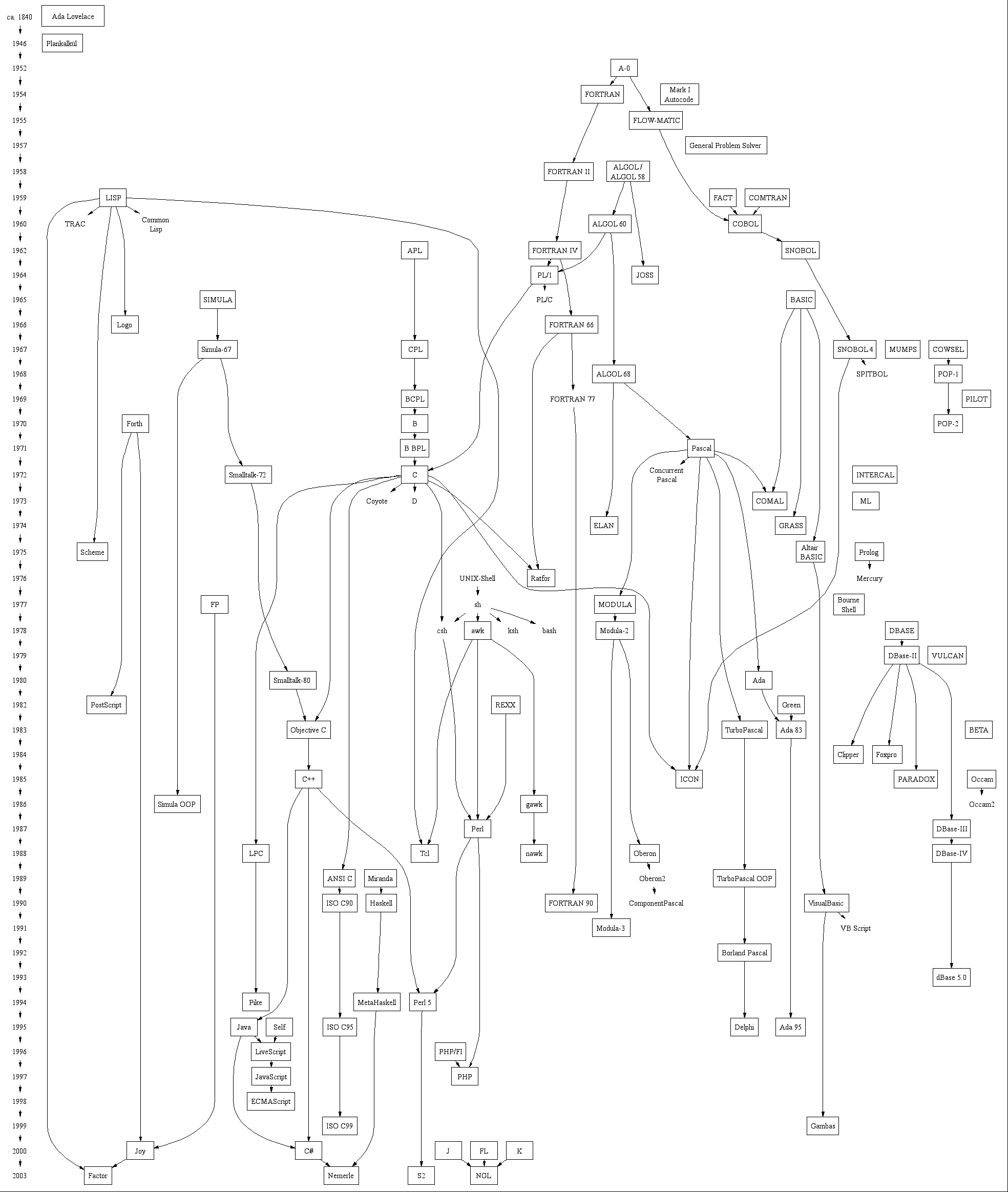
C++ Programming/Chapter Object Oriented Programming C++ Programming/Chapter Advanced Features C++ Programming/Chapter Beyond the Standard
Appendix A: Internal References
- List of Keywords
- [included next to The Compiler]
- List of Standard Headers
- [included in The preprocessor Chapter (next to the #include keyword)]
- Table of Preprocessors
- [included in The preprocessor Chapter]
- Table of Operators
- [included in the introduction to Operators]
- Table of Data Types
- [included in the introduction to Variables]
Appendix B: External References
C++ Programming/Weblinks C++ Programming/Booklinks
References
[[Template:BOOKCATEGORY|.]]