


TI-Basic Z80 Programming/Menus
Menu( (PRGM CTL D) is useful for allowing the user to select an option. By using Menu(, you can list several choices which the user can pick; each choice jumping to a different label.
Syntax
[edit | edit source]The basic syntax for Menu(:
Menu("title","text1",label1[,"text2",label2,...,"text7",label7])
- In place of any text string, you may substitute a string variable name (e.g., Str1)
- title can have a max length of 16 characters
- Each choice can have a max length of 14 characters, any additional characters are truncated
- Menus can have a limit of 7 options. Attempting to add more options than 7 will result in an ARGUMENT error being displayed upon attempted command execution.
When a user selects an option in the menu by pressing ENTER, the program will jump to the Lbl with the same name defined in the Menu( statement.
If the Menu( statement references a Lbl that does not exist, a LABEL error will be returned.
Example
[edit | edit source]To create a simple menu with several options:
- Menu("PHYSICS","PE",A,"KE",B,"WEIGHT",C)
- Lbl A
- statements
- Lbl B
- statements
- Lbl C
- statements
Displays the following when executed:
PHYSICS
1:PE
2:KE
3:WEIGHT
Advanced Menus
[edit | edit source]The Menu( function allows for great use of static menus, but when more choices are needed or when more interactive, dynamic menus are needed. The following method uses getKey to achieve this.
Note: The following example uses the Text command, which draws text to the graph screen. This is covered with more detail in later chapters.
- statements
- Lbl B
- statements
- Lbl C
- statements
You try it!
[edit | edit source]Try these examples to practice using the Menu( command.
Physics Calculations
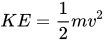
[edit | edit source]The potential energy of an object is defined by , where m is the mass in kilograms, g is the gravity, and h is the height in meters. The kinetic energy of an object is defined by , where m is the mass in kilograms and v is the velocity in meters per second. The apparent weight of an object is defined by , where m is the mass in kilograms and g is the gravity. Use the Menu( command to write a simple program that the user can select from each of the previously defined formulas, enter known values, and receive an output.


Solution
|
|---|
|
It is important to use the Stop command so that when statements under Lbl A and B are done executing, the succeeding labels do not execute. However, it is not necessary for a Stop command after Lbl C statements, since it is the end of the program.
:Menu("PHYSICS","PE",A,"KE",B,"WEIGHT",C)
:ClrHome
:Lbl A
:Prompt M,H,G
:Disp "PE = ",M*H*G
:Stop
:Lbl B
:Prompt M,V
:Disp "KE = ",(1/2)*M*V^2
:Stop
:Lbl C
:Prompt M,G
:Disp "W = ",G*M
|