Signals and Systems/Filter Transforms
Normalized Lowpass Filter[edit | edit source]
When designing a filter, it is common practice to first design a normalized low-pass filter, and then use a spectral transform to transform that low-pass filter into a different type of filter (high-pass, band-pass, band-stop).
The reason for this is because the necessary values for designing lowpass filters are extensively described and tabulated. From this, filter design can be reduced to the task of looking up the appropriate values in a table, and then transforming the filter to meet the specific needs.
Lowpass to Lowpass Transformation[edit | edit source]
Converting a normalized lowpass filter to another lowpass filter allows to set the cutoff frequency of the resulting filter. This is also called frequency scaling.
Transformation[edit | edit source]
Having a normalized transfer function, with cutoff frequency of 1 Hz, one can modify it in order to move the cutoff frequency to a specified value .

This is done with the help of the following replacement:

Transfer Function[edit | edit source]
As an example, the biquadratic transfer function

will be transformed into:

In the transfer function, all coefficients are multiplied by the corresponding power of .
Analog Element Values[edit | edit source]
If the filter is given by a circuit and its R, L and C element values found in a table, the transfer function is scaled by changing the element values.
The resistance values will stay as they are (a further impedance scaling can be done).
The capacitance values are changed according to:
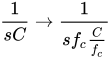
The inductance values are changed according to:

In the circuit, all capacitances and inductances values are divided by .
Lowpass to Highpass[edit | edit source]
Converting a lowpass filter to a highpass filter is one of the easiest transformations available. To transform to a highpass, we will replace all S in our equation with the following:

Lowpass to Bandpass[edit | edit source]
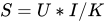
To Convert from a low-pass filter to a bandpass filter requires that we replace S with the following:
Lowpass to Bandstop[edit | edit source]
To convert a lowpass filter to a bandstop filter, we replace every reference to S with:
