


Guide to Game Development/Theory/Collision detection/Circular

Circle, Circle Collision Detection
[edit | edit source]This the collision detection to check if two circles are colliding. This method can be directly applied to two spheres.
For this example we'll need to define some example variables:
- The origin as a null position vector.

- Circle 1's centre as a position vector.

- Circle 2's centre as a position vector.

- Circle 1's radius as a decimal number.

- Circle 1's radius as a decimal number.

Collision test
[edit | edit source]If then: They are not colliding. If then: They are touching. If then: They are colliding.



if you wish to treat 'touching' as 'colliding', then use the following:
If then: They are not colliding. If then: They are colliding.

Circle, Point Collision Detection
[edit | edit source]This is basically a simplified version of the one above, this is because you can treat a point like a circle with no radius.
For this example we'll need to define some example variables:
- The origin as a null position vector.
- The point's location as a position vector.

- Circle 1's centre as a position vector.

- The Circle's radius as a decimal number.

Collision test
[edit | edit source]If then: They are not colliding. If then: They are touching. If then: They are colliding.
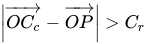
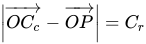
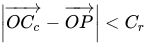
if you wish to treat 'touching' as 'colliding', then use the following:
If then: They are not colliding. If then: They are colliding.
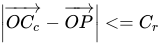
Circle, Line collision detection
[edit | edit source]Circle, Rectangle Collision Detection
[edit | edit source]External Links
[edit | edit source]Youtube:
- Covers "Circle, Circle" and "Circle, Point"