Serial Programming/RS-485


All bookshelves > Science bookshelf > Computer Science bookshelf > Serial communications bookshelf > RS-485 Technical Manual

Introduction[edit | edit source]
ANSI/TIA/EIA-485, commonly called RS-485, is a standard defining the physical layer of a two wire multipoint communications network. This standard is one of the more misunderstood of EIA’s standards. Many engineers have worked on an RS-485 application and think that since their application worked, they understand exactly what the standard is. Yet few of these engineers have ever seen the standard, let alone read it.
The RS-232, RS-422, and RS-485 standards are not comprehensive communications protocols, but are electrical layer standards that are intended to be used in conjunction with other standards. These other standards provide the protocol and other requirements that are needed for two devices to transfer information. Just because a protocol is used with a particular implementation of RS-232 or RS-485, does not mean it is part of the standard.
A direct quote from the RS-485 standard’s scope:
- “This Standard does not specify other characteristics, such as signal quality, timing, protocol, pin assignments, power supply voltage, operating temperature range, etc., that are essential for proper operation of interconnected equipment.”
The RS-485 standard states that it does not include protocol, but a common belief is that the RS-485 standard includes the asynchronous start-stop communication bit protocol (the UART bit protocol commonly used with a "RS-232" serial port), a “standard” connector, etc.
This appendix will attempt to explain what RS-232, RS-422, and RS-485 are and are not; then discuss one of the more common implementations of RS-422 and RS-485, asynchronous start-stop ASCII communication with a UART.
History[edit | edit source]
The EIA once labeled all its standards with the prefix "RS" (Recommended Standard), but the EIA-TIA officially replaced "RS" with "EIA/TIA" to help identify the origin of its standards[1] (starting in 198? [citation needed]). The EIA has officially disbanded and these standards are now maintained by the TIA. The RS-485 standard is obsolete and has been superseded by TIA-485, but many if not most engineers and applications guides continue to use the RS designation even though it has officially changed.
Because the EIA was accredited by ANSI to help develop standards in its areas, these standards may be described as an ANSI standard e.g. ANSI/TIA/EIA-485
RS-485[edit | edit source]
Title: Electrical Characteristics of Generators and Receivers for Use in Balanced Multipoint Systems
[Note: The following information is is believed to be correct but verification is needed]
Developer: Electronics Industries Association (EIA). Association of Industrial Electronics.
RS-485A (Recommended Standard 485 Edition: A) 1983.
EIA 485-A 1986
TIA/EIA 485-A 1998 [Approved: March 3, 1998]
TIA/EIA 485-A 2003 [Reaffirmed: March 28, 2003]
International and national standards based on the standard RS-485
ISO/IEC 8482 (Second edition 1993-12-15, current)
ISO 8284 (1987, obsolete)
ITU-T v.11 (1996, current)
ITU-T v.11 (1993, obsolete)
CCITT v.11 (1988, obsolete)
RS-232[edit | edit source]
The IHS Standards Store has relabeled all of the 232 standards as TIA-232. It is not clear as to what the actual standard name is for each release.[assistance appreciated (rev E verified)]
According to the IHS Standards Store [2] The RS-232 history is as follows:
RS-232?
- Revision - 1960 Edition
- Published - May 1, 1960
- Title - Interconnection of Data Terminal Equipment with a Communications Channel
- Pages - 8
- PURPOSE AND SCOPE OF COVERAGE - This standard is intended to provide a method of interconnecting data terminal equipment and a data communication channel when each is furnished by different companies. It defines a means of exchanging control signals and binary serialized data signals between data terminal equipment and a data communication channel in cases where interchange point.
RS-232?
- Revision - Revision A
- Published - October 1, 1963
- Title - Interface Between Data Processing Terminal Equipment and Data Communication Equipment
- Pages - 12
- PURPOSE AND SCOPE OF COVERAGE - This standard is applicable to the interconnection of data processing terminal equipment and data communication equipment. It defines a means of exchanging control signals and binary serialized data signals between data processing terminal equipment and data communication equipment, and is of particular importance when each is furnished by a different company.
RS-232?
- Revision - Revision B
- Published - October 1, 1965
- Title - Interface Between Data Processing Terminal Equipment and Data Communication Equipment
- Pages - 12
- PURPOSE AND SCOPE OF COVERAGE - This standard is applicable to the interconnection of data processing terminal equipment and data communication equipment. It defines a means of exchanging control signals and binary serialized data signals between data processing terminal equipment and data communication equipment, and is of particular importance when each is furnished by a different company.
RS-232?
- Revision - Revision C
- Published - August 1, 1969
- Title - Interface Between Data Terminal Equipment and Data Communication Equipment Employing Serial Binary Data Interchange
- Pages - 34
- PURPOSE AND SCOPE OF COVERAGE - This standard is applicable to the interconnection of data terminal equipment (DTE) and data communication equipment (DCE) employing serial binary data interchange. It defines:
???-232?
- Revision - Revision D
- Published - November 12, 1986
- Title - Interface Between Data Terminal Equipment and Data Circuit-Terminating Equipment Employing Serial Binary Data Interchange
- Pages - 53
- PURPOSE AND SCOPE OF COVERAGE - This standard is applicable to the interconnection of data terminal equipment (DTE) and data circuit-terminal equipment (DCE) employing serial binary data interchange. It defines:
ANSI/EIA/TIA-232-E-1991
- Revision - Revision E
- Published - January 1, 1991
- Title - Interface Between Data Terminal Equipment and Data Circuit-Terminating Equipment Employing Serial Binary Data Interchange
- Pages - 43
- PURPOSE AND SCOPE OF COVERAGE - This standard is applicable to the interconnection of data terminal equipment (DTE) and data circuit-terminating equipment (DCE) employing serial binary data interchange. It defines:
ANSI/EIA/TIA-232-F?
- Revision - Revision F
- Published - October 1, 1997
- Title - Interface Between Data Terminal Equipment and Data Circuit-Terminating Equipment Employing Serial Binary Data Interchange
- Pages - 47
- PURPOSE AND SCOPE OF COVERAGE - Unavailable
ANSI/EIA/TIA-232-F?
- Revision - Revision F
- Published - October 1, 1997
- Title - Interface Between Data Terminal Equipment and Data Circuit-Terminating Equipment Employing Serial Binary Data Interchange (Includes all amendments and changes through Reaffirmation Notice , October 11, 2002)
- Pages - 51
- PURPOSE AND SCOPE OF COVERAGE - unavailable
TIA-232-F?
- Revision - Revision F
- Published - October 1, 1997
- Title - Interface Between Data Terminal Equipment and Data Circuit-Terminating Equipment Employing Serial Binary Data Interchange (Includes all amendments and changes through Reaffirmation Notice , December 7, 2012)
- Pages - 54
- PURPOSE AND SCOPE OF COVERAGE - unavailable
RS-422[edit | edit source]
[Stub]
Document Conventions[edit | edit source]
This document is primarily directed at discussion of RS-485 but also includes information about RS-232 and RS-422.
Direct quotations from one of the standards are shown "inside quotation marks in a fixed width font"
All three standards have annexes. These annexes clearly state that they are not a part of the standard, and are included for informational (informative) purposes only. These annexes are discussed in this document but it should be clear that they are not a part of the standard even though they are included in the standard.
Many references and examples are made to "asynchronous start-stop communication with a UART" or "UART" communications. This is the 7 or 8-bit protocol commonly associated with serial ports. This was done since this protocol is a very common bit format used with serial communications. It does not mean that this protocol is part of the standards or that only this protocol may be used with the 232/422/485 standards.
The term network is used to define the wires, terminations, bias networks, and all devices connected as a whole system.
The RS standards, the OSI model, and the serial port[edit | edit source]
In the early 80’s IBM introduced the IBM PC. This computer had limited functionality with a keyboard and monitor as the primary peripherals. A serial port could be added with a card that plugged into one of the ISA expansion slots. This type of port was needed to transfer data from/to a printer, modem, or in rare cases a mouse. The serial port used a D-sub, B-shell, 25-pin connector (commonly called a DB-25) and RS-232 electrical signal levels, which made it "RS-232 compatible" or compatible with the RS-232 standard. The term "RS-232 compatible serial port" was often shortened to "RS-232 port".
The original PC was upgraded with a hard drive and became the PC/XT. Later it was upgraded again to a 80286 processor and a 16-bit EISA bus and became the PC/AT. When IBM introduced the PC/AT they also changed the physical format of the serial port connector to a D-sub, E-shell, 9-pin connector (a DE-9 commonly miscalled a DB-9). When IBM changed to the new connector they also changed the electrical signal levels. The new IBM PC/AT serial port no longer used the RS-232 25-pin connector or signal levels, but IBM took care to ensure that the new serial port’s electrical levels would still work with existing serial port peripherals, requiring only a 9-pin to 25-pin adapter. The 9-pin connector and electrical levels were eventually documented in EIA/TIA-574. This serial port was no longer a "RS-232 compatible" serial port since the connector and signal levels no longer matched the RS-232 standard. But, since existing RS-232 compatible peripherals still functioned with it, it was still regularly called an "RS-232 port".
The original "RS-232 compatible" serial port used a UART to drive the RS-232 electrical signal levels and many came to believe that the UART protocol was a part of the RS-232 standard. While this is incorrect, many to this day still believe that the RS-232 standard includes things such as baud rate and the bit stream protocol used in the IBM serial port.
Somewhere around this time the OSI model was developed. The RS-232 standard resides in layer one of the OSI model, or the physical layer. The physical layer may include a connector, wires, and electrical levels, but does not include the bit and framing protocol of the UART. Bit and framing protocols are in layer two of the OSI model.
The RS-232 standard does not include a line length limit, but practical limits of the electrical signal levels prevent long lengths. The RS-485 standard calls for a differential signaling scheme that will operate over a much longer line length than RS-232 can. Converters that changed the RS-232 electrical levels to RS-485 levels were developed which allow the serial port to transfer data over much longer distances than the RS-232 levels allowed. Again many thought that the UART protocol used in the serial port were part of the RS-485 standard, but the RS-485 standard contains even less of the OSI model layer one than RS-232 does. The connector resides in layer one of the OSI model and RS-232 includes the connector. RS-485 does not include any connector. Neither standard includes any of the OSI model layer two, where the bit framing protocol resides.
In summary, the EIA/TIA standards (which are commonly miscalled RS standards) are the physical layer which include electrical signal levels and RS-232 includes the connector. Layer two of the OSI model includes the bit and framing protocol, which is outside of these EIA/TIA standards.
RS-232, RS-422, and RS-485[edit | edit source]
RS-232[edit | edit source]
The RS-232 standard title is "Interface Between Data Terminal Equipment and Data Circuit Terminating Equipment Employing Serial Binary Data Interchange". This standard is for up to 21 circuits on a 25 pin DB-25 connector. A circuit is a full definition of a signal from the transmitting device to the receiving device, but many now think of these definitions as pin labels. One circuit (Signal Common) is required for all interface types. RS-232 defines thirteen "standard" interface types lettered A through M. None of these match IBM's implementation of its serial port. A fourteenth interface type, lettered Z, is reserved for applications not covered by types A through M. All of the circuits on interface type Z (except Signal Common) are optional and are to be specified by the supplier.

In addition to the 21 circuits, the shield may be connected to pin 1, pins 9 and 10 are "Reserved for Testing", and pin 11 is "unassigned". This defines all 25 pins of the connector.
An interesting point with the RS232 standard is that the serial data is transmitted from the Data Terminal Equipment [DTE] to the Data Circuit Terminating Equipment [DCE] on pin 2, and this pin is defined as "Transmitted Data" for both ends. RS-232 only defines connecting DTE to DCE, so when two computers are connected together this is outside of the standard.
Many think the RS-232 standard completely defines the IBM PC serial port, but this is incorrect. The IBM PC serial port is only partially described by the RS-232 standard. A common and incorrect assumption is that the RS-232 standard defines the bit protocol of the data being transferred asynchronously through the UART. When configuring an IBM PC’s serial port, the parity, number of data bits, and number of stop bits must be set; therefore, many think this must be part of the RS-232 standard. But, the RS-232 standard allows for synchronous communications, which is not compatible with the IBM PC serial port, as well as asynchronous communications, which can be. It can’t be denied that the UART IBM selected for its implementation of the serial port is considered by many as the definition of RS-232, but these parts are not in the RS-232 standard.
Another example of misunderstanding the RS-232 standard is the 9-pin connector. RS-232 specifies two connectors, a 25-pin (DB-25) and an alternate 26-pin connector (pin 26 is "No Connection"). The 9-pin “RS-232” connector used for the IBM PC-AT serial port is not specified in RS-232. EIA/TIA-574 is the standard for 9-pin connectors, and EIA/TIA-561 is a standard for 8-pin connectors that are commonly used with serial ports.
The RS-232 standard defines a DB-25 and a 26-pin alternate connector, the function of each of the pins in the connector (called circuits), and the electrical characteristics of the signals that are on the “circuits”. For example, one of the circuits is “AB”. Circuit AB is on pin 7 and is described as “Signal Common”. This is a rather convoluted way of saying pin 7 of the DB-25 connector is used as a signal common. Two circuits are for transmitting and receiving the serial data, circuit “BA” (TX data on pin 2) and “BB” (RX data on pin 3). A number of circuits are for handshaking and other functions. The RS-232 standard includes secondary serial data circuits (secondary TX data, and secondary RX data), three clocks (timing elements) for synchronous serial data transfer, Signal Quality Detector, and more. Clearly not all of these circuits or signals are included in IBM’s implementation (very few implementations use secondary data lines or many of the other circuits). RS-232 provides a list of circuits and says if you use a circuit; this is what it must do and it must be on this pin of the connector.
RS-232 defines the voltages of these circuits, and the polarity of the logic generating the voltage. When a binary 0 is being transmitted (i.e. when the UART is transmitting a zero), the voltage on the TX data circuit is more positive than +3V, and when a binary 1 is being transmitted, the voltage must be more negative than -3V. Voltages between -3V and +3V are undefined by the standard. There are other electrical characteristics in the standard, but you should be getting the idea that RS-232 specifies the connector, signals, and electrical characteristics. It does not specify bit protocols.
RS-232 allows for both a transmit and receive circuit. If both are implemented then the connection is full-duplex. If only one circuit is implemented then the connection is simplex or one way. Half-duplex RS-232 implementations exist but require all of the hardware and wires that a full-duplex network requires. Half-Duplex RS-232 is usually limited by an additional communications device between the two farthest ends that are communicating. For example; Two computers communicating with each other over an older modem. The modem may be limited to half-duplex communications, and therefore the link between the two computers is half-duplex. But, the RS-232 connection from the computer to the modem would still be full-duplex. Other reasons that some RS-232 ports were half-duplex: some very old UARTs may be half-duplex limiting the system, and some very old computers drove the RS-232 drivers directly from the processor without a UART. These old and slow microprocessors did not always have the horsepower to monitor the timing of both the incoming and outgoing bits, limiting the system to half-duplex.
The UART connected to the RS-232 driver/receiver controls the protocol of the bits being transferred. This protocol may include things like the start bit, number of data bits, parity and stop bit(s). Again, this protocol is not part of the RS-232 standard, even though many engineers think of this protocol as “RS-232”.
RS-422[edit | edit source]
The RS-422 standard title is "Electrical Characteristics of Balanced Voltage Digital Interface Circuits". This standard specifies the electrical characteristics of a single transmitter and up to ten receivers on a single pair of wires. RS-422 does not specify the function of the signal on the wires so the signal can be data, clocking, handshaking, etc.
RS-422 specifies the electrical levels of one transmitter to one of more receivers on a single pair of wires. Typical UART communications with an RS-422 device, uses both a transmitter and receiver on a network of two balanced pairs of wires for a total of four wires. Other standards such as EIA-530 reference RS-422 for electrical signal levels, and include multiple signals on multiple pairs of wires. EIA-530 signals include transmit. receive, handshaking and clocking which require all 25 wires. Not all of the EIA-530 signals use RS-422 levels.

When two pair of wires are used for full-duplex communications, one pair is used for the interface generator (driver) to talk to the other device(s) on the RS-422 network, and the second pair is the interface receiver used to listen to an other device (not devices, since only one driver can be on this pair of wires) on the network. RS-422 includes the voltage levels of the two wires when a binary 0 or 1 is on the RS-422 lines, but specifically excludes the logic function of the generator or receiver. RS-422 specifies a number of other things, but they are all electrical values. Any bit protocol such as that from a UART is specifically not included. RS-422 is inherently simplex on each pair of wires. When a network with two pair of wires is used as shown in the diagram, the network is full-duplex. I.e. the two devices on an RS-422 network can talk to each other at the same time. RS-422 allows for multiple receivers on each pair, but only one driver. This means that in a master/slave configuration, a master can talk to multiple slaves, but only one slave can talk back to the master. This limits most RS-422 bidirectional networks to two devices that talk to each other.
RS-422 does not specify any connector. EIA-530 and EIA-449 are standards that specify a connector, pin assignments and RS-422 electrical levels.
Since the driver and receiver are differential circuits, the input and output voltages are specified as differential, but these voltages are also referenced to a circuit common. See the section on grounding for a discussion of this "extra wire".
RS-485[edit | edit source]
The RS-485 standard title is "Electrical Characteristics of Generators and Receivers for Use in Balanced Digital Multipoint Systems". This standard is for a network of a single balanced pair of wires.

Both the generator (driver) and the receiver of all devices on the network are connected to the two wires. A third interface is defined as a transceiver, which has both a generator and receiver. All of the drivers and transceivers must be able to be "made passive" or effectively disconnected from the network to allow other drivers to transmit. The RS-485 standard includes the voltage levels of the two wires when a binary 0 or 1 is on the two RS-485 wires, but specifically excludes the logic function of the generator or receiver. RS-485 specifies a number of other things, but they are all electrical values. Any bit protocol such as that from a UART is specifically not included. RS-485 is inherently half-duplex. I.e. only one device can talk to the other devices on the RS-485 network at a time. RS-485 allows for multiple devices on the two wires. This means that in a master/slave configuration, a master can talk to multiple slaves, all of the slaves can talk back to the master, and every device on the network can hear every other device. Implementing this requires a higher level addressing scheme so the data being transmitted goes to the correct device. RS-485 does not specify any protocol, addressing scheme, or connector.
Since the driver and receiver are differential circuits, the input and output voltages are specified as differential, but these voltages are also referenced to a circuit common. See the section on grounding for a discussion of this "extra wire".
Please note that a RS-485 network is a single pair of wires, but there is nothing in the RS-485 standard that prevents more than one RS-485 network from being used by each device. One RS-485 network can be used for the master to talk to all of the slaves on the network, and a different RS-485 network can be used for all of the slaves to talk back to the master. This particular implementation of two RS-485 networks is often called 4-wire or full-duplex RS-485. This implementation is very similar to a 4-wire RS-422 network. The most significant difference is that more than one slave can talk back to the master. Another implementation of two RS-485 networks is BitBus, which uses one of the RS-485 networks for bidirectional SDLC data communications (very different from asynchronous start-stop communications with a UART), and a second, optional, RS-485 network for RTS (direction control if a repeater is used).
There is no collision detection in RS-485. If multiple devices start to talk at the same time, the data may be corrupted. RS-485 does not define a way for a device to detect that the data it transmitted has been corrupted. This means that a higher-level protocol is usually used to verify that the data has been sent. A simple example is a query/response protocol. A master asks a slave for data. The slave responds to the request providing the master with the information. If the master does not receive the requested information, it asks for the information again. If either the query or response is lost through a collision or other error mechanism, the data will end up being retransmitted. Other error detection mechanisms can be used. A CRC or checksum can be added to the end of the data being transmitted. A receipt response verifying valid data received can be sent back to the master. None of these protocols are part of the RS-485 standard, and implementation is up to the engineer writing the software.
Physical Layer[edit | edit source]
The Wires[edit | edit source]
RS-232[edit | edit source]
RS-232 has one requirement:
- Maximum circuit capacitance of 2500pF
Its annex also states "It is desirable for proper operation over the interchange cable that the DC wire resistance not exceed 25 Ω per conductor." Any cable that meets the capacitance requirement can be used. For long cables, heavier gauge wire may be needed to reduce resistance. Shielded cable increases the capacitance between wires and reduces the total cable length.
RS-422 & RS-485[edit | edit source]
RS-422 & RS-485 have one requirement
- "balanced interconnecting media" - "The characteristics of the interconnecting cable are not specified."
Then both standards go on to say things that the cable should have/do:
- "paired cable with metallic conductors should be employed." [yup, both standards really say the wire should be made of metal]
- The performance of the cable should work for the application. - "maintain the necessary signal quality required for the specific application"
- Shielded cable may be used. (RS-422 only - The RS-485 annex says shielded cable may be needed for RFI/EMI or other purpose, but the standard does not mention the word shield)
- 120 Ω nominal. (RS-485 only)
- Other impedance cable may be used such as 100 Ω nominal. (RS-485 only)
Note that the RS-422/485 standards call for "balanced interconnecting media", not twisted pair. In reality, the only viable option for long lines is twisted pair, but the standards do not require it.
RS-485 calls out TSB-89 application guidelines for TIA/EIA-485-A. TSB-89 discusses wire types and effects, but TSB-89 also says "The designer should empirically determine the performance of the media in these regards."
.png)
RS-485 usually has a single pair of wires that both the transmitter and receiver are connected to. The data is sent down the wires differentially, or when one wire has a high, the other wire has a low and vice-verse. In the RS-485 standard, one wire is labeled "A" and the other is labeled "B", and the wires are twisted together (a "twisted pair"). This allows RS-485 to transmit over longer distances than RS-232. Due to the confusion of polarity, some commercial device manufacturers have labeled the wire connections "+" and "-", TX(+) and TX(-), etc. See the section [That Pesky] Polarity for more information.
Figure 1 of the RS-485 standard is a diagram (not shown for copyright concerns) which shows the "balanced interconnecting cable" as a transmission line of two wires. In this figure the driver has two leads and connects via a stub to the transmission line at points "A" and "B". A third point on the driver shown as "C" is labeled as a common, but is not shown connecting to any wire. There are two other devices in this figure (receiver and transciever) that are connected to the transmission line the same way. Another figure in the annex (again, the annexes are not considered to be part of the standards) discusses connecting the "Green Wire Ground of Power System" or "Protective Ground or Frame Ground" to "Circuit Common or Circuit Ground" and "SC Signal Common". The annex says this connection can be wired directly or made through a 100 Ω resistor. This "third wire" is not officially part of the standard and is discussed further in the grounds and grounding section.
The primary difference between RS-422 and RS-485 is that RS-485 requires two wires in a single pair which all devices transmitters and receivers are connected to, and RS-422 typically uses two or more pair in which only one transmitter and up to ten receivers are connected to a single pair. However, the specifications are different in many other places. The annexes are also different. RS-422's annex has a chart of empirical data using 24 AWG copper UTP telephone cable. POTS telephone cable's impedance is less controlled than CAT cable and can vary from 600 Ω at lower audio frequencies to less than 100 Ω at higher frequencies.
In the end, the cable you use needs to work for the application where you use it. The cable's length, impedance, terminations, stub lengths, and data rate will all have an impact on signal quality. 120 Ω cable should provide the best performance, but the 100 Ω CAT-X cable may you have laying around may also work. Even POTS telephone wire may work for many applications. If the length is short enough and the bit rate is low enough, completely unbalanced loose wires will work. Low capacitance cable becomes important when pushing line length and/or data rates to the maximum.
Line Length and Bit Rate[edit | edit source]
RS-232[edit | edit source]
RS-232 is very clear that is intended for a maximum bit rate of 20kbit/s. The forward recommends EIA/TIA-530, EIA/TIA-561, and EIA/TIA-574 for operation at higher bit rates. Section 1.3, Data Signalling Rates, states; this standard is applicable for use up to a nominal limit of 20,000 bits per second. Section 2.1.4 discusses transition times as a percentage of unit interval (bit time) where the unit interval is between 25mS and 50uS. This unit interval range works out to 40bit/s to 20kbit/s.
Section 3.2 clearly states that "The maximum length of the cable is not defined". Then it references section 2.1.4 where the maximum capacitance of the receiver side of the interface point, including the cable, shall not exceed 2500pF. Then suggests seeing appendix A for guidance (again, the appendix states that it is not a formal part of the standard). The appendix discusses capacitance and resistance of the cable, then gives an example calculation where the capacitance of the cable per foot (30pF/foot) multiplied by the cable's length, plus the capacitance of the receiver (100pF) gives a maximum cable length of 80 feet. Try to find the capacitance of the cable being used (in pF/foot) and divide 2500 by it. This should give you an approximate limit for that cable in feet. If you keep the cable length at 70% or 80% of this limit you should expect the network to work with a true RS-232 driver and receiver.
If you are trying to get two ancient pieces of equipment (both of which use true RS-232 drivers and receivers) to work with a long cable, the capacitance limit in RS-232 may apply, but RS-232 does not take bit rate into account. If they don't communicate, reducing the bit rate may make the two devices function together.
In reality either or both the driver or receiver are going to meet the more modern RS-574 requirements and none of the RS-232 limits will apply. In this case your best bet for defining how long the cable can be is to try it. Pull a cable between the two devices and see if they can talk to each other. If the can't, try reducing the bit rate. If reducing the bit rate is not an option, then you could try an RS-232 to RS-485 converter at both ends. If you have to know that it will work before you pull the cable, then get the required length of the cable and move the two devices next to each other, connect them and see if they can talk. There are numerous mentions of "empirically determined" in these standards. Empirically determined means try it and see if it works.
There is a lot of folklore stating that RS-232 has a 50 or 100 foot limit. In reality, if you are using relatively modern equipment (say 1990 or later) and a low baud rate, line lengths of 1,000 feet (300 m) or more are possible.[3]
RS-422 & RS-485[edit | edit source]
The legends and folklore, not to mention the flat out wrong information that has grown around the line length and data rate limits inherent in RS-485 are truly astounding. Articles, application notes, even data sheets from semiconductor manufacturers discuss both the data rate and line length limits in RS-485. Sadly neither of these limits are in the RS-485 standard.

(This chart is not in RS-485)
The graph at right, which is often shown in these app-notes, shows a limit of 1200 meters/DC at one end and 14 meters/10 Mbit at the other. This graph is not in RS-485. This graph is from annex A of RS-422. (again, the annex specifically states that it is not a part of the standard) Worse is the fact that annex A states that this graph is a conservative guide based on empirical data of 24AWG telephone cable (POTS). The annex discusses the fact that many applications can handle greater amplitude and timing distortion, and that practical experience has shown that the cable length can be extended to several kilometers at lower data rates. The graph in RS-422's annex A is not an absolute limit, but a guide to what should always work with cheap telephone wire.
RS-485 has even less information. The forward to RS-485 references TSB-89 which has topics including data signaling rate vs. cable length, stub length, etc. RS-485 also has some information in its annex (which is not considered to be part of the standard) RS-485's annex states: "consideration should be given to some of the problems that may be encountered due to system configuration, data signaling rate vs. cable length, stub length, and grounding arrangements." "High data signaling rates and long cable lengths are possible, however, they are mutually exclusive. High data signaling rate applications should be limited to short cable lengths, while low data signaling rate applications may employ long cable lengths."
Low data rates are primarily limited by the DC resistance of the cable (the effects of the DC resistance of the cable are made worse if a termination resistor is used) and high data rates are limited by the AC effects of the cable on signal quality. There is no graph of cable length vs. data rate in RS-485 or its annex.
RS-485 discusses that it is used for devices up to 10Mbit/S, then says they need not be limited to 10Mbps. It also states that "the upper bound is beyond the scope of this Standard".
All of the application guides and data sheets that say RS-485 has a limit of 1200 meters or 10Mbit are flat out wrong.
It should be noted that RS-422 is limited to 10Mb and devices meeting the RS-422 standard do not need to operate over the full range. Devices may be designed to operate at lower data rates for "economically specific applications".
That being said, what is the practical line length limit? It depends on many factors. Data rate is usually the primary factor. Since the majority of RS-485 applications are driven by a UART, the data rate is usually below 100kbit. In this case, POTS telephone wire should work for quite a long line. If you are pushing the data rate above 100kbit or the line length above 1000 meters, you may want to use a better grade of wire. The termination resistor has a significant impact on DC losses, so networks with long cable lengths may benefit from tweaking the termination resistor to a higher value. Many cable manufacturers can recommend a 120 Ω cable intended to work with RS-422 or RS-485.
How fast can you go? Maxim has an app note that says speeds of 50Mbps[4] are possible with the right drivers. (and the right cable, terminations, receivers, etc.) Linear Technology claims 52Mbps with their LTC1695 [5]
If your intention is to push the cable length or bit rate to extremes, you should pay careful attention to the cable, drivers, and installation. A conversation with a cable manufacturer can help to define the best available cable for your application. In addition to using the best cable, there are many different drivers, receivers, and transceivers available. Not all will provide the same performance. The RS-485 standard requires a minimum performance, but many drivers exceed this performance and some have quirks such as slew rate limiting. Slew rate limiting reduces the maximum bit rate, but will improve signal quality on networks with poor characteristics. And, of course, the installation can make or break the network performance. Stub length, termination, and biasing resistors can have a significant impact on the performance of the network. A higher value termination resistor will reduce the DC losses associated with extreme line lengths, allowing for much longer line lengths at the cost of ringing on the wires. The ringing occurs when the data transitions, and will eventually damp out. This means that low data rates can handle an improperly terminated (or even unterminated) cable better than high data rates.
Some thought should be given to changing the technology for really long line lengths. A kilometer of POTS cable can cost a lot, two kilometers twice as much. Add the cost of pulling the cable and long networks can get very expensive. A gateway that converts the RS-485 data to run over an existing network may cost less in the end than running a kilometer of cable.
RS-485 gives limits for rise and fall times as 0.3 of the unit interval. This is a ratio of rise/fall time to bit width. There are no limits given in time units, so there is no minimum or maximum bit rate associated with RS-485.
Grounds and Grounding[edit | edit source]
Grounding of the RS-485 hardware is another contentious issue. The reason for this is that different installations have different grounding requirements. No one solution can fit all installations.
The ground between RS-485 devices is often called a "Third Wire". This Chipkin article [6] has some good information on this "third wire", but notice in the comments how there is disagreement on exactly when this wire is needed.
The RS-485 standard has very little to say about grounding. The standard defines the common-mode voltage as being referenced to ground, it defines a term "ground potential difference" as the difference in the signal ground between the driver and receiver, but it does not say that this is earth ground or just a a third wire common. It shows a diagram of the driver and receiver with two wires connecting them, and a third point "C" that is called a common. There is no wire shown connecting this third point between driver and receiver. Then the annex states that consideration should be given to various things including grounding arrangements. Section A.4 of the annex defines two optional grounding arrangements. The first is to connect the signal common of the driver/receiver circuit to "protective or frame ground" through a 100 Ω resistor. This frame ground is shown as being connected to the "green wire ground of power system", more commonly called earth ground. The second optional grounding arrangement is to connect the circuit common directly to the frame ground without a resistor. The annex also says that certain applications may cause the resistor to fail so the installation must allow access for inspection and replacement. I.e., you should be able to change the resistor when it goes up in smoke.
Since the annex admits that the installation can cause physical damage to components, it is not surprising that grounding is a contentious subject. Anyone who has seen a device go up in smoke, is likely to be very vehement on how to, and how not to wire grounds. The problem with this is that a particular method of grounding may be required for one installation to function and cause damage at another.
RS-485 requires the driver and receiver to function if the common mode voltage is shifted against circuit common (see the section on voltages for more information). If the circuit common is truly isolated from earth ground, then scuffing your feet on carpet (to pick up an ESD charge) and touching the wires can cause the wires to shift potential several thousand volts. In practice this type of isolation is rare. It would require an isolated power supply and optically isolated drivers. Or a couple of laptops running on battery power and sitting on an insulated surface.
Consider three different installations.

The first is a desktop computer talking to a laptop. The desktop is connected to earth ground and the RS-485 port is referenced to the earth ground. The laptop is battery powered and has no connection to earth ground. An ESD shock to the laptop could cause the two RS-485 wires to increase in potential against the earth ground to several thousand volts. This far exceeds the RS-485 allowed voltage of +12V and -7V. If the desktop's port is ESD protected damage may not occur, but there is no guarantee. This installation should have a third wire connecting the earth ground/circuit common from the desktop PC to the laptop's RS-485 port circuit common. Since the laptop has no connection to earth ground, there will normally be little current through this third wire.

A second installation has two desktop PCs sitting very close to each other. The RS-485 circuit common is connected to earth ground in both PCs. Since the PCs are sitting near each other, they are on the same power circuit,the difference in the earth ground between the two computers is very small. This installation does not require a third wire, but including one will not hurt.

The third installation uses the same two computers as the second example, but they are separated by several thousand feet of wire, and one of the computers is sitting next to an arc furnace that draws several thousand amps when operating. The difference in earth ground potentials between these two computers may be tens or even hundreds of volts. This difference in earth ground may be high enough to cause damage to the RS-485 devices, but connecting a third wire between their circuit commons/earth grounds would try to bypass the power earth common (this is often called a ground loop) causing excessive current in the third wire. The current could cause damage to the wire, or the RS-485 port. This third example would be a good place to use an isolating RS-485 transceiver. Isolated transceivers are available in IC packages, modules, and gateways.
A shielded cable may be used. A shield is sometimes used to reduce EMI in twisted pair, but will reduce the maximum RS-485 operational line length. The annex of RS-485 states that "When employed, the shield shall be connected only to frame ground at either or both ends depending on the specific application." Shields usually have a lot more copper (and/or aluminum) than a single wire and can therefore carry a lot more current. A thousand feet of 24 AWG wire is in the 26Ω range. This helps to limit the current through the "third" wire. A 10V difference in earth ground potential would only have less than 0.4 amps of current
A shield could have less than 1 Ω of resistance. Using the shield to connect the two earth grounds could result in 10+ amps with a 10V difference. Beware of ground loops when using the shield as the third wire.

Voltages[edit | edit source]
RS-232[edit | edit source]
RS-232 typically has a transmit wire, receive wire and signal common wire. It may also have flow control signal wires. The voltages are measured at the signal wire and are referenced to signal common.
The driver must output between 5V and 15V in magnitude into a load of 3kΩ to 7kΩ. The driver must not be able to output more than 100mA when shorted to any other conductor in the cable, must not be able to output more than 25V and must be able to handle an open circuit, or a short to any other conductor in the cable.
The receiver is designed to operate with voltages between 3 and 15V in magnitude (i.e. both positive and negative voltages) but must be able to handle an input of 25V without damage.
When a binary 1 is transmitted, the signal is spacing, and the voltage on the wire must be more negative than -3V. When a binary 0 is transmitted, the signal is marking, and the voltage on the wire must be more positive than +3V. The region between -3V and +3V is undefined.
Older driver IC's commonly used +12V and -12V as their voltage sources. This limited the open circuit voltage to ±12V. Lower voltage drivers are now available to allow operation from battery powered devices and the open circuit voltages may be lower than ±12V. If so, these drivers could be RS-232 but could also be EIA/TIA-574.
Note that the logic function of the driver and receiver are defined. When the driver is transmitting a 1 (from the UART for example), then the voltage on the wire must be less than -3V. This is considered "inverting" logic by many engineers.
RS-422[edit | edit source]
RS-422 has one or more pair of wires. Each pair has two wires to which a driver and one more receivers are connected. The signals appear differentially on two wires of each pair. When the driver increases the voltage on one of the wires, it simultaneously decreases the voltage on the other wire resulting in a differential voltage between the two wires. When 5V drivers are used, the driver typically pulls one wire to circuit common, and the other wire to 5V (and vice-verse for the opposite data). This does not mean the voltages will reach 0V or 5V on these wires. The exact voltages will depend on the driver, the loading, biasing, termination, and any shift in ground potential between the driver and receiver.
RS-422 voltages are referenced differentially from one wire to the other, but are also referenced to circuit common. This means the specification has a differential voltage requirement, and a common mode voltage requirement.
The driver must produce a differential voltage between 2 and 10V into a loaded/terminated cable. The driver must present a low impedance to the cable of 100 Ω or less. The driver must not exceed 10V differential, or 6V common mode (outputs relative to circuit common). The driver's output current when shorted to circuit common must be limited to 150mA.
The receiver must have an input impedance of greater than 4k Ω and function over a common mode voltage range of -7V to +7V. The receiver must recognize a differential voltage of greater than ±200mV as a binary value. Voltages of less than 200mV are undefined. The receiver may recognize any voltage between -200mV and +200mV as a binary value, but different manufacturers can set the threshold where ever they want. Hysteresis is typically incorporated in the receiver to improve noise margin, but is not required. The maximum voltage between either of the wires and circuit common must not exceed 10V absolute magnitude, and voltages up to 10V cannot cause damage to the receiver.
The driver has the capability of driving 10 receivers of 4k impedance, but the actual number that can be driven depend on the actual input impedance of the receivers, bit rate, wire, stub lengths, biasing and termination of the network.
The logic function of the driver and receiver are not defined, only the binary state of the differential voltages on the wires. A binary 1 may (or may not) be inverted by the driver before it is output. See the section on polarity for more information.
RS-485[edit | edit source]
RS-485 has a single pair of wires. The signals appear differentially on these two wires. For each device interface, the driver and receiver are both connected to these two wires. The driver must be electrically disconnected or "made passive" when it is not transmitting. When the driver increases the voltage on one of the wires, it simultaneously decreases the voltage on the other wire resulting in a differential voltage between the two wires. When 5V drivers are used, the driver typically pulls one wire to common, and the other wire to 5V (and vice-versa for the opposite data). This does not mean the voltages will reach 0V or 5V on these wires. The exact voltages will depend on the driver, the loading, biasing, termination, and any shift in ground potential between the driver and receiver.
RS-485 voltages are referenced differentially from one wire to the other, but are also referenced to circuit common. This means the specification has a differential voltage requirement, and a common mode voltage requirement.
The driver must produce a differential voltage between 1.5 and 5V into a loaded/terminated cable. The driver's impedance (when active) is not specified, but the driver needs to be capable of driving 32 unit loads and a termination resistance as low as 60 Ω. [ this works out to 51.72Ω if the unit load is really 12 kΩ, but section 4.5.3 puts the total load limit at 54 Ω.] The driver must not exceed 6V differential, or 6V common mode. The driver's output must be limited to 250mA peak output current, but may be limited to much less. The driver must not be damaged when the outputs are shorted together, or to any voltage between -7 and +12V.
The receiver's input impedance is specified in terms of a "unit load" where a unit load is specified as input current in mA at a voltage referenced to ground. It is commonly considered that a 12k resistance is 1 unit load, but unit load is more complex than than a single resistance. The receiver must function with common mode input voltages [referenced to circuit common] over the range of -7V to +12V. The receiver must recognize a differential voltage of greater than ±200mV as a binary value. Voltages of less than 200mV are undefined. The receiver may recognize any voltage between -200mV and +200mV as a binary value, but different manufacturers can set the threshold where ever they want.
The driver has to be capable of driving 32 unit loads. Since a receiver may have a loading of less than one, the actual number of receivers that can be connected depend on the unit load rating of the receivers, as well as the wire, bit rate, stub lengths, biasing and termination of the network. The maximum number of receivers may be much greater than 32.
The RS-485 driver must be disabled [effectively disconnected from the wires] when it is not transmitting to allow other devices to transmit. This means there will be times when no driver is connected to the wires. With no driver connected, the differential voltage on the wires will depend on the termination resistor and biasing. If there are no biasing resistors on the wires, they will effectively be at 0V differential, which is in the undefined region between -200mV and +200mV. This can cause a problem if the RS-485 network is using a UART to transmit data. The UART should function correctly if the receiver considers the undriven voltage on the wires to be the idle condition. However, if the receiver considers the undriven wires to be a binary 0, when the driver is turned on and set to transmit a start bit, which is also a binary 0, the receiver will not see a transition, and therefore will not see the start bit. For this application to work, the driver must transmit an idle (binary 1) after the driver is enabled, for some period of time before the start bit is transmitted.
Some manufacturers get around this problem by setting their receivers input threshold to a slightly biased value, such as -50mV, instead of exactly at 0V. When the wire pair is not driven, the receiver will see the input as an idle condition (binary 1). If the transmitter is turned on at the exact same time as the edge of the start bit, the receiver will see the voltage change from idle to start so the UART will always see the first start bit transmitted. This problem can also be fixed by adding bias resistors to force the line to idle condition when a driver is not connected, but this has to be done on a network basis, not a device basis. Adding the biasing resistor to every device on the network can cause termination problems. See the sections on termination and biasing for more information.
The logic function of the driver and receiver are not defined, only the binary state of the differential voltages on the wires. A binary 1 may (or may not) be inverted by the driver before it is output. See the section on polarity for more information.
[That Pesky] Polarity[edit | edit source]
Before we discuss polarity lets take a look at logic levels and binary states.
Logic IC's don't output a precision voltage. As a general rule when the voltage measured (with respect to circuit common) is "high" the binary state is considered to be a 1 and when the voltage is low the state is 0. There are exceptions to this rule (such as differential logic and negative logic), but for the purpose of this discussion we'll talk about normal logic. When you turn a switch ON for a lamp, the a voltage is applied to the light bulb and the bulb is on, therefore a voltage is ON and no voltage is OFF. Digital logic usually uses the same convention (but not the same voltage) as the lamp example. The exact voltage level that a logic device considers ON or OFF varies by logic type, but when the voltage is high (usually but not always approaching the IC's supply voltage), the output is on and a binary 1 is on the wire, and when the voltage is approaching 0 the output is off and, a binary 0 is on the wire.
In most digital logic a binary 0 is usually considered OFF and a binary 1 is ON. All three of the standards, RS-232, RS-422, and RS485, reverse this convention. This can create some confusion.
A logic device may have an "inverting" and/or "non-inverting" output. For normal logic when the input of a driver is a 1 or high, the non-inverting output will go high. When the input is low or 0, the non-inverting output will go low. The opposite is true of an inverting output. When the input is high the inverting output goes low, and when the input is low the inverting output goes high. The inverting output usually is shown with a bubble on it and the non-inverting output does not have the bubble. An inverting output is sometimes designated with a "-" and the non-inverting output is sometimes designated with a "+".
When the input of an RS-485 driver goes high, one of the outputs will go high in reference to circuit common and the other will go low. The exact voltage of high and low are not usually specified, rather a voltage difference between the two outputs is specified. But, since one of outputs goes high when the input goes high, it is often called the "non-inverting" output. Conversely, the output that goes low when the input goes high is often called the "inverting" output. RS-485 does not use the terms inverting or non-inverting nor have the "+" or "-" label on the interface points. RS-485 simply defines the interface connection points as "A" and "B" and shows the voltage relationship between "A" and "B" for the binary states of the two wires, not the binary state of the input to the driver.
|
 |
RS-485 figure 2 shows a generator (driver) with two interface connection points labeled "A" and "B". The third point C is discussed in the section on grounding. Figure 1 also shows the output signaling waveforms, redrawn here in color for clarity. It also very clearly states "The logic function of the generator and the receiver is beyond the scope of this Standard, and therefore is not defined."
Now look at the driver schematic symbol you should notice that the "A" output is the non-inverting output and the "B" output is inverting. You would think that this would mean that when a 1 is being transmitted "A" would be high and "B" would be low. Yet the signaling waveforms in Figure 1 of the RS-485 standard clearly show that when a binary 0 (ON) is on the wires, the voltage on wire "A" is positive with respect to "B" and conversely, when a binary 1 (OFF) is on the wires, the voltage on wire "A" is negative with respect to "B". In other words, to make the symbol match the waveform, the input to the schematic symbol would have to be reversed or inverted at the input to the symbol. Also note that the symbol does not show the input. That's because "The logic function of the generator and the receiver is beyond the scope of this Standard, and therefore is not defined."
Stating that the logic function of the generator and receiver are not defined, then showing a symbol and signaling waveform of the wires that are inverted, adds more confusion.
When an RS-485 driver gets its data directly from a UART (with no added inversion), you would expect the "A" and "B" wires to match the voltages in the RS-485 standard for the voltages on the wires, but they will not (unless the driver inverts its input). They will be exactly backwards.
If both the driver and receiver of the devices on the network have no inversion, (or If both the driver and receiver of the devices are inverted) then the A and B lines of the devices should be connected together. But some device manufacturers match their A and B labels to the symbol (no inversion), and some match to the signaling waveform (inverted).
RS-232 states that when a binary 0 (aka ON or Spacing) is being transmitted (from the logic such as a UART) the voltage on the TXData wire is greater than +3V (referenced to the signal common wire). When a binary 1 (aka OFF or marking) is being transmitted the voltage on TXData must be less than -3V. Some consider this to be inverting since a 0 is the highest voltage and a 1 is the lowest voltage. This is not technically correct since RS-232 requires the use of voltages outside those of normal logic, but the input and output of an RS-232 driver look inverted on an oscilloscope, and most data sheets show the driver as an inverter.
If an RS-232 to RS-485 converter is used, things start to get even more murky. If the voltage on the RS-232 line is positive or high, the signal is a binary 0. Should this signal be inverted back to a low? See the instructions on the converter you are using. You may not have the polarity you expect.
Finally there is confusion from the IC manufacturers. The datasheet for Linear Technology's LTC2850 [7] shows that when pin 4 (DI - the driver's input pin) is high, the output voltage on pin 6 (The A output) will be positive with respect to pin 7 (the B output).
 |
 |
This is exactly what is expected from the symbol of RS-485 figure 1, and exactly backwards from what is expected based on the signaling waveform of RS-485 figure 1, because this driver does not invert its input. Many other IC manufacturers make a drop-in replacement for this IC, and many of them (such as the MAX483) use the same labeling. Some manufacturers have avoided this confusion by changing the name of the output pins labels to X and Y. There are two things to be noted about this so called "pin mislabeling". The first is that RS-485 denies any control of the logic function of the generator and receiver. The other is that the IC manufacturer's datasheets never state that the IC pin A is the same thing as RS-485's wire "A". While it may seem quite rational to assume that an RS-485 driver IC pin that is labeled A matches the RS-485 standard's wire "A", this is actually an assumption and is in fact not the case. The designer has to define the logic function of the driver and receiver.
So how do you know what pin is "A" and what is "B"? Well if you paid attention to the previous discussion, there is no way. The result of this is that many RS-232 to RS-485 converters have changed the labeling of their devices to (+)/(-), or TD+/TD-, etc. The good news is that you won't damage the device if you connect it backwards. If you are running asynchronous start/stop communications (a UART) across the RS-485 wires, it simply will not work if the polarity is backwards. It is usually a fairly simple matter to reverse the wires and test the communications again. This is a good first step if the communications are not working. Of course, many other problems can cause a communications failure and these will be addressed in the troubleshooting section.
For those designing or documenting a system, it is a bit more complicated than simply swapping pins. The "pin mislabeling" discussed above is a good starting point. Even though the logic function of the generator and receiver are not defined by RS-485, it makes sense to many engineers to have a binary 1 appear on the RS-485 wires when a binary 1 is being transmitted. You can design the system to accomplish this if you pay careful attention to logic function of the driver being used, as well as the labeling of the terminal on the device. Don't assume that the A and B pins of an IC match the "A" and "B" of the RS-485 standard because they can't. The standard does not define the logic function of the driver or receiver. And the symbol in RS-485 figure 1 is opposite of the output signaling waveforms in figure 1.
Termination[edit | edit source]
Termination is a less controversial subject than a misunderstood subject.
To understand how to terminate a network (the wires) you must first understand transmission lines. This is too complicated a subject to go into depth here but a basic tutorial using oversimplified concepts may help.
[Note that the diagrams below do not take into account phase shift or the ringing that can be induced from the inductance and capacitance of the wires, but this is an oversimplified tutorial and the basic concepts hold.]
A wire has both inductance and resistance. How much of each depends on the wire. A pair of wires has capacitive coupling and a finite (usually very high) resistance between the wires. How much of each depends on the wires and the insulation. The inductance, resistance, and capacitance of the wires are modeled below.

Since inductance and capacitance can both be expressed as resistance (actually impedance - not including phase shift), the previous diagram can be redrawn as a purely resistive diagram.

It should be noted that this model is only valid for one frequency. Increasing the frequency will increase the inductive reactance, thereby increasing the series resistance in this model. Increasing the frequency will decrease the capacitive reactance, thereby decreasing the parallel resistance in this model. For example; at a higher frequency the model's series resistance could increase from 0.5 Ω to 1 Ω (per wire) and the parallel resistance could decrease from 14.52k Ω to 7.32k Ω. None of these values are an absolute, they are going to change with frequency.
Another thing is that different cables have different characteristic impedances at different frequencies. POTS telephone cable varies from 600 Ω at audio frequencies (say 1kHz) to 100 Ω at 1MHz, while CAT-5 cable is around 100 Ω over a wider frequency range.
There are a number of other things to note with this model. The first is that if the line is long enough, an AC "ohmmeter" connected to the input of the model will see the "resistance" of the wires as 120 Ω. How long the lines have to be for this to occur depends of the values of the series and parallel resistances (and therefore the frequency being input). The second thing is that this is effectively an infinite voltage divider. The longer the wires are, the less signal there will be at the end. Again the amount of loss depends of the values of the series and parallel resistance and the loss will increase with frequency. This is why long cables and high frequencies are incompatible.
A final thing to note is that this model falls apart if the lines are not of infinite length. A signal traveling down the wires will reach the end and "reflect" off of it (at the receiver's end). It then travels back to the source and will reflect off of it (at the driver's end). Since the signal is attenuated as it travels, the "reflected" signal decreases in amplitude until its level stabilizes. This phenomenon will appear as ringing on the edges of the signal. If the data bit is sampled while there is ringing it may be sampled as an incorrect value. This means that it is necessary to wait until the signal has stabilized before the bit can be sampled.
Adding a resistor to the end of the cable that matches the value of the cable's impedance will absorb the signal traveling down the line and reduce or prevent reflection. This will decrease the amount of time to wait for the signal to stabilize, increasing the possible bit rate. This resistor will also make any length of cable, even a short length, look like the characteristic impedance of the cable (120 Ω in the model) to the driver. This resistor is called a termination resistor, designated as Rterm in the following diagrams.

Since the RS-485 driver is "made passive" (disconnected from the wires) when not transmitting, and the other end of the cable can then drive the network, a termination resistor should be added to both ends. The result of this looks like two 120 Ω resistors in parallel (60 Ω) to either end or to any point on the cable. So it does not matter where the driver is connected on the cable, it "sees" a 60 Ω load.

This is why RS-485 states "The use of a cable termination is normally required"..
RS-422 drivers are always connected and act as their own termination at the driver's end of the wire. This will reduce the reflections on a RS-422 network to some extent, but RS-422 also recommends a termination resistor at the receiver's end of the wires (well it sort of recommends, depending on the "data rate" or the "signal rise time at the load end of the cable"). The termination resistor should be equal to the characteristic impedance of the cable.
Any receiver connected at some point in the cable will change the impedance of the cable at that point on the cable. This will cause reflections both back to the driver and forward to other receivers on the cable. Termination resistors will reduce the amplitude of this reflection back from the ends which will improve the signal quality.
A few other things to consider are:
- Faster rise times will result in greater ringing amplitude. Slew rate limiting drivers will reduce the rise time and decrease the ringing of an unterminated line.
- The signal will eventually stabilize (until the next bit transition) so the slower the bit rate the more time the signal will have to stabilize before it is sampled (usually by a UART). This means that the lower the bit rate the less termination resistors are needed.
- Branching the cable to a receiver will cause secondary reflections which will cause more and unpredictable ringing of the signal. Branching on an RS-485 network is always a bad idea, the cable should be daisy chained from device to device.
- Longer cables take longer for the signal to get to the end (and back and forth ...) so longer cables result in longer periods of ringing on the wires, and longer periods of time for the signal to stabilize. The longer the unterminated wires are the slower the bit rate needs to be. Therefore the longer the cable length, the more important the termination resistor is to improve signal quality.
- The longer the cable length, the more effect the termination resistor has on the signal level. Therefore the longer the cable length is the more the termination resistor decreases signal amplitude.
If you've been paying attention, you may notice that the last two points are contradictory. This is why some engineers try to ignore the need for termination resistors. A termination resistor can increase the signal's quality (reduce ringing), but it will also reduce the signal's amplitude. There is no way to say that a termination resistor will always increase the line length the network.
A final note on transmission lines is that the termination resistor should match the characteristic impedance of the cable. If CAT-5 (100 Ω cable) cable is used, the termination resistors should be 100 Ω. Unfortunately RS-485 section 4.5.3 states that the total load between "A" and "B" should be no less than 54 Ω. This limits the load termination and is an argument against using 100 Ω cable. However, an incorrect value termination resistor will usually improve the signal quality compared to an unterminated network. A 120 Ω resistor on a 100 Ω cable will dramatically reduce the ringing compared to no termination. And since a 120 Ω termination resistor can cause enough signal loss with an extremely long 120 Ω cable to stop the network from functioning, a 500 Ω or even a 1kΩ termination resistor may improve the signal quality enough without causing too much signal loss for the network to function. If you are pushing any limits, the termination resistor value has to be determined empirically for the individual network. A decent oscilloscope that is isolated from earth ground (battery operated or powered by an unplugged UPS (if you're good enough with a scope you can also subtract channel 1 from channel 2 to see the differential waveform, or use a differential probe, etc.)) can be a very useful troubleshooting tool.
So are termination resistors required? Per RS-485 it is "normally" required. In practice it is often not required. Lower data rates have more time for the ringing to stabilize so the lower the data rate the less needed this resistor is. The ringing will also stabilize faster in shorter cables. If you run a data rate of less than 30kBit and don't need long cables, the termination resistors are probably not required. The higher the data rate and the longer the cable, the more likely it will be that you have to add termination resistors.
There are a number of termination techniques, all of which may work great under a narrow range of conditions.
Bob Perrin lists the 4 most popular techniques[8]:
- Unterminated: This is the simplest system, but only works if both the data rate and length are low enough. A rule of thumb is that if the propagation delay of the data line is much less than one bit width, termination is not needed.[9] Slew rate limited drivers will improve signal quality significantly with an unterminated network. An unterminated network may improve signal quality where a star bus topology has to be used.[10]. But, it should be noted that the network running in the reference was running at 300 baud and had other tweaks such as isolated transceivers and high resistance bias resistors on every node. It also had over 10 miles of wire (WOW). This length of cable would be expected to have significant DC losses if termination resistors were used.
- One-way resistor termination: RS-422 networks should only have one resistor at the receiver end. Should also be used on RS-485 networks if the driver is always enabled.
- Two-way resistor termination: Works best on a linear bus, with transmitters anywhere along the bus.[8]
- AC termination: While AC termination may work well on backplanes[11], others discourage its use on RS-485 lines: "In practice, I have never seen [AC termination] do anything except butcher signal integrity."[8]
Biasing[edit | edit source]
Biasing has a number of uses on a RS-485 network, but first lets look at what RS422 and RS-485 have to say.
Biasing, sometimes called fail-safe biasing, is discussed briefly in the RS-422 and RS-485 specifications. But biasing is discussed as an internal receiver characteristic, not an external biasing network. In RS-485, the receiver's internal biasing will be such that the "receiver will remain in the intended binary state when a differential voltage (VR3) of ±0.40 V is applied through matched resistors equal to 1500/nUL 1/2 to each input terminal, as shown in figure 13, with the input voltages VR1 and VR2 (and resulting VR3) to achieve any allowed input condition.". RS-422's requirement is very similar except the resistors are specified as 499Ω rather than a ratio of UL. This is not external biasing resistors, but a receiver characteristic of limiting induced differential noise due to imbalance of the inputs.
Fail-safe is mentioned twice in RS-485. The first time is in the total load limit stating that the total load limit of the network including fail-safe provisions, should be no less than 54Ω. This implies that the fail-safe provisions are resistance external to the receiver. RS-422 is similar (except they leave the hyphen out) Both standards have a section defining why you may want fail-safe operation, but neither discuss how to implement it.
RS-422 and RS-485 state that some fault conditions that can be detected with fail-safe include:
- generator(s) in power-off condition
- receiver not connected with the cable
- open-circuited interconnecting cable
- short-circuited interconnecting cable
- input signal to the load remaining within the transition region (±200 mV) for an abnormal period of time (application dependent)
Which fault conditions are to be detected and what is to be done when a fault is detected is application-dependent. Like much of the RS-485 standard, fail-safe operation is left wide open and implementation is not part of the standard.
So why do you need to bias the network? Detecting the faults listed above is one reason, but biasing by itself cannot not detect all of them. Nor can it differentiate between them.
For example: An RS-422 network has an always active driver and receiver. If the driver is transmitting asynchronous start stop data (from a UART and no inversion of the driver's input) the idle condition of the two wires will be a 1. If you bias the network at the receiver so that the receiver see's a 1, you could not tell when the driver was disconnected (without additional hardware) If you bias the network to force the two wires to a 0 (when the transmitter is not connected), the receiver will see a 1 on the wires (when the receiver and the driver are connected without an open in the wires). The receiver can monitor the wires and indicate a fault if a 0 is detected on the wires for an extended period of time. Determining which fault has occurred would take additional hardware.
This example of biasing would be a bad thing on an equivalent RS-485 network. As mentioned above in the Voltages section; On the RS-485 network there will be times when the two wires are not driven by a transmitter. The UART should function correctly if the receiver considers the undriven voltage on the wires to be the idle condition. However, if the receiver considers the undriven wires to be a binary 0, when the driver is turned on and set to transmit a start bit, which is also a binary 0, the receiver will not see a transition, and therefore will not see the start bit. Forcing the wires to the idle condition when no driver is active is the most common reason to need biasing on the network.
Biasing will also improve noise rejection. RS-485 puts the voltage between -200mV and +200mV as undefined, but the IC manufacturer can put the threshold for a 0 and a 1 anywhere they want. They will usually add some hysteresis to the receiver to reduce its sensitivity to noise, but biasing will decrease the receivers noise sensitivity.
The following example is to bias the network to 200mV. You may want to bias the network to a higher differential voltage to improve the noise margin.

This figure shows biasing applied to the termination network. Normally you will want to use a pull-up voltage that matches the driver's supply voltage. 5V is shown in the figure since many drivers are powered by 5Vdc. Other pull-up voltages can be used and it is not an absolute requirement that the pull-up voltage match the driver's supply voltage.
The bias and terminations resistors form a voltage divider and several process can be used to calculate the resistor values. In the following example the desired result is to get 0.2V of bias across Rterm, and Rterm is 120Ω. It should also be noted that this example ignores any current from or to the drivers and receivers.
The ratio of resistance will match the ratio of voltage. Since the total voltage is 5V and the desired voltage across Rterm is 0.2, that leaves 4.8V across the bias resistors
The ratio of voltage across the bias resistors to the voltage across the termination resistor is
()
24 times the 120Ω termination resistor is 2880Ω. Half of this resistance is in each bias resistor, so each bias resistor should be 1440Ω. So if Rbias+ and Rbias- are 1440Ω and Rterm is 120Ω there will be 0.2V of bias across the termination resistor.


However the bias resistors effect the total termination resistance.

The next figure shows the AC Thevinin equivalent of the bias resistors with the termination resistor. The 5V supply is going to have capacitors on its output. These capacitors will act as a short to AC signals. Therefore the total bias resistance is effectively in parallel with the termination resistor as a load to the cable. The bias resistance needs to be taken into account when selecting the termination resistor.
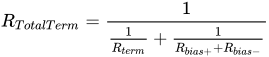
The total load resistance can be calculated as
Using the values from the previous example the total termination resistance with the bias resistors is 115.2Ω:
Ω

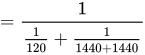

This is within 10% of 120Ω and these values could be used, or you could tweak the termination resistance to 125Ω which would give you a total termination resistance of 119.8Ω. Changing the termination resistance would change the bias voltage across the termination resistor but it would only increase to 0.208V.
In practice you will probably use 5% resistors. Available 5% values for the bias and termination resistors would limit you to 120Ω and 1.5kΩ. This would result in a total termination resistance of 115.4Ω and a bias voltage of 0.192V. Or you could use 130Ω and 1.5kΩ. This would result in a total termination resistance of 124.6Ω and a bias voltage of 0.208V.
Even if you use 1% resistors, the standard values would be 127Ω and 1.47kΩ. This would result in a total termination resistance of 121.7Ω and a bias voltage of 0.207V. Since the tolerance of the resistors means that you will never get the ideal calculated values, don't sweat it. If you can get within 10%, you can expect it to work.
These examples are for bias resistors that just barely meet the 0.2V differential voltage. Lowering the bias resistor values will increase the bias voltage which will increase the noise immunity at the cost of increased current from the 5V supply.
These examples are for a single 120 Ω termination. Bias resistors would be required at each end of the network with these values. A single set of bias resistors could be used at one end of the network, if the resistance was halved to 720 Ω. To add a little extra noise margin, use 680 Ω resistors and you have one of the more common biasing networks used on a RS-485 network.
Another thing to note is that biasing may not be required. Just because RS-485 says the voltage between +0.2V and -0.2V is undefined does not mean the engineer designing the receiver cannot define the exact voltage that switches from a received 0 to a 1. Some RS-485 IC manufacturers such as Maxim[12] and Analog Devices[13] have set the threshold of some of their receivers so that 0V differential on the two wires results in a 1 being detected. This provides some noise immunity as well as resolves the problem of missing the start bit, but only for the receivers that implement this internal biasing. Other receivers on the network that do not have this shifted receive threshold may require that external bias resistors added to the network.
A final note is that RS-485 receivers commonly switch at the +0.2V and -0.2V levels. When the differential voltage into the receiver goes above +0.2V the receivers output switches to a 1 and when the voltage goes below -0.2V the receivers output switches to a 0. (or vice versa if there is inversion on the receiver) Since the last bit from a UART will be the stop bit (1), then the transmitter is turned off (the differential voltage goes to 0V, but not having gone less than -0.2V), this should leave the receiver with a 1 being output to the receiving UART. The first bit a UART transmits is the start bit (0) and the receiving UART should see this transition. But this is only true if there is no ringing or noise on the line that switches the receiver back to a 0 at the end of the stop bit. A termination resistor may reduce the ringing on the network enough that biasing resistors are not required.
Pinouts[edit | edit source]
RS-422 and RS-485 [Common Application - Not Part of the Standard][edit | edit source]
The RS-422 and RS-485 standards do not include a connector. Many connectors and pin assignments exist, but there is no standard. Clearly a physical connection to the signal is necessary. The connections range from screw terminals that bare wire is inserted into, to connectors such as a DE-9. Devices with the same connector but from different manufacturers are probably not directly inter-connectable. Look at the data sheets from each manufacturer to determine what signal is on what pin and if the two devices can be connected either directly or with an adapter.
Other standards may define the connectors and signals on the pins of the connector. For example; EIA-449 and EIA-530 are connector standards that reference RS-422 for electrical levels. Two devices from different manufacturers that adhere to the EIA-449 standard should be able to be directly connected together. But the baud rate and bit framing must also match.
[TODO: add connectors and pins from manufacturers such as NI, B&B, ADAM, etc. Volunteers?]
RS-232 and EIA-574[edit | edit source]
The following table lists commonly used RS-232/EIA-574 signals and pin assignments. RS-232 does not define a protocol, but the protocol that is almost always transmitted on these connectors is asynchronous start-stop ASCII (data from a UART).
| Signal | Origin | DB-25 (RS-232) |
DE-9 (TIA-574) | |||
|---|---|---|---|---|---|---|
| Name | Typical purpose | Abbreviation | DTE | DCE | ||
| Data Terminal Ready | Indicates presence of DTE to DCE. | DTR | ● | 20 | 4 | |
| Data Carrier Detect | DCE is connected to the telephone line. | DCD | ● | 8 | 1 | |
| Data Set Ready | DCE is ready to receive commands or data. | DSR | ● | 6 | 6 | |
| Ring Indicator | DCE has detected an incoming ring signal on the telephone line. | RI | ● | 22 | 9 | |
| Request To Send | DTE requests the DCE prepare to receive data. | RTS | ● | 4 | 7 | |
| Clear To Send | Indicates DCE is ready to accept data. | CTS | ● | 5 | 8 | |
| Transmitted Data | Carries data from DTE to DCE. | TxD | ● | 2 | 3 | |
| Received Data | Carries data from DCE to DTE. | RxD | ● | 3 | 2 | |
| Common Ground | GND | common | 7 | 5 | ||
| Protective Ground | PG | common | 1 | — | ||
The signals are named from the standpoint of the DTE. The ground signal is a common return for all signals. The DB-25 connector includes a second "protective ground" on pin 1.
Handshaking[edit | edit source]
There is no hardware handshaking in the RS-485 standard and in most cases it is no longer needed.
The purpose of handshaking is for the receiver to tell the transmitting device to "shut up, I'm full of data and will lose anything more you send me". This stopped the data flow to the receiving end, allowing the receiver to process the data in its buffer. When it was able to receive more data, the receiver would use the handshaking lines to signal the transmitter that it was OK to send more data.
When the microprocessor in the computer was very slow, it was so horsepower limited that this was necessary. The stop sending / OK to send lines would toggle on and off with every byte sent. When the microprocessor's in the computers and peripheral's speed was increased to a blistering 1MHz, handshaking was still necessary, but the stop sending / OK to send lines would toggle less often. The advent of UARTs with buffers helped even more. The processor could check the level of the buffer and only had to stop the data when the buffer was too full. Modern processors are fast enough that handshaking is rarely needed.
If handshaking is required, it can be attempted using using X-On / X-Off handshaking protocol, but it is unlikely to work. Since RS-485 is half-duplex, it is difficult for the receiver to tell the transmitter to "shut up" when it can't get a byte into the incoming data. RS-422 is full duplex so it can use the X-On / X-Off protocol, if needed.
Some RS-232 to RS-485 converters originally used the handshaking signals such as RTS to control the enable of the RS-485 transmitter. The software would set the RTS pin from the serial port active before it would stuff a byte into the UART's transmit buffer. When the transmitter was empty it would set the RTS pin inactive to disable or "make passive" the RS-485 transmitter. This allowed other devices on the RS-485 network to transmit. There are advantages and disadvantages to this. An advantage is that this allows the software (if properly written) to take control of the network and hold it for a short time before transmitting the data. This would ensure that the network has a period of marking before the start bit was transmitted, eliminating the need for a bias resistor to force the network to a marking state. A couple of disadvantages are that the network is being driven without data on it so contention is more likely, and software complexity increases.
Another RS-232 to RS485 scheme is to monitor the data stream going into the RS-485 transmitter and trigger a one-shot timer when an edge occurs. The RS-485 driver's enable is controlled by the timer. This scheme will automatically take control of the network when a byte is transmitted, but there will not be any guaranteed marking time so bias resistors may be required. Another problem with this scheme is that the transmitter needs to stay enabled during the transmission of all of the data. If a 0x00 (eight 0-bits) is transmitted the timer has to keep the driver enabled long enough to transmit all 8-bits with no edges to be detected. Since data rates on a PC serial port can vary from 300 baud (26mS for 8-bits) up to over 100k baud (0.08mS for 8-bits), the timer will have to either be limited in the baud rates that it can work with, or keep control of the RS-485 network for much longer than it needs. The latter significantly increases the probability of collisions.
The entire subject of handshaking is obsolete with modern USB to RS-485 adapters since the PC's driver's and/or hardware handle driver enabling, and a modern PC can handle data rates much faster than can be transmitted over an RS-485 network.
USB to serial converters come with ADDC (Automatic Data Direction Control) to automatically sense and control data direction, making the handshaking control method obsolete. [14]
[editors note, the preceding paragraph is legacy and the reference is unclear on a number of things and may not be a good citation]
Hardware handshaking can be added to an RS-485 network by adding extra hardware, software, and wires, but this is outside the RS-485 standard. If this is required, it can be accomplished by any means desired including RS-485 drivers on an additional network, RS-232 drivers on extra wires, TTL levels, or really anything you can dream up since it won't work with any other RS-485 network except the one you are designing.
Legacy[edit | edit source]
[All information below this point is legacy and very questionable. It has been left in at this time to provide a starting point for future expansion of this article (and to show just how misunderstood RS-485 is)]
RS-485 is the physical layer for many higher-level protocols, including Profibus and other fieldbus systems, SCSI-2, SCSI-3, and BitBus. [15]
Some RS-485 implementations (in particular, some Ethernet configurations) (also some Macintosh GPIO socket) use 4 wires (2 pairs) for point-to-point communication. One of the pairs is dedicated to PC-to-peripheral communication. The other pair is dedicated to peripheral-to-PC communication. Each pair can transmit at full speed whether or not the other pair is transmitting (full-duplex).
Typically the bit sequence is generated by a UART inside a microcontroller, which is wired to a RS-485 interface IC (also called a "RS485 Line Driver/Receivers" or "RS-485/RS422 Transceiver").
Many manufacturers make such interface chips
[16]
.
From there the RS-485 signaling typically travels over CAT-5 cable
[17]
.
At the other end of the cable is (typically) the same thing -- the connectors, the RS-485 interface IC, and a UART inside a microcontroller.
RS-485 in the Real World[edit | edit source]
Now being used commonly in the pro audio industry to control digital audio and signal processors such as the DBX driverack and other manufacturers equivalent products. Preferred to RS232 due to cheaper cabling run costs and the common availability of cables (similar to RJ-45).
When wiring a RS-485 network, always connect "A" to "A", "B" to "B", and "G" to "G".[18]
Many people recommend writing prototype software as if it will be connected to a half-duplex RS-485 network. Then the software will work unchanged when connected to a full-duplex RS-485 network, a RS-232 network, and a variety of other communication media.
Many people recommend wiring things up on a prototype with Category 5 cable connected as point-to-point full-duplex RS-485. The CAT-5 cable allows you to relatively quickly switch -- to half-duplex RS-485, or the 3 wires of RS-232, or a variety of other communication protocols -- without pulling any new cables. The point-to-point full-duplex RS-485 network allows you to get the complete prototype system fully operational quickly, since it is easier to debug and more immune to certain common problems on other systems (noise problems on RS-232, turn-around problems on half-duplex RS-485, etc.).
Applications[edit | edit source]
Applications
Nonstandard Connectors and Wiring[edit | edit source]

The LocalTalk network uses RS-485-compatible differential signaling on standard 4-wire RJ11 telephone connectors and cable. LocalTalk only connects to the next-outermost pair of wires (the "outer pair" on a standard 4-wire cable).
The innermost pair of wires is ignored by LocalTalk, so the inner pair is often used for standard analog telephones.
(Is there a similar standard for RS-485 on a RJ45?)
RJ45 connections are used for RS-485 frequently, due to the ease of using the modular connectors and availability of cables and connectors. A RS-485 interface will usually use pins 7 and 8 for the two data lines, since they comprise a twisted pair. This avoids conflict with both Ethernet (Pins 1-3, 6) and analog phone (Pins 4-5). Grounding can be problematic depending on the application. Often, use of shielded CAT5/6 cable can give an adequate signal ground, although this is not recommended.
Physical Limitations in Practice[edit | edit source]
(stub)
Differences between RS-232 and full-duplex RS-485[edit | edit source]
(stub)
From a software point of view, full-duplex RS-485 looks very similar to RS-232. With 2 pairs of wires -- a dedicated "transmit" pair and a dedicated "receive" pair (similar to some Ethernet hardware), software can't tell the difference between RS-485 and RS-232.
From a hardware point of view, full-duplex RS-485 has some major advantages over RS-232 -- it can communicate over much longer distances at higher speeds.
Alas, a long 3-conductor cable intended for RS-232 can not be switched to full-duplex RS-485, which requires 5 conductors.
RS-232 is only defined for point-to-point connections, so you need a separate cable for each sensor connected to a host CPU. RS-485 allows a host CPU to talk to a bunch of sensors all connected to the same cable.
Differences between RS-232 and half-duplex RS-485[edit | edit source]
But a lot of RS-485 hardware uses only 1 pair of wires (half-duplex). In that case, the major differences are
- Each RS-485 node, including the host CPU, must "turn off the transmitter" when done transmitting a message, to allow other devices their turn using the shared medium
- The RS-485 hardware generally receives on the receiver every byte that was transmitted by every device on the shared medium, including the local transmitter. So software should ignore messages sent by itself.
A long 3-conductor cable intended for RS-232 can often be switched to half-duplex RS-485, allowing communication at higher speeds and at higher external noise levels than the same cable used with RS-232 signaling.
RS-232 is only defined for point-to-point connections, so you need a separate cable for each sensor connected to a host CPU. RS-485 allows a host CPU to talk to a bunch of sensors all connected to the same cable.
Alas, half-duplex RS-485 networks are often more difficult to debug when things go wrong than RS-232 networks, because
- When a "bad message" shows up on the cable, it is more difficult (but not impossible) to figure out which node(s) transmitted that message when you have a shared-medium with a dozen nodes connected to the same single cable, compared to a point-to-point medium with only 2 nodes connected to any particular cable.
- Transmitting data bidirectionally over the same wire(s), rather than unidirectional transmission, requires a turn-around delay. The turn-around delay should be proportional to the baud rate -- too much or too little turn-around delay may cause timing problems that are difficult to debug[18]
Differences between RS-232 and both kinds of RS-485[edit | edit source]
RS-485 signal levels are typically 0 to +5 V relative to the signal ground.
RS-232 signal levels are typically -12 V to +12 V relative to the signal ground.
RS-232 uses point-to-point unidirectional signal wires: There are only two devices connected to a RS-232 cable. The TX output of a first device connected to the RX input of a second device, and the TX output of the second device connected to the RX input of the first device. In a RS-232 cable, data always flows in only one direction on any particular wire, from TX to RX.
RS-485 typically uses a linear network with bidirectional signal wires: There are typically many devices along a RS-485 shared cable. The "A" output of each device is connected to the "A" output of every other device. In a RS-485 cable, data typically flows in both directions along any particular wire, sometimes from the "A" of the first device to the "A" of the second device, and at a later time from the "A" of the second device to the "A" of the first device.
Alternatives to ASCII UARTs that drive RS-485 signal levels[edit | edit source]
I've been told that 10BASE-T Ethernet and SCSI cables use a bunch of RS-485 pairs -- is that right ? In the case of 8 bit SCSI this is not the case, the drivers are single wire with a 220/330 Ω terminator at each end of the buss. Half of the conductors in a 50 way cable are ground return wires. This applies to the 8 bit version of the original 50 way SCSI interface. Ultrawide SCSI does use differential drive but whether it is RS485 compatible, I don't know.
further reading[edit | edit source]
- ↑ "Trim-the-fat-off-RS-485-designs". EE Times. 2000.
- ↑ "TIA Standards Store - Document History for TIA-232". TIA. 2016.
- ↑ Lawrence, Tony (1992). "Serial Wiring". A. P. Lawrence. Retrieved 28 July 2011.
- ↑ "How Far and How Fast Can You Go with RS-485?". Maxim IC. 2006.
- ↑ "LTC1685 - 52Mbps, Precision Delay, RS485 Fail-Safe Transceiver". Linear Technology. 1997.
- ↑ "RS485 Cables – Why you need 3 wires for 2 (two) wire RS485"
- ↑ "LTC2850 Datasheet". Linear Technology. 2007.
- ↑ a b c "The art and science of RS-485: Termination" (PDF). Circuit Cellar. 1999.
- ↑ "RS-422 And RS-485 Applications Ebook" (PDF). B&B Electronics. 2010.
- ↑ PicList Thread: "Reflections in RS485 PIC Network?" 1998.
- ↑ Bus Terminations
- ↑ "Guidelines for Proper Wiring of an RS-485 (TIA/EIA-485-A) Network". Maxim Integrated. 2001.
- ↑ "RS-485/RS-422 Circuit Implementation Guide" (PDF). Analog Devices. 2008.
- ↑ "Selecting the Right USB to Serial adapter"
- ↑ http://interfacebus.com/Design_Connector_RS485.html
- ↑ "EIA-458 Bus Interface IC Manufacturers"
- ↑ "Cable Selection for RS-422 and RS-485 Systems"
- ↑ a b "Basics of the RS-485 Standard"
- "Serial Communication Overview" includes "Pinouts for NI Serial Interface Connectors"
- "RS-485 Serial Interface Explained" by Jason Kelly of CUI Devices
- "What's the correct pinout for Half Duplex RS-485 in an RJ-45 connector?".
- "RS485 RJ45 Interface" includes a pinout for RS485 over 8P8C RJ45 jack
- "RS485 RJ11 Interface" includes a pintout for RS485 over 6P6C RJ11 jack
- "RS485 Data Interface: a Tutorial" includes a section on "Cable selection for RS-422 and RS-485 systems"