Parallel Spectral Numerical Methods/The Cubic Nonlinear Schrodinger Equation
The Cubic Nonlinear Schrödinger Equation[edit | edit source]
Background[edit | edit source]
The cubic nonlinear Schrödinger equation occurs in a variety of areas, including, quantum mechanics, nonlinear optics and surface water waves. A general introduction can be found at http://en.wikipedia.org/wiki/Schrodinger_equation and http://en.wikipedia.org/wiki/Nonlinear_Schrodinger_equation. A mathematical introduction to Schrödinger equations can be found in Sulem and Sulem[1] and Yang[2]. In this section we will introduce the idea of operator splitting and then go on to explain how this can be applied to the nonlinear Schrödinger equation in one, two and three dimensions. In one dimension, one can show that the cubic nonlinear Schrödinger equation is subcritical, and hence one has solutions which exist for all time. In two dimensions, it is critical, and so solutions may exhibit blow-up of the norm, that is the integral of the square of the gradient of the solution can become infinite in finite time. Finally, in three dimensions, the nonlinear Schrödinger equation is supercritical, and so the integral of the square of the solution can also become infinite in finite time. For an introduction to norms and Hilbert spaces, see a textbook on partial differential equations or analysis, such as Evans[3], Linares and Ponce[4], Lieb and Loss[5] or Renardy and Rogers[6]. A question of interest is how this blow-up occurs and numerical simulations are often used to understand this; see Sulem and Sulem[7] for examples of this. The cubic nonlinear Schrödinger equation[8] is given by



where is the wave function and is the Laplacian operator, so in one dimension it is , in two dimensions, and in three dimensions it is . The corresponds to the focusing cubic nonlinear Schrödinger equation and the corresponds to the defocusing cubic nonlinear Schrödinger equation. This equation has many conserved quantities, including the “mass”,





and the “energy”,
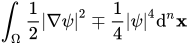
where is the dimension and is the domain of the solution. As explained by Klein[9], these two quantities can provide useful checks on the accuracy of numerically generated solutions.


Splitting[edit | edit source]
We will consider a numerical method to solve this equation known as splitting. This method occurs in several applications, and is a useful numerical method when the equation can be split into two separate equations, each of which can either be solved exactly, or each part is best solved by a different numerical method. Introductions to splitting can be found in Holden et al.[10], McLachlan and Quispel[11], Thalhammer[12], Shen, Tang and Wang[13], Weideman and Herbst[14] and Yang[15], and also at http://en.wikipedia.org/wiki/Split-step_method. For those interested in a comparison of time stepping methods for the nonlinear Schrödinger equation, see Klein[16]. To describe the basic idea of the method, we consider an example given in Holden et al.[17], which is the ordinary differential equation,
-
with .
()


We can solve this equation relatively simply by separation of variables to find that
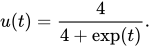
Now, an interesting observation is that we can also solve the equations and individually. For the first we get that and for the second we get that . The principle behind splitting is to solve these two separate equations alternately for short periods of time. We will describe Strang splitting, although there are other forms of splitting, such as Godunov splitting and also additive splittings. We will not describe these here, but refer you to the previously mentioned references, in particular Holden et al.[18]. To understand how we can solve the differential equation using splitting, consider the linear ordinary differential equation


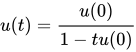

with .


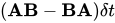
We can first solve for a time and then using , we solve also for a time to get and finally solve for a time with initial data . Thus in this case , and , which in this case is the exact solution. One can perform a similar splitting for matrix differential equations. Consider solving , where and are matrices, the exact solution is , and an approximate solution produced after one time step of splitting is , which is not in general equal to unless the matrices and commute[19], and so the error in doing splitting in this case is of the form [20]. Listing A uses Matlab to demonstrate how to do splitting for eq. 1 .











|
() |
% A program to solve the u_t=u(u-1) using a
% Strang Splitting method

clear all; format compact; format short;
set(0,'defaultaxesfontsize',30,'defaultaxeslinewidth',.7,...
    'defaultlinelinewidth',6,'defaultpatchlinewidth',3.7,...
    'defaultaxesfontweight','bold')
Nt = 1000; % number of time slices
tmax = 1; % maximum time
dt=tmax/Nt; % increment between times
time=(linspace(1,Nt,Nt)-1)*dt; % time
uexact=4./(4+exp(time)); % exact solution
u(1)=0.8

for i=1:Nt-1
    c=-1/u(i);
    utemp=-1/(c+0.5*dt);
    utemp2=utemp*exp(-dt);
    c=-1/utemp2;
    u(i+1)=-1/(c+0.5*dt);
end
figure(1)
plot(time,u,'r+',time,uexact,'b-');
|
() |
"""
A program to solve u_t'=u(u-1) using a Strang
splitting method
"""

import time
import numpy
import matplotlib.pyplot as plt

Nt = 1000	# Number of timesteps
tmax = 1.0	# Maximum time
dt=tmax/Nt # increment between times
u0 = 0.8 # Initial value
t0 = 0	# Starting time
u = [u0]	# Variables holding the values of iterations
t = [t0]	# Times of discrete solutions

T0 = time.clock()
for i in xrange(Nt):
c = -1.0/u[i]
utemp=-1.0/(c+0.5*dt)
utemp2=utemp*numpy.exp(-dt)
c = -1.0/utemp2
unew=-1.0/(c+0.5*dt)
u.append(unew)
t.append(t[i]+dt)

T = time.clock() - T0
uexact = [4.0/(4.0+numpy.exp(tt)) for tt in t]

print
print "Elapsed time is %f" % (T)

plt.figure()
plt.plot(t,u,'r+',t,uexact,'b-.')
plt.xlabel('Time')
plt.ylabel('Solution')
plt.legend(('Numerical Solution', 'Exact solution'))
plt.title('Numerical solution of du/dt=u(u-1)')
plt.show()
Exercises[edit | edit source]
- Modify the Matlab code to calculate the error at time 1 for several different choices of timestep. Numerically verify that Strang splitting is second order accurate.
- Modify the Matlab code to use Godunov splitting where one solves for a time and then using as initial data solves also for a time to get the approximation to . Calculate the error at time 1 for several different choices of timestep. Numerically verify that Godunov splitting is first order accurate.


Serial[edit | edit source]
For the nonlinear Schrödinger equation
-
,
()

we first solve
-
()

exactly using the Fourier transform to get
.

We then solve
-
()
with
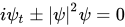
as initial data for a time step of . As explained by Klein[21] and Thalhammer[22], this can be solved exactly in real space because in eq. 4 , is a conserved quantity at every point in space and time. To show this, let denote the complex conjugate of , so that


.

Another half step using eq. 3 is then computed using the solution produced by solving eq. 4 to obtain the approximate solution at time . Example Matlab codes demonstrating splitting follow.
Example Matlab and Python Programs for the Nonlinear Schrödinger Equation[edit | edit source]
The program in listing B computes an approximation to an explicitly known exact solution to the focusing nonlinear Schrödinger equation.
|
() |
% A program to solve the nonlinear Schr\"{o}dinger equation using a
% splitting method

clear all; format compact; format short;
set(0,'defaultaxesfontsize',30,'defaultaxeslinewidth',.7,...
    'defaultlinelinewidth',6,'defaultpatchlinewidth',3.7,...
    'defaultaxesfontweight','bold')

Lx = 20; % period 2*pi * L
Nx = 16384; % number of harmonics
Nt = 1000; % number of time slices
dt = 0.25*pi/Nt; % time step
U=zeros(Nx,Nt/10);

Es = -1; % focusing or defocusing parameter

% initialise variables
x = (2*pi/Nx)*(-Nx/2:Nx/2 -1)'*Lx; % x coordinate
kx = 1i*[0:Nx/2-1 0 -Nx/2+1:-1]'/Lx; % wave vector
k2x = kx.^2; % square of wave vector
% initial conditions
t=0; tdata(1)=t;
u=4*exp(1i*t)*(cosh(3*x)+3*exp(8*1i*t)*cosh(x))...
    ./(cosh(4*x)+4*cosh(2*x)+3*cos(8*t));
v=fft(u);
figure(1); clf; plot(x,u);xlim([-2,2]); drawnow;
U(:,1)=u;

% mass
ma = fft(abs(u).^2);
ma0 = ma(1);

% solve pde and plot results
for n =2:Nt+1

    vna=exp(0.5*1i*dt*k2x).*v;
    una=ifft(vna);
    pot=2*(una.*conj(una));
    unb=exp(-1i*Es*dt*pot).*una;
    vnb=fft(unb);
    v=exp(0.5*1i*dt*k2x).*vnb;
    t=(n-1)*dt;

    if (mod(n,10)==0)
        tdata(n/10)=t;
        u=ifft(v);
        U(:,n/10)=u;
        uexact=4*exp(1i*t)*(cosh(3*x)+3*exp(8*1i*t)*cosh(x))...
            ./(cosh(4*x)+4*cosh(2*x)+3*cos(8*t));
        figure(1); clf; plot(x,abs(u).^2); ...
            xlim([-0.5,0.5]); title(num2str(t));
        figure(2); clf; plot(x,abs(u-uexact).^2);...
            xlim([-0.5,0.5]); title(num2str(t));
        drawnow;
        ma = fft(abs(u).^2);
        ma = ma(1);
        test = log10(abs(1-ma/ma0))
    end
end
figure(3); clf; mesh(tdata(1:(n-1)/10),x,abs(U(:,1:(n-1)/10)).^2);
|
() |
"""
A program to solve the 1D Nonlinear Schrodinger equation using a
second order splitting method. The numerical solution is compared
to an exact soliton solution. The exact equation solved is
iu_t+u_{xx}+2|u|^2u=0

More information on visualization can be found on the Mayavi
website, in particular:
http://github.enthought.com/mayavi/mayavi/mlab.html
which was last checked on 6 April 2012

"""

import math
import numpy
import matplotlib.pyplot as plt
import time

plt.ion()

# Grid
Lx=16.0 # Period 2*pi*Lx
Nx=8192 # Number of harmonics
Nt=1000 # Number of time slices
tmax=1.0 # Maximum time
dt=tmax/Nt # time step
plotgap=10 # time steps between plots
Es= -1.0 # focusing (+1) or defocusing (-1) parameter
numplots=Nt/plotgap # number of plots to make

x = [i*2.0*math.pi*(Lx/Nx) for i in xrange(-Nx/2,1+Nx/2)]
k_x = (1.0/Lx)*numpy.array([complex(0,1)*n for n in range(0,Nx/2) \
+ [0] + range(-Nx/2+1,0)])

k2xm=numpy.zeros((Nx), dtype=float)
xx=numpy.zeros((Nx), dtype=float)

for i in xrange(Nx):
   k2xm[i] = numpy.real(k_x[i]**2)
   xx[i]=x[i]


# allocate arrays
usquared=numpy.zeros((Nx), dtype=float)
pot=numpy.zeros((Nx), dtype=float)
u=numpy.zeros((Nx), dtype=complex)
uexact=numpy.zeros((Nx), dtype=complex)
una=numpy.zeros((Nx), dtype=complex)
unb=numpy.zeros((Nx), dtype=complex)
v=numpy.zeros((Nx), dtype=complex)
vna=numpy.zeros((Nx), dtype=complex)
vnb=numpy.zeros((Nx), dtype=complex)
mass=numpy.zeros((Nx), dtype=complex)
test=numpy.zeros((numplots-1),dtype=float)
tdata=numpy.zeros((numplots-1), dtype=float)

t=0.0
u=4.0*numpy.exp(complex(0,1.0)*t)*\
   (numpy.cosh(3.0*xx)+3.0*numpy.exp(8.0*complex(0,1.0)*t)*numpy.cosh(xx))\
   /(numpy.cosh(4*xx)+4.0*numpy.cosh(2.0*xx)+3.0*numpy.cos(8.0*t))
uexact=u
v=numpy.fft.fftn(u)
usquared=abs(u)**2
fig =plt.figure()
ax = fig.add_subplot(311)
ax.plot(xx,numpy.real(u),'b-')
plt.xlabel('x')
plt.ylabel('real u')
ax = fig.add_subplot(312)
ax.plot(xx,numpy.imag(u),'b-')
plt.xlabel('x')
plt.ylabel('imaginary u')
ax = fig.add_subplot(313)
ax.plot(xx,abs(u-uexact),'b-')
plt.xlabel('x')
plt.ylabel('error')
plt.show()


# initial mass
usquared=abs(u)**2
mass=numpy.fft.fftn(usquared)
ma=numpy.real(mass[0])
maO=ma
tdata[0]=t
plotnum=0
#solve pde and plot results
for nt in xrange(numplots-1):
    for n in xrange(plotgap):
        vna=v*numpy.exp(complex(0,0.5)*dt*k2xm)
        una=numpy.fft.ifftn(vna)
        usquared=2.0*abs(una)**2
        pot=Es*usquared
        unb=una*numpy.exp(complex(0,-1)*dt*pot)
        vnb=numpy.fft.fftn(unb)
        v=vnb*numpy.exp(complex(0,0.5)*dt*k2xm)
        u=numpy.fft.ifftn(v)
        t+=dt
    plotnum+=1
    usquared=abs(u)**2
    uexact = 4.0*numpy.exp(complex(0,1.0)*t)*\
      (numpy.cosh(3.0*xx)+3.0*numpy.exp(8.0*complex(0,1.0)*t)*numpy.cosh(xx))\
      /(numpy.cosh(4*xx)+4.0*numpy.cosh(2.0*xx)+3.0*numpy.cos(8.0*t))
    ax = fig.add_subplot(311)
    plt.cla()
    ax.plot(xx,numpy.real(u),'b-')
    plt.title(t)
    plt.xlabel('x')
    plt.ylabel('real u')
    ax = fig.add_subplot(312)
    plt.cla()
    ax.plot(xx,numpy.imag(u),'b-')
    plt.xlabel('x')
    plt.ylabel('imaginary u')
    ax = fig.add_subplot(313)
    plt.cla()
    ax.plot(xx,abs(u-uexact),'b-')
    plt.xlabel('x')
    plt.ylabel('error')
    plt.draw()
    mass=numpy.fft.fftn(usquared)
    ma=numpy.real(mass[0])
    test[plotnum-1]=numpy.log(abs(1-ma/maO))
    print(test[plotnum-1])
    tdata[plotnum-1]=t

plt.ioff()
plt.show()
|
() |
% A program to solve the 2D nonlinear Schr\"{o}dinger equation using a
% splitting method

clear all; format compact; format short;
set(0,'defaultaxesfontsize',30,'defaultaxeslinewidth',.7,...
    'defaultlinelinewidth',6,'defaultpatchlinewidth',3.7,'defaultaxesfontweight','bold')

% set up grid
tic
Lx = 20; % period 2*pi*L
Ly = 20; % period 2*pi*L
Nx = 2*256; % number of harmonics
Ny = 2*256; % number of harmonics
Nt = 100; % number of time slices
dt = 5.0/Nt; % time step

Es = 1.0;

% initialise variables
x = (2*pi/Nx)*(-Nx/2:Nx/2 -1)'*Lx; % x coordinate
kx = 1i*[0:Nx/2-1 0 -Nx/2+1:-1]'/Lx; % wave vector
y = (2*pi/Ny)*(-Ny/2:Ny/2 -1)'*Ly; % y coordinate
ky = 1i*[0:Ny/2-1 0 -Ny/2+1:-1]'/Ly; % wave vector
[xx,yy]=meshgrid(x,y);
[k2xm,k2ym]=meshgrid(kx.^2,ky.^2);
% initial conditions
u = exp(-(xx.^2+yy.^2));
v=fft2(u);
figure(1); clf; mesh(xx,yy,u); drawnow;
t=0; tdata(1)=t;

% mass
ma = fft2(abs(u).^2);
ma0 = ma(1,1);

% solve pde and plot results
for n =2:Nt+1
    vna=exp(0.5*1i*dt*(k2xm + k2ym)).*v;
    una=ifft2(vna);
    pot=Es*((abs(una)).^2);
    unb=exp(-1i*dt*pot).*una;
    vnb=fft2(unb);
    v=exp(0.5*1i*dt*(k2xm + k2ym)).*vnb;
    u=ifft2(v);
    t=(n-1)*dt;
    tdata(n)=t;
     if (mod(n,10)==0)
         figure(2); clf; mesh(xx,yy,abs(u).^2); title(num2str(t));
         drawnow;
         ma = fft2(abs(u).^2);
         ma = ma(1,1);
         test = log10(abs(1-ma/ma0))
     end
end
figure(4); clf; mesh(xx,yy,abs(u).^2);
toc
|
() |
"""
A program to solve the 2D Nonlinear Schrodinger equation using a
second order splitting method

More information on visualization can be found on the Mayavi
website, in particular:
http://github.enthought.com/mayavi/mayavi/mlab.html
which was last checked on 6 April 2012

"""

import math
import numpy
from mayavi import mlab
import matplotlib.pyplot as plt
import time

# Grid
Lx=4.0 # Period 2*pi*Lx
Ly=4.0 # Period 2*pi*Ly
Nx=64 # Number of harmonics
Ny=64 # Number of harmonics
Nt=100 # Number of time slices
tmax=1.0 # Maximum time
dt=tmax/Nt # time step
plotgap=10 # time steps between plots
Es= 1.0 # focusing (+1) or defocusing (-1) parameter
numplots=Nt/plotgap # number of plots to make

x = [i*2.0*math.pi*(Lx/Nx) for i in xrange(-Nx/2,1+Nx/2)]
y = [i*2.0*math.pi*(Ly/Ny) for i in xrange(-Ny/2,1+Ny/2)]
k_x = (1.0/Lx)*numpy.array([complex(0,1)*n for n in range(0,Nx/2) \
+ [0] + range(-Nx/2+1,0)])
k_y = (1.0/Ly)*numpy.array([complex(0,1)*n for n in range(0,Ny/2) \
+ [0] + range(-Ny/2+1,0)])

k2xm=numpy.zeros((Nx,Ny), dtype=float)
k2ym=numpy.zeros((Nx,Ny), dtype=float)
xx=numpy.zeros((Nx,Ny), dtype=float)
yy=numpy.zeros((Nx,Ny), dtype=float)


for i in xrange(Nx):
    for j in xrange(Ny):
            k2xm[i,j] = numpy.real(k_x[i]**2)
            k2ym[i,j] = numpy.real(k_y[j]**2)
            xx[i,j]=x[i]
            yy[i,j]=y[j]


# allocate arrays
usquared=numpy.zeros((Nx,Ny), dtype=float)
pot=numpy.zeros((Nx,Ny), dtype=float)
u=numpy.zeros((Nx,Ny), dtype=complex)
una=numpy.zeros((Nx,Ny), dtype=complex)
unb=numpy.zeros((Nx,Ny), dtype=complex)
v=numpy.zeros((Nx,Ny), dtype=complex)
vna=numpy.zeros((Nx,Ny), dtype=complex)
vnb=numpy.zeros((Nx,Ny), dtype=complex)
mass=numpy.zeros((Nx,Ny), dtype=complex)
test=numpy.zeros((numplots-1),dtype=float)
tdata=numpy.zeros((numplots-1), dtype=float)

u=numpy.exp(-(xx**2 + yy**2 ))
v=numpy.fft.fftn(u)
usquared=abs(u)**2
src = mlab.surf(xx,yy,usquared,colormap='YlGnBu',warp_scale='auto')
mlab.scalarbar()
mlab.xlabel('x',object=src)
mlab.ylabel('y',object=src)
mlab.zlabel('abs(u)^2',object=src)

# initial mass
usquared=abs(u)**2
mass=numpy.fft.fftn(usquared)
ma=numpy.real(mass[0,0])
print(ma)
maO=ma
t=0.0
tdata[0]=t
plotnum=0
#solve pde and plot results
for nt in xrange(numplots-1):
    for n in xrange(plotgap):
        vna=v*numpy.exp(complex(0,0.5)*dt*(k2xm+k2ym))
        una=numpy.fft.ifftn(vna)
        usquared=abs(una)**2
        pot=Es*usquared
        unb=una*numpy.exp(complex(0,-1)*dt*pot)
        vnb=numpy.fft.fftn(unb)
        v=vnb*numpy.exp(complex(0,0.5)*dt*(k2xm+k2ym) )
        u=numpy.fft.ifftn(v)
        t+=dt
    plotnum+=1
    usquared=abs(u)**2
    src.mlab_source.scalars = usquared
    mass=numpy.fft.fftn(usquared)
    ma=numpy.real(mass[0,0])
    test[plotnum-1]=numpy.log(abs(1-ma/maO))
    print(test[plotnum-1])
    tdata[plotnum-1]=t

plt.figure()
plt.plot(tdata,test,'r-')
plt.title('Time Dependence of Change in Mass')
plt.show()
|
() |
% A program to solve the 3D nonlinear Schr\"{o}dinger equation using a
% splitting method
% updated by Abdullah Bargash , AbdulAziz Al-thiban
% vol3d can be downloaded from http://www.mathworks.com/matlabcentral/fileexchange/22940-vol3d-v2
%
clear all; format compact; format short;
set(0,'defaultaxesfontsize',30,'defaultaxeslinewidth',.7,...
    'defaultlinelinewidth',6,'defaultpatchlinewidth',3.7,...
    'defaultaxesfontweight','bold')

% set up grid
tic
Lx = 4; % period 2*pi*L
Ly = 4; % period 2*pi*L
Lz = 4; % period 2*pi*L
Nx = 64; % number of harmonics
Ny = 64; % number of harmonics
Nz = 64; % number of harmonics
Nt = 100; % number of time slices
dt = 1.0/Nt; % time step

Es = 1.0; % focusing or defocusing parameter

% initialise variables
x = (2*pi/Nx)*(-Nx/2:Nx/2 -1)'*Lx; % x coordinate
kx = 1i*[0:Nx/2-1 0 -Nx/2+1:-1]'/Lx; % wave vector
y = (2*pi/Ny)*(-Ny/2:Ny/2 -1)'*Ly; % y coordinate
ky = 1i*[0:Ny/2-1 0 -Ny/2+1:-1]'/Ly; % wave vector
z = (2*pi/Nz)*(-Nz/2:Nz/2 -1)'*Lz; % y coordinate
kz = 1i*[0:Nz/2-1 0 -Nz/2+1:-1]'/Lz; % wave vector
[xx,yy,zz]=meshgrid(x,y,z);
[k2xm,k2ym,k2zm]=meshgrid(kx.^2,ky.^2,kz.^2);

% initial conditions
u = exp(-(xx.^2+yy.^2+zz.^2));
v=fftn(u);
figure(1); clf; UP = abs(u).^2;
    H = vol3d('CData',UP,'texture','3D','XData',x,'YData',y,'ZData',z);
    xlabel('x'); ylabel('y'); zlabel('z'); colorbar;
    axis equal; axis square; view(3);

    xlabel('x'); ylabel('y'); zlabel('z');
axis equal; axis square; view(3); drawnow;
t=0; tdata(1)=t;

% mass
ma = fftn(abs(u).^2);
ma0 = ma(1,1,1);

% solve pde and plot results

for n =2:Nt+1
    vna=exp(0.5*1i*dt*(k2xm + k2ym + k2zm)).*v;
    una=ifftn(vna);
    pot=Es*((abs(una)).^2);
    unb=exp(-1i*dt*pot).*una;
    vnb=fftn(unb);
    v=exp(0.5*1i*dt*(k2xm + k2ym + k2zm)).*vnb;
    u=ifftn(v);
    t=(n-1)*dt;
    tdata(n)=t;
    if (mod(n,10)==0)

    figure(1); clf; UP = abs(u).^2;

    H = vol3d('CData',UP,'texture','3D','XData',x,'YData',y,'ZData',z);
    xlabel('x'); ylabel('y'); zlabel('z'); colorbar;
    axis equal; axis square; view(3);
    title(num2str(t));


        xlabel('x'); ylabel('y'); zlabel('z');
        axis equal; axis square; view(3); drawnow;
        ma = fftn(abs(u).^2);
        ma = ma(1,1,1); test = log10(abs(1-ma/ma0))

    end

end

    figure(1); clf; UP = abs(u).^2;

    H = vol3d('CData',UP,'texture','3D','XData',x,'YData',y,'ZData',z);
    xlabel('x'); ylabel('y'); zlabel('z'); colorbar;
    axis equal; axis square; view(3);
Example One-Dimensional Fortran Program for the Nonlinear Schrödinger Equation[edit | edit source]
Before considering parallel programs, we need to understand how to write a Fortran code for the one-dimensional nonlinear Schrödinger equation. Below is an example Fortran program followed by a Matlab plotting script to visualize the results. In compiling the Fortran program a standard Fortran compiler and the FFTW library are required. Since the commands required for this are similar to those in the makefile for the heat equation, we do not include them here.
|
() |
!--------------------------------------------------------------------
!
!
! PURPOSE
!
! This program solves nonlinear Schrodinger equation in 1 dimension
! i*u_t+Es*|u|^2u+u_{xx}=0
! using a second order time spectral splitting scheme
!
! The boundary conditions are u(0)=u(2*L*\pi)
! The initial condition is u=exp(-x^2)
!
! .. Parameters ..
! Nx = number of modes in x - power of 2 for FFT
! Nt = number of timesteps to take
! Tmax = maximum simulation time
! plotgap = number of timesteps between plots
! FFTW_IN_PLACE = value for FFTW input
! FFTW_MEASURE = value for FFTW input
! FFTW_EXHAUSTIVE = value for FFTW input
! FFTW_PATIENT = value for FFTW input
! FFTW_ESTIMATE = value for FFTW input
! FFTW_FORWARD = value for FFTW input
! FFTW_BACKWARD = value for FFTW input
! pi = 3.14159265358979323846264338327950288419716939937510d0
! L = width of box
! ES = +1 for focusing and -1 for defocusing
! .. Scalars ..
! i = loop counter in x direction
! n = loop counter for timesteps direction
! allocatestatus = error indicator during allocation
! start = variable to record start time of program
! finish = variable to record end time of program
! count_rate = variable for clock count rate
! planfx = Forward 1d fft plan in x
! planbx = Backward 1d fft plan in x
! dt = timestep
! .. Arrays ..
! u = approximate solution
! v = Fourier transform of approximate solution
! .. Vectors ..
! una = temporary field
! unb = temporary field
! vna = temporary field
! pot = potential
! kx = fourier frequencies in x direction
! x = x locations
! time = times at which save data
! name_config = array to store filename for data to be saved
! fftfx = array to setup x Fourier transform
! fftbx = array to setup x Fourier transform
! REFERENCES
!
! ACKNOWLEDGEMENTS
!
! ACCURACY
!
! ERROR INDICATORS AND WARNINGS
!
! FURTHER COMMENTS
! Check that the initial iterate is consistent with the
! boundary conditions for the domain specified
!--------------------------------------------------------------------
! External routines required
!
! External libraries required
! FFTW3 -- Fast Fourier Transform in the West Library
! (http://www.fftw.org/)


PROGRAM main

! Declare variables
IMPLICIT NONE
INTEGER(kind=4), PARAMETER :: Nx=8*256
INTEGER(kind=4), PARAMETER	:: Nt=200
REAL(kind=8), PARAMETER	&
:: pi=3.14159265358979323846264338327950288419716939937510d0
REAL(kind=8), PARAMETER	:: L=5.0d0
REAL(kind=8), PARAMETER	:: Es=1.0d0
REAL(kind=8)	:: dt=2.0d0/Nt
COMPLEX(kind=8), DIMENSION(:), ALLOCATABLE	:: kx
REAL(kind=8), DIMENSION(:), ALLOCATABLE	:: x
COMPLEX(kind=8), DIMENSION(:,:), ALLOCATABLE	:: u
COMPLEX(kind=8), DIMENSION(:,:), ALLOCATABLE	:: v
COMPLEX(kind=8), DIMENSION(:), ALLOCATABLE	:: una,vn
COMPLEX(kind=8), DIMENSION(:), ALLOCATABLE	:: unb,pot
REAL(kind=8), DIMENSION(:), ALLOCATABLE	:: time
INTEGER(kind=4)	:: i,j,k,n,modes,AllocateStatus
INTEGER(kind=4)	:: start, finish, count_rate
INTEGER(kind=4), PARAMETER	:: FFTW_IN_PLACE = 8, FFTW_MEASURE = 0, &
FFTW_EXHAUSTIVE = 8, FFTW_PATIENT = 32, FFTW_ESTIMATE = 64
INTEGER(kind=4), PARAMETER :: FFTW_FORWARD = -1, FFTW_BACKWARD=1
COMPLEX(kind=8), DIMENSION(:), ALLOCATABLE	:: fftfx,fftbx
INTEGER(kind=8)	:: planfx,planbx
   CHARACTER*100	:: name_config

CALL system_clock(start,count_rate)
ALLOCATE(kx(1:Nx),x(1:Nx),u(1:Nx,1:Nt+1),v(1:Nx,1:Nt+1),&
una(1:Nx),vn(1:Nx),unb(1:Nx),pot(1:Nx),time(1:Nt+1),&
fftfx(1:Nx),fftbx(1:Nx),stat=AllocateStatus)
IF (allocatestatus .ne. 0) STOP
! set up ffts
CALL dfftw_plan_dft_1d_(planfx,Nx,fftfx(1:Nx),fftbx(1:Nx),&
FFTW_FORWARD,FFTW_PATIENT)
CALL dfftw_plan_dft_1d_(planbx,Nx,fftbx(1:Nx),fftfx(1:Nx),&
FFTW_BACKWARD,FFTW_PATIENT)
PRINT *,'Setup FFTs'
! setup fourier frequencies
DO i=1,1+Nx/2
kx(i)= cmplx(0.0d0,1.0d0)*(i-1.0d0)/L
END DO
kx(1+Nx/2)=0.0d0
DO i = 1,Nx/2 -1
kx(i+1+Nx/2)=-kx(1-i+Nx/2)
END DO
DO i=1,Nx
x(i)=(-1.0d0 + 2.0d0*REAL(i-1,kind(0d0))/REAL(Nx,kind(0d0)))*pi*L
END DO
PRINT *,'Setup grid and fourier frequencies'

DO i=1,Nx
u(i,1)=exp(-1.0d0*(x(i)**2))
END DO
! transform initial data
CALL dfftw_execute_dft_(planfx,u(1:Nx,1),v(1:Nx,1))
PRINT *,'Got initial data, starting timestepping'
time(1)=0.0d0
DO n=1,Nt
time(n+1)=n*dt
DO i=1,Nx
vn(i)=exp(0.5d0*dt*kx(i)*kx(i)*cmplx(0.0d0,1.0d0))*v(i,n)
END DO
CALL dfftw_execute_dft_(planbx,vn(1:Nx),una(1:Nx))
! normalize
DO i=1,Nx
una(i)=una(1:Nx)/REAL(Nx,kind(0d0))
pot(i)=Es*una(i)*conjg(una(i))
unb(i)=exp(cmplx(0.0d0,-1.0d0)*dt*pot(i))*una(i)
END DO
CALL dfftw_execute_dft_(planfx,unb(1:Nx),vn(1:Nx))
DO i=1,Nx
v(i,n+1)=exp(0.50d0*dt*kx(i)*kx(i)*cmplx(0.0d0,1.0d0))*vn(i)
END DO
CALL dfftw_execute_dft_(planbx,v(1:Nx,n+1),u(1:Nx,n+1))
! normalize
DO i=1,Nx
u(i,n+1)=u(i,n+1)/REAL(Nx,kind(0d0))
END DO
END DO
PRINT *,'Finished time stepping'
CALL system_clock(finish,count_rate)
PRINT*,'Program took ',&
REAL(finish-start,kind(0d0))/REAL(count_rate,kind(0d0)),'for execution'

name_config = 'u.dat'
OPEN(unit=11,FILE=name_config,status="UNKNOWN")
REWIND(11)
DO j=1,Nt
DO i=1,Nx
WRITE(11,*) abs(u(i,j))**2
END DO
END DO
CLOSE(11)

name_config = 'tdata.dat'
OPEN(unit=11,FILE=name_config,status="UNKNOWN")
REWIND(11)
DO j=1,Nt
WRITE(11,*) time(j)
END DO
CLOSE(11)

name_config = 'xcoord.dat'
OPEN(unit=11,FILE=name_config,status="UNKNOWN")
REWIND(11)
DO i=1,Nx
WRITE(11,*) x(i)
END DO
CLOSE(11)

PRINT *,'Saved data'

CALL dfftw_destroy_plan_(planbx)
CALL dfftw_destroy_plan_(planfx)
CALL dfftw_cleanup_()

DEALLOCATE(kx,x,u,v,una,vn,unb,&
pot,time,fftfx,fftbx,&
stat=AllocateStatus)
IF (allocatestatus .ne. 0) STOP
PRINT *,'deallocated memory'
PRINT *,'Program execution complete'
END PROGRAM main
|
() |
% A program to plot the computed results

clear all; format compact, format short,
set(0,'defaultaxesfontsize',18,'defaultaxeslinewidth',.9,...
    'defaultlinelinewidth',3.5,'defaultpatchlinewidth',5.5);

% Load data
load('./u.dat');
load('./tdata.dat');
load('./xcoord.dat');
Tsteps = length(tdata);

Nx = length(xcoord); Nt = length(tdata);

u = reshape(u,Nx,Nt);

% Plot data
figure(3); clf; mesh(tdata,xcoord,u); xlabel t; ylabel x; zlabel('|u|^2');
[edit | edit source]
We recall that OpenMP is a set of compiler directives that can allow one to easily make a Fortran, C or C++ program run on a shared memory machine – that is a computer for which all compute processes can access the same globally addressed memory space. It allows for easy parallelization of serial programs which have already been written in one of the aforementioned languages.
We will demonstrate one form of parallelizm for the two dimensional nonlinear Schrödinger equation in which we will parallelize the loops using OpenMP commands, but will use the threaded FFTW library to parallelize the transforms for us. The example programs are in listing E . A second method to parallelize the loops and Fast Fourier transforms explicitly using OpenMP commands is outlined in the exercises.
|
() |
!--------------------------------------------------------------------
!
!
! PURPOSE
!
! This program solves nonlinear Schrodinger equation in 2 dimensions
! i*u_t+Es*|u|^2u+u_{xx}+u_{yy}=0
! using a second order time spectral splitting scheme
!
! The boundary conditions are u(x=0,y)=u(2*Lx*\pi,y),
! u(x,y=0)=u(x,y=2*Ly*\pi)
! The initial condition is u=exp(-x^2-y^2)
!
! .. Parameters ..
! Nx = number of modes in x - power of 2 for FFT
! Ny = number of modes in y - power of 2 for FFT
! Nt = number of timesteps to take
! Tmax = maximum simulation time
! plotgap = number of timesteps between plots
! FFTW_IN_PLACE = value for FFTW input
! FFTW_MEASURE = value for FFTW input
! FFTW_EXHAUSTIVE = value for FFTW input
! FFTW_PATIENT = value for FFTW input
! FFTW_ESTIMATE = value for FFTW input
! FFTW_FORWARD = value for FFTW input
! FFTW_BACKWARD = value for FFTW input
! pi = 3.14159265358979323846264338327950288419716939937510d0
! Lx = width of box in x direction
! Ly = width of box in y direction
! ES = +1 for focusing and -1 for defocusing
! .. Scalars ..
! i = loop counter in x direction
! j = loop counter in y direction
! n = loop counter for timesteps direction
! allocatestatus = error indicator during allocation
! numthreads = number of openmp threads
! ierr = error return code
! start = variable to record start time of program
! finish = variable to record end time of program
! count_rate = variable for clock count rate
! planfx = Forward 1d fft plan in x
! planbx = Backward 1d fft plan in x
! planfy = Forward 1d fft plan in y
! planby = Backward 1d fft plan in y
! dt = timestep
! .. Arrays ..
! u = approximate solution
! v = Fourier transform of approximate solution
! unax = temporary field
! vnax = temporary field
! vnbx = temporary field
! vnay = temporary field
! vnby = temporary field
! potx = potential
! .. Vectors ..
! kx = fourier frequencies in x direction
! ky = fourier frequencies in y direction
! x = x locations
! y = y locations
! time = times at which save data
! name_config = array to store filename for data to be saved
! fftfx = array to setup x Fourier transform
! fftbx = array to setup x Fourier transform
! fftfy = array to setup y Fourier transform
! fftby = array to setup y Fourier transform
!
! REFERENCES
!
! ACKNOWLEDGEMENTS
!
! ACCURACY
!
! ERROR INDICATORS AND WARNINGS
!
! FURTHER COMMENTS
! Check that the initial iterate is consistent with the
! boundary conditions for the domain specified
!--------------------------------------------------------------------
! External routines required
!
! External libraries required
! FFTW3 -- Fast Fourier Transform in the West Library
! (http://www.fftw.org/)
! OpenMP library
PROGRAM main
USE omp_lib
IMPLICIT NONE
! Declare variables
INTEGER(kind=4), PARAMETER :: Nx=1024
INTEGER(kind=4), PARAMETER :: Ny=1024
INTEGER(kind=4), PARAMETER	:: Nt=20
INTEGER(kind=4), PARAMETER	:: plotgap=5
REAL(kind=8), PARAMETER	:: &
pi=3.14159265358979323846264338327950288419716939937510d0
REAL(kind=8), PARAMETER	:: Lx=2.0d0
REAL(kind=8), PARAMETER	:: Ly=2.0d0
REAL(kind=8), PARAMETER	:: Es=1.0d0
REAL(kind=8)	:: dt=0.10d0/Nt
COMPLEX(kind=8), DIMENSION(:), ALLOCATABLE	:: kx
COMPLEX(kind=8), DIMENSION(:), ALLOCATABLE	:: ky
REAL(kind=8), DIMENSION(:), ALLOCATABLE	:: x
REAL(kind=8), DIMENSION(:), ALLOCATABLE	:: y
COMPLEX(kind=8), DIMENSION(:,:), ALLOCATABLE:: unax,vnax,vnbx,potx
COMPLEX(kind=8), DIMENSION(:,:), ALLOCATABLE:: vnay,vnby
REAL(kind=8), DIMENSION(:), ALLOCATABLE	:: time
INTEGER(kind=4)	:: i,j,k,n,allocatestatus,ierr
INTEGER(kind=4)	:: start, finish, count_rate, numthreads
INTEGER(kind=8), PARAMETER :: FFTW_IN_PLACE=8, FFTW_MEASURE=0,&
FFTW_EXHAUSTIVE=8, FFTW_PATIENT=32,&
                    FFTW_ESTIMATE=64
INTEGER(kind=8),PARAMETER :: FFTW_FORWARD=-1, FFTW_BACKWARD=1
INTEGER(kind=8)	:: planfxy,planbxy
    CHARACTER*100	:: name_config,number_file

numthreads=omp_get_max_threads()
PRINT *,'There are ',numthreads,' threads.'

ALLOCATE(kx(1:Nx),ky(1:Nx),x(1:Nx),y(1:Nx),unax(1:Nx,1:Ny),&
vnax(1:Nx,1:Ny),potx(1:Nx,1:Ny),time(1:1+Nt/plotgap),&
stat=allocatestatus)
IF (allocatestatus .ne. 0) stop
PRINT *,'allocated memory'

! set up multithreaded ffts
CALL dfftw_init_threads_(ierr)
PRINT *,'Initiated threaded FFTW'
CALL dfftw_plan_with_nthreads_(numthreads)
PRINT *,'Inidicated number of threads to be used in planning'
CALL dfftw_plan_dft_2d_(planfxy,Nx,Ny,unax(1:Nx,1:Ny),vnax(1:Nx,1:Ny),&
FFTW_FORWARD,FFTW_ESTIMATE)
  CALL dfftw_plan_dft_2d_(planbxy,Nx,Ny,vnax(1:Nx,1:Ny),unax(1:Nx,1:Ny),&
  FFTW_BACKWARD,FFTW_ESTIMATE)
PRINT *,'Setup FFTs'

! setup fourier frequencies
!$OMP PARALLEL PRIVATE(i,j)
!$OMP DO SCHEDULE(static)
DO i=1,1+Nx/2
kx(i)= cmplx(0.0d0,1.0d0)*REAL(i-1,kind(0d0))/Lx
END DO
!$OMP END DO
kx(1+Nx/2)=0.0d0
!$OMP DO SCHEDULE(static)
DO i = 1,Nx/2 -1
kx(i+1+Nx/2)=-kx(1-i+Nx/2)
END DO
!$OMP END DO
!$OMP DO SCHEDULE(static)
   DO i=1,Nx
x(i)=(-1.0d0+2.0d0*REAL(i-1,kind(0d0))/REAL(Nx,kind(0d0)) )*pi*Lx
END DO
!$OMP END DO
!$OMP DO SCHEDULE(static)
DO j=1,1+Ny/2
ky(j)= cmplx(0.0d0,1.0d0)*REAL(j-1,kind(0d0))/Ly
END DO
!$OMP END DO
ky(1+Ny/2)=0.0d0
!$OMP DO SCHEDULE(static)
DO j = 1,Ny/2 -1
ky(j+1+Ny/2)=-ky(1-j+Ny/2)
END DO
!$OMP END DO
!$OMP DO SCHEDULE(static)
   DO j=1,Ny
y(j)=(-1.0d0+2.0d0*REAL(j-1,kind(0d0))/REAL(Ny,kind(0d0)) )*pi*Ly
END DO
!$OMP END DO
PRINT *,'Setup grid and fourier frequencies'
!$OMP DO SCHEDULE(static)
DO j=1,Ny
unax(1:Nx,j)=exp(-1.0d0*(x(1:Nx)**2 +y(j)**2))
END DO
!$OMP END DO
!$OMP END PARALLEL
name_config = 'uinitial.dat'
OPEN(unit=11,FILE=name_config,status="UNKNOWN")
REWIND(11)
DO j=1,Ny
DO i=1,Nx
WRITE(11,*) abs(unax(i,j))**2
END DO
END DO
CLOSE(11)
! transform initial data and do first half time step
CALL dfftw_execute_dft_(planfxy,unax(1:Nx,1:Ny),vnax(1:Nx,1:Ny))

PRINT *,'Got initial data, starting timestepping'
time(1)=0.0d0
CALL system_clock(start,count_rate)
DO n=1,Nt
!$OMP PARALLEL DO PRIVATE(j) SCHEDULE(static)
DO j=1,Ny
DO i=1,Nx
vnax(i,j)=exp(0.5d0*dt*(kx(i)*kx(i) + ky(j)*ky(j))&
*cmplx(0.0d0,1.0d0))*vnax(i,j)
END DO
END DO
!$OMP END PARALLEL DO
CALL dfftw_execute_dft_(planbxy,vnax(1:Nx,1:Ny),unax(1:Nx,1:Ny))
!$OMP PARALLEL DO PRIVATE(j) SCHEDULE(static)
DO j=1,Ny
DO i=1,Nx
unax(i,j)=unax(i,j)/REAL(Nx*Ny,kind(0d0))
potx(i,j)=Es*unax(i,j)*conjg(unax(i,j))
unax(i,j)=exp(cmplx(0.0d0,-1.0d0)*dt*potx(i,j))&
*unax(i,j)
END DO
END DO
!$OMP END PARALLEL DO
CALL dfftw_execute_dft_(planfxy,unax(1:Nx,1:Ny),vnax(1:Nx,1:Ny))
!$OMP PARALLEL DO PRIVATE(i) SCHEDULE(static)
DO j=1,Ny
DO i=1,Nx
vnax(i,j)=exp(0.5d0*dt*(kx(i)*kx(i) + ky(j)*ky(j))&
*cmplx(0.0d0,1.0d0))*vnax(i,j)
END DO
END DO
!$OMP END PARALLEL DO
IF (mod(n,plotgap)==0) then
time(1+n/plotgap)=n*dt
PRINT *,'time',n*dt
CALL dfftw_execute_dft_(planbxy,vnax(1:Nx,1:Ny),unax(1:Nx,1:Ny))
!$OMP PARALLEL DO PRIVATE(j) SCHEDULE(static)
DO j=1,Ny
DO i=1,Nx
unax(i,j)=unax(i,j)/REAL(Nx*Ny,kind(0d0))
END DO
END DO
!$OMP END PARALLEL DO
name_config='./data/u'
WRITE(number_file,'(i0)') 10000000+1+n/plotgap
ind=index(name_config,' ') -1
name_config=name_config(1:ind)//numberfile
ind=index(name_config,' ') -1
name_config=name_config(1:ind)//'.dat'
OPEN(unit=11,FILE=name_config,status="UNKNOWN")
REWIND(11)
DO j=1,Ny
DO i=1,Nx
WRITE(11,*) abs(unax(i,j))**2
END DO
END DO
CLOSE(11)
END IF
END DO
PRINT *,'Finished time stepping'
CALL system_clock(finish,count_rate)
PRINT*,'Program took ',REAL(finish-start)/REAL(count_rate),&
'for Time stepping'


name_config = 'tdata.dat'
OPEN(unit=11,FILE=name_config,status="UNKNOWN")
REWIND(11)
DO j=1,1+Nt/plotgap
WRITE(11,*) time(j)
END DO
CLOSE(11)

name_config = 'xcoord.dat'
OPEN(unit=11,FILE=name_config,status="UNKNOWN")
REWIND(11)
DO i=1,Nx
WRITE(11,*) x(i)
END DO
CLOSE(11)

name_config = 'ycoord.dat'
OPEN(unit=11,FILE=name_config,status="UNKNOWN")
REWIND(11)
DO j=1,Ny
WRITE(11,*) y(j)
END DO
CLOSE(11)
PRINT *,'Saved data'

CALL dfftw_destroy_plan_(planbxy)
CALL dfftw_destroy_plan_(planfxy)
CALL dfftw_cleanup_threads_()

DEALLOCATE(unax,vnax,potx,stat=allocatestatus)
IF (allocatestatus .ne. 0) STOP
PRINT *,'Deallocated memory'

PRINT *,'Program execution complete'
END PROGRAM main
|
() |
#define the complier
COMPILER = gfortran
# compilation settings, optimization, precision, parallelization
FLAGS = -O3 -fopenmp


# libraries
LIBS = -L/usr/local/lib -lfftw3 -lm
# source list for main program
SOURCES = NLSsplitting.f90

test: $(SOURCES)
${COMPILER} -o NLSsplitting $(FLAGS) $(SOURCES) $(LIBS)

clean:
rm *.o

clobber:
rm NLSsplitting
The example assumes one is using Flux and has loaded environments for the GCC compiler as well as the GCC compiled version of FFTW. To use the Intel compiler to with this code, the OMP stack size needs to be explicitly set to be large enough. If one is using the PGI compilers instead of the GCC compilers, change the flag to in the makefile.


|
() |
% A program to plot the computed results for the 2D NLS equation

clear all; format compact, format short,
set(0,'defaultaxesfontsize',18,'defaultaxeslinewidth',.9,...
    'defaultlinelinewidth',3.5,'defaultpatchlinewidth',5.5);

% Load data
load('./ufinal.dat');
load('./tdata.dat');
load('./ycoord.dat');
load('./xcoord.dat');

Ny = length(ycoord); Nx = length(xcoord); Nt = length(tdata);

ufinal = reshape(ufinal,Nx,Ny);

% Plot data
figure(3); clf; mesh(xcoord,ycoord,ufinal); xlabel x; ylabel y; zlabel('|u|^2');
|
() |
#!/bin/bash
#PBS -N NLS
#PBS -l nodes=1:ppn=2,walltime=00:03:00
#PBS -q flux
#PBS -l qos=math471f11_flux
#PBS -A math471f11_flux
#PBS -M your_username@umich.edu
#PBS -m abe
#PBS -V
#
# Create a local directory to run and copy your files to local.
# Let PBS handle your output
cp ${HOME}/parallelspectralintro/NLSsplitting /nobackup/your_username/NLSsplitting
cd /nobackup/your_username

export OMP_NUM_THREADS=2
./NLSsplitting
Exercises[edit | edit source]
Download the example Matlab programs which accompany the pre-print by Klein, Muite and Roidot[23]. Examine how the mass and energy for these Schrödinger like equations are computed. Add code to check conservation of mass and energy to the Matlab programs for the nonlinear Schrödinger equation.
The Gross-Pitaevskii equation[24] is given by where we will take in which is the space dimension. Show that this equation can be solved by splitting it into
-
()
and
-
.
()
-
Modify the Matlab codes to solve the Gross-Pitaevskii equation in one, two and three dimensions.
Modify the serial Fortran codes to solve the Gross-Pitaevskii equation in one, two and three dimensions.
Listings J and K give an alternate method of parallelizing an OpenMP program. Make the program in listing G as efficient as possible and as similar to that in J , but without changing the parallelization strategy. Compare the speed of the two different programs. Try to vary the number of grid points and cores used. Which code is faster on your system? Why do you think this is?
An OpenMP Fortran program to solve the 2D nonlinear Schrödinger equation using splitting Code download()
!--------------------------------------------------------------------
!
!
! PURPOSE
!
! This program solves nonlinear Schrodinger equation in 2 dimensions
! i*u_t+Es*|u|^2u+u_{xx}+u_{yy}=0
! using a second order time spectral splitting scheme
!
! The boundary conditions are u(x=0,y)=u(2*Lx*\pi,y),
! u(x,y=0)=u(x,y=2*Ly*\pi)
! The initial condition is u=exp(-x^2-y^2)
!
! .. Parameters ..
! Nx = number of modes in x - power of 2 for FFT
! Ny = number of modes in y - power of 2 for FFT
! Nt = number of timesteps to take
! Tmax = maximum simulation time
! plotgap = number of timesteps between plots
! FFTW_IN_PLACE = value for FFTW input
! FFTW_MEASURE = value for FFTW input
! FFTW_EXHAUSTIVE = value for FFTW input
! FFTW_PATIENT = value for FFTW input
! FFTW_ESTIMATE = value for FFTW input
! FFTW_FORWARD = value for FFTW input
! FFTW_BACKWARD = value for FFTW input
! pi = 3.14159265358979323846264338327950288419716939937510d0
! Lx = width of box in x direction
! Ly = width of box in y direction
! ES = +1 for focusing and -1 for defocusing
! .. Scalars ..
! i = loop counter in x direction
! j = loop counter in y direction
! n = loop counter for timesteps direction
! allocatestatus = error indicator during allocation
! start = variable to record start time of program
! finish = variable to record end time of program
! count_rate = variable for clock count rate
! planfx = Forward 1d fft plan in x
! planbx = Backward 1d fft plan in x
! planfy = Forward 1d fft plan in y
! planby = Backward 1d fft plan in y
! dt = timestep
! .. Arrays ..
! u = approximate solution
! v = Fourier transform of approximate solution
! unax = temporary field
! vnax = temporary field
! vnbx = temporary field
! vnay = temporary field
! vnby = temporary field
! potx = potential
! .. Vectors ..
! kx = fourier frequencies in x direction
! ky = fourier frequencies in y direction
! x = x locations
! y = y locations
! time = times at which save data
! name_config = array to store filename for data to be saved
! fftfx = array to setup x Fourier transform
! fftbx = array to setup x Fourier transform
! fftfy = array to setup y Fourier transform
! fftby = array to setup y Fourier transform
!
! REFERENCES
!
! ACKNOWLEDGEMENTS
!
! ACCURACY
!
! ERROR INDICATORS AND WARNINGS
!
! FURTHER COMMENTS
! Check that the initial iterate is consistent with the
! boundary conditions for the domain specified
!--------------------------------------------------------------------
! External routines required
!
! External libraries required
! FFTW3 -- Fast Fourier Transform in the West Library
! (http://www.fftw.org/)
! OpenMP library

PROGRAM main
USE omp_lib
IMPLICIT NONE
! Declare variables
INTEGER(kind=4), PARAMETER :: Nx=2**8
INTEGER(kind=4), PARAMETER :: Ny=2**8
INTEGER(kind=4), PARAMETER	:: Nt=20
INTEGER(kind=4), PARAMETER	:: plotgap=5
REAL(kind=8), PARAMETER	:: &
pi=3.14159265358979323846264338327950288419716939937510d0
REAL(kind=8), PARAMETER	:: Lx=2.0d0
REAL(kind=8), PARAMETER	:: Ly=2.0d0
REAL(kind=8), PARAMETER	:: Es=0.0d0
REAL(kind=8)	:: dt=0.10d0/Nt
COMPLEX(kind=8), DIMENSION(:), ALLOCATABLE	:: kx,ky
REAL(kind=8), DIMENSION(:), ALLOCATABLE	:: x,y
COMPLEX(kind=8), DIMENSION(:,:), ALLOCATABLE:: unax,vnax,vnbx,potx
COMPLEX(kind=8), DIMENSION(:,:), ALLOCATABLE:: vnay,vnby
REAL(kind=8), DIMENSION(:), ALLOCATABLE	:: time
INTEGER(kind=4)	:: i,j,k,n,allocatestatus
INTEGER(kind=4)	:: start, finish, count_rate
INTEGER(kind=8), PARAMETER :: FFTW_IN_PLACE=8, FFTW_MEASURE=0,&
FFTW_EXHAUSTIVE=8, FFTW_PATIENT=32,&
                    FFTW_ESTIMATE=64
INTEGER(kind=8),PARAMETER :: FFTW_FORWARD=-1, FFTW_BACKWARD=1
COMPLEX(kind=8), DIMENSION(:), ALLOCATABLE :: fftfx,fftbx,fftfy,fftby
INTEGER(kind=8)	:: planfx,planbx,planfy,planby
    CHARACTER*100	:: name_config

ALLOCATE(kx(1:Nx),ky(1:Nx),x(1:Nx),y(1:Nx),unax(1:Nx,1:Ny),&
vnax(1:Nx,1:Ny),vnbx(1:Nx,1:Ny),potx(1:Nx,1:Ny),fftfx(1:Nx),&
fftbx(1:Nx),fftfy(1:Nx),fftby(1:Nx),vnay(1:Ny,1:Nx),&
vnby(1:Ny,1:Nx),time(1:1+Nt/plotgap),stat=allocatestatus)
IF (allocatestatus .ne. 0) stop
PRINT *,'allocated memory'
! set up ffts
CALL dfftw_plan_dft_1d_(planfx,Nx,fftfx(1:Nx),fftbx(1:Nx),&
FFTW_FORWARD,FFTW_ESTIMATE)
  CALL dfftw_plan_dft_1d_(planbx,Nx,fftbx(1:Nx),fftfx(1:Nx),&
  FFTW_BACKWARD,FFTW_ESTIMATE)
CALL dfftw_plan_dft_1d_(planfy,Ny,fftfy(1:Ny),fftby(1:Ny),&
FFTW_FORWARD,FFTW_ESTIMATE)
  CALL dfftw_plan_dft_1d_(planby,Ny,fftby(1:Ny),fftfy(1:Ny),&
  FFTW_BACKWARD,FFTW_ESTIMATE)
PRINT *,'Setup FFTs'

! setup fourier frequencies
!$OMP PARALLEL DO PRIVATE(i) SCHEDULE(static)
DO i=1,1+Nx/2
kx(i)= cmplx(0.0d0,1.0d0)*REAL(i-1,kind(0d0))/Lx
END DO
!$OMP END PARALLEL DO
kx(1+Nx/2)=0.0d0
!$OMP PARALLEL DO PRIVATE(i) SCHEDULE(static)
DO i = 1,Nx/2 -1
kx(i+1+Nx/2)=-kx(1-i+Nx/2)
END DO
!$OMP END PARALLEL DO
!$OMP PARALLEL DO PRIVATE(i) SCHEDULE(static)
   DO i=1,Nx
x(i)=(-1.0d0+2.0d0*REAL(i-1,kind(0d0))/REAL(Nx,kind(0d0)) )*pi*Lx
END DO
!$OMP END PARALLEL DO
!$OMP PARALLEL DO PRIVATE(j) SCHEDULE(static)
DO j=1,1+Ny/2
ky(j)= cmplx(0.0d0,1.0d0)*REAL(j-1,kind(0d0))/Ly
END DO
!$OMP END PARALLEL DO
ky(1+Ny/2)=0.0d0
!$OMP PARALLEL DO PRIVATE(j) SCHEDULE(static)
DO j = 1,Ny/2 -1
ky(j+1+Ny/2)=-ky(1-j+Ny/2)
END DO
!$OMP END PARALLEL DO
!$OMP PARALLEL DO PRIVATE(j) SCHEDULE(static)
   DO j=1,Ny
y(j)=(-1.0d0+2.0d0*REAL(j-1,kind(0d0))/REAL(Ny,kind(0d0)) )*pi*Ly
END DO
!$OMP END PARALLEL DO
PRINT *,'Setup grid and fourier frequencies'
!$OMP PARALLEL DO PRIVATE(j) SCHEDULE(static)
DO j=1,Ny
DO i=1,Nx
unax(i,j)=exp(-1.0d0*(x(i)**2 +y(j)**2))
END DO
END DO
!$OMP END PARALLEL DO
name_config = 'uinitial.dat'
OPEN(unit=11,FILE=name_config,status="UNKNOWN")
REWIND(11)
DO j=1,Ny
DO i=1,Nx
WRITE(11,*) abs(unax(i,j))**2
END DO
END DO
CLOSE(11)
!$OMP PARALLEL DO PRIVATE(j) SCHEDULE(static)
DO j=1,Ny
DO i=1,Nx
CALL dfftw_execute_dft_(planfx,unax(i,j),vnax(i,j))
END DO
END DO
!$OMP END PARALLEL DO
vnay(1:Ny,1:Nx)=TRANSPOSE(vnax(1:Nx,1:Ny))
! transform initial data and do first half time step
!$OMP PARALLEL DO PRIVATE(i) SCHEDULE(static)
DO i=1,Nx
CALL dfftw_execute_dft_(planfy,vnay(1:Ny,i),vnby(1:Ny,i))
DO j=1,Ny
vnby(j,i)=exp(0.5d0*dt*(kx(i)*kx(i) + ky(j)*ky(j))&
*cmplx(0.0d0,1.0d0))*vnby(j,i)
END DO
CALL dfftw_execute_dft_(planby,vnby(j,i),vnay(j,i))
END DO
!$OMP END PARALLEL DO
PRINT *,'Got initial data, starting timestepping'
time(1)=0.0d0
CALL system_clock(start,count_rate)
DO n=1,Nt
vnbx(1:Nx,1:Ny)=TRANSPOSE(vnay(1:Ny,1:Nx))/REAL(Ny,kind(0d0))
!$OMP PARALLEL DO PRIVATE(j) SCHEDULE(static)
DO j=1,Ny
CALL dfftw_execute_dft_(planbx,vnbx(1:Nx,j),unax(1:Nx,j))
DO i=1,Nx
unax(i,j)=unax(1:Nx,j)/REAL(Nx,kind(0d0))
potx(i,j)=Es*unax(i,j)*conjg(unax(i,j))
unax(i,j)=exp(cmplx(0.0d0,-1.0d0)*dt*potx(i,j))&
*unax(i,j)
END DO
CALL dfftw_execute_dft_(planfx,unax(1:Nx,j),vnax(1:Nx,j))
END DO
!$OMP END PARALLEL DO
vnby(1:Ny,1:Nx)=TRANSPOSE(vnax(1:Nx,1:Ny))
!$OMP PARALLEL DO PRIVATE(i) SCHEDULE(static)
DO i=1,Nx
CALL dfftw_execute_dft_(planfy,vnby(1:Ny,i),vnay(1:Ny,i))
DO j=1,Ny
vnby(j,i)=exp(dt*(kx(i)*kx(i) + ky(j)*ky(j))&
*cmplx(0.0d0,1.0d0))*vnay(j,i)
END DO
CALL dfftw_execute_dft_(planby,vnby(1:Ny,i),vnay(1:Ny,i))
END DO
!$OMP END PARALLEL DO
IF (mod(n,plotgap)==0) then
time(1+n/plotgap)=n*dt
PRINT *,'time',n*dt
END IF
END DO
PRINT *,'Finished time stepping'
CALL system_clock(finish,count_rate)
PRINT*,'Program took ',REAL(finish-start)/REAL(count_rate),&
'for Time stepping'

! transform back final data and do another half time step
vnbx(1:Nx,1:Ny)=transpose(vnay(1:Ny,1:Nx))/REAL(Ny,kind(0d0))
!$OMP PARALLEL DO PRIVATE(j) SCHEDULE(static)
DO j=1,Ny
CALL dfftw_execute_dft_(planbx,vnbx(1:Nx,j),unax(1:Nx,j))
unax(1:Nx,j)=unax(1:Nx,j)/REAL(Nx,kind(0d0))
potx(1:Nx,j)=Es*unax(1:Nx,j)*conjg(unax(1:Nx,j))
unax(1:Nx,j)=exp(cmplx(0,-1)*dt*potx(1:Nx,j))*unax(1:Nx,j)
CALL dfftw_execute_dft_(planfx,unax(1:Nx,j),vnax(1:Nx,j))
END DO
!$OMP END PARALLEL DO
vnby(1:Ny,1:Nx)=TRANSPOSE(vnax(1:Nx,1:Ny))
!$OMP PARALLEL DO PRIVATE(i) SCHEDULE(static)
DO i=1,Nx
CALL dfftw_execute_dft_(planfy,vnby(1:Ny,i),vnay(1:Ny,i))
vnby(1:Ny,i)=exp(0.5d0*dt*(kx(i)*kx(i) + ky(1:Ny)*ky(1:Ny))&
*cmplx(0,1))*vnay(1:Ny,i)
CALL dfftw_execute_dft_(planby,vnby(1:Ny,i),vnay(1:Ny,i))
END DO
!$OMP END PARALLEL DO
vnbx(1:Nx,1:Ny)=TRANSPOSE(vnay(1:Ny,1:Nx))/REAL(Ny,kind(0d0))
!$OMP PARALLEL DO PRIVATE(j) SCHEDULE(static)
DO j=1,Ny
CALL dfftw_execute_dft_(planbx,vnbx(1:Nx,j),unax(1:Nx,j))
unax(1:Nx,j)=unax(1:Nx,j)/REAL(Nx,kind(0d0))
END DO
!$OMP END PARALLEL DO
name_config = 'ufinal.dat'
OPEN(unit=11,FILE=name_config,status="UNKNOWN")
REWIND(11)
DO j=1,Ny
DO i=1,Nx
WRITE(11,*) abs(unax(i,j))**2
END DO
END DO
CLOSE(11)

name_config = 'tdata.dat'
OPEN(unit=11,FILE=name_config,status="UNKNOWN")
REWIND(11)
DO j=1,1+Nt/plotgap
WRITE(11,*) time(j)
END DO
CLOSE(11)

name_config = 'xcoord.dat'
OPEN(unit=11,FILE=name_config,status="UNKNOWN")
REWIND(11)
DO i=1,Nx
WRITE(11,*) x(i)
END DO
CLOSE(11)

name_config = 'ycoord.dat'
OPEN(unit=11,FILE=name_config,status="UNKNOWN")
REWIND(11)
DO j=1,Ny
WRITE(11,*) y(j)
END DO
CLOSE(11)
PRINT *,'Saved data'

CALL dfftw_destroy_plan_(planbx)
CALL dfftw_destroy_plan_(planfx)
CALL dfftw_destroy_plan_(planby)
CALL dfftw_destroy_plan_(planfy)
CALL dfftw_cleanup_()

DEALLOCATE(unax,vnax,vnbx,potx, vnay,vnby,stat=allocatestatus)
IF (allocatestatus .ne. 0) STOP
PRINT *,'Deallocated memory'

PRINT *,'Program execution complete'
END PROGRAM main
The example assumes one is using Flux and has loaded environments for the intel compiler as well as the Intel compiled version of FFTW. If one is using the freely available GCC compilers instead of the Intel compilers, change the flag to in the makefile.
An example makefile for compiling the OpenMP program in listing J Code download()
#define the complier
COMPILER = gfortran
# compilation settings, optimization, precision, parallelization
FLAGS = -O0 -fopenmp


# libraries
LIBS = -L/usr/local/lib -lfftw3 -lm
# source list for main program
SOURCES = NLSsplitting.f90

test: $(SOURCES)
${COMPILER} -o NLSsplitting $(FLAGS) $(SOURCES) $(LIBS)

clean:
rm *.o

clobber:
rm NLSsplitting
Modify the OpenMP Fortran codes to solve the Gross-Pitaevskii equation in two and three dimensions.
[25] Some quantum hydrodynamic models for plasmas are very similar to the nonlinear Schrodinger equation and can also be numerically approximated using splitting methods. A model for a plasma used by Eliasson and Shukla[26] is
-
()
and
-
()
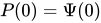
where is the effective wave function, the electrostatic potential and the dimension, typically 1,2 or 3. This equation can be solved in a similar manner to the Davey-Stewartson equations in Klein, Muite and Roidot[27]. Specifically, first solve
-
()
using the Fourier transform so that
where . Then solve
-
()
using the Fourier transform. Finally, solve
-
()
-
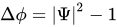
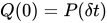
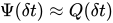
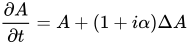
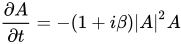
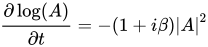
[28]The operator splitting method can be used for equations other than the nonlinear Schrödinger equation. Another equation for which operator splitting can be used is the complex Ginzburg-Landau equation where is a complex function, typically of one, two or three variables. An example one dimensional code is provided in listing L , based on an earlier finite difference code by Blanes, Casa, Chartier and Miura, using the methods described in Blanes et al.[29]. By using complex coefficients, Blanes et al.[30] can create high order splitting methods for parabolic equations. Previous attempts to do this have failed since if only real coefficients are used, a backward step which is required for methods higher than second order leads to numerical instability. Modify the example code to solve the complex Ginzburg-Landau equation in one, two and then in three spatial dimensions. The linear part can be solved explicitly using the Fourier transform. To solve the nonlinear part, consider and solve this exactly for . To recover the phase, observe that which can also be integrated explicitly since is known.
A Matlab program which uses 16th order splitting to solve the cubic nonlinear Schrödinger equation Code download()
% A program to solve the nonlinear Schr\"{o}dinger equation using a
% splitting method. The numerical solution is compared to an exact
% solution.
% S. Blanes, F. Casas, P. Chartier and A. Murua
% "Optimized high-order splitting methods for some classes of parabolic
% equations"
% ArXiv pre-print 1102.1622v2
% Forthcoming Mathematics of Computation

clear all; format compact; format short;
set(0,'defaultaxesfontsize',30,'defaultaxeslinewidth',.7,...
    'defaultlinelinewidth',6,'defaultpatchlinewidth',3.7,...
    'defaultaxesfontweight','bold')

% set up grid
Lx = 20; % period 2*pi * L
Nx = 16384; % number of harmonics
Nt = 2000; % number of time slices
dt = 0.25*pi/Nt;% time step
U=zeros(Nx,Nt/10);
method=3; % splitting method: 1 Strang, 2 CCDV10, 3 Blanes et al 2012

% initialise variables
x = (2*pi/Nx)*(-Nx/2:Nx/2 -1)'*Lx; % x coordinate
kx = 1i*[0:Nx/2-1 0 -Nx/2+1:-1]'/Lx; % wave vector

% initial conditions
t=0; tdata(1)=t;
u=4*exp(1i*t)*(cosh(3*x)+3*exp(8*1i*t)*cosh(x))...
    ./(cosh(4*x)+4*cosh(2*x)+3*cos(8*t));
v=fft(u);
figure(1); clf; plot(x,u);xlim([-2,2]); drawnow;
U(:,1)=u;

% mass
ma = fft(abs(u).^2);
ma0 = ma(1);

if method==1,
    %
    % Strang-Splitting
    %
    s=2;
    a=[1;0];
    b=[1/2;1/2];
    %
elseif method==2,
    %
    % Method of Castella, Chartier, Descombes and Vilmart
    % BIT Numerical Analysis vol 49 pp 487-508, 2009
    %
    s=5;
    a=[1/4;1/4;1/4;1/4;0];
    b=[1/10-1i/30;4/15+2*1i/15;4/15-1i/5;4/15+2*1i/15;1/10-1i/30];
    %
elseif method==3,
    %
    % Method of Blanes, Casas, Chartier and Murua 2012
    %
    s=17;
    a=1/16*[1;1;1;1;1;1;1;1;1;1;1;1;1;1;1;1;0];
    b=[0.028920177910074098791 - 0.005936580835725746103*1i;
       0.056654351383649876160 + 0.020841963949772627119*1i;
       0.067258385822722143569 - 0.039386393748812362460*1i;
       0.070333980553260772061 + 0.058952097930307840316*1i;
       0.077095100838099173580 - 0.038247636602014810025*1i;
       0.042022140317231098258 - 0.033116379859951038579*1i;
       0.050147397749937784280 + 0.061283684958324249562*1i;
       0.047750191909146143447 - 0.032332468814362628262*1i;
       0.119636547031757819706 + 0.015883426044923736862*1i;
       0.047750191909146143447 - 0.032332468814362628262*1i;
       0.050147397749937784280 + 0.061283684958324249562*1i;
       0.042022140317231098258 - 0.033116379859951038579*1i;
       0.077095100838099173580 - 0.038247636602014810025*1i;
       0.070333980553260772061 + 0.058952097930307840316*1i;
       0.067258385822722143569 - 0.039386393748812362460*1i;
       0.056654351383649876160 + 0.020841963949772627119*1i;
       0.028920177910074098791 - 0.005936580835725746103*1i];
end;


% solve pde and plot results
for n =2:Nt+1
    for m=1:(s-1)
        vna=exp(b(m)*1i*dt*kx.*kx).*v;
        una=ifft(vna);
        pot=(2*una.*conj(una));
        unb=exp(-1i*a(m)*(-1)*dt*pot).*una;
        v=fft(unb);
    end
    v=exp(b(s)*1i*dt*kx.*kx).*v;
    u=ifft(v);
    t=(n-1)*dt;
    if (mod(n,10)==0)
        tdata(n/10)=t;
        u=ifft(v);
        U(:,n/10)=u;
        uexact=...
            4*exp(1i*t)*(cosh(3*x)+3*exp(8*1i*t)*cosh(x))...
            ./(cosh(4*x)+4*cosh(2*x)+3*cos(8*t));
        figure(1); clf; plot(x,abs(u).^2); ...
            xlim([-0.5,0.5]); title(num2str(t));
        figure(2); clf; loglog(abs(v(1:Nx/2))); ...
            title('Fourier Coefficients');
        figure(3); clf; plot(x,abs(u-uexact).^2); ...
            xlim([-0.5,0.5]); title('error');
        drawnow;
        ma = fft(abs(u).^2);
        ma = ma(1);
        test = log10(abs(1-ma/ma0))
    end
end
figure(4); clf; mesh(tdata(1:(n-1)/10),x,abs(U(:,1:(n-1)/10)).^2);
xlim([0,t]);










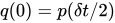
![{\displaystyle Q(\delta t)=\exp \left[i\left(\phi -|\Phi |^{4/D}\right)\delta t\right]Q(0)}](https://wikimedia.org/api/rest_v1/media/math/render/svg/5f48538d101098662f838d2206476d7005de58fe)





Distributed Memory Parallel: MPI[edit | edit source]
For this section, we will use the library 2DECOMP&FFT available from http://www.2decomp.org/index.html. The website includes some examples which indicate how this library should be used, in particular the sample code at http://www.2decomp.org/case_study1.html is a very helpful indication of how one converts a code that uses FFTW to one that uses MPI and the aforementioned library.
Before creating a parallel MPI code using 2DECOMP&FFT, we will generate a serial Fortran code that uses splitting to solve the 3D nonlinear Schrodinger equation. Rather than using loop-based parallelization to do a sequence of one dimensional fast Fourier transforms, we will use FFTW's three dimensional FFT, so that the serial version and MPI parallel version have the same structure. The serial version is in listing E . This file can be compiled in a similar manner to that in Listing A of the chapter Fortran Programs.
|
() |
!--------------------------------------------------------------------
!
!
! PURPOSE
!
! This program solves nonlinear Schrodinger equation in 3 dimensions
! i*u_t+Es*|u|^2u+u_{xx}+u_{yy}+u_{zz}=0
! using a second order time spectral splitting scheme
!
! The boundary conditions are u(x=0,y,z)=u(2*Lx*\pi,y,z),
! u(x,y=0,z)=u(x,y=2*Ly*\pi,z), u(x,y,z=0)=u(x,y,z=2*Lz*\pi)
! The initial condition is u=exp(-x^2-y^2)
!
! .. Parameters ..
! Nx = number of modes in x - power of 2 for FFT
! Ny = number of modes in y - power of 2 for FFT
! Nz = number of modes in z - power of 2 for FFT
! Nt = number of timesteps to take
! Tmax = maximum simulation time
! plotgap = number of timesteps between plots
! FFTW_IN_PLACE = value for FFTW input
! FFTW_MEASURE = value for FFTW input
! FFTW_EXHAUSTIVE = value for FFTW input
! FFTW_PATIENT = value for FFTW input
! FFTW_ESTIMATE = value for FFTW input
! FFTW_FORWARD = value for FFTW input
! FFTW_BACKWARD = value for FFTW input
! pi = 3.14159265358979323846264338327950288419716939937510d0
! Lx = width of box in x direction
! Ly = width of box in y direction
! Lz = width of box in z direction
! ES = +1 for focusing and -1 for defocusing
! .. Scalars ..
! i = loop counter in x direction
! j = loop counter in y direction
! k = loop counter in z direction
! n = loop counter for timesteps direction
! allocatestatus = error indicator during allocation
! start = variable to record start time of program
! finish = variable to record end time of program
! count_rate = variable for clock count rate
! count = keep track of information written to disk
! iol = size of array to write to disk
! planfxyz = Forward 3d fft plan
! planbxyz = Backward 3d fft plan
! dt = timestep
! modescalereal = Number to scale after backward FFT
! ierr = error code
! .. Arrays ..
! unax = approximate solution
! vnax = Fourier transform of approximate solution
! potx = potential
! .. Vectors ..
! kx = fourier frequencies in x direction
! ky = fourier frequencies in y direction
! x = x locations
! y = y locations
! time = times at which save data
! name_config = array to store filename for data to be saved
! fftfxy = array to setup 2D Fourier transform
! fftbxy = array to setup 2D Fourier transform
!
! REFERENCES
!
! ACKNOWLEDGEMENTS
!
! ACCURACY
!
! ERROR INDICATORS AND WARNINGS
!
! FURTHER COMMENTS
! Check that the initial iterate is consistent with the
! boundary conditions for the domain specified
!--------------------------------------------------------------------
! External routines required
!
! External libraries required
! FFTW3 -- Fast Fourier Transform in the West Library
! (http://www.fftw.org/)
PROGRAM main
! Declare variables
IMPLICIT NONE
INTEGER(kind=4), PARAMETER	:: Nx=2**5
INTEGER(kind=4), PARAMETER :: Ny=2**5
INTEGER(kind=4), PARAMETER :: Nz=2**5
INTEGER(kind=4), PARAMETER	:: Nt=50
INTEGER(kind=4), PARAMETER	:: plotgap=10
REAL(kind=8), PARAMETER	::&
pi=3.14159265358979323846264338327950288419716939937510d0
REAL(kind=8), PARAMETER	:: Lx=2.0d0,Ly=2.0d0,Lz=2.0d0
REAL(kind=8), PARAMETER	:: Es=1.0d0
REAL(kind=8)	:: dt=0.10d0/Nt
REAL(kind=8) :: modescalereal
COMPLEX(kind=8), DIMENSION(:), ALLOCATABLE	:: kx,ky,kz
REAL(kind=8), DIMENSION(:), ALLOCATABLE	:: x,y,z
COMPLEX(kind=8), DIMENSION(:,:,:), ALLOCATABLE	:: unax,vnax,potx
REAL(kind=8), DIMENSION(:), ALLOCATABLE	:: time
INTEGER(kind=4)	:: i,j,k,n,AllocateStatus,count,iol
! timing
INTEGER(kind=4)	:: start, finish, count_rate
   ! fftw variables
INTEGER(kind=8), PARAMETER	:: FFTW_IN_PLACE = 8, FFTW_MEASURE = 0, &
FFTW_EXHAUSTIVE = 8, FFTW_PATIENT = 32, FFTW_ESTIMATE = 64
INTEGER(kind=8),PARAMETER	:: FFTW_FORWARD = -1, FFTW_BACKWARD=1
INTEGER(kind=8)	::	planfxyz,planbxyz
CHARACTER*100	::	name_config, number_file

CALL system_clock(start,count_rate)
ALLOCATE(unax(1:Nx,1:Ny,1:Nz),vnax(1:Nx,1:Ny,1:Nz),potx(1:Nx,1:Ny,1:Nz),&
    kx(1:Nx),ky(1:Ny),kz(1:Nz),x(1:Nx),y(1:Ny),z(1:Nz),&
    time(1:1+Nt/plotgap),stat=AllocateStatus)
IF (AllocateStatus .ne. 0) STOP
PRINT *,'allocated space'
modescalereal=1.0d0/REAL(Nx,KIND(0d0))
modescalereal=modescalereal/REAL(Ny,KIND(0d0))
modescalereal=modescalereal/REAL(Nz,KIND(0d0))

! set up ffts
CALL dfftw_plan_dft_3d_(planfxyz,Nx,Ny,Nz,unax(1:Nx,1:Ny,1:Nz),&
vnax(1:Nx,1:Ny,1:Nz),FFTW_FORWARD,FFTW_ESTIMATE)
  CALL dfftw_plan_dft_3d_(planbxyz,Nx,Ny,Nz,vnax(1:Nx,1:Ny,1:Nz),&
  unax(1:Nx,1:Ny,1:Nz),FFTW_BACKWARD,FFTW_ESTIMATE)

PRINT *,'Setup FFTs'

! setup fourier frequencies and grid points
DO i=1,1+Nx/2
kx(i)= cmplx(0.0d0,1.0)*REAL(i-1,kind(0d0))/Lx
END DO
kx(1+Nx/2)=0.0d0
DO i = 1,Nx/2 -1
kx(i+1+Nx/2)=-kx(1-i+Nx/2)
END DO
DO i=1,Nx
x(i)=(-1.0d0+2.0d0*REAL(i-1,kind(0d0))/REAL(Nx,kind(0d0)) )*pi*Lx
END DO
DO j=1,1+Ny/2
ky(j)= cmplx(0.0d0,1.0d0)*REAL(j-1,kind(0d0))/Ly
END DO
ky(1+Ny/2)=0.0d0
DO j = 1,Ny/2 -1
ky(j+1+Ny/2)=-ky(1-j+Ny/2)
END DO
DO j=1,Ny
y(j)=(-1.0d0+2.0d0*REAL(j-1,kind(0d0))/REAL(Ny,kind(0d0)) )*pi*Ly
END DO
DO k=1,1+Nz/2
kz(k)= cmplx(0.0d0,1.0d0)*REAL(k-1,kind(0d0))/Lz
END DO
kz(1+Nz/2)=0.0d0
DO k = 1,Nz/2 -1
kz(k+1+Nz/2)=-kz(1-k+Nz/2)
END DO
DO k=1,Nz
z(k)=(-1.0d0+2.0d0*REAL(k-1,kind(0d0))/REAL(Nz,kind(0d0)) )*pi*Lz
END DO

PRINT *,'Setup grid and fourier frequencies'

DO k=1,Nz;	DO j=1,Ny; DO i=1,Nx
unax(i,j,k)=exp(-1.0d0*(x(i)**2 +y(j)**2+z(k)**2))
END DO; END DO; END DO
name_config = 'uinitial.dat'
INQUIRE(iolength=iol) unax(1,1,1)
OPEN(unit=11,FILE=name_config,form="unformatted", &
access="direct",recl=iol)
count=1
DO k=1,Nz; DO j=1,Ny; DO i=1,Nx
WRITE(11,rec=count) unax(i,j,k)
        count=count+1
END DO; END DO; END DO
CLOSE(11)

CALL dfftw_execute_dft_(planfxyz,unax(1:Nx,1:Ny,1:Nz),vnax(1:Nx,1:Ny,1:Nz))

PRINT *,'Got initial data, starting timestepping'
time(1)=0
DO n=1,Nt
DO k=1,Nz; DO j=1,Ny; DO i=1,Nx
vnax(i,j,k)=exp(0.50d0*dt*&
(kz(k)*kz(k) + kx(i)*kx(i) + ky(j)*ky(j))&
*cmplx(0.0d0,1.0d0))*vnax(i,j,k)
END DO; END DO; END DO
CALL dfftw_execute_dft_(planbxyz,vnax(1:Nx,1:Ny,1:Nz),&
unax(1:Nx,1:Ny,1:Nz))

DO k=1,Nz; DO j=1,Ny; DO i=1,Nx
unax(i,j,k)=unax(i,j,k)*modescalereal
potx(i,j,k)=Es*unax(i,j,k)*conjg(unax(i,j,k))
unax(i,j,k)=exp(cmplx(0.0d0,-1.0d0)*dt*potx(i,j,k))&
*unax(i,j,k)
END DO; END DO; END DO
CALL dfftw_execute_dft_(planfxyz,unax(1:Nx,1:Ny,1:Nz),&
vnax(1:Nx,1:Ny,1:Nz))

DO k=1,Nz; DO j=1,Ny; DO i=1,Nx
vnax(i,j,k)=exp(0.5d0*dt*&
(kx(i)*kx(i) + ky(j)*ky(j)+ kz(k)*kz(k))&
*cmplx(0.0d0,1.0d0))*vnax(i,j,k)
END DO; END DO; END DO
IF (mod(n,plotgap)==0) THEN
time(1+n/plotgap)=n*dt
PRINT *,'time',n*dt
CALL dfftw_execute_dft_(planbxyz,vnax(1:Nx,1:Ny,1:Nz),unax(1:Nx,1:Ny,1:Nz))
DO k=1,Nz; DO j=1,Ny; DO i=1,Nx
unax(i,j,k)=unax(i,j,k)*modescalereal
END DO; END DO; END DO
name_config='./data/u'
WRITE(number_file,'(i0)') 10000000+1+n/plotgap
ind=index(name_config,' ') -1
name_config=name_config(1:ind)//numberfile
ind=index(name_config,' ') -1
name_config=name_config(1:ind)//'.dat'
OPEN(unit=11,FILE=name_config,status="UNKNOWN")
REWIND(11)
DO j=1,Ny
DO i=1,Nx
WRITE(11,*) abs(unax(i,j))**2
END DO
END DO
CLOSE(11)

END IF
END DO
PRINT *,'Finished time stepping'

! transform back final data and do another half time step
CALL system_clock(finish,count_rate)
PRINT*,'Program took ',REAL(finish-start)/REAL(count_rate),'for execution'

name_config = 'tdata.dat'
OPEN(unit=11,FILE=name_config,status="UNKNOWN")
REWIND(11)
DO j=1,1+Nt/plotgap
WRITE(11,*) time(j)
END DO
CLOSE(11)

name_config = 'xcoord.dat'
OPEN(unit=11,FILE=name_config,status="UNKNOWN")
REWIND(11)
DO i=1,Nx
WRITE(11,*) x(i)
END DO
CLOSE(11)

name_config = 'ycoord.dat'
OPEN(unit=11,FILE=name_config,status="UNKNOWN")
REWIND(11)
DO j=1,Ny
WRITE(11,*) y(j)
END DO
CLOSE(11)

name_config = 'zcoord.dat'
OPEN(unit=11,FILE=name_config,status="UNKNOWN")
REWIND(11)
DO k=1,Nz
WRITE(11,*) z(k)
END DO
CLOSE(11)
PRINT *,'Saved data'

CALL dfftw_destroy_plan_(planbxyz)
CALL dfftw_destroy_plan_(planfxyz)
CALL dfftw_cleanup_()

DEALLOCATE(unax,vnax,potx,&
    kx,ky,kz,x,y,z,&
    time,stat=AllocateStatus)
IF (AllocateStatus .ne. 0) STOP
PRINT *,'Program execution complete'
END PROGRAM main
In comparison to the previous programs, the program in listing E writes out its final data as a binary file. This is often significantly faster than writing out a text file, and the resulting file is usually much smaller in size. This is important when many such files are written and/or if individual files are large. Due to the formatting change, the binary file also needs to be read in slightly differently. The Matlab script in listing N shows how to do this.
|
() |
% A program to plot the computed results

clear all; format compact, format short,
set(0,'defaultaxesfontsize',18,'defaultaxeslinewidth',.9,...
    'defaultlinelinewidth',3.5,'defaultpatchlinewidth',5.5);

% Load data
tdata=load('./tdata.dat');
x=load('./xcoord.dat');
y=load('./ycoord.dat');
z=load('./zcoord.dat');
Tsteps = length(tdata);

Nx = length(x); Nt = length(tdata);
Ny = length(y); Nz = length(z);
fid=fopen('./ufinal.datbin','r');
[fname,mode,mformat]=fopen(fid);
u=fread(fid,Nx*Ny*Nz,'double',mformat);
u = reshape(u,Nx,Ny,Nz);

% Plot data
figure (1); clf ; UP = abs(u).^2;
p1 = patch(isosurface(x,y,z,UP,.0025) ,...
'FaceColor','yellow','EdgeColor','none');
p2 = patch(isocaps(x,y,z,UP,.0025) ,...
'FaceColor','interp','EdgeColor','none');
isonormals(UP,p1); lighting phong;
xlabel('x'); ylabel('y'); zlabel('z');
axis equal; axis square; view(3); drawnow;
We now modify the above code to use MPI and the library 2DECOMP&FFT. The library 2DECOMP&FFT hides most of the details of MPI although there are a few commands which it is useful for the user to understand. These commands are:
- USE mpi or INCLUDE 'mpif.h'
- MPI_INIT
- MPI_COMM_SIZE
- MPI_COMM_RANK
- MPI_FINALIZE
The program is listed in listing O , please compare this to the serial code in E . The library 2DECOMP&FFT does a domain decomposition of the arrays so that separate parts of the arrays are on separate processors. The library can also perform a Fourier transform on the arrays even though they are stored on different processors – the library does all the necessary message passing and transpositions required to perform the Fourier transform. It should be noted that the order of the entries in the arrays after the Fourier transform is not necessarily the same as the order used by FFTW. However, the correct ordering of the entries is returned by the structure decomp and so this structure is used to obtain starting and stopping entries for the loops. We assume that the library 2DECOMP&FFT has been installed in an appropriate location.
|
() |
!--------------------------------------------------------------------
!
!
! PURPOSE
!
! This program solves nonlinear Schrodinger equation in 3 dimensions
! i*u_t+Es*|u|^2u+u_{xx}+u_{yy}+u_{zz}=0
! using a second order time spectral splitting scheme
!
! The boundary conditions are u(x=0,y,z)=u(2*Lx*\pi,y,z),
! u(x,y=0,z)=u(x,y=2*Ly*\pi,z), u(x,y,z=0)=u(x,y,z=2*Lz*\pi)
! The initial condition is u=exp(-x^2-y^2)
!
! .. Parameters ..
! Nx = number of modes in x - power of 2 for FFT
! Ny = number of modes in y - power of 2 for FFT
! Nz = number of modes in z - power of 2 for FFT
! Nt = number of timesteps to take
! Tmax = maximum simulation time
! plotgap = number of timesteps between plots
! pi = 3.14159265358979323846264338327950288419716939937510d0
! Lx = width of box in x direction
! Ly = width of box in y direction
! Lz = width of box in z direction
! ES = +1 for focusing and -1 for defocusing
! .. Scalars ..
! i = loop counter in x direction
! j = loop counter in y direction
! k = loop counter in z direction
! n = loop counter for timesteps direction
! allocatestatus = error indicator during allocation
! start = variable to record start time of program
! finish = variable to record end time of program
! count_rate = variable for clock count rate
! dt = timestep
! modescalereal = Number to scale after backward FFT
! myid = Process id
! ierr = error code
! p_row = number of rows for domain decomposition
! p_col = number of columns for domain decomposition
! filesize = total filesize
! disp = displacement to start writing data from
! ind = index in array to write
! plotnum = number of plot to save
! numberfile = number of the file to be saved to disk
! stat = error indicator when reading inputfile
! .. Arrays ..
! u = approximate solution
! v = Fourier transform of approximate solution
! pot = potential
! .. Vectors ..
! kx = fourier frequencies in x direction
! ky = fourier frequencies in y direction
! kz = fourier frequencies in z direction
! x = x locations
! y = y locations
! z = z locations
! time = times at which save data
! nameconfig = array to store filename for data to be saved
! InputFileName = name of the Input File
! .. Special Structures ..
! decomp = contains information on domain decomposition
! see http://www.2decomp.org/ for more information
!
! REFERENCES
!
! ACKNOWLEDGEMENTS
!
! ACCURACY
!
! ERROR INDICATORS AND WARNINGS
!
! FURTHER COMMENTS
! Check that the initial iterate is consistent with the
! boundary conditions for the domain specified
!--------------------------------------------------------------------
! External routines required
!
! External libraries required
! 2DECOMP&FFT -- Domain decomposition and Fast Fourier Library
! (http://www.2decomp.org/index.html)
! MPI library

PROGRAM main
USE decomp_2d
USE decomp_2d_fft
USE decomp_2d_io
USE MPI
! Declare variables
IMPLICIT NONE
INTEGER(kind=4)	:: Nx=2**5
INTEGER(kind=4) :: Ny=2**5
INTEGER(kind=4) :: Nz=2**5
INTEGER(kind=4)	:: Nt=50
INTEGER(kind=4)	:: plotgap=10
REAL(kind=8), PARAMETER	::&
pi=3.14159265358979323846264338327950288419716939937510d0
REAL(kind=8)	:: Lx=2.0d0,Ly=2.0d0,Lz=2.0d0
REAL(kind=8)	:: Es=1.0d0
REAL(kind=8)	:: dt=0.0010d0
COMPLEX(kind=8), DIMENSION(:), ALLOCATABLE	:: kx,ky,kz
REAL(kind=8), DIMENSION(:), ALLOCATABLE	:: x,y,z
COMPLEX(kind=8), DIMENSION(:,:,:), ALLOCATABLE	:: u,v,pot
REAL(kind=8), DIMENSION(:), ALLOCATABLE	:: time
INTEGER(KIND=4), DIMENSION(1:5)	:: intcomm
REAL(KIND=8), DIMENSION(1:5)	:: dpcomm
REAL(kind=8) :: modescalereal
INTEGER(kind=4)	:: i,j,k,n,AllocateStatus,stat
INTEGER(kind=4)	:: myid,numprocs,ierr
TYPE(DECOMP_INFO)	:: decomp
INTEGER(kind=MPI_OFFSET_KIND) :: filesize, disp
INTEGER(kind=4)	:: p_row=0, p_col=0
  INTEGER(kind=4)	:: start, finish, count_rate, ind, plotnum
CHARACTER*50	::	nameconfig
CHARACTER*20	::	numberfile
! initialisation of MPI
CALL MPI_INIT(ierr)
CALL MPI_COMM_SIZE(MPI_COMM_WORLD, numprocs, ierr)
CALL MPI_COMM_RANK(MPI_COMM_WORLD, myid, ierr)

! initialisation of 2decomp
! do automatic domain decomposition
CALL decomp_2d_init(Nx,Ny,Nz,p_row,p_col)
! get information about domain decomposition choosen
CALL decomp_info_init(Nx,Ny,Nz,decomp)
! initialise FFT library
CALL decomp_2d_fft_init
ALLOCATE(u(decomp%xst(1):decomp%xen(1),&
    decomp%xst(2):decomp%xen(2),&
    decomp%xst(3):decomp%xen(3)),&
            v(decomp%zst(1):decomp%zen(1),&
             decomp%zst(2):decomp%zen(2),&
             decomp%zst(3):decomp%zen(3)),&
            pot(decomp%xst(1):decomp%xen(1),&
             decomp%xst(2):decomp%xen(2),&
             decomp%xst(3):decomp%xen(3)),&
    kx(1:Nx),ky(1:Ny),kz(1:Nz),&
    x(1:Nx),y(1:Ny),z(1:Nz),&
    time(1:1+Nt/plotgap),stat=AllocateStatus)
IF (AllocateStatus .ne. 0) STOP

IF (myid.eq.0) THEN
PRINT *,'allocated space'
END IF
modescalereal=1.0d0/REAL(Nx,KIND(0d0))
modescalereal=modescalereal/REAL(Ny,KIND(0d0))
modescalereal=modescalereal/REAL(Nz,KIND(0d0))

! setup fourier frequencies and grid points
DO i=1,1+Nx/2
kx(i)= cmplx(0.0d0,1.0d0)*REAL(i-1,kind(0d0))/Lx
END DO
kx(1+Nx/2)=0.0d0
DO i = 1,Nx/2 -1
kx(i+1+Nx/2)=-kx(1-i+Nx/2)
END DO
DO i=1,Nx
x(i)=(-1.0d0 + 2.0d0*REAL(i-1,kind(0d0))/REAL(Nx,kind(0d0)))*pi*Lx
END DO
DO j=1,1+Ny/2
ky(j)= cmplx(0.0d0,1.0d0)*REAL(j-1,kind(0d0))/Ly
END DO
ky(1+Ny/2)=0.0d0
DO j = 1,Ny/2 -1
ky(j+1+Ny/2)=-ky(1-j+Ny/2)
END DO
DO j=1,Ny
y(j)=(-1.0d0 + 2.0d0*REAL(j-1,kind(0d0))/REAL(Ny,kind(0d0)))*pi*Ly
END DO
DO k=1,1+Nz/2
kz(k)= cmplx(0.0d0,1.0d0)*REAL(k-1,kind(0d0))/Lz
END DO
kz(1+Nz/2)=0.0d0
DO k = 1,Nz/2 -1
kz(k+1+Nz/2)=-kz(1-k+Nz/2)
END DO
DO k=1,Nz
z(k)=(-1.0d0 + 2.0d0*REAL(k-1,kind(0d0))/REAL(Nz,kind(0d0)))*pi*Lz
END DO

IF (myid.eq.0) THEN
PRINT *,'Setup grid and fourier frequencies'
END IF
DO k=decomp%xst(3),decomp%xen(3)
DO j=decomp%xst(2),decomp%xen(2)
DO i=decomp%xst(1),decomp%xen(1)
u(i,j,k)=exp(-1.0d0*(x(i)**2 +y(j)**2+z(k)**2))
END DO
END DO
END DO

! write out using 2DECOMP&FFT MPI-IO routines
nameconfig='./data/u'
plotnum=0
WRITE(numberfile,'(i0)') 10000000+plotnum
ind=index(nameconfig,' ') -1
nameconfig=nameconfig(1:ind)//numberfile
ind=index(nameconfig,' ') -1
nameconfig=nameconfig(1:ind)//'.datbin'
CALL decomp_2d_write_one(1,u,nameconfig)

CALL decomp_2d_fft_3d(u,v,DECOMP_2D_FFT_FORWARD)
IF (myid.eq.0) THEN
PRINT *,'Got initial data, starting timestepping'
END IF
CALL system_clock(start,count_rate)
time(1)=0
DO n=1,Nt
! Use Strang splitting
DO k=decomp%zst(3),decomp%zen(3)
DO j=decomp%zst(2),decomp%zen(2)
DO i=decomp%zst(1),decomp%zen(1)
v(i,j,k)=exp(0.50d0*dt*&
(kz(k)*kz(k) + kx(i)*kx(i) + ky(j)*ky(j))&
*cmplx(0.0d0,1.0d0))*v(i,j,k)
END DO
END DO
END DO

CALL decomp_2d_fft_3d(v,u,DECOMP_2D_FFT_BACKWARD)

DO k=decomp%xst(3),decomp%xen(3)
DO j=decomp%xst(2),decomp%xen(2)
DO i=decomp%xst(1),decomp%xen(1)
u(i,j,k)=u(i,j,k)*modescalereal
pot(i,j,k)=Es*u(i,j,k)*conjg(u(i,j,k))
u(i,j,k)=exp(cmplx(0.0d0,-1.0d0)*dt*pot(i,j,k))*u(i,j,k)
END DO
END DO
END DO
CALL decomp_2d_fft_3d(u,v,DECOMP_2D_FFT_FORWARD)

DO k=decomp%zst(3),decomp%zen(3)
DO j=decomp%zst(2),decomp%zen(2)
DO i=decomp%zst(1),decomp%zen(1)
v(i,j,k)=exp(dt*0.5d0*&
(kx(i)*kx(i) +ky(j)*ky(j) +kz(k)*kz(k))&
*cmplx(0.0d0,1.0d0))*v(i,j,k)
END DO
END DO
END DO
IF (mod(n,plotgap)==0) THEN
time(1+n/plotgap)=n*dt
IF (myid.eq.0) THEN
PRINT *,'time',n*dt
END IF
CALL decomp_2d_fft_3d(v,u,DECOMP_2D_FFT_BACKWARD)
u=u*modescalereal
nameconfig='./data/u'
plotnum=plotnum+1
WRITE(numberfile,'(i0)') 10000000+plotnum
ind=index(nameconfig,' ') -1
nameconfig=nameconfig(1:ind)//numberfile
ind=index(nameconfig,' ') -1
nameconfig=nameconfig(1:ind)//'.datbin'
! write out using 2DECOMP&FFT MPI-IO routines
CALL decomp_2d_write_one(1,u,nameconfig)
END IF
END DO
IF (myid.eq.0) THEN
PRINT *,'Finished time stepping'
END IF

CALL system_clock(finish,count_rate)

IF (myid.eq.0) THEN
PRINT*,'Program took ',REAL(finish-start)/REAL(count_rate),'for execution'
END IF
IF (myid.eq.0) THEN
! Save times at which output was made in text format
nameconfig = './data/tdata.dat'
OPEN(unit=11,FILE=nameconfig,status="UNKNOWN")
REWIND(11)
DO j=1,1+Nt/plotgap
WRITE(11,*) time(j)
END DO
CLOSE(11)
! Save x grid points in text format
nameconfig = './data/xcoord.dat'
OPEN(unit=11,FILE=nameconfig,status="UNKNOWN")
REWIND(11)
DO i=1,Nx
WRITE(11,*) x(i)
END DO
CLOSE(11)
! Save y grid points in text format
nameconfig = './data/ycoord.dat'
OPEN(unit=11,FILE=nameconfig,status="UNKNOWN")
REWIND(11)
DO j=1,Ny
WRITE(11,*) y(j)
END DO
CLOSE(11)
! Save z grid points in text format
nameconfig = './data/zcoord.dat'
OPEN(unit=11,FILE=nameconfig,status="UNKNOWN")
REWIND(11)
DO k=1,Nz
WRITE(11,*) z(k)
END DO
CLOSE(11)
PRINT *,'Saved data'
END IF

! clean up
   CALL decomp_2d_fft_finalize
   CALL decomp_2d_finalize
  DEALLOCATE(u,v,pot,&
    kx,ky,kz,x,y,z,&
    time,stat=AllocateStatus)
IF (AllocateStatus .ne. 0) STOP
IF (myid.eq.0) THEN
PRINT *,'Program execution complete'
END IF
CALL MPI_FINALIZE(ierr)
END PROGRAM main
To compile the code modify the makefile in listing P appropriately for your system. Type make and then you should be ready to run it after it compiles. It is assumed that FFTW is the underlying one dimensional fast Fourier transform library called by 2DECOMP&FFT, so this should be changed if another library is used. Note that you will need to rebuild the program if you want to change the problem size or the runtime.
|
() |
COMPILER =  mpif90
decompdir=../2decomp_fft
FLAGS = -O0

DECOMPLIB = -I${decompdir}/include -L${decompdir}/lib -l2decomp_fft
LIBS = -L${FFTW_LINK} -lfftw3_threads -lfftw3 -lm
SOURCES = NLSsplitting.f90

NLSsplitting: $(SOURCES)
		${COMPILER} -o NLSsplitting $(FLAGS) $(SOURCES) $(LIBS) $(DECOMPLIB)


clean:
	rm -f *.o
	rm -f *.mod
clobber:
	rm -f NLSsplitting
Exercises[edit | edit source]
- The ASCII character set requires 7 bits per character and so at least 7 bits are required to store a digit between 0 and 9. A double precision number in IEEE arithmetic requires 64 bits to store a double precision number with approximately 15 decimal digits and approximately a 3 decimal digit exponent. How many bits are required to store a IEEE double precision number? Suppose a file has double precision numbers. What is the minimum size of the file if the numbers are stored as IEEE double precision numbers? What is the minimum size of the file if the numbers are stored as characters?
- Write an MPI code using 2DECOMP&FFT to solve the Gross-Pitaevskii equation in three dimensions.
- Learn to use either VisIt (https://wci.llnl.gov/codes/visit/) or Paraview (http://www.paraview.org/) and write a script to visualize two and three dimensional output in a manner that is similar to the Matlab codes.

Notes[edit | edit source]
- ↑ Sulem and Sulem (1999)
- ↑ Yang (2010)
- ↑ Evans (2010)
- ↑ Linares and Ponce (2009)
- ↑ Lieb and Loss (2003)
- ↑ Rennardy and Rogers (2004)
- ↑ Sulem and Sulem (1989)
- ↑ To simplify the presentation, we primarily consider the focusing cubic nonlinear Schrödinger equation.
- ↑ Klein (2008)
- ↑ Holden et al (2011)
- ↑ McLachlan and Quispel (2002)
- ↑ Thalhammer
- ↑ Shen, Tang and Wang (2011)
- ↑ Weideman and Herbst (1986)
- ↑ Yang (2010)
- ↑ Klein (2008)
- ↑ Holden et al (2011)
- ↑ Holden et al (2011)
- ↑ That is.
- ↑ One can derive this by using the series expansion of the exponential function, , and subtracting from
- ↑ Klein (2008)
- ↑ Thalhammer (2008)
- ↑ Klein, Muite and Roidot (2011)
- ↑
http://en.wikipedia.org/wiki/Gross\%E2\%80\%93Pitaevskii\_equation
- ↑
This question is due to a project by Joshua Kirschenheiter.
- ↑ Eliasson and Shukla (2009)
- ↑ Klein, Muite and Roidot (2011)
- ↑
This question is due to a project by Kohei Harada and Matt Warnez.
- ↑ Blanes et al
- ↑ Blanes et al

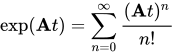


References[edit | edit source]
Blanes, S.; Casas, F.; Chartier, P.; Murua, A. "Splitting methods with complex coefficients for some classes of evolution equations". Mathematics of Computation.
Shukla, P.K. (2009). "Nonlinear aspects of quantum plasma physics: Nanoplasmonics and nanostructures in dense plasmas". Plasma and Fusion Research: Review Articles. 4: 32.
Evans, L.C. (2010). Partial Differential Equations. American Mathematical Society.
Holden, H.; Karlsen, K.H.; Risebro, N.H.; Tao, T. (2011). "Operator splitting for the KdV equation". Mathematics of Computation. 80: 821–846.
Klein, C. (2008). "Fourth order time-stepping for low dispersion Korteweg-De Vries and nonlinear Schrödinger equations". Electronic Transactions on Numerical Analysis. 29: 116–135.
Klein, C.; Muite, B.K.; Roidot, K. (2011). "Numerical Study of Blowup in the Davey-Stewartson System". {{cite journal}}: Cite journal requires |journal= (help)
Klein, C.; Roidot, K. (2011). "Fourth order time-stepping for Kadomstev-Petviashvili and Davey-Stewartson Equations". SIAM Journal on Scientific Computation. 33: 3333–3356.
Loss, M. (2003). Analysis. American Mathematical Society.
Ponce, G. (2009). Introduction to Nonlinear Dispersive Equations. Springer.
McLachlan, R.I.; Quispel, G.R.W. (2002). "Splitting Methods". Acta Numerica. 11: 341–434.
Rogers, R.C. (2004). An Introduction to Partial Differential Equations. Springer.
Wang, L.-L. (2011). Spectral Methods: Algorithms, Analysis and Applications. Springer.
Sulem, P.L. (1999). The Nonlinear Schrödinger equation: Self-Focusing and Wave Collapse. Springer.
Thalhammer, M. Time-Splitting Spectral Methods for Nonlinear Schrödinger Equations (PDF). {{cite book}}: Cite has empty unknown parameter: |coauthors= (help)
Weideman, J.A.C.; Herbst, B.M. (1986). "Split-step methods for the solution of the nonlinear Schrödinger equation". SIAM Journal on Numerical Analysis. SIAM. 23 (3): 485–507.
Yang, J. (2010). Nonlinear Waves in Integrable and Nonintegrable Systems. SIAM.