OpenSCAD User Manual/Other Language Features

Special variables[edit | edit source]
Special variables provide an alternate means of passing arguments to modules and functions. All user, or OpenSCAD, defined variables starting with a '$' are special variables, similar to special variables in lisp. Modules and function see all outside variables in addition to those passed as arguments or defined internally.
Currently valid special variable names can only be composed of $ followed by simple characters and underscores [a-zA-Z0-9_] and do not allow high-ascii or unicode characters.
The value for a regular variable is assigned at compile time and is thus static for all calls.
Special variables pass along their value from within the scope (see scope of variables) from which the module or function is called. This means that special variables can potentially have a different value each time a module or function is called.
regular  = "regular global";
$special = "special global";
module show() echo("         in show    ", regular,"   ", $special );

echo ("         outside    ", regular,"   ", $special );
          // ECHO: "         outside    ", "regular global", "   ", "special global"

for ( regular = [0:1] ){ echo("in regular loop     ", regular,"   ", $special ); show();}
          // ECHO: "in regular loop     ", 0, "   ", "special global"
          // ECHO: "         in show    ", "regular global", "   ", "special global"
          // ECHO: "in regular loop     ", 1, "   ", "special global"
          // ECHO: "         in show    ", "regular global", "   ", "special global"

for ( $special = [5:6] ){ echo("in special loop     ", regular,"   ", $special ); show();}
          // ECHO: "in special loop     ", "regular global", "   ", 5
          // ECHO: "         in show    ", "regular global", "   ", 5
          // ECHO: "in special loop     ", "regular global", "   ", 6
          // ECHO: "         in show    ", "regular global", "   ", 6

show();
          // ECHO: "         in show    ", "regular global", "   ", "special global"
This is useful when multiple arguments need to be passed thru several layers of module calls.
Several special variables are already defined by OpenSCAD.
Circle resolution: $fa, $fs, and $fn [edit | edit source]
The $fa, $fs, and $fn special variables control the number of facets used to generate an arc:
$fa is the minimum angle for a fragment. Even a huge circle does not have more fragments than 360 divided by this number. The default value is 12 (i.e. 30 fragments for a full circle). The minimum allowed value is 0.01. Attempting to set a lower value causes a warning.
$fs is the minimum size of a fragment. The default value is 2 so very small circles have a smaller number of fragments than specified using $fa. The minimum allowed value is 0.01. Attempting to set a lower value causes a warning.
$fn is number of fragments and usually has the default value of 0. When this variable has a value greater than zero, the other two variables are ignored, and a full circle is rendered using this number of fragments.
The higher the number of fragments, the more memory and CPU consumed; large values can bring many systems to their knees. Depending on the design, $fn values, and the corresponding results of $fa & $fs, should be kept small, at least until the design is finalised when it can be increased for the final result. A $fn over 128 is not recommended or only for specific circumstances, and below 50 would be advisable for performance.
You can also use two different values for preview and render
$fn = $preview ? 32 : 64;
TIP: If you want to create a circle/cylinder/sphere which has an axis aligned integer bounding box (i.e. a bounding box that has integral dimensions, and an integral position) use a value of $fn that is divisible by 4.
When $fa and $fs are used to determine the number of fragments for a circle, then OpenSCAD never uses fewer than 5 fragments.
This is the C code that calculates the number of fragments in a circle:
      int get_fragments_from_r(double r, double fn, double fs, double fa)
      {
             if (r < GRID_FINE) return 3;
             if (fn > 0.0) return (int)(fn >= 3 ? fn : 3);
             return (int)ceil(fmax(fmin(360.0 / fa, r*2*M_PI / fs), 5));
      }
Or you can embed this OpenSCAD version in your code to work out what's going on, you need to set r= to your size
echo(n=($fn>0?($fn>=3?$fn:3):ceil(max(min(360/$fa,r*2*PI/$fs),5))),a_based=360/$fa,s_based=r*2*PI/$fs);
Spheres are first sliced into as many slices as the number of fragments being used to render a circle of the sphere's radius, and then every slice is rendered into as many fragments as are needed for the slice radius. You might have recognized already that the pole of a sphere is usually a pentagon. This is why.
The number of fragments for a cylinder is determined using the greater of the two radii.
The method is also used when rendering circles and arcs from DXF files. The variables have no effect when importing STL files.
You can generate high resolution spheres by resetting the $fX values in the instantiating module:
      $fs = 0.01;
      sphere(2);
or simply by passing the special variable as parameter:
sphere(2, $fs = 0.01);
You can even scale the special variable instead of resetting it:
sphere(2, $fs = $fs * 0.01);
Animation: $t [edit | edit source]


The $t variable is used in "rotate" and "translate" for animation, $t*360 giving complete cycles. To start animation, select View\Animate and enter values for "FPS" and "Steps". The "Time" field shows the current value of $t as a decimal fraction.
Simple harmonic motion[edit | edit source]
translate ([0, 0, 10*sin($t*360)])
sphere(2);
gives a sphere that oscillates between -10 and +10 on the Z-axis.
Rotation[edit | edit source]
rotate ([0, 0, $t*360])
square(5);
rotates a square around one corner around the Z-axis. To rotate the square about its middle, use:
rotate ([0, 0, $t*360])
square(5, center=true);
Part-rotation[edit | edit source]
All parts in an animation complete one cycle of motion in the same time, $t, jump back to zero, and start again. However, the cycles can be given different numbers of steps, to give the illusion of different speeds in the same animation. This can be used to animate meshing gears of different sizes.
rotate([0, 0, $t*360/17])
gear(teeth=17);
and
rotate([0, 0, -$t*360/31])
gear(teeth=31);
Circular orbit[edit | edit source]
rotate ([0, 0, $t*360])
translate ([10, 0])
square(5, center=true);
Circular orbit without rotation[edit | edit source]
rotate ([0, 0, $t*360])
translate ([9, 0])

rotate ([0, 0, -$t*360])
square(5, center=true);
Elliptical orbit[edit | edit source]
translate([10*sin($t*360), 20*cos($t*360)])
square(2, center=true);
Note that with "translate", the object does not rotate.
Elliptical motion[edit | edit source]

e=10;
rotate([0, 0, $t*360])
translate([e, 0])
rotate([0, 0, -$t*720])
square([2*e, 2], center=true);
If "Dump Pictures" is checked, then images are created in the same directory as the .scad file. The exported PNG files can be turned into a gif via command line:
convert -delay 10 -loop 0 *.png myimage.gif
where -delay 10 is the duration of each frame in milliseconds, and -loop 0 specifies the number of loops (0 = loop forever).
The Linux convert command is part of ImageMagick, which can also be installed on macOS and Windows. Additional parameters are possible for cropping and scaling.
Viewport: $vpr, $vpt, $vpf and $vpd [edit | edit source]
These contain the current viewport rotation and translation and camera distance - at the time of doing the rendering. Moving the viewport does not update them. During an animation they are updated for each frame.
- $vpr shows rotation
- $vpt shows translation (i.e. won't be affected by rotate and zoom)
- $vpf shows the FOV (Field of View) of the view [Note: Requires version 2021.01]
- $vpd shows the camera distance [Note: Requires version 2015.03]
Example
cube([10, 10, $vpr[0] / 10]);
which makes the cube change size based on the view angle, if an animation loop is active (which does not need to use the $t variable)
You can also make bits of a complex model vanish as you change the view.
All four variables are writable, but only assignments at the top-level of the main file has an effect on the viewport. [Note: Requires version 2015.03]
Example
$vpr = [0, 0, $t * 360];
which allows a simple 360 degree rotation around the Z axis in animation mode.
The menu command Edit - Paste Viewport Rotation/Translation copies the current value of the viewport, but not the current $vpr or $vpt.
Execution mode: $preview [edit | edit source]
[Note: Requires version 2019.05]
$preview is true, when in OpenCSG preview (F5). $preview is false, when in render (F6).
This can, for example, be used to reduce detail during preview to save time, without losing detail in the final rendered result:
$fn = $preview ? 12 : 72;
sphere(r = 1);
Note that the render module does not affect $preview:
render(){
    $fn = $preview ? 12 : 72;
    sphere(r = 1);
}
Another use could be to make the preview show an assembly view and the render generate just the printed parts laid out for printing.
If printed parts need extra features that are removed post printing, for example support for suspended holes, then the preview can omit these to show the finished part after post processing.
When OpenSCAD is run from the command line $preview is only true when generating a PNG image with OpenCSG. It is false when generating STL, DXF and SVG files with CGAL. It is also false when generating CSG and ECHO files. This may or may not be what you want, but you can always override it on the command line like any other variable with the -D option.
Echo module [edit | edit source]
The echo() module prints the contents to the compilation window (aka Console). Useful for debugging code. Also see the String function str().
Numeric values are rounded to 5 significant digits.
It can be handy to use 'variable=variable' as the expression to easily label the variables, see the example below.
Usage examples:
my_h=50;
my_r=100;
echo("This is a cylinder with h=", my_h, " and r=", my_r);
echo(my_h=my_h,my_r=my_r); // shortcut
cylinder(h=my_h, r=my_r);
Shows in the Console as
ECHO: "This is a cylinder with h=", 50, " and r=", 100
ECHO: my_h = 50, my_r = 100
Note that the output will not have the extra double quotes and commas if converted to a string using str().
Rounding examples[edit | edit source]
An example for the rounding:
a=1.0;
b=1.000002;
echo(a);
echo(b);

if(a==b){ //while echoed the same, the values are still distinct
    echo ("a==b");
}else if(a>b){
    echo ("a>b");
}else if(a<b){
    echo ("a<b");
}else{
    echo ("???");
}
Small and large Numbers[edit | edit source]
c=1000002;
d=0.000002;
echo(c); //1e+06
echo(d); //2e-06
HTML[edit | edit source]
HTML output is not officially supported, however depending on the OpenSCAD version, some HTML tags were rendered in the console window.
Echo function[edit | edit source]
[Note: Requires version 2019.05]
Echo can be used in expression context to print information while the function/expression is evaluated. The output is generated before the expression evaluation to allow debugging of recursive functions.
Example
 a = 3; b = 5;

 // echo() prints values before evaluating the expression
 r1 = echo(a, b) a * b; // ECHO: 3, 5

 // using let it's still easy to output the result
 r2 = let(r = 2 * a * b) echo(r) r; // ECHO: 30

 // use echo statement for showing results
 echo(r1, r2); // ECHO: 15, 30
A more complex example shows how echo() can be used in both descending and ascending path of a recursive function. The result() helper function is a simple way to output the value of an expression after evaluation.
Example printing both input values and result of recursive sum()
 v = [4, 7, 9, 12];
 function result(x) = echo(result = x) x;
 function sum(x, i = 0) = echo(str("x[", i, "]=", x[i])) result(len(x) > i ? x[i] + sum(x, i + 1) : 0);
 echo("sum(v) = ", sum(v));

 // ECHO: "x[0]=4"
 // ECHO: "x[1]=7"
 // ECHO: "x[2]=9"
 // ECHO: "x[3]=12"
 // ECHO: "x[4]=undef"
 // ECHO: result = 0
 // ECHO: result = 12
 // ECHO: result = 21
 // ECHO: result = 28
 // ECHO: result = 32
 // ECHO: "sum(v) = ", 32
render[edit | edit source]


Forces the generation of a mesh even in preview mode. This is useful in certain situations, e.g. when the boolean operations become too slow to track.
Render can also be used (typically in conjunction with convexity) to avoid/workaround preview artifacts.[1] See also OpenSCAD User Manual/FAQ#Why are some parts (e.g. holes) of the model not rendered correctly?
Usage examples: (Needs description)
render(convexity = 2) difference() {
 cube([20, 20, 150], center = true);
 translate([-10, -10, 0])
  cylinder(h = 80, r = 10, center = true);
 translate([-10, -10, +40])
  sphere(r = 10);
 translate([-10, -10, -40])
  sphere(r = 10);
}
surface[edit | edit source]
Surface reads Heightmap information from text or image files.
Parameters
- file
- String. The path to the file containing the heightmap data.
- center
- Boolean. This determines the positioning of the generated object. If true, object is centered in X- and Y-axis. Otherwise, the object is placed in the positive quadrant. Defaults to false.
- invert
- Boolean. Inverts how the color values of imported images are translated into height values. This has no effect when importing text data files. Defaults to false. [Note: Requires version 2015.03]
- convexity
- Integer. The convexity parameter specifies the maximum number of front sides (back sides) a ray intersecting the object might penetrate. This parameter is only needed for correctly displaying the object in OpenCSG preview mode and has no effect on the final rendering.
Text file format[edit | edit source]
The format for text based height maps is a matrix of numbers which represent the heights for specific points. Rows are mapped in Y-axis direction, columns in X axis direction, with one unit increment between adjacent rows and columns. The numbers must be separated by spaces or tabs. Empty lines and lines starting with a # character are ignored.
Images[edit | edit source]
[Note: Requires version 2015.03]
Currently only PNG images are supported. Alpha channel information of the image is ignored and the height for the pixel is determined by converting the color value to Grayscale using the linear luminance for the sRGB color space (Y = 0.2126R + 0.7152G + 0.0722B). The gray scale values are scaled to be in the range 0 to 100.
Examples[edit | edit source]
Example 1:
//surface.scad
surface(file = "surface.dat", center = true, convexity = 5);
%translate([0,0,5])cube([10,10,10], center =true);
#surface.dat
10 9 8 7 6 5 5 5 5 5
9 8 7 6 6 4 3 2 1 0
8 7 6 6 4 3 2 1 0 0
7 6 6 4 3 2 1 0 0 0
6 6 4 3 2 1 1 0 0 0
6 6 3 2 1 1 1 0 0 0
6 6 2 1 1 1 1 0 0 0
6 6 1 0 0 0 0 0 0 0
3 1 0 0 0 0 0 0 0 0
3 0 0 0 0 0 0 0 0 0
Result:

Example 2
// example010.dat generated using octave or matlab:
d = (sin(1:0.2:10)' * cos(1:0.2:10)) * 10;
save("-ascii", "example010.dat", "d");
//original surface
surface(file = "example010.dat", center = true, convexity = 5);
//rotated surface
translate(v = [70, 0, 0]) rotate(45, [0, 0, 1]) surface(file = "example010.dat", center = true, convexity = 5);

//intersection
translate(v = [35, 60, 0])
intersection() {
    surface(file = "example010.dat", center = true, convexity = 5);
    rotate(45, [0, 0, 1]) surface(file = "example010.dat", center = true, convexity = 5);
}

Example 3:
[Note: Requires version 2015.03]
// Example 3a
scale([1, 1, 0.1])
  surface(file = "smiley.png", center = true);
// Example 3b
scale([1, 1, 0.1])
  surface(file = "smiley.png", center = true, invert = true);


.png)
Example 4:
[Note: Requires version 2015.03]
// Example 4
surface(file = "BRGY-Grey.png", center = true, invert = false);
-
 PNG Test File
 -
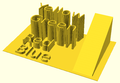 3D Surface


search[edit | edit source]
The search() function is a general-purpose function to find one or more (or all) occurrences of a value or list of values in a vector, string or more complex list-of-list construct.
Search usage[edit | edit source]
- search( match_value , string_or_vector [, num_returns_per_match [, index_col_num ] ] );
Search arguments[edit | edit source]
- match_value
- Can be a single string value. Search loops over the characters in the string and searches for each one in the second argument. The second argument must be a string or a list of lists (this second case is not recommended). The search function does not search for substrings.
- Can be a single numerical value.
- Can be a list of values. The search function searches for each item on the list.
- To search for a list or a full string give the list or string as a single element list such as ["abc"] to search for the string "abc" (See Example 9) or [[6,7,8]] to search for the list [6,7,8]. Without the extra brackets, search looks separately for each item in the list.
- If match_value is boolean then search returns undef.
- string_or_vector
- The string or vector to search for matches.
- If match_value is a string then this should be a string and the string is searched for individual character matches to the characters in match_value
- If this is a list of lists, v=[[a0,a1,a2...],[b0,b1,b2,...],[c0,c1,c2,...],...] then search looks only at one index position of the sublists. By default this is position 0, so the search looks only at a0, b0, c0, etc. The index_col_num parameter changes which index is searched.
- If match_value is a string and this parameter is a list of lists then the characters of the string are tested against the appropriate index entry in the list of lists. However, if any characters fail to find a match a warning message is printed and that return value is excluded from the output (if num_returns_per_match is 1). This means that the length of the output is unpredictable.
- num_returns_per_match (default: 1)
- By default, search only looks for one match per element of match_value to return as a list of indices
- If num_returns_per_match > 1, search returns a list of lists of up to num_returns_per_match index values for each element of match_value.
- See Example 8 below.
- If num_returns_per_match = 0, search returns a list of lists of all matching index values for each element of match_value.
- See Example 6 below.
- index_col_num (default: 0)
- As noted above, when searching a list of lists, search looks only at one index position of each sublist. That index position is specified by index_col_num.
- See Example 5 below for a simple usage example.
Search usage examples[edit | edit source]
- See example023.scad included with OpenSCAD for a renderable example.
Index values return as list[edit | edit source]
| Example | Code | Result |
|---|---|---|
|
1 |
|
[0] |
|
2 |
|
[] |
|
3 |
|
[[0,4]] |
|
4 |
|
[[0,4]] (see also Example 6 below) |
Search on different column; return Index values[edit | edit source]
Example 5:
 data= [ ["a",1],["b",2],["c",3],["d",4],["a",5],["b",6],["c",7],["d",8],["e",3] ];
 echo(search(3, data));    // Searches index 0, so it doesn't find anything
 echo(search(3, data, num_returns_per_match=0, index_col_num=1));
Outputs:
 ECHO: []
 ECHO: [2, 8]
Search on list of values[edit | edit source]
Example 6: Return all matches per search vector element.
 data= [ ["a",1],["b",2],["c",3],["d",4],["a",5],["b",6],["c",7],["d",8],["e",9] ];
 search("abc", data, num_returns_per_match=0);
Returns:
[[0,4],[1,5],[2,6]]
Example 7: Return first match per search vector element; special case return vector.
 data= [ ["a",1],["b",2],["c",3],["d",4],["a",5],["b",6],["c",7],["d",8],["e",9] ];
 search("abc", data, num_returns_per_match=1);
Returns:
[0,1,2]
Example 8: Return first two matches per search vector element; vector of vectors.
 data= [ ["a",1],["b",2],["c",3],["d",4],["a",5],["b",6],["c",7],["d",8],["e",9] ];
 search("abce", data, num_returns_per_match=2);
Returns:
[[0,4],[1,5],[2,6],[8]]
Search on list of strings[edit | edit source]
Example 9:
 lTable2=[ ["cat",1],["b",2],["c",3],["dog",4],["a",5],["b",6],["c",7],["d",8],["e",9],["apple",10],["a",11] ];
 lSearch2=["b","zzz","a","c","apple","dog"];
 l2=search(lSearch2,lTable2);
 echo(str("Default list string search (",lSearch2,"): ",l2));
Returns
ECHO: "Default list string search (["b", "zzz", "a", "c", "apple", "dog"]): [1, [], 4, 2, 9, 3]"
Getting the right results[edit | edit source]
// workout which vectors get the results
v=[ ["O",2],["p",3],["e",9],["n",4],["S",5],["C",6],["A",7],["D",8] ];
//
echo(v[0]);					// -> ["O",2]
echo(v[1]);                                     // -> ["p",3]
echo(v[1][0],v[1][1]);                          // -> "p",3
echo(search("p",v));                            // find "p" -> [1]
echo(search("p",v)[0]);                         // -> 1
echo(search(9,v,0,1));                          // find  9  -> [2]
echo(v[search(9,v,0,1)[0]]);                    // -> ["e",9]
echo(v[search(9,v,0,1)[0]][0]);                 // -> "e"
echo(v[search(9,v,0,1)[0]][1]);                 // -> 9
echo(v[search("p",v,1,0)[0]][1]);               // -> 3
echo(v[search("p",v,1,0)[0]][0]);               // -> "p"
echo(v[search("d",v,1,0)[0]][0]);               // "d" not found -> undef
echo(v[search("D",v,1,0)[0]][1]);               // -> 8
OpenSCAD version [edit | edit source]
version() and version_num() returns the OpenSCAD version number.
- The version() function returns the OpenSCAD version as a vector of three numbers, e.g. [2011, 9, 23]
- The version_num() function returns the OpenSCAD version as a number, e.g. 20110923
parent_module(n) and $parent_modules[edit | edit source]
$parent_modules contains the number of modules in the instantiation stack. parent_module(i) returns the name of the module i levels above the current module in the instantiation stack. The stack is independent of where the modules are defined. It's where they're instantiated that counts. This can, for example, be used to build a BOM (Bill Of Material).
Example:
 module top() {
   children();
 }
 module middle() {
   children();
 }
 top() middle() echo(parent_module(0)); // prints "middle"
 top() middle() echo(parent_module(1)); // prints "top"
assert[edit | edit source]
[Note: Requires version 2019.05]
see also Assertion (software development)
Assert evaluates a logical expression. If the expression evaluates to false, the generation of the preview/render is stopped, and an error condition is reported via the console. The report consists of a string representation of the expression and an additional string (optional) that is specified in the assert command.
 assert(condition);
 assert(condition, message);
Parameters
- condition
- Expression. The expression to be evaluated as check for the assertion.
- message
- String. Optional message to be output in case the assertion failed.
Example[edit | edit source]
The simplest example is a simple assert(false);, e.g. in a file named assert_example1.scad.
cube();
assert(false);
sphere();

// ERROR: Assertion 'false' failed in file assert_example1.scad, line 2
This example has little use, but the simple assert(false); can be used in code sections that should be unreachable.
Checking parameters[edit | edit source]
A useful example is checking the validity of input parameters:
module row(cnt = 3){
    // Count has to be a positive integer greater 0
    assert(cnt > 0);
    for (i = [1 : cnt]) {
        translate([i * 2, 0, 0]) sphere();
    }
}

row(0);

// ERROR: Assertion '(cnt > 0)' failed in file assert_example2.scad, line 3
Adding message[edit | edit source]
When writing a library, it could be useful to output additional information to the user in case of an failed assertion.
module row(cnt = 3){
    assert(cnt > 0, "Count has to be a positive integer greater 0");
    for(i = [1 : cnt]) {
        translate([i * 2, 0, 0]) sphere();
    }
}

row(0);

// ERROR: Assertion '(cnt > 0)': "Count has to be a positive integer greater 0" failed in file assert_example3.scad, line 2
Using assertions in function[edit | edit source]
Assert returns its children, so when using it in a function you can write
function f(a, b) =
    assert(a < 0, "wrong a") // assert input
    assert(b > 0, "wrong b") // assert input
    let (c = a + b) // derive a new value from input
    assert(c != 0, "wrong c") // assert derived value
    a * b; // calculate