OpenSCAD User Manual/Mathematical Operators

Scalar arithmetic operators[edit | edit source]
The scalar arithmetic operators take numbers as operands and produce a new number.
| + | add |
| - | subtract |
| * | multiply |
| / | divide |
| % | modulo |
| ^ | exponent [Note: Requires version 2021.01] |
The - can also be used as prefix operator to negate a number.
Prior to version 2021.01, the builtin mathematical function pow() is used instead of the ^ exponent operator.
Relational operators[edit | edit source]
Relational operators produce a boolean result from two operands.
| < | less than |
| <= | less or equal |
| == | equal |
| != | not equal |
| >= | greater or equal |
| > | greater than |
If both operands are simple numbers, the meaning is self-evident.
If both operands are strings, alphabetical sorting determines equality and order. E.g., "ab" > "aa" > "a".
If both operands are Booleans, true > false. In an inequality comparison between a Boolean and a number true is treated as 1 and false is treated as 0. Other inequality tests involving Booleans return false.
If both operands are vectors, an equality test returns true when the vectors are identical and false otherwise. Inequality tests involving one or two vectors always return false, so for example [1] < [2] is false.
Dissimilar types always test as unequal with '==' and '!='. Inequality comparisons between dissimilar types, except for Boolean and numbers as noted above, always result in false. Note that [1] and 1 are different types so [1] == 1 is false.
undef doesn't equal anything but undef. Inequality comparisons involving undef result in false.
nan doesn't equal anything (not even itself) and inequality tests all produce false. See Numbers.
Logical operators[edit | edit source]
All logical operators take Booleans as operands and produce a Boolean. Non-Boolean quantities are converted to Booleans before the operator is evaluated.
| && | logical AND |
| || | logical OR |
| ! | logical unary NOT |
Since [false] is true, false || [false] is also true.
Logical operators deal with vectors differently than relational operators:
[1, 1] > [0, 2] is false, but
[false, false] && [false, false] is true.
Conditional operator[edit | edit source]
The ?: operator can be used to conditionally evaluate one or another expression. It works like the ?: operator from the family of C-like programming languages.
| ? : | Conditional operator |
| Usage Example: |
a=1;
b=2;
c= a==b ? 4 : 5;
If a equals b, then c is set to 4, else c is set to 5.
|
Vector-number operators[edit | edit source]
The vector-number operators take a vector and a number as operands and produce a new vector.
| * | multiply all vector elements by number |
| / | divide all vector elements by number |
- Example
L = [1, [2, [3, "a"] ] ];
echo(5*L);
// ECHO: [5, [10, [15, undef]]]
Vector operators[edit | edit source]
The vector operators take vectors as operands and produce a new vector.
| + | add element-wise |
| - | subtract element-wise |
The - can also be used as prefix operator to element-wise negate a vector.
- Example
L1 = [1, [2, [3, "a"] ] ];
L2 = [1, [2, 3] ];
echo(L1+L1); // ECHO: [2, [4, [6, undef]]]
echo(L1+L2); // ECHO: [2, [4, undef]]
Using + or - with vector operands of different sizes produce a result vector that is the size of the smaller vector.
Vector dot-product operator[edit | edit source]
If both operands of multiplication are simple vectors, the result is a number according to the linear algebra rule for dot product.
c = u*v; results in . If the operands' sizes don't match, the result is undef.

Matrix multiplication[edit | edit source]
If one or both operands of multiplication are matrices, the result is a simple vector or matrix according to the linear algebra rules for matrix product. In the following, A, B, C... are matrices, u, v, w... are vectors. Subscripts i, j denote element indices.
For A a matrix of size n × m and
B a matrix of size m × p, their product
C = A*B; is a matrix of size n × p with elements
.
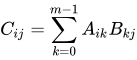
C = B*A; results in undef unless n = p.
For A a matrix of size n × m and
v a vector of size m, their product
u = A*v; is a vector of size n with elements
.
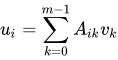
In linear algebra, this is the product of a matrix and a column vector.
For v a vector of size n and
A a matrix of size n × m, their product
u = v*A; is a vector of size m with elements
.
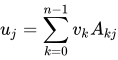
In linear algebra, this is the product of a row vector and a matrix.
Matrix multiplication is not commutative: , .

