C Programming/Print version
 |
This is the print version of C Programming You won't see this message or any elements not part of the book's content when you print or preview this page. |
The current, editable version of this book is available in Wikibooks, the open-content textbooks collection, at
https://en.wikibooks.org/wiki/C_Programming
Why learn C?[edit | edit source]

C is the most commonly used programming language for writing operating systems. The first operating system written in C was Unix. Later operating systems like GNU/Linux were all written in C. Not only is C the language of operating systems, it is the precursor and inspiration for almost all of the most popular high-level languages available today. In fact, Perl, PHP, Python and Ruby are all written in C.
By way of analogy, let's say that you were going to be learning Spanish, Italian, French, or Romanian. Do you think knowing Latin would be helpful? Just as Latin was the basis of all of those languages, knowing C will enable you to understand and appreciate an entire family of programming languages built upon the traditions of C. Knowledge of C enables freedom.
Why C and not assembly?[edit | edit source]
The biggest reason to learn C over assembly is because it's much easier and faster to write code in C than in assembly for a given programming task. With C, you will write far fewer lines of code, complete the job much quicker, and with far less mental effort than if you wrote it in assembly. And with today's modern compilers, an executable file compiled from C source code will typically run faster than one written "by hand" using assembly. Only in rare edge cases, and only if you really know what you are doing, can assembly offer important speed advantages over C code compiled with a decent compiler.
And with C, you do not have to sacrifice a lot of low level control over how your code is executed. A typical C statement translates into just a few assembly instructions. But C also provides you with a large software library to help you execute low-level tasks that you'd rather not be bothered programming.
Another huge advantage of C is portability. Different processors have different instruction sets. Having to rewrite and maintain assembly code for each computer architecture you wish to execute your code on is an onerous task. And so one of the main strengths of C is that it combines universality and portability across various computer architectures while still giving you the same kind of low level hardware control you get with assembly. This means you can write your C source code once and easily compile it into binaries for use on a wide variety of machines.
For example, C programs can be compiled and run on the HP 50g calculator (ARM processor), the TI-89 calculator (68000 processor), Palm OS Cobalt smartphones (ARM processor), the original iMac (PowerPC), the Arduino (Atmel AVR), and the Intel iMac (Intel Core 2 Duo). Each of these devices has its own assembly that is completely incompatible with the assembly of any other. C makes it possible to run your code on these machines with much less effort.
So is it any wonder that C is such a popular language?
Like toppling dominoes, the next generation of programs follows the trend of its ancestors. Operating systems designed in C always have system libraries designed in C. Those system libraries are in turn used to create higher-level libraries (like OpenGL, or GTK), and the designers of those libraries often decide to use the language the system libraries used. Application developers use the higher-level libraries to design word processors, games, media players and the like. Many of them will choose to program in the language that the higher-level library uses. And the pattern continues on and on and on...
That said, learning assembly can be fun and worthwhile because it can give you a deep understanding of how your computer works at very low levels. And learning assembly will definitely help you become a more skilled C programmer. So, by all means, we encourage you learn assembly, but when it comes time to do real work, you'll definitely want to get it done with C.
Why C, and not another language?[edit | edit source]
The primary design of C is to produce portable code while maintaining performance and minimizing footprint (CPU time, memory usage, disk I/O, etc.). This is useful for operating systems, embedded systems or other programs where performance matters a lot (“high-level” interface would affect performance). With C it’s relatively easy to keep a mental picture of what a given line really does, because most of the things are written explicitly in the code. C has a big codebase for low level applications. It is the “native” language of UNIX, which makes it flexible and portable. It is a stable and mature language which is unlikely to disappear for a long time and has been ported to most, if not all, platforms.
One powerful reason is memory allocation. Unlike most programming languages, C allows the programmer to write directly to memory. Key constructs in C such as structs, pointers and arrays are designed to structure and manipulate memory in an efficient, machine-independent fashion. In particular, C gives control over the memory layout of data structures. Moreover dynamic memory allocation is under the control of the programmer (which also means that memory deallocation has to be done by the programmer). Languages like Java and Perl shield the programmer from having to manage most details of memory allocation and pointers (except for memory leaks and some other forms of excess memory usage). This can be useful since dealing with memory allocation when building a high-level program is a highly error-prone process. However, when dealing with low-level code such as the part of the OS that controls a device, C provides a uniform, clean interface. These capabilities just do not exist in most other languages.
While Perl, PHP, Python and Ruby may be powerful and support many features not provided by default in C, they are not normally implemented in their own language. Rather, most such languages initially relied on being written in C (or another high-performance programming language), and would require their implementation be ported to a new platform before they can be used.
As with all programming languages, whether you want to choose C over another high-level language is a matter of opinion and both technical and business requirements could dictate which language is required.
History[edit | edit source]
The field of computing as we know it today started in 1947 with three scientists at Bell Telephone Laboratories—William Shockley, Walter Brattain, and John Bardeen—and their groundbreaking invention: the transistor. In 1956, the first fully transistor-based computer, the TX-0, was completed at MIT. The first integrated circuit was created in 1958 by Jack Kilby at Texas Instruments, but the first high-level programming language existed even before then.
The Fortran project was developed in 1954 by IBM. A shortening of "The IBM Mathematical Formula Translating System", the project had the purpose of creating and fostering development of a procedural, imperative programming language that was especially suited to numeric computation and scientific computing. It was a breakthrough in terms of productivity and programming ease (compared to assembly language) and speed (Fortran programs ran nearly as fast as, and in some cases, just as fast as, programs written in assembly). Furthermore, Fortran was written at a high-enough level (and thus was machine independent enough) to become the first widely adopted programming language. The Algorithmic Language (Algol 58) was derived from Fortran in 1958 and evolved into Algol 60 in 1960. The Combined Programming Language (CPL) was then created out of Algol 60 in 1963. In 1967, it evolved into Basic CPL (BCPL), which was the basis for B, which was created in 1971, and served as the basis of C.
Created by Ken Thompson at Bell Labs, B was a stripped-down version of BCPL that was also a compiled language (see User's Reference to B) used in early internal versions of the UNIX operating system. As Dennis Ritchie noted in his Development of the C Language :
The B compiler on the PDP-7 did not generate machine instructions, but instead 'threaded code', an interpretive scheme in which the compiler's output consists of a sequence of addresses of code fragments that perform the elementary operations. The operations typically — in particular for B — act on a simple stack machine.
Thompson and Ritchie improved B, and called the result NB. Further extensions to NB created its logical successor, C. Most of UNIX was rewritten in NB, and then C, which resulted in a more portable operating system. The portability of UNIX was the main reason for the initial popularity of both UNIX and C. Rather than creating a new operating system for each new machine, system programmers could simply write the few system-dependent parts required for the machine, and then write a C compiler for the new system. Since most of the system utilities were thus written in C, it simply made sense to also write new utilities in C.
The American National Standards Institute began work on standardizing the C language in 1983, and completed the standard in 1989. The standard, ANSI X3.159-1989 "Programming Language C", served as the basis for all implementations of C compilers. The standards were later updated in 1990 and 1999, allowing for features that were either in common use, or were appearing in C++.
What You Need Before You Can Learn[edit | edit source]
Getting Started[edit | edit source]
This book introduces and teaches the basics of the C programming language and touches upon some advanced topics as well. This section outlines the required skills and tools you'll need to get the most out of this book.
Skills and Prior Experience You'll Need[edit | edit source]
This book is for beginning programmers, so don't worry if you have no formal computer training or prior programming experience. It's assumed you know how to turn your computer on, start and stop applications, and perform other basic operations like installing software. It's also assumed you have some experience interacting with your operating system through a terminal window using its command line interface. If you aren't sure what this means, consider seeking out a tutorial for your chosen platform that can get you comfortable with getting around your computer's command line. At a minimum, you should know the basic commands for navigating to different directories and performing simple file management operations. This book will spell out any other commands you'll need to run from the command line to get your C code working on your machine.
Software You'll Need[edit | edit source]
No one ever became a musician just by reading sheet music. Musicians have to constantly play and practice on their instruments to get good. Similarly, the only way to become a programmer is to write and execute lots of code. To do that, you will need two different pieces of software: a compiler and a text editor. Both can be had for no cost.
Compilers[edit | edit source]
A compiler is a sophisticated piece of software for converting the C source code you write with your text editor into the machine code[1] that you can execute on your computer. Below is a list of some popular C compilers. Note that some of the compilers listed below come as part of an integrated development environment (IDE). However, if you are brand new to programming, it's best if you can install and run the compiler from the command line instead of through an IDE. This book uses the GNU C Compiler (GCC) in its examples so we recommend installing this compiler for use with this book. The next section in this chapter will explain how to download and install the GCC software to your machine.
Popular C compilers/IDEs include:
| Name | Website | Platform | License | Details |
|---|---|---|---|---|
| Microsoft Visual Studio Community | Visual Studio | Windows | Proprietary, free of charge | Powerful and student-friendly version of an industry standard compiler. |
| Xcode | Xcode | macOS, OSX | Proprietary, free of charge | Available free of charge at Mac App Store. |
| Tiny C Compiler (TCC) | tinycc | GNU/Linux, Windows | LGPL | Small, fast and simple compiler. |
| Clang | clang | GNU/Linux, Windows, Unix, OS X | University of Illinois/NCSA License | A free, permissively licensed front-end using a LLVM backend. |
| GNU C Compiler | gcc | GNU/Linux, MinGW or mingw-w64 (Windows), Unix, OS X. | GPL | The De facto standard. Ships with most Unix-like systems. |
Text Editors and IDEs[edit | edit source]
Aside from a compiler, the only other software requirement is a text editor for writing and saving your C code. Note that a text editor is different from a word processor, a piece of software with many features for creating visually appealing documents. Unlike word processors, text editors are primarily designed to create plain text files. On Windows, the Notepad text editor can be used but it does not offer any advanced capabilities such as syntax highlighting and code completion. There are hundreds of text editors (see List of Text Editors). Among the most popular are Notepad++ for Windows as well as Sublime Text, gedit, Vim and Emacs which are also available on other operating systems (“cross-platform”). These text editors come with syntax highlighting and line numbers, which makes code easier to read at a glance, and to spot syntax errors. Many text editors have features for increasing your coding speed, such as keystroke macros and code snippets, that you can take advantage of as you gain skill as a programmer.
You may also be considering the use of an integrated Development Environment (IDE) to help you write code. An IDE is a suite of integrated tools and features in one convenient package, usually with a graphical user interface. These programs include a text editor and file browser and are also sometimes bundled with an easily accessible compiler. They also typically include a debugger, a tool that will enable you to do such things as step through the program you develop manually one source code line at a time, or alter data as an aid to finding and correcting programming errors.
However, many IDEs do not offer a command line interface to the compiler and/or offer only graphical buttons or a menu for executing programs. So for new programmers, an IDE is not ideal. Instead, a simple text editor will suffice along with the ability to issue simple commands on the command line to help you gain a hands-on familiarity and understanding of core development tools. Of course, an IDE may still be useful to you if you have experience with one. But as a general guideline: Do not use an IDE unless you know what the IDE is doing for you!
Other popular compilers/IDEs include:
| Name | Website | Platform | License | Details |
|---|---|---|---|---|
| Eclipse CDT | Eclipse | Windows, Mac OS X, GNU/Linux | Free/Libre and Open Source | Eclipse IDE for C/C++ development, a popular open source IDE. |
| Netbeans | Netbeans | Cross-platform | CDDL and GPL 2.0 | A Good comparable matured IDE to Eclipse. |
| GNOME Builder | Builder | GNU/Linux | GPL | A feature-rich but simple IDE for the GNOME desktop environment. |
| Anjuta | Anjuta | GNU/Linux | GPL | An extensible GTK+3 IDE for the GNOME desktop environment. |
| Geany | geany | Cross-platform | GPL | A lightweight cross-platform GTK+ notepad based on Scintilla, with basic IDE features. |
| KDevelop | KDevelop | Cross-platform | GPL | A cross-platform IDE for the KDE project. |
| Little C Compiler (LCC) | lcc | Windows | Open Source but not Libre | Small open source compiler. |
| Pelles C | Pelles C | Windows, Pocket PC | Proprietary, free of charge | A complete C development kit for Windows. |
| Dev-C++ | Dev C++ | Windows | GPL | Updated version of the formerly popular Bloodshed Dev-C++. |
| CodeLite | CodeLite | Cross-platform | GPL 2 | Free IDE for C/C++ development. |
| Code::Blocks | Code::Blocks | Cross-platform | GPL 3.0 | Built to meet users' most demanding needs. Very extensible and fully configurable. |
On GNU/Linux, GCC is almost always included by default.
On Microsoft Windows, Dev-C++ is recommended for beginners because it is easy to use, free, and simple to install. Although the initial developer (Bloodshed) hasn’t updated it since 2005, a new version appeared in 2011, made by an independent programmer, and is being actively developed.[2] An alternate option for those working only in the Windows environment is the proprietary Microsoft Visual Studio Community which is free of charge and has an excellent debugger.
On Mac OS X, the Xcode IDE provides the compilers needed to compile various source files. The newer versions do not include the command line tools. They need to be downloaded via Xcode->Preferences->Downloads.
Footnotes[edit | edit source]
- ↑ Actually, GCC’s (GNU C Compiler) cc (C Compiler) translates the input .c file to the target CPU’s assembly, output is written to an .s file. Then as (assembler) generates a machine code file from the .s file. Pre-processing is done by another sub-program cpp (C PreProcessor), which is not to be confused with c++ (a compiler for another programming language).
- ↑ http://orwelldevcpp.blogspot.com/
Obtaining a Compiler[edit | edit source]
Dev-C++[edit | edit source]
Dev C++ is an Integrated Development Environment (IDE) for the C++ programming language, available from Bloodshed Software. An updated version is available at Orwell Dev-C++.
C++ is a programming language which contains within itself most of the C language, plus extensions. Most C++ compilers will compile C programs, sometimes with a few adjustments (like invoking them with a different name or command line switch). Therefore, you can use Dev C++ for C development.
However, Dev C++ is not the compiler. It is designed to use the MinGW or Cygwin versions of GCC - both of which can be obtained as part of the Dev C++ package, although they are completely different projects.
Dev C++ simply provides an editor, syntax highlighting, some facilities for the visualisation of code (like class and package browsing) and a graphical interface to the chosen compiler. Because Dev C++ analyses the error messages produced by the compiler and attempts to distinguish the line numbers from the errors themselves, the use of other compiler software is discouraged since the format of their error messages is likely to be different.
The latest version of Dev-C++ is a beta for version 5. However, it still has a significant number of bugs. All the features are there, and it is quite usable. It is considered one of the best free software C IDEs available for Windows.
A version of Dev C++ for Linux is in the pipeline. It is not quite usable yet, however. Linux users already have a wealth of IDEs available. (e.g. KDevelop and Anjuta.) Most of the graphical text editors, and other common editors such as emacs and vim, support syntax highlighting.
Windows[edit | edit source]
- Go to https://sourceforge.net/projects/orwelldevcpp/ and pick the download option.
- The setup is pretty straight forward. Make sure the compiler option is ticked.
- You can now use the environment provided by the software to write and run your code.
- OPTIONALLY: "C:\Program Files (x86)\Dev-Cpp\MinGW64\bin" can be added to the global PATH variable of the operating system to compile with GCC from a command prompt.
GCC[edit | edit source]
The GNU Compiler Collection (GCC) is a free/libre set of compilers developed by the Free Software Foundation and can be installed on a wide variety of operating systems. GCC commands are used throughout this book to demonstrate how to compile C code so you are encouraged to take the time to install GCC on your machine.
GNU/Linux[edit | edit source]
On GNU/Linux, Installing the GNU C Compiler can vary in method from distribution to distribution. (Type in cc -v to see if it is installed already.)
- For Ubuntu, install the GCC compiler (along with other necessary tools) by running
sudo apt install build-essentialin the terminal. - For Debian, install the GCC compiler (as root) by running
apt install gccin the terminal. - For Fedora, install the GCC compiler (as root) by running
dnf install gccin the terminal. - For RHEL, install the GCC compiler (as root) by running
dnf install gccin the terminal. - For Mandrake, install the GCC compiler (as root) by running
urpmi gccin the terminal. - For Slackware, the package is available on their website - simply download, and type
installpkg gcc-xxxxx.tgzin the terminal. - For Gentoo, you should already have GCC installed as it will have been used when you first installed. To update it run (as root)
emerge -uav gccin the terminal. - For Arch Linux, install the GCC compiler (as root) by running
pacman -S gccin the terminal. - For Void Linux, install the GCC compiler (as root) by running
xbps-install -S gccin the terminal. - If you cannot become root, get the GCC tarball from ftp://ftp.gnu.org/ and follow the instructions in it to compile and install in your home directory. Be warned though, you need a C compiler to do that - yes, GCC itself is written in C.
- You can use a commercial C compiler/IDE.
macOS[edit | edit source]
The simplest method for obtaining a compiler is to install Apple's proprietary IDE, Xcode, available for free.
Xcode comes bundled with a GCC-compatible compiler called clang which replaced GCC as Xcode's default C compiler a number of years ago. But because Xcode aliases the gcc command to the clang compiler, GCC installation isn't necessary to compile the example code in this book.
If you prefer using the GCC compiler, the third-party package manager, Homebrew, provides an easy installation process. You'll first need to install Homebrew, and then issue the brew install command to install the desired GCC Homebrew formulae. You may want to find a recent tutorial that will step you through this process as other commands may be necessary to get GCC set up flawlessly on your system, especially if you already have Xcode installed.
For hardcore computer enthusiasts, GCC can be compiled directly from the source code. We highly recommend searching out and following an up-to-date tutorial for installing GCC from source files.
BSD Family Systems[edit | edit source]
- For FreeBSD, NetBSD, OpenBSD, DragonFly BSD the port of GNU GCC is available in the base system, or it could be obtained using the ports collection or pkgsrc.
Windows[edit | edit source]
There are three ways to use GCC on Windows: Cygwin, MinGW and Windows Subsystem for Linux (WSL). Applications compiled with Cygwin will not run on any computer without Cygwin, so MinGW is recommended. MinGW is simpler to install, and takes less disk space.
MinGW[edit | edit source]
- Go to http://sourceforge.net/projects/mingw/ download and save this to your hard drive.
- Once the download is finished, open it and follow the instructions. You can also choose to install additional compilers, or the tool Make, but these aren't necessary.
- Now you need to set your PATH. Right-click on "My computer" and click "Properties". Go to the "Advanced" tab and click on "Environment variables". Go to the "System variables" section and scroll down until you see "Path". Click on it, then click "edit". Add "C:\MinGW\bin\" (without the quotes) to the end.
- To test if GCC works, open a command prompt and type "gcc". You should get the message "gcc: fatal error: no input files compilation terminated.". If you get this message, GCC is installed correctly.
Cygwin[edit | edit source]
- Go to http://www.cygwin.com and click on the "Install Cygwin Now" button in the upper right corner of the page.
- Click "run" in the window that pops up, and click "next" several times, accepting all the default settings.
- Choose any of the Download sites ("ftp.easynet.be", etc.) when that window comes up; press "next" and the Cygwin installer should start downloading.
- When the "Select Packages" window appears, scroll down to the heading "Devel" and click on the "+" by it. In the list of packages that now displays, scroll down and find the "gcc-core" package; this is the compiler. Click once on the word "Skip", and it should change to some number like "3.4" etc. (the version number), and an "X" will appear next to "gcc-core" and several other related packages that will now be downloaded.
- Click "next" and the compiler as well as the Cygwin tools should start downloading; this could take a while. While you're waiting for the installation to finish, download any text-editor designed for programming. While Cygwin does include some, you may prefer doing a web search to find other alternatives. While using a stock text editor is possible, it is not ideal.
- Once the Cygwin downloads are finished and you have clicked "next", etc. to finish the installation, double-click the Cygwin icon on your desktop to begin the Cygwin "command prompt". Your home directory will automatically be set up in the Cygwin folder, which now should be at "C:\cygwin" (the Cygwin folder is in some ways like a small unix/linux computer on your Windows machine -- not technically of course, but it may be helpful to think of it that way).
- Type "gcc" at the Cygwin prompt and press "enter"; if "gcc: no input files" or something like it appears you have succeeded and now have the GCC compiler on your computer (and congratulations -- you have also just received your first error message!).
Windows Subsystem for Linux[edit | edit source]
- Go to http://aka.ms/wsldocs and follow the steps to install WSL
- Go to https://aka.ms/vscode and follow the steps to install VSCode
- Follow the guide and choose Get Started with C++ and WSL
- As a result you will need to install possibly Ubuntu and set-up accordingly installing GCC like the Linux guide above.
The current stable (usable) version of GCC is 4.9.1 published on 2014-07-16, which supports several platforms. In fact, GCC is not only a C compiler, but a family of compilers for several languages, such as C++, Ada, Java, and Fortran.
Embedded systems[edit | edit source]
- Most CPUs are microcontrollers in embedded systems, often programmed in C, but most of the compilers mentioned above (except GCC) do not support such CPUs. For specialized compilers that do support embedded systems, see Embedded Systems/C Programming.
Other C compilers[edit | edit source]
We have a long list of C compilers in a much later section of this Wikibook. Which of those compilers would be suitable for beginning C programmers, that we should say a few words about getting started with that particular compiler in this section of this Wikibook?
Beginning C[edit | edit source]
Intro Exercise[edit | edit source]
The "Hello, World!" Program[edit | edit source]
Tradition dictates that we begin with a program that displays a "Hello, World!" greeting to the screen, followed by a new line, and then exits. Below is the C source code that does just that. Type this code into your preferred text editor/IDE and save it to a file named hello.c.
#include <stdio.h>

int main(void)
{
    printf("Hello, World!\n");
    return 0;
}
Source code analysis[edit | edit source]
Although this is a very simple program, a lot of hidden meaning is packed into the many symbols you see in the code. Though your compiler understands it, you can only guess at what the code, sprinkled with some familiar English words, might do. One of your first jobs as a new programmer will be to learn the many "words" and symbols of the C programming language, the language your compiler understands. Once you learn the meaning underlying the code, you will be able to "talk to" the compiler and give it your own orders and build any kind of program you are inventive and resourceful enough to create.
But note that knowing the meanings of arcane symbols is not all there is to programming. You can't master another language by reading a translation dictionary. To become fluent in another language, you have to practice conversing in that language. Learning a programming language is no different. You have to practice "talking" to the compiler with the source code you write. So be sure to type in the code example above and feel free to experiment and alter it with your curiosity as your guide.
OK, so let's dive in and look at the first line in our program:
#include <stdio.h>
Before understanding what this line does, you have to know that your machine already comes pre-installed with some C software code. The code is there to save you from the drudgery of writing code that performs basic, common tasks. This reusable code is referred to as a library. And so our first line in our example program signals to the compiler that we'd like to "check out" some code from the library and make use of it in our program. Here, we are borrowing code that will help us print text to the screen.
The way we tell the C compiler to include library code into our own code is by using what's called a preprocessor directive. One of the very first tasks your compiler will perform is to search through your source code for preprocessor directives which modify your source code in some way. In our case, the #include preprocessor directive tells the compiler to copy source code from a library and insert it directly into the code where the preprocessor directive is found. Since our directive is at the very top of the file, the library code will be inserted at the top of the source file. (Note that this all happens in the computer's memory, so the original file on your disk never actually gets altered.)
But which library code should the compiler insert? The next bit in the line, the <stdio.h>, tells the compiler to copy and paste the C code from the stdio.h file into your code. The angle brackets surrounding the file name tell the compiler to look for the file in the standard library as opposed, to say, your own personal library of reusable code. Note that files with the .h extension are called header files. The stdio.h header file contains many functions related to input and output that are defined according to the C standard. Though this header file gives us access to many different functions, the only library function we are interested in from stdio.h is the printf function.
OK, but what, exactly, is a function? Let's take a look at the next line in our code so we can begin to get an idea:
int main(void)
Here we create a function named main that is the starting point for all C programs. All C programs require a function called "main" or they will not compile. Our function name is surrounded by two mysterious symbols, int and (void). The "int" bit tells the compiler what kind of value our function will return while the "(void)" bit tells our compiler what kind of values we will "pass" into our function. We'll skip over what exactly this means for now as these values will be covered in more detail later in the book. The most important thing to understand right now is that together, these symbols declare our function to the compiler and tell it that it exists.
So what is a function? In computer science, the term “function” is used a bit more loosely than in mathematics, since functions often express imperative ideas (as in the case of C) - that is, how-to process, instead of declarations. For now, suffice it to say, functions define a set of computer statements that work together to carry out a specific task. In C, the statements associated with a function are placed between a set of curly braces, { }, which mark the beginning and end of the statements. Together, the curly braces and the statements are called a block. Let's take a look at the first line in our function's block:
printf("Hello World!\n");
This line of code is the heart of our program, the one that outputs our greeting to the user’s console (also known as the terminal in the context of Unix-like operating systems), the text-based interface installed on your computer. This statement is a function call and has two main parts: the name of the library function used to print our greeting, printf, followed by the data that we will pass to the function, seen here between the pair of parentheses. The data we are passing to the function is the string, “Hello World!\n”. The "\n" part at the end of the string is a special kind of character called an escape sequence. The "\n" escape sequence generates the new line at the end of our text. Strings and escape sequences will be covered in more detail later. We terminate the function call statement with a semicolon so the compiler knows that it should begin looking for a new statement which it finds on the next line:
return 0;
Here, we say that our main function returns an integer value using the return keyword. The integer value we are returning is "0". But what does this mean, exactly? In the specific context of the main function, the value we return is called the exit status, which we report back to the operating system to indicate whether our code ran without error. As our programs grow in complexity, we can use other integers as codes to indicate various types of errors. This style of providing exit status is a long standing convention[1]. We will go into much more detail on return values of functions later in the book.
So that's a lot to take in, even for such a short program. Don't worry if you don't understand all of it and don't worry about memorizing it. You do not learn programming by memorizing, you learn by repetition and by doing. Memorizing all the notes to Beethoven's 5th symphony does not make you a concert pianist, you must get on the keyboard and practice and play!
Next we will show you how to take the source code you typed in and turn it into an executable file with your compiler.
Compiling[edit | edit source]
Compiling is the process we used to describe translating the orders you gave to the compiler in your source code into the machine language that can be run by your operating system and microprocessor. In this way, your C compiler is a middle-man. You talk to the compiler in a language it understands, C source code, and the compiler translates the source into machine code to save you a lot of painstaking, tedious work writing assembly code.
If the compiler finds your source code confusing, it will throw an error along with a message to help you fix up your source code and clear up any confusion. You will then need to try to recompile the code and repeat the process until it compiles without error. Note that code that compiles without error doesn't mean it's free of bugs. It just means the compiler understands the instructions provided by your source code.
Unix-like[edit | edit source]
If you are using a Unix(-like) system, such as GNU/Linux, Mac OS X, or Solaris, it will probably have GCC installed, otherwise on Linux you can install it using the package manager of your distribution. Open the virtual console or a terminal emulator and enter the following (be certain your current working directory is the one containing your source code):
gcc hello.c
By default gcc will generate our executable binary with the name a.out. To run your new generated program type:
./a.out
You should see Hello, World! printed after the last prompt.
To see the exit status of the last program you ran, type on your shell command:
echo $?
This shows the value the main function has returned, which is 0 in the above example.
There are a lot of options you can use with the gcc compiler. For example, if you want the output to have a name other than a.out, you can use the -o option. The following shows a few examples:
-o- indicates that the next parameter is the name of the resulting program (or library). If this option is not specified, the compiled program will, for historic reasons, end up in a file called "a.out" or "a.exe" (for cygwin users).
-Wall- indicates that gcc should warn about many types of suspicious code that are likely to be incorrect.
You can use these options to create a program called "helloworld" instead of "a.out" by typing:
gcc -o helloworld hello.c -Wall
Now you can run it by typing:
./helloworld
All the options are well documented in the manual[2] for GCC.
On IDEs[edit | edit source]
If you are using an IDE you may have to select console project, and to compile you just select build from the menu or the toolbar. The executable will appear inside the project folder, but you should have a menu button so you can just run the executable from the IDE. The process is roughly the same on all IDEs.
References[edit | edit source]
Preliminaries[edit | edit source]
Before learning C syntax and programming constructs, it is important to learn the meaning of a few key terms that are central in understanding C.
Block Structure, Statements, Whitespace, and Scope[edit | edit source]
Next we'll discuss the basic structure of a C program. If you're familiar with PASCAL, you may have heard it referred to as a block-structured language. C does not have complete block structure (and you'll find out why when you go over functions in detail) but it is still very important to understand what blocks are and how to use them.
So what is in a block? Generally, a block consists of executable statements.
But before we delve into blocks, let's examine statements. One way to describe statements is they are the text (and surrounding whitespace) the compiler will attempt to turn into executable instructions. A simpler definition is statements are bits of code that do things. For example:
int i = 6;
This declares an integer variable, which can be accessed with the identifier 'i', and initializes it to the value 6. The various data types are introduced in the chapter Variables.
You might have noticed the semicolon at the end of the statement. Statements in C always end with a semicolon (;). Leaving off the semicolon is a common mistake many people make, beginners and experts alike! So until it becomes second nature, be sure to double check your statements!
Since C is a "free-format" language, several statements can share a single line in the source file, like this:
/* this declares the variables 'i', 'test', 'foo', and 'bar'
    note that ONLY the variable named 'bar' is initialized to six! */
int i, test, foo, bar = 6;
There are several kinds of statements. You've already seen some of them, such as the assignment (i = 6;). A substantial portion of this book deals with statement construction.
Back to our discussion of blocks. In C, blocks begin with an opening brace "{" and end with a closing brace "}". Blocks can contain other blocks which can contain their own blocks, and so on.
Let's look at a block example.
int main(void)
{
    /* this is a 'block' */
    int i = 5;

    {
        /* this is also a 'block', nested inside the outer block */
        int j = 6;
    }

    return 0;
}
You can use blocks with the preceding statements, such as the main function declaration (and other statements we've not yet covered), but you can also use blocks by themselves.
Whitespace refers to the tab, space and newline characters that separate the text characters that make up the source code.
Like many things in life, it's hard to appreciate whitespace until it's gone. To a C compiler, the source code
    printf("Hello world");
    return 0;
is the same as
printf("Hello world");
return 0;
which is also the same as
    printf (
    "Hello world") ;


    return 0;
The compiler simply ignores most whitespace (except, for example, when it separates return from 0). However, it is common practice to use spaces (or tabs) to organize source code for human readability.
Most of the time we do not want other functions or other programmer's routines accessing data we are currently manipulating, which is why it is important to understand the concept of scope.
Scope describes the level at which a piece of data or a function is visible. There are two types of scope in C, local and global. When we speak of global scope, we're referring to something that can be seen or manipulated from anywhere in the program. Local scope applies to a program element that can be seen or manipulated only within the block in which it was declared.
Let's look at some examples to get a better idea of scope.
int i = 5; /* this is a 'global' variable, it can be accessed from anywhere in the program */

/* this is a function, all variables inside of it
    are "local" to the function. */
int main(void)
{
    int i = 6; /* "local" 'i' is set to 6 */
    printf("%d\n", i); /* prints a '6' to the screen, instead of the global variable of 'i', which is 5 */

    return 0;
}
That shows an example of local and global. But what about different scopes inside of functions?
(you'll learn more about functions later, for now, just focus on the "main" part.)
/* the main function */
int main(void)
{
    /* this is the beginning of a 'block', you read about those above */

    int i = 6; /* this is the first variable of this 'block', 'i' */

    {
        /* this is a new 'block', and because it's a different block, it has its own scope */

        /* this is also a variable called 'i', but in a different 'block',
            because it's in a different 'block' than the first variable named 'i', it doesn't affect the first one! */
        int i = 5;
        printf("%d\n", i); /* prints a '5' onto the screen */
    }
    /* now we're back into the first block */

    printf("%d\n", i); /* prints a '6' onto the screen */

    return 0;
}
Basics of Using Functions[edit | edit source]
Functions are a big part of programming. A function is a special kind of block that performs a well-defined task. If a function is well-designed, it can enable a programmer to perform a task without knowing anything about how the function works. The act of requesting a function to perform its task is called a function call. Many functions require a function call to hand it certain pieces of data needed to perform its task; these are called arguments. Many functions also return a value to the function call when they're finished; this is called a return value (the return value in the above program is 0).
The things you need to know before calling a function are:
- What the function does
- The data type (discussed later) of the arguments and what they mean
- The data type of the return value and what it means
Many functions use the return value for the result of a computation. Some functions use the return value to indicate whether they successfully completed their work. As you have seen in the intro exercise, the main function uses a return value to provide an exit status to the operating system.
All code other than global data definitions and declarations needs to be a part of a function.
Usually, you're free to call a function whenever you wish to. The only restriction is that every executable program needs to have one, and only one, main function, which is where the program begins executing.
We will discuss functions in more detail in a later chapter, C Programming/Procedures and functions.
The Standard Library[edit | edit source]
In 1983, when C was in the process of becoming standardized, the American National Standards Institute (ANSI) formed a committee to establish a standard specification of C known as "ANSI C". That standard specification created a basic set of functions common to each implementation of C, which is referred to as the Standard Library. The Standard Library provides functions for tasks such as input/output, string manipulation, mathematics, files, and memory allocation. The Standard Library does not provide functions that are dependent on specific hardware or operating systems, like graphics, sound, or networking. In the "Hello, World" program, a Standard Library function is used (printf) which outputs lines of text to the standard output stream.
Basics of Compilation[edit | edit source]
Having covered the basic concepts of C programming, we can now briefly discuss the process of compilation.
Like any programming language, C by itself is completely incomprehensible to a microprocessor. Its purpose is to provide an intuitive way for humans to provide instructions that can be easily converted into machine code that is comprehensible to a microprocessor. The compiler is what translates our human-readable source code into machine code.
To those new to programming, this seems fairly simple. A naive compiler might read in every source file, translate everything into machine code, and write out an executable. That could work, but has two serious problems. First, for a large project, the computer may not have enough memory to read all of the source code at once. Second, if you make a change to a single source file, you would have to recompile the entire application.
To deal with these problems, compilers break the job into steps. For each source file (each .c file), the compiler reads the file, reads the files it references via the #include directive, and translates them to machine code. The result of this is an "object file" (.o). After all the object files are created, a "linker" program collects all of the object files and writes the actual executable program. That way, if you change one source file, only that file needs to be recompiled, after which, the application will need to be re-linked.
Without going into details, it can be beneficial to have a superficial understanding of the compilation process.
Preprocessor[edit | edit source]
The preprocessor provides the ability for the inclusion of so called header files, macro expansions, conditional compilation and line control. These features can be accessed by inserting the appropriate preprocessor directives into your code. Before compiling the source code, a special program, called the preprocessor, scans the source code for tokens, or special strings, and replaces them with other strings or code according to specific rules. The C preprocessor is not technically part of the C language and is instead a tool offered by your compiler's software.
All preprocessor directives begin with the hash character (#). You can see one preprocessor directive in the Hello world program. Example:
#include <stdio.h>
This directive causes the stdio header to be included into your program. Other directives such as #pragma control compiler settings and macros. The result of the preprocessing stage is a text string. You can think of the preprocessor as a non-interactive text editor that modifies your code to prepare it for compilation. The language of preprocessor directives is agnostic to the grammar of C, so the C preprocessor can also be used independently to process other kinds of text files.
Syntax Checking[edit | edit source]
This step ensures that the code is valid and will sequence into an executable program. Under most compilers, you may get messages or warnings indicating potential issues with your program (such as a conditional statement always being true or false, etc.)
When an error is detected in the program, the compiler will normally report the file name and line that is preventing compilation.
Object Code[edit | edit source]
The compiler produces a machine code equivalent of the source code that can be linked into the final program. At this point the code itself can't be executed, as it requires linking to do so.
It's important to note after discussing the basics that compilation is a "one way street". That is, compiling a C source file into machine code is easy, but "decompiling" (turning machine code into the C source that creates it) is not. Decompilers for C do exist, but the code they create is hard to understand and only useful for reverse engineering.
Linking[edit | edit source]
Linking combines the separate object files into one complete program by integrating libraries and the code and producing either an executable program or a library. Linking is performed by a linker program, which is often part of a compiler suite.
Common errors during this stage are either missing or duplicate functions.
Automation[edit | edit source]
For large C projects, many programmers choose to automate compilation, both in order to reduce user interaction requirements and to speed up the process by recompiling only modified files.
Most Integrated Development Environments (IDE's) have some kind of project management which makes such automation very easy. However, the project management files are often usable only by users of the same integrated development environment, so anyone desiring to modify the project would need to use the same IDE.
On UNIX-like systems, make and Makefiles are often used to accomplish the same. Make is traditional and flexible and is available as one of the standard developer tools on most Unix and GNU distributions.
Makefiles have been extended by the GNU Autotools, composed of Automake and Autoconf for making software compilable, testable, translatable and configurable on many types of machines. Automake and Autoconf are described in detail in their respective manuals.
The Autotools are often perceived to be complicated and various simpler build systems have been developed. Many components of the GNOME project now use the declarative Meson build system which is less flexible, but instead focuses on providing the features most commonly needed from a build system in a simple way. Other popular build systems for programs written in the C language include CMake and Waf.
Once GCC is installed, it can be called with a list of c source files that have been written but not yet compiled. e.g. if the file main.c includes functions described in myfun.h and implemented in myfun_a.c and myfun_b.c, then it is enough to write
gcc main.c myfun_a.c myfun_b.c
myfun.h is included in main.c, but if it is in a separate header file directory, then that directory can be listed after a "-I " switch.
In larger programs, Makefiles and GNU make program can compile c files into intermediate files ending with suffix .o which can be linked by GCC.
How to compile each object file is usually described in the Makefile with the object file as a label ending with a colon followed by two spaces (tabs often cause problems) followed by a list of other files that are dependencies, e.g. .c files and .o files compiled in another section, and on the next line, the invocation of GCC that is required.
Typing man make or info make often gives the information
needed to on how to use make, as well as GCC.
Although GCC has a lot of option switches, one often used is -g to generate debugging information for gdb to allow gdb to show source code during a step-through of the machine code program. gdb has an 'h' command that shows what it can do, and is usually started with 'gdb a.out' if a.out is the anonymous executable machine code file that was compiled by GCC.
Programming Structure and Style[edit | edit source]
C Structure and Style[edit | edit source]
This is a basic introduction to good coding style in the C Programming Language. It is designed to provide information on how to effectively use indentation, comments, and other elements that will make your C code more readable. It is not a tutorial on actual C programming.
As a beginning programmer, the point of creating structure in the program code might not be clear, as the compiler doesn't care about the difference. However, as programs become complex, chances are that writing the program has become a joint effort. (Or others might want to see how it was accomplished. Or you may have to read it again years later.) Well-written code also helps you get an overview of what the code does.
In the following sections, we will attempt to explain good programming practices that will in turn make your programs clearer.
Introduction[edit | edit source]
In C, programs are composed of statements. Statements are terminated with a semi-colon, and are collected in sections known as functions. By convention, a statement should be kept on its own line, as shown in the example below:
 #include <stdio.h>

 int main(void) {
 	printf("Hello, World!\n");
 	return 0;
 }
The following block of code is essentially the same. While it contains exactly the same code, and will compile and execute with the same result, the removal of spacing causes an essential difference: it's harder to read.
 #include <stdio.h>
 int main(void) {printf("Hello, World!\n");return 0;}
The simple use of indents and line breaks can greatly improve code readability without impacting code performance. Readable code makes it much easier to see where functions and procedures end and which lines are part of which loops and procedures.
This lesson is going to focus on improving the coding style of an example piece of code which applies a formula and prints the result. Later, you'll see how to write code for such tasks in more detail. For now, focus on how the code looks, not what it does.
Line Breaks and Indentation[edit | edit source]
The addition of white space inside your code is arguably the most important part of good code structure. Effective use of white space can create a visual scale of how your code flows, which can be very important when returning to your code when you want to maintain it.
Line Breaks[edit | edit source]
 | Note the use of line numbers. They are not part of the actual code. They are only for reference. |
With minimal line breaks, code is barely human-readable, and may be hard to debug or understand:
#include <stdio.h>
int main(void) { int revenue = 80; int cost = 50; int roi; roi = (100 * (revenue - cost)) / cost; if (roi >= 0) { printf ("%d\n", roi); } return 0; }
Rather than putting everything on one line, it is much more readable to break up long lines so that each statement and declaration goes on its own line. After inserting line breaks, the code will look like this:
#include <stdio.h>
int main(void) {
int revenue = 80;
int cost = 50;
int roi;
roi = (100 * (revenue - cost)) / cost;
if (roi >= 0) {
printf ("%d\n", roi);
}
return 0;
}
Blank Lines[edit | edit source]
Blank lines should be used to offset the main components of your code. Always use them:
- After preprocessor directives.
- After new variables are declared.
- Use your own judgment for finding other places where components should be separated.
Based on these two rules, there should now be at least two line breaks added:
- After line 1, because line 1 has a preprocessor directive.
- After line 6, because line 6 contains a variable declaration.
This will make the code much more readable than it was before:
The following lines of code have line breaks between functions, but without indentation.
#include <stdio.h>

int main(void) {

int revenue = 80;
int cost = 50;

int roi;

roi = (100 * (revenue - cost)) / cost;

if (roi >= 0) {
printf ("%d\n", roi);
}

return 0;
}
But it's still not as readable as it can be.
Indentation[edit | edit source]
Although adding simple line breaks between key blocks of code can make code easier to read, it provides no information about the block structure of the program. Using the tab key can be very helpful. Indentation visually separates paths of execution by moving their starting points to a new column. This simple practice will make it much easier to read and understand code. Indentation follows a fairly simple rule:
- All code inside a new block should be indented by one tab[1] more than the code in the previous path.
Based on the code from the previous section, there are two blocks requiring indentation:
- Lines 4 to 16
- Line 13
#include <stdio.h>

int main(void) {

    int revenue = 80;
    int cost = 50;

    int roi;

    roi = (100 * (revenue - cost)) / cost;

    if (roi >= 0) {
        printf ("%d\n", roi);
    }

    return 0;
}
It is now fairly obvious as to which parts of the program fit inside which blocks. You can tell which parts of the program the coder has intended to be conditional, and which ones he or she has not. Although it might not be immediately noticeable, once many nested paths get added to the structure of the program, the use of indentation can be very important. Thus, indentation makes the structure of your program clear.
It is claimed that research has shown that an indentation size between 2 to 4 characters is easier to read than 8 character indents[2]. However, an indent of 8 characters may still be in use for some systems[3].
Comments[edit | edit source]
Comments in code can be useful for a variety of purposes. They provide the easiest way to set off specific parts of code (and their purpose); as well as providing a visual "split" between various parts of your code. Having good comments throughout your code will make it much easier to remember what specific parts of your code do.
Comments in modern flavors of C (and many other languages) can come in two forms:
// Single Line Comments (added by C99 standard, famously known as c++ style of comments)
and
/* Multi-Line
Comments
(only form of comments supported by C89 standard)*/
Note that Single line comments are a more recent addition to C, so some compilers may not support them. A recent version of GCC will have no problems supporting them.
This section is going to focus on the various uses of each form of commentary.
Single-line Comments[edit | edit source]
Single-line comments are most useful for simple 'side' notes that explain what certain parts of the code do. The best places to put these comments are next to variable declarations, and next to pieces of code that may need explanation. Comments should make clear the intention and ideas behind the corresponding code. What is immediately obvious from reading the code does not belong in a comment.
Based on our previous program, there are various good places to place comments:
- Line 5 and/or 6, to explain what 'int revenue' and 'int cost' represent,
- Line 8, to explain what the variable 'roi' is going to be used for,
- Line 10, to explain the idea of the calculation,
- Line 12, to explain the purpose of the 'if'.
This will make our program look something like:
#include <stdio.h>

int main(void) {

    int revenue = 80;               // as of 2016
    int cost = 50;

    int roi;                        // return on investment in percent

    roi = (100 * (revenue - cost)) / cost;  // formula from accounting book

    if (roi >= 0) {                 // we don't care about negative roi
        printf ("%d\n", roi);
    }

    return 0;
}
Multi-line Comments[edit | edit source]
Multi-line comments are most useful for long explanations of code. They can be used as copyright/licensing notices, and they can also be used to explain the purpose of a block of code. This can be useful for two reasons: They make your functions easier to understand, and they make it easier to spot errors in code. If you know what a block is supposed to do, then it is much easier to find the piece of code that is responsible if an error occurs.
As an example, suppose we had a program that was designed to print "Hello, World! " a certain number of lines, a specified number of times. There would be many for loops in this program. For this example, we shall call the number of lines i, and the number of strings per line as j.
A good example of a multi-line comment that describes 'for' loop i's purpose would be:
 /* For Loop (int i)
    Loops the following procedure i times (for number of lines).  Performs 'for' loop j on each loop,
    and prints a new line at end of each loop.
 */
This provides a good explanation of what i's purpose is, whilst not going into detail of what j does. By going into detail over what the specific path does (and not ones inside it), it will be easier to troubleshoot the path.
Similarly, you should always include a multi-line comment before each function, to explain the role, preconditions and postconditions of each function. Always leave the technical details to the individual blocks inside your program - this makes it easier to troubleshoot.
A function descriptor should look something like:
 /* Function : int hworld (int i,int j)
    Input    : int i (Number of lines), int j (Number of instances per line)
    Output   : 0 (on success)
    Procedure: Prints "Hello, World!" j times, and a new line to standard output over i lines.
 */
This system allows for an at-a-glance explanation of what the function should do. You can then go into detail over how each aspect of the program is achieved later on in the program.
Finally, if you like to have aesthetically-pleasing source code, the multi-line comment system allows for the easy addition of comment boxes. These make the comments stand out much more than they would otherwise. They look like this:
 /***************************************
  *  This is a multi line comment
  *  That is nearly surrounded by a
  *  Cool, starry border!
  ***************************************/
Applied to our original program, we can now include a much more descriptive and readable source code:
#include <stdio.h>

int main(void) {
    /************************************************************************************
     * Function: int main(void)
     * Input   : none
     * Output  : Returns 0 on success
     * Procedure: Prints 2016's return on investment in percent if it is not negative.
     ************************************************************************************/
    int revenue = 80;               // as of 2016
    int cost = 50;

    int roi;                        // return on investment in percent

    roi = (100 * (revenue - cost)) / cost;  // formula from accounting book

    if (roi >= 0) {                 // we don't care about negative roi
        printf ("%d\n", roi);
    }

    return 0;
}
This will allow any outside users of the program an easy way to comprehend what the code functions are and how they operate. It also inhibits uncertainty with other like-named functions.
A few programmers add a column of stars on the right side of a block comment:
 /***************************************
  *  This is a multi line comment       *
  *  that is completely surrounded by a *
  *  cool, starry border!               *
  ***************************************/
But most programmers don't put any stars on the right side of a block comment. They feel that aligning the right side is a waste of time.
Comments written in source files can be used for documenting source code automatically by using popular tools like Doxygen.[4][5]
References[edit | edit source]
- ↑ Several programmers recommend "use spaces for indentation. Do not use tabs in your code. You should set your editor to emit spaces when you hit the tab key." [1] [2] Other programmers disagree. [3] [4] Regardless of whether you prefer spaces or tabs, make sure you keep it consistent within the projects you are working on. Mixing tabs and spaces can cause code to become unreadable.
- ↑ http://www.oualline.com/vim/vim-cook.html#drawing Vim cookbook
- ↑ https://www.kernel.org/doc/html/latest/process/coding-style.html Linux Kernel Coding Style
- ↑ "Coding Conventions for C++ and Java" "all the block comments illustrated in this document have no pretty stars on the right side of the block comment. This deliberate choice was made because aligning those pretty stars is a large waste of time and discourages the maintenance of in-line comments.",
- ↑ c2:BigBlocksOfAsterisks,"Code craft" by Pete Goodliffe page 82,Falvotech "C Programming Style Guide", Fedora Directory Server Coding Style
- Aladdin's C coding guidelines - A more definitive C coding guideline.
- C/C++ Programming Styles GNU Coding styles & Linux Kernel Coding style
Variables[edit | edit source]
Like most programming languages, C uses and processes variables. In C, variables are human-readable names for the computer's memory addresses used by a running program. Variables make it easier to store, read and change the data within the computer's memory by allowing you to associate easy-to-remember labels for the memory addresses that store your program's data. The memory addresses associated with variables aren't determined until after the program is compiled and running on the computer.
At first, it's easiest to imagine variables as placeholders for values, much like in mathematics. You can think of a variable as being equivalent to its assigned value. So, if you have a variable i that is initialized (set equal) to 4, then it follows that i + 1 will equal 5. However, a skilled C programmer is more mindful of the invisible layer of abstraction going on just under the hood: that a variable is a stand-in for the memory address where the data can be found, not the data itself. You will gain more clarity on this point when you learn about pointers.
Since C is a relatively low-level programming language, before a C program can utilize memory to store a variable it must claim the memory needed to store the values for a variable. This is done by declaring variables. Declaring variables is the way in which a C program shows the number of variables it needs, what they are going to be named, and how much memory they will need.
Within the C programming language, when managing and working with variables, it is important to know the type of variables and the size of these types. A type’s size is the amount of computer memory required to store one value of this type. Since C is a fairly low-level programming language, the size of types can be specific to the hardware and compiler used – that is, how the language is made to work on one type of machine can be different from how it is made to work on another.
All variables in C are typed. That is, every variable declared must be assigned as a certain type of variable.
Declaring, Initializing, and Assigning Variables[edit | edit source]
Here is an example of declaring an integer, which we've called some_number. (Note the semicolon at the end of the line; that is how your compiler separates one program statement from another.)
int some_number;
This statement tells the compiler to create a variable called some_number and associate it with a memory location on the computer. We also tell the compiler the type of data that will be stored at that address, in this case an integer. Note that in C we must specify the type of data that a variable will store. This lets the compiler know how much total memory to set aside for the data (on most modern machines an int is 4 bytes in length). We'll look at other data types in the next section.
Multiple variables can be declared with one statement, like this:
int anumber, anothernumber, yetanothernumber;
In early versions of C, variables had to be declared at the beginning of a block. In C99 it is allowed to mix declarations and statements arbitrarily – but doing so is not usual, because it is rarely necessary, some compilers still don’t support C99 (portability), and it may, because it is uncommon yet, irritate fellow programmers (maintainability).
After declaring variables, you can assign a value to a variable later on using a statement like this:
some_number = 3;
The assignment of a value to a variable is called initialization. The above statement directs the compiler to insert an integer representation of the number "3" into the memory address associated with some_number.
We can save a bit of typing by declaring and assigning data to a memory address at the same time:
int some_new_number = 4;
You can also assign variables to the value of other variable, like so:
some_number = some_new_number;
Or assign multiple variables the same value with one statement:
anumber = anothernumber = yetanothernumber = 8;
This is because the assignment x = y returns the value of the assignment, y. For example, some_number = 4 returns 4. That said, x = y = z is really a shorthand for x = (y = z).
Naming Variables[edit | edit source]
Variable names in C are made up of letters (upper and lower case) and digits. The underscore character ("_") is also permitted. Names must not begin with a digit. Unlike some languages (such as Perl and some BASIC dialects), C does not use any special prefix characters on variable names.
Some examples of valid (but not very descriptive) C variable names:
foo
Bar
BAZ
foo_bar
_foo42
_
QuUx
Some examples of invalid C variable names:
2foo    (must not begin with a digit)
my foo  (spaces not allowed in names)
$foo    ($ not allowed -- only letters, and _)
while   (language keywords cannot be used as names)
As the last example suggests, certain words are reserved as keywords in the language, and these cannot be used as variable names.
It is not allowed to use the same name for multiple variables in the same scope. When working with other developers, you should therefore take steps to avoid using the same name for global variables or function names. Some large projects adhere to naming guidelines[1] to avoid duplicate names and for consistency.
In addition there are certain sets of names that, while not language keywords, are reserved for one reason or another. For example, a C compiler might use certain names "behind the scenes", and this might cause problems for a program that attempts to use them. Also, some names are reserved for possible future use in the C standard library. The rules for determining exactly what names are reserved (and in what contexts they are reserved) are too complicated to describe here[citation needed], and as a beginner you don't need to worry about them much anyway. For now, just avoid using names that begin with an underscore character.
The naming rules for C variables also apply to naming other language constructs such as function names, struct tags, and macros, all of which will be covered later.
Literals[edit | edit source]
Anytime within a program in which you specify a value explicitly instead of referring to a variable or some other form of data, that value is referred to as a literal. In the initialization example above, 3 is a literal. Literals can either take a form defined by their type (more on that soon), or one can use hexadecimal (hex) notation to directly insert data into a variable regardless of its type.[citation needed] Hex numbers are always preceded with 0x. For now, though, you probably shouldn't be too concerned with hex.
The Four Basic Data Types[edit | edit source]
In Standard C there are four basic data types. They are int, char, float, and double.
The int type[edit | edit source]
The int type stores integers in the form of "whole numbers". An integer is typically the size of one machine word, which on most modern home PCs is 32 bits (4 octets). Examples of literals are whole numbers (integers) such as 1, 2, 3, 10, 100... When int is 32 bits (4 octets), it can store any whole number (integer) between -2147483648 and 2147483647. A 32 bit word (number) has the possibility of representing any one number out of 4294967296 possibilities (2 to the power of 32).
If you want to declare a new int variable, use the int keyword. For example:
int numberOfStudents, i, j = 5;
In this declaration we declare 3 variables, numberOfStudents, i and j, j here is assigned the literal 5.
The char type[edit | edit source]
The char type is capable of holding any member of the execution character set. It stores the same kind of data as an int (i.e. integers), but typically has a size of one byte. The size of a byte is specified by the macro CHAR_BIT which specifies the number of bits in a char (byte). In standard C it never can be less than 8 bits. A variable of type char is most often used to store character data, hence its name. Most implementations use the ASCII character set as the execution character set, but it's best not to know or care about that unless the actual values are important.
Examples of character literals are 'a', 'b', '1', etc., as well as some special characters such as '\0' (the null character) and '\n' (newline, recall "Hello, World"). Note that the char value must be enclosed within single quotations.
When we initialize a character variable, we can do it two ways. One is preferred, the other way is bad programming practice.
The first way is to write:
char letter1 = 'a';
This is good programming practice in that it allows a person reading your code to understand that letter1 is being initialized with the letter 'a' to start off with.
The second way, which should not be used when you are coding letter characters, is to write:
char letter2 = 97; /* in ASCII, 97 = 'a' */
This is considered by some to be extremely bad practice, if we are using it to store a character, not a small number, in that if someone reads your code, most readers are forced to look up what character corresponds with the number 97 in the encoding scheme. In the end, letter1 and letter2 store both the same thing – the letter 'a', but the first method is clearer, easier to debug, and much more straightforward.
One important thing to mention is that characters for numerals are represented differently from their corresponding number, i.e. '1' is not equal to 1. In short, any single entry that is enclosed within 'single quotes'.
There is one more kind of literal that needs to be explained in connection with chars: the string literal. A string is a series of characters, usually intended to be displayed. They are surrounded by double quotations (" ", not ' '). An example of a string literal is the "Hello, World!\n" in the "Hello, World" example.
The string literal is assigned to a character array, arrays are described later. Example:
const char MY_CONSTANT_PEDANTIC_ITCH[] = "learn the usage context.\n";
printf("Square brackets after a variable name means it is a pointer to a string of memory blocks the size of the type of the array element.\n");
The float type[edit | edit source]
float is short for floating point. It stores inexact representations of real numbers, both integer and non-integer values. It can be used with numbers that are much greater than the greatest possible int. float literals must be suffixed with F or f. Examples are: 3.1415926f, 4.0f, 6.022e+23f.
It is important to note that floating-point numbers are inexact. Some numbers like 0.1f cannot be represented exactly as floats but will have a small error. Very large and very small numbers will have less precision and arithmetic operations are sometimes not associative or distributive because of a lack of precision. Nonetheless, floating-point numbers are most commonly used for approximating real numbers and operations on them are efficient on modern microprocessors.[2] Floating-point arithmetic is explained in more detail on Wikipedia.
float variables can be declared using the float keyword. A float is only one machine word in size. Therefore, it is used when less precision than a double provides is required.
The double type[edit | edit source]
The double and float types are very similar. The float type allows you to store single-precision floating point numbers, while the double keyword allows you to store double-precision floating point numbers – real numbers, in other words. Its size is typically two machine words, or 8 bytes on most machines. Examples of double literals are 3.1415926535897932, 4.0, 6.022e+23 (scientific notation). If you use 4 instead of 4.0, the 4 will be interpreted as an int.
The distinction between floats and doubles was made because of the differing sizes of the two types. When C was first used, space was at a minimum and so the judicious use of a float instead of a double saved some memory. Nowadays, with memory more freely available, you rarely need to conserve memory like this – it may be better to use doubles consistently. Indeed, some C implementations use doubles instead of floats when you declare a float variable.
If you want to use a double variable, use the double keyword.
sizeof[edit | edit source]
If you have any doubts as to the amount of memory actually used by any variable (and this goes for types we'll discuss later, also), you can use the sizeof operator to find out for sure. (For completeness, it is important to mention that sizeof is a unary operator, not a function.) Its syntax is:
sizeof object
sizeof(type)
The two expressions above return the size of the object and type specified, in bytes. The return type is size_t (defined in the header <stddef.h>) which is an unsigned value. Here's an example usage:
size_t size;
int i;
size = sizeof(i);
size will be set to 4, assuming CHAR_BIT is defined as 8, and an integer is 32 bits wide. The value of sizeof's result is the number of bytes.
Note that when sizeof is applied to a char, the result is 1; that is:
sizeof(char)
always returns 1.
Data type modifiers[edit | edit source]
One can alter the data storage of any data type by preceding it with certain modifiers.
long and short are modifiers that make it possible for a data type to use either more or less memory. The int keyword need not follow the short and long keywords. This is most commonly the case. A short can be used where the values fall within a lesser range than that of an int, typically -32768 to 32767. A long can be used to contain an extended range of values. It is not guaranteed that a short uses less memory than an int, nor is it guaranteed that a long takes up more memory than an int. It is only guaranteed that sizeof(short) <= sizeof(int) <= sizeof(long). Typically a short is 2 bytes, an int is 4 bytes, and a long either 4 or 8 bytes. Modern C compilers also provide long long which is typically an 8 byte integer.
In all of the types described above, one bit is used to indicate the sign (positive or negative) of a value. If you decide that a variable will never hold a negative value, you may use the unsigned modifier to use that one bit for storing other data, effectively doubling the range of values while mandating that those values be positive. The unsigned specifier also may be used without a trailing int, in which case the size defaults to that of an int. There is also a signed modifier which is the opposite, but it is not necessary, except for certain uses of char, and seldom used since all types (except char) are signed by default.
The long modifier can also be used with double to create a long double type. This floating-point type may (but is not required to) have greater precision than the double type.
To use a modifier, just declare a variable with the data type and relevant modifiers:
unsigned short int usi;  /* fully qualified -- unsigned short int */
short si;                /* short int */
unsigned long uli;       /* unsigned long int */
const qualifier[edit | edit source]
When the const qualifier is used, the declared variable must be initialized at declaration. It is then not allowed to be changed.
While the idea of a variable that never changes may not seem useful, there are good reasons to use const. For one thing, many compilers can perform some small optimizations on data when it knows that data will never change. For example, if you need the value of π in your calculations, you can declare a const variable of pi, so a program or another function written by someone else cannot change the value of pi.
Note that a Standard conforming compiler must issue a warning if an attempt is made to change a const variable - but after doing so the compiler is free to ignore the const qualifier.
Magic numbers[edit | edit source]
When you write C programs, you may be tempted to write code that will depend on certain numbers. For example, you may be writing a program for a grocery store. This complex program has thousands upon thousands of lines of code. The programmer decides to represent the cost of a can of corn, currently 99 cents, as a literal throughout the code. Now, assume the cost of a can of corn changes to 89 cents. The programmer must now go in and manually change each entry of 99 cents to 89. While this is not that big a problem, considering the "global find-replace" function of many text editors, consider another problem: the cost of a can of green beans is also initially 99 cents. To reliably change the price, you have to look at every occurrence of the number 99.
C possesses certain functionality to avoid this. This functionality is approximately equivalent, though one method can be useful in one circumstance, over another.
Using the const keyword[edit | edit source]
The const keyword helps eradicate magic numbers. By declaring a variable const corn at the beginning of a block, a programmer can simply change that const and not have to worry about setting the value elsewhere.
There is also another method for avoiding magic numbers. It is much more flexible than const, and also much more problematic in many ways. It also involves the preprocessor, as opposed to the compiler. Behold...
#define[edit | edit source]
When you write programs, you can create what is known as a macro, so when the computer is reading your code, it will replace all instances of a word with the specified expression.
Here's an example. If you write
#define PRICE_OF_CORN 0.99
when you want to, for example, print the price of corn, you use the word PRICE_OF_CORN instead of the number 0.99 – the preprocessor will replace all instances of PRICE_OF_CORN with 0.99, which the compiler will interpret as the literal double 0.99. The preprocessor performs substitution, that is, PRICE_OF_CORN is replaced by 0.99 so this means there is no need for a semicolon.
It is important to note that #define has basically the same functionality as the "find-and-replace" function in a lot of text editors/word processors.
For some purposes, #define can be harmfully used, and it is usually preferable to use const if #define is unnecessary. It is possible, for instance, to #define, say, a macro DOG as the number 3, but if you try to print the macro, thinking that DOG represents a string that you can show on the screen, the program will have an error. #define also has no regard for type. It disregards the structure of your program, replacing the text everywhere (in effect, disregarding scope), which could be advantageous in some circumstances, but can be the source of problematic bugs.
You will see further instances of the #define directive later in the text. It is good convention to write #defined words in all capitals, so a programmer will know that this is not a variable that you have declared but a #defined macro.
It is not necessary to end a preprocessor directive such as #define with a semicolon; in fact, some compilers may warn you about unnecessary tokens in your code if you do.
Scope[edit | edit source]
In the Basic Concepts section, the concept of scope was introduced. It is important to revisit the distinction between local types and global types, and how to declare variables of each. To declare a local variable, you place the declaration at the beginning (i.e. before any non-declarative statements) of the block to which the variable is deemed to be local. To declare a global variable, declare the variable outside of any block. If a variable is global, it can be read, and written, from anywhere in your program.
Global variables are not considered good programming practice, and should be avoided whenever possible. They inhibit code readability, create naming conflicts, waste memory, and can create difficult-to-trace bugs. Excessive usage of globals is usually a sign of laziness or poor design. However, if there is a situation where local variables may create more obtuse and unreadable code, there's no shame in using globals.
Other Modifiers[edit | edit source]
Included here, for completeness, are more of the modifiers that standard C provides. For the beginning programmer, static and extern may be useful. volatile is more of interest to advanced programmers. register and auto are largely deprecated and are generally not of interest to either beginning or advanced programmers.
static[edit | edit source]
static is sometimes a useful keyword. It is a common misbelief that the only purpose is to make a variable stay in memory.
When you declare a function or global variable as static, you cannot access the function or variable through the extern (see below) keyword from other files in your project. This is called static linkage.
When you declare a local variable as static, it is created just like any other variable. However, when the variable goes out of scope (i.e. the block it was local to is finished) the variable stays in memory, retaining its value. The variable stays in memory until the program ends. While this behaviour resembles that of global variables, static variables still obey scope rules and therefore cannot be accessed outside of their scope. This is called static storage duration.
Variables declared static are initialized to zero (or for pointers, NULL[3][4]) by default. They can be initialized explicitly on declaration to any constant value. The initialization is made just once, at compile time.
You can use static in (at least) two different ways. Consider this code, and imagine it is in a file called jfile.c:
#include <stdio.h>

static int j = 0;

void up(void)
{
   /* k is set to 0 when the program starts. The line is then "ignored"
    * for the rest of the program (i.e. k is not set to 0 every time up()
    * is called)
    */
   static int k = 0;
   j++;
   k++;
   printf("up() called.   k= %2d, j= %2d\n", k , j);
}

void down(void)
{
   static int k = 0;
   j--;
   k--;
   printf("down() called. k= %2d, j= %2d\n", k , j);
}

int main(void)
{
   int i;

   /* call the up function 3 times, then the down function 2 times */
   for (i = 0; i < 3; i++)
      up();
   for (i = 0; i < 2; i++)
      down();

   return 0;
}
The j variable is accessible by both up and down and retains its value. The k variables also retain their value, but they are two different variables, one in each of their scopes. Static variables are a good way to implement encapsulation, a term from the object-oriented way of thinking that effectively means not allowing changes to be made to a variable except through function calls.
Running the program above will produce the following output:
up() called.   k=  1, j=  1
up() called.   k=  2, j=  2
up() called.   k=  3, j=  3
down() called. k= -1, j=  2
down() called. k= -2, j=  1
Features of static variables :
    1. Keyword used        - static
    2. Storage             - Memory
    3. Default value       - Zero
    4. Scope               - Local to the block in which it is declared
    5. Lifetime            - Value persists between different function calls
    6. Keyword optionality - Mandatory to use the keyword
extern[edit | edit source]
extern is used when a file needs to access a variable in another file that it may not have #included directly. Therefore, extern does not allocate memory for the new variable, it just provides the compiler with sufficient information to access a variable declared in another file.
Features of extern variable :
    1. Keyword used        - extern
    2. Storage             - Memory
    3. Default value       - Zero
    4. Scope               - Global (all over the program)
    5. Lifetime            - Value persists till the program's execution comes to an end
    6. Keyword optionality - Optional if declared outside all the functions
volatile[edit | edit source]
volatile is a special type of modifier which informs the compiler that the value of the variable may be changed by external entities other than the program itself. This is necessary for certain programs compiled with optimizations – if a variable were not defined volatile then the compiler may assume that certain operations involving the variable are safe to optimize away when in fact they aren't. volatile is particularly relevant when working with embedded systems (where a program may not have complete control of a variable) and multi-threaded applications.
auto[edit | edit source]
auto is a modifier which specifies an "automatic" variable that is automatically created when in scope and destroyed when out of scope. If you think this sounds like pretty much what you've been doing all along when you declare a variable, you're right: all declared items within a block are implicitly "automatic". For this reason, the auto keyword is more like the answer to a trivia question than a useful modifier, and there are lots of very competent programmers that are unaware of its existence.
Features of automatic variables :
    1. Keyword used        - auto
    2. Storage             - Memory
    3. Default value       - Garbage value (random value)
    4. Scope               - Local to the block in which it is defined
    5. Lifetime            - Value persists while the control remains within the block
    6. Keyword optionality - Optional
register[edit | edit source]
register is a hint to the compiler to attempt to optimize the storage of the given variable by storing it in a register of the computer's CPU when the program is run. Most optimizing compilers do this anyway, so use of this keyword is often unnecessary. In fact, ANSI C states that a compiler can ignore this keyword if it so desires – and many do. Microsoft Visual C++ is an example of an implementation that completely ignores the register keyword.
Features of register variables :
    1. Keyword used        - register
    2. Storage             - CPU registers (values can be retrieved faster than from memory)
    3. Default value       - Garbage value
    4. Scope               - Local to the block in which it is defined
    5. Lifetime            - Value persists while the control remains within the block
    6. Keyword optionality - Mandatory to use the keyword
Concepts[edit | edit source]
In this section[edit | edit source]
References[edit | edit source]
- ↑ Examples of naming guidelines are those of the GNOME Project or the parts of the Python interpreter that are written in C.
- ↑ Representations of real numbers other than floating-point numbers exist but are not fundamental data types in C. Some C compilers support fixed-point arithmetic data types, but these are not part of standard C. Libraries such as the GNU Multiple Precision Arithmetic Library offer more data types for real numbers and very large numbers.
- ↑ [5] - What is NULL and how is it defined?
- ↑ [6] - NULL or 0, which should you use?
Simple Input and Output[edit | edit source]
Machines process things. We feed stuff into a machine and get different stuff out. A saw turns trees into planks. An internal combustion engine turns gasoline into rotational energy. A computer is no different. But instead of physical materials, computers process information for us.
We feed information into the computer, tell the computer what do with it, and then get a result back out. The information we put into a computer is called input and the information we receive from the computer is called output. Input can come from just about anywhere. Keystrokes on a keyboard, data from an internet connection, or sound waves converted to electrical signals are examples of input. Output can also take many forms such as video played on a monitor, a string of text displayed in a terminal, or data we save onto a hard drive. The collection of input and generation of output is known under the general term, input/output, or I/O for short, and is a core function of computers.
Interestingly, the C programming language doesn't have I/O abilities built into it. It does, however, provide us with an external library containing I/O functions which we can compile and link into our programs. We have already used an output library function in the Hello, World! example at the beginning of this text: printf(). You may recall this function resided in the stdio.h library file. As that file's name implies, stdio.h contains standardized I/O functions for adding input and output capability to our programs. This section of the text will explore some of these functions.
Output using printf()[edit | edit source]
Recall from the beginning of this text the demonstration program duplicated below:
#include <stdio.h>

int main(void)
{
     printf("Hello, World!");
     return 0;
}
If you compile and run this program, you will see the sentence below show up on your screen:
Hello, World! |
This amazing accomplishment was achieved by using the function printf(). A function is like a "black box" that does something for you without exposing the internals inside. We can write functions ourselves in C, but we will cover that later.
You have seen that to use printf() one puts text, surrounded by quotes, in between the parentheses. We call the text surrounded by quotes a literal string (or just a string), and we call that string an argument to printf.
As a note of explanation, it is sometimes convenient to include the opening and closing parentheses after a function name to remind us that it is, indeed, a function. However usually when the name of the function we are talking about is understood, it is not necessary.
As you can see in the example above, using printf() can be as simple as typing in some text, surrounded by double quotes (note that these are double quotes and not two single quotes). So, for example, you can print any string by placing it as an argument to the printf() function:
printf("This sentence will print out exactly as you see it...");
|
And once it is contained in a proper main() function, it will show:
This sentence will print out exactly as you see it... |
Printing numbers and escape sequences[edit | edit source]
Placeholder codes[edit | edit source]
The printf() function is a powerful function, and is probably the most-used function in C programs.
For example, let us look at a problem. Say we want to calculate: 19 + 31. Let's use C to get the answer.
We start writing:
#include <stdio.h> // this is important, since printf
                   // can't be used without this header

int main(void)
{
    printf("19+31 is");
But here we are stuck! printf() only prints strings! Thankfully, printf has methods for printing numbers. What we do is put a placeholder format code in the string. We write:
printf("19+31 is '''%d'''", 19+31);
The placeholder %d literally "holds the place" for the actual number that is the result of adding 19 to 31.
These placeholders are called format specifiers. Many other format specifiers work with printf(). If we have a floating-point number, we can use %f to print out a floating-point number, decimal point and all. Other format specifiers are:
%d- int (same as %i)%ld- long int (same as %li)%f- float%lf , %g- double[1]%c- char%s- string%x- hexadecimal
A complete listing of all the format specifiers for printf() is on Wikipedia.
Tabs and newlines[edit | edit source]
What if, we want to achieve some output that will look like:
   1905
  312 +
  -----
printf() will not put line breaks in at the end of each statement: we must do this ourselves. But how?
What we can do is use the newline escape character. An escape character is a special character that we can write but will do something special onscreen, such as make a beep, write a tab, and so on. To write a newline we write \n. All escape characters start with a backslash.
So to achieve the output above, we write:
printf(" 1905\n312 +\n-----\n");
or to be a bit clearer, we can break this long printf statement over several lines. So our program will be:
#include <stdio.h>

int main(void)
{
    printf(" 1905\n");
    printf("312 +\n");
    printf("-----\n");
    printf("%d", 1905+312);
    return 0;
}
There are other escape characters we can use. Another common one is to use \t to write a tab. You can use \a to ring the computer's bell, but you should not use this very much in your programs, as excessive use of sound is not very friendly to the user.
Other output methods[edit | edit source]
puts()[edit | edit source]
The puts() function is a very simple way to send a string to the screen when you have no placeholders or variables to be concerned about. It works very much like the printf() function we saw in the "Hello, World!" example:
puts("Print this string.");
will print to the screen:
Print this string.
followed by the newline character (as discussed above). (The puts function appends a newline character to its output.)
Input using scanf()[edit | edit source]
The scanf() function is the input method equivalent to the printf() output function - simple yet powerful. In its simplest invocation, the scanf format string holds a single placeholder representing the type of value that will be entered by the user. These placeholders are mostly the same as the printf() function - %d for integers, %f for floats, and %lf for doubles.
There is, however, one variation to scanf() as compared to printf(). The scanf() function requires the memory address of the variable to which you want to save the input value. While pointers (variables storing memory addresses) can be used here, this is a concept that won't be approached until later in the text. Instead, the simple technique is to use the address-of operator, &. For now it may be best to consider this "magic" before we discuss pointers.
A typical application might be like this:
#include "stdio.h"

int main(void)
{
    int a;

    printf("Please input an integer value: ");
    scanf("%d", &a);
    printf("You entered: %d\n", a);

    return 0;
}
If you were to describe the effect of the scanf() function call above, it might read as: "Read in an integer from the user and store it at the address of variable a ".
If you are trying to input a string using scanf, you should not include the & operator. The code below will produce a runtime error and the program will likely crash:
scanf("%s", &a);
The correct usage would be:
scanf("%s", a);
This is because, whenever you use a format specifier for a string (%s), the variable that you use to store the value will be an array and, the array names (in this case - a) themselves point out to their base address and hence, the address of operator is not required.
Note that using scanf() to collect keyboard input from the user can make your code vulnerable to Buffer overflow issues and lead to other undesirable behavior if you are not very careful. Consider using fgets() instead of scanf().
Note on inputs: When data is typed at a keyboard, the information does not go straight to the program that is running. It is first stored in what is known as a buffer - a small amount of memory reserved for the input source. Sometimes there will be data left in the buffer when the program wants to read from the input source, and the scanf() function will read this data instead of waiting for the user to type something. Some may suggest you use the function fflush(stdin), which may work as desired on some computers, but isn't considered good practice, as you will see later. Doing this has the downfall that if you take your code to a different computer with a different compiler, your code may not work properly.
References[edit | edit source]
- ↑ Actually
%fprintsdoubles as well, but the use of%ffor input is different. For more details, see the Wikipedia article on C data types.
Operators and type casting[edit | edit source]
Operators and Assignments[edit | edit source]
C has a wide range of operators that make simple math easy to handle. The list of operators grouped into precedence levels is as follows:
Primary expressions[edit | edit source]
Identifiers are names of things in C, and consist of either a letter or an underscore ( _ ) optionally followed by letters, digits, or underscores. An identifier (or variable name) is a primary expression, provided that it has been declared as designating an object (in which case it is an lvalue [a value that can be used as the left side of an assignment expression]) or a function (in which case it is a function designator).
A constant is a primary expression. Its type depends on its form and value. The types of constants are character constants (e.g. ' ' is a space), integer constants (e.g. 2), floating-point constants (e.g. 0.5), and enumerated constants that have been previously defined via enum.
A string literal is a primary expression. It consists of a string of characters within double quotes ( " ).
A parenthesized expression is a primary expression. It consists of an expression within parentheses ( ( ) ). Its type and value are those of the non-parenthesized expression within the parentheses.
In C11, an expression that starts with _Generic followed by (, an initial expression, a list of values of the form type: expression where type is either a named type or the keyword default, and ) constitutes a primary expression. The value is the expression that follows the type of the initial expression or the default if not found.
Postfix operators[edit | edit source]
First, a primary expression is also a postfix expression. The following expressions are also postfix expressions:
A postfix expression followed by a left square bracket ([), an expression, and a right square bracket (]) in sequence constitutes an invocation of the array subscript operator. One of the expressions shall have type "pointer to object type" and the other shall have an integer type; the result type is type. Successive array subscript operators designate an element of a multidimensional array.
A postfix expression followed by parentheses or an optional parenthesized argument list indicates an invocation of the function call operator. The value of the function call operator is the return value of the function called with the provided arguments. The parameters to the function are copied on the stack by value (or at least the compiler acts as if that is what happens; if the programmer wanted the parameter to be copied by reference, then it is easier to pass the address of the area to be modified by value, then the called function can access the area through the respective pointer). The trend for compilers is to pass the parameters from right to left onto the stack, but this is not universal.
A postfix expression followed by a dot (.) followed by an identifier selects a member from a structure or union; a postfix expression followed by an arrow (->) followed by an identifier selects a member from a structure or union who is pointed to by the pointer on the left-hand side of the expression.
A postfix expression followed by the increment or decrement operators (++ or -- respectively) indicates that the variable is to be incremented or decremented as a side effect. The value of the expression is the value of the postfix expression before the increment or decrement. These operators only work on integers and pointers.
Unary expressions[edit | edit source]
First, a postfix expression is a unary expression. The following expressions are all unary expressions:
The increment or decrement operators followed by a unary expression is a unary expression. The value of the expression is the value of the unary expression after the increment or decrement. These operators only work on integers and pointers.
The following operators followed by a cast expression are unary expressions:
Operator     Meaning
========     =======
   &         Address-of; value is the location of the operand
   *         Contents-of; value is what is stored at the location
   -         Negation
   +         Value-of operator
   !         Logical negation ( (!E) is equivalent to (0==E) )
   ~         Bit-wise complement
The keyword sizeof followed by a unary expression is a unary expression. The value is the size of the type of the expression in bytes. The expression is not evaluated.
The keyword sizeof followed by a parenthesized type name is a unary expression. The value is the size of the type in bytes.
Cast operators[edit | edit source]
A unary expression is also a cast expression.
A parenthesized type name followed by any expression, including literals, is a cast expression. The parenthesized type name has the effect of forcing the cast expression into the type specified by the type name in parentheses. For arithmetic types, this either does not change the value of the expression, or truncates the value of the expression if the expression is an integer and the new type is smaller than the previous type.
An example of casting an int as a float:
int i = 5;
printf("%f\n", (float) i / 2); // Will print out:  2.500000
Multiplicative and additive operators[edit | edit source]
First, a multiplicative expression is also a cast expression, and an additive expression is also a multiplicative expression. This follows the precedence that multiplication happens before addition.
In C, simple math is very easy to handle. The following operators exist: + (addition), - (subtraction), * (multiplication), / (division), and % (modulus); You likely know all of them from your math classes - except, perhaps, modulus. It returns the remainder of a division (e.g. 5 % 2 = 1). (Modulus is not defined for floating-point numbers, but the math.h library has an fmod function.)
Care must be taken with the modulus, because it's not the equivalent of the mathematical modulus: (-5) % 2 is not 1, but -1. Division of integers will return an integer, and the division of a negative integer by a positive integer will round towards zero instead of rounding down (e.g. (-5) / 3 = -1 instead of -2). However, it is always true that for all integer a and nonzero integer b, ((a / b) * b) + (a % b) == a.
There is no inline operator to do exponentiation (e.g. 5 ^ 2 is not 25 [it is 7; ^ is the exclusive-or operator], and 5 ** 2 is an error), but there is a power function.
The mathematical order of operations does apply. For example (2 + 3) * 2 = 10 while 2 + 3 * 2 = 8. Multiplicative operators have precedence over additive operators.
#include <stdio.h>

int main(void)
{
int i = 0, j = 0;

    /* while i is less than 5 AND j is less than 5, loop */
    while( (i < 5) && (j < 5) )
    {
        /* postfix increment, i++
         *     the value of i is read and then incremented
         */
        printf("i: %d\t", i++);

        /*
         * prefix increment, ++j
         *     the value of j is incremented and then read
         */
        printf("j: %d\n", ++j);
    }

    printf("At the end they have both equal values:\ni: %d\tj: %d\n", i, j);

    getchar(); /* pause */
    return 0;
}
will display the following:
i: 0    j: 1
i: 1    j: 2
i: 2    j: 3
i: 3    j: 4
i: 4    j: 5
At the end they have both equal values:
i: 5    j: 5
The shift operators (which may be used to rotate bits)[edit | edit source]
A shift expression is also an additive expression (meaning that the shift operators have a precedence just below addition and subtraction).
Shift functions are often used in low-level I/O hardware interfacing. Shift and rotate functions are heavily used in cryptography and software floating point emulation. Other than that, shifts can be used in place of division or multiplication by a power of two. Many processors have dedicated function blocks to make these operations fast -- see Microprocessor Design/Shift and Rotate Blocks. On processors which have such blocks, most C compilers compile shift and rotate operators to a single assembly-language instruction -- see X86 Assembly/Shift and Rotate.
shift left[edit | edit source]
The << operator shifts the binary representation to the left, dropping the most significant bits and appending it with zero bits.
The result is equivalent to multiplying the integer by a power of two.
unsigned shift right[edit | edit source]
The unsigned shift right operator, also sometimes called the logical right shift operator.
It shifts the binary representation to the right, dropping the least significant bits and prepending it with zeros.
The >> operator is equivalent to division by a power of two for unsigned integers.
signed shift right[edit | edit source]
The signed shift right operator, also sometimes called the arithmetic right shift operator.
It shifts the binary representation to the right, dropping the least significant bit, but prepending it with copies of the original sign bit.
The >> operator is not equivalent to division for signed integers.
In C, the behavior of the >> operator depends on the data type it acts on.
Therefore, a signed and an unsigned right shift looks exactly the same, but produces a different result in some cases.
rotate right[edit | edit source]
Contrary to popular belief, it is possible to write C code that compiles down to the "rotate" assembly language instruction (on CPUs that have such an instruction).
Most compilers recognize this idiom:
  unsigned int x;
  unsigned int y;
  /* ... */
  y = (x >> shift) | (x << (32 - shift));
and compile it to a single 32 bit rotate instruction. [1] [2]
On some systems, this may be "#define"ed as a macro or defined as an inline function called something like "rightrotate32" or "rotr32" or "ror32" in a standard header file like "bitops.h". [3]
rotate left[edit | edit source]
Most compilers recognize this idiom:
  unsigned int x;
  unsigned int y;
  /* ... */
  y = (x << shift) | (x >> (32 - shift));
and compile it to a single 32 bit rotate instruction.
On some systems, this may be "#define"ed as a macro or defined as an inline function called something like "leftrotate32" or "rotl32" in a header file like "bitops.h".
Relational and equality operators[edit | edit source]
A relational expression is also a shift expression; an equality expression is also a relational expression.
The relational binary operators < (less than), > (greater than), <= (less than or equal), and >= (greater than or equal) operators return a value of 1 if the result of the operation is true, 0 if false. The result of these operators is type int.
The equality binary operators == (equals) and != (not equals) operators are similar to the relational operators except that their precedence is lower. They also return a value of 1 if the result of the operation is true and 0 if it is false.
One thing with floating-point numbers and equality operators: Because floating-point operations can produce approximations (e.g. 0.1 is a repeating decimal in binary, so 0.1 * 10.0 is hardly ever 1.0), it is unwise to use the == operator with floating-point numbers. Instead, if a and b are the numbers to compare, compare fabs (a - b) to a fudge factor.
Bitwise operators[edit | edit source]
The bitwise operators are & (and), ^ (exclusive or) and | (inclusive or). The & operator has higher precedence than ^, which has higher precedence than |.
The values being operated upon must be integral; the result is integral.
One use for the bitwise operators is to emulate bit flags. These flags can be set with OR, tested with AND, flipped with XOR, and cleared with AND NOT. For example:
/* This code is a sample for bitwise operations.  */
#define BITFLAG1    (1)
#define BITFLAG2    (2)
#define BITFLAG3    (4) /* They are powers of 2 */

unsigned bitbucket = 0U;    /* Clear all */
bitbucket |= BITFLAG1;      /* Set bit flag 1 */
bitbucket &= ~BITFLAG2;     /* Clear bit flag 2 */
bitbucket ^= BITFLAG3;      /* Flip the state of bit flag 3 from off to on or
                               vice versa */
if (bitbucket & BITFLAG3) {
  /* bit flag 3 is set */
} else {
  /* bit flag 3 is not set */
}
Logical operators[edit | edit source]
The logical operators are && (and), and || (or). Both of these operators produce 1 if the relationship is true and 0 for false. Both of these operators short-circuit; if the result of the expression can be determined from the first operand, the second is ignored. The && operator has higher precedence than the || operator.
&& is used to evaluate expressions left to right, and returns a 1 if both statements are true, 0 if either of them are false. If the first expression is false, the second is not evaluated.
  int x = 7;
  int y = 5;
  if(x == 7 && y == 5) {
      ...
  }
Here, the && operator checks the left-most expression, then the expression to its right. If there were more than two expressions chained (e.g. x && y && z), the operator would check x first, then y (if x is nonzero), then continue rightwards to z if neither x or y is zero.
Since both statements return true, the && operator returns true, and the code block is executed.
    if(x == 5 && y == 5) {
        ...
    }
The && operator checks in the same way as before, and finds that the first expression is false. The && operator stops evaluating as soon as it finds a statement to be false, and returns a false.
|| is used to evaluate expressions left to right, and returns a 1 if either of the expressions are true, 0 if both are false. If the first expression is true, the second expression is not evaluated.
    /* Use the same variables as before. */
    if(x == 2 || y == 5) { // the || statement checks both expressions, finds that the latter is true, and returns true
        ...
    }
The || operator here checks the left-most expression, finds it false, but continues to evaluate the next expression.
It finds that the next expression returns true, stops, and returns a 1.
Much how the && operator ceases when it finds an expression that returns false, the || operator ceases when it finds an expression that returns true.
It is worth noting that C does not have Boolean values (true and false) commonly found in other languages. It instead interprets a 0 as false, and any nonzero value as true.
Conditional operators[edit | edit source]
The ternary ?: operator is the conditional operator. The expression (x ? y : z) has the value of y if x is nonzero, z otherwise.
Example:
int x = 0;
int y;
y = (x ? 10 : 6); /* The parentheses are technically not necessary as assignment
                     has a lower precedence than the conditional operator, but
                     it's there for clarity.  */
The expression x evaluates to 0. The ternary operator then looks for the "if-false" value, which in this case, is 6. It returns that, so y is equal to six. Had x been a non-zero, then the expression would have returned a 10.
Assignment operators[edit | edit source]
The assignment operators are =, *=, /=, %=, +=, -=, <<=, >>=, &=, ^=, and |= . The = operator stores the value of the right operand into the location determined by the left operand, which must be an lvalue (a value that has an address, and therefore can be assigned to).
For the others, x op= y is shorthand for x = x op (y) . Hence, the following expressions are the same:
    1. x += y     -     x = x+y
    2. x -= y     -     x = x-y
    3. x *= y     -     x = x*y
    4. x /= y     -     x = x/y
    5. x %= y     -     x = x%y
The value of the assignment expression is the value of the left operand after the assignment. Thus, assignments can be chained; e.g. the expression a = b = c = 0; would assign the value zero to all three variables.
Comma operator[edit | edit source]
The operator with the least precedence is the comma operator. The value of the expression x, y will evaluate both x and y, but provides the value of y.
This operator is useful for including multiple actions in one statement (e.g. within a for loop conditional).
Here is a small example of the comma operator:
int i, x;      /* Declares two ints, i and x, in one declaration.
                  Technically, this is not the comma operator. */

/* this loop initializes x and i to 0, then runs the loop */
for (x = 0, i = 0; i <= 6; i++) {
    printf("x = %d, and i = %d\n", x, i);
}
References[edit | edit source]
- ↑ GCC: "Optimize common rotate constructs"
- ↑ "Cleanups in ROTL/ROTR DAG combiner code" mentions that this code supports the "rotate" instruction in the CellSPU
- ↑ "replace private copy of bit rotation routines" -- recommends including "bitops.h" and using its rol32 and ror32 rather than copy-and-paste into a new program.
Arrays and Strings[edit | edit source]
Arrays in C act to store related data under a single variable name with an index, also known as a subscript. It is easiest to think of an array as simply a list or ordered grouping for variables of the same type. As such, arrays often help a programmer organize collections of data efficiently and intuitively.
Later we will consider the concept of a pointer, fundamental to C, which extends the nature of the array (array can be termed as a constant pointer). For now, we will consider just their declaration and their use.
Arrays[edit | edit source]
C arrays are declared in the following form:
type name[number of elements];
For example, if we want an array of six integers (or whole numbers), we write in C:
int numbers[6];
For a six character array called letters,
char letters[6];
and so on.
You can also initialize as you declare. Just put the initial elements in curly brackets separated by commas as the initial value:
type name[number of elements]={comma-separated values}
For example, if we want to initialize an array with six integers, with 0, 0, 1, 0, 0, 0 as the initial values:
int point[6]={0,0,1,0,0,0};
Though when the array is initialized as in this case, the array dimension may be omitted, and the array will be automatically sized to hold the initial data:
int point[]={0,0,1,0,0,0};
This is very useful in that the size of the array can be controlled by simply adding or removing initializer elements from the definition without the need to adjust the dimension.
If the dimension is specified, but not all elements in the array are initialized, the remaining elements will contain a value of 0. This is very useful, especially when we have very large arrays.
int numbers[2000]={245};
The above example sets the first value of the array to 245, and the rest to 0.
If we want to access a variable stored in an array, for example with the above declaration, the following code will store a 1 in the variable x
int x;
x = point[2];
Arrays in C are indexed starting at 0, as opposed to starting at 1. The first element of the array above is point[0]. The index to the last value in the array is the array size minus one. In the example above the subscripts run from 0 through 5. C does not guarantee bounds checking on array accesses. The compiler may not complain about the following (though the best compilers do):
char y;
int z = 9;
char point[6] = { 1, 2, 3, 4, 5, 6 };
//examples of accessing outside the array. A compile error is not always raised
y = point[15];
y = point[-4];
y = point[z];
During program execution, an out of bounds array access does not always cause a run time error. Your program may happily continue after retrieving a value from point[-1]. To alleviate indexing problems, the sizeof() expression is commonly used when coding loops that process arrays.
Many people use a macro that in turn uses sizeof() to find the number of elements in an array, a macro variously named "lengthof()",[1] "MY_ARRAY_SIZE()" or "NUM_ELEM()",[2] "SIZEOF_STATIC_ARRAY()",[3] etc.
int ix;
short anArray[]= { 3, 6, 9, 12, 15 };

for (ix=0; ix< (sizeof(anArray)/sizeof(short)); ++ix) {
  DoSomethingWith("%d", anArray[ix] );
}
Notice in the above example, the size of the array was not explicitly specified. The compiler knows to size it at 5 because of the five values in the initializer list. Adding an additional value to the list will cause it to be sized to six, and because of the sizeof expression in the for loop, the code automatically adjusts to this change. Good programming practice is to declare a variable size , and store the number of elements in the array in it.
size = sizeof(anArray)/sizeof(short)
C also supports multi dimensional arrays (or, rather, arrays of arrays). The simplest type is a two dimensional array. This creates a rectangular array - each row has the same number of columns. To get a char array with 3 rows and 5 columns we write in C
char two_d[3][5];
To access/modify a value in this array we need two subscripts:
char ch;
ch = two_d[2][4];
or
two_d[0][0] = 'x';
Similarly, a multi-dimensional array can be initialized like this:
int two_d[2][3] = {{ 5, 2, 1 },
                   { 6, 7, 8 }};
The number of columns must be explicitly stated; however, the compiler will find the appropriate amount of rows based on the initializer list.
There are also weird notations possible:
int a[100];
int i = 0;
if (a[i]==i[a])
{
  printf("Hello world!\n");
}
a[i] and i[a] refer to the same location. (This is explained later in the next Chapter.)
Strings[edit | edit source]

C has no string handling facilities built in; consequently, strings are defined as arrays of characters. C allows a character array to be represented by a character string rather than a list of characters, with the null terminating character automatically added to the end. For example, to store the string "Merkkijono", we would write
char string[11] = "Merkkijono";
or
char string[11] = {'M', 'e', 'r', 'k', 'k', 'i', 'j', 'o', 'n', 'o', '\0'};
In the first example, the string will have a null character automatically appended to the end by the compiler; by convention, library functions expect strings to be terminated by a null character. The latter declaration indicates individual elements, and as such the null terminator needs to be added manually.
Strings do not always have to be linked to an explicit variable. As you have seen already, a string of characters can be created directly as an unnamed string that is used directly (as with the printf functions.)
To create an extra long string, you will have to split the string into multiple sections, by closing the first section with a quote, and recommencing the string on the next line (also starting and ending in a quote):
char string[58] = "This is a very, very long "
                "string that requires two lines.";
While strings may also span multiple lines by putting the backslash character at the end of the line, this method is deprecated.
There is a useful library of string handling routines which you can use by including another header file.
#include <string.h> //new header file
This standard string library will allow various tasks to be performed on strings, and is discussed in the Strings chapter.
References[edit | edit source]
Program Flow Control[edit | edit source]
Very few programs follow exactly one control path and have each instruction stated explicitly. In order to program effectively, it is necessary to understand how one can alter the steps taken by a program due to user input or other conditions, how some steps can be executed many times with few lines of code, and how programs can appear to demonstrate a rudimentary grasp of logic. C constructs known as conditionals and loops grant this power.
From this point forward, it is necessary to understand what is usually meant by the word block. A block is a group of code statements that are associated and intended to be executed as a unit. In C, the beginning of a block of code is denoted with { (left curly), and the end of a block is denoted with }. It is not necessary to place a semicolon after the end of a block. Blocks can be empty, as in {}. Blocks can also be nested; i.e. there can be blocks of code within larger blocks.
Conditionals[edit | edit source]
There is likely no meaningful program written in which a computer does not demonstrate basic decision-making skills. It can actually be argued that there is no meaningful human activity in which some sort of decision-making, instinctual or otherwise, does not take place. For example, when driving a car and approaching a traffic light, one does not think, "I will continue driving through the intersection." Rather, one thinks, "I will stop if the light is red, go if the light is green, and if yellow go only if I am traveling at a certain speed a certain distance from the intersection." These kinds of processes can be simulated in C using conditionals.
A conditional is a statement that instructs the computer to execute a certain block of code or alter certain data only if a specific condition has been met. The most common conditional is the If-Else statement, with conditional expressions and Switch-Case statements typically used as more shorthanded methods.
Before one can understand conditional statements, it is first necessary to understand how C expresses logical relations. C treats logic as being arithmetic. The value 0 (zero) represents false, and all other values represent true. If you chose some particular value to represent true and then compare values against it, sooner or later your code will fail when your assumed value (often 1) turns out to be incorrect. Code written by people uncomfortable with the C language can often be identified by the usage of #define to make a "TRUE" value. [1]
Because logic is arithmetic in C, arithmetic operators and logical operators are one and the same. Nevertheless, there are a number of operators that are typically associated with logic:
Relational and Equivalence Expressions:[edit | edit source]
- a < b
- 1 if a is less than b, 0 otherwise.
- a > b
- 1 if a is greater than b, 0 otherwise.
- a <= b
- 1 if a is less than or equal to b, 0 otherwise.
- a >= b
- 1 if a is greater than or equal to b, 0 otherwise.
- a == b
- 1 if a is equal to b, 0 otherwise.
- a != b
- 1 if a is not equal to b, 0 otherwise
New programmers should take special note of the fact that the "equal to" operator is ==, not =. This is the cause of numerous coding mistakes and is often a difficult-to-find bug, as the expression (a = b) sets a equal to b and subsequently evaluates to b; but the expression (a == b), which is usually intended, checks if a is equal to b. It needs to be pointed out that, if you confuse = with ==, your mistake will often not be brought to your attention by the compiler. A statement such as if (c = 20) {} is considered perfectly valid by the language, but will always assign 20 to c and evaluate as true. A simple technique to avoid this kind of bug (in many, not all cases) is to put the constant first. This will cause the compiler to issue an error, if == got misspelled with =.
Note that C does not have a dedicated boolean type as many other languages do. 0 means false and anything else true. So the following are equivalent:
 if (foo()) {
   // do something
 }
and
 if (foo() != 0) {
   // do something
 }
Often #define TRUE 1 and #define FALSE 0 are used to work around the lack of a boolean type. This is bad practice, since it makes assumptions that do not hold. It is a better idea to indicate what you are actually expecting as a result from a function call, as there are many different ways of indicating error conditions, depending on the situation.
 if (strstr("foo", bar) >= 0) {
   // bar contains "foo"
 }
Here, strstr returns the index where the substring foo is found and -1 if it was not found. Note: this would always fail with the TRUE definition mentioned in the previous paragraph. It would also not produce the expected results if we omitted the >= 0.
One other thing to note is that the relational expressions do not evaluate as they would in mathematical texts. That is, an expression myMin < value < myMax does not evaluate as you probably think it might. Mathematically, this would test whether or not value is between myMin and myMax. But in C, what happens is that value is first compared with myMin. This produces either a 0 or a 1. It is this value that is compared against myMax. Example:
 int value = 20;
 /* ... */
 if (0 < value < 10) { // don't do this! it always evaluates to "true"!
   /* do some stuff */
 }
Because value is greater than 0, the first comparison produces a value of 1. Now 1 is compared to be less than 10, which is true, so the statements in the if are executed. This probably is not what the programmer expected. The appropriate code would be:
 int value = 20;
 /* ... */
 if (0 < value && value < 10) {   // the && means "and"
   /* do some stuff */
 }
Logical Expressions[edit | edit source]
- a || b
- when EITHER a or b is true (or both), the result is 1, otherwise the result is 0.
- a && b
- when BOTH a and b are true, the result is 1, otherwise the result is 0.
- !a
- when a is true, the result is 0; when a is 0, the result is 1.
Here's an example of a larger logical expression. In the statement:
e = ((a && b) || (c > d));
e is set equal to 1 if a and b are non-zero, or if c is greater than d. In all other cases, e is set to 0.
C uses short circuit evaluation of logical expressions. That is to say, once it is able to determine the truth of a logical expression, it does no further evaluation. This is often useful as in the following:
int myArray[12];
....
if (i < 12 && myArray[i] > 3) {
....
In the snippet of code, the comparison of i with 12 is done first. If it evaluates to 0 (false), i would be out of bounds as an index to myArray. In this case, the program never attempts to access myArray[i] since the truth of the expression is known to be false. Hence we need not worry here about trying to access an out-of-bounds array element if it is already known that i is greater than or equal to zero. A similar thing happens with expressions involving the or || operator.
while (doThis() || doThat()) ...
doThat() is never called if doThis() returns a non-zero (true) value.
The If-Else statement[edit | edit source]
If-Else provides a way to instruct the computer to execute a block of code only if certain conditions have been met. The syntax of an If-Else construct is:
 if (/* condition goes here */) {
   /* if the condition is non-zero (true), this code will execute */
 } else {
   /* if the condition is 0 (false), this code will execute */
 }
The first block of code executes if the condition in parentheses directly after the if evaluates to non-zero (true); otherwise, the second block executes.
The else and following block of code are completely optional. If there is no need to execute code if a condition is not true, leave it out.
Also, keep in mind that an if can directly follow an else statement. While this can occasionally be useful, chaining more than two or three if-elses in this fashion is considered bad programming practice. We can get around this with the Switch-Case construct described later.
Two other general syntax notes need to be made that you will also see in other control constructs: First, note that there is no semicolon after if or else. There could be, but the block (code enclosed in { and }) takes the place of that. Second, if you only intend to execute one statement as a result of an if or else, curly braces are not needed. However, many programmers believe that inserting curly braces anyway in this case is good coding practice.
The following code sets a variable c equal to the greater of two variables a and b, or 0 if a and b are equal.
 if (a > b) {
   c = a;
 } else if (b > a) {
   c = b;
 } else {
   c = 0;
 }
Consider this question: why can't you just forget about else and write the code like:
 if (a > b) {
   c = a;
 }

 if (a < b) {
   c = b;
 }

 if (a == b) {
   c = 0;
 }
There are several answers to this. Most importantly, if your conditionals are not mutually exclusive, two cases could execute instead of only one. If the code was different and the value of a or b changes somehow (e.g.: you reset the lesser of a and b to 0 after the comparison) during one of the blocks? You could end up with multiple if statements being invoked, which is not your intent. Also, evaluating if conditionals takes processor time. If you use else to handle these situations, in the case above assuming (a > b) is non-zero (true), the program is spared the expense of evaluating additional if statements. The bottom line is that it is usually best to insert an else clause for all cases in which a conditional will not evaluate to non-zero (true).
The conditional expression[edit | edit source]
A conditional expression is a way to set values conditionally in a more shorthand fashion than If-Else. The syntax is:
(/* logical expression goes here */) ? (/* if non-zero (true) */) : (/* if 0 (false) */)
The logical expression is evaluated. If it is non-zero (true), the overall conditional expression evaluates to the expression placed between the ? and :, otherwise, it evaluates to the expression after the :. Therefore, the above example (changing its function slightly such that c is set to b when a and b are equal) becomes:
c = (a > b) ? a : b;
Conditional expressions can sometimes clarify the intent of the code. Nesting the conditional operator should usually be avoided. It's best to use conditional expressions only when the expressions for a and b are simple. Also, contrary to a common beginner belief, conditional expressions do not make for faster code. As tempting as it is to assume that fewer lines of code result in faster execution times, there is no such correlation.
The Switch-Case statement[edit | edit source]
Say you write a program where the user inputs a number 1-5 (corresponding to student grades, A(represented as 1)-D(4) and F(5)), stores it in a variable grade and the program responds by printing to the screen the associated letter grade. If you implemented this using If-Else, your code would look something like this:
 if (grade == 1) {
   printf("A\n");
 } else if (grade == 2) {
   printf("B\n");
 } else if /* etc. etc. */
Having a long chain of if-else-if-else-if-else can be a pain, both for the programmer and anyone reading the code. Fortunately, there's a solution: the Switch-Case construct, of which the basic syntax is:
 switch (/* integer or enum goes here */) {
 case /* potential value of the aforementioned int or enum */:
   /* code */
 case /* a different potential value */:
   /* different code */
 /* insert additional cases as needed */
 default:
   /* more code */
 }
The Switch-Case construct takes a variable, usually an int or an enum, placed after switch, and compares it to the value following the case keyword. If the variable is equal to the value specified after case, the construct "activates", or begins executing the code after the case statement. Once the construct has "activated", there will be no further evaluation of cases.
Switch-Case is syntactically "weird" in that no braces are required for code associated with a case.
Very important: Typically, the last statement for each case is a break statement. This causes program execution to jump to the statement following the closing bracket of the switch statement, which is what one would normally want to happen. However if the break statement is omitted, program execution continues with the first line of the next case, if any. This is called a fall-through. When a programmer desires this action, a comment should be placed at the end of the block of statements indicating the desire to fall through. Otherwise another programmer maintaining the code could consider the omission of the 'break' to be an error, and inadvertently 'correct' the problem. Here's an example:
 switch (someVariable) {
 case 1:
   printf("This code handles case 1\n");
   break;
 case 2:
   printf("This prints when someVariable is 2, along with...\n");
   /* FALL THROUGH */
 case 3:
   printf("This prints when someVariable is either 2 or 3.\n" );
   break;
 }
If a default case is specified, the associated statements are executed if none of the other cases match. A default case is optional. Here's a switch statement that corresponds to the sequence of if - else if statements above.
Back to our example above. Here's what it would look like as Switch-Case:
 switch (grade) {
 case 1:
   printf("A\n");
   break;
 case 2:
   printf("B\n");
   break;
 case 3:
   printf("C\n");
   break;
 case 4:
   printf("D\n");
   break;
 default:
   printf("F\n");
   break;
 }
A set of statements to execute can be grouped with more than one value of the variable as in the following example. (the fall-through comment is not necessary here because the intended behavior is obvious)
 switch (something) {
 case 2:
 case 3:
 case 4:
   /* some statements to execute for 2, 3 or 4 */
   break;
 case 1:
 default:
   /* some statements to execute for 1 or other than 2,3,and 4 */
   break;
 }
Switch-Case constructs are particularly useful when used in conjunction with user defined enum data types. Some compilers are capable of warning about an unhandled enum value, which may be helpful for avoiding bugs.
Loops[edit | edit source]
Often in computer programming, it is necessary to perform a certain action a certain number of times or until a certain condition is met. It is impractical and tedious to simply type a certain statement or group of statements a large number of times, not to mention that this approach is too inflexible and unintuitive to be counted on to stop when a certain event has happened. As a real-world analogy, someone asks a dishwasher at a restaurant what he did all night. He will respond, "I washed dishes all night long." He is not likely to respond, "I washed a dish, then washed a dish, then washed a dish, then...". The constructs that enable computers to perform certain repetitive tasks are called loops.
While loops[edit | edit source]
A while loop is the most basic type of loop. It will run as long as the condition is non-zero (true). For example, if you try the following, the program will appear to lock up and you will have to manually close the program down. A situation where the conditions for exiting the loop will never become true is called an infinite loop.
 int a = 1;
 while (42) {
   a = a * 2;
 }
Here is another example of a while loop. It prints out all the powers of two less than 100.
 int a = 1;
 while (a < 100) {
   printf("a is %d \n", a);
   a = a * 2;
 }
The flow of all loops can also be controlled by break and continue statements. A break statement will immediately exit the enclosing loop. A continue statement will skip the remainder of the block and start at the controlling conditional statement again. For example:
 int a = 1;
 while (42) { // loops until the break statement in the loop is executed
   printf("a is %d ", a);
   a = a * 2;
   if (a > 100) {
     break;
   } else if (a == 64) {
     continue;  // Immediately restarts at while, skips next step
   }
   printf("a is not 64\n");
 }
In this example, the computer prints the value of a as usual, and prints a notice that a is not 64 (unless it was skipped by the continue statement).
Similar to If above, braces for the block of code associated with a While loop can be omitted if the code consists of only one statement, for example:
 int a = 1;
 while (a < 100)
   a = a * 2;
This will merely increase a until a is not less than 100.
When the computer reaches the end of the while loop, it always goes back to the while statement at the top of the loop, where it re-evaluates the controlling condition.
If that condition is "true" at that instant -- even if it was temporarily 0 for a few statements inside the loop -- then the computer begins executing the statements inside the loop again; otherwise the computer exits the loop.
The computer does not "continuously check" the controlling condition of a while loop during the execution of that loop.
It only "peeks" at the controlling condition each time it reaches the while at the top of the loop.
It is very important to note, once the controlling condition of a While loop becomes 0 (false), the loop will not terminate until the block of code is finished and it is time to reevaluate the conditional. If you need to terminate a While loop immediately upon reaching a certain condition, consider using break.
A common idiom is to write:
 int i = 5;
 while (i--) {
   printf("java and c# can't do this\n");
 }
This executes the code in the while loop 5 times, with i having values that range from 4 down to 0 (inside the loop). Conveniently, these are the values needed to access every item of an array containing 5 elements.
For loops[edit | edit source]
For loops generally look something like this:
for (initialization; test; increment) {
  /* code */
}
The initialization statement is executed exactly once - before the first evaluation of the test condition. Typically, it is used to assign an initial value to some variable, although this is not strictly necessary. The initialization statement can also be used to declare and initialize variables used in the loop.
The test expression is evaluated each time before the code in the for loop executes. If this expression evaluates as 0 (false) when it is checked (i.e. if the expression is not true), the loop is not (re)entered and execution continues normally at the code immediately following the FOR-loop. If the expression is non-zero (true), the code within the braces of the loop is executed.
After each iteration of the loop, the increment statement is executed. This often is used to increment the loop index for the loop, the variable initialized in the initialization expression and tested in the test expression. Following this statement execution, control returns to the top of the loop, where the test action occurs. If a continue statement is executed within the for loop, the increment statement would be the next one executed.
Each of these parts of the for statement is optional and may be omitted. Because of the free-form nature of the for statement, some fairly fancy things can be done with it. Often a for loop is used to loop through items in an array, processing each item at a time.
 int myArray[12];
 int ix;
 for (ix = 0; ix < 12; ix++) {
   myArray[ix] = 5 * ix + 3;
 }
The above for loop initializes each of the 12 elements of myArray. The loop index can start from any value. In the following case it starts from 1.
 for (ix = 1; ix <= 10; ix++) {
   printf("%d ", ix);
 }
which will print
1 2 3 4 5 6 7 8 9 10
You will most often use loop indexes that start from 0, since arrays are indexed at zero, but you will sometimes use other values to initialize a loop index as well.
The increment action can do other things, such as decrement. So this kind of loop is common:
 for (i = 5; i > 0; i--) {
   printf("%d ", i);
 }
which yields
5 4 3 2 1
Here's an example where the test condition is simply a variable. If the variable has a value of 0 or NULL, the loop exits, otherwise the statements in the body of the loop are executed.
 for (t = list_head; t; t = NextItem(t)) {
   /* body of loop */
 }
A WHILE loop can be used to do the same thing as a FOR loop, however a FOR loop is a more condensed way to perform a set number of repetitions since all of the necessary information is in a one line statement.
A FOR loop can also be given no conditions, for example:
 for (;;) {
   /* block of statements */
 }
This is called an infinite loop since it will loop forever unless there is a break statement within the statements of the for loop. The empty test condition effectively evaluates as true.
It is also common to use the comma operator in for loops to execute multiple statements.
 int i, j, n = 10;
 for (i = 0, j = 0; i <= n; i++, j += 2) {
   printf("i = %d , j = %d \n", i, j);
 }
Special care should be taken when designing or refactoring the conditional part, especially whether using < or <= , whether start and stop should be corrected by 1, and in case of prefix- and postfix-notations. ( On a 100 yards promenade with a tree every 10 yards there are 11 trees. )
 int i, n = 10;
 for (i = 0; i < n; i++)
   printf("%d ", i); // processed n times => 0 1 2 3 ... (n-1)
 printf("\n");
 for (i = 0; i <= n; i++)
   printf("%d ", i); // processed (n+1) times => 0 1 2 3 ... n
 printf("\n");
 for (i = n; i--;)
   printf("%d ", i); // processed n times => (n-1) ...3 2 1 0
 printf("\n");
 for (i = n; --i;)
   printf("%d ", i); // processed (n-1) times => (n-1) ...4 3 2 1
 printf("\n");
Do-While loops[edit | edit source]
A DO-WHILE loop is a post-check while loop, which means that it checks the condition after each run. As a result, even if the condition is zero (false), it will run at least once. It follows the form of:
 do {
   /* do stuff */
 } while (condition);
Note the terminating semicolon. This is required for correct syntax. Since this is also a type of while loop, break and continue statements within the loop function accordingly. A continue statement causes a jump to the test of the condition and a break statement exits the loop.
It is worth noting that Do-While and While are functionally almost identical, with one important difference: Do-While loops are always guaranteed to execute at least once, but While loops will not execute at all if their condition is 0 (false) on the first evaluation.
One last thing: goto[edit | edit source]
goto is a very simple and traditional control mechanism. It is a statement used to immediately and unconditionally jump to another line of code. To use goto, you must place a label at a point in your program. A label consists of a name followed by a colon (:) on a line by itself. Then, you can type "goto label;" at the desired point in your program. The code will then continue executing beginning with label. This looks like:
 MyLabel:
   /* some code */
   goto MyLabel;
The ability to transfer the flow of control enabled by gotos is so powerful that, in addition to the simple if, all other control constructs can be written using gotos instead. Here, we can let "S" and "T" be any arbitrary statements:
 if (''cond'') {
   S;
 } else {
   T;
 }
 /* ... */
The same statement could be accomplished using two gotos and two labels:
 if (''cond'') goto Label1;
   T;
   goto Label2;
 Label1:
   S;
 Label2:
   /* ... */
Here, the first goto is conditional on the value of "cond". The second goto is unconditional. We can perform the same translation on a loop:
 while (''cond1'') {
   S;
   if (''cond2'')
     break;
   T;
 }
 /* ... */
Which can be written as:
 Start:
   if (!''cond1'') goto End;
   S;
   if (''cond2'') goto End;
   T;
   goto Start;
 End:
   /* ... */
As these cases demonstrate, often the structure of what your program is doing can usually be expressed without using gotos. Undisciplined use of gotos can create unreadable, unmaintainable code when more idiomatic alternatives (such as if-elses, or for loops) can better express your structure. Theoretically, the goto construct does not ever have to be used, but there are cases when it can increase readability, avoid code duplication, or make control variables unnecessary. You should consider first mastering the idiomatic solutions, and use goto only when necessary. Keep in mind that many, if not most, C style guidelines strictly forbid use of goto, with the only common exceptions being the following examples.
One use of goto is to break out of a deeply nested loop. Since break will not work (it can only escape one loop), goto can be used to jump completely outside the loop. Breaking outside of deeply nested loops without the use of the goto is always possible, but often involves the creation and testing of extra variables that may make the resulting code far less readable than it would be with goto. The use of goto makes it easy to undo actions in an orderly fashion, typically to avoid failing to free memory that had been allocated.
Another accepted use is the creation of a state machine. This is a fairly advanced topic though, and not commonly needed.
Examples[edit | edit source]
#include <errno.h>
#include <stdio.h>
#include <stdlib.h>

int main(void)
{
	int years;

	printf("Enter your age in years : ");
	fflush(stdout);
	errno = 0;
	if (scanf("%d", &years) != 1 || errno)
		return EXIT_FAILURE;
	printf("Your age in days is %d\n", years * 365);
	return 0;
}
References[edit | edit source]
Procedures and Functions[edit | edit source]
C Programming/Procedures and Functions
Standard Libraries[edit | edit source]
The C standard library is a standardized collection of header files and library routines used to implement common operations, such as input/output and character string handling. Unlike other languages (such as COBOL, Fortran, and PL/I) C does not include built in keywords for these tasks, so nearly all C programs rely on the standard library to operate.
History[edit | edit source]
The C programming language previously did not provide any elementary functions, such as I/O operations. Over time, user communities of C shared ideas and implementations to provide those functions. These ideas became common, and were eventually incorporated into the definition of the standardized C programming language in 1989. These are now called the C standard libraries.
Both Unix and C were created at AT&T's Bell Laboratories in the late 1960s and early 1970s. During the 1970s the C programming language became increasingly popular, with many universities and organizations beginning to create their own variations of the language for their own projects. By the start of the 1980s compatibility problems between the various C implementations became apparent. In 1983 the American National Standards Institute (ANSI) formed a committee to establish a standard specification of C known as "ANSI C". This work culminated in the creation of the so-called C89 standard in 1989. Part of the resulting standard was a set of software libraries called the ANSI C standard library.
Later revisions of the C standard have added several new required header files to the library. Support for these new extensions varies between implementations.
The headers <iso646.h>, <wchar.h>, and <wctype.h> were added with Normative Addendum 1 (hereafter abbreviated as NA1), an addition to the C Standard ratified in 1995.
The headers <complex.h>, <fenv.h>, <inttypes.h>, <stdbool.h>, <stdint.h>, and <tgmath.h> were added with C99, a revision to the C Standard published in 1999.
Design[edit | edit source]
The declaration of each function is kept in a header file, while the actual implementation of functions are separated into a library file. The naming and scope of headers have become common but the organization of libraries still remains diverse. The standard library is usually shipped along with a compiler. Since C compilers often provide extra functions that are not specified in ANSI C, a standard library with a particular compiler is mostly incompatible with standard libraries of other compilers.
Much of the C standard library has been shown to have been well-designed. A few parts, with the benefit of hindsight, are regarded as mistakes. The string input functions gets() (and the use of scanf() to read string input) are the source of many buffer overflows, and most programming guides recommend avoiding this usage. Another oddity is strtok(), a function that is designed as a primitive lexical analyser but is highly "fragile" and difficult to use.
ANSI Standard[edit | edit source]
The ANSI C standard library consists of 24 C header files which can be included into a programmer's project with a single directive. Each header file contains one or more function declarations, data type definitions and macros. The contents of these header files follows.
In comparison to some other languages (for example Java) the standard library is minuscule. The library provides a basic set of mathematical functions, string manipulation, type conversions, and file and console-based I/O. It does not include a standard set of "container types" like the C++ Standard Template Library, let alone the complete graphical user interface (GUI) toolkits, networking tools, and profusion of other functions that Java provides as standard. The main advantage of the small standard library is that providing a working ANSI C environment is much easier than it is with other languages, and consequently porting C to a new platform is relatively easy.
Many other libraries have been developed to supply equivalent functions to that provided by other languages in their standard library. For instance, the GNOME desktop environment project has developed the GTK+ graphics toolkit and GLib, a library of container data structures, and there are many other well-known examples. The variety of libraries available has meant that some superior toolkits have proven themselves through history. The considerable downside is that they often do not work particularly well together, programmers are often familiar with different sets of libraries, and a different set of them may be available on any particular platform.
ANSI C library header files[edit | edit source]
| <assert.h> | Contains the assert macro, used to assist with detecting logical errors and other types of bug in debugging versions of a program. |
| <complex.h> | A set of functions for manipulating complex numbers. (New with C99) |
| <ctype.h> | This header file contains functions used to classify characters by their types or to convert between upper and lower case in a way that is independent of the used character set (typically ASCII or one of its extensions, although implementations utilizing EBCDIC are also known). |
| <errno.h> | For testing error codes reported by library functions. |
| <fenv.h> | For controlling floating-point environment. (New with C99) |
| <float.h> | Contains defined constants specifying the implementation-specific properties of the floating-point library, such as the minimum difference between two different floating-point numbers (_EPSILON), the maximum number of digits of accuracy (_DIG) and the range of numbers which can be represented (_MIN, _MAX). |
| <inttypes.h> | For precise conversion between integer types. (New with C99) |
| <iso646.h> | For programming in ISO 646 variant character sets. (New with NA1) |
| <limits.h> | Contains defined constants specifying the implementation-specific properties of the integer types, such as the range of numbers which can be represented (_MIN, _MAX). |
| <locale.h> | For setlocale() and related constants. This is used to choose an appropriate locale. |
| <math.h> | For computing common mathematical functions
-- see Further math or C++ Programming/Code/Standard C Library/Math for details. |
| <setjmp.h> | setjmp and longjmp, which are used for non-local exits |
| <signal.h> | For controlling various exceptional conditions |
| <stdarg.h> | For accessing a varying number of arguments passed to functions. |
| <stdbool.h> | For a boolean data type. (New with C99) |
| <stdint.h> | For defining various integer types. (New with C99) |
| <stddef.h> | For defining several useful types and macros. |
| <stdio.h> | Provides the core input and output capabilities of the C language. This file includes the venerable printf function.
|
| <stdlib.h> | For performing a variety of operations, including conversion, pseudo-random numbers, memory allocation, process control, environment, signalling, searching, and sorting. |
| <string.h> | For manipulating several kinds of strings. |
| <tgmath.h> | For type-generic mathematical functions. (New with C99) |
| <time.h> | For converting between various time and date formats. |
| <wchar.h> | For manipulating wide streams and several kinds of strings using wide characters - key to supporting a range of languages. (New with NA1) |
| <wctype.h> | For classifying wide characters. (New with NA1) |
Common support libraries[edit | edit source]
While not standardized, C programs may depend on a runtime library of routines which contain code the compiler uses at runtime. The code that initializes the process for the operating system, for example, before calling main(), is implemented in the C Run-Time Library for a given vendor's compiler. The Run-Time Library code might help with other language feature implementations, like handling uncaught exceptions or implementing floating point code.
The C standard library only documents that the specific routines mentioned in this article are available, and how they behave. Because the compiler implementation might depend on these additional implementation-level functions to be available, it is likely the vendor-specific routines are packaged with the C Standard Library in the same module, because they're both likely to be needed by any program built with their toolset.
Though often confused with the C Standard Library because of this packaging, the C Runtime Library is not a standardized part of the language and is vendor-specific.
Compiler built-in functions[edit | edit source]
Some compilers (for example, GCC) provide built-in versions of many of the functions in the C standard library; that is, the implementations of the functions are written into the compiled object file, and the program calls the built-in versions instead of the functions in the C library shared object file. This reduces function call overhead, especially if function calls are replaced with inline variants, and allows other forms of optimization (as the compiler knows the control-flow characteristics of the built-in variants), but may cause confusion when debugging (for example, the built-in versions cannot be replaced with instrumented variants).
POSIX standard library[edit | edit source]
POSIX, (along with the Single Unix Specification), specifies a number of routines that should be available over and above those in the C standard library proper; these are often implemented alongside the C standard library functions, with varying degrees of closeness. For example, glibc implements functions such as fork within libc.so, but before NPTL was merged into glibc it constituted a separate library with its own linker flag. Often, this POSIX-specified function will be regarded as part of the library; the C library proper may be identified as the ANSI or ISO C library.
The following libraries are recognized by POSIX:
| c |
This option shall make available all interfaces referenced in the System Interfaces volume of POSIX.1-2008, with the possible exception of those interfaces listed as residing in <aio.h>, <arpa/inet.h>, <complex.h>, <fenv.h>, <math.h>, <mqueue.h>, <netdb.h>, <net/if.h>, <netinet/in.h>, <pthread.h>, <sched.h>, <semaphore.h>, <spawn.h>, <sys/socket.h>, pthread_kill(), and pthread_sigmask() in <signal.h>, <trace.h>, interfaces marked as optional in <sys/mman.h>, interfaces marked as ADV (Advisory Information) in <fcntl.h>, and interfaces beginning with the prefix clock_ or time_ in <time.h>. This option shall not be required to be present to cause a search of this library. |
| l |
This option shall make available all interfaces required by the C-language output of lex that are not made available through the -l c option. (The flex program, a clone of lex, uses fl instead of l.) |
| pthread |
This option shall make available all interfaces referenced in <pthread.h> and pthread_kill() and pthread_sigmask() referenced in <signal.h>. An implementation may search this library in the absence of this option. |
| m |
This option shall make available all interfaces referenced in <math.h>, <complex.h>, and <fenv.h>. An implementation may search this library in the absence of this option. |
| rt |
This option shall make available all interfaces referenced in <aio.h>, <mqueue.h>, <sched.h>, <semaphore.h>, and <spawn.h>, interfaces marked as optional in <sys/mman.h>, interfaces marked as ADV (Advisory Information) in <fcntl.h>, and interfaces beginning with the prefix clock_ and time_ in <time.h>. An implementation may search this library in the absence of this option. |
| trace |
This option shall make available all interfaces referenced in <trace.h>. An implementation may search this library in the absence of this option. |
| xnet |
This option shall make available all interfaces referenced in <arpa/inet.h>, <netdb.h>, <net/if.h>, <netinet/in.h>, and <sys/socket.h>. An implementation may search this library in the absence of this option. |
| y |
This option shall make available all interfaces required by the C-language output of yacc that are not made available through the -l c option. (Some clones of yacc, including bison and byacc, include the entire library in the generated file, so it is not necessary to use -l y.) |
References[edit | edit source]
Beginning exercises[edit | edit source]
Variables[edit | edit source]
Naming[edit | edit source]
- Can a variable name start with a number?
- Can a variable name start with a typographical symbol(e.g. #, *, _)?
- Give an example of a C variable name that would not work. Why doesn't it work?
Data Types[edit | edit source]
- List at least three data types in C
- On your computer, how much memory does each require?
- Which ones can be used in place of another? Why?
- Are there any limitations on these uses?
- If so, what are they?
- Is it necessary to do anything special to use the alternative?
- Can the name we use for a data type (e.g. 'int', 'float') be used as a variable?
Assignment[edit | edit source]
- How would you assign the value 3.14 to a variable called pi?
- Is it possible to assign an int to a double?
- Is the reverse possible?
Referencing[edit | edit source]
- A common mistake for new students is reversing the assignment statement. Suppose you want to assign the value stored in the variable "pi" to another variable, say "pi2":
- What is the correct statement?
- What is the reverse? Is this a valid C statement (even if it gives incorrect results)?
- What if you wanted to assign a constant value (like 3.1415) to "pi2":
- a. What would the correct statement look like?
- b. Would the reverse be a valid or invalid C statement?
Simple I/O[edit | edit source]
String manipulation[edit | edit source]
1. Write a program that prompts the user for a string (pick a maximum length), and prints its reverse.
2. Write a program that prompts the user for a sentence (again, pick a maximum length), and prints each word on its own line.
Loops[edit | edit source]
1. Write a function that outputs a right isosceles triangle of height and width n, so n = 3 would look like
*
**
***
2. Write a function that outputs a sideways triangle of height 2n-1 and width n, so the output for n = 4 would be:
*
**
***
****
***
**
*
3. Write a function that outputs a right-side-up triangle of height n and width 2n-1; the output for n = 6 would be:
     *
    ***
   *****
  *******
 *********
***********
Program Flow[edit | edit source]
1. Build a program where control passes from main to four different functions with 4 calls.
2. Now make a while loop in main with the function calls inside it. Ask for input at the beginning of the loop. End the while loop if the user hits Q
3. Next add conditionals to call the functions when the user enters numbers, so 1 goes to function1, 2 goes to function 2, etc.
4. Have function 1 call function a, which calls function b, which calls function c
5. Draw out a diagram of program flow, with arrows to indicate where control goes
Functions[edit | edit source]
1. Write a function to check if an integer is negative; the declaration should look like bool is_positive(int i);
2. Write a function to raise a floating point number to an integer power, so for example to when you use it
float a = raise_to_power(2, 3);    //a gets 8
float b = raise_to_power(9, 2);    //b gets 81
float raise_to_power(float f, int power);    //make this your declaration
Math[edit | edit source]
1. Write a function to calculate if a number is prime. Return 1 if it is prime and 0 if it is not a prime.
2. Write a function to determine the number of prime numbers below n.
3. Write a function to find the square root by using Newton's method.
4. Write functions to evaluate the trigonometric functions.
5. Try to write a random number generator.
6. Write a function to determine the prime number(s) between 2 and 100.
Recursion[edit | edit source]
Merge sort[edit | edit source]
1. Write a C program to generate a random integer array with a given length n , and sort it recursively using the Merge sort algorithm.
- The merge sort algorithm is a recursive algorithm .
- sorting a one element array is easy.
- sorting two one-element arrays, requires the merge operation. The merge operation looks at two sorted arrays as lists, and compares the head of the list , and which ever head is smaller, this element is put on the sorted list and the head of that list is ticked off, so the next element becomes the head of that list. This is done until one of the lists is exhausted, and the other list is then copied onto the end of the sorted list.
- the recursion occurs, because merging two one-element arrays produces one two-element sorted array, which can be merged with another two-element sorted array produced the same way. This produces a sorted 4 element array, and the same applies for another 4 element sorted array.
- so the basic merge sort, is to check the size of list to be sorted, and if it is greater than one, divide the array into two, and call merge sort again on the two halves. After wards, merge the two halves in a temporary space of equal size, and then copy back the final sorted array onto the original array.
Binary heaps[edit | edit source]
2. Binary heaps :
- A binary max-heap or min-heap, is an ordered structure where some nodes are guaranteed greater than other nodes, e.g. the parent vs two children. A binary heap can be stored in an array , where ,
- given a position i (the parent) , i*2 is the left child, and i*2+1 is the right child.
- ( C arrays begin at position 0, but 0 * 2 = 0, and 0 *2 + 1= 1, which is incorrect , so start the heap at position 1, or add 1 for parent-to-child calculations, and subtract 1 for child-to-parent calculations ).
- try to model this using with a pencil and paper, using 10 random unsorted numbers, and inserting each of them into a "heapsort" array of 10 elements.
- To insert into a heap, end-add and swap-parent if higher, until parent higher.
- To delete the top of a heap, move end-to-top, and defer-higher-child or sift-down , until no child is higher.
- try it on a pen and paper the numbers 10, 4, 6 ,3 ,5 , 11.
- the answer was 11, 5, 10, 3, 4 , 6.
- EXERCISE: Now try removing each top element of 11, 5, 10, 3, 4, 6 , using end-to-top and sift-down ( or swap-higher-child) to get the numbers
in descending order.
- a priority queue allows elements to be inserted with a priority , and extracted according to priority. ( This can happen usefully, if the element has a paired structure, one part is the key, and the other part the data. Otherwise, it is just a mechanism for sorting ).
- EXERCISE: Using the above technique of insert-back/challenge-parent, and delete-front/last-to-front/defer-higher-child, implement either heap sort or a priority queue.
Dijkstra's algorithm[edit | edit source]
Dijkstra's algorithm is a searching algorithm using a priority queue. It begins with inserting the start node with a priority value of 0. All other nodes are inserted with priority values of large N. Each node has an adjacency list of other nodes, a current distance to start node, and previous pointer to previous node used to calculate current node. Alternative to an adjacency list, is an adjacency matrix, which needs n x n boolean adjacencies.
The algorithm basically iterates over the priority queue, removing the front node, examining the adjacent nodes, and updating with a distance equal to the sum of the front nodes distance for each adjacent node , and the distance given by the adjacency information for an adjacent node.
After each node's update, the extra operation "update priority" is used on that node :
while the node's distance is less than it's parents node ( for this priority queue, parents have lesser distances than the children), the node is swapped with the parent.
After this, while the node is greater distance than one or more of its children, it is swapped with the least distant child, so the least distant child becomes parent of its greater distant sibling, and parent to the greater distant current node.
With updating the priority, the adjacent node to the current node has a back pointer changed to the current node.
The algorithm ends when the target node becomes the current node removed, and the path to the start node can be recorded in an array by following back pointers, and then doing something like a quick sort partition to reverse the order of the array , to give the shortest path to target node from the start node.
Quick sort[edit | edit source]
3. Write a C program to recursively sort using the Quick sort partition exchange algorithm.
- you can use the "driver", or the random number test data from Q1. on mergesort. This is "re-use", which is encouraged in general.
- an advantage of reuse is less writing time, debugging time, testing time.
- the concept of partition exchange is that a partition element is (randomly) selected, and every thing that needs sorted is put into 3 equivalence
classes : those elements less than the partition value, the partition element, and everything above (and equal to ) the partition element.
- this can be done without allocating more space than one temporary element space for swapping two elements. e.g a temporary integer for integer data.
- However, where the partition element should be using the original array space is not known.
- This is usually implemented with putting the partition on the end of the array to be sorted, and then putting two pointers , one at the start of the array,
and one at the element next to the partition element , and repeatedly scanning the left pointer right, and the right pointer left.
- the left scan stops when an element equal to or greater than the partition is found, and the right scan stops for a smaller element than the partition value,
and these are swapped, which uses the temporary extra space.
- the left scan will always stop if it reaches the partition element , which is the last element; this means the entire array is less than partition value.
- the right scan could reach the first element, if the entire array is greater than the partition , and this needs to be tested for, else the scan doesn't stop.
- the outer loop exits when then left and right pointers cross. Testing for pointer crossing and outer loop exit
should occur before swapping, otherwise the right pointer may be swapping a less-than-partition element previously scanned by the left pointer.
- finally, the partition element needs to be put between the left and right partitions, once the pointers cross.
- At pointer crossing, the left pointer may be stopped at the partition element's last position in the array, and the right pointer not progressed past the
element just before the last element. This happens when all the elements are less than the partition.
- if the right pointer is chosen to swap with the partition, then an incorrect state results where the last element of the left array becomes less than the partition element value.
- if the left pointer is chosen to swap with the partition, then the left array will be less than the partition, and partition will have swapped with an element with value greater than the partition or the partition itself.
- The corner case of quicksorting a 2 element out-of-order array has to be examined.
- The left pointer stops on the first out of order element. The right pointer begins on the first out-of-order element, but the outer loop exits because this is the leftmost element. The partition element is then swapped with the left pointer's first element, and the two elements are now in order.
- In the case of a 2 element in order array, the leftmost pointer skips the first element which is less than the partition, and stops on the partition. The right pointer begins on the first element and exits because it is the first position. The pointers have crossed so the outer loop exits. The partition swaps with itself, so the in-ordering is preserved.
- After doing a swap, the left pointer should be incremented and right pointer decremented, so the same positions aren't scanned again, because an endless loop can result ( possibly when the left pointer exits when the element is equal to or greater than the partition, and the right element is equal to the partition value). One implementation, Sedgewick, starts the pointers with the left pointer minus one and right pointer
the plus one the intended initial scan positions, and use the pre-increment and pre-decrement operators e.g. ( ++i, --i) .
Intermediate C[edit | edit source]
Advanced Data Types[edit | edit source]

In the chapter Variables we looked at the primitive data types. However advanced data types allow us greater flexibility in managing data in our program.
Structs[edit | edit source]
Structs are data types made of variables of other data types (possibly including other structs). They are used to group pieces of information into meaningful units, and also permit some constructs not possible otherwise. The variables declared in a struct are called "members". One defines a struct using the struct keyword. For example:
struct mystruct {
    int int_member;
    double double_member;
    char string_member[25];
} struct_var;
struct_var is a variable of type struct mystruct, which we declared along with the definition of the new struct mystruct data type. More commonly, struct variables are declared after the definition of the struct, using the form:
struct mystruct struct_var;
It is often common practice to make a type synonym so we don't have to type "struct mystruct" all the time. C allows us the possibility to do so using a typedef statement, which aliases a type:
typedef struct {
    // ...
} Mystruct;
The struct itself is an incomplete type (by the absence of a name on the first line), but it is aliased as Mystruct. Then the following may be used:
Mystruct struct_var;
The members of a struct variable may be accessed using the member access operator . (a dot) or the indirect member access operator -> (an arrow) if the struct variable is a pointer:
struct_var.int_member = 0;
struct_var->int_number = 0; // this statement is equivalent to: (*struct_var).int_number = 0;
(Pointers will be explained in the next chapter.) Structs may contain not only their own variables but may also contain variables pointing to other structs. This allows a recursive definition, which is very powerful when used with pointers:
struct restaurant_order {
    char description[100];
    double price;
    struct restaurant_order *next_order;
};
This is an implementation of the linked list data structure. Each node (a restaurant order) is pointing to one other node. The linked list is terminated on the last node (in our example, this would be the last order) whose next_order variable would be assigned to NULL.
A recursive struct definition can be tricky when used with typedef. It is not possible to declare a struct variable inside its own type by using its aliased definition, since the aliased definition by typedef does not exist before the typedef statement is evaluated:
typedef struct Mystruct {
    // ...
    struct Mystruct *pointer; // Mystruct *pointer; would cause a compile-time error
} Mystruct;
The size of a struct type is at least the sum of the sizes of all its members. But a compiler is free to insert padding bytes between the struct members to align the members to certain constraints. For example, a struct containing of a char and a float will occupy 8 bytes on many 32bit architectures.
Unions[edit | edit source]
The definition of a union is similar to that of a struct. The difference between the two is that in a struct, the members occupy different areas of memory, but in a union, the members occupy the same area of memory. Thus, in the following type, for example:
union {
    int i;
    double d;
} u;
The programmer can access either u.i or u.d, but not both at the same time. Since u.i and u.d occupy the same area of memory, modifying one modifies the value of the other, sometimes in unpredictable ways. This is also the main reason that unions are rarely seen in practice.
The size of a union is the size of its largest member.
Enumerations[edit | edit source]
Enumerations are artificial data types representing associations between labels and integers. Unlike structs or unions, they are not composed of other data types. An example declaration:
enum color {
    red,
    orange,
    yellow,
    green,
    cyan,
    blue,
    purple,
} crayon_color;
In the example above, red equals 0, orange equals 1, ... and so on. It is possible to assign values to labels within the integer range, but they must be a literal.
Similar declaration syntax that applies for structs and unions also applies for enums. Also, one normally doesn't need to be concerned with the integers that labels represent:
enum weather weather_outside = rain;
This peculiar property makes enums especially convenient in switch-case statements:
enum weather {
    sunny,
    windy,
    cloudy,
    rain,
} weather_outside;

// ...

switch (weather_outside) {
case sunny:
    wear_sunglasses();
    break;
case windy:
    wear_windbreaker();
    break;
case cloudy:
    get_umbrella();
    break;
case rain:
    get_umbrella();
    wear_raincoat();
    break;
}
Enums are a simplified way to emulate associative arrays in C.
Pointers and Relationship to Arrays[edit | edit source]

A pointer is a value that designates the address (i.e., the location in memory), of some value. Pointers are variables that hold a memory location.
There are four fundamental things you need to know about pointers:
- How to declare them (with the address operator '
&':int *pointer = &variable;) - How to assign to them (
pointer = NULL;) - How to reference the value to which the pointer points (known as dereferencing, by using the dereferencing operator '
*':value = *pointer;) - How they relate to arrays (the vast majority of arrays in C are simple lists, also called "1 dimensional arrays", but we will briefly cover multi-dimensional arrays with some pointers in a later chapter).
Pointers can reference any data type, even functions. We'll also discuss the relationship of pointers with text strings and the more advanced concept of function pointers.
Declaring pointers[edit | edit source]
Consider the following snippet of code which declares two pointers:
struct MyStruct {
    int   m_aNumber;
    float num2;
};

int main()
{
     int *pJ2;
     struct MyStruct *pAnItem;
}
Lines 1-4 define a structure. Line 8 declares a variable that points to an int, and line 9 declares a variable that points to something with structure MyStruct. So to declare a variable as something that points to some type, rather than contains some type, the asterisk (*) is placed before the variable name.
In the following, line 1 declares var1 as a pointer to a long and var2 as a long and not a pointer to a long. In line 2, p3 is declared as a pointer to a pointer to an int.
long  *  var1, var2;
int   ** p3;
Pointer types are often used as parameters to function calls. The following shows how to declare a function which uses a pointer as an argument. Since C passes function arguments by value, in order to allow a function to modify a value from the calling routine, a pointer to the value must be passed. Pointers to structures are also used as function arguments even when nothing in the struct will be modified in the function. This is done to avoid copying the complete contents of the structure onto the stack. More about pointers as function arguments later.
int MyFunction(struct MyStruct *pStruct);
Assigning values to pointers[edit | edit source]
So far we've discussed how to declare pointers. The process of assigning values to pointers is next. To assign the address of a variable to a pointer, the & or 'address of' operator is used.
int myInt;
int *pPointer;
struct MyStruct dvorak;
struct MyStruct *pKeyboard;

pPointer = &myInt;
pKeyboard = &dvorak;
Here, pPointer will now reference myInt and pKeyboard will reference dvorak.
Pointers can also be assigned to reference dynamically allocated memory. The malloc() and calloc() functions are often used to do this.
#include <stdlib.h>
/* ... */
struct MyStruct *pKeyboard;
/* ... */
pKeyboard = malloc(sizeof *pKeyboard);
The malloc function returns a pointer to dynamically allocated memory (or NULL if unsuccessful). The size of this memory will be appropriately sized to contain the MyStruct structure.
The following is an example showing one pointer being assigned to another and of a pointer being assigned a return value from a function.
static struct MyStruct val1, val2, val3, val4;

struct MyStruct *ASillyFunction( int b )
{
    struct MyStruct *myReturn;

    if (b == 1) myReturn = &val1;
    else if (b==2) myReturn = &val2;
    else if (b==3) myReturn = &val3;
    else myReturn = &val4;

    return myReturn;
}

struct MyStruct *strPointer;
int     *c, *d;
int     j;

c = &j;                           /* pointer assigned using & operator */
d = c;                            /* assign one pointer to another     */
strPointer = ASillyFunction( 3 ); /* pointer returned from a function. */
When returning a pointer from a function, do not return a pointer that points to a value that is local to the function or that is a pointer to a function argument. Pointers to local variables become invalid when the function exits. In the above function, the value returned points to a static variable. Returning a pointer to dynamically allocated memory is also valid.
Pointer dereferencing[edit | edit source]

To access a value to which a pointer points, the * operator is used. Another operator, the -> operator is used in conjunction with pointers to structures. Here's a short example.
int   c, d;
int   *pj;
struct MyStruct astruct;
struct MyStruct *bb;

c   = 10;
pj  = &c;             /* pj points to c */
d   = *pj;            /* d is assigned the value to which pj points, 10 */
pj  = &d;             /* now points to d */
*pj = 12;             /* d is now 12 */

bb = &astruct;
(*bb).m_aNumber = 3;  /* assigns 3 to the m_aNumber member of astruct */
bb->num2 = 44.3;      /* assigns 44.3 to the num2 member of astruct   */
*pj = bb->m_aNumber;  /* equivalent to d = astruct.m_aNumber;          */
The expression bb->m_aNumber is entirely equivalent to (*bb).m_aNumber. They both access the m_aNumber element of the structure pointed to by bb. There is one more way of dereferencing a pointer, which will be discussed in the following section.
When dereferencing a pointer that points to an invalid memory location, an error often occurs which results in the program terminating. The error is often reported as a segmentation error. A common cause of this is failure to initialize a pointer before trying to dereference it.
C is known for giving you just enough rope to hang yourself, and pointer dereferencing is a prime example. You are quite free to write code that accesses memory outside that which you have explicitly requested from the system. And many times, that memory may appear as available to your program due to the vagaries of system memory allocation. However, even if 99 executions allow your program to run without fault, that 100th execution may be the time when your "memory pilfering" is caught by the system and the program fails. Be careful to ensure that your pointer offsets are within the bounds of allocated memory!
The declaration void *somePointer; is used to declare a pointer of some nonspecified type. You can assign a value to a void pointer, but you must cast the variable to point to some specified type before you can dereference it. Pointer arithmetic is also not valid with void * pointers.
Pointers and Arrays[edit | edit source]
Up to now, we've carefully been avoiding discussing arrays in the context of pointers. The interaction of pointers and arrays can be confusing but here are two fundamental statements about it:
- A variable declared as an array of some type acts as a pointer to that type. When used by itself, it points to the first element of the array.
- A pointer can be indexed like an array name.
The first case often is seen to occur when an array is passed as an argument to a function. The function declares the parameter as a pointer, but the actual argument may be the name of an array. The second case often occurs when accessing dynamically allocated memory.
Let's look at examples of each. In the following code, the call to calloc() effectively allocates an array of struct MyStruct items.
struct MyStruct {
    int someNumber;
    float otherNumber;
};

float returnSameIfAnyEquals(struct MyStruct *workingArray, int size, int bb)
{
    /* Go through the array and check if any value in someNumber is equal to bb. If
     * any value is, return the value in otherNumber. If no values are equal to bb,
     * return 0.0f. */
    for (int i = 0; i < size; i++) {
        if (workingArray[i].someNumber == bb ) {
            return workingArray[i].otherNumber;
        }
    }
    return 0.0f;
}

// Declare our variables
float  someResult;
int    someSize;
struct MyStruct myArray[4];
struct MyStruct *secondArray; // Notice that this is a pointer

const int ArraySize = sizeof(myArray) / sizeof(*myArray);

// Initialization of myArray occurs
someResult = returnSameIfAnyEquals(myArray, ArraySize, 4);

secondArray = calloc(someSize, sizeof(struct MyStruct));
for (int i = 0; i < someSize; i++) {
    /* Fill secondArray with some data */
    secondArray[i].someNumber = i * 2;
    secondArray[i].otherNumber = 0.304f * i * i;
}
Pointers and array names can pretty much be used interchangeably; however, there are exceptions. You cannot assign a new pointer value to an array name. The array name will always point to the first element of the array. In the function returnSameIfAnyEquals, you could however assign a new value to workingArray, as it is just a pointer to the first element of workingArray. It is also valid for a function to return a pointer to one of the array elements from an array passed as an argument to a function. A function should never return a pointer to a local variable, even though the compiler will probably not complain.
When declaring parameters to functions, declaring an array variable without a size is equivalent to declaring a pointer. Often this is done to emphasize the fact that the pointer variable will be used in a manner equivalent to an array.
/* Two equivalent function prototypes */

int LittleFunction(int *paramN);
int LittleFunction(int paramN[]);
Now we're ready to discuss pointer arithmetic. You can add and subtract integer values to/from pointers. If myArray is declared to be some type of array, the expression *(myArray+j), where j is an integer, is equivalent to myArray[j]. For instance, in the above example where we had the expression secondArray[i].otherNumber, we could have written that as (*(secondArray+i)).otherNumber or more simply (secondArray+i)->otherNumber.
Note that for addition and subtraction of integers and pointers, the value of the pointer is not adjusted by the integer amount, but is adjusted by the amount multiplied by the size of the type to which the pointer refers in bytes. (For example, pointer + x can be thought of as pointer + (x * sizeof(*type)).)
One pointer may also be subtracted from another, provided they point to elements of the same array (or the position just beyond the end of the array). If you have a pointer that points to an element of an array, the index of the element is the result when the array name is subtracted from the pointer. Here's an example.
struct MyStruct someArray[20];
struct MyStruct *p2;
int i;

/* array initialization .. */

for (p2 = someArray; p2 < someArray+20;  ++p2) {
    if (p2->num2 > testValue)
        break;
}
i = p2 - someArray;
You may be wondering how pointers and multidimensional arrays interact. Let's look at this a bit in detail. Suppose A is declared as a two dimensional array of floats (float A[D1][D2];) and that pf is declared a pointer to a float. If pf is initialized to point to A[0][0], then *(pf+1) is equivalent to A[0][1] and *(pf+D2) is equivalent to A[1][0]. The elements of the array are stored in row-major order.
float A[6][8];
float *pf;
pf = &A[0][0];
*(pf+1) = 1.3;   /* assigns 1.3 to A[0][1] */
*(pf+8) = 2.3;   /* assigns 2.3 to A[1][0] */
Let's look at a slightly different problem. We want to have a two dimensional array, but we don't need to have all the rows the same length. What we do is declare an array of pointers. The second line below declares A as an array of pointers. Each pointer points to a float. Here's some applicable code:
float  linearA[30];
float *A[6];

A[0] = linearA;              /*  5 - 0 = 5 elements in row  */
A[1] = linearA + 5;          /* 11 - 5 = 6 elements in row  */
A[2] = linearA + 11;         /* 15 - 11 = 4 elements in row */
A[3] = linearA + 15;         /* 21 - 15 = 6 elements        */
A[4] = linearA + 21;         /* 25 - 21 = 4 elements        */
A[5] = linearA + 25;         /* 30 - 25 = 5 elements        */

*A[3][2] = 3.66;          /* assigns 3.66 to linearA[17];     */
*A[3][-3] = 1.44;         /* refers to linearA[12];
                             negative indices are sometimes useful. But avoid using them as much as possible. */
We also note here something curious about array indexing. Suppose myArray is an array and i is an integer value. The expression myArray[i] is equivalent to i[myArray]. The first is equivalent to *(myArray+i), and the second is equivalent to *(i+myArray). These turn out to be the same, since the addition is commutative.
Pointers can be used with pre-increment or post-decrement, which is sometimes done within a loop, as in the following example. The increment and decrement applies to the pointer, not to the object to which the pointer refers. In other words, *pArray++ is equivalent to *(pArray++).
long  myArray[20];
long  *pArray;
int   i;

/* Assign values to the entries of myArray */
pArray = myArray;
for (i=0; i<10; ++i) {
    *pArray++ = 5 + 3*i + 12*i*i;
    *pArray++ = 6 + 2*i + 7*i*i;
}
Pointers in Function Arguments[edit | edit source]
Often we need to invoke a function with an argument that is itself a pointer. In many instances, the variable is itself a parameter for the current function and may be a pointer to some type of structure. The ampersand (&) character is not needed in this circumstance to obtain a pointer value, as the variable is itself a pointer. In the example below, the variable pStruct, a pointer, is a parameter to function FunctTwo, and is passed as an argument to FunctOne.
The second parameter to FunctOne is an int. Since in function FunctTwo, mValue is a pointer to an int, the pointer must first be dereferenced using the * operator, hence the second argument in the call is *mValue. The third parameter to function FunctOne is a pointer to a long. Since pAA is itself a pointer to a long, no ampersand is needed when it is used as the third argument to the function.
int FunctOne(struct someStruct *pValue, int iValue, long *lValue)
{
    /*  do some stuff ... */
    return 0;
}

int FunctTwo(struct someStruct *pStruct, int *mValue)
{
    int j;
    long  AnArray[25];
    long *pAA;

    pAA = &AnArray[13];
    j = FunctOne( pStruct, *mValue, pAA ); /* pStruct already holds the address that the pointer will point to; there is no need to get the address of anything.*/
    return j;
}
Pointers and Text Strings[edit | edit source]
Historically, text strings in C have been implemented as arrays of characters, with the last byte in the string being a zero, or the null character '\0'. Most C implementations come with a standard library of functions for manipulating strings. Many of the more commonly used functions expect the strings to be null terminated strings of characters. To use these functions requires the inclusion of the standard C header file "string.h".
A statically declared, initialized string would look similar to the following:
static const char *myFormat = "Total Amount Due: %d";
The variable myFormat can be viewed as an array of 21 characters. There is an implied null character ('\0') tacked on to the end of the string after the 'd' as the 21st item in the array.
You can also initialize the individual characters of the array as follows:
static const char myFlower[] = { 'P', 'e', 't', 'u', 'n', 'i', 'a', '\0' };
An initialized array of strings would typically be done as follows:
static const char *myColors[] = {
    "Red", "Orange", "Yellow", "Green", "Blue", "Violet" };
The initialization of an especially long string can be split across lines of source code as follows.
static char *longString = "Hello. My name is Rudolph and I work as a reindeer "
    "around Christmas time up at the North Pole.  My boss is a really swell guy."
    " He likes to give everybody gifts.";
The library functions that are used with strings are discussed in a later chapter.
Pointers to Functions[edit | edit source]
C also allows you to create pointers to functions. Pointers to functions syntax can get rather messy. As an example of this, consider the following functions:
static int Z = 0;

int *pointer_to_Z(int x) {
    /* function returning integer pointer, not pointer to function */
    return &Z;
}

int get_Z(int x) {
    return Z;
}

int (*function_pointer_to_Z)(int); // pointer to function taking an int as argument and returning an int
function_pointer_to_Z = &get_Z;

printf("pointer_to_Z output: %d\n", *pointer_to_Z(3));
printf("function_pointer_to_Z output: %d", (*function_pointer_to_Z)(3));
Declaring a typedef to a function pointer generally clarifies the code. Here's an example that uses a function pointer, and a void * pointer to implement what's known as a callback. The DoSomethingNice function invokes a caller supplied function TalkJive with caller data. Note that DoSomethingNice really doesn't know anything about what dataPointer refers to.
typedef  int (*MyFunctionType)( int, void *);      /* a typedef for a function pointer */

#define THE_BIGGEST 100

int DoSomethingNice( int aVariable, MyFunctionType aFunction, void *dataPointer )
{
    int rv = 0;
    if (aVariable < THE_BIGGEST) {
       /* invoke function through function pointer (old style) */
       rv = (*aFunction)(aVariable, dataPointer );
     } else {
         /* invoke function through function pointer (new style) */
       rv = aFunction(aVariable, dataPointer );
    };
    return rv;
}

typedef struct {
    int    colorSpec;
    char   *phrase;
} DataINeed;

int TalkJive( int myNumber, void *someStuff )
{
    /* recast void * to pointer type specifically needed for this function */
    DataINeed *myData = someStuff;
    /* talk jive. */
    return 5;
}

static DataINeed sillyStuff = { BLUE, "Whatcha talkin 'bout Willis?" };

DoSomethingNice( 41, &TalkJive,  &sillyStuff );
Some versions of C may not require an ampersand preceding the TalkJive argument in the DoSomethingNice call. Some implementations may require specifically casting the argument to the MyFunctionType type, even though the function signature exacly matches that of the typedef.
Function pointers can be useful for implementing a form of polymorphism in C. First one declares a structure having as elements function pointers for the various operations to that can be specified polymorphically. A second base object structure containing a pointer to the previous structure is also declared. A class is defined by extending the second structure with the data specific for the class, and static variable of the type of the first structure, containing the addresses of the functions that are associated with the class. This type of polymorphism is used in the standard library when file I/O functions are called.
A similar mechanism can also be used for implementing a state machine in C. A structure is defined which contains function pointers for handling events that may occur within state, and for functions to be invoked upon entry to and exit from the state. An instance of this structure corresponds to a state. Each state is initialized with pointers to functions appropriate for the state. The current state of the state machine is in effect a pointer to one of these states. Changing the value of the current state pointer effectively changes the current state. When some event occurs, the appropriate function is called through a function pointer in the current state.
Practical use of function pointers in C[edit | edit source]
Function pointers are mainly used to reduce the complexity of switch statement. Example with switch statement:
#include <stdio.h>
int add(int a, int b);
int sub(int a, int b);
int mul(int a, int b);
int div(int a, int b);
int main()
{
    int i, result;
    int a=10;
    int b=5;
    printf("Enter the value between 0 and 3 : ");
    scanf("%d",&i);
    switch(i)
    {
        case 0:  result = add(a,b); break;
        case 1:  result = sub(a,b); break;
        case 2:  result = mul(a,b); break;
        case 3:  result = div(a,b); break;
    }
}
int add(int i, int j)
{
    return (i+j);
}
int sub(int i, int j)
{
    return (i-j);
}
 int mul(int i, int j)
{
    return (i*j);
}
int div(int i, int j)
{
    return (i/j);
}
Without using a switch statement:
#include <stdio.h>
int add(int a, int b);
int sub(int a, int b);
int mul(int a, int b);
int div(int a, int b);
int (*oper[4])(int a, int b) = {add, sub, mul, div};
int main()
{
    int i,result;
    int a=10;
    int b=5;
    printf("Enter the value between 0 and 3 : ");
    scanf("%d",&i);
    result = oper[i](a,b);
}
int add(int i, int j)
{
    return (i+j);
}
int sub(int i, int j)
{
    return (i-j);
}
int mul(int i, int j)
{
    return (i*j);
}
int div(int i, int j)
{
    return (i/j);
}
Function pointers may be used to create a struct member function:
typedef struct
{
    int (*open)(void);
    void (*close)(void);
    int (*reg)(void);
} device;

int my_device_open(void)
{
    /* ... */
}

void my_device_close(void)
{
    /* ... */
}

void register_device(void)
{
    /* ... */
}

device create(void)
{
    device my_device;
    my_device.open = my_device_open;
    my_device.close = my_device_close;
    my_device.reg = register_device;
    my_device.reg();
    return my_device;
}
Use to implement this pointer (following code must be placed in library).
static struct device_data
{
    /* ... here goes data of structure ... */
};

static struct device_data obj;

typedef struct
{
    int (*open)(void);
    void (*close)(void);
    int (*reg)(void);
} device;

static struct device_data create_device_data(void)
{
    struct device_data my_device_data;
    /* ... here goes constructor ... */
    return my_device_data;
}

/* here I omit the my_device_open, my_device_close and register_device functions */

device create_device(void)
{
    device my_device;
    my_device.open = my_device_open;
    my_device.close = my_device_close;
    my_device.reg = register_device;
    my_device.reg();
    return my_device;
}
Examples of pointer constructs[edit | edit source]
Below are some example constructs which may aid in creating your pointer.
int i;          // integer variable 'i'
int *p;         // pointer 'p' to an integer
int a[];        // array 'a' of integers
int f();        // function 'f' with return value of type integer
int **pp;       // pointer 'pp' to a pointer to an integer
int (*pa)[];    // pointer 'pa' to an array of integer
int (*pf)();    // pointer 'pf' to a function with return value integer
int *ap[];      // array 'ap' of pointers to an integer
int *fp();      // function 'fp' which returns a pointer to an integer
int ***ppp;     // pointer 'ppp' to a pointer to a pointer to an integer
int (**ppa)[];  // pointer 'ppa' to a pointer to an array of integers
int (**ppf)();  // pointer 'ppf' to a pointer to a function with return value of type integer
int *(*pap)[];  // pointer 'pap' to an array of pointers to an integer
int *(*pfp)();  // pointer 'pfp' to function with return value of type pointer to an integer
int **app[];    // array of pointers 'app' that point to pointers to integer values
int (*apa[])[]; // array of pointers 'apa' to arrays of integers
int (*apf[])(); // array of pointers 'apf' to functions with return values of type integer
int ***fpp();   // function 'fpp' which returns a pointer to a pointer to a pointer to an int
int (*fpa())[]; // function 'fpa' with return value of a pointer to array of integers
int (*fpf())(); // function 'fpf' with return value of a pointer to function which returns an integer
sizeof[edit | edit source]
The sizeof operator is often used to refer to the size of a static array declared earlier in the same function.
To find the end of an array (example from wikipedia:Buffer overflow):
#include <stdio.h>
#include <string.h>

int main(int argc, char *argv[])
{
  char buffer[10];
  if (argc < 2)
  {
    fprintf(stderr, "USAGE: %s string\n", argv[0]);
    return 1;
  }
  strncpy(buffer, argv[1], sizeof(buffer));
  buffer[sizeof(buffer) - 1] = '\0';
  return 0;
}
To iterate over every element of an array, use
 #define NUM_ELEM(x) (sizeof (x) / sizeof (*(x)))

 for( i = 0; i < NUM_ELEM(array); i++ )
 {
     /* do something with array[i] */
     ;
 }
Note that the sizeof operator only works on things defined earlier in the same function.
The compiler replaces it with some fixed constant number.
In this case, the buffer was declared as an array of 10 char's earlier in the same function, and the compiler replaces sizeof(buffer) with the number 10 at compile time (equivalent to us hard-coding 10 into the code in place of sizeof(buffer)).
The information about the length of buffer is not actually stored anywhere in memory (unless we keep track of it separately) and cannot be programmatically obtained at run time from the array/pointer itself.
Often a function needs to know the size of an array it was given -- an array defined in some other function. For example,
/* broken.c - demonstrates a flaw */

#include <stdio.h>
#include <string.h>
#define NUM_ELEM(x) (sizeof (x) / sizeof (*(x)))

int sum( int input_array[] ){
  int sum_so_far = 0;
  int i;
  for( i = 0; i < NUM_ELEM(input_array); i++ ) // WON'T WORK -- input_array wasn't defined in this function.
  {
    sum_so_far += input_array[i];
  };
  return( sum_so_far );
}

int main(int argc, char *argv[])
{
  int left_array[] = { 1, 2, 3 };
  int right_array[] = { 10, 9, 8, 7, 6, 5, 4, 3, 2, 1 };
  int the_sum = sum( left_array );
  printf( "the sum of left_array is: %d", the_sum );
  the_sum = sum( right_array );
  printf( "the sum of right_array is: %d", the_sum );

  return 0;
}
Unfortunately, (in C and C++) the length of the array cannot be obtained from an array passed in at run time, because (as mentioned above) the size of an array is not stored anywhere. The compiler always replaces sizeof with a constant. This sum() routine needs to handle more than just one constant length of an array.
There are some common ways to work around this fact:
- Write the function to require, for each array parameter, a "length" parameter (which has type "size_t"). (Typically we use sizeof at the point where this function is called).
- Use of a convention, such as a null-terminated string to mark the end of the array.
- Instead of passing raw arrays, pass a structure that includes the length of the array (such as ".length") as well as the array (or a pointer to the first element); similar to the
stringorvectorclasses in C++.
/* fixed.c - demonstrates one work-around */

#include <stdio.h>
#include <string.h>
#define NUM_ELEM(x) (sizeof (x) / sizeof (*(x)))

int sum( int input_array[], size_t length ){
  int sum_so_far = 0;
  int i;
  for( i = 0; i < length; i++ )
  {
    sum_so_far += input_array[i];
  };
  return( sum_so_far );
}

int main(int argc, char *argv[])
{
  int left_array[] = { 1, 2, 3, 4 };
  int right_array[] = { 10, 9, 8, 7, 6, 5, 4, 3, 2, 1 };
  int the_sum = sum( left_array, NUM_ELEM(left_array) ); // works here, because left_array is defined in this function
  printf( "the sum of left_array is: %d", the_sum );
  the_sum = sum( right_array, NUM_ELEM(right_array) ); // works here, because right_array is defined in this function
  printf( "the sum of right_array is: %d", the_sum );

  return 0;
}
It's worth mentioning that sizeof operator has two variations: sizeof (type) (for instance: sizeof (int) or sizeof (struct some_structure)) and sizeof expression (for instance: sizeof some_variable.some_field or sizeof 1).
External Links[edit | edit source]
- "Common Pointer Pitfalls" by Dave Marshall
Memory Management[edit | edit source]
In C, you have already considered creating variables for use in the program. You have created some arrays for use, but you may have already noticed some limitations:
- the size of the array must be known beforehand
- the size of the array cannot be changed in the duration of your program
Dynamic memory allocation in C is a way of circumventing these problems.
The malloc function[edit | edit source]
#include <stdlib.h>
void *calloc(size_t nmemb, size_t size);
void free(void *ptr);
void *malloc(size_t size);
void *realloc(void *ptr, size_t size);
The standard C function malloc is the means of implementing dynamic memory allocation. It is defined in stdlib.h or malloc.h, depending on what operating system you may be using. Malloc.h contains only the definitions for the memory allocation functions and not the rest of the other functions defined in stdlib.h. Usually you will not need to be so specific in your program, and if both are supported, you should use <stdlib.h>, since that is ANSI C, and what we will use here.
The corresponding call to release allocated memory back to the operating system is free.
When dynamically allocated memory is no longer needed, free should be called to release it back to the memory pool. Overwriting a pointer that points to dynamically allocated memory can result in that data becoming inaccessible. If this happens frequently, eventually the operating system will no longer be able to allocate more memory for the process. Once the process exits, the operating system is able to free all dynamically allocated memory associated with the process.
Let's look at how dynamic memory allocation can be used for arrays.
Normally when we wish to create an array we use a declaration such as
int array[10];
Recall array can be considered a pointer which we use as an array. We specify the length of this array is 10 ints. After array[0], nine other integers have space to be stored consecutively.
Sometimes it is not known at the time the program is written how much memory will be needed for some data; for example, when it depends upon user input. In this case we would want to dynamically allocate required memory after the program has started executing.
To do this we only need to declare a pointer, and invoke malloc when we wish to make space for the elements in our array, or, we can tell malloc to make space when we first initialize the array. Either way is acceptable and useful.
We also need to know how much an int takes up in memory in order to make room for it; fortunately this is not difficult, we can use C's builtin sizeof operator. For example, if sizeof(int) yields 4, then one int takes up 4 bytes. Naturally, 2*sizeof(int) is how much memory we need for 2 ints, and so on.
So how do we malloc an array of ten ints like before? If we wish to declare and make room in one hit, we can simply say
int *array = malloc(10*sizeof(int));
We only need to declare the pointer; malloc gives us some space to store the 10 ints, and returns the pointer to the first element, which is assigned to that pointer.
Important note! malloc does not initialize the array; this means that the array may contain random or unexpected values! Like creating arrays without dynamic allocation, the programmer must initialize the array with sensible values before using it. Make sure you do so, too. (See later the function memset for a simple method.)
It is not necessary to immediately call malloc after declaring a pointer for the allocated memory.
Often a number of statements exist between the declaration and the call to malloc, as follows:
int *array = NULL;
printf("Hello World!!!");
/* more statements */
array = malloc(10*sizeof(int)); /* delayed allocation */
/* use the array */
A more practical example of dynamic memory allocation would be the following:
Given an array of 10 integers, remove all duplicate elements from the array, and create a new array without duplicate elements (a set).
A simple algorithm to remove duplicate elements:
    int arrl = 10; // Length of the initial array
    int arr[10] = {1, 2, 2, 3, 4, 4, 5, 6, 5, 7}; // A sample array, containing several duplicate elements

    for (int x = 0; x < arrl; x++)
    {
        for (int y = x + 1; y < arrl; y++)
        {
            if (arr[x] == arr[y])
            {
                for (int s = y; s < arrl; s++)
                {
                    if (!(s + 1 == arrl))
                        arr[s] = arr[s + 1];
                }

                arrl--;
                y--;
            }
        }
    }
Because the length of our new array depends on the input, it must be dynamically allocated:
int *newArray = malloc(arrl*sizeof(int));
The above array will currently contain unexpected values, so we must use memcpy to set our dynamically allocated memory block to the new values:
memcpy(newArray, arr, arrl*sizeof(int));
Some security researchers recommend always using calloc(x,y) rather than malloc(x*y), for 2 reasons:
- Many implementations of calloc() carefully check the x and y arguments and return NULL if "x*y" could overflow. Using malloc(x*y), the multiplication "x*y" can overflow to 0 or some other too-small number, usually leading to buffer overflow.[1][2][3][4]
- calloc ensures that the buffer is completely empty of sensitive information, avoiding some kinds of security bugs[5] (but, unfortunately, this would not have prevented the Heartbleed bug).
Error checking[edit | edit source]
When we want to use malloc, we have to be mindful that the pool of memory available to the programmer is finite. Even if a modern PC will have at least an entire gigabyte of memory, it is still possible and conceivable to run out of it! In this case, malloc will return NULL. In order to stop the program crashing from having no more memory to use, one should always check that malloc has not returned NULL before attempting to use the memory; we can do this by
int *pt = malloc(3 * sizeof(int));
if(pt == NULL)
{
   fprintf(stderr, "Out of memory, exiting\n");
   exit(1);
}
Of course, suddenly quitting as in the above example is not always appropriate, and depends on the problem you are trying to solve and the architecture you are programming for. For example, if the program is a small, non critical application that's running on a desktop quitting may be appropriate. However if the program is some type of editor running on a desktop, you may want to give the operator the option of saving their tediously entered information instead of just exiting the program. A memory allocation failure in an embedded processor, such as might be in a washing machine, could cause an automatic reset of the machine. For this reason, many embedded systems designers avoid dynamic memory allocation altogether.
The calloc function[edit | edit source]
The calloc function allocates space for an array of items and initializes the memory to zeros. The call mArray = calloc( count, sizeof(struct V)) allocates count objects, each of whose size is sufficient to contain an instance of the structure struct V. The space is initialized to all bits zero. The function returns either a pointer to the allocated memory or, if the allocation fails, NULL.
The realloc function[edit | edit source]
void * realloc ( void * ptr, size_t size );
The realloc function changes the size of the object pointed to by ptr to the size specified by size. The contents of the object shall be unchanged up to the lesser of the new and old sizes. If the new size is larger, the value of the newly allocated portion of the object is indeterminate. If ptr is a null pointer, the realloc function behaves like the malloc function for the specified size. Otherwise, if ptr does not match a pointer earlier returned by the calloc, malloc, or realloc function, or if the space has been deallocated by a call to the free or realloc function, the behavior is undefined. If the space cannot be allocated, the object pointed to by ptr is unchanged. If size is zero and ptr is not a null pointer, the object pointed to is freed. The realloc function returns either a null pointer or a pointer to the possibly moved allocated object.
The free function[edit | edit source]
Memory that has been allocated using malloc, realloc, or calloc must be released back to the system memory pool once it is no longer needed. This is done to avoid perpetually allocating more and more memory, which could result in an eventual memory allocation failure. Memory that is not released with free is however released when the current program terminates on most operating systems. Calls to free are as in the following example.
int *myStuff = malloc( 20 * sizeof(int));
if (myStuff != NULL)
{
   /* more statements here */
   /* time to release myStuff */
   free( myStuff );
}
free with recursive data structures[edit | edit source]
It should be noted that free is neither intelligent nor recursive. The following code that depends on the recursive application of free to the internal variables of a struct does not work.
typedef struct BSTNode
{
   int value;
   struct BSTNode* left;
   struct BSTNode* right;
} BSTNode;

// Later: ...

BSTNode* temp = calloc(1, sizeof(BSTNode));
temp->left = calloc(1, sizeof(BSTNode));

// Later: ...

free(temp); // WRONG! don't do this!
The statement "free(temp);" will not free temp->left, causing a memory leak. The correct way is to define a function that frees every node in the data structure:
void BSTFree(BSTNode* node){
    if (node != NULL) {
        BSTFree(node->left);
        BSTFree(node->right);
        free(node);
    }
}
Because C does not have a garbage collector, C programmers are responsible for making sure there is a free() exactly once for each time there is a malloc().
If a tree has been allocated one node at a time, then it needs to be freed one node at a time.
Don't free undefined pointers[edit | edit source]
Furthermore, using free when the pointer in question was never allocated in the first place often crashes or leads to mysterious bugs further along.
To avoid this problem, always initialize pointers when they are declared.
Either use malloc at the point they are declared (as in most examples in this chapter), or set them to NULL when they are declared (as in the "delayed allocation" example in this chapter).
[6]
Write constructor/destructor functions[edit | edit source]
One way to get memory initialization and destruction right is to imitate object-oriented programming. In this paradigm, objects are constructed after raw memory is allocated for them, live their lives, and when it is time for them to be destructed, a special function called a destructor destroys the object's innards before the object itself is destroyed.
For example:
#include <stdlib.h> /* need malloc and friends */

/* this is the type of object we have, with a single int member */
typedef struct WIDGET_T {
  int member;
} WIDGET_T;

/* functions that deal with WIDGET_T */

/* constructor function */
void
WIDGETctor (WIDGET_T *this, int x)
{
  this->member = x;
}

/* destructor function */
void
WIDGETdtor (WIDGET_T *this)
{
  /* In this case, I really don't have to do anything, but
     if WIDGET_T had internal pointers, the objects they point to
     would be destroyed here.  */
  this->member = 0;
}

/* create function - this function returns a new WIDGET_T */
WIDGET_T *
WIDGETcreate (int m)
{
  WIDGET_T *x = 0;

  x = malloc (sizeof (WIDGET_T));
  if (x == 0)
    abort (); /* no memory */
  WIDGETctor (x, m);
  return x;
}

/* destroy function - calls the destructor, then frees the object */
void
WIDGETdestroy (WIDGET_T *this)
{
  WIDGETdtor (this);
  free (this);
}

/* END OF CODE */
References[edit | edit source]
- ↑ "calloc when multiply overflows"
- ↑ "Why does calloc exist?".
- ↑ "MEM07-C. Ensure that the arguments to calloc(), when multiplied, do not wrap".
- ↑ "ps buffer overflow - CVE 2023-4016".
- ↑ "MEM03-C. Clear sensitive information stored in reusable resources".
- ↑ "Bug 478901 ... libpng-1.2.34 and earlier might free undefined pointers"
Error Handling[edit | edit source]
C does not provide direct support for error handling (also known as exception handling). By convention, the programmer is expected to prevent errors from occurring in the first place, and test return values from functions. For example, -1 and NULL are used in several functions such as socket() (Unix socket programming) or malloc() respectively to indicate problems that the programmer should be aware about. In a worst case scenario where there is an unavoidable error and no way to recover from it, a C programmer usually tries to log the error and "gracefully" terminate the program.
There is an external variable called "errno", accessible by the programs after including <errno.h> - that file comes from the definition of the possible errors that can occur in some Operating Systems (e.g. Linux - in this case, the definition is in include/asm-generic/errno.h) when programs ask for resources. Such variable indexes error descriptions accessible by the function 'strerror( errno )'.
The following code tests the return value from the library function malloc to see if dynamic memory allocation completed properly:
#include <stdio.h>        /* perror */
#include <errno.h>        /* errno */
#include <stdlib.h>       /* malloc, free, exit */

int main(void)
{

    /* Pointer to char, requesting dynamic allocation of 2,000,000,000
     * storage elements (declared as an integer constant of type
     * unsigned long int). (If your system has less than 2 GB of memory
     * available, then this call to malloc will fail.)
     */
    char *ptr = malloc(2000000000UL);

    if (ptr == NULL) {
        perror("malloc failed");
        /* here you might want to exit the program or compensate
           for that you don't have 2GB available
         */
    } else {
        /* The rest of the code hereafter can assume that 2,000,000,000
         * chars were successfully allocated...
         */
        free(ptr);
    }

    exit(EXIT_SUCCESS); /* exiting program */
}
The code snippet above shows the use of the return value of the library function malloc to check for errors. Many library functions have return values that flag errors, and thus should be checked by the astute programmer. In the snippet above, a NULL pointer returned from malloc signals an error in allocation, so the program exits. In more complicated implementations, the program might try to handle the error and try to recover from the failed memory allocation.
Preventing divide by zero errors[edit | edit source]
A common pitfall made by C programmers is not checking if a divisor is zero before a division command. The following code will produce a runtime error and in most cases, exit.
int dividend = 50;
int divisor = 0;
int quotient;

quotient = (dividend/divisor); /* This will produce a runtime error! */
In ordinary arithmetic division by zero is undefined. Because of this, you must check or make sure that a divisor is never zero. Alternatively, for *nix processes, you can stop the OS from terminating your process by blocking the SIGFPE signal.
The code below fixes this by checking if the divisor is zero before dividing.
#include <stdio.h> /* for fprintf and stderr */
#include <stdlib.h> /* for exit */
int main( void )
{
    int dividend = 50;
    int divisor = 0;
    int quotient;

    if (divisor == 0) {
        /* Example handling of this error. Writing a message to stderr, and
         * exiting with failure.
         */
        fprintf(stderr, "Division by zero! Aborting...\n");
        exit(EXIT_FAILURE); /* indicate failure.*/
    }

    quotient = dividend / divisor;
    exit(EXIT_SUCCESS); /* indicate success.*/
}
Signals[edit | edit source]
In some cases, the environment may respond to a programming error in C by raising a signal. Signals are events raised by the host environment or operating system to indicate that a specific error or critical event has occurred (e.g. a division by zero, interrupt, and so on.) However, these signals are not meant to be used as a means of error catching; they usually indicate a critical event that will interfere with normal program flow.
To handle signals, a program needs to use the signal.h header file. A signal handler will need to be defined, and the signal() function is then called to allow the given signal to be handled. Some signals that are raised to an exception within your code (e.g. a division by zero) are unlikely to allow your program to recover. These signal handlers will be required to instead ensure that some resources are properly cleaned up before the program terminates.
The C Standard Library only defines six signals; Unix systems define 15 more. Each signal has a number, called a signum, associated with it. Here are a few common ones:
    #define SIGHUP  1   /* Hangup the process */
    #define SIGINT  2   /* Interrupt the process. C standard */
    #define SIGQUIT 3   /* Quit the process */
    #define SIGILL  4   /* Illegal instruction. C standard.*/
    #define SIGTRAP 5   /* Trace trap, for debugging. C standard.*/
    #define SIGABRT 6   /* Abort. C standard. */
    #define SIGFPE  8   /* Floating Point Error. C standard. */
    #define SIGSEGV 11  /* Memory error. C standard.  */
    #define SIGTERM 15  /* Termination request. C standard. */
Signals are handled with the signal() function, from the signal.h library. Its syntax is:
void signal(signal_to_catch, signal_handler)
Signals can be raised with raise() or kill(). raise() sends the signal to the current process; kill() sends it to a specific process.
Note that signal is now deprecated in favor of sigaction(), due to a lack of portability between Unix systems and potential for unexpected behavior. However, as sigaction()'s use is more complicated, we will stick with signal() to illustrate the concept here.
To understand how signals work, here's a simple example:
#include <stdio.h>
#include <unistd.h> // Unix Standard library, used to import sleep()
#include <stdlib.h>
#include <signal.h>

void handler(int signum) {
   printf("Signal received %d, coming out...\n", signum);
   exit(1);
}


int main () {
   signal(SIGINT, handler); // attaching the handler() function to SIGINT signals; i.e, ctrl+c, keyboard interrupt.

   while(1) {
      printf("Sleeping...\n");
      sleep(1000); // sleep pauses the process for a given number of seconds, or until a signal is received.
   }
   return(0);
}
Try compiling and testing this on your machine; after you see "Sleeping...", send the interrupt signal by pressing ctrl + c.
Here's a more complex example. This creates a signal handler and raises the signal:
#include <signal.h>
#include <stdio.h>
#include <stdlib.h>

static void catch_function(int signal) {
    puts("Interactive attention signal caught.");
}

int main(void) {
    if (signal(SIGINT, catch_function) == SIG_ERR) {
        fputs("An error occurred while setting a signal handler.\n", stderr);
        return EXIT_FAILURE;
    }
    puts("Raising the interactive attention signal.");
    if (raise(SIGINT) != 0) {
        fputs("Error raising the signal.\n", stderr);
        return EXIT_FAILURE;
    }
    puts("Exiting.");
    return 0;
}
setjmp[edit | edit source]
The setjmp function can be used to emulate the exception handling feature of other programming languages. The first call to setjmp stores a reference point to the current execution point, and is valid as long as the function containing setjmp() doesn't return or exit. A call to longjmp causes the execution to return to the point of the associated setjmp call.
setjmp takes a `jmp_buf` (a type that will store an execution context) as an argument, and returns 0 the first time it runs (i.e., when it sets the return point). When it runs a second time - when longjmp is called - it then returns the value passed to longjmp.
longjmp takes a `jmp_buf` as an argument (one that's already been passed to setjmp), and a value to pass to setjmp to return.
#include <stdio.h>
#include <stdlib.h>
#include <setjmp.h>

int main(void) {
   int val;
   jmp_buf environment;

   val = setjmp(environment); // val is set to 0 the first time this is called

   if (val !=0)
   {
      printf("You returned from a longjmp call, return value is %d", val); // now, value is 1, passed from longjmp()
      exit(0);
   }

   puts("Calling longjmp now");
   longjmp(environment, 1);

   return(0);
}
Try running this with a compiler on your own machine.
The values of non-volatile variables may be corrupted when setjmp returns from a longjmp call.
While setjmp() and longjmp() may be used for error handling, it is generally preferred to use the return value of a function to indicate an error, if possible. setjmp() and longjmp() are most useful when errors occur in deeply nested function calls, and it would be tedious to check return values all the way back to the point you wish to return to.
File I/O[edit | edit source]
Introduction[edit | edit source]
The stdio.h header declares a broad assortment of functions that perform input and output to files and devices such as the console. It was one of the earliest headers to appear in the C library. It declares more functions than any other standard header and also requires more explanation because of the complex machinery that underlies the functions.
The device-independent model of input and output has seen dramatic improvement over the years and has received little recognition for its success. FORTRAN II was touted as a machine-independent language in the 1960s, yet it was essentially impossible to move a FORTRAN program between architectures without some change. In FORTRAN II, you named the device you were talking to right in the FORTRAN statement in the middle of your FORTRAN code. So, you said READ INPUT TAPE 5 on a tape-oriented IBM 7090 but READ CARD to read a card image on other machines. FORTRAN IV had more generic READ and WRITE statements, specifying a logical unit number (LUN) instead of the device name. The era of device-independent I/O had dawned.
Peripheral devices such as printers still had fairly strong notions about what they were asked to do. And then, peripheral interchange utilities were invented to handle bizarre devices. When cathode-ray tubes came onto the scene, each manufacturer of consoles solved problems such as console cursor movement in an independent manner, causing further headaches.
It was into this atmosphere that Unix was born. Ken Thompson and Dennis Ritchie, the developers of Unix, deserve credit for packing any number of bright ideas into the operating system. Their approach to device independence was one of the brightest.
The ANSI C <stdio.h> library is based on the original Unix file I/O primitives but casts a wider net to accommodate the least-common denominator across varied systems.
Streams[edit | edit source]
Input and output, whether to or from physical devices such as terminals and tape drives, or whether to or from files supported on structured storage devices, are mapped into logical data streams, whose properties are more uniform than their various inputs and outputs. Two forms of mapping are supported: text streams and binary streams.
A text stream consists of one or more lines. A line in a text stream consists of zero or more characters plus a terminating new-line character. (The only exception is that in some implementations the last line of a file does not require a terminating new-line character.) Unix adopted a standard internal format for all text streams. Each line of text is terminated by a new-line character. That's what any program expects when it reads text, and that's what any program produces when it writes text. (This is the most basic convention, and if it doesn't meet the needs of a text-oriented peripheral attached to a Unix machine, then the fix-up occurs out at the edges of the system. Nothing in between needs to change.) The string of characters that go into, or come out of a text stream may have to be modified to conform to specific conventions. This results in a possible difference between the data that go into a text stream and the data that come out. For instance, in some implementations when a space-character precedes a new-line character in the input, the space character gets removed out of the output. In general, when the data only consists of printable characters and control characters like horizontal tab and new-line, the input and output of a text stream are equal.
Compared to a text stream, a binary stream is pretty straight forward. A binary stream is an ordered sequence of characters that can transparently record internal data. Data written to a binary stream shall always equal the data that gets read out under the same implementation. Binary streams, however, may have an implementation-defined number of null characters appended to the end of the stream. There are no further conventions which need to be considered.
Nothing in Unix prevents the program from writing arbitrary 8-bit binary codes to any open file, or reading them back unchanged from an adequate repository. Thus, Unix obliterated the long-standing distinction between text streams and binary streams.
Standard Streams[edit | edit source]
When a C program starts its execution the program automatically opens three standard streams named
stdin, stdout, and stderr. These are attached for every C program.
The first standard stream is used for input buffering and the other two are used for output. These streams are sequences of bytes.
Consider the following program:
 /* An example program. */
 int main()
 {
     int var;
     scanf ("%d", &var); /* use stdin for scanning an integer from keyboard. */
     printf ("%d", var); /* use stdout for printing the integer that was just scanned in. */
     return 0;
 }
 /* end program. */
By default stdin points to the keyboard and stdout and stderr point to the screen. It is possible under Unix and may be possible under other operating systems to redirect input from or output to a file or both.
Pointers to streams[edit | edit source]
FILE rather than stream. The <stdio.h> header contains a definition for a type FILE (usually via a typedef) which is capable of processing all the information needed to exercise control over a stream, including its file position indicator, a pointer to the associated buffer (if any), an error indicator that records whether a read/write error has occurred, and an end-of-file indicator that records whether the end of the file has been reached.
It is considered bad form to access the contents of FILE directly unless the programmer is writing an implementation of <stdio.h> and its contents. Better access to the contents of FILE is provided via the functions in <stdio.h>. It can be said that the FILE type is an early example of object-oriented programming.
Opening and Closing Files[edit | edit source]
To open and close files, the <stdio.h> library has three functions: fopen, freopen, and fclose.
Opening Files[edit | edit source]
 #include <stdio.h>
 FILE *fopen(const char *filename, const char *mode);
 FILE *freopen(const char *filename, const char *mode, FILE *stream);
fopen and freopen opens the file whose name is in the string pointed to by filename and associates a stream with it. Both return a pointer to the object controlling the stream, or, if the open operation fails, a null pointer. The error and end-of-file indicators are cleared, and if the open operation fails error is set. freopen differs from fopen in that the file pointed to by stream is closed first when already open and any close errors are ignored.
mode for both functions points to a string beginning with one of the following sequences (additional characters may follow the sequences):
r           open a text file for reading
w           truncate to zero length or create a text file for writing
a           append; open or create text file for writing at end-of-file
rb          open binary file for reading
wb          truncate to zero length or create a binary file for writing
ab          append; open or create binary file for writing at end-of-file
r+          open text file for update (reading and writing)
w+          truncate to zero length or create a text file for update
a+          append; open or create text file for update
r+b or rb+  open binary file for update (reading and writing)
w+b or wb+  truncate to zero length or create a binary file for update
a+b or ab+  append; open or create binary file for update
Opening a file with read mode ('r' as the first character in the mode argument) fails if the file does not exist or cannot be read.
Opening a file with append mode ('a' as the first character in the mode argument) causes all subsequent writes to the file to be forced to the then-current end-of-file, regardless of intervening calls to the fseek function. In some implementations, opening a binary file with append mode ('b' as the second or third character in the above list of mode arguments) may initially position the file position indicator for the stream beyond the last data written, because of null character padding.
When a file is opened with update mode ('+' as the second or third character in the above list of mode argument values), both input and output may be performed on the associated stream. However, output may not be directly followed by input without an intervening call to the fflush function or to a file positioning function (fseek, fsetpos, or rewind), and input may not be directly followed by output without an intervening call to a file positioning function, unless the input operation encounters end-of-file. Opening (or creating) a text file with update mode may instead open (or create) a binary stream in some implementations.
When opened, a stream is fully buffered if and only if it can be determined not to refer to an interactive device.
Closing Files[edit | edit source]
 #include <stdio.h>
 int fclose(FILE *stream);
The fclose function causes the stream pointed to by stream to be flushed and the associated file to be closed. Any unwritten buffered data for the stream are delivered to the host environment to be written to the file; any unread buffered data are discarded. The stream is disassociated from the file. If the associated buffer was automatically allocated, it is deallocated. The function returns zero if the stream was successfully closed or EOF if any errors were detected.
Stream buffering functions[edit | edit source]
The fflush function[edit | edit source]
 #include <stdio.h>
 int fflush(FILE *stream);
If stream points to an output stream or an update stream in which the most recent operation was not input, the fflush function causes any unwritten data for that stream to be deferred to the host environment to be written to the file. The behavior of fflush is undefined for input stream.
If stream is a null pointer, the fflush function performs this flushing action on all streams for which the behavior is defined above.
The fflush functions returns EOF if a write error occurs, otherwise zero.
The reason for having a fflush function is because streams in C can have buffered input/output; that is, functions that write to a file actually write to a buffer inside the FILE structure. If the buffer is filled to capacity, the write functions will call fflush to actually "write" the data that is in the buffer to the file. Because fflush is only called every once in a while, calls to the operating system to do a raw write are minimized.
The setbuf function[edit | edit source]
 #include <stdio.h>
 void setbuf(FILE *stream, char *buf);
Except that it returns no value, the setbuf function is equivalent to the setvbuf function invoked with the values _IOFBF for mode and BUFSIZ for size, or (if buf is a null pointer) with the value _IONBF for mode.
The setvbuf function[edit | edit source]
 #include <stdio.h>
 int setvbuf(FILE *stream, char *buf, int mode, size_t size);
The setvbuf function may be used only after the stream pointed to by stream has been associated with an open file and before any other operation is performed on the stream. The argument mode determines how the stream will be buffered, as follows: _IOFBF causes input/output to be fully buffered; _IOLBF causes input/output to be line buffered; _IONBF causes input/output to be unbuffered. If buf is not a null pointer, the array it points to may be used instead of a buffer associated by the setvbuf function. (The buffer must have a lifetime at least as great as the open stream, so the stream should be closed before a buffer that has automatic storage duration is deallocated upon block exit.) The argument size specifies the size of the array. The contents of the array at any time are indeterminate.
The setvbuf function returns zero on success, or nonzero if an invalid value is given for mode or if the request cannot be honored.
Functions that Modify the File Position Indicator[edit | edit source]
The stdio.h library has five functions that affect the file position indicator besides those that do reading or writing: fgetpos, fseek, fsetpos, ftell, and rewind.
The fseek and ftell functions are older than fgetpos and fsetpos.
The fgetpos and fsetpos functions[edit | edit source]
 #include <stdio.h>
 int fgetpos(FILE *stream, fpos_t *pos);
 int fsetpos(FILE *stream, const fpos_t *pos);
The fgetpos function stores the current value of the file position indicator for the stream pointed to by stream in the object pointed to by pos. The value stored contains unspecified information usable by the fsetpos function for repositioning the stream to its position at the time of the call to the fgetpos function.
If successful, the fgetpos function returns zero; on failure, the fgetpos function returns nonzero and stores an implementation-defined positive value in errno.
The fsetpos function sets the file position indicator for the stream pointed to by stream according to the value of the object pointed to by pos, which shall be a value obtained from an earlier call to the fgetpos function on the same stream.
A successful call to the fsetpos function clears the end-of-file indicator for the stream and undoes any effects of the ungetc function on the same stream. After an fsetpos call, the next operation on an update stream may be either input or output.
If successful, the fsetpos function returns zero; on failure, the fsetpos function returns nonzero and stores an implementation-defined positive value in errno.
The fseek and ftell functions[edit | edit source]
 #include <stdio.h>
 int fseek(FILE *stream, long int offset, int whence);
 long int ftell(FILE *stream);
The fseek function sets the file position indicator for the stream pointed to by stream.
For a binary stream, the new position, measured in characters from the beginning of the file, is obtained by adding offset to the position specified by whence. Three macros in stdio.h called SEEK_SET, SEEK_CUR, and SEEK_END expand to unique values. If the position specified by whence is SEEK_SET, the specified position is the beginning of the file; if whence is SEEK_END, the specified position is the end of the file; and if whence is SEEK_CUR, the specified position is the current file position. A binary stream need not meaningfully support fseek calls with a whence value of SEEK_END.
For a text stream, either offset shall be zero, or offset shall be a value returned by an earlier call to the ftell function on the same stream and whence shall be SEEK_SET.
The fseek function returns nonzero only for a request that cannot be satisfied.
The ftell function obtains the current value of the file position indicator for the stream pointed to by stream. For a binary stream, the value is the number of characters from the beginning of the file; for a text stream, its file position indicator contains unspecified information, usable by the fseek function for returning the file position indicator for the stream to its position at the time of the ftell call; the difference between two such return values is not necessarily a meaningful measure of the number of characters written or read.
If successful, the ftell function returns the current value of the file position indicator for the stream. On failure, the ftell function returns -1L and stores an implementation-defined positive value in errno.
The rewind function[edit | edit source]
 #include <stdio.h>
 void rewind(FILE *stream);
The rewind function sets the file position indicator for the stream pointed to by stream to the beginning of the file. It is equivalent to
(void)fseek(stream, 0L, SEEK_SET)
except that the error indicator for the stream is also cleared.
Error Handling Functions[edit | edit source]
The clearerr function[edit | edit source]
 #include <stdio.h>
 void clearerr(FILE *stream);
The clearerr function clears the end-of-file and error indicators for the stream pointed to by stream.
The feof function[edit | edit source]
 #include <stdio.h>
 int feof(FILE *stream);
The feof function tests the end-of-file indicator for the stream pointed to by stream and returns nonzero if and only if the end-of-file indicator is set for stream, otherwise it returns zero.
The ferror function[edit | edit source]
 #include <stdio.h>
 int ferror(FILE *stream);
The ferror function tests the error indicator for the stream pointed to by stream and returns nonzero if and only if the error indicator is set for stream, otherwise it returns zero.
The perror function[edit | edit source]
 #include <stdio.h>
 void perror(const char *s);
The perror function maps the error number in the integer expression errno to an error message. It writes a sequence of characters to the standard error stream thus: first, if s is not a null pointer and the character pointed to by s is not the null character, the string pointed to by s followed by a colon (:) and a space; then an appropriate error message string followed by a new-line character. The contents of the error message are the same as those returned by the strerror function with the argument errno, which are implementation-defined.
Other Operations on Files[edit | edit source]
The stdio.h library has a variety of functions that do some operation on files besides reading and writing.
The remove function[edit | edit source]
 #include <stdio.h>
 int remove(const char *filename);
The remove function causes the file whose name is the string pointed to by filename to be no longer accessible by that name. A subsequent attempt to open that file using that name will fail, unless it is created anew. If the file is open, the behavior of the remove function is implementation-defined.
The remove function returns zero if the operation succeeds, nonzero if it fails.
The rename function[edit | edit source]
 #include <stdio.h>
 int rename(const char *old_filename, const char *new_filename);
The rename function causes the file whose name is the string pointed to by old_filename to be henceforth known by the name given by the string pointed to by new_filename. The file named old_filename is no longer accessible by that name. If a file named by the string pointed to by new_filename exists prior to the call to the rename function, the behavior is implementation-defined.
The rename function returns zero if the operation succeeds, nonzero if it fails, in which case if the file existed previously it is still known by its original name.
The tmpfile function[edit | edit source]
 #include <stdio.h>
 FILE *tmpfile(void);
The tmpfile function creates a temporary binary file that will automatically be removed when it is closed or at program termination. If the program terminates abnormally, whether an open temporary file is removed is implementation-defined. The file is opened for update with "wb+" mode.
The tmpfile function returns a pointer to the stream of the file that it created. If the file cannot be created, the tmpfile function returns a null pointer.
The tmpnam function[edit | edit source]
 #include <stdio.h>
 char *tmpnam(char *s);
The tmpnam function generates a string that is a valid file name and that is not the name of an existing file.
The tmpnam function generates a different string each time it is called, up to TMP_MAX times. (TMP_MAX is a macro defined in stdio.h.) If it is called more than TMP_MAX times, the behavior is implementation-defined.
The implementation shall behave as if no library function calls the tmpnam function.
If the argument is a null pointer, the tmpnam function leaves its result in an internal static object and returns a pointer to that object. Subsequent calls to the tmpnam function may modify the same object. If the argument is not a null pointer, it is assumed to point to an array of at least L_tmpnam characters (L_tmpnam is another macro in stdio.h); the tmpnam function writes its result in that array and returns the argument as its value.
The value of the macro TMP_MAX must be at least 25.
Reading from Files[edit | edit source]
Character Input Functions[edit | edit source]
The fgetc function[edit | edit source]
 #include <stdio.h>
 int fgetc(FILE *stream);
The fgetc function obtains the next character (if present) as an unsigned char converted to an int, from the stream pointed to by stream, and advances the associated file position indicator for the stream (if defined).
The fgetc function returns the next character from the stream pointed to by stream. If the stream is at end-of-file or a read error occurs, fgetc returns EOF (EOF is a negative value defined in <stdio.h>, usually (-1)). The routines feof and ferror must be used to distinguish between end-of-file and error. If an error occurs, the global variable errno is set to indicate the error.
The fgets function[edit | edit source]
 #include <stdio.h>
 char *fgets(char *s, int n, FILE *stream);
The fgets function reads at most one less than the number of characters specified by n from the stream pointed to by stream into the array pointed to by s. No additional characters are read after a new-line character (which is retained) or after end-of-file. A null character is written immediately after the last character read into the array.
The fgets function returns s if successful. If end-of-file is encountered and no characters have been read into the array, the contents of the array remain unchanged and a null pointer is returned. If a read error occurs during the operation, the array contents are indeterminate and a null pointer is returned.
Warning: Different operating systems may use different character sequences to represent the end-of-line sequence. For example, some filesystems use the terminator \r\n in text files; fgets may read those lines, removing the \n but keeping the \r as the last character of s. This expurious character should be removed in the string s before the string is used for anything (unless the programmer doesn't care about it). Unixes typically use \n as its end-of-line sequence, MS-DOS and Windows uses \r\n, and Mac OSes used \r before OS X. Many compilers on operating systems other than Unix or Linux map newline sequences to \n on input for text files; check your compiler's documentation to discover what it does in this situation.
 /* An example program that reads from stdin and writes to stdout */
 #include <stdio.h>

 #define BUFFER_SIZE 100

 int main(void)
 {
     char buffer[BUFFER_SIZE]; /* a read buffer */
     while( fgets (buffer, BUFFER_SIZE, stdin) != NULL)
     {
          printf("%s",buffer);
     }
     return 0;
 }
 /* end program. */
The getc function[edit | edit source]
 #include <stdio.h>
 int getc(FILE *stream);
The getc function is equivalent to fgetc, except that it may be implemented as a macro. If it is implemented as a macro, the stream argument may be evaluated more than once, so the argument should never be an expression with side effects (i.e. have an assignment, increment, or decrement operators, or be a function call).
The getc function returns the next character from the input stream pointed to by stream. If the stream is at end-of-file, the end-of-file indicator for the stream is set and getc returns EOF (EOF is a negative value defined in <stdio.h>, usually (-1)). If a read error occurs, the error indicator for the stream is set and getc returns EOF.
The getchar function[edit | edit source]
 #include <stdio.h>
 int getchar(void);
The getchar function is equivalent to getc with the argument stdin.
The getchar function returns the next character from the input stream pointed to by stdin. If stdin is at end-of-file, the end-of-file indicator for stdin is set and getchar returns EOF (EOF is a negative value defined in <stdio.h>, usually (-1)). If a read error occurs, the error indicator for stdin is set and getchar returns EOF.
The gets function[edit | edit source]
 #include <stdio.h>
 char *gets(char *s);
The gets function reads characters from the input stream pointed to by stdin into the array pointed to by s until an end-of-file is encountered or a new-line character is read. Any new-line character is discarded, and a null character is written immediately after the last character read into the array.
The gets function returns s if successful. If the end-of-file is encountered and no characters have been read into the array, the contents of the array remain unchanged and a null pointer is returned. If a read error occurs during the operation, the array contents are indeterminate and a null pointer is returned.
This function and description is only included here for completeness. Most C programmers nowadays shy away from using gets, as there is no way for the function to know how big the buffer is that the programmer wants to read into.
Commandment #5 of Henry Spencer's The Ten Commandments for C Programmers (Annotated Edition) reads
Thou shalt check the array bounds of all strings (indeed, all arrays), for surely where thou typest foo someone someday shall type supercalifragilisticexpialidocious.
It mentions gets in the annotation:
As demonstrated by the deeds of the Great Worm, a consequence of this commandment is that robust production software should never make use ofgets(), for it is truly a tool of the Devil. Thy interfaces should always inform thy servants of the bounds of thy arrays, and servants who spurn such advice or quietly fail to follow it should be dispatched forthwith to the Land Of Rm, where they can do no further harm to thee.
Before the 2018 version of the C standard, the gets function was deprecated. It is hoped that programmers would use the fgets function instead.
The ungetc function[edit | edit source]
 #include <stdio.h>
 int ungetc(int c, FILE *stream);
The ungetc function pushes the character specified by c (converted to an unsigned char) back onto the input stream pointed to by stream. The pushed-back characters will be returned by subsequent reads on that stream in the reverse order of their pushing. A successful intervening call (with the stream pointed to by stream) to a file-positioning function (fseek, fsetpos, or rewind) discards any pushed-back characters for the stream. The external storage corresponding to the stream is unchanged.
One character of pushback is guaranteed. If the ungetc function is called too many times on the same stream without an intervening read or file positioning operation on that stream, the operation may fail.
If the value of c equals that of the macro EOF, the operation fails and the input stream is unchanged.
A successful call to the ungetc function clears the end-of-file indicator for the stream. The value of the file position indicator for the stream after reading or discarding all pushed-back characters shall be the same as it was before the characters were pushed back. For a text stream, the value of its file-position indicator after a successful call to the ungetc function is unspecified until all pushed-back characters are read or discarded. For a binary stream, its file position indicator is decremented by each successful call to the ungetc function; if its value was zero before a call, it is indeterminate after the call.
The ungetc function returns the character pushed back after conversion, or EOF if the operation fails.
EOF pitfall[edit | edit source]
A mistake when using fgetc, getc, or getchar is to assign the result to a variable of type char before comparing it to EOF. The following code fragments exhibit this mistake, and then show the correct approach (using type int):
| Mistake | Correction |
|---|---|
char c;
while ((c = getchar()) != EOF)
    putchar(c);
|
int c;
while ((c = getchar()) != EOF)
    putchar(c);
|
Consider a system in which the type char is 8 bits wide, representing 256 different values. getchar may return any of the 256 possible characters, and it also may return EOF to indicate end-of-file, for a total of 257 different possible return values.
When getchar's result is assigned to a char, which can represent only 256 different values, there is necessarily some loss of information—when packing 257 items into 256 slots, there must be a collision. The EOF value, when converted to char, becomes indistinguishable from whichever one of the 256 characters shares its numerical value. If that character is found in the file, the above example may mistake it for an end-of-file indicator; or, just as bad, if type char is unsigned, then because EOF is negative, it can never be equal to any unsigned char, so the above example will not terminate at end-of-file. It will loop forever, repeatedly printing the character which results from converting EOF to char.
However, this looping failure mode does not occur if the char definition is signed (C makes the signedness of the default char type implementation-dependent),[1] assuming the commonly used EOF value of -1. However, the fundamental issue remains that if the EOF value is defined outside of the range of the char type, when assigned to a char that value is sliced and will no longer match the full EOF value necessary to exit the loop. On the other hand, if EOF is within range of char, this guarantees a collision between EOF and a char value. Thus, regardless of how system types are defined, never use char types when testing against EOF.
On systems where int and char are the same size (i.e., systems incompatible with minimally the POSIX and C99 standards), even the "good" example will suffer from the indistinguishability of EOF and some character's value. The proper way to handle this situation is to check feof and ferror after getchar returns EOF. If feof indicates that end-of-file has not been reached, and ferror indicates that no errors have occurred, then the EOF returned by getchar can be assumed to represent an actual character. These extra checks are rarely done, because most programmers assume that their code will never need to run on one of these "big char" systems. Another way is to use a compile-time assertion to make sure that UINT_MAX > UCHAR_MAX, which at least prevents a program with such an assumption from compiling in such a system.
Direct input function: the fread function[edit | edit source]
 #include <stdio.h>
 size_t fread(void *ptr, size_t size, size_t nmemb, FILE *stream);
The fread function reads, into the array pointed to by ptr, up to nmemb elements whose size is specified by size, from the stream pointed to by stream. The file position indicator for the stream (if defined) is advanced by the number of characters successfully read. If an error occurs, the resulting value of the file position indicator for the stream is indeterminate. If a partial element is read, its value is indeterminate.
The fread function returns the number of elements successfully read, which may be less than nmemb if a read error or end-of-file is encountered. If size or nmemb is zero, fread returns zero and the contents of the array and the state of the stream remain unchanged.
Formatted input functions: the scanf family of functions[edit | edit source]
 #include <stdio.h>
 int fscanf(FILE *stream, const char *format, ...);
 int scanf(const char *format, ...);
 int sscanf(const char *s, const char *format, ...);
The fscanf function reads input from the stream pointed to by stream, under control of the string pointed to by format that specifies the admissible sequences and how they are to be converted for assignment, using subsequent arguments as pointers to the objects to receive converted input. If there are insufficient arguments for the format, the behavior is undefined. If the format is exhausted while arguments remain, the excess arguments are evaluated (as always) but are otherwise ignored.
The format shall be a multibyte character sequence, beginning and ending in its initial shift state. The format is composed of zero or more directives: one or more white-space characters; an ordinary multibyte character (neither % or a white-space character); or a conversion specification. Each conversion specification is introduced by the character %. After the %, the following appear in sequence:
- An optional assignment-suppressing character *.
- An optional nonzero decimal integer that specifies the maximum field width.
- An optional h, l (ell) or L indicating the size of the receiving object. The conversion specifiers d, i, and n shall be preceded by h if the corresponding argument is a pointer to
short intrather than a pointer toint, or by l if it is a pointer tolong int. Similarly, the conversion specifiers o, u, and x shall be preceded by h if the corresponding argument is a pointer tounsigned short intrather thanunsigned int, or by l if it is a pointer tounsigned long int. Finally, the conversion specifiers e, f, and g shall be preceded by l if the corresponding argument is a pointer todoublerather than a pointer tofloat, or by L if it is a pointer tolong double. If an h, l, or L appears with any other format specifier, the behavior is undefined. - A character that specifies the type of conversion to be applied. The valid conversion specifiers are described below.
The fscanf function executes each directive of the format in turn. If a directive fails, as detailed below, the fscanf function returns. Failures are described as input failures (due to the unavailability of input characters) or matching failures (due to inappropriate input).
A directive composed of white-space character(s) is executed by reading input up to the first non-white-space character (which remains unread) or until no more characters remain unread.
A directive that is an ordinary multibyte character is executed by reading the next characters of the stream. If one of the characters differs from one comprising the directive, the directive fails, and the differing and subsequent characters remain unread.
A directive that is a conversion specification defines a set of matching input sequences, as described below for each specifier. A conversion specification is executed in the following steps:
Input white-space characters (as specified by the isspace function) are skipped, unless the specification includes a [, c, or n specifier. (The white-space characters are not counted against the specified field width.)
An input item is read from the stream, unless the specification includes an n specifier. An input item is defined as the longest matching sequences of input characters, unless that exceeds a specified field width, in which case it is the initial subsequence of that length in the sequence. The first character, if any, after the input item remains unread. If the length of the input item is zero, the execution of the directive fails; this condition is a matching failure, unless an error prevented input from the stream, in which case it is an input failure.
Except in the case of a % specifier, the input item (or, in the case of a %n directive, the count of input characters) is converted to a type appropriate to the conversion specifier. If the input item is not a matching sequence, the execution of the directive fails; this condition is a matching failure. Unless assignment suppression was indicated by a *, the result of the conversion is placed in the object pointed to by the first argument following the format argument that has not already received a conversion result. If this object does not have an appropriate type, or if the result of the conversion cannot be represented in the space provided, the behavior is undefined.
The following conversion specifiers are valid:
- d
- Matches an optionally signed decimal integer, whose format is the same as expected for the subject sequence of the
strtolfunction with the value 10 for thebaseargument. The corresponding argument shall be a pointer to integer.
- i
- Matches an optionally signed integer, whose format is the same as expected for the subject sequence of the
strtolfunction with the value 0 for thebaseargument. The corresponding argument shall be a pointer to integer.
- o
- Matches an optionally signed octal integer, whose format is the same as expected for the subject sequence of the
strtoulfunction with the value 8 for thebaseargument. The corresponding argument shall be a pointer to unsigned integer.
- u
- Matches an optionally signed decimal integer, whose format is the same as expected for the subject sequence of the
strtoulfunction with the value 10 for thebaseargument. The corresponding argument shall be a pointer to unsigned integer.
- x
- Matches an optionally signed hexadecimal integer, whose format is the same as expected for the subject sequence of the
strtoulfunction with the value 16 for thebaseargument. The corresponding argument shall be a pointer to unsigned integer.
- e, f, g
- Matches an optionally signed floating-point number, whose format is the same as expected for the subject string of the
strtodfunction. The corresponding argument will be a pointer to floating.
- s
- Matches a sequence of non-white-space characters. (No special provisions are made for multibyte characters.) The corresponding argument shall be a pointer to the initial character of an array large enough to accept the sequence and a terminating null character, which will be added automatically.
- [
- Matches a nonempty sequence of characters (no special provisions are made for multibyte characters) from a set of expected characters (the scanset). The corresponding argument shall be a pointer to the initial character of an array large enough to accept the sequence and a terminating null character, which will be added automatically. The conversion specifier includes all subsequent characters in the
formatstring, up to and including the matching right bracket (]). The characters between the brackets (the scanlist) comprise the scanset, unless the character after the left bracket is a circumflex (^), in which case the scanset contains all the characters that do not appear in the scanlist between the circumflex and the right bracket. If the conversion specifier begins with [] or [^], the right-bracket character is in the scanlist and the next right bracket character is the matching right bracket that ends the specification; otherwise, the first right bracket character is the one that ends the specification. If a - character is in the scanlist and is not the first, nor the second where the first character is a ^, nor the last character, the behavior is implementation-defined.
- c
- Matches a sequence of characters (no special provisions are made for multibyte characters) of the number specified by the field width (1 if no field width is present in the directive). The corresponding argument shall be a pointer to the initial character of an array large enough to accept the sequence. No null character is added.
- p
- Matches an implementation-defined set of sequences, which should be the same as the set of sequences that may be produced by the %p conversion of the
fprintffunction. The corresponding argument shall be a pointer tovoid. The interpretation of the input then is implementation-defined. If the input item is a value converted earlier during the same program execution, the pointer that results shall compare equal to that value; otherwise the behavior of the %p conversion is undefined.
- n
- No input is consumed. The corresponding argument shall be a pointer to integer into which is to be written the number of characters read from the input stream so far by this call to the
fscanffunction. Execution of a %n directive does not increment the assignment count returned at the completion of execution of thefscanffunction.
- %
- Matches a single %; no conversion or assignment occurs. The complete conversion specification shall be %%.
If a conversion specification is invalid, the behavior is undefined.
The conversion specifiers E, G, and X are also valid and behave the same as, respectively, e, g, and x.
If end-of-file is encountered during input, conversion is terminated. If end-of-file occurs before any characters matching the current directive have been read (other than leading white space, where permitted), execution of the current directive terminates with an input failure; otherwise, unless execution of the current directive is terminated with a matching failure, execution of the following directive (if any) is terminated with an input failure.
If conversion terminates on a conflicting input character, the offending input character is left unread in the input stream. Trailing white space (including new-line characters) is left unread unless matched by a directive. The success of literal matches and suppressed assignments is not directly determinable other than via the %n directive.
The fscanf function returns the value of the macro EOF if an input failure occurs before any conversion. Otherwise, the fscanf function returns the number of input items assigned, which can be fewer than provided for, or even zero, in the event of an early matching failure.
The scanf function is equivalent to fscanf with the argument stdin interposed before the arguments to scanf. Its return value is similar to that of fscanf.
The sscanf function is equivalent to fscanf, except that the argument s specifies a string from which the input is to be obtained, rather than from a stream. Reaching the end of the string is equivalent to encountering the end-of-file for the fscanf function. If copying takes place between objects that overlap, the behavior is undefined.
Writing to Files[edit | edit source]
Character Output Functions[edit | edit source]
The fputc function[edit | edit source]
#include <stdio.h>
int fputc(int c, FILE *stream);
The fputc function writes the character specified by c (converted to an unsigned char) to the stream pointed to by stream at the position indicated by the associated file position indicator (if defined), and advances the indicator appropriately. If the file cannot support positioning requests, or if the stream is opened with append mode, the character is appended to the output stream. The function returns the character written, unless a write error occurs, in which case the error indicator for the stream is set and fputc returns EOF.
The fputs function[edit | edit source]
#include <stdio.h>
int fputs(const char *s, FILE *stream);
The fputs function writes the string pointed to by s to the stream pointed to by stream. The terminating null character is not written. The function returns EOF if a write error occurs, otherwise it returns a nonnegative value.
The putc function[edit | edit source]
#include <stdio.h>
int putc(int c, FILE *stream);
The putc function is equivalent to fputc, except that if it is implemented as a macro, it may evaluate stream more than once, so the argument should never be an expression with side effects. The function returns the character written, unless a write error occurs, in which case the error indicator for the stream is set and the function returns EOF.
The putchar function[edit | edit source]
#include <stdio.h>
int putchar(int c);
The putchar function is equivalent to putc with the second argument stdout. It returns the character written, unless a write error occurs, in which case the error indicator for stdout is set and the function returns EOF.
The puts function[edit | edit source]
#include <stdio.h>
int puts(const char *s);
The puts function writes the string pointed to by s to the stream pointed to by stdout, and appends a new-line character to the output. The terminating null character is not written. The function returns EOF if a write error occurs; otherwise, it returns a nonnegative value.
Direct output function: the fwrite function[edit | edit source]
#include <stdio.h>
size_t fwrite(const void *ptr, size_t size, size_t nmemb, FILE *stream);
The fwrite function writes, from the array pointed to by ptr, up to nmemb elements whose size is specified by size to the stream pointed to by stream. The file position indicator for the stream (if defined) is advanced by the number of characters successfully written. If an error occurs, the resulting value of the file position indicator for the stream is indeterminate. The function returns the number of elements successfully written, which will be less than nmemb only if a write error is encountered.
Formatted output functions: the printf family of functions[edit | edit source]
#include <stdarg.h>
#include <stdio.h>
int fprintf(FILE *stream, const char *format, ...);
int printf(const char *format, ...);
int sprintf(char *s, const char *format, ...);
int vfprintf(FILE *stream, const char *format, va_list arg);
int vprintf(const char *format, va_list arg);
int vsprintf(char *s, const char *format, va_list arg);
Note: Some length specifiers and format specifiers are new in C99. These may not be available in older compilers and versions of the stdio library, which adhere to the C89/C90 standard. Wherever possible, the new ones will be marked with (C99).
The fprintf function writes output to the stream pointed to by stream under control of the string pointed to by format that specifies how subsequent arguments are converted for output. If there are insufficient arguments for the format, the behavior is
undefined. If the format is exhausted while arguments remain, the excess arguments are evaluated (as always) but are otherwise ignored. The fprintf function returns when the end of the format string is encountered.
The format shall be a multibyte character sequence, beginning and ending in its initial shift state. The format is composed of zero or more directives: ordinary multibyte characters (not %), which are copied unchanged to the output stream; and conversion specifications, each of which results in fetching zero or more subsequent arguments, converting them, if applicable, according to the corresponding conversion specifier, and then writing the result to the output stream.
Each conversion specification is introduced by the character %. After the %, the following appear in sequence:
- Zero or more flags (in any order) that modify the meaning of the conversion specification.
- An optional minimum field width. If the converted value has fewer characters than the field width, it is padded with spaces (by default) on the left (or right, if the left adjustment flag, described later, has been given) to the field width. The field width takes the form of an asterisk * (described later) or a decimal integer. (Note that 0 is taken as a flag, not as the beginning of a field width.)
- An optional precision that gives the minimum number of digits to appear for the d, i, o, u, x, and X conversions, the number of digits to appear after the decimal-point character for a, A, e, E, f, and F conversions, the maximum number of significant digits for the g and G conversions, or the maximum number of characters to be written from a string in s conversions. The precision takes the form of a period (.) followed either by an asterisk * (described later) or by an optional decimal integer; if only the period is specified, the precision is taken as zero. If a precision appears with any other conversion specifier, the behavior is undefined. Floating-point numbers are rounded to fit the precision; i.e. printf("%1.1f\n", 1.19); produces 1.2.
- An optional length modifier that specifies the size of the argument.
- A conversion specifier character that specifies the type of conversion to be applied.
As noted above, a field width, or precision, or both, may be indicated by an asterisk. In this case, an int argument supplies the field width or precision. The arguments specifying field width, or precision, or both, shall appear (in that order) before the argument (if any) to be converted. A negative field width argument is taken as a - flag followed by a positive field width. A negative precision argument is taken as if the precision were omitted.
The flag characters and their meanings are:
- -
- The result of the conversion is left-justified within the field. (It is right-justified if this flag is not specified.)
- +
- The result of a signed conversion always begins with a plus or minus sign. (It begins with a sign only when a negative value is converted if this flag is not specified. The results of all floating conversions of a negative zero, and of negative values that round to zero, include a minus sign.)
- space
- If the first character of a signed conversion is not a sign, or if a signed conversion results in no characters, a space is prefixed to the result. If the space and + flags both appear, the space flag is ignored.
- #
- The result is converted to an "alternative form". For o conversion, it increases the precision, if and only if necessary, to force the first digit of the result to be a zero (if the value and precision are both 0, a single 0 is printed). For x (or X) conversion, a nonzero result has 0x (or 0X) prefixed to it. For a, A, e, E, f, F, g, and G conversions, the result always contains a decimal-point character, even if no digits follow it. (Normally, a decimal-point character appears in the result of these conversions only if a digit follows it.) For g and G conversions, trailing zeros are not removed from the result. For other conversions, the behavior is undefined.
- 0
- For d, i, o, u, x, X, a, A, e, E, f, F, g, and G conversions, leading zeros (following any indication of sign or base) are used to pad to the field width; no space padding is performed. If the 0 and - flags both appear, the 0 flag is ignored. For d, i, o, u, x, and X conversions, if a precision is specified, the 0 flag is ignored. For other conversions, the behavior is undefined.
The length modifiers and their meanings are:
- hh
- (C99) Specifies that a following d, i, o, u, x, or X conversion specifier applies to a
signed charorunsigned charargument (the argument will have been promoted according to the integer promotions, but its value shall be converted tosigned charorunsigned charbefore printing); or that a following n conversion specifier applies to a pointer to asigned charargument.
- h
- Specifies that a following d, i, o, u, x, or X conversion specifier applies to a
short intorunsigned short intargument (the argument will have been promoted according to the integer promotions, but its value shall be converted toshort intorunsigned short intbefore printing); or that a following n conversion specifier applies to a pointer to ashort intargument.
- l (ell)
- Specifies that a following d, i, o, u, x, or X conversion specifier applies to a
long intorunsigned long intargument; that a following n conversion specifier applies to a pointer to along intargument; (C99) that a following c conversion specifier applies to awint_targument; (C99) that a following s conversion specifier applies to a pointer to awchar_targument; or has no effect on a following a, A, e, E, f, F, g, or G conversion specifier.
- ll (ell-ell)
- (C99) Specifies that a following d, i, o, u, x, or X conversion specifier applies to a
long long intorunsigned long long intargument; or that a following n conversion specifier applies to a pointer to along long intargument.
- j
- (C99) Specifies that a following d, i, o, u, x, or X conversion specifier applies to an
intmax_toruintmax_targument; or that a following n conversion specifier applies to a pointer to anintmax_targument.
- z
- (C99) Specifies that a following d, i, o, u, x, or X conversion specifier applies to a
size_tor the corresponding signed integer type argument; or that a following n conversion specifier applies to a pointer to a signed integer type corresponding tosize_targument.
- t
- (C99) Specifies that a following d, i, o, u, x, or X conversion specifier applies to a
ptrdiff_tor the corresponding unsigned integer type argument; or that a following n conversion specifier applies to a pointer to aptrdiff_targument.
- L
- Specifies that a following a, A, e, E, f, F, g, or G conversion specifier applies to a
long doubleargument.
If a length modifier appears with any conversion specifier other than as specified above, the behavior is undefined.
The conversion specifiers and their meanings are:
- d, i
- The
intargument is converted to signed decimal in the style [−]dddd. The precision specifies the minimum number of digits to appear; if the value being converted can be represented in fewer digits, it is expanded with leading zeros. The default precision is 1. The result of converting a zero value with a precision of zero is no characters.
- o, u, x, X
- The
unsigned intargument is converted to unsigned octal (o), unsigned decimal (u), or unsigned hexadecimal notation (x or X) in the style dddd; the letters abcdef are used for x conversion and the letters ABCDEF for X conversion. The precision specifies the minimum number of digits to appear; if the value being converted can be represented in fewer digits, it is expanded with leading zeros. The default precision is 1. The result of converting a zero value with a precision of zero is no characters.
- f, F
- A
doubleargument representing a (finite) floating-point number is converted to decimal notation in the style [−]ddd.ddd, where the number of digits after the decimal-point character is equal to the precision specification. If the precision is missing, it is taken as 6; if the precision is zero and the # flag is not specified, no decimal-point character appears. If a decimal-point character appears, at least one digit appears before it. The value is rounded to the appropriate number of digits.
(C99) Adoubleargument representing an infinity is converted in one of the styles [-]inf or [-]infinity — which style is implementation-defined. A double argument representing a NaN is converted in one of the styles [-]nan or [-]nan(n-char-sequence) — which style, and the meaning of any n-char-sequence, is implementation-defined. The F conversion specifier produces INF, INFINITY, or NAN instead of inf, infinity, or nan, respectively. (When applied to infinite and NaN values, the -, +, and space flags have their usual meaning; the # and 0 flags have no effect.)
- e, E
- A
doubleargument representing a (finite) floating-point number is converted in the style [−]d.ddde±dd, where there is one digit (which is nonzero if the argument is nonzero) before the decimal-point character and the number of digits after it is equal to the precision; if the precision is missing, it is taken as 6; if the precision is zero and the # flag is not specified, no decimal-point character appears. The value is rounded to the appropriate number of digits. The E conversion specifier produces a number with E instead of e introducing the exponent. The exponent always contains at least two digits, and only as many more digits as necessary to represent the exponent. If the value is zero, the exponent is zero.
(C99) Adoubleargument representing an infinity or NaN is converted in the style of an f or F conversion specifier.
- g, G
- A
doubleargument representing a (finite) floating-point number is converted in style f or e (or in style F or E in the case of a G conversion specifier), with the precision specifying the number of significant digits. If the precision is zero, it is taken as 1. The style used depends on the value converted; style e (or E) is used only if the exponent resulting from such a conversion is less than –4 or greater than or equal to the precision. Trailing zeros are removed from the fractional portion of the result unless the # flag is specified; a decimal-point character appears only if it is followed by a digit.
(C99) Adoubleargument representing an infinity or NaN is converted in the style of an f or F conversion specifier.
- a, A
- (C99) A double argument representing a (finite) floating-point number is converted in the style [−]0xh.hhhhp±d, where there is one hexadecimal digit (which is nonzero if the argument is a normalized floating-point number and is otherwise unspecified) before the decimal-point character (Binary implementations can choose the hexadecimal digit to the left of the decimal-point character so that subsequent digits align to nibble [4-bit] boundaries.) and the number of hexadecimal digits after it is equal to the precision; if the precision is missing and
FLT_RADIXis a power of 2, then the precision is sufficient for an exact representation of the value; if the precision is missing andFLT_RADIXis not a power of 2, then the precision is sufficient to distinguish (The precision p is sufficient to distinguish values of the source type if 16p–1 > bn where b isFLT_RADIXand n is the number of base-b digits in the significand of the source type. A smaller p might suffice depending on the implementation's scheme for determining the digit to the left of the decimal-point character.) values of typedouble, except that trailing zeros may be omitted; if the precision is zero and the # flag is not specified, no decimal-point character appears. The letters abcdef are used for a conversion and the letters ABCDEF for A conversion. The A conversion specifier produces a number with X and P instead of x and p. The exponent always contains at least one digit, and only as many more digits as necessary to represent the decimal exponent of 2. If the value is zero, the exponent is zero.
Adoubleargument representing an infinity or NaN is converted in the style of an f or F conversion specifier.
- c
- If no l length modifier is present, the
intargument is converted to anunsigned char, and the resulting character is written.
(C99) If an l length modifier is present, thewint_targument is converted as if by an ls conversion specification with no precision and an argument that points to the initial element of a two-element array ofwchar_t, the first element containing thewint_targument to the lc conversion specification and the second a null wide character.
- s
- If no l length modifier is present, the argument shall be a pointer to the initial element of an array of character type. (No special provisions are made for multibyte characters.) Characters from the array are written up to (but not including) the terminating null character. If the precision is specified, no more than that many characters are written. If the precision is not specified or is greater than the size of the array, the array shall contain a null character.
(C99) If an l length modifier is present, the argument shall be a pointer to the initial element of an array ofwchar_ttype. Wide characters from the array are converted to multibyte characters (each as if by a call to thewcrtombfunction, with the conversion state described by anmbstate_tobject initialized to zero before the first wide character is converted) up to and including a terminating null wide character. The resulting multibyte characters are written up to (but not including) the terminating null character (byte). If no precision is specified, the array shall contain a null wide character. If a precision is specified, no more than that many characters (bytes) are written (including shift sequences, if any), and the array shall contain a null wide character if, to equal the multibyte character sequence length given by the precision, the function would need to access a wide character one past the end of the array. In no case is a partial multibyte character written. (Redundant shift sequences may result if multibyte characters have a state-dependent encoding.)
- p
- The argument shall be a pointer to
void. The value of the pointer is converted to a sequence of printable characters, in an implementation-defined manner.
- n
- The argument shall be a pointer to signed integer into which is written the number of characters written to the output stream so far by this call to
fprintf. No argument is converted, but one is consumed. If the conversion specification includes any flags, a field width, or a precision, the behavior is undefined.
- %
- A % character is written. No argument is converted. The complete conversion specification shall be %%.
If a conversion specification is invalid, the behavior is undefined. If any argument is not the correct type for the corresponding coversion specification, the behavior is undefined.
In no case does a nonexistent or small field width cause truncation of a field; if the result of a conversion is wider than the field width, the field is expanded to contain the conversion result.
For a and A conversions, if FLT_RADIX is a power of 2, the value is correctly rounded to a hexadecimal floating number with the given precision.
It is recommended practice that if FLT_RADIX is not a power of 2, the result should be one of the two adjacent numbers in hexadecimal floating style with the given precision, with the extra stipulation that the error should have a correct sign for the current rounding direction.
It is recommended practice that for e, E, f, F, g, and G conversions, if the number of significant decimal digits is at most DECIMAL_DIG, then the result should be correctly rounded. (For binary-to-decimal conversion, the result format's values are the numbers representable with the given format specifier. The number of significant digits is determined by the format specifier, and in the case of fixed-point conversion by the source value as well.) If the number of significant decimal digits is more than DECIMAL_DIG but the source value is exactly representable with DECIMAL_DIG digits, then the result should be an exact representation with trailing zeros. Otherwise, the source value is bounded by two adjacent decimal strings L < U, both having DECIMAL_DIG significant digits; the value of the resultant decimal string D should satisfy L ≤ D ≤ U, with the extra stipulation that the error should have a correct sign for the current rounding direction.
The fprintf function returns the number of characters transmitted, or a negative value if an output or encoding error occurred.
The printf function is equivalent to fprintf with the argument stdout interposed before the arguments to printf. It returns the number of characters transmitted, or a negative value if an output error occurred.
The sprintf function is equivalent to fprintf, except that the argument s specifies an array into which the generated input is to be written, rather than to a stream. A null character is written at the end of the characters written; it is not counted as part of the returned sum. If copying takes place between objects that overlap, the behavior is undefined. The function returns the number of characters written in the array, not counting the terminating null character.
The vfprintf function is equivalent to fprintf, with the variable argument list replaced by arg, which shall have been initialized by the va_start macro (and possibly subsequent va_arg calls). The vfprintf function does not invoke the va_end macro. The function returns the number of characters transmitted, or a negative value if an output error occurred.
The vprintf function is equivalent to printf, with the variable argument list replaced by arg, which shall have been initialized by the va_start macro (and possibly subsequent va_arg calls). The vprintf function does not invoke the va_end macro. The function returns the number of characters transmitted, or a negative value if an output error occurred.
The vsprintf function is equivalent to sprintf, with the variable argument list replaced by arg, which shall have been initialized by the va_start macro (and possibly subsequent va_arg calls). The vsprintf function does not invoke the va_end macro. If copying takes place between objects that overlap, the behavior is undefined. The function returns the number of characters written into the array, not counting the terminating null character.
References[edit | edit source]
- ↑ C99 §6.2.5/15
String Manipulation[edit | edit source]
A string in C is merely an array of characters. The length of a string is determined by a terminating null character: '\0'. So, a string with the contents, say, "abc" has four characters: 'a', 'b', 'c', and the terminating null ('\0') character.
The terminating null character has the value zero.
Syntax[edit | edit source]
In C, string constants (literals) are surrounded by double quotes ("), e.g. "Hello world!" and are compiled to an array of the specified char values with an additional null terminating character (0-valued) code to mark the end of the string. The type of a string constant is char [].
backslash escapes[edit | edit source]
String literals may not directly in the source code contain embedded newlines or other control characters, or some other characters of special meaning in string.
To include such characters in a string, the backslash escapes may be used, like this:
| Escape | Meaning |
|---|---|
| \\ | Literal backslash |
| \" | Double quote |
| \' | Single quote |
| \n | Newline (line feed) |
| \r | Carriage return |
| \b | Backspace |
| \t | Horizontal tab |
| \f | Form feed |
| \a | Alert (bell) |
| \v | Vertical tab |
| \? | Question mark (used to escape trigraphs) |
| \nnn | Character with octal value nnn |
| \xhh | Character with hexadecimal value hh |
Wide character strings[edit | edit source]
C supports wide character strings, defined as arrays of the type wchar_t, 16-bit (at least) values. They are written with an L before the string like this
- wchar_t *p = L"Hello world!";
This feature allows strings where more than 256 different possible characters are needed (although also variable length char strings can be used). They end with a zero-valued wchar_t. These strings are not supported by the <string.h> functions. Instead they have their own functions, declared in <wchar.h>.
Character encodings[edit | edit source]
What character encoding the char and wchar_t represent is not specified by the C standard, except that the value 0x00 and 0x0000 specify the end of the string and not a character. It is the input and output code which are directly affected by the character encoding. Other code should not be too affected. The editor should also be able to handle the encoding if strings shall be able to written in the source code.
There are three major types of encodings:
- One byte per character. Normally based on ASCII. There is a limit of 255 different characters plus the zero termination character.
- Variable length char strings, which allows many more than 255 different characters. Such strings are written as normal char-based arrays. These encodings are normally ASCII-based and examples are UTF-8 or Shift JIS.
- Wide character strings. They are arrays of wchar_t values. UTF-16 is the most common such encoding, and it is also variable-length, meaning that a character can be two wchar_t.
The <string.h> Standard Header[edit | edit source]
Because programmers find raw strings cumbersome to deal with, they wrote the code in the <string.h> library. It represents not a concerted design effort but rather the accretion of contributions made by various authors over a span of years.
First, three types of functions exist in the string library:
- the
memfunctions manipulate sequences of arbitrary characters without regard to the null character; - the
strfunctions manipulate null-terminated sequences of characters; - the
strnfunctions manipulate sequences of non-null characters.
The more commonly-used string functions[edit | edit source]
The nine most commonly used functions in the string library are:
strcat- concatenate two stringsstrchr- string scanning operationstrcmp- compare two stringsstrcpy- copy a stringstrlen- get string lengthstrncat- concatenate one string with part of anotherstrncmp- compare parts of two stringsstrncpy- copy part of a stringstrrchr- string scanning operation
Other functions, such as strlwr (convert to lower case), strrev (return the string reversed), and strupr (convert to upper case) may be popular; however, they are neither specified by the C Standard nor the Single Unix Standard. It is also unspecified whether these functions return copies of the original strings or convert the strings in place.
The strcat function[edit | edit source]
char *strcat(char * restrict s1, const char * restrict s2);
Some people recommend using strncat() or strlcat() instead of strcat, in order to avoid buffer overflow.
The strcat() function shall append a copy of the string pointed to by s2 (including the terminating null byte) to the end of the string pointed to by s1. The initial byte of s2 overwrites the null byte at the end of s1. If copying takes place between objects that overlap, the behavior is undefined. The function returns s1.
This function is used to attach one string to the end of another string. It is imperative that the first string (s1) have the space needed to store both strings.
Example:
    #include <stdio.h>
    #include <string.h>
    ...
    static const char *colors[] = {"Red","Orange","Yellow","Green","Blue","Purple" };
    static const char *widths[] = {"Thin","Medium","Thick","Bold" };
    ...
    char penText[20];
    ...
    int penColor = 3, penThickness = 2;
    strcpy(penText, colors[penColor]);
    strcat(penText, widths[penThickness]);
    printf("My pen is %s\n", penText); /* prints 'My pen is GreenThick' */
Before calling strcat(), the destination must currently contain a null terminated string or the first character must have been initialized with the null character (e.g. penText[0] = '\0';).
The following is a public-domain implementation of strcat:
 #include <string.h>
 /* strcat */
 char *(strcat)(char *restrict s1, const char *restrict s2)
 {
     char *s = s1;
     /* Move s so that it points to the end of s1.  */
     while (*s != '\0')
         s++;
     /* Copy the contents of s2 into the space at the end of s1.  */
     strcpy(s, s2);
     return s1;
 }
The strchr function[edit | edit source]
char *strchr(const char *s, int c);
The strchr() function shall locate the first occurrence of c (converted to a char) in the string pointed to by s. The terminating null byte is considered to be part of the string. The function returns the location of the found character, or a null pointer if the character was not found.
This function is used to find certain characters in strings.
At one point in history, this function was named index. The strchr name, however cryptic, fits the general pattern for naming.
The following is a public-domain implementation of strchr:
 #include <string.h>
 /* strchr */
 char *(strchr)(const char *s, int c)
 {
     char ch = c;
     /* Scan s for the character.  When this loop is finished,
        s will either point to the end of the string or the
        character we were looking for.  */
     while (*s != '\0' && *s != ch)
         s++;
     return (*s == ch) ? (char *) s : NULL;
 }
The strcmp function[edit | edit source]
int strcmp(const char *s1, const char *s2);
A rudimentary form of string comparison is done with the strcmp() function. It takes two strings as arguments and returns a value less than zero if the first is lexographically less than the second, a value greater than zero if the first is lexographically greater than the second, or zero if the two strings are equal. The comparison is done by comparing the coded (ascii) value of the characters, character by character.
This simple type of string comparison is nowadays generally considered unacceptable when sorting lists of strings.
More advanced algorithms exist that are capable of producing lists in dictionary sorted order. They can also fix problems such as strcmp() considering the string "Alpha2" greater than "Alpha12". (In the previous example, "Alpha2" compares greater than "Alpha12" because '2' comes after '1' in the character set.) What we're saying is, don't use this strcmp() alone for general string sorting in any commercial or professional code.
The strcmp() function shall compare the string pointed to by s1 to the string pointed to by s2. The sign of a non-zero return value shall be determined by the sign of the difference between the values of the first pair of bytes (both interpreted as type unsigned char) that differ in the strings being compared. Upon completion, strcmp() shall return an integer greater than, equal to, or less than 0, if the string pointed to by s1 is greater than, equal to, or less than the string pointed to by s2, respectively.
Since comparing pointers by themselves is not practically useful unless one is comparing pointers within the same array, this function lexically compares the strings that two pointers point to.
This function is useful in comparisons, e.g.
if (strcmp(s, "whatever") == 0) /* do something */
    ;
The collating sequence used by strcmp() is equivalent to the machine's native character set. The only guarantee about the order is that the digits from '0' to '9' are in consecutive order.
The following is a public-domain implementation of strcmp:
 #include <string.h>
 /* strcmp */
 int (strcmp)(const char *s1, const char *s2)
 {
     unsigned char uc1, uc2;
     /* Move s1 and s2 to the first differing characters
        in each string, or the ends of the strings if they
        are identical.  */
     while (*s1 != '\0' && *s1 == *s2) {
         s1++;
         s2++;
     }
     /* Compare the characters as unsigned char and
        return the difference.  */
     uc1 = (*(unsigned char *) s1);
     uc2 = (*(unsigned char *) s2);
     return ((uc1 < uc2) ? -1 : (uc1 > uc2));
 }
The strcpy function[edit | edit source]
char *strcpy(char *restrict s1, const char *restrict s2);
Some people recommend always using strncpy() instead of strcpy, to avoid buffer overflow.
The strcpy() function shall copy the C string pointed to by s2 (including the terminating null byte) into the array pointed to by s1. If copying takes place between objects that overlap, the behavior is undefined. The function returns s1. There is no value used to indicate an error: if the arguments to strcpy() are correct, and the destination buffer is large enough, the function will never fail.
Example:
    #include <stdio.h>
    #include <string.h>
    /* ... */
    static const char *penType="round";
    /* ... */
    char penText[20];
    /* ... */
    strcpy(penText, penType);
Important: You must ensure that the destination buffer (s1) is able to contain all the characters in the source array, including the terminating null byte. Otherwise, strcpy() will overwrite memory past the end of the buffer, causing a buffer overflow, which can cause the program to crash, or can be exploited by hackers to compromise the security of the computer.
The following is a public-domain implementation of strcpy:
 #include <string.h>
 /* strcpy */
 char *(strcpy)(char *restrict s1, const char *restrict s2)
 {
     char *dst = s1;
     const char *src = s2;
     /* Do the copying in a loop.  */
     while ((*dst++ = *src++) != '\0')
         ;               /* The body of this loop is left empty. */
     /* Return the destination string.  */
     return s1;
 }
The strlen function[edit | edit source]
size_t strlen(const char *s);
The strlen() function shall compute the number of bytes in the string to which s points, not including the terminating null byte.
It returns the number of bytes in the string. No value is used to indicate an error.
The following is a public-domain implementation of strlen:
 #include <string.h>
 /* strlen */
 size_t (strlen)(const char *s)
 {
     const char *p = s; /* pointer to character constant */
     /* Loop over the data in s.  */
     while (*p != '\0')
         p++;
     return (size_t)(p - s);
 }
Note how the line
const char *p = s
declares and initializes a pointer p to an integer constant, i.e. p cannot change the value it points to.
The strncat function[edit | edit source]
char *strncat(char *restrict s1, const char *restrict s2, size_t n);
The strncat() function shall append not more than n bytes (a null byte and bytes that follow it are not appended) from the array pointed to by s2 to the end of the string pointed to by s1. The initial byte of s2 overwrites the null byte at the end of s1. A terminating null byte is always appended to the result. If copying takes place between objects that overlap, the behavior is undefined. The function returns s1.
The following is a public-domain implementation of strncat:
 #include <string.h>
 /* strncat */
 char *(strncat)(char *restrict s1, const char *restrict s2, size_t n)
 {
     char *s = s1;
     /* Loop over the data in s1.  */
     while (*s != '\0')
         s++;
     /* s now points to s1's trailing null character, now copy
        up to n bytes from s2 into s stopping if a null character
        is encountered in s2.
        It is not safe to use strncpy here since it copies EXACTLY n
        characters, NULL padding if necessary.  */
     while (n != 0 && (*s = *s2++) != '\0') {
         n--;
         s++;
     }
     if (*s != '\0')
         *s = '\0';
     return s1;
 }
The strncmp function[edit | edit source]
int strncmp(const char *s1, const char *s2, size_t n);
The strncmp() function shall compare not more than n bytes (bytes that follow a null byte are not compared) from the array pointed to by s1 to the array pointed to by s2. The sign of a non-zero return value is determined by the sign of the difference between the values of the first pair of bytes (both interpreted as type unsigned char) that differ in the strings being compared. See strcmp for an explanation of the return value.
This function is useful in comparisons, as the strcmp function is.
The following is a public-domain implementation of strncmp:
 #include <string.h>
 /* strncmp */
 int (strncmp)(const char *s1, const char *s2, size_t n)
 {
     unsigned char uc1, uc2;
     /* Nothing to compare?  Return zero.  */
     if (n == 0)
         return 0;
     /* Loop, comparing bytes.  */
     while (n-- > 0 && *s1 == *s2) {
         /* If we've run out of bytes or hit a null, return zero
            since we already know *s1 == *s2.  */
         if (n == 0 || *s1 == '\0')
             return 0;
         s1++;
         s2++;
     }
     uc1 = (*(unsigned char *) s1);
     uc2 = (*(unsigned char *) s2);
     return ((uc1 < uc2) ? -1 : (uc1 > uc2));
 }
The strncpy function[edit | edit source]
char *strncpy(char *restrict s1, const char *restrict s2, size_t n);
The strncpy() function shall copy not more than n bytes (bytes that follow a null byte are not copied) from the array pointed to by s2 to the array pointed to by s1. If copying takes place between objects that overlap, the behavior is undefined. If the array pointed to by s2 is a string that is shorter than n bytes, null bytes shall be appended to the copy in the array pointed to by s1, until n bytes in all are written. The function shall return s1; no return value is reserved to indicate an error.
It is possible that the function will not return a null-terminated string, which happens if the s2 string is longer than n bytes.
The following is a public-domain version of strncpy:
 #include <string.h>
 /* strncpy */
 char *(strncpy)(char *restrict s1, const char *restrict s2, size_t n)
 {
     char *dst = s1;
     const char *src = s2;
     /* Copy bytes, one at a time.  */
     while (n > 0) {
         n--;
         if ((*dst++ = *src++) == '\0') {
             /* If we get here, we found a null character at the end
                of s2, so use memset to put null bytes at the end of
                s1.  */
             memset(dst, '\0', n);
             break;
         }
     }
     return s1;
 }
The strrchr function[edit | edit source]
char *strrchr(const char *s, int c);
The strrchr function is similar to the strchr function, except that strrchr returns a pointer to the last occurrence of c within s instead of the first.
The strrchr() function shall locate the last occurrence of c (converted to a char) in the string pointed to by s. The terminating null byte is considered to be part of the string. Its return value is similar to strchr's return value.
At one point in history, this function was named rindex. The strrchr name, however cryptic, fits the general pattern for naming.
The following is a public-domain implementation of strrchr:
 #include <string.h>
 /* strrchr */
 char *(strrchr)(const char *s, int c)
 {
     const char *last = NULL;
     /* If the character we're looking for is the terminating null,
        we just need to look for that character as there's only one
        of them in the string.  */
     if (c == '\0')
         return strchr(s, c);
     /* Loop through, finding the last match before hitting NULL.  */
     while ((s = strchr(s, c)) != NULL) {
         last = s;
         s++;
     }
     return (char *) last;
 }
The less commonly-used string functions[edit | edit source]
The less-used functions are:
memchr- Find a byte in memorymemcmp- Compare bytes in memorymemcpy- Copy bytes in memorymemmove- Copy bytes in memory with overlapping areasmemset- Set bytes in memorystrcoll- Compare bytes according to a locale-specific collating sequencestrcspn- Get the length of a complementary substringstrerror- Get error messagestrpbrk- Scan a string for a bytestrspn- Get the length of a substringstrstr- Find a substringstrtok- Split a string into tokensstrxfrm- Transform string
Copying functions[edit | edit source]
The memcpy function[edit | edit source]
void *memcpy(void * restrict s1, const void * restrict s2, size_t n);
The memcpy() function shall copy n bytes from the object pointed to by s2 into the object pointed to by s1. If copying takes place between objects that overlap, the behavior is undefined. The function returns s1.
Because the function does not have to worry about overlap, it can do the simplest copy it can.
The following is a public-domain implementation of memcpy:
 #include <string.h>
 /* memcpy */
 void *(memcpy)(void * restrict s1, const void * restrict s2, size_t n)
 {
     char *dst = s1;
     const char *src = s2;
     /* Loop and copy.  */
     while (n-- != 0)
         *dst++ = *src++;
     return s1;
 }
The memmove function[edit | edit source]
void *memmove(void *s1, const void *s2, size_t n);
The memmove() function shall copy n bytes from the object pointed to by s2 into the object pointed to by s1. Copying takes place as if the n bytes from the object pointed to by s2 are first copied into a temporary array of n bytes that does not overlap the objects pointed to by s1 and s2, and then the n bytes from the temporary array are copied into the object pointed to by s1. The function returns the value of s1.
The easy way to implement this without using a temporary array is to check for a condition that would prevent an ascending copy, and if found, do a descending copy.
The following is a public-domain, though not completely portable, implementation of memmove:
 #include <string.h>
 /* memmove */
 void *(memmove)(void *s1, const void *s2, size_t n)
 {
    /* note: these don't have to point to unsigned chars */
    char *p1 = s1;
    const char *p2 = s2;
    /* test for overlap that prevents an ascending copy */
    if (p2 < p1 && p1 < p2 + n) {
        /* do a descending copy */
        p2 += n;
        p1 += n;
        while (n-- != 0)
            *--p1 = *--p2;
    } else
        while (n-- != 0)
            *p1++ = *p2++;
    return s1;
 }
Comparison functions[edit | edit source]
The memcmp function[edit | edit source]
int memcmp(const void *s1, const void *s2, size_t n);
The memcmp() function shall compare the first n bytes (each interpreted as unsigned char) of the object pointed to by s1 to the first n bytes of the object pointed to by s2. The sign of a non-zero return value shall be determined by the sign of the difference between the values of the first pair of bytes (both interpreted as type unsigned char) that differ in the objects being compared.
The following is a public-domain implementation of memcmp:
 #include <string.h>
 /* memcmp */
 int (memcmp)(const void *s1, const void *s2, size_t n)
 {
     const unsigned char *us1 = (const unsigned char *) s1;
     const unsigned char *us2 = (const unsigned char *) s2;
     while (n-- != 0) {
         if (*us1 != *us2)
             return (*us1 < *us2) ? -1 : +1;
         us1++;
         us2++;
     }
     return 0;
 }
The strcoll and strxfrm functions[edit | edit source]
int strcoll(const char *s1, const char *s2);
size_t strxfrm(char *s1, const char *s2, size_t n);
The ANSI C Standard specifies two locale-specific comparison functions.
The strcoll function compares the string pointed to by s1 to the string pointed to by s2, both interpreted as appropriate to the LC_COLLATE category of the current locale. The return value is similar to strcmp.
The strxfrm function transforms the string pointed to by s2 and places the resulting string into the array pointed to by s1. The transformation is such that if the strcmp function is applied to the two transformed strings, it returns a value greater than, equal to, or less than zero, corresponding to the result of the strcoll function applied to the same two original strings. No more than n characters are placed into the resulting array pointed to by s1, including the terminating null character. If n is zero, s1 is permitted to be a null pointer. If copying takes place between objects that overlap, the behavior is undefined. The function returns the length of the transformed string.
These functions are rarely used and nontrivial to code, so there is no code for this section.
Search functions[edit | edit source]
The memchr function[edit | edit source]
void *memchr(const void *s, int c, size_t n);
The memchr() function shall locate the first occurrence of c (converted to an unsigned char) in the initial n bytes (each interpreted as unsigned char) of the object pointed to by s. If c is not found, memchr returns a null pointer.
The following is a public-domain implementation of memchr:
 #include <string.h>
 /* memchr */
 void *(memchr)(const void *s, int c, size_t n)
 {
     const unsigned char *src = s;
     unsigned char uc = c;
     while (n-- != 0) {
         if (*src == uc)
             return (void *) src;
         src++;
     }
     return NULL;
 }
The strcspn, strpbrk, and strspn functions[edit | edit source]
size_t strcspn(const char *s1, const char *s2);
char *strpbrk(const char *s1, const char *s2);
size_t strspn(const char *s1, const char *s2);
The strcspn function computes the length of the maximum initial segment of the string pointed to by s1 which consists entirely of characters not from the string pointed to by s2.
The strpbrk function locates the first occurrence in the string pointed to by s1 of any character from the string pointed to by s2, returning a pointer to that character or a null pointer if not found.
The strspn function computes the length of the maximum initial segment of the string pointed to by s1 which consists entirely of characters from the string pointed to by s2.
All of these functions are similar except in the test and the return value.
The following are public-domain implementations of strcspn, strpbrk, and strspn:
 #include <string.h>
 /* strcspn */
 size_t (strcspn)(const char *s1, const char *s2)
 {
     const char *sc1;
     for (sc1 = s1; *sc1 != '\0'; sc1++)
         if (strchr(s2, *sc1) != NULL)
             return (sc1 - s1);
     return sc1 - s1;            /* terminating nulls match */
 }
 #include <string.h>
 /* strpbrk */
 char *(strpbrk)(const char *s1, const char *s2)
 {
     const char *sc1;
     for (sc1 = s1; *sc1 != '\0'; sc1++)
         if (strchr(s2, *sc1) != NULL)
             return (char *)sc1;
     return NULL;                /* terminating nulls match */
 }
 #include <string.h>
 /* strspn */
 size_t (strspn)(const char *s1, const char *s2)
 {
     const char *sc1;
     for (sc1 = s1; *sc1 != '\0'; sc1++)
         if (strchr(s2, *sc1) == NULL)
             return (sc1 - s1);
     return sc1 - s1;            /* terminating nulls don't match */
 }
The strstr function[edit | edit source]
char *strstr(const char *haystack, const char *needle);
The strstr() function shall locate the first occurrence in the string pointed to by haystack of the sequence of bytes (excluding the terminating null byte) in the string pointed to by needle. The function returns the pointer to the matching string in haystack or a null pointer if a match is not found. If needle is an empty string, the function returns haystack.
The following is a public-domain implementation of strstr:
 #include <string.h>
 /* strstr */
 char *(strstr)(const char *haystack, const char *needle)
 {
     size_t needlelen;
     /* Check for the null needle case.  */
     if (*needle == '\0')
         return (char *) haystack;
     needlelen = strlen(needle);
     for (; (haystack = strchr(haystack, *needle)) != NULL; haystack++)
         if (memcmp(haystack, needle, needlelen) == 0)
             return (char *) haystack;
     return NULL;
 }
The strtok function[edit | edit source]
char *strtok(char *restrict s1, const char *restrict delimiters);
A sequence of calls to strtok() breaks the string pointed to by s1 into a sequence of tokens, each of which is delimited by a byte from the string pointed to by delimiters. The first call in the sequence has s1 as its first argument, and is followed by calls with a null pointer as their first argument. The separator string pointed to by delimiters may be different from call to call.
The first call in the sequence searches the string pointed to by s1 for the first byte that is not contained in the current separator string pointed to by delimiters. If no such byte is found, then there are no tokens in the string pointed to by s1 and strtok() shall return a null pointer. If such a byte is found, it is the start of the first token.
The strtok() function then searches from there for a byte (or multiple, consecutive bytes) that is contained in the current separator string. If no such byte is found, the current token extends to the end of the string pointed to by s1, and subsequent searches for a token shall return a null pointer. If such a byte is found, it is overwritten by a null byte, which terminates the current token. The strtok() function saves a pointer to the following byte, from which the next search for a token shall start.
Each subsequent call, with a null pointer as the value of the first argument, starts searching from the saved pointer and behaves as described above.
The strtok() function need not be reentrant. A function that is not required to be reentrant is not required to be thread-safe.
Because the strtok() function must save state between calls, and you could not have two tokenizers going at the same time, the Single Unix Standard defined a similar function, strtok_r(), that does not need to save state. Its prototype is this:
char *strtok_r(char *s, const char *delimiters, char **lasts);
The strtok_r() function considers the null-terminated string s as a sequence of zero or more text tokens separated by spans of one or more characters from the separator string delimiters. The argument lasts points to a user-provided pointer which points to stored information necessary for strtok_r() to continue scanning the same string.
In the first call to strtok_r(), s points to a null-terminated string, delimiters to a null-terminated string of separator characters, and the value pointed to by lasts is ignored. The strtok_r() function shall return a pointer to the first character of the first token, write a null character into s immediately following the returned token, and update the pointer to which lasts points.
In subsequent calls, s is a null pointer and lasts shall be unchanged from the previous call so that subsequent calls shall move through the string s, returning successive tokens until no tokens remain. The separator string delimiters may be different from call to call. When no token remains in s, a NULL pointer shall be returned.
The following public-domain code for strtok and strtok_r codes the former as a special case of the latter:
#include <string.h>
/* strtok_r */
char *(strtok_r)(char *s, const char *delimiters, char **lasts)
{
char *sbegin, *send;
sbegin = s ? s : *lasts;
sbegin += strspn(sbegin, delimiters);
if (*sbegin == '\0') {
*lasts = "";
return NULL;
}
send = sbegin + strcspn(sbegin, delimiters);
if (*send != '\0')
*send++ = '\0';
*lasts = send;
return sbegin;
}
/* strtok */
char *(strtok)(char *restrict s1, const char *restrict delimiters)
{
static char *ssave = "";
return strtok_r(s1, delimiters, &ssave);
}
Miscellaneous functions[edit | edit source]
These functions do not fit into one of the above categories.
The memset function[edit | edit source]
void *memset(void *s, int c, size_t n);
The memset() function converts c into unsigned char, then stores the character into the first n bytes of memory pointed to by s.
The following is a public-domain implementation of memset:
#include <string.h>
/* memset */
void *(memset)(void *s, int c, size_t n)
{
unsigned char *us = s;
unsigned char uc = c;
while (n-- != 0)
*us++ = uc;
return s;
}
The strerror function[edit | edit source]
char *strerror(int errorcode);
This function returns a locale-specific error message corresponding to the parameter. Depending on the circumstances, this function could be trivial to implement, but this author will not do that as it varies.
The Single Unix System Version 3 has a variant, strerror_r, with this prototype:
int strerror_r(int errcode, char *buf, size_t buflen);
This function stores the message in buf, which has a length of size buflen.
Examples[edit | edit source]
To determine the number of characters in a string, the strlen() function is used:
#include <stdio.h>
#include <string.h>
...
int length, length2;
char *turkey;
static char *flower= "begonia";
static char *gemstone="ruby ";
length = strlen(flower);
printf("Length = %d\n", length); // prints 'Length = 7'
length2 = strlen(gemstone);
turkey = malloc( length + length2 + 1);
if (turkey) {
strcpy( turkey, gemstone);
strcat( turkey, flower);
printf( "%s\n", turkey); // prints 'ruby begonia'
free( turkey );
}
Note that the amount of memory allocated for 'turkey' is one plus the sum of the lengths of the strings to be concatenated. This is for the terminating null character, which is not counted in the lengths of the strings.
Exercises[edit | edit source]
- The string functions use a lot of looping constructs. Is there some way to portably unravel the loops?
- What functions are possibly missing from the library as it stands now?
References[edit | edit source]
- A Little C Primer/C String Function Library
- C++ Programming/Code/IO/Streams/string
- Because so many functions in the standard
string.hlibrary are vulnerable to buffer overflow errors, some people recommend avoiding thestring.hlibrary and "C style strings" and instead using a dynamic string API, such as the ones listed in the String library comparison. - There's a tiny public domain concat() function, which will allocate memory and safely concatenate any number of strings in portable C/C++ code
Further Math[edit | edit source]
The <math.h> header contains prototypes for several functions that deal with mathematics. In the 1990 version of the ISO standard, only the double versions of the functions were specified; the 1999 version added the float and long double versions. To use these math functions, you must link your program with the math library. For some compilers (including GCC), you must specify the additional parameter -lm[1][2].
The math functions may produce one of two kinds of errors. Domain errors occur when the parameters to the functions are invalid, such as a negative number as a parameter to sqrt (the square root function). Range errors occur when the result of the function cannot be expressed in that particular floating-point type, such as pow(1000.0, 1000.0) if the maximum value of a double is around 10308.
The functions can be grouped into the following categories:
Trigonometric functions[edit | edit source]
The acos and asin functions[edit | edit source]
The acos functions return the arccosine of their arguments in radians, and the asin functions return the arcsine of their arguments in radians. All functions expect the argument in the range [-1,+1]. The arccosine returns a value in the range [0,π]; the arcsine returns a value in the range [-π/2,+π/2].
#include <math.h>
float asinf(float x); /* C99 */
float acosf(float x); /* C99 */
double asin(double x);
double acos(double x);
long double asinl(long double x); /* C99 */
long double acosl(long double x); /* C99 */
The atan and atan2 functions[edit | edit source]
The atan functions return the arctangent of their arguments in radians, and the atan2 function return the arctangent of y/x in radians. The atan functions return a value in the range [-π/2,+π/2] (the reason why ±π/2 are included in the range is because the floating-point value may represent infinity, and atan(±∞) = ±π/2); the atan2 functions return a value in the range [-π,+π]. For atan2, a domain error may occur if both arguments are zero.
#include <math.h>
float atanf(float x); /* C99 */
float atan2f(float y, float x); /* C99 */
double atan(double x);
double atan2(double y, double x);
long double atanl(long double x); /* C99 */
long double atan2l(long double y, long double x); /* C99 */
The cos, sin, and tan functions[edit | edit source]
The cos, sin, and tan functions return the cosine, sine, and tangent of the argument, expressed in radians.
#include <math.h>
float cosf(float x); /* C99 */
float sinf(float x); /* C99 */
float tanf(float x); /* C99 */
double cos(double x);
double sin(double x);
double tan(double x);
long double cosl(long double x); /* C99 */
long double sinl(long double x); /* C99 */
long double tanl(long double x); /* C99 */
Hyperbolic functions[edit | edit source]
The cosh, sinh and tanh functions compute the hyperbolic cosine, the hyperbolic sine, and the hyperbolic tangent of the argument respectively. For the hyperbolic sine and cosine functions, a range error occurs if the magnitude of the argument is too large.
The acosh functions compute the inverse hyperbolic cosine of the argument. A domain error occurs for arguments less than 1.
The asinh functions compute the inverse hyperbolic sine of the argument.
The atanh functions compute the inverse hyperbolic tangent of the argument. A domain error occurs if the argument is not in the interval [-1, +1]. A range error may occur if the argument equals -1 or +1.
#include <math.h>
float coshf(float x); /* C99 */
float sinhf(float x); /* C99 */
float tanhf(float x); /* C99 */
double cosh(double x);
double sinh(double x);
double tanh(double x);
long double coshl(long double x); /* C99 */
long double sinhl(long double x); /* C99 */
long double tanhl(long double x); /* C99 */
float acoshf(float x); /* C99 */
float asinhf(float x); /* C99 */
float atanhf(float x); /* C99 */
double acosh(double x); /* C99 */
double asinh(double x); /* C99 */
double atanh(double x); /* C99 */
long double acoshl(long double x); /* C99 */
long double asinhl(long double x); /* C99 */
long double atanhl(long double x); /* C99 */
Exponential and logarithmic functions[edit | edit source]
The exp, exp2, and expm1 functions[edit | edit source]
The exp functions compute the base-e exponential function of x (ex). A range error occurs if the magnitude of x is too large.
The exp2 functions compute the base-2 exponential function of x (2x). A range error occurs if the magnitude of x is too large.
The expm1 functions compute the base-e exponential function of the argument, minus 1. A range error occurs if the magnitude of x is too large.
#include <math.h>
float expf(float x); /* C99 */
double exp(double x);
long double expl(long double x); /* C99 */
float exp2f(float x); /* C99 */
double exp2(double x); /* C99 */
long double exp2l(long double x); /* C99 */
float expm1f(float x); /* C99 */
double expm1(double x); /* C99 */
long double expm1l(long double x); /* C99 */
The frexp, ldexp, modf, scalbn, and scalbln functions[edit | edit source]
These functions are heavily used in software floating-point emulators, but are otherwise rarely directly called.
Inside the computer, each floating point number is represented by two parts:
- The significand is either in the range [1/2, 1), or it equals zero.
- The exponent is an integer.
The value of a floating point number is .


The frexp functions break the argument floating point number value into those two parts, the exponent and significand.
After breaking it apart, it stores the exponent in the int object pointed to by ex, and returns the significand.
In other words, the value returned is a copy of the given floating point number but with an exponent replaced by 0.
If value is zero, both parts of the result are zero.
The ldexp functions multiply a floating-point number by a integral power of 2 and return the result.
In other words, it returns copy of the given floating point number with the exponent increased by ex.
A range error may occur.
The modf functions break the argument value into integer and fraction parts, each of which has the same sign as the argument. They store the integer part in the object pointed to by *iptr and return the fraction part.
The *iptr is a floating-point type, rather than an "int" type, because it might be used to store an integer like 1 000 000 000 000 000 000 000 which is too big to fit in an int.
The scalbn and scalbln compute x × FLT_RADIXn. FLT_RADIX is the base of the floating-point system; if it is 2, the functions are equivalent to ldexp.
#include <math.h>
float frexpf(float value, int *ex); /* C99 */
double frexp(double value, int *ex);
long double frexpl(long double value, int *ex); /* C99 */
float ldexpf(float x, int ex); /* C99 */
double ldexp(double x, int ex);
long double ldexpl(long double x, int ex); /* C99 */
float modff(float value, float *iptr); /* C99 */
double modf(double value, double *iptr);
long double modfl(long double value, long double *iptr); /* C99 */
float scalbnf(float x, int ex); /* C99 */
double scalbn(double x, int ex); /* C99 */
long double scalbnl(long double x, int ex); /* C99 */
float scalblnf(float x, long int ex); /* C99 */
double scalbln(double x, long int ex); /* C99 */
long double scalblnl(long double x, long int ex); /* C99 */
Most C floating point libraries also implement the IEEE754-recommended nextafter(), nextUp( ), and nextDown( ) functions. [10]
The log, log2, log1p, and log10 functions[edit | edit source]
The log functions compute the base-e natural logarithm of the argument and return the result. A domain error occurs if the argument is negative. A range error may occur if the argument is zero.
The log1p functions compute the base-e natural logarithm of one plus the argument and return the result. A domain error occurs if the argument is less than -1. A range error may occur if the argument is -1.
The log10 functions compute the common (base-10) logarithm of the argument and return the result. A domain error occurs if the argument is negative. A range error may occur if the argument is zero.
The log2 functions compute the base-2 logarithm of the argument and return the result. A domain error occurs if the argument is negative. A range error may occur if the argument is zero.
#include <math.h>
float logf(float x); /* C99 */
double log(double x);
long double logl(long double x); /* C99 */
float log1pf(float x); /* C99 */
double log1p(double x); /* C99 */
long double log1pl(long double x); /* C99 */
float log10f(float x); /* C99 */
double log10(double x);
long double log10l(long double x); /* C99 */
float log2f(float x); /* C99 */
double log2(double x); /* C99 */
long double log2l(long double x); /* C99 */
The ilogb and logb functions[edit | edit source]
The ilogb functions extract the exponent of x as a signed int value. If x is zero, they return the value FP_ILOGB0; if x is infinite, they return the value INT_MAX; if x is not-a-number they return the value FP_ILOGBNAN; otherwise, they are equivalent to calling the corresponding logb function and casting the returned value to type int. A range error may occur if x is zero. FP_ILOGB0 and FP_ILOGBNAN are macros defined in math.h; INT_MAX is a macro defined in limits.h.
The logb functions extract the exponent of x as a signed integer value in floating-point format. If x is subnormal, it is treated as if it were normalized; thus, for positive finite x, 1 ≤ x × FLT_RADIX-logb(x) < FLT_RADIX . FLT_RADIX is the radix for floating-point numbers, defined in the float.h header.
#include <math.h>
int ilogbf(float x); /* C99 */
int ilogb(double x); /* C99 */
int ilogbl(long double x); /* C99 */
float logbf(float x); /* C99 */
double logb(double x); /* C99 */
long double logbl(long double x); /* C99 */
Power functions[edit | edit source]
The pow functions[edit | edit source]
The pow functions compute x raised to the power y and return the result. A domain error occurs if x is negative and y is not an integral value. A domain error occurs if the result cannot be represented when x is zero and y is less than or equal to zero. A range error may occur.
#include <math.h>
float powf(float x, float y); /* C99 */
double pow(double x, double y);
long double powl(long double x, long double y); /* C99 */
The sqrt functions[edit | edit source]
The sqrt functions compute the positive square root of x and return the result. A domain error occurs if the argument is negative.
#include <math.h>
float sqrtf(float x); /* C99 */
double sqrt(double x);
long double sqrtl(long double x); /* C99 */
The cbrt functions[edit | edit source]
The cbrt functions compute the cube root of x and return the result.
#include <math.h>
float cbrtf(float x); /* C99 */
double cbrt(double x); /* C99 */
long double cbrtl(long double x); /* C99 */
The hypot functions[edit | edit source]
The hypot functions compute the square root of the sums of the squares of x and y, without overflow or underflow, and return the result.
#include <math.h>
float hypotf(float x, float y); /* C99 */
double hypot(double x, double y); /* C99 */
long double hypotl(long double x, long double y); /* C99 */
Nearest integer, absolute value, and remainder functions[edit | edit source]
The ceil and floor functions[edit | edit source]
The ceil functions compute the smallest integral value not less than x and return the result; the floor functions compute the largest integral value not greater than x and return the result.
#include <math.h>
float ceilf(float x); /* C99 */
double ceil(double x);
long double ceill(long double x); /* C99 */
float floorf(float x); /* C99 */
double floor(double x);
long double floorl(long double x); /* C99 */
The fabs functions[edit | edit source]
The fabs functions compute the absolute value of a floating-point number x and return the result.
#include <math.h>
float fabsf(float x); /* C99 */
double fabs(double x);
long double fabsl(long double x); /* C99 */
The fmod functions[edit | edit source]
The fmod functions compute the floating-point remainder of x/y and return the value x - i * y, for some integer i such that, if y is nonzero, the result has the same sign as x and magnitude less than the magnitude of y. If y is zero, whether a domain error occurs or the fmod functions return zero is implementation-defined.
#include <math.h>
float fmodf(float x, float y); /* C99 */
double fmod(double x, double y);
long double fmodl(long double x, long double y); /* C99 */
The nearbyint, rint, lrint, and llrint functions[edit | edit source]
The nearbyint functions round their argument to an integer value in floating-point format, using the current rounding direction and without raising the "inexact" floating-point exception.
The rint functions are similar to the nearbyint functions except that they can raise the "inexact" floating-point exception if the result differs in value from the argument.
The lrint and llrint functions round their arguments to the nearest integer value according to the current rounding direction. If the result is outside the range of values of the return type, the numeric result is undefined and a range error may occur if the magnitude of the argument is too large.
#include <math.h>
float nearbyintf(float x); /* C99 */
double nearbyint(double x); /* C99 */
long double nearbyintl(long double x); /* C99 */
float rintf(float x); /* C99 */
double rint(double x); /* C99 */
long double rintl(long double x); /* C99 */
long int lrintf(float x); /* C99 */
long int lrint(double x); /* C99 */
long int lrintl(long double x); /* C99 */
long long int llrintf(float x); /* C99 */
long long int llrint(double x); /* C99 */
long long int llrintl(long double x); /* C99 */
The round, lround, and llround functions[edit | edit source]
The round functions round the argument to the nearest integer value in floating-point format, rounding halfway cases away from zero, regardless of the current rounding direction.
The lround and llround functions round the argument to the nearest integer value, rounding halfway cases away from zero, regardless of the current rounding direction. If the result is outside the range of values of the return type, the numeric result is undefined and a range error may occur if the magnitude of the argument is too large.
#include <math.h>
float roundf(float x); /* C99 */
double round(double x); /* C99 */
long double roundl(long double x); /* C99 */
long int lroundf(float x); /* C99 */
long int lround(double x); /* C99 */
long int lroundl(long double x); /* C99 */
long long int llroundf(float x); /* C99 */
long long int llround(double x); /* C99 */
long long int llroundl(long double x); /* C99 */
The trunc functions[edit | edit source]
The trunc functions round their argument to the integer value in floating-point format that is nearest but no larger in magnitude than the argument.
#include <math.h>
float truncf(float x); /* C99 */
double trunc(double x); /* C99 */
long double truncl(long double x); /* C99 */
The remainder functions[edit | edit source]
The remainder functions compute the remainder x REM y as defined by IEC 60559. The definition reads, "When y ≠ 0, the remainder r = x REM y is defined regardless of the rounding mode by the mathematical reduction r = x - ny, where n is the integer nearest the exact value of x/y; whenever |n - x/y| = ½, then n is even. Thus, the remainder is always exact. If r = 0, its sign shall be that of x." This definition is applicable for all implementations.
#include <math.h>
float remainderf(float x, float y); /* C99 */
double remainder(double x, double y); /* C99 */
long double remainderl(long double x, long double y); /* C99 */
The remquo functions[edit | edit source]
The remquo functions return the same remainder as the remainder functions. In the object pointed to by quo, they store a value whose sign is the sign of x/y and whose magnitude is congruent modulo 2n to the magnitude of the integral quotient of x/y, where n is an implementation-defined integer greater than or equal to 3.
#include <math.h>
float remquof(float x, float y, int *quo); /* C99 */
double remquo(double x, double y, int *quo); /* C99 */
long double remquol(long double x, long double y, int *quo); /* C99 */
Error and gamma functions[edit | edit source]
The erf functions compute the error function of the argument
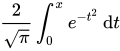
The erfc functions compute the complimentary error function of the argument (that is, 1 - erf x). For the erfc functions, a range error may occur if the argument is too large.
The lgamma functions compute the natural logarithm of the absolute value of the gamma of the argument (that is, loge|Γ(x)|). A range error may occur if the argument is a negative integer or zero.
The tgamma functions compute the gamma of the argument (that is, Γ(x)). A domain error occurs if the argument is a negative integer or if the result cannot be represented when the argument is zero. A range error may occur.
#include <math.h>
float erff(float x); /* C99 */
double erf(double x); /* C99 */
long double erfl(long double x); /* C99 */
float erfcf(float x); /* C99 */
double erfc(double x); /* C99 */
long double erfcl(long double x); /* C99 */
float lgammaf(float x); /* C99 */
double lgamma(double x); /* C99 */
long double lgammal(long double x); /* C99 */
float tgammaf(float x); /* C99 */
double tgamma(double x); /* C99 */
long double tgammal(long double x); /* C99 */
References[edit | edit source]
Libraries[edit | edit source]
A library in C is a collection of header files, exposed for use by other programs. The library therefore consists of an interface expressed in a .h file (named the "header") and an implementation expressed in a .c file. This .c file might be precompiled or otherwise inaccessible, or it might be available to the programmer. (Note: Libraries may call functions in other libraries such as the Standard C or math libraries to do various tasks.)
The format of a library varies with the operating system and compiler one is using. For example, in the Unix and Linux operating systems, a library consists of one or more object files, which consist of object code that is usually the output of a compiler (if the source language is C or something similar) or an assembler (if the source language is assembly language). These object files are then turned into a library in the form of an archive by the ar archiver (a program that takes files and stores them in a bigger file without regard to compression). The filename for the library usually starts with "lib" and ends with ".a"; e.g. the libc.a file contains the Standard C library and the "libm.a" the mathematics routines, which the linker would then link in. Other operating systems such as Microsoft Windows use a ".lib" extension for libraries and an ".obj" extension for object files. Some programs in the Unix environment such as lex and yacc generate C code that can be linked with the libl and liby libraries to create an executable.
We're going to use as an example a library that contains one function: a function to parse arguments from the command line. Arguments on the command line could be by themselves:
-i
have an optional argument that is concatenated to the letter:
-ioptarg
or have the argument in a separate argv-element:
-i optarg
The library also has four declarations that it exports in addition to the function: three integers and a pointer to the optional argument. If the argument does not have an optional argument, the pointer to the optional argument will be null.
In order to parse all these types of arguments, we have written the following "getopt.c" file:
#include <stdio.h> /* for fprintf() and EOF */
#include <string.h> /* for strchr() */
#include "getopt.h" /* consistency check */
/* variables */
int opterr = 1; /* getopt prints errors if this is on */
int optind = 1; /* token pointer */
int optopt; /* option character passed back to user */
char *optarg; /* flag argument (or value) */
/* function */
/* return option character, EOF if no more or ? if problem.
The arguments to the function:
argc, argv - the arguments to the main() function. An argument of "--"
stops the processing.
opts - a string containing the valid option characters.
an option character followed by a colon (:) indicates that
the option has a required argument.
*/
int
getopt (int argc, char **argv, char *opts)
{
static int sp = 1; /* character index into current token */
register char *cp; /* pointer into current token */
if (sp == 1)
{
/* check for more flag-like tokens */
if (optind >= argc || argv[optind][0] != '-' || argv[optind][1] == '\0')
return EOF;
else if (strcmp (argv[optind], "--") == 0)
{
optind++;
return EOF;
}
}
optopt = argv[optind][sp];
if (optopt == ':' || (cp = strchr (opts, optopt)) == NULL)
{
if (opterr)
fprintf (stderr, "%s: invalid option -- '%c'\n", argv[0], optopt);
/* if no characters left in this token, move to next token */
if (argv[optind][++sp] == '\0')
{
optind++;
sp = 1;
}
return '?';
}
if (*++cp == ':')
{
/* if a value is expected, get it */
if (argv[optind][sp + 1] != '\0')
/* flag value is rest of current token */
optarg = argv[optind++] + (sp + 1);
else if (++optind >= argc)
{
if (opterr)
fprintf (stderr, "%s: option requires an argument -- '%c'\n",
argv[0], optopt);
sp = 1;
return '?';
}
else
/* flag value is next token */
optarg = argv[optind++];
sp = 1;
}
else
{
/* set up to look at next char in token, next time */
if (argv[optind][++sp] == '\0')
{
/* no more in current token, so setup next token */
sp = 1;
optind++;
}
optarg = 0;
}
return optopt;
}
/* END OF FILE */
The interface would be the following "getopt.h" file:
#ifndef GETOPT_H
#define GETOPT_H
/* exported variables */
extern int opterr, optind, optopt;
extern char *optarg;
/* exported function */
int getopt(int, char **, char *);
#endif
/* END OF FILE */
At a minimum, a programmer has the interface file to figure out how to use a library, although, in general, the library programmer also wrote documentation on how to use the library. In the above case, the documentation should say that the provided arguments **argv and *opts both shouldn't be null pointers (or why would you be using the getopt function anyway?). Specifically, it typically states what each parameter is for and what return values can be expected in which conditions. Programmers that use a library, are normally not interested in the implementation of the library -- unless the implementation has a bug, in which case he would want to complain somehow.
Both the implementation of the getopts library, and programs that use the library should state #include "getopt.h", in order to refer to the corresponding interface. Now the library is "linked" to the program -- the one that contains the main() function. The program may refer to dozens of interfaces.
In some cases, just placing #include "getopt.h" may appear correct but will still fail to link properly. This indicates that the library is not installed correctly, or there may be some additional configuration required. You will have to check either the compiler's documentation or library's documentation on how to resolve this issue.
What to put in header files[edit | edit source]
As a general rule, headers should contain any declarations and macro definitions (preprocessor #defines) to be "seen" by the other modules in a program.
Possible declarations:
- struct, union, and enum declarations
- typedef declarations
- external function declarations
- global variable declarations
In the above getopt.h example file, one function (getopt) is declared and four global variables (optind, optopt, optarg, and opterr) are also declared. The variables are declared with the storage class specifier extern in the header file because that keyword specifies that the "real" variables are stored elsewhere (i.e. the getopt.c file) and not within the header file.
The #ifndef GETOPT_H/#define GETOPT_H trick is colloquially called include guards. This is used so that if the getopt.h file were included more than once in a translation unit, the unit would only see the contents once. Alternatively, #pragma once in a header file can also be used to achieve the same thing in some compilers (#pragma is an unportable catchall).
Linking Libraries Into Executables[edit | edit source]
Linking libraries into executables varies by operating system and compiler/linker used. In Unix, directories of linked object files can be specified with the -L option to the cc command and individual libraries are specified with the -l (small ell) option. The -lm option specifies that the libm math library should be linked in, for example.
References[edit | edit source]
- C FAQ: "I'm wondering what to put in .c files and what to put in .h files. (What does ".h" mean, anyway?)"
- PIClist thread: "Global variables in projects with many C files."
- "How do I use extern to share variables between source files in C?".
Advanced C[edit | edit source]
Common Practices[edit | edit source]
With its extensive use, a number of common practices and conventions have evolved to help avoid errors in C programs. These are simultaneously a demonstration of the application of good software engineering principles to a language and an indication of the limitations of C. Although few are used universally, and some are controversial, each of these enjoys wide use.
Dynamic multidimensional arrays[edit | edit source]
Although one-dimensional arrays are easy to create dynamically using malloc, and fixed-size multidimensional arrays are easy to create using the built-in language feature, dynamic multidimensional arrays are trickier. There are a number of different ways to create them, each with different tradeoffs. The two most popular ways to create them are:
- They can be allocated as a single block of memory, just like static multidimensional arrays. This requires that the array be rectangular (i.e. subarrays of lower dimensions are static and have the same size). The disadvantage is that the syntax of declaration the pointer is a little tricky for programmers at first. For example, if one wanted to create an array of ints of 3 columns and rows rows, one would do
int (*multi_array)[3] = malloc(rows * sizeof(int[3]));
- (Note that here multi_array is a pointer to an array of 3 ints.)
- Because of array-pointer interchangeability, you can index this just like static multidimensional arrays, i.e. multi_array[5][2] is the element at the 6th row and 3rd column.
- Dynamic multidimensional arrays can be allocated by first allocating an array of pointers, and then allocating subarrays and storing their addresses in the array of pointers.[1] (This approach is also known as an Iliffe vector). The syntax for accessing elements is the same as for multidimensional arrays described above (even though they are stored very differently). This approach has the advantage of the ability to make ragged arrays (i.e. with subarrays of different sizes). However, it also uses more space and requires more levels of indirection to index into, and can have worse cache performance. It also requires many dynamic allocations, each of which can be expensive.
For more information, see the comp.lang.c FAQ, question 6.16.
In some cases, the use of multi-dimensional arrays can best be addressed as an array of structures. Before user-defined data structures were available, a common technique was to define a multi-dimensional array, where each column contained different information about the row. This approach is also frequently used by beginner programmers. For example, columns of a two-dimensional character array might contain last name, first name, address, etc.
In cases like this, it is better to define a structure that contains the information that was stored in the columns, and then create an array of pointers to that structure. This is especially true when the number of data points for a given record might vary, such as the tracks on an album. In these cases, it is better to create a structure for the album that contains information about the album, along with a dynamic array for the list of songs on the album. Then an array of pointers to the album structure can be used to store the collection.
- Another useful way to create a dynamic multi-dimensional array is to flatten the array and index manually. For example, a 2-dimensional array with sizes x and y has x*y elements, therefore can be created by
int dynamic_multi_array[x*y];
The index is slightly trickier than before, but can still be obtained by y*i+j. You then access the array with
static_multi_array[i][j];
dynamic_multi_array[y*i+j];
Some more examples with higher dimensions:
int dim1[w];
int dim2[w*x];
int dim3[w*x*y];
int dim4[w*x*y*z];
dim1[i]
dim2[w*j+i];
dim3[w*(x*i+j)+k] // index is k + w*j + w*x*i
dim4[w*(x*(y*i+j)+k)+l] // index is w*x*y*i + w*x*j + w*k + l
Note that w*(x*(y*i+j)+k)+l is equal to w*x*y*i + w*x*j + w*k + l, but uses fewer operations (see Horner's Method). It uses the same number of operations as accessing a static array by dim4[i][j][k][l], so should not be any slower to use.
The advantage to using this method is that the array can be passed freely between functions without knowing the size of the array at compile time (since C sees it as a 1-dimensional array, although some way of passing the dimensions is still necessary), and the entire array is contiguous in memory, so accessing consecutive elements should be fast. The disadvantage is that it can be difficult at first to get used to how to index the elements.
Constructors and destructors[edit | edit source]
In most object-oriented languages, objects cannot be created directly by a client that wishes to use them. Instead, the client must ask the class to build an instance of the object using a special routine called a constructor. Constructors are important because they allow an object to enforce invariants about its internal state throughout its lifetime. Destructors, called at the end of an object's lifetime, are important in systems where an object holds exclusive access to some resource, and it is desirable to ensure that it releases these resources for use by other objects.
Since C is not an object-oriented language, it has no built-in support for constructors or destructors. It is not uncommon for clients to explicitly allocate and initialize records and other objects. However, this leads to a potential for errors, since operations on the object may fail or behave unpredictably if the object is not properly initialized. A better approach is to have a function that creates an instance of the object, possibly taking initialization parameters, as in this example:
struct string {
size_t size;
char *data;
};
struct string *create_string(const char *initial) {
assert (initial != NULL);
struct string *new_string = malloc(sizeof(*new_string));
if (new_string != NULL) {
new_string->size = strlen(initial);
new_string->data = strdup(initial);
}
return new_string;
}
Similarly, if it is left to the client to destroy objects correctly, they may fail to do so, causing resource leaks. It is better to have an explicit destructor which is always used, such as this one:
void free_string(struct string *s) {
assert (s != NULL);
free(s->data); ''/* free memory held by the structure */''
free(s); ''/* free the structure itself */''
}
It is often useful to combine destructors with #Nulling freed pointers.
Sometimes it is useful to hide the definition of the object to ensure that the client does not allocate it manually. To do this, the structure is defined in the source file (or a private header file not available to users) instead of the header file, and a forward declaration is put in the header file:
struct string;
struct string *create_string(const char *initial);
void free_string(struct string *s);
Nulling freed pointers[edit | edit source]
As discussed earlier, after free() has been called on a pointer, it becomes a dangling pointer. Worse still, most modern platforms cannot detect when such a pointer is used before being reassigned.
One simple solution to this is to ensure that any pointer is set to a null pointer immediately after being freed: [2]
free(p);
p = NULL;
Unlike dangling pointers, a hardware exception will arise on many modern architectures when a null pointer is dereferenced. Also, programs can include error checks for the null value, but not for a dangling pointer value. To ensure it is done at all locations, a macro can be used:
#define FREE(p) do { free(p); (p) = NULL; } while(0)
(To see why the macro is written this way, see #Macro conventions.) Also, when this technique is used, destructors should zero out the pointer that they are passed, and their argument must be passed by reference to allow this. For example, here's the destructor from #Constructors and destructors updated:
void free_string(struct string **s) {
assert(s != NULL && *s != NULL);
FREE((*s)->data); ''/* free memory held by the structure */''
FREE(*s); ''/* free the structure itself */''
*s=NULL; ''/* zero the argument */''
}
Unfortunately, this idiom will not do anything to any other pointers that may be pointing to the freed memory. For this reason, some C experts regard this idiom as dangerous due to creating a false sense of security.
Macro conventions[edit | edit source]
Because preprocessor macros in C work using simple token replacement, they are prone to a number of confusing errors, some of which can be avoided by following a simple set of conventions:
- Placing parentheses around macro arguments wherever possible. This ensures that, if they are expressions, the order of operations does not affect the behavior of the expression. For example:
- Wrong:
#define square(x) x*x - Better:
#define square(x) (x)*(x)
- Wrong:
- Placing parentheses around the entire expression if it is a single expression. Again, this avoids changes in meaning due to the order of operations.
- Wrong:
#define square(x) (x)*(x) - Better:
#define square(x) ((x)*(x)) - Dangerous, remember it replaces the text in verbatim. Suppose your code is
square (x++), after the macro invocation will x be incremented by 2
- Wrong:
- If a macro produces multiple statements, or declares variables, it can be wrapped in a do { ... } while(0) loop, with no terminating semicolon. This allows the macro to be used like a single statement in any location, such as the body of an if statement, while still allowing a semicolon to be placed after the macro invocation without creating a null statement.[3][4][5][6][7][8] Care must be taken that any new variables do not potentially mask portions of the macro's arguments.
- Wrong:
#define FREE(p) free(p); p = NULL; - Better:
#define FREE(p) do { free(p); p = NULL; } while(0)
- Wrong:
- Avoiding using a macro argument twice or more inside a macro, if possible; this causes problems with macro arguments that contain side effects, such as assignments.
- If a macro may be replaced by a function in the future, considering naming it like a function.
- By convention, preprocessor values and macros defined by
#defineare named in all uppercase letters.[9][10][11][12][13]
Further reading[edit | edit source]
- ↑ Adam N. Rosenberg. [http://www.the-adam.com/adam/rantrave/st02.pdf "A Description of One Programmer’s Programming Style Revisited"]. 2001. p. 19-20.
- ↑ comp.lang.c FAQ list: "Why isn't a pointer null after calling free?" mentions that "it is often useful to set [pointer variables] to NULL immediately after freeing them".
- ↑ "comp.lang.c FAQ: What's the best way to write a multi-statement macro?".
- ↑ "The C Preprocessor: Swallowing the Semicolon"
- ↑ "Why use apparently meaningless do-while and if-else statements in macros?"
- ↑ "do {...} while (0) in macros"
- ↑ "KernelNewbies: FAQ / DoWhile0".
- ↑ "PRE10-C. Wrap multistatement macros in a do-while loop".
- ↑ "What is the history for naming constants in all uppercase?"
- ↑ "The Preprocessor".
- ↑ "C Language Style Guide".
- ↑ "non capitalized macros are always evil".
- ↑ "Exploiting the Preprocessor for Fun and Profit".
There are a huge number of C style guidelines.
- "C and C++ Style Guides" by Chris Lott lists many popular C style guides.
- The Motor Industry Software Reliability Association (MISRA) publishes "MISRA-C: Guidelines for the use of the C language in critical systems". (Wikipedia: MISRA C; [11]).
Preprocessor Directives and Macros[edit | edit source]
Preprocessors are a way of making text processing with your C program before they are actually compiled. Before the actual compilation of every C program it is passed through a Preprocessor. The Preprocessor looks through the program trying to find out specific instructions called Preprocessor directives that it can understand. All Preprocessor directives begin with the # (hash) symbol. C++ compilers use the same C preprocessor.[1]
The preprocessor is a part of the compiler which performs preliminary operations (conditionally compiling code, including files etc...) to your code before the compiler sees it. These transformations are lexical, meaning that the output of the preprocessor is still text.
|
NOTE: Technically the output of the preprocessing phase for C consists of a sequence of tokens, rather than source text, but it is simple to output source text which is equivalent to the given token sequence, and that is commonly supported by compilers via a -E or /E option -- although command line options to C compilers aren't completely standard, many follow similar rules. |
Directives[edit | edit source]
Directives are special instructions directed to the preprocessor (preprocessor directive) or to the compiler (compiler directive) on how it should process part or all of your source code or set some flags on the final object and are used to make writing source code easier (more portable for instance) and to make the source code more understandable. Directives are handled by the preprocessor, which is either a separate program invoked by the compiler or part of the compiler itself. Symbol of preprocesser is hashtag (#)
#include[edit | edit source]
C has some features as part of the language and some others as part of a standard library, which is a repository of code that is available alongside every standard - conformant C compiler. When the C compiler compiles your program it usually also links it with the standard C library. For example, on encountering a #include <stdio.h> directive, it replaces the directive with the contents of the stdio.h header file.
When you use features from the library, C requires you to declare what you would be using. The first line in the program is a preprocessing directive which should look like this:
#include <stdio.h>
The above line causes the C declarations which are in the stdio.h header to be included for use in your program. Usually this is implemented by just inserting into your program the contents of a header file called stdio.h, located in a system-dependent location. The location of such files may be described in your compiler's documentation. A list of standard C header files is listed below in the Headers table.
The stdio.h header contains various declarations for input/output (I/O) using an abstraction of I/O mechanisms called streams. For example there is an output stream object called stdout which is used to output text to the standard output, which usually displays the text on the computer screen.
If using angle brackets like the example above, the preprocessor is instructed to search for the include file along the development environment path for the standard includes.
#include "other.h"
If you use quotation marks (" "), the preprocessor is expected to search in some additional, usually user-defined, locations for the header file, and to fall back to the standard include paths only if it is not found in those additional locations. It is common for this form to include searching in the same directory as the file containing the #include directive.
|
NOTE: You should check the documentation of the development environment you are using for any vendor specific implementations of the #include directive. |
Headers[edit | edit source]
The C90 standard headers list:
Headers added since C90:
#pragma[edit | edit source]
The pragma (pragmatic information) directive is part of the standard, but the meaning of any pragma depends on the software implementation of the standard that is used. The #pragma directive provides a way to request special behavior from the compiler. This directive is most useful for programs that are unusually large or that need to take advantage of the capabilities of a particular compiler.
Pragmas are used within the source program.
#pragma token(s)
- pragma is usually followed by a single token, which represents a command for the compiler to obey. You should check the software implementation of the C standard you intend on using for a list of the supported tokens. Not surprisingly, the set of commands that can appear in #pragma directives is different for each compiler; you'll have to consult the documentation for your compiler to see which commands it allows and what those commands do.
For instance one of the most implemented preprocessor directives, #pragma once when placed at the beginning of a header file, indicates that the file where it resides will be skipped if included several times by the preprocessor.
|
NOTE: Other methods exist to do this action that is commonly referred as using include guards. |
#define[edit | edit source]
Each #define preprocessor instruction defines a macro.
For example,
#define PI 3.14159265358979323846 /* pi */
A macro defined with a space immediately after the name is called a constant or literal. A macro defined with a parenthesis immediately after the name is called a function-like macro.[2]
|
WARNING: Preprocessor macros, although tempting, can produce quite unexpected results if not done right. Always keep in mind that macros are textual substitutions done to your source code before anything is compiled. The compiler does not know anything about the macros and never gets to see them. This can produce obscure errors, amongst other negative effects. Prefer to use language features, if there are equivalent. For example, use That said, there are cases, where macros are very useful (see the |
The #define directive is used to define macros. Macros are used by the preprocessor to manipulate the program source code before it is compiled. Because preprocessor macro definitions are substituted before the compiler acts on the source code, any errors that are introduced by #define are difficult to trace.
By convention, macros defined using #define are named in uppercase. Although doing so is not a requirement, it is considered very bad practice to do otherwise. This allows the macros to be easily identified when reading the source code.
(We mention many other common conventions for using #define in a later chapter, C Programming/Common practices).
Today, #define is primarily used to handle compiler and platform differences. E.g., a define might hold a constant which is the appropriate error code for a system call. The use of #define should thus be limited unless absolutely necessary; typedef statements and constant variables can often perform the same functions more safely.
Another feature of the #define command is that it can take arguments, making it rather useful as a pseudo-function creator. Consider the following code:
#define ABSOLUTE_VALUE( x ) ( ((x) < 0) ? -(x) : (x) )
...
int x = -1;
while( ABSOLUTE_VALUE( x ) ) {
...
}
It's generally a good idea to use extra parentheses when using complex macros. Notice that in the above example, the variable "x" is always within its own set of parentheses. This way, it will be evaluated in whole, before being compared to 0 or multiplied by -1. Also, the entire macro is surrounded by parentheses, to prevent it from being contaminated by other code. If you're not careful, you run the risk of having the compiler misinterpret your code.
Because of side-effects it is considered a very bad idea to use macro functions as described above.
int x = -10; int y = ABSOLUTE_VALUE( x++ );
If ABSOLUTE_VALUE() were a real function 'x' would now have the value of '-9', but because it was an argument in a macro it was expanded twice and thus has a value of -8.
|
Example: To illustrate the dangers of macros, consider this naive macro #define MAX(a,b) a>b?a:b and the code i = MAX(2,3)+5; j = MAX(3,2)+5; Take a look at this and consider what the value after execution might be. The statements are turned into int i = 2>3?2:3+5; int j = 3>2?3:2+5; Thus, after execution i=8 and j=3 instead of the expected result of i=j=8! This is why you were cautioned to use an extra set of parenthesis above, but even with these, the road is fraught with dangers. The alert reader might quickly realize that if #define MAX(a,b) ((a)>(b)?(a):(b)) This works, provided a,b have no side effects. Indeed, i = 2; j = 3; k = MAX(i++, j++); would result in k=4, i=3 and j=5. This would be highly surprising to anyone expecting MAX() to behave like a function. So what is the correct solution? The solution is not to use macro at all. A global, inline function, like this inline int max(int a, int b) {
return a>b?a:b
}
has none of the pitfalls above, but will not work with all types.
|
(#, ##)
The # and ## operators are used with the #define macro. Using # causes the first argument after the # to be returned as a string in quotes. For example, the command
#define as_string( s ) # s
will make the compiler turn this command
puts( as_string( Hello World! ) ) ;
into
puts( "Hello World!" );
Using ## concatenates what's before the ## with what's after it. For example, the command
#define concatenate( x, y ) x ## y ... int xy = 10; ...
will make the compiler turn
printf( "%d", concatenate( x, y ));
into
printf( "%d", xy);
which will, of course, display 10 to standard output.
It is possible to concatenate a macro argument with a constant prefix or suffix to obtain a valid identifier as in
#define make_function( name ) int my_ ## name (int foo) {}
make_function( bar )
which will define a function called my_bar(). But it isn't possible to integrate a macro argument into a constant string using the concatenation operator. In order to obtain such an effect, one can use the ANSI C property that two or more consecutive string constants are considered equivalent to a single string constant when encountered. Using this property, one can write
#define eat( what ) puts( "I'm eating " #what " today." ) eat( fruit )
which the macro-processor will turn into
puts( "I'm eating " "fruit" " today." )
which in turn will be interpreted by the C parser as a single string constant.
The following trick can be used to turn a numeric constants into string literals
#define num2str(x) str(x) #define str(x) #x #define CONST 23 puts(num2str(CONST));
This is a bit tricky, since it is expanded in 2 steps. First num2str(CONST) is replaced with str(23), which in turn is replaced with "23". This can be useful in the following example:
#ifdef DEBUG #define debug(msg) fputs(__FILE__ ":" num2str(__LINE__) " - " msg, stderr) #else #define debug(msg) #endif
This will give you a nice debug message including the file and the line where the message was issued. If DEBUG is not defined however the debugging message will completely vanish from your code. Be careful not to use this sort of construct with anything that has side effects, since this can lead to bugs, that appear and disappear depending on the compilation parameters.
macros[edit | edit source]
Macros aren't type-checked and so they do not evaluate arguments. Also, they do not obey scope properly, but simply take the string passed to them and replace each occurrence of the macro argument in the text of the macro with the actual string for that parameter (the code is literally copied into the location it was called from).
An example on how to use a macro:
#include <stdio.h>
#define SLICES 8
#define ADD(x) ( (x) / SLICES )
int main(void)
{
int a = 0, b = 10, c = 6;
a = ADD(b + c);
printf("%d\n", a);
return 0;
}
-- the result of "a" should be "2" (b + c = 16 -> passed to ADD -> 16 / SLICES -> result is "2")
|
NOTE: A macro should be defined only when it is not possible to achieve the same result with a function or some other mechanism. Some compilers are able to optimize code to where calls to small functions are replaced with inline code, negating any possible speed advantage. Using typedefs, enums, and inline (in C99) is often a better option. |
One of the few situations where inline functions won't work -- so you are pretty much forced to use function-like macros instead -- is to initialize compile time constants (static initialization of structs). This happens when the arguments to the macro are literals that the compiler can optimize to another literal. [3]
#error[edit | edit source]
The #error directive halts compilation. When one is encountered the standard specifies that the compiler should emit a diagnostic containing the remaining tokens in the directive. This is mostly used for debugging purposes.
Programmers use "#error" inside a conditional block, to immediately halt the compiler when the "#if" or "#ifdef" -- at the beginning of the block -- detects a compile-time problem. Normally the compiler skips the block (and the "#error" directive inside it) and the compilation proceeds.
#error message
#warning[edit | edit source]
Many compilers support a #warning directive. When one is encountered, the compiler emits a diagnostic containing the remaining tokens in the directive.
#warning message
#undef[edit | edit source]
The #undef directive undefines a macro. The identifier need not have been previously defined.
#if,#else,#elif,#endif (conditionals)[edit | edit source]
The #if command checks whether a controlling conditional expression evaluates to zero or nonzero, and excludes or includes a block of code respectively. For example:
#if 1
/* This block will be included */
#endif
#if 0
/* This block will not be included */
#endif
The conditional expression could contain any C operator except for the assignment operators, the increment and decrement operators, the address-of operator, and the sizeof operator.
One unique operator used in preprocessing and nowhere else is the defined operator. It returns 1 if the macro name, optionally enclosed in parentheses, is currently defined; 0 if not.
The #endif command ends a block started by #if, #ifdef, or #ifndef.
The #elif command is similar to #if, except that it is used to extract one from a series of blocks of code. E.g.:
#if /* some expression */
:
:
:
#elif /* another expression */
:
/* imagine many more #elifs here ... */
:
#else
/* The optional #else block is selected if none of the previous #if or
#elif blocks are selected */
:
:
#endif /* The end of the #if block */
#ifdef,#ifndef[edit | edit source]
The #ifdef command is similar to #if, except that the code block following it is selected if a macro name is defined. In this respect,
#ifdef NAME
is equivalent to
#if defined NAME
The #ifndef command is similar to #ifdef, except that the test is reversed:
#ifndef NAME
is equivalent to
#if !defined NAME
#line[edit | edit source]
This preprocessor directive is used to set the file name and the line number of the line following the directive to new values. This is used to set the __FILE__ and __LINE__ macros.
Useful Preprocessor Macros for Debugging[edit | edit source]
ANSI C defines some useful preprocessor macros and variables,[4][5] also called "magic constants", include:
__FILE__ => The name of the current file, as a string literal
__LINE__ => Current line of the source file, as a numeric literal
__DATE__ => Current system date, as a string
__TIME__ => Current system time, as a string
__TIMESTAMP__ => Date and time (non-standard)
__cplusplus => undefined when your C code is being compiled by a C compiler; 199711L when your C code is being compiled by a C++ compiler compliant with 1998 C++ standard.
__func__ => Current function name of the source file, as a string (part of C99)
__PRETTY_FUNCTION__ => "decorated" Current function name of the source file, as a string (in GCC; non-standard)
Compile-time assertions[edit | edit source]
Compile-time assertions can help you debug faster than using only run-time assert() statements, because the compile-time assertions are all tested at compile time, while it is possible that a test run of a program may fail to exercise some run-time assert() statements.
Prior to the C11 standard, some people[6][7][8] defined a preprocessor macro to allow compile-time assertions, something like:
#define COMPILE_TIME_ASSERT(pred) switch(0){case 0:case pred:;}
COMPILE_TIME_ASSERT( BOOLEAN CONDITION );
The static_assert.hpp Boost library defines a similar macro.[9]
Since C11, such macros are obsolete, as _Static_assert and its macro equivalent static_assert are standardized and built-in to the language.
X-Macros[edit | edit source]
 |
A Wikibookian suggests that this book or chapter be merged into C Programming/Serialization#X-Macros. Please discuss whether or not this merge should happen on the discussion page. |
One little-known usage pattern of the C preprocessor is known as "X-Macros".[10][11][12][13] An X-Macro is a header file or macro. Commonly these use the extension ".def" instead of the traditional ".h". This file contains a list of similar macro calls, which can be referred to as "component macros". The include file is then referenced repeatedly in the following pattern. Here, the include file is "xmacro.def" and it contains a list of component macros of the style "foo(x, y, z)".
#define foo(x, y, z) doSomethingWith(x, y, z);
#include "xmacro.def"
#undef foo
#define foo(x, y, z) doSomethingElseWith(x, y, z);
#include "xmacro.def"
#undef foo
(etc...)
The most common usage of X-Macros is to establish a list of C objects and then automatically generate code for each of them. Some implementations also perform any #undefs they need inside the X-Macro, as opposed to expecting the caller to undefine them.
Common sets of objects are a set of global configuration settings, a set of members of a struct, a list of possible XML tags for converting an XML file to a quickly-traversable tree, or the body of an enum declaration; other lists are possible.
Once the X-Macro has been processed to create the list of objects, the component macros can be redefined to generate, for instance, accessor and/or mutator functions. Structure serializing and deserializing are also commonly done.
Here is an example of an X-Macro that establishes a struct and automatically creates serialize/deserialize functions. For simplicity, this example doesn't account for endianness or buffer overflows.
File star.def:
EXPAND_EXPAND_STAR_MEMBER(x, int)
EXPAND_EXPAND_STAR_MEMBER(y, int)
EXPAND_EXPAND_STAR_MEMBER(z, int)
EXPAND_EXPAND_STAR_MEMBER(radius, double)
#undef EXPAND_EXPAND_STAR_MEMBER
File star_table.c:
typedef struct {
#define EXPAND_EXPAND_STAR_MEMBER(member, type) type member;
#include "star.def"
} starStruct;
void serialize_star(const starStruct *const star, unsigned char *buffer) {
#define EXPAND_EXPAND_STAR_MEMBER(member, type) \
memcpy(buffer, &(star->member), sizeof(star->member)); \
buffer += sizeof(star->member);
#include "star.def"
}
void deserialize_star(starStruct *const star, const unsigned char *buffer) {
#define EXPAND_EXPAND_STAR_MEMBER(member, type) \
memcpy(&(star->member), buffer, sizeof(star->member)); \
buffer += sizeof(star->member);
#include "star.def"
}
Handlers for individual data types may be created and accessed using token concatenation ("##") and quoting ("#") operators.
For example, the following might be added to the above code:
#define print_int(val) printf("%d", val)
#define print_double(val) printf("%g", val)
void print_star(const starStruct *const star) {
/* print_##type will be replaced with print_int or print_double */
#define EXPAND_EXPAND_STAR_MEMBER(member, type) \
printf("%s: ", #member); \
print_##type(star->member); \
printf("\n");
#include "star.def"
}
Note that in this example you can also avoid the creation of separate handler functions for each datatype in this example by defining the print format for each supported type, with the additional benefit of reducing the expansion code produced by this header file:
#define FORMAT_(type) FORMAT_##type
#define FORMAT_int "%d"
#define FORMAT_double "%g"
void print_star(const starStruct *const star) {
/* FORMAT_(type) will be replaced with FORMAT_int or FORMAT_double */
#define EXPAND_EXPAND_STAR_MEMBER(member, type) \
printf("%s: " FORMAT_(type) "\n", #member, star->member);
#include "star.def"
}
The creation of a separate header file can be avoided by creating a single macro containing what would be the contents of the file. For instance, the above file "star.def" could be replaced with this macro at the beginning of:
File star_table.c:
#define EXPAND_STAR \
EXPAND_STAR_MEMBER(x, int) \
EXPAND_STAR_MEMBER(y, int) \
EXPAND_STAR_MEMBER(z, int) \
EXPAND_STAR_MEMBER(radius, double)
and then all calls to #include "star.def" could be replaced with a simple EXPAND_STAR statement. The rest of the above file would become:
typedef struct {
#define EXPAND_STAR_MEMBER(member, type) type member;
EXPAND_STAR
#undef EXPAND_STAR_MEMBER
} starStruct;
void serialize_star(const starStruct *const star, unsigned char *buffer) {
#define EXPAND_STAR_MEMBER(member, type) \
memcpy(buffer, &(star->member), sizeof(star->member)); \
buffer += sizeof(star->member);
EXPAND_STAR
#undef EXPAND_STAR_MEMBER
}
void deserialize_star(starStruct *const star, const unsigned char *buffer) {
#define EXPAND_STAR_MEMBER(member, type) \
memcpy(&(star->member), buffer, sizeof(star->member)); \
buffer += sizeof(star->member);
EXPAND_STAR
#undef EXPAND_STAR_MEMBER
}
and the print handler could be added as well as:
#define print_int(val) printf("%d", val)
#define print_double(val) printf("%g", val)
void print_star(const starStruct *const star) {
/* print_##type will be replaced with print_int or print_double */
#define EXPAND_STAR_MEMBER(member, type) \
printf("%s: ", #member); \
print_##type(star->member); \
printf("\n");
EXPAND_STAR
#undef EXPAND_STAR_MEMBER
}
or as:
#define FORMAT_(type) FORMAT_##type
#define FORMAT_int "%d"
#define FORMAT_double "%g"
void print_star(const starStruct *const star) {
/* FORMAT_(type) will be replaced with FORMAT_int or FORMAT_double */
#define EXPAND_STAR_MEMBER(member, type) \
printf("%s: " FORMAT_(type) "\n", #member, star->member);
EXPAND_STAR
#undef EXPAND_STAR_MEMBER
}
A variant which avoids needing to know the members of any expanded sub-macros is to accept the operators as an argument to the list macro:
File star_table.c:
/*
Generic
*/
#define STRUCT_MEMBER(member, type, dummy) type member;
#define SERIALIZE_MEMBER(member, type, obj, buffer) \
memcpy(buffer, &(obj->member), sizeof(obj->member)); \
buffer += sizeof(obj->member);
#define DESERIALIZE_MEMBER(member, type, obj, buffer) \
memcpy(&(obj->member), buffer, sizeof(obj->member)); \
buffer += sizeof(obj->member);
#define FORMAT_(type) FORMAT_##type
#define FORMAT_int "%d"
#define FORMAT_double "%g"
/* FORMAT_(type) will be replaced with FORMAT_int or FORMAT_double */
#define PRINT_MEMBER(member, type, obj) \
printf("%s: " FORMAT_(type) "\n", #member, obj->member);
/*
starStruct
*/
#define EXPAND_STAR(_, ...) \
_(x, int, __VA_ARGS__) \
_(y, int, __VA_ARGS__) \
_(z, int, __VA_ARGS__) \
_(radius, double, __VA_ARGS__)
typedef struct {
EXPAND_STAR(STRUCT_MEMBER, )
} starStruct;
void serialize_star(const starStruct *const star, unsigned char *buffer) {
EXPAND_STAR(SERIALIZE_MEMBER, star, buffer)
}
void deserialize_star(starStruct *const star, const unsigned char *buffer) {
EXPAND_STAR(DESERIALIZE_MEMBER, star, buffer)
}
void print_star(const starStruct *const star) {
EXPAND_STAR(PRINT_MEMBER, star)
}
This approach can be dangerous in that the entire macro set is always interpreted as if it was on a single source line, which could encounter compiler limits with complex component macros and/or long member lists.
This technique was reported by Lars Wirzenius[14] in a web page dated January 17, 2000, in which he gives credit to Kenneth Oksanen for "refining and developing" the technique prior to 1997. The other references describe it as a method from at least a decade before the turn of the century.
We discuss X-Macros more in a later section, Serialization and X-Macros.
- ↑ Understanding C++/C Preprocessor
- ↑ "Exploiting the Preprocessor for Fun and Profit".
- ↑ David Hart, Jon Reid. "9 Code Smells of Preprocessor Use". 2012.
- ↑ HP C Compiler Reference Manual
- ↑ C++ reference: Predefined preprocessor variables
- ↑ "Compile Time Assertions in C" by Jon Jagger 1999
- ↑ Pádraig Brady. "static assertion".
- ↑ "ternary operator with a constant (true) value?".
- ↑ Wikipedia: C++0x#Static assertions
- ↑ Wirzenius, Lars. "C Preprocessor Trick For Implementing Similar Data Types". Retrieved January 9, 2011.
- ↑ Meyers, Randy (1 May 2001). "The New C: X Macros". Dr. Dobb's Journal. Retrieved 5 April 2024.
- ↑ Beal, Stephan (22 August 2004). "Supermacros". Retrieved 27 October 2008.
{{cite web}}: CS1 maint: date and year (link) - ↑ Keith Schwarz. "Advanced Preprocessor Techniques". 2009. Includes "Practical Applications of the Preprocessor II: The X Macro Trick".
- ↑ Wirzenius, Lars. C Preprocessor Trick For Implementing Similar Data Types Retrieved January 9, 2011.
Sockets and Networking (UNIX)[edit | edit source]
Network programming under UNIX is relatively simple in C.
This guide assumes you already have a good general idea about C, UNIX and networks.
A simple client[edit | edit source]
To start with, we'll look at one of the simplest things you can do: initialize a stream connection and receive a message from a remote server.
#include <stdio.h>
#include <stdlib.h>
#include <string.h>
#include <unistd.h>
#include <arpa/inet.h>
#include <sys/types.h>
#include <netinet/in.h>
#include <sys/socket.h>
#define MAXRCVLEN 500
#define PORTNUM 2300
int main(int argc, char *argv[])
{
char buffer[MAXRCVLEN + 1]; /* +1 so we can add null terminator */
int len, mysocket;
struct sockaddr_in dest;
mysocket = socket(AF_INET, SOCK_STREAM, 0);
memset(&dest, 0, sizeof(dest)); /* zero the struct */
dest.sin_family = AF_INET;
dest.sin_addr.s_addr = htonl(INADDR_LOOPBACK); /* set destination IP number - localhost, 127.0.0.1*/
dest.sin_port = htons(PORTNUM); /* set destination port number */
connect(mysocket, (struct sockaddr *)&dest, sizeof(struct sockaddr_in));
len = recv(mysocket, buffer, MAXRCVLEN, 0);
/* We have to null terminate the received data ourselves */
buffer[len] = '\0';
printf("Received %s (%d bytes).\n", buffer, len);
close(mysocket);
return EXIT_SUCCESS;
}
This is the very bare bones of a client; in practice, we would check every function that we call for failure, however, error checking has been left out for clarity.
As you can see, the code mainly revolves around dest which is a struct of type sockaddr_in. This struct stores information about the machine we want to connect to.
mysocket = socket(AF_INET, SOCK_STREAM, 0);
The socket() function tells our OS that we want a file descriptor for a socket which we can use for a network stream connection; what the parameters mean is mostly irrelevant for now.
memset(&dest, 0, sizeof(dest)); /* zero the struct */
dest.sin_family = AF_INET;
dest.sin_addr.s_addr = inet_addr("127.0.0.1"); /* set destination IP number */
dest.sin_port = htons(PORTNUM); /* set destination port number */
Now we get on to the interesting part:
The first line uses memset() to zero the struct.
The second line sets the address family. This should be the same value that was passed as the first parameter to socket(); for most purposes AF_INET will serve.
The third line is where we set the IP of the machine we need to connect to. The variable dest.sin_addr.s_addr is just an integer stored in Big Endian format, but we don't have to know that as the inet_addr() function will do the conversion from string into Big Endian integer for us.
The fourth line sets the destination port number. The htons() function converts the port number into a Big Endian short integer. If your program is going to be run solely on machines which use Big Endian numbers as default then dest.sin_port = 21 would work just as well. However, for portability reasons htons() should always be used.
Now that all of the preliminary work is done, we can actually make the connection and use it:
connect(mysocket, (struct sockaddr *)&dest, sizeof(struct sockaddr_in));
This tells our OS to use the socket mysocket to create a connection to the machine specified in dest.
len = recv(mysocket, buffer, MAXRCVLEN, 0);
Now this receives up to MAXRCVLEN bytes of data from the connection and stores them in the buffer string. The number of characters received is returned by recv(). It is important to note that the data received will not automatically be null terminated when stored in the buffer, so we need to do it ourselves with buffer[len] = '\0'.
And that's about it!
The next step after learning how to receive data is learning how to send it. If you've understood the previous section then this is quite easy. All you have to do is use the send() function, which uses the same parameters as recv(). If in our previous example buffer had the text we wanted to send and its length was stored in len we would write send(mysocket, buffer, len, 0). send() returns the number of bytes that were sent. It is important to remember that send(), for various reasons, may not be able to send all of the bytes, so it is important to check that its return value is equal to the number of bytes you tried to send. In most cases this can be resolved by resending the unsent data.
A simple server[edit | edit source]
#include <stdio.h>
#include <stdlib.h>
#include <string.h>
#include <unistd.h>
#include <arpa/inet.h>
#include <sys/types.h>
#include <netinet/in.h>
#include <sys/socket.h>
#define PORTNUM 2300
int main(int argc, char *argv[])
{
char* msg = "Hello World !\n";
struct sockaddr_in dest; /* socket info about the machine connecting to us */
struct sockaddr_in serv; /* socket info about our server */
int mysocket; /* socket used to listen for incoming connections */
socklen_t socksize = sizeof(struct sockaddr_in);
memset(&serv, 0, sizeof(serv)); /* zero the struct before filling the fields */
serv.sin_family = AF_INET; /* set the type of connection to TCP/IP */
serv.sin_addr.s_addr = htonl(INADDR_ANY); /* set our address to any interface */
serv.sin_port = htons(PORTNUM); /* set the server port number */
mysocket = socket(AF_INET, SOCK_STREAM, 0);
/* bind serv information to mysocket */
bind(mysocket, (struct sockaddr *)&serv, sizeof(struct sockaddr));
/* start listening, allowing a queue of up to 1 pending connection */
listen(mysocket, 1);
int consocket = accept(mysocket, (struct sockaddr *)&dest, &socksize);
while(consocket)
{
printf("Incoming connection from %s - sending welcome\n", inet_ntoa(dest.sin_addr));
send(consocket, msg, strlen(msg), 0);
close(consocket);
consocket = accept(mysocket, (struct sockaddr *)&dest, &socksize);
}
close(mysocket);
return EXIT_SUCCESS;
}
Superficially, this is very similar to the client. The first important difference is that rather than creating a sockaddr_in with information about the machine we're connecting to, we create it with information about the server, and then we bind() it to the socket. This allows the machine to know the data received on the port specified in the sockaddr_in should be handled by our specified socket.
The listen() function then tells our program to start listening using the given socket. The second parameter of listen() allows us to specify the maximum number of connections that can be queued. Each time a connection is made to the server it is added to the queue. We take connections from the queue using the accept() function. If there is no connection waiting on the queue the program waits until a connection is received. The accept() function returns another socket. This socket is essentially a "session" socket, and can be used solely for communicating with connection we took off the queue. The original socket (mysocket) continues to listen on the specified port for further connections.
Once we have "session" socket we can handle it in the same way as with the client, using send() and recv() to handle data transfers.
Note that this server can only accept one connection at a time; if you want to simultaneously handle multiple clients then you'll need to fork() off separate processes, or use threads, to handle the connections.
Useful network functions[edit | edit source]
int gethostname(char *hostname, size_t size);
The parameters are a pointer to an array of chars and the size of that array. If possible, it finds the hostname and stores it in the array. On failure it returns -1.
struct hostent *gethostbyname(const char *name);
This function obtains information about a domain name and stores it in a hostent struct. The most useful part of a hostent structure is the (char**) h_addr_list field, which is a null terminated array of the IP addresses associated with that domain. The field h_addr is a pointer to the first IP address in the h_addr_list array. Returns NULL on failure.
FAQs[edit | edit source]
What about stateless connections?[edit | edit source]
If you don't want to exploit the properties of TCP in your program and would rather just use a UDP connection, then you can just replace SOCK_STREAM with SOCK_DGRAM in your call to socket() and use the result in the same way. It is important to remember that UDP does not guarantee delivery of packets and order of delivery, so checking is important.
If you want to exploit the properties of UDP, then you can use sendto() and recvfrom(), which operate like send() and recv() except you need to provide extra parameters specifying who you are communicating with.
How do I check for errors?[edit | edit source]
The functions socket(), recv() and connect() all return -1 on failure and use errno for further details.
Serialization and X-Macros[edit | edit source]
Serialization[edit | edit source]
It is often necessary to send or receive complex data structures to or from another program that may run on a different architecture or may have been designed for different version of the data structures in question. A typical example is a program that saves its state to a file on exit and then reads it back when started.
The 'send' function will typically start by writing a magic identifier and version to the file or network socket and then proceed to write all the data members one by one (i.e. in serial). If variable length arrays are encountered (e.g. strings), it will either write a length followed by the data or it will write the data followed by a special terminator. The format is often XML or binary; in the latter case the htonl() set of macros may come in handy.
The 'receive' function will be nearly identical: it will read all the items one by one. Variable length arrays are either handled by reading the count followed by the data, or by reading the data until the special terminator is reached.
Since these two functions often follow the same pattern as the declaration of the data(structures), it would be nice if they could all be generated from a common definition.
X-Macros[edit | edit source]
 |
A Wikibookian suggests that C Programming/Preprocessor#X-Macros be merged into this chapter. Discuss whether or not this merger should happen on the discussion page. |
X-Macros uses the preprocessor to force the compiler to compile the same piece of text more than once. Sometimes a special file (with extension .def) is included multiple times. For example variables.def may look like this :
INT(value) INT(shift)
In this example the C programming will then look like this :
...
#define INT(var) int var;
#include "variables.def"
#undef INT
...
printf ("version=1\n");
#define INT(var) printf (#var "=%d\n", var);
#include "variables.def"
#undef INT
...
If including a separate file multiple times is undesirable, another macro can be used. For example :
#define VARIABLES INT(value) \
INT(shift)
The #includes can then be replaced with calls to the macro.
Using this method, one can also pass in the name(s) of (an)other macro(s) that can operate on the list of values. For example:
#define VAR_LIST(_) _(value) \
_(shift)
...
#define VAR_INT_DECL(var) int var;
VAR_LIST(VAR_INT_DECL)
...
printf ("version=1\n");
#define VAR_INT_PRINTF(var) printf (#var "=%d\n", var);
VAR_LIST(VAR_INT_PRINTF)
...
This does not require the redefinition of macros and can make the code easier to understand and maintain.
X-Macros are also particularly useful for keeping mappings between strings and enumerated types synchronized.
Serialization with versioning[edit | edit source]
Suppose we want to add additional variables to the above example, but we still want the program to be able to read the old version 1 files. Then we would add a version parameter and a default value parameter to the list processing macros:
#define VAR_LIST(_) _(value,1,0) \
_(shift,1,0) \
_(mask,2,0xffff)
...
int inputVer;
#define VAR_INT_DECL(var,varVer,default) int var;
VAR_LIST(VAR_INT_DECL)
...
scanf ("version=%d", &inputVer);
#define VAR_INT_SCN(var,varVer,default) if (varVer <= inputVer) scanf (#var "=%d", &var); else var = default;
VAR_LIST(VAR_INT_SCN)
...
printf ("version=2\n"); /* Always output at highest known version */
#define VAR_INT_PRT(var,varVer,default) printf (#var "=%d\n", var);
VAR_LIST(VAR_INT_PRT)
...
Coroutines[edit | edit source]
A little known fact is that most C implementations have built-in primitives that can be used for cooperative multitasking / coroutines. They are setcontext and setjmp.
setjmp[edit | edit source]
The function setjmp is used in a pair with longjmp to transfer execution to a different point in the code. It relies on an existing jmp_buf declaration.
#include <setjmp.h>
int main (void)
{
jmp_buf buf1;
if (setjmp(buf1) == 0)
{
/* This code is executed on the first call to setjmp. */
longjmp(buf1, 1);
} else {
/* This code is executed once longjmp is called. */
}
return 0;
}
setjmp() stores the current execution point in memory, which remains valid as long as the containing function doesn't return. It initially returns 0. Control is returned to setjmp once longjmp is called with the original jmp_buf and the replacement return value.
Note that jmp_buf is passed to setjmp without using the address-of operator.
The easiest way to understand setjmp and longjmp, is that setjmp stores the state of the cpu which includes program counter, stack pointer, all the registers, including the bits of the flags register, at the location pointed to by jmp_buf , which is defined some LEN+1, which is enough bytes to store the registers of whatever CPU is involved. The longjmp(buf) , never returns, because it restores the CPU from the contents of struct jmp_buf buf previously set by a previous call the setjmp, so execution begins from after setjmp was called, but the return value of setjmp is not 0, but whatever value was used in the second parameter to longjmp. This is similar to the fork() system call, which returns 0 to the child process, and the PID of the child process to the parent.
The internet suggests co-routines are useful for implementing software as state machines cooperating, such as lexer processing input text and emitting tokens , so that a parser can decide to store the token and ask for the next one, or to act on its current set of token . This is not multithreaded programs synchronising on data, with possibly race conditions if a bug forgets to acquire a lock, but with setjmp and longjmp, seems to be cooperative processes that guarantee only one process will run at a time, with no worries about context switches waking up sleeping processes ( using separate jmp_buf static locations, each process can call setjmp for its own jmp_buf, before calling longjmp later on if zero was returned, or continue a loop to process shared data for non-zero returns).
C and beyond[edit | edit source]
Particularities of C[edit | edit source]
C is an efficient, minimalist language that has some peculiarities that a programmer must be aware of. To address these, sometimes a good solution is to combine another language with C for added flexibility and power, like the combination of Emacs-LISP and C used for Emacs. Sometimes they can be addressed at the cost of slower speed and increased complexity by using special constructs that will guarantee function and security. Mostly however, through practice, C programmers have no trouble with the things mentioned here, and prefer using a language that closely models the general purpose, Von Neumann hardware architecture.
Below are several of these particularities of ANSI C (that sometimes are also its strengths), some minor and some major:
- Lack of differentiation between arrays and pointers
- The very first C (around 1973) did not have arrays at all; modern implementations are contiguous areas in memory accessed with pointer arithmetic (note: a declared array cannot be assigned to like a pointer), which circumvents the need to declare arrays with a fixed size. This ability, however, can cause buffer overflow errors with careless use.
- Arrays do not store their length
- A consequence of the above feature. This means that the program might need to explicitly perform a bounds check before accessing an array. Unless a function is passed an array of a fixed size, there is no way for it to discover the length of the array it was given: So the function must be given the length, perhaps passed to the function as a separate variable or in a structure. Because of this, most implementations do not provide automatic array bounds checking, and manual bounds checking is error prone.
- If a C (or C++) program attempts to access an array element outside of the actual allocated memory, then a buffer overflow occurs, typically crashing the program. Buffer overflow bugs are a common security vulnerability too. Many other computer languages provide automatic bounds checking, and so they are nearly immune to such bugs. [1][2][3][4][5]
- Variable Length Arrays
- A VLA ‒ variable length array ‒ can only be used for function parameters and auto variables. VLAs cannot be used inside a structure (except as the last item in the structure). It's not possible to define a structure that corresponds to the standard Forth dictionary definition (which has 2 variable-length parts), except as an undifferentiated array of
char.
- Arbitrary-size built-in 2D or 3D arrays are not widely supported
- This feature has been added starting with the C99 specification for variable-length arrays, although many C compilers still do not support it. Without VLAs, there is no way for a function to accept 2D or 3D arrays of arbitrary size. In particular, it's impossible to define a function that accepts
int a[5][4][3];on one call, and later acceptsint b[10][10][10];in a later call. Instead of using the built-in 2D or 3D array data type, C programmers use some other data type to hold (mathematical) 2D or 3D arrays of arbitrary size (multi-dimensional arrays) -- see C Programming/Common practices#Dynamic multidimensional arrays for details.
- No formal String data type
- Strings are character arrays (lacking any abstraction) and inherit all their constraints (structs can provide an abstraction, to an extent).
- Weak type safety
- C is not very type-safe. The memory management functions operate on untyped pointers, there is no built-in run-time type enforcement, and the type system can be circumvented with pointers and casts. Additionally, typedef does not create a new type but only an alias, thus it serves solely for code legibility. However, it is possible to use single member structs to enforce type safety.
- No garbage collection
- As a low-level language designed for minimum overhead, C features only manual memory management, which can allow simple memory leaks to go on unchecked.
- Local variables are uninitialized upon declaration
- Local (but not global) variables must be initialized manually; before this, they contain whatever was already in memory at the time. This is not unusual, but the C standard does not forbid access to uninitialized variables (which is).
- Unwieldy function pointer syntax
- Function pointers take the form of
[return type] [name]([arg1 type])([arg2 type]), making them somewhat difficult to use. Typedefs can alleviate this burdensome syntax. For example,typedef int fn(int i);. See C Programming/Pointers and arrays#Pointers to Functions for more details.
- No reflection
- It is not possible for a C program -- at runtime -- to evaluate a string as if it were a source C code statement.
- Nested functions are not standard
- However, many C compilers do support nested functions, including GNU C.[6]
- No formal exception handling
- Some standard functions return special values that must be handled manually. For example,
malloc()returns null upon failure. For example, one must store the return value ofgetchar()in anint(not, as one might expect, in achar) in order to reliably detect the end-of-file -- see EOF pitfall. Programs that do not include appropriate error handling might work fine most of the time, but can crash or otherwise malfunction when exceptional cases occur. POSIX systems often usesignal()to handle some kinds of exceptions. (See C Programming/Error handling#Signals for details). Some programs usesetjmp(),longjmp()orgototo manually handle some kinds of exceptions. (See C Programming/Control#One last thing: goto and C Programming/Coroutines for details).
- No anonymous function definitions
References[edit | edit source]
- ↑ http://projects.webappsec.org/Buffer-Overflow
- ↑ http://www.dwheeler.com/secure-programs/Secure-Programs-HOWTO/buffer-overflow.html
- ↑ http://searchsecurity.techtarget.com/news/article/0,289142,sid14_gci860185,00.html
- ↑ http://www.owasp.org/index.php/Buffer_Overflows
- ↑ http://cyclone.thelanguage.org/wiki/Why%20Cyclone
- ↑ "A GNU Manual": "Extensions to the C Language: Nested Functions" [9]
C Trigraph[edit | edit source]
Trigraphs[edit | edit source]
C was designed in English and assumes the common English character set, which includes such characters as {, }, [, ], and so on. Some other languages, however, do not have these or other characters which are required by C. To solve this problem, the 1989 C standard in section 5.2.1.1 defined a set of trigraph sequences which can be substitutes for the symbols and which will work in any situation. In fact, the first translation phase of compilation specified in the 1989 C standard (section 5.1.1.2) is to replace the trigraph sequences with their corresponding single-character equivalents. Note that trigraphs will be removed from C after the next major standard of it, C23, is released.[1]
The following trigraph sequences exist, and no other. Each question mark ? that does not begin one of the trigraph sequences listed is not changed.
Sequence Replacement
======== ===========
??= #
??( [
??/ \
??) ]
??' ^
??< {
??! |
??> }
??- ~
The effect of this is that statements such as
printf ("Eh???/n");
will, after the trigraph is replaced, be the equivalent of
printf ("Eh?\n");
Should the programmer want the trigraph not to be replaced, within strings and character constants (which is the only place they would need replacing and it would change things), the programmer can simply escape the second question mark; e.g.
printf ("Two question marks in a row: ?\?!\n");
The 1999 C standard added these punctuators, sometimes called digraphs, in section 6.4.6. They are equivalent to the following tokens except for their spelling:
Digraph Equivalent
======= ==========
<: [
:> ]
<% {
%> }
%: #
%:%: ##
In other words, they behave differently when stringized as part of a macro replacement, but are otherwise equivalent.
References[edit | edit source]
Language Overloading and Extensions[edit | edit source]
Most C compilers have one or more "extensions" to the standard C language, to do things that are inconvenient to do in standard, portable C.
Some examples of language extensions:
- in-line assembly language
- interrupt service routines
- variable-length data structure (a structure whose last item is a "zero-length array").[1]
- re-sizeable multidimensional arrays
- various "#pragma" settings to compile quickly, to generate fast code, or to generate compact code.
- bit manipulation, especially bit-rotations and things involving the "carry" bit
- storage alignment
- Arrays whose length is computed at run time.
External links[edit | edit source]
- GNU C: Extensions to the C Language
- C/C++ interpreter Ch extensions to the C language for scripting
- SDCC: Storage Class Language Extensions
- ↑ comp.lang.c FAQ list: Question 2.6: "C99 introduces the concept of a flexible array member, which allows the size of an array to be omitted if it is the last member in a structure, thus providing a well-defined solution."
Combining Languages[edit | edit source]
Assembler[edit | edit source]
See Embedded Systems/Mixed C and Assembly Programming
Cg[edit | edit source]
Make the main program (for CPU) in C, which loads and run the Cg program ( for GPU ).[1][2][3]
Header files[edit | edit source]
Add to C program:[4]
#include <Cg/cg.h> /* To include the core Cg runtime API into your program */
#include <Cg/cgGL.h> /* to include the OpenGL-specific Cg runtime API */
Minimal program[edit | edit source]
- by bobobobo[5]
Java[edit | edit source]
Using the Java native interface (JNI), Java applications can call C libraries.
See also
Perl[edit | edit source]
To mix Perl and C, we can use XS. XS is an interface description file format used to create an extension interface between Perl and C code (or a C library) which one wishes to use with Perl.
The basic procedure is very simple. We can create the necessary subdirectory structure by running "h2xs" application (e.g. "h2xs -A -n Modulename"). This will create - among others - a Makefile.PL, a .pm Perl module and a .xs XSUB file in the subdirectory tree. We can edit the .xs file by adding our code to that, let's say:
void
hello()
CODE:
printf("Hello, world!\n");
and we can successfully use our new command at Perl side, after running a "perl Makefile.PL" and "make".
Further details can be found on the perlxstut perldoc page.
Python[edit | edit source]
Here can be found some details about extending Python with modules written in C. You might read about Cython and Pyrex as well, that makes easier to create modules in C, translating a Python-like code into C.
 |
This section is a stub. You can help Wikibooks by expanding it. |
Using the Python ctypes module, one can write C code directly into Python.
Further reading[edit | edit source]
References[edit | edit source]
- ↑ Lesson: 47 from NeHe Productions
- ↑ Cg Bumpmapping by Razvan Surdulescu at GameDev
- ↑ [http://www.fusionindustries.com/default.asp?page=cg-hlsl-faq | Cg & HLSL Shading Language FAQ by Fusion Industries]
- ↑ http://http.developer.nvidia.com/CgTutorial/cg_tutorial_appendix_b.html NVidia Cg tutorial. Appendix B. The Cg Runtime
- ↑ Absolutely minimal CG program for good fundamentals understanding
Object Oriented Programming: The GObject System[edit | edit source]
Since the C Programming-Language was not created with Object Oriented Programming in mind, it has no explicit support for classes, inheritance, polymorphism and other OO Concepts. Neither does it have its own Virtual Table, which is found in object-oriented languages such C++, Java and C#. Therefore, it might not be as easy to implement an object-oriented programming paradigm using only C's language features and standard library. However, it can be done using structures which contain both function pointers as well as data, for example, or by using third-party libraries.
There are many third-party libraries designed to add support for object-oriented programming in C. The most general-purpose and widely used among these is the GObject System, which is part of Glib. The GObject System comes with its own virtual table. To create an object in C using the GObject system, it has to be sub-classed from the GObject struct.
Object-Creation[edit | edit source]
In this example a new object will be implemented directly derived from GObject. For simplicity, the object is named MyObject.
Declaring An Object[edit | edit source]
To create a simple non-derivable (final) object, two structs must be declared, the instance and the class. They are declared using a macro:
/* in myobject.h */
G_DECLARE_FINAL_TYPE (MyObject, my_object, MY, OBJECT, GObject)
This declares two structures, MyObject and MyObjectClass. MyObject must be defined in the C implementation, and MyObjectClass is already defined by the macro.
Boiler-Plate Code[edit | edit source]
Since the GObject System is just a third-party library and therefore cannot make any changes to the C Language itself, creating a new object requires a lot of boiler-plate code. This is mostly handled by the macro shown above. However, the following is also required:
/* in myobject.h */
#define MY_TYPE_OBJECT my_object_get_type ()
The macro defines several functions, namely MY_OBJECT () and MY_OBJECT_CLASS (), used for casting, MY_IS_OBJECT () and MY_IS_OBJECT_CLASS () for testing whether an object or class is of the correct type and MY_OBJECT_GET_CLASS () for getting the class structure from an instance.
Defining The Object[edit | edit source]
Before use, the newly created object must be defined, along with the instance structure.
/* in myobject.c */
struct _MyObject
{
GObject parent_instance;
/* other members */
};
G_DEFINE_TYPE (MyObject, my_object, G_TYPE_OBJECT)
Static Functions[edit | edit source]
There are a few static functions that may or may not to be defined, depending on your object. For a minimal object these ones are compulsory:
/* in myobject.c */
static void
my_object_class_init (MyObjectClass *klass)
{
/* code */
}
static void
my_object_init (MyObject *self)
{
/* code */
}
The Constructor[edit | edit source]
There is no internal way of allocating memory for an object in C. Therefore an explicit constructor must be declared for the new object.
/* in myobject.c */
GObject *
my_object_new (void)
{
return g_object_new (MY_TYPE_OBJECT,
0);
}
Object-Usage[edit | edit source]
Although creating the object using its own pointer-type is perfectly valid, it is recommended to use the pointer-type of the object at the top of the hierarchy i.e the furthest off base class. The newly created object may now be used like this:
/* in main.c */
/* Note: GObject is at the top of the hierarchy. */
/* declaration and construction */
GObject *myobj = my_object_new ();
/* destruction */
g_object_unref (myobj);
Inheritance[edit | edit source]
Concept[edit | edit source]
Inheritance is one of the most widely used and useful OO Concepts. It provides an efficient way to reuse existing code by wrapping it up into an object and then sub-classing it. The new classes are known as derived classes. Many object hieriarchies can be created using inheritance. Inheritance is also one of the most efficient ways of abstracting code.
Implementation[edit | edit source]
In the GObject System, inheritance can be achieved by sub-classing GObject. Since C provides no keyword or operator for inheritance, a derived object is usually made by declaring the base instance and base class as a member of the derived instance and derived class respectively. In C code:
/* derived object instance */
struct _DerivedObject
{
/* the base instance is a member of the derived instance */
BaseObject parent_instance;
};
Further reading[edit | edit source]
- Hanser. "Object-oriented programming with ANSI-C". 1994. Hanser describes another way of implementing classes, inheritance, instances, methods, objects, vtables, polymorphism, late binding, etc. in standard ANSI C.
- Gregory Naçu - C64OS.com. "Object Orientation in 6502 (Take 2)". 2019. Greg Nacu describes another way of implementing classes, inheritance, instances, methods, objects, etc., using very little memory, in 6502 Assembly language.
- Greg Kroah-Hartman. "Everything you never wanted to know about kobjects, ksets, and ktypes". mirror: "Everything you never wanted to know about kobjects, ksets, and ktypes". 2007.
Computer Programming[edit | edit source]
The following articles are C adaptations from articles of the Computer programming book.
Statements[edit | edit source]
A statement is a command given to the computer that instructs the computer to take a specific action, such as display to the screen, or collect input. A computer program is made up of a series of statements.
In C, a statement can be any of the following:
Labeled Statements[edit | edit source]
A statement can be preceded by a label. Three types of labels exist in C.
A simple identifier followed by a colon (:) is a label. Usually, this label is the target of a goto statement.
Within switch statements, case and default labeled statements exist.
A statement of the form
case constant-expression : statement
indicates that control will pass to this statement if the value of the control expression of the switch statement matches the value of the constant-expression. (In this case, the type of the constant-expression must be an integer or character.)
A statement of the form
default : statement
indicates that control will pass to this statement if the control expression of the switch statement does not match any of the constant-expressions within the switch statement. If the default statement is omitted, the control will pass to the statement following the switch statement. Within a switch statement, there can be only one default statement, unless the switch statement is within another switch statement.
Compound Statements[edit | edit source]
A compound statement is the way C groups multiple statements into a single statement. It consists of multiple statements and declarations within braces (i.e. { and }). In the ANSI C Standard of 1989-1990, a compound statement contained an optional list of declarations followed by an optional list of statements; in more recent revisions of the Standard, declarations and statements can be freely interwoven through the code. The body of a function is also a compound statement by rule.
Expression Statements[edit | edit source]
An expression statement consists of an optional expression followed by a semicolon (;). If the expression is present, the statement may have a value. If no expression is present, the statement is often called the null statement.
The printf function calls are expressions, so statements such as printf ("Hello World!\n"); are expression statements.
Selection Statements[edit | edit source]
Three types of selection statements exist in C:
if ( expression ) statement
In this type of if-statement, the sub-statement will only be executed iff the expression is non-zero.
if ( expression ) statement else statement
In this type of if-statement, the first sub-statement will only be executed iff the expression is non-zero; otherwise, the second sub-statement will be executed. Each else matches up with the closest unmatched if, so that the following two snippets of code are not equal:
if (expression)
if (secondexpression) statement1;
else
statement2;
if (expression)
{
if (secondexpression) statement1;
}
else
statement2;
because in the first, the else statement matches up with the if statement that has secondexpression for a control, but in the second, the braces force the else to match up with the if that has expression for a control.
Switch statements are also a type of selection statement. They have the format
switch ( expression ) statement
The expression here is an integer or a character. The statement here is usually compound and it contains case-labeled statements and optionally a default-labeled statement. The compound statement should not have local variables as the jump to an internal label may skip over the initialization of such variables.
Iteration Statements[edit | edit source]
C has three kinds of iteration statements. The first is a while-statement with the form
while ( expression ) statement
The substatement of a while runs repeatedly as long as the control expression evaluates to non-zero at the beginning of each iteration. If the control expression evaluates to zero the first time through, the substatement may not run at all.
The second is a do-while statement of the form
do statement while ( expression ) ;
This is similar to a while loop, except that the controlling expression is evaluated at the end of the loop instead of the beginning and consequently the sub-statement must execute at least once.
The third type of iteration statement is the for-statement. In ANSI C 1989, it has the form
for ( expressionopt ; expressionopt ; expressionopt ) statement
In more recent versions of the C standard, a declaration can substitute for the first expression. The opt subscript indicates that the expression is optional.
The statement
for (e1; e2; e3)
s;
is the rough equivalent of
{
e1;
while (e2)
{
s;
e3;
}
}
except for the behavior of continue statements within s.
The e1 expression represents an initial condition; e2 a control expression; and e3 what to happen on each iteration of the loop. If e2 is missing, the expression is considered to be non-zero on every iteration, and only a break statement within s (or a call to a non-returning function such as exit or abort) will end the loop.
Jump Statements[edit | edit source]
C has four types of jump statements. The first, the goto statement, is used sparingly and has the form
goto identifier ;
This statement transfers control flow to the statement labeled with the given identifier. The statement must be within the same function as the goto.
The second, the break statement, with the form
break ;
is used within iteration statements and switch statements to pass control flow to the statement following the while, do-while, for, or switch.
The third, the continue statement, with the form
continue ;
is used within the substatement of iteration statements to transfer control flow to the place just before the end of the substatement. In for statements the iteration expression (e3 above) will then be executed before the controlling expression (e2 above) is evaluated.
The fourth type of jump statement is the return statement with the form
return expressionopt ;
This statement returns from the function. If the function return type is void, the function may not return a value; otherwise, the expression represents the value to be returned.
Reference Tables[edit | edit source]
This section has some tables and lists of C entities.
Standard Library Reference[edit | edit source]
Headers[edit | edit source]
ANSI C (C89)/ISO C (C90)[edit | edit source]
| assert.h | Verify program assertion file |
| ctype.h | Character types file. |
| errno.h | System error numbers file |
| float.h | Floating types file |
| limits.h | Implementation-defined constants file. |
| locale.h | Category macros file. |
| math.h | Mathematical declarations file. |
| setjmp.h | Stack environment declarations file. |
| signal.h | Signals file. |
| stdarg.h | Handle variable argument list file. |
| stddef.h | Standard type definitions file. |
| stdio.h | Standard buffered input/output file. |
| stdlib.h | Standard library definitions file. |
| string.h | String operations file. |
| time.h | Time types file. |
ISO C (C94/C95), Amendment 1 (AMD1)[edit | edit source]
Very old compilers may not include some or all of these headers
| iso646.h | Alternative spellings. |
| wchar.h | Wide-character handling. |
| wctype.h | Wide-character classification and mapping utilities. |
ISO C (C99)[edit | edit source]
These are supported only in newer compilers
| complex.h | Complex arithmetic. |
| fenv.h | Floating-point environment. |
| inttypes.h | Fixed size integer types. |
| stdbool.h | Boolean type and values. |
| stdint.h | Integer types. |
| tgmath.h | Type-generic macros. |
ISO C (C11)[edit | edit source]
These are supported only in newer compilers
| stdalign.h | Alignment keywords and macros. |
| stdatomic.h | Atomic operations on data shared between threads. |
| stdnoreturn.h | _Noreturn function specifier macro. |
| threads.h | Support for multiple threads of execution. |
| uchar.h | Types and functions for manipulating Unicode characters. |
Table of functions[edit | edit source]
This table also includes function-like macros
assert.h[edit | edit source]
complex.h[edit | edit source]
ctype.h[edit | edit source]
fenv.h[edit | edit source]
inttypes.h[edit | edit source]
locale.h[edit | edit source]
math.h[edit | edit source]
setjmp.h[edit | edit source]
signal.h[edit | edit source]
stdarg.h[edit | edit source]
stdatomic.h[edit | edit source]
stddef.h[edit | edit source]
stdio.h[edit | edit source]
stdlib.h[edit | edit source]
string.h[edit | edit source]
threads.h[edit | edit source]
time.h[edit | edit source]
uchar.h[edit | edit source]
wchar.h[edit | edit source]
wctype.h[edit | edit source]
Language Reference[edit | edit source]
Table of keywords[edit | edit source]
ANSI (American National Standards Institute) C (C89)/ISO C (C90)[edit | edit source]
Very old compilers may not recognize some or all of the C89 keywords const, enum, signed, void, volatile, as well as any later standards' keywords.
|
|
|
|
ISO C (C99)[edit | edit source]
These are supported in most new compilers.
|
|
ISO C (C11)[edit | edit source]
These are supported only in some newer compilers
|
|
|
Although not technically a keyword, C99-capable preprocessors/compilers additionally recognize the special preprocessor operator _Pragma, which acts as an alternate form of the #pragma directive that can be used from within macro expansions. For example, the following code will cause some compilers (incl. GCC, Clang) to emit a diagnostic message:
#define EMIT_MESSAGE(str) EMIT_PRAGMA(message(str))
#define EMIT_PRAGMA(content) _Pragma(#content)
EMIT_MESSAGE("Hello, world!")
Some compilers use a slight variant syntax; in particular, MSVC supports __pragma instead of _Pragma.
Specific compilers may also—in a non-standards-compliant mode, or with additional syntactic markers like __extension__—treat some other words as keywords, including asm, cdecl, far, fortran, huge, interrupt, near, pascal, or typeof. However, they typically allow these keywords to be overridden by declarations when operating in standards-compliant modes (e.g., by defining a variable named typeof), in order to avoid introducing incompatibilities with existing programs. In order to ensure the compiler can maintain access to extension features, these compilers usually have an additional set of proper keywords beginning with two underscores (__). For example, GCC treats asm, __asm, and __asm__ somewhat identically, but the latter two are always guaranteed to have the expected meaning since they can't be overridden.
Many of the newly introduced keywords—namely, those beginning with an underscore and capital letter like _Noreturn or _Imaginary—are intended to be used only indirectly in most situations. Instead, the programmer should prefer the use of standard headers such as <stdbool.h> or <stdalign.h>, which typically use the preprocessor to establish an all-lower-case variant of the keyword (e.g.,
or complex
). These headers serve the purpose of enabling C and C++ code, as well as code targeting different compilers or language versions, to interoperate more cleanly. For example, by including noreturn<stdbool.h>, the tokens
, bool
, and true
can be used identically in either C99 or C++ without having to explicitly use false_Bool in C99 or bool in C++.
See also the list of reserved identifiers [1].
Table of operators[edit | edit source]
Operators in the same row of this table have the same precedence and the order of evaluation is decided by the associativity (left-to-right or right-to-left). Operators closer to the top of this table have higher precedence than those in a subsequent group.
| Operators | Description | Example Usage | Associativity |
|---|---|---|---|
| Postfix operators | Left to right | ||
() |
function call operator | swap (x, y)
| |
[] |
array index operator | arr [i]
| |
. |
member access operator for an object of struct/union type or a reference to it |
obj.member
| |
-> |
member access operator for a pointer to an object of struct/union type |
ptr->member
| |
| Unary Operators | Right to left | ||
! |
logical not operator | !eof_reached
| |
~ |
bitwise not operator | ~mask
| |
+ -[2]
|
unary plus/minus operators | -num
| |
++ -- |
post-increment/decrement operators | num++
| |
++ -- |
pre-increment/decrement operators | ++num
| |
& |
address-of operator | &data
| |
* |
indirection operator | *ptr
| |
sizeof |
sizeof operator for expressions | sizeof 123
| |
sizeof() |
sizeof operator for types | sizeof (int)
| |
(type) |
cast operator | (float)i
| |
| Multiplicative Operators | Left to right | ||
* / % |
multiplication, division and modulus operators |
celsius_diff * 9.0 / 5.0
| |
| Additive Operators | Left to right | ||
+ - |
addition and subtraction operators | end - start + 1
| |
| Bitwise Shift Operators | Left to right | ||
<< |
left shift operator | bits << shift_len
| |
>> |
right shift operator | bits >> shift_len
| |
| Relational Inequality Operators | Left to right | ||
< > <= >= |
less-than, greater-than, less-than or equal-to, greater-than or equal-to operators |
i < num_elements
| |
| Relational Equality Operators | Left to right | ||
== != |
equal-to, not-equal-to | choice != 'n'
| |
| Bitwise And Operator | Left to right | ||
& |
bits & clear_mask_complement
| ||
| Bitwise Xor Operator | Left to right | ||
^ |
bits ^ invert_mask
| ||
| Bitwise Or Operator | Left to right | ||
| |
bits | set_mask
| ||
| Logical And Operator | Left to right | ||
&& |
arr != 0 && arr->len != 0
| ||
| Logical Or Operator | Left to right | ||
|| |
arr == 0 || arr->len == 0
| ||
| Conditional Operator | Right to left | ||
?: |
size != 0 ? size : 0
| ||
| Assignment Operators | Right to left | ||
= |
assignment operator | i = 0
| |
+= -= *= /=
|
shorthand assignment operators ( foo op= bar representsfoo = foo op bar) |
num /= 10
| |
| Comma Operator | Left to right | ||
, |
i = 0, j = i + 1, k = 0
| ||
Table of data types[edit | edit source]
| Type | Size in Bits | Comments | Alternative Names |
|---|---|---|---|
| Primitive Types in ANSI C (C89)/ISO C (C90) | |||
char |
≥ 8 |
|
— |
signed char |
same as char
|
|
— |
unsigned char |
same as char
|
|
— |
short |
≥ 16, ≥ size of char
|
|
short int, signed short, signed short int
|
unsigned short |
same as short
|
|
unsigned short int
|
int |
≥ 16, ≥ size of short
|
|
signed, signed int
|
unsigned int |
same as int
|
|
unsigned
|
long |
≥ 32, ≥ size of int
|
|
long int, signed long, signed long int
|
unsigned long |
same as long
|
|
unsigned long int
|
float |
≥ size of char
|
|
— |
double |
≥ size of float
|
|
— |
long double |
≥ size of double
|
|
— |
| Primitive Types added to ISO C (C99) | |||
long long |
≥ 64, ≥ size of long
|
|
long long int, signed long long, signed long long int
|
unsigned long long |
same as long long
|
|
unsigned long long int
|
intmax_t |
the maximum width supported by the platform |
|
— |
uintmax_t |
same as intmax_t
|
|
— |
| User Defined Types | |||
struct |
≥ sum of size of each member |
|
— |
union |
≥ size of the largest member |
|
— |
enum |
≥ size of char
|
|
— |
typedef |
same as the type being given a name |
|
— |
| Derived Types[7] | |||
type*(pointer) |
≥ size of char
|
|
— |
type [integer[8]](array) |
≥ integer × size of type
|
|
— |
type (comma-delimited list of types/declarations)(function) |
— |
|
— |
Character sets[edit | edit source]
Programs written in C can read and write any character set, provided the libraries that support them are included/used.
The source code for C programs, however, is usually limited to the ASCII character set.
In a file containing source code, the end of a line is sometimes, depending on the operating system it was created on not a newline character but compilers treat the end of each line as if it were a single newline character.
Virtually all compilers allow the $, @, and ` characters in string constants. Many compilers also allow literal multibyte Unicode characters, but they are not portable.
Certain characters must be escaped with a backslash to represent themselves in a string or character constant. These are:
|
|
|
Additionally, some compilers allow these characters:
\rCarriage return\aAlert (audible bell)\bBackspace
\xhh, where the 'h' characters are hexadecimal digits, is used to represent arbitrary bytes (including \x00, the zero byte).
\uhhhh or \Uhhhhhhhh, where the 'h' characters are hexadecimal digits, is used to portably represent Unicode characters.
References[edit | edit source]
- ↑ http://publib.boulder.ibm.com/infocenter/comphelp/v7v91/topic/com.ibm.vacpp7a.doc/language/ref/clrc02reserved_identifiers.htm list of reserved identifiers
- ↑ Very old compilers may not recognize the unary
+operator. - ↑ -128 can be stored in two's-complement machines (i.e. most machines in existence). Very old compilers may not recognize the
signedkeyword - ↑ a b -32768 can be stored in two's-complement machines (i.e. most machines in existence). Very old compilers may not recognize the
signedkeyword - ↑ -2147483648 can be stored in two's-complement machines (i.e. most machines in existence). Very old compilers may not recognize the
signedkeyword - ↑ -9223372036854775808 can be stored in two's-complement machines (i.e. most machines in existence)
- ↑ The precedences in a declaration are:
[],()(left associative) — Highest*(right associative) — Lowest - ↑ The standards do NOT place any restriction on the size/type of the integer, it's implementation dependent. The only mention in the standards is a reference that an implementation may have limits to the maximum size of memory block which can be allocated, and as such the limit on integer will be size_of_max_block/sizeof(type)
Platform Reference[edit | edit source]
C Programming/Platform reference
POSIX Reference[edit | edit source]
The C POSIX library is a language-independent library (using C calling conventions) that adds functions specific to POSIX systems. POSIX (and the Single Unix Specification) specifies a number of routines that should be available over and above those in the C standard library proper. It was developed at the same time as the ANSI C standard and is closely related to C. Some effort was made to make the C and POSIX libraries compatible, but there are a few POSIX functions that were never introduced into ANSI C.
Facilities are often implemented alongside the C standard library functionality, with varying degrees of closeness. For example, glibc implements functions such as fork within libc.so, but before NPTL was merged into glibc it constituted a separate library with its own linker flag. Often, this POSIX-specified functionality will be regarded as part of the library; the C library proper may be identified as the ANSI or ISO C library.
Header files[edit | edit source]
| aio.h | Asynchronous input and output. |
| arpa/inet.h | Definitions for internet operations. |
| cpio.h | Magic numbers for the cpio archive format. |
| dirent.h | Allows the opening and listing of directories. |
| fcntl.h | File opening, locking and other operations. |
| fmtmsg.h | Message display structures. |
| fnmatch.h | Filename-matching types. |
| ftw.h | File tree traversal. |
| glob.h | Pathname pattern-matching types. |
| grp.h | User group information and control. |
| iconv.h | Codeset conversion facility. |
| langinfo.h | Language information constants. |
| libgen.h | Definitions for pattern matching functions. |
| monetary.h | Monetary types. |
| mqueue.h | Message queues (REALTIME). |
| ndbm.h | Definitions for ndbm database operations. |
| net/if.h | Sockets local interfaces. |
| netdb.h | Definitions for network database operations. |
| netinet/in.h | Internet address family. |
| netinet/tcp.h | Definitions for the Internet Transmission Control Protocol (TCP). |
| nl_types.h | Data types. |
| poll.h | Definitions for the poll() function. |
| pthread.h | Defines an API for creating and manipulating POSIX threads. |
| pwd.h | Passwd (user information) access and control. |
| regex.h | Regular expression matching types. |
| sched.h | Execution scheduling. |
| search.h | Search tables. |
| semaphore.h | Semaphores. |
| spawn.h | Create a new process to run an executable program. |
| strings.h | String operations. |
| stropts.h | STREAMS interface (STREAMS). |
| sys/ipc.h | Inter-process communication (IPC). |
| sys/mman.h | POSIX memory management declarations. |
| sys/msg.h | POSIX message queues. |
| sys/resource.h | Definitions for XSI resource operations. |
| sys/select.h | Select types. |
| sys/sem.h | POSIX semaphores. |
| sys/shm.h | XSI shared memory facility. |
| sys/socket.h | Main sockets header. |
| sys/stat.h | File information (stat et al.). |
| sys/statvfs.h | VFS File System information structure. |
| sys/time.h | Time and date functions and structures. |
| sys/times.h | File access and modification times structure. |
| sys/types.h | Various data types used elsewhere. |
| sys/uio.h | Definitions for vector I/O operations. |
| sys/un.h | Definitions for UNIX domain sockets. |
| sys/utsname.h | uname and related structures. |
| sys/wait.h | Status of terminated child processes. |
| syslog.h | Definitions for system error logging. |
| tar.h | Magic numbers for the tar archive format. |
| termios.h | Allows terminal I/O interfaces. |
| trace.h | Tracing. |
| ulimit.h | ulimit commands. |
| unistd.h | Various essential POSIX functions and constants. |
| utime.h | File access and modification times. |
| utmpx.h | User accounting database definitions. |
| wordexp.h | Word-expansion types. |
Standard overlap headers[edit | edit source]
Headers that overlap/extend the C standard.
| assert.h | Verify program assertion. |
| complex.h | Complex arithmetic. |
| ctype.h | Character types. |
| fenv.h | Floating-point environment. |
| float.h | Floating types. |
| inttypes.h | Fixed size integer types. |
| iso646.h | Alternative spellings. |
| limits.h | Implementation-defined constants. |
| locale.h | Category macros. |
| math.h | Mathematical declarations. |
| setjmp.h | Stack environment declarations. |
| signal.h | Signals. |
| stdarg.h | Handle variable argument list. |
| stdbool.h | Boolean type and values. |
| stddef.h | Standard type definitions. |
| stdint.h | Integer types. |
| stdio.h | Standard buffered input/output. |
| stdlib.h | Standard library definitions. |
| string.h | String operations. |
| tgmath.h | Type-generic macros. |
| time.h | Time types. |
| wchar.h | Wide-character handling. |
| wctype.h | Wide-character classification and mapping utilities. |
References[edit | edit source]
- Official List of headers in the POSIX library on opengroup.org
- Lists headers in the POSIX library
- Description of the posix library from the Flux OSKit
Bibliography[edit | edit source]
- Gallmeister, Bill (January 1, 1995), POSIX.4 Programmers Guide: Programming for the Real World (1st ed.), O'Reilly Media, p. 564, ISBN 1565920740
GNU C Library Reference[edit | edit source]
Header files[edit | edit source]
| argp.h | Interface for parsing unix-style argument vectors. |
| argz.h | Allocate/grow argz vectors. |
| envz.h | |
| execinfo.h | Backtrace support. |
| libintl.h |
Table of functions[edit | edit source]
argp.h[edit | edit source]
argz.h[edit | edit source]
envz.h[edit | edit source]
execinfo.h[edit | edit source]
libintl.h[edit | edit source]
Standard Library Extensions[edit | edit source]
Platform facilities that extend the standard library headers.
assert.h[edit | edit source]
complex.h[edit | edit source]
fenv.h[edit | edit source]
math.h[edit | edit source]
signal.h[edit | edit source]
stdio.h[edit | edit source]
stdlib.h[edit | edit source]
MS Windows Reference[edit | edit source]
Header files[edit | edit source]
| alloc.h | Dynamic memory allocation. |
| conio.h | Text user interfaces. |
| process.h | Threads and processes. |
Table of functions[edit | edit source]
alloc.h[edit | edit source]
conio.h[edit | edit source]
process.h[edit | edit source]
C Compilers Reference List[edit | edit source]
For a brief introduction to setting up and using some of the more beginner-friendly compilers and IDEs, see Using a Compiler.
Free (or with a free version)[edit | edit source]
- Ch_interpreter (http://www.softintegration.com) - The software works in Windows, Linux, Mac OS X, Freebsd, Solaris, AIX and HP-UX. The Ch Standard Edition is free for noncommercial use.
- Interactive C (http://www.botball.org/educational-resources/ic.php)
- target platform: Handy Board (Freescale 68HC11); Lego RCX
- CINT is an interpreter for C and C++ code, included in the data-analysis package ROOT. The CINT interpreter is licensed under the X11/MIT license. ( https://root.cern.ch/drupal/content/cint ).
- PicoC is a very small C interpreter, intended for small embedded systems with very little code space or data space.
- PicoC target platform: x86-32, x86-64, powerpc, arm, ultrasparc, HP-PA and blackfin processors; and is easy to port to new targets.
- Extensible Interactive C (EiC)
- lcc-win32 (http://www.cs.virginia.edu/~lcc-win32) - Software copyrighted by Jacob Navia. It is free for non-commercial use. Windows (98/ME/XP/2000/NT).
- GNU Compiler Collection (http://gcc.gnu.org) - GNU Compiler Collection. GNU General Public License / GNU Lesser General Public License.
- MinGW (http://www.mingw.org/) provides GCC for Windows
- clang (LLVM) (http://clang.llvm.org/) - Almost everywhere
- Open Watcom (http://www.openwatcom.org) Open Source development community to maintain and enhance the Watcom C/C++ and Fortran cross compilers and tools. Version 1.4 released in December 2005.
- Host Platforms: Win32 systems (IDE and command line), 32-bit OS/2 (IDE and command line), DOS (command line), and Windows 3.x (IDE)
- Target Platforms: DOS (16-bit), Windows 3.x (16-bit), OS/2 1.x (16-bit), Extended DOS, Win32s, Windows 95/98/Me, Windows NT/2000/XP, 32-bit OS/2, and Novell NLMs
- Experimental / Development: Linux, BSD, *nix, PowerPC, Alpha AXP, MIPS, and Sparc v8
- Tiny C Compiler (http://www.tinycc.org) - A small C compiler designed to work for slow computers with little disk space (e.g. on rescue disks).
- Portable C Compiler (http://pcc.ludd.ltu.se) - Portable C Compiler. BSD Style License(s).
- Small Device C Compiler (SDCC)
- target platforms: Intel 8051-compatibles; Freescale (Motorola) HC08; Microchip PIC16 and PIC18.
- FpgaC. Target platform: FPGA hardware via XNF or VHDL files.
- C compilers for many digital signal processors (DSPs), many of them are free, and are listed in the comp.dsp FAQ.
- Microsoft Visual C++ (http://msdn.microsoft.com/visualc) - Free (partially limited) version available (Express|Community Edition)
Paid[edit | edit source]
- Intel C Compiler (http://software.intel.com/en-us/intel-compilers) - Windows, Linux, Mac, QNX, and embedded C/C++ compilers. Optimized for Intel 32-bit and 64-bit CPUs.
- Impulse C - Target platform: FPGA hardware via Hardware Description Language (HDL) files.