
A-level Computing/AQA/Print version/Unit 2
 |
This is the print version of A-level Computing You won't see this message or any elements not part of the book's content when you print or preview this page. |
A-level Computing is an A-level course run for students in the UK
Note: current version of this book can be found at http://en.wikibooks.org/wiki/A-level_Computing/AQA
Authors
- (AQA) Peter EJ Kemp (editor) - London
- (CIE) Peter Astbury - Alexandria, Egypt
Contributors and proof readers
- Students from Christ the King Sixth Form College
- Students from Loxford School
- Students from Wreake Valley Academy
- Peter L Higginson - Reading
Thanks for helping out!
Book Overview
This is a book about A-Level Computer Science. It aims to fit with the AQA GCE A-Level Computer Science 2015 syllabus but is not endorsed by AQA. It should be useful as a revision guide or to find alternative explanations to the ones in your textbook. If you haven't heard of an A-Level then this book probably won't be of much interest to you but you can find out about them at Wikipedia.
If any part of this book is unclear or even wrong then please post a comment on the discussion page or simply fix it yourself! In particular, please say if the book assumes any knowledge or skills which not all A-Level Computer Science students have.
A-level
- 1. Fundamentals of programming
- 2. Fundamentals of data structures
- 3. Fundamentals of algorithms
- 4. Theory of computation
- 13. Systematic approach to problem solving
- Skeleton program | A-level | AS-level


- 5. Fundamentals of data representation
- 6. Fundamentals of computer systems
- 7. Fundamentals of computer organisation and architecture
- 8. External hardware devices
- 9. Consequences of uses of computing
- 10. Fundamentals of communication and networking
- 11. Fundamentals of databases
- 12. Fundamentals of functional programming (A-level only)
Non-exam assessment
Programming
Accepted languages
A-Level Projects can be written in any language.
Old Specification (up to 2017)
AS modules
- COMP1 - Problem Solving, Programming, Data Representation and Practical Exercise
- COMP2 - Computer Components, The Stored Program Concept and the Internet
A2 modules
- COMP3 - Problem Solving, Programming, Operating Systems, Databases and Networking
- COMP4 - The Computing Project
How to read the book
You will meet several coloured boxes, here are their meanings:
|
Specification link What the specification says you must learn for each chapter
|
|
Examples Example questions and how to solve them
|
|
Questions Questions to test yourself, click below Answer: to check if you were right |
|
Extension Topics that aren't examined but you might be interested in
|
There will be a lot of concepts that you need to be familiar with, definitions are highlighted like so:
Unit 2 - Summary
This exam is worth 40% of your AS grade (20% of A2). It is examined in June.
Definitions
Past Papers
Fundamentals of Computer Systems
|
From the Specification : Hardware and Software Understand the relationship between hardware and software and be able to define both. |
|
From the Specification : Classification of Software
|
|
From the Specification : System Software Understand the need for, and functions of, system software:
|
|
From the Specification : Application Software Describe the different types of application software and the criteria for selecting appropriate software for particular purposes.
|
|
From the Specification : Generations of Programming Language Describe machine-code language and assembly language. Awareness of the development of programming languages and the limitations of both machine-code and assembly-language programming
|
|
From the Specification : Types of Program Translator Define each type of language translator and describe situations where each would be appropriate.
|
Hardware and software
Hardware and Software have a symbiotic relationship, this means that without software hardware is very limited; and without hardware, software wouldn't be able to run at all. They need each other to fulfill their potential.
| Standard hardware components | The relationship between Hardware and Software |
|---|---|
 |
 |
|
Exercise: Hardware and Software Define Hardware: Answer: Physical components that make up a computer system. Define Software: Answer: Computer programs and related data that provide the instructions for telling computer hardware what to do and how to do it. Give names to all the numbered hardware components above: Answer:
Give 2 examples of software: Answer:
NOTE: If you mentioned a brand name such as Windows TM, you get no marks, the exam wants software types meaning you should have written Operating System. After all, for the previous question, you probably didn't answer Nvidia GTX 970 SSC ACX 2.0. |
Classification of Software
You have probably used a lot of software over the years, here we are going to study the different classifications (types) of software that are out there.
- Software can perform many different tasks
-

-

-

-

-

-

-

-

-

-


The two main classifications of software that all programs fit under are:
- System software
- Application software
 |
Whatever you do don't use brand names in answer questions about software types. Writing Microsoft Word will get you no marks, writing word processor will! |

Without software, most hardware would sit there doing nothing or perform specific tasks. To make most hardware run we need to use software, and your task here is to select the correct type of software for each job.
System software

Modern computers are complex machines involving many different parts. To keep it running well you will need system software. System software will handle the smooth running of all the components of the computer. It will also provide the general functionality for other programs to use. These include programs that may be tools to speed up the computer, tools to develop new software and programs to keep you safe from attacks. There are several different types of system software that we will look at in more detail very shortly:
- Operating Systems are a collection of programs that make the computer hardware conveniently available to the user and also hide the complexities of the computer's operation. The Operating System (such as Windows 7, Apples iOS or Linux) interprets commands issued by application software (e.g. word processor and spreadsheets). The Operating System is also an interface between the application software and computer. Without the operating system, the application programs would be unable to communicate with the computer.
- Utility programs are small, powerful programs with a limited capability, they are usually operated by the user (or) operator to maintain a smooth running of the computer system. Various examples include file management, diagnosing problems and finding out information about the computer etc. Notable examples of utility programs include copy, paste, delete, file searching, disk defragmenter, disk cleanup. However, there are also other types that can be separately installable from the Operating System.
- Library programs are a compiled collection of subroutines (e.g. libraries make many functions and procedures available when you write a program)
- Translator software (Assembler, Compiler, Interpreter)
- Assembler translates assembly language programs into machine code (A binary code that a machine can understand).
- Compiler translates high level language code into object code (which is the machine language of the target machine).
- Interpreter analyses and executes a high-level language program a line at a time. Execution will be slower than for the equivalent compiled code as the source code is analyzed line by line.
Application software

Application software is designed for people like me and you to perform tasks that we consider useful. This might be the ability of a scientist to work out statistical information using a set of results, or someone who wants to play the latest computer game. There are several categories of Application software that we'll look into shortly:
- General purpose application software.
- Special purpose application software.
- Bespoke application software
|
Example: Software categories Place the following software into its correct category:
|
|
Exercise: Software categories What are the two main categories of software? Answer:
Why is software important for computer systems? Answer:
For each of the two main classifications of software give three sub categories: Answer:
Place each of these software products into its correct category (application or system):
Answer:
Fill in the missing software categories:
Answer:
 |

System software
We should know by now that system software is software that helps a computer to run. We will now look at the different types of system software out there and why each is needed:
Operating system software
An operating system (OS) is a set of programs that manage computer hardware resources and provide common services for application software. The operating system is the most important type of system software in a computer system. Without an operating system, a user cannot run an application program on their computer (unless the application program is self booting).

Time-sharing operating systems schedule tasks for efficient use of the system and may also include accounting for cost allocation of processor time, mass storage, printing, and other resources.
For hardware functions such as input/output and main memory management, the operating system acts as a middleman between application programs and the computer hardware, although the application code is usually executed directly by the hardware it will frequently call the OS or be interrupted by it. Operating systems can be found on almost any device that contains a computer, from mobile phones and video game consoles to supercomputers and web servers.
Examples of popular modern operating systems include Android, iOS, Linux, Mac OS X and Microsoft Windows, but don't use these names in the exam!
|
Extension: Open vs Closed Source operating systems You might hear the words Open Source when you read about operating systems. Linux is the most well known Open Source OS and Windows is the most well known Closed Source OS. So what does this mean? Open Source programs are programs where you can see the code (the source), you can edit it, copy it and use as you wish within the confines of an open source license. You can even sell it, but the person would be welcome to acquire the code for free if they wanted. As a result of this Linux is not developed by one person or one company but uses code developed by thousands of people, working for different organisations all over the world. And as a result there are many different versions (known as distributions) of Linux out there including Ubuntu, Slackware and Fedora. Android is built using Linux code. Closed Source software doesn't allow people to look at the code or adapt it. Companies normally sell closed source products and you'll have to pay for a copy of Windows. Currently about 83% of desktops run the Windows OS. |
Utility programs
Utility software is a type of system software which has a very specific task to perform related to the working of the computer, for example anti virus software, disk defragment etc.
Utility software should not be confused with application software, which allows users to do things like creating text documents, playing games, listening to music or surfing the web. Rather than providing these kinds of user-oriented or output-oriented functionality, utility software usually focuses on how the computer infrastructure (including the computer hardware, operating system, application software and data storage) operates. Due to this focus, utilities are often rather technical and targeted at people with an advanced level of computer knowledge.

Examples of utility software include:
- Virus scanner - to protect your system from trojans and viruses
- Disk defragmenter - to speed up your hard disk
- System monitor - to look at your current system resources
- File managers - to add, delete, rename and move files and folders
Library programs
Library programs are collections of compiled routines which are shared by multiple programs, such as the printing function.

Library programs contain code and data that provide services to other programs such as interface (look and feel), printing, network code and even the graphic engines of computer games. If you have ever wondered why all Microsoft Office programs have the same look and feel, that is because they are using the same graphical user interface libraries. For computer games a developer might not have the time and budget to write a new graphics engine so they often buy graphical libraries to speed up development, this will allow them to quickly develop a good looking game that runs on the desired hardware. For example Battlefield 3 and Need for Speed both use the same Frostbite engine.

Most programming languages have a standard set of libraries that can be used, offering code to handle input/output, graphics and specialist maths functions. You can also create your own custom libraries and when you start to write lots of programs with similar functionality you'll find them very useful. Below is an example of how you might import libraries into VB.NET:
'imports the libraries allowing a program to send emails
Imports System.Net.Mail

'imports the libraries allowing a program to draw in 2D
Imports System.Drawing.Drawing2D
Translator software
The final type of system software that you need to know is translator software. This is software that allows new programs to be written and run on computers, by converting source code into machine code. There are three types that we'll cover in a lot more detail shortly
- Assembler - converts assembly code into machine code
- Interpreter - converts 3rd generation languages such as javascript into machine code one line at a time
- Compiler - converts 3rd generation languages such as C++ into machine code all at once
|
Exercise: System software Give the 4 system software types Answer:
Explain two functions of an operating system: Answer:
Give a benefit of using library programs: Answer:
Give two examples of utility programs: Answer:
What is system software for? Answer:
What is utility software for? Answer: Utility software is a kind of system software designed to help analyze, configure, optimize and maintain the computer What is the purpose of translator software, give two examples Answer:
|
Application software
General purpose application software
General purpose application software is a kind of application that can be used for a variety of tasks. It is not limited to one particular function. They provide large no of features for its users. For example, a word processor could be classed as general purpose software as it would allow a user to write a novel, create a restaurant menu or even make a poster.

Examples of General purpose application software include: Word processors, Spreadsheet and Presentation software. Whatever you do, do not use brand names!
Special purpose application software
Special purpose application software is a type of software created to execute one specific task. For example, a camera application on your phone will only allow you to take and share pictures. Another example would be a chess game, it would only allow you to play chess.
.png)
Other examples of special purpose application software are web browsers, calculators, media players, calendar programs etc. Again, make sure that you don't use brand names!
Bespoke application software
Bespoke application software is tailor made for a specific user and purpose. For example a factory may require software to run a robot to make cars, however, it is the only factory making that car in the world, so the software required would have to be specially built for the task.
Other examples might include software for the military, missile/UAV operations, software for hospitals and medical equipment, software being written inside banks and other financial institutions.
There are several things to consider before purchasing bespoke software, on the plus side:
 Software is built for and will meet your precise needs
However, you must also consider
 Software will be expensive as you have to cover all of the production costs It may take some time to develop the software, when special purpose software could be brought straight away The software is more likely to be buggy as it probably won't have thousands of clients using and testing it
|
Exercise: Application Software List and describe the three types of application software: Answer:
Give an example of each: Answer:
Why might you choose to use general purpose software instead of bespoke software, why might it not be suitable? Answer:
However,
|
Generations of programming language
There are many types of programming languages out there and you might already have heard of a few of them, for example: C++, VB.NET, Java, Python, Assembly. We will now look at the history of how these languages came about and what they are still useful for. In all cases keep in mind that the only thing a computer will execute is machine code or object code when it has been converted from a language to run on a processor.
| Generation | First | Second | Third | Fourth |
|---|---|---|---|---|
| Code example |
10101010011000101 |
LDA 34
ADD #1
STO 34
|
x = x + 1
|
body.top { color : red;
           font-style : italic
}
|
| Language | (LOW) Machine Code | (LOW) Assembly Code | (HIGH) Visual Basic, C, python etc. | (HIGH) SQL, CSS, Haskell etc. |
| Relation to Object Code (generally) |
-- | one to one | one to many | one to many |
First generation

The first generation program language is pure machine code, that is just ones and zeros, e.g.. Programmers have to design their code by hand then transfer it to a computer by using a punch card, punch tape or flicking switches. There is no need to translate the code and it will run straight away. This may sound rather archaic, but there are benefits:
 Code can be fast and efficientCode can make use of specific processor features such as special registers
And of course drawbacks
Code cannot be ported to other systems and has to be rewritten Code is difficult to edit and update
Second generation programming
Second-generation programming languages are a way of describing Assembly code which you may have already met.
By using codes resembling English, programming becomes much easier. The usage of these mnemonic codes such as LDA for load and STA for store means the code is easier to read and write. To convert an assembly code program into object code to run on a computer requires an Assembler and each line of assembly can be replaced by the equivalent one line of object (machine) code:
| Assembly Code | Object Code | |
|---|---|---|
LDA A
ADD #5
STA A
JMP #3
|
-> Assembler -> |
000100110100 |
Assembly code has similar benefits to writing in machine code, it is a one to one relationship after all. This means that assembly code is often used when writing low level fast code for specific hardware. Until recently machine code was used to program things such as mobile phones, but with the speed and performance of languages such as C being very close to Assembly, and with C's ability to talk to processor registers, Assembly's use is declining.
As you can hopefully see there are benefits to using Second-Generation Languages over First-Generation, plus a few other things that makes Assembly great:
Code can be fast and efficientCode can make use of specific processor features such as special registersAs it is closer to plain English, it is easier to read and write when compared to machine code
And of course drawbacks
Code cannot be ported to other systems and has to be rewritten
Third generation (High Level Language)
Even though Assembly code is easier to read than machine code, it is still not straight forward to perform loops and conditionals and writing large programs can be a slow process creating a mish-mash of goto statements and jumps. Third-generation programming languages brought many programmer-friendly features to code such as loops, conditionals, classes etc. This means that one line of third generation code can produce many lines of object (machine) code, saving a lot of time when writing programs.
Third generation (High Level Languages) codes are imperative. Imperative means that code is executed line by line, in sequence. For example:
dim x as integer
x = 3
dim y as integer
y = 5
x = x + y
console.writeline(x)
Would output: 8
Third generation languages can be platform independent, meaning that code written for one system will work on another. To convert a 3rd generation program into object code requires a Compiler or an Interpreter.
To summarise:
Hardware independence, can be easily ported to other systems and processorsTime saving programmer friendly, one line of 3rd gen is the equivalent of many lines of 1st and 2nd gen
However
Code produced might not make the best use of processor specific features unlike 1st and 2nd gen|
Extension: Programming Paradigms There are several types of Third-generation languages that you will cover in more detail at A2. They include: |
Fourth generation
Fourth-generation languages are designed to reduce programming effort and the time it takes to develop software, resulting in a reduction in the cost of software development. They are not always successful in this task, sometimes resulting in inelegant and hard to maintain code. Languages have been designed with a specific purpose in mind and this might include languages to query databases (SQL), languages to make reports (Oracle Reports) and languages to construct user interface (XUL). An example of 4th generation programming type is the declarative language.
--an example of a Structured Query Language (SQL) to select criminal details from a database
SELECT name, height, DoB FROM criminals WHERE numScars = 7;
An example of a declarative language is CSS which you might learn more about when completing any web design unit
/*code to change the headings on a page to green and the paragraphs to red and italic*/
h1 { color : #00FF00; }
p { color : #FF0000; font-style : italic }
|
Exercise: Generations of programming language Describe what is meant by an imperative language: Answer: code is executed line by line, in sequence What is the relationship between lines of object code and lines of 2nd generation language code Answer: one line of 2nd generation = one line of object code What is the relationship between lines of object code and lines of 3rd generation language code: Answer: one line of 3rd generation = many lines of object code Give two benefits of using 3rd generation over using assembly. Give one drawback Answer:
Give the definition of a declarative language Answer: describes what computation should be performed and not how to perform it. Not imperative! For 2nd and 3rd generation languages give the program translator required to convert the language generation to object code: Answer:
|
Fundamental Hardware Elements of Computers
|
From the specification: Logic Gate:
Boolean Algebra:
|
Logic Gates
In 1854 a British mathematician, George Boole, developed Boolean Algebra. Instead of an algebra that uses numbers, boolean algebra uses truth values, true(1) and false(0). By defining sentences using truth values and performing operations on these truth values you can work out the overall conclusion of complex statements. Boolean Algebra has had a massive impact on Computer Science and the language that computers understand is a language of 1s and 0s, boolean.
|
|
|||||||||||||||||||||||||||||||||||||||||


Logic gates are pieces of hardware that perform operations on boolean inputs, allowing us to create complex devices out of abstract boolean algebra. Logic gates are the fundamental building blocks of hardware and processors will be made out of billions of them. A logic gate will typically have one or two inputs, in the examples here defined by A and B, There are six types of gate that you need to know:
-
 NOT
NOT -
 AND
AND -
 OR
OR -
 XOR
XOR -
 NAND
NAND -
 NOR
NOR
NOT

A NOT gate will always give an output opposite to what the input is e.g. 1 (not gate) 0. A NOT gate takes one boolean input and flips it. It is possible to have a double NOT. This will reverse the original NOT. The symbol would have an extra bar over it.
In Boolean Algebra we write a NOT symbol by placing a bar on top of a letter() or letters ().


|
Examples of a NOT gate at work are as follows:
|


To summarise here is a truth table showing the relationship between A and
| A | |
|---|---|
| 0 | 1 |
| 1 | 0 |
AND (.)

An AND gate will combine the boolean values of two inputs (you can get more than two inputs but we don't need to know about that type of gate here). If and only if both inputs are true will it output true. If any of the inputs are false it will out put false.
In Boolean Algebra we write an AND symbol by placing a bullet point between two () or more () values.


|
Examples of an AND gate at work are as follows:
|



An easy way to remember how an AND gate works is thinking about a circuit to turn a light bulb on. If both switches are on then the bulb will light up, if any switch is off then the bulb won't light.

To summarise here is a truth table showing all the different values for two inputs A and B and the result of ANDing those values together
| A | B | A.B |
|---|---|---|
| 0 | 0 | |
| 0 | 1 | |
| 1 | 0 | |
| 1 | 1 |
OR (+)

An OR gate will combine the boolean values of two inputs. If one or more inputs are true then the output will be true. If both the inputs are false then the output will be false.
In Boolean Algebra we write an OR symbol by placing a plus symbol between two () or more () values.


|
Examples of an OR gate at work are as follows:
|



An easy way to remember how an OR gate works is thinking about a circuit to turn a light bulb on. If one or more switches are on then the bulb will light up, if both switch are off then the bulb won't light.

To summarise here is a truth table showing all the different values for two inputs A and B and the result of ORing those values together
| A | B | A+B |
|---|---|---|
| 0 | 0 | |
| 0 | 1 | |
| 1 | 0 | |
| 1 | 1 |
XOR ()


An exclusive- OR, XOR, gate will combine the boolean values of two inputs. If exactly one input is true then the output will be true. If both the inputs are false or both the inputs are true then the output will be false.
In Boolean Algebra we write an XOR symbol by placing a plus symbol surrounded by a circle between two () or more () values.


|
Examples of an XOR gate at work are as follows:
|



To summarise here is a truth table showing all the different values for two inputs A and B and the result of XORing those values together
| A | B | |
|---|---|---|
| 0 | 0 | |
| 0 | 1 | |
| 1 | 0 | |
| 1 | 1 |

NAND

A NAND gate will combine the boolean values of two inputs, AND them together, and NOT the result. If one or less input is true then the output will be true. If both the inputs are true then the output will be false. To draw a NAND gate you draw an AND gate and add a circle to the front, as you can see above.
In Boolean Algebra we write an NAND symbol by taking an AND equation and NOTing the result ().

|
Examples of an NAND gate at work are as follows:
|



To summarise here is a truth table showing all the different values for two inputs A and B and the result of NANDing those values together
| A | B | ||
|---|---|---|---|
| 0 | 0 | 0 | |
| 0 | 1 | 0 | |
| 1 | 0 | 0 | |
| 1 | 1 | 1 |


NOR

A NOR gate will combine the boolean values of two inputs, OR them together, and NOT the result. If no input is true then the output will be true. If either or both inputs are true then the result will be false. To draw a NOR gate you draw an OR gate and add a circle to the front, as you can see above.
In Boolean Algebra we write an NOR symbol by taking an OR equation and NOTing the result ().

|
Examples of an NOR gate at work are as follows:
|



| A | B | ||
|---|---|---|---|
| 0 | 0 | 0 | |
| 0 | 1 | 1 | |
| 1 | 0 | 1 | |
| 1 | 1 | 1 |


|
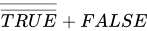
Exercise: Logic Gates Give the symbol and gate diagram for an OR statement Answer: + Give the symbol and gate diagram for an AND statement Answer: . Give the symbol and gate diagram for a XOR statement Answer: Give answers to the following equations: TRUE AND TRUE Answer: TRUE TRUE + FALSE Answer: TRUE TRUE + TRUE Answer: TRUE TRUE TRUE Answer: FALSE NOT(TRUE) . TRUE Answer: FALSE
Answer: TRUE Draw a NAND gate and truth table Answer:
Complete the following table:
Answer:
|


Boolean gate combinations
Now you have learnt logic gates we will take a look at how they are combined inside hardware. You may well be asked in an exam to draw your own logic gates or to work out what a combination of logic gates will output. In this section we will look at the best way to describe what a set of logic gates is in boolean algebra. Let's take a look at a quick example:

|
Exercise: Logic gate combination outputs For the following logic gate combinations work out output Q for each:
Answer:
Answer:
Answer:
Answer:
Answer:
|




Building circuits
|
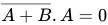
Sometimes you might get an ambiguous equation such as . Do you work out the AND or the OR first? The rule is to treat the AND part first so we would treat |


A common question in the exam is to be given some boolean algebra and be asked to express it as logic gates. Let's take a look at an addition and subtraction example that you should be familiar with:

First we are going to deal with the inner-most brackets

Finally we combine this answer with the

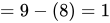
It will work exactly in the same way for boolean algebra, but instead of using numbers to store our results, we'll use logic gates:
|
Example: Building circuits
As with any equation, we are going to deal with the inner-most brackets first, then combine this answer with the |


|
Exercise: Building circuits Draw the circuit diagrams for the following. (Remember: do we deal with AND or OR first?):
Answer:
Answer:
Answer:
Answer:
Answer:
|
%2BC.svg)

.C.svg)

.C.svg)
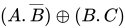
(%2B)(B.C).svg)
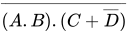
.(C%2B%C2%ACD)).svg)
A common question in the exam is to give you a description of a system. You'll then be asked to create a boolean statement from this description, and finally build a logic gate circuit to show this system:
|
Example: Building circuits Using boolean algebra describe the following scenario:
Where:
Before you rush into answering a question like this, let's try and break it down into its components. The questioner will often be trying to trick you. The two occasions that the alarm will sound are: but there is a caveat, the alarm will sound if either of these are true AND two things are also true, namely the engine is NOT on, and the car is NOT being towed: Combining both we get (remember the brackets!): The next step is to create a diagram out of this:
|



.(%C2%ACA%2B%C2%ACB).svg)
|
Exercise: Building circuits A security system allows people of two different clearance levels access to a building. Either they have low privileges and they have a card and they are not carrying a mobile. Alternatively they have a key and are allowed to carry a mobile. The inputs available are:
Write down the boolean equation to express this: Answer:
If you wrote: You'd be wrong! The reason being the text says: Alternatively they have a key and are allowed to carry a mobile. This doesn't mean , it means they can carry a mobile, or they can choose not to: , which simplifies to: . Draw the logic gate diagram to solve this: Answer:
|

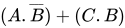


%2B(C).svg)
Gate conversion
Sometimes it is cheaper to create circuits using only one sort of gate, and you might be asked to do so in the exam. These gates tend to be NAND & NOR gates. "But how can you create complex circuits by using only one type of gate?!" you may well ask. We'll now cover how other gates can be made from NAND & NOR gates:
| Step | NOR Gate | Equivalent | |||||||||||||||
|---|---|---|---|---|---|---|---|---|---|---|---|---|---|---|---|---|---|
| Diagram |  |
| |||||||||||||||
| Description | If you split the same input (A) and feed it into NOR both gate inputs you create a NOT Gate | ||||||||||||||||
| Truth Table |
Because:
| ||||||||||||||||


| Step | NAND Gate | Equivalent | |||||||||||||||
|---|---|---|---|---|---|---|---|---|---|---|---|---|---|---|---|---|---|
| Diagram |  |
| |||||||||||||||
| Description | If you split the same input (A) and feed it into both NAND gate inputs you create a NOT Gate | ||||||||||||||||
| Truth Table |
Because:
| ||||||||||||||||


|
Exercise: Gate Conversion Render the following boolean equations using only NAND gates:
Answer:
Answer:
Now try the similar questions using only NOR gates (you might need De Morgan's Law to help you out here, or use a truth table to simplify things)
Answer:
Answer:
Why might you want to use only one sort of gate to create a circuit? Answer: It might be cheaper to make circuits with only one sort of gate, it might make for simpler circuits |

.svg)

.svg)

.svg)
Boolean algebra
We have met gate logic and combinations of gates. Another way of representing gate logic is through boolean algebra, a way of algebraically representing logic gates. You should have already covered the symbols, below is a quick reminder:
| Bitwise Operator | NOT() | AND(.) | OR(+) | XOR() | NAND() | NOR() |
|---|---|---|---|---|---|---|
| Description | invert input | where exactly two 1s | where one or more 1s | where exactly one 1 | where less than two 1s | where exactly two 0s |
For the exam you might have:
- to convert logic gates into boolean algebra,
- build logic gate combinations from boolean algebra,
- simplify boolean algebra.
Simplifying boolean equations
A common question is to give you a complex boolean equation, which you will then have to work out a simpler exact equivalent. This is useful when you are designing circuits and want to minimise the number of gates you are using or make circuits that only use particular types of gates. To simplify boolean equations you must be familiar with two methods. You can normally use either, but try to master both:
- Truth tables
- Boolean algebra - identities and De Morgans Law
|
Example: Simplifying boolean equations with Truth Tables Draw the truth table for the following:
We are going to solve this using a truth table and we need to break the problem down into its component parts: As the equation uses A and B list the different values they can take (4 in total)
Next we are going to work out the brackets first: and add this to our truth table
Finally we will OR this result () with A to find , the final column of the truth table
Now that our truth table is complete, look at the final column, is there a simpler way of writing this? Why aye! The final column is true when, and only when, A is true, it doesn't require B's input at all. So we can simplify to A telling us that:
|



|
Example: Simplifying boolean equations with Truth Tables Let's look at another example
We first of all need to break down the equation into its component parts. Starting off with A and B we the work out , then and finally .
This can be simplified to telling us that: . How did we jump to this conclusion? Let's take a look at all the places where the result is true:
We need to get a combination of A, B that gives the result shown above. We can see that whenever A is false ()the answer is true:
We can also see that whenever the B value is true then the answer is also true:
So we know that we need to combine with to get an equation solving all cases. If we AND them this only gives us one of the scenarios, so that's not the answer. If we OR them then this gives us three answers, matching all the responses above. This is our solution.
|


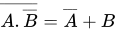

|
Exercise: Simplifying boolean equations with Truth Tables Give a simplified boolean description, ?, for the following truth tables:
Answer:
Answer:
Answer:
Answer:
Simplify the following boolean equations using truth tables:
Answer:
This can be simplified to:
Answer:
The answer in all cases is a plain
Answer:
This can be simplified to: OR (because of De Morgan's Laws)
Answer: Remember that we deal with the AND before the OR, meaning we can read the equation as:
This can be simplified to:
Answer:
This can be simplified to: |


Boolean identities
Sometimes a very complex set of gates can be simplified to save on cost and make faster circuits. A quick way to do that is through boolean identities. Boolean identities are quick rules that allow you to simplify boolean expressions. For all situations described below:
A = It is raining upon the British Museum right now (or any other statement that can be true or false)
B = I have a cold (or any other statement that can be true or false)
| Identity | Explanation | Truth Table | ||||||||||||||||||||
|---|---|---|---|---|---|---|---|---|---|---|---|---|---|---|---|---|---|---|---|---|---|---|
| It is raining AND It is raining is the same as saying It is raining |
| |||||||||||||||||||||
| It is raining AND It isn't raining is impossible at the same time so the statement is always false |
| |||||||||||||||||||||
| 2+2=4 OR It is raining. So it doesn't matter whether it's raining or not as 2+2=4 and it is impossible to make the equation false |
| |||||||||||||||||||||
| 1+2=4 OR It is raining. So it doesn't matter about the 1+2=4 statement, the only thing that will make the statement true or not is whether it's raining |
| |||||||||||||||||||||
| It is raining OR It is raining is the equivalent of saying It is raining |
| |||||||||||||||||||||
| It is raining OR It isn't raining is always true |
| |||||||||||||||||||||
| 1+2=4 AND It is raining. It is impossible to make 1+2=4 so this equation so this equation is always false |
| |||||||||||||||||||||
| 2+2=4 AND It is raining. This statement relies totally on whether it is raining or not, so we can ignore the 2+2=4 part |
| |||||||||||||||||||||
| It is raining OR I have a cold, is the same as saying: I have a cold OR It is raining |
| |||||||||||||||||||||
| It is raining AND I have a cold, is the same as saying: I have a cold AND It is raining |
| |||||||||||||||||||||
| It is raining OR (It is raining AND I have a cold). If It is raining then both sides of the equation are true. Or if It is not raining then both sides are false. Therefore everything relies on A and we can replace the whole thing with A. Alternatively we could play with the boolean algebra equation: Using the identity rule |
| |||||||||||||||||||||
| It is raining AND (It is raining OR I have a cold). If It is raining then both sides of the equation are true. Or if It is not raining then both sides are false. Therefore everything relies on A and we can replace the whole thing with A. Alternatively we could play with the boolean algebra equation: Using the identity rule |
|

















Examples of manipulating and simplifying simple Boolean expressions.
|
Example: Simplifying boolean expressions Let's try to simplify the following:
Using the rule
Trying a slightly more complicated example:
dealing with the bracket first as as |






|
Exercise: Simplifying boolean expressions
Answer:
Answer:
Answer:
Answer:
Answer:
Answer:
Answer:
|








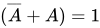
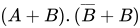
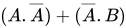
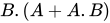
Sometimes we'll have to use a combination of boolean identities and 'multiplying' out the equations. This isn't always simple, so be prepared to write truth tables to check your answers:
|
Example: Simplifying boolean expressions
Where can we go from here, let's take a look at some identities
Now for something that requires some 'multiplication'
|



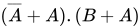


|
Exercise: Simplifying boolean expressions
Answer:
multiplying out
Answer: This takes some 'multiplying' out:
Answer: This takes some 'multiplying' out: treat the brackets first and the AND inside the brackets first multiply it out as as
Answer:
as as take A out as the common denominator as
Answer: This takes some 'multiplying' out:
Answer: This takes some 'multiplying' out: multiplied out as as
Answer: Take the common factor, from both sides: As Then As Then
|


















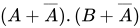

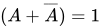

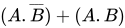




De Morgan's Laws
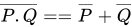
De Morgan's laws are used to simplify Boolean equations so that you can build equations only involving one sort of gate, generally only using NAND or NOR gates. This can lead to cheaper hardware. There are two laws that you need to remember:
| Rule 1 | Rule 2 |
|---|
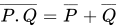
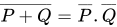
An easy way to remember De Morgan's Laws is through the rhyme: "break the line, change the sign"!
Let's prove that I'm not lying to you by creating a truth table to prove that:
Answer:
| P | Q | |||||
|---|---|---|---|---|---|---|
| 0 | 0 | 0 | 1 | 1 | 1 | 1 |
| 0 | 1 | 1 | 0 | 1 | 0 | 0 |
| 1 | 0 | 1 | 0 | 0 | 1 | 0 |
| 1 | 1 | 1 | 0 | 0 | 0 | 0 |


Since the values in the 4th and last columns are the same for all rows (which cover all possible truth value assignments to the variables), we can conclude that the two expressions are logically equivalent.
Now we prove by the same method:
Answer:
| P | Q | |||||
|---|---|---|---|---|---|---|
| 0 | 0 | 0 | 1 | 1 | 1 | 1 |
| 0 | 1 | 0 | 1 | 1 | 0 | 1 |
| 1 | 0 | 0 | 1 | 0 | 1 | 1 |
| 1 | 1 | 1 | 0 | 0 | 0 | 0 |


There is a rather nice concrete way of thinking about this, with a gate that's padlocked with two padlocks, padlock 1 and padlock 2.
We'll use to stand for padlock 1 is open, and to stand for padlock 2 is open.


You can go through the gate if padlock 1 is open AND padlock 2 is open () You can not go through the gate if padlock 1 is locked OR padlock 2 is locked ()

Since 'You can not go through the gate' is the same as the opposite (negation) of 'You can go through the gate' and, remembering
gate is open = gate is closed = you should be able to see that NOT{gate is open} = or
=
|
Example: Simplifying boolean equations using boolean algebra Simplify the following:
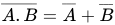
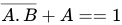
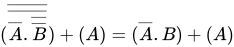
From looking at the truth table we can see that it equates to . But we should also know how to get to this result by using boolean identities. Let's give it a go:
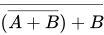
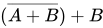
Let's try another |




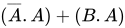



|
Exercise: Simplifying boolean equations Simplify the following using De Morgan's Laws and boolean identities. Check your answers by making truth tables:
Answer:
Answer:
If you're catching on to this, you'll notice that this is the equivalent of . But we better check it with boolean algebra identities and De Morgans Law to confirm we have the correct answer.
Answer:
If you're catching on to this, you'll notice that this is the equivalent of . But we better check it with boolean algebra identities and De Morgans Law to confirm we have the correct answer.
|














Hardware and software
Hardware and Software have a symbiotic relationship, this means that without software hardware is very limited; and without hardware, software wouldn't be able to run at all. They need each other to fulfill their potential.
| Standard hardware components | The relationship between Hardware and Software |
|---|---|
|
|
|
Exercise: Hardware and Software Define Hardware: Answer: Physical components that make up a computer system. Define Software: Answer: Computer programs and related data that provide the instructions for telling computer hardware what to do and how to do it. Give names to all the numbered hardware components above: Answer:
Give 2 examples of software: Answer:
NOTE: If you mentioned a brand name such as Windows TM, you get no marks, the exam wants software types meaning you should have written Operating System. After all, for the previous question, you probably didn't answer Nvidia GTX 970 SSC ACX 2.0. |
Internal and external hardware components of a computer
Modern computing (arguably) started in 1822 when Charles Babbage, a British Mathematician, proposed 'the difference engine'. This was a mechanical machine that could calculate numbers from given inputs. Unfortunately Babbage never got enough funding to realise his plans and there was no Victorian Computing Revolution, however, you can see a completed modern version in the Science Museum in London (along with half of Babbage's brain!).
Since Babbage there have been several different designs of computers, and the one we are going to focus on here is called the 3-Box Model, or Von Neumann machine. In this machine:
- All data and instructions are stored in the Main Memory
- Instructions are sent to the Processor along the System Bus to be executed
- Any input and output (such as printing and entering instruction) is performed by I/O devices with the data travelling from the I/O devices to the Processor and Main Memory by means of the System Bus:

Consider a program stored on a DVD, to get the machine to run it, you will have to input the data from the DVD to the memory using the system bus. Once the program is loaded into memory the instructions it will be sent to the CPU line by line using the system bus and executed there. Any things to be printed or shown on a screen will be sent to the Output box.
We'll now look in more detail at these components:
Processor

The processor (or Central Processor Unit - CPU) is one of the most complex parts of any computer system. The processor executes programs and supervises the operation of the rest of the system. Single chip processors are otherwise known as microprocessors. Gordon E Moore theorized that the number of transistors that could be integrated onto the chip would double every 18–24 months, most modern processors will contain billions of transistors. Multicore microprocessors are now very popular, where the processor will have several cores allowing for multiple programs or threads to be run at once.


Main Memory
Main memory is used to store program instruction and data, using the System Bus to communicate with CPU. Main memory is often created using Random Access Memory (or RAM) or Read Only Memory (ROM). Modern computers will have gigabytes of RAM, meaning that large programs can run and multiple programs can run at once. The more main memory that you have the larger the number of programs you can run at once.

Main memory consists of data stored in addresses, in general, the more main memory you have the more addresses you'll have and vice versa.
Address Contents 1024 Cabbage 1025 Celery 1026 Courgette 1027 Carrot 1028 Cucumber 1029 Chard
In the above example if we were to perform the following assembly code instruction:
LDA 1026 ;LOAD memory location 1026
This would return the word: "Courgette"
If we were to perform the following assembly code instruction:
STO "Beetroot", 1025 ;STORE data given into memory location 1025
This would change the value stored in memory location 1025 from "Celery" to "Beetroot"
ROM and RAM
The two main types of main memory are ROM and RAM. Whilst RAM might be several gigabytes in size, ROM will often be a few kilobytes. As ROM is read only memory, it tends to store core software instructions such as the code needed to load the Operating System into RAM (known as bootstrapping) or change the bios. RAM is much much larger and stores the code to run the operating system and programs that you run on your computer. When you load a disc into a games console, the code won't do anything until it has loaded from the disc into the system RAM, that's why you see a loading screen.
|
Exercise: Central Processing Unit Give a definition for main memory: Answer: Main memory is a data store that can be directly addressed by the CPU What is the difference between ROM and RAM? Answer: ROM is Read Only Memory, RAM is random access memory. This means that ROM cannot be written to, it can only be read from. RAM can be both read from and written to. Name the four components of Von Neumann Architecture Answer:
|
System Bus
|
Remember the name of each bus, what they do and which directions they operate in |
A Bus is a connection between different devices. This connection will normally consist of multiple wires along which signals, instructions and data will be carried. In Von Neumann Architecture there is a single bus to manage the connection between the three main components. The System Bus consists of 3 separate buses, each with a specific task that you need to know. This three bus model is an expansion of the Von Neumann architecture showing greater detail.
.svg)
Address Bus
A single-directional bus that carries address signals from the CPU to Main Memory and I/O devices. This might involve the CPU requesting some data from Main Memory, sending the address of the data to Main Memory, then Main Memory returning the data along the data bus. Let's take a look at some code:
LDA 23
This code is asking to load the data from memory address 23 into the CPU, the address bus does not send addresses to the processor, but only sends them from the processor. To do this the CPU would send 23 along the Address Bus, and the value from memory location 23 would be sent along the Data Bus back to the CPU. The size of the Address Bus can dictate how much Main Memory you can have in your system. For example, if you had an Address Bus of 3 bits, then:
Maximum value   = 111 = 7
Range of values =
                  000
                  001
                  010
                  011
                  100
                  101
                  110
                  111
This would mean that your Main Memory could only have 8 different addressable blocks
Data bus
A bi-directional bus, typically consisting of 32 wires, used to transport data and instructions between the three components of the three-box model. The larger the Data Bus the more data can be transported at one time. For example if we have an 8 bit Data Bus, the maximum value we could send along the Bus would be:
1111 1111 = 255
The larger the Data Bus the more data we can send at once and the more complex instructions we can use.
Control bus
A bi-directional bus, typically consisting of more than 16 wires, used to transport control signals between the three components of the three-box model. The control bus is used to carry important information such as messages to say when a device has finished a job or when a device has just been plugged in. A simple example would be when you plug in your USB key and after a few moments a screen pops up asking you what you want to do with it. The control bus also contains interrupt signals which allow devices (printers, keyboards, disks, etc.) to signal that they have finished a request. The CPU temporarily suspends its current program, services the device and then resumes the previous program.
|
Extension: Modern Architecture The information above will serve you well for the exam; however, the way many modern processors work may break the definitions you have just learnt:
|
|
Exercise: Central Processing Unit Complete the following table:
Answer:
What is the largest number the following width data buses can carry at one time: width 4 wires Answer:
width 6 wires Answer:
width 10 wires Answer:
How many addresses can the following width addresses buses address: width 4 wires Answer:
width 5 wires Answer:
width 8 wires Answer:
An address bus that can address a maximum of 2GB memory is 31 wires in width. How many wires would it need if it were to address a maximum of 4GB of memory? Answer: 32 as bytes or 4GB of memory But you don't have to be really good at maths to answer this. 4GB is twice 2GB and we know that 2^x is half the size of 2^x+1. |







Peripherals
Input/Output devices are used by the system to get information in and out, as they are not internal but are connected to the CPU, we refer to them as peripherals (your hands are peripheral to your torso). We'll cover the specific ones you need to learn a little later, but for the moment you need to know the fundamental difference:
- Input Devices - used to get information into the system. E.g. Keyboard
- Output Devices - used to send information out of the system. E.g. Visual Display Unit (VDU)
If you look at the Von Neumann Architecture notice that it doesn't mention Keyboard or display, this is a very smart move as you don't want to force every computer to have a keyboard (think about a games console, there is no keyboard on that) or a VDU (some computer such as MP3 players don't have a screen). However, some computer architecture does include specific I/O controllers:
I/O controllers
An I/O controller is an electronic circuit that connects to a system bus and an I/O device; it provides the correct voltages and currents for the system bus and the I/O device. Examples would include:
- keyboard controller, attached to a keyboard
- disk controller for a Hard Disk (Hard Disks are not main memory!)
- video display controller, attaching a video display unit (monitor)
I/O ports
I/O ports is a complementary method of performing input/output between the CPU and peripheral devices in a computer. This allows I/O devices to be connected to the CPU without having to have specialist hardware for each one. Think about the USB port on your computer, you can connect Keyboards, Mice, Game pads, Cameras, Phones, etc. and they all connect using the same port.
Secondary storage
|
Even if secondary storage is within the computer case, such as a Hard Disk, because it is external to the CPU and connected through an I/O controller it is classified as Secondary Storage |
Main memory can be very expensive and you often require storing data that you won't use constantly. Think about a computer game that you haven't played for a couple of months. The last thing you want to do is to store this code in main memory taking up all that precious and expensive space. To get past this issue we use secondary storage. This is normally inexpensive data storage sitting external to the CPU, connected through an I/O controller, that we can use as and when we need. Secondary Storage will store data permanently, without the need for the electricity to remain always on (Think about a USB key, it doesn't need to be plugged in to keep its data). So taking the game example again, we only load the game into main memory (maybe from a DVD or hard disk), as and when we need it. Examples of secondary storage include:
- Hard Disk drive
- USB thumb drives
- CD-ROM / DVD / Blu-ray
- Tape drives

|
Exercise: I/O and Peripherals Name 2 input peripherals: Answer:
Name 2 output peripherals: Answer:
Name two ways to connect peripherals to a CPU: Answer:
Name 2 secondary storage devices: Answer:
Name 2 I/O controllers Answer:
|
Functional characteristics of a processor
Addressable memory
A computer must be able to access main memory for reading and writing, they do this by using addressable memory. Main memory is a little like a set of school lockers, each with a different number. Each locker contains a block of data and if you fill up one locker you can use the next locker to expand into.

Looking at the example above you can see locker '0' contains '8975', whilst lockers 1 to 6 contain the sentence "The Cat sat on the dog!". Locker '7' is empty, locker '8' contains a boolean value and locker '9' contains the number 48. As you can see if we only used one character for the locker number then we could only ever have 10 lockers. If you limit the number of addresses you can use then you limit the amount of memory you can talk to. If you have a small address bus then you won't be able to have much main memory.
The way that data is stored in a computer is very similar:

Stored program concept
Building on the Von Neumann architecture we get the idea of how the stored program concept works. If you have ever loaded a game on a console you might notice that:
- you need to insert a disc
- the disc spins
- the game says loading
- the game plays
This is the stored program concept in motion! Let's take apart what is happening:
- You insert an optical disk (secondary storage) with the code on
- The code is loaded into main memory
- The processor fetches, decodes and executes instructions from main memory to play game

|
Exercise: Characteristics of a processor How many different addresses can a 8 line address bus address? Answer:
How does the address bus affect main memory? Answer: If you have a small address bus then you will be limited in the number of addresses you can talk to and therefore how much main memory you can directly address. How wide would the address bus have to be to talk to 1024 addresses? Answer: 10 lines wide since What is wrong with using a 9 bit address bus but having 700 memory locations in main memory? Answer: We can only address different locations. It wouldn't be able to talk to address locations . Define the stored program concept: Answer: A program must be (resident) in main memory in order for it to be executed. The instructions are fetched from main memory, then decoded and executed in the CPU. |


Structure and role of the processor
A processor (CPU) has several core components that work together to perform calculations. You need to know each of these and how they interact:
Arithmetic logic unit

The Arithmetic Logic Unit or the ALU is a digital circuit that performs arithmetic and logical operations. Where arithmetic operations include things such as ADD and SUBTRACT and the logical operations include things such as AND, OR, NOT.
The ALU is a fundamental building block in the central processing unit (CPU) of a computer and without it the computer wouldn't be able to calculate anything! Some examples of assembly code instructions that would use the ALU are as follows (not all processors will have all these instructions):
ADD ;add one number to another number
SUB ;subtract one number to another number
INC ;increment a number by 1
DEC ;decrements a number by 1
MUL ;multiply numbers together
OR  ;boolean algebra function
AND ;boolean algebra function
NOT ;boolean algebra function
XOR ;boolean algebra function
JNZ ;jump to another section of code if a number is not zero (used for loops and ifs)
JZ  ;jump to another section of code if a number is zero (used for loops and ifs)
Control unit
The control unit sits inside the CPU and coordinates the input and output devices of a computer system. It coordinates the fetching of program code from main memory to the CPU and directs the operation of the other processor components by providing timing and control signals.
Clock
Your computer might contain several clocks that each regulate different things. The clock we are going to look at here will keep the processor in line. It will send the processor a signal at regular times telling it to start the fetch decode execute routine.

Clock speed is measured in Hertz, which means 'per second'. You have probably heard of clock speeds such as 1 MHz, this means 1,000,000 cycles per second and potentially a million calculations. A computer of speed 3.4 GHz means it might be capable of processing 3,400,000,000 instructions per second! However it isn't as simple at that, as some processors can perform more than one calculation on each clock cycle, and processors from different manufacturers and using different architecture are often difficult to compare. (See the Megahertz myth). Also with the increase in multi-core processors such as the PS3 (7 cores) and the Xbox 360 (3 cores) there might be times where the clock might be ticking but there is nothing for the processor to calculate, the processor will then sit idle.
General purpose and dedicated registers
For immediate calculations, using main memory is too slow. Imagine having to send a signal along the address bus and some data along the data bus when all you want to do is store the result of adding two numbers together. The distance between the processor and main memory, even though it might be a few centimetres, is far enough for the signal to take a significant time to get there. To get past this issue there are small amounts of memory stored inside the processor itself, these are called registers. Registers are incredibly fast pieces of memory that are used to store the results of arithmetic and logic calculations.
Different processors will have different sets of registers. A common register is the Accumulator (acc) which is a data register, where the user is able to directly address (talk to) it and use it to store any results they wish. Processors may also have other registers with particular purposes:
- General purpose register - allow users to use them as they wish
- Address registers - used for storing addresses
- Conditional registers - hold truth values for loop and selection
There are also 4 registers in particular that you need to know, we'll meet them in more detail in the next chapter:
- Program Counter (PC) - an incrementing counter that keeps track of the memory address of which instruction is to be executed next.
- Memory Address Register (MAR) - holds the address in memory of the next instruction to be executed
- Memory Buffer Register (MBR) - a two-way register that holds data fetched from memory (and ready for the CPU to process) or data waiting to be stored in memory
- Current Instruction register (CIR) - a temporary holding ground for the instruction that has just been fetched from memory
|
Exercise: Structure and role of the processor Give a description of the Arithemtic Logic Unit: Answer: The Arithmetic Logic Unit or the ALU is a digital circuit that performs arithmetic and logical operations. What does 3MHz mean: Answer: 3,000,000 clock cycles per second What does a processor clock do: Answer: Synchronises the operation of the processor What are registers: Answer: a small amount of fast storage which is part of the processor Name 3 registers used by the processor and explain what each does: Answer:
|
Increasing performance
If we want to increase the performance of our computer, we can try several things
- Increasing the clock speed
- Adjusting word length
- Increasing bus widths
For each different methods we are going to look at these old games consoles to see how performance increase was achieved:
| System | Year | Speed | Word size | Notes |
|---|---|---|---|---|
| NES | 1983 | 1.79 MHz | 8 bit | |
| SNES | 1990 | 3.58 MHz | 16 bit | |
| Nintendo 64 | 1996 | 93.75 MHz | 64 bit | |
| GameCube | 2001 | 486 MHz | 128 bit | cooling fan introduced |
Clock speed
The most obvious way to increase the speed of a computer would be to increase the speed of the computer clock. With a faster clock speed the processor would be forced to perform more instructions per second.
|
Example: Clock Speed As you can see on the console table above, each successive console showed an increase in clock speed. A clock speed of 800 MHz is twice as fast as a clock speed of 400 MHz, meaning it should be able to calculate twice as many calculations in a given time. |
But what is to stop us increasing the clock speed as much as we want? If you study Physics you might already know this, but the problem with increased clock speed is that an increased current will have to flow through the circuits. The more current that flows, the hotter things get. You might notice that a laptop will get hot or even your mobile phone when you are doing something processor intensive like playing a game. The faster the clock speed, the hotter the processor runs. To counter this computer scientists have come up with smarter chip designs and introduced heat sinks, fans, and even liquid cooling into computers. If a processor runs too hot it can burn out!
| NES processor | Heat sink | CPU fan | Water cooling |
|---|---|---|---|
 |
 |
 |

|
| No need for fans or heat sinks | Draws the heat away from the processor, which sits beneath |
I love the CPU so much, I'm a real CPU fan | Metal contacts are placed on the cpu drawing heat away, water then passes over these contacts to draw heat away |
Word size
Another way to increase the performance of a computer is to increase the word size. This means increasing the number of bits a computer can process at one time. As you can see from our console table, increasing word size was a big part of creating faster consoles, they even named a console the N64 to boast about its word size. With a larger word, computers can handle larger or more precise calculations and do more complicated things. Modern computer mostly have 32 or 64 bit word sizes, with specialist hardware such as games consoles being able to handle up to 128 bit words.
|
Example: Word Length  Imagine that we were only able to use words of length 6 letters or less and we wanted to describe the Compsognathus dinosaur to someone. We might try the following:
If we were able to use more letters per word (have a larger word size), then we could achieve more in fewer words.
However, to understand the longer words you would have to know what dinosaur and million meant, maybe stopping for a brief moment to remember. In computing terminology, you would have to have more complicated hardware and using lots of little words could be faster than processing larger ones. |
Bus size
Now that we understand what word size is. Imagine that you have a processor able to understand 32 bit words at a single time. This is pretty standard. But what happens if the bus sending the words from memory to the processor was only 8 bits wide? We'd get a bottle neck. It would involve four chunks of data to be sent along the Data Bus before we had a word for the processor to execute. In other words, to increase performance we must also increase the bus size to avoid bottle necks:
|
Example: Bus Size Imagine our friend can understand words of 28 bit length and we are sending the word: antidisestablishmentarianism to them. If the link between us (the bus), say a chat window on a website, only allowed for 4 letters at a time (the bus width). We'd have to send the following: anti dise stab lish ment aria nism Requiring seven data sends before our friend is ready to process the word we sent them. If we were able to send more letters at once, through a larger bus width, then our friend wouldn't have to wait around to receive all the data. |
|
Exercise: Increasing Processor Performance Name three ways to increase Processor performance: Answer:
What draw back might increasing clock speed bring? Answer: Processor might need extra cooling hardware to stop it over heating What is a benefit of increasing word length? Answer: Computers can perform more complex instructions in one go, dealing with larger numbers and greater number accuracy How might bus width impact on the speed of a computer? Answer: If the bus width is smaller than the word size, then the CPU will have to wait around whilst the bus delivers data and instructions to it. |
How does it all fit together?
A very common exam question is to name the components of a computer architecture diagram. Now we have met the processor, buses and various other computer components we can start to answer questions like the following:
|
Example: Name the component Match the following components to the numbers on the diagram: Processor, Data bus, Control Bus, Main memory, Keyboard, Secondary storage, Address bus, Clock, Monitor, VDU controller, disk controller, keyboard controller  Don't worry about the size of this problem, we are going to tackle it bit by bit. the first step is to remember the differences between each of the components:
Now we have remembered what each device does, can you label them all? Answer:
|
|
Exercise: System Diagrams For the following diagram where applicable add single or multi directional connections between devices and buses  Answer:
 |
Machine code and processor instruction set
Machine code
As we should hopefully already know, computers can only understand binary, 1s and 0s. We are now going to look at the simplest instructions that we can give a computer. This is called machine code.
Machine code allows computers to perform the most basic, but essential tasks. For this section we are going to use the Accumulator (you met this register earlier) to store the intermediate results of all our calculations. Amongst others, the following instructions are important for all processors:
- LDA - Loads the contents of the memory address or integer into the accumulator
- ADD - Adds the contents of the memory address or integer to the accumulator
- STO - Stores the contents of the accumulator into the addressed location
Assembly code is the easy to read interpretation of machine code, there is a one to one matching, one line of assembly equals one line of machine code:
| Machine code | Assembly code |
|---|---|
| 000000110101 = | Store 53
|
Let's take a look at a quick coding example using assembly code.
LDA #23 ;loads the number 23 into the accumulator
ADD #42 ;adds the number 42 to the contents of the accumulator = 65
STO 34  ;save the accumulator result to the memory address 34
The code above is the equivalent of saying x = 23 + 42 in VB.NET.
- the above example is not entirely factually correct as the variable "x" has never been created(defined)in the Assembly code example.
Instruction set
There are many different instructions that we can use in machine code, you have already met three (LDA, ADD, STO), but some processors will be capable of understanding many more. The selection of instructions that a machine can understand is called the instruction set. Below are a list of some other instructions that might be used:
ADD ;add one number to another number
SUB ;subtract one number from another number
INC ;increment a number by 1
DEC ;decrement a number by 1
MUL ;multiply numbers together
OR  ;boolean algebra function
AND ;boolean algebra function
NOT ;boolean algebra function
XOR ;boolean algebra function
JNZ ;jump to another section of code if a number is not zero (used for loops and ifs)
JZ  ;jump to another section of code if a number is zero (used for loops and ifs)
JMP ;jump to another section of code (used for loops and ifs)
Let us look at a more complex example of assembly code instructions:
LDA #12 ;loads the number 12 into the accumulator
MUL #2  ;multiplies the accumulator by 2 = 24
SUB #6  ;take 6 away from the accumulator = 18
JNZ 6   ;if the accumulator <> 0 then goto line 6
SUB #5  ;take 5 away from the accumulator (this line isn't executed!)
STO 34  ;saves the accumulator result (18) to the memory address 34
You'll notice that in general instructions have two main parts:
- opcode - instruction name
- operand - data or address

Depending on the word size, there will be different numbers of bits available for the opcode and for the operand. There are two different philosophies at play, with some processors choosing to have lots of different instructions and a smaller operand (Intel, AMD) and others choosing to have less instructions and more space for the operand (ARM).
- CISC - Complex Instruction Set Computer - more instructions allowing for complex tasks to be executed, but range and precision of the operand is reduced. Some instruction may be of variable length, for example taking extra words (or bytes) to address full memory addresses, load full data values or just expand the available instructions.
- RISC - Reduced Instruction Set Computer - less instructions allowing for larger and higher precision operands.
|
Exercise: Instruction sets What is the instruction set: Answer: the range of instructions that a CPU can execute Name and explain the two parts that make up an machine code instruction: Answer:
For a word with 4 bits for an opcode and 6 bits for an operand
Answer:
For a 16 bit word with 6 bits for an opcode
Answer:
Why might a manufacturer choose to increase the instruction set size? Answer: so that they can increase the number of discrete instructions that can be executed What might be the problem with increasing the space taken up by the opcode? Answer: less space for the operand, meaning reduced range and precision in data be processed in a single instruction Give two benefits for increasing the word size of a processor? Answer:
|



Addressing modes
You might notice that some instructions use a # and others don't, you might even have an inkling as to what the difference is. Well here is the truth:
        # = number
[no hash] = address
Let's take a look at a quick example:
| Assembly code | Main memory start | Main memory end | ||||||||||||||||||||||||
|---|---|---|---|---|---|---|---|---|---|---|---|---|---|---|---|---|---|---|---|---|---|---|---|---|---|---|
LOAD #10
ADD #12
STORE 12
|
|
| ||||||||||||||||||||||||
| This code loads the number 10 into the accumulator, then adds the number 12, it then stores the result 22 into memory location 12. | ||||||||||||||||||||||||||
Let's take a look at doing this without the hashes:
| Assembly code | Main memory start | Main memory end | ||||||||||||||||||||||||
|---|---|---|---|---|---|---|---|---|---|---|---|---|---|---|---|---|---|---|---|---|---|---|---|---|---|---|
LOAD 10
ADD 12
STORE 12
|
|
| ||||||||||||||||||||||||
| This code loads the value stored in memory location 10 into the accumulator (9), then adds the value stored in memory location 12 (7), it then stores the result into memory location 12 (9 + 7 = 16). | ||||||||||||||||||||||||||
There are many types of addressing modes. But we only need to know 3, they are:
| Addressing Mode | Symbol | Example | Description |
|---|---|---|---|
| Memory Location | LOAD 15 | 15 is treated as an address | |
| Integer | # | LOAD #15 | 15 is treated as a number |
| Nothing | HALT | Some instruction don't need operands such as halting a program |
|
Exercise: Assembly code and Addressing modes For the following memory space, what would it look like after executing the assembly code below:
LOAD 14
ADD #12
STORE 12
Answer:
For the following memory space, what would it look like after executing the assembly code below:
LOAD #100
STORE 213
LOAD 214
ADD 213
STORE 214
Answer:
For the following memory space, what would it look like after executing the assembly code below:
LOAD 100
ADD 101
DIV #7
STORE 102
Answer:
Write some assembly code to do the following:
Answer:
LOAD #34
ADD #35
STORE 100
Write some assembly code to do the following:
Answer:
LOAD #100
DIV #2
ADD #4
STORE 100
List and give examples of three addressing modes: Answer:
|
Machine code and instruction sets
There is no set binary bit pattern for different opcodes in an instruction set. Different processors will use different patterns, but sometimes it might be the case that you are given certain bit patterns that represent different opcodes. You will then be asked to write machine code instructions using them. Below is an example of bit patterns that might represent certain instructions.
| Machine code | Instruction | Addressing mode | Hexadecimal | Example |
|---|---|---|---|---|
| 0000 | STORE | Address | 0 | STO 12 |
| 0001 | LOAD | Number | 1 | LDA #12 |
| 0010 | LOAD | Address | 2 | LDA 12 |
| 0100 | ADD | Number | 4 | ADD #12 |
| 1000 | ADD | Address | 8 | ADD 12 |
| 1111 | HALT | None | F | HALT |
|
Exercise: Machine Code Using the table above provide machine code to do the following: LOAD 12
ADD #6
Answer:
0010 00001100
0100 00000110
Using the table above give the assembly code for the following machine code: 0001 00000111 0100 00001001 0000 00011110 Answer:
LOAD #7
ADD #9
STORE 30
Explain what the above code does: Answer: loads the integer 7 into the Accumulator, adds the integer 9 to the Accumulator, stores the result, 16, in memory location 30 Convert the following machine code into hexadecimal: 0001 00111011 0100 00001001 0000 00011110 1111 00000000 Answer:
1 3 B
4 0 9
0 1 E
F 0 0
If we were lacking Assembly code, why might we want to convert machine code into Hexadecimal? Answer: It makes it easier for humans to read and understand. |
|
Extension: Little Man Computer If you would like to play around with Assembly language a great place to start is the Little man computer. You can find a Java applet and some examples at the York University website or a javascript version created by Peter Higginson |
The Fetch–Execute cycle and the role of registers within it
The Fetch-Decode-Execute cycle of a computer is the process by which a computer:
- fetches a program instruction from its memory,
- determines what the instruction wants to do,
- and carries out those actions.
This cycle is repeated continuously by the central processing unit (CPU), from bootup to when the computer is shut down. In modern computers this means completing the cycle billions of times a second! Without it nothing would be able to be calculated.
Registers/circuits involved
The circuits used in the CPU during the cycle are:
- Program Counter (PC) - an incrementing counter that keeps track of the memory address of which instruction is to be executed next...
- Memory Address Register (MAR) - the address in main memory that is currently being read or written
- Memory Buffer Register (MBR) or Memory Data Register (MDR) - a register that holds data fetched from memory (and ready for the CPU to process) or data waiting to be stored in memory. This register can send or receive data via the Data Bus (2-way register).
- Current Instruction register (CIR) - a temporary holding ground for the instruction that has just been fetched from memory
- Control Unit (CU) - decodes the program instruction in the CIR, selecting machine resources such as a data source register and a particular arithmetic operation, and coordinates activation of those resources
- Arithmetic logic unit (ALU) - performs mathematical and logical operations
Register notation
To describe the cycle we can use register notation. This is a very simple way of noting all the steps involved. In all cases where you see brackets e.g. [PC], this means that the contents of the thing inside the brackets is loaded. In the case of the first line, the contents of the program counter is loaded into the Memory Address Register.
![{\displaystyle MAR\gets [PC]}](https://wikimedia.org/api/rest_v1/media/math/render/svg/0b41bdef5bb1175ad9fceec79a93b25f7fa4e535)
(Increment the PC for next cycle at the same time)
![{\displaystyle MBR\gets [Memory]_{MARaddress};PC\gets [PC]+1}](https://wikimedia.org/api/rest_v1/media/math/render/svg/29b15a09ac9f9c9a4ed38876a6b4a8b1ac48d4e3)
![{\displaystyle CIR\gets [MBR]}](https://wikimedia.org/api/rest_v1/media/math/render/svg/699becd35d73ac5354adee5d86434b0faeba40e9)
decoded then executed
![{\displaystyle [CIR]}](https://wikimedia.org/api/rest_v1/media/math/render/svg/389e1cc97ca05d5686ea10dbbb9e6ef6c1354f58)
Detailed description of Fetch-Decode-Execute Cycle
To better understand what is going on at each stage we'll now look at a detailed description:

The contents of the Program Counter, the address of the next instruction to be executed, is placed into the Memory Address Register

The address is sent from the MAR along the address bus to the Main Memory. The instruction at that address is found and returned along the data bus to the Memory Buffer Register. At the same time the contents of the Program Counter is increased by 1, to reference the next instruction to be executed.

The MBR loads the Current Instruction Register with the instruction to be executed.

The instruction is decoded and executed using the ALU if necessary.
The Cycle starts again!
|
Exercise: Fetch Execute Cycle Name 3 registers involved in the Fetch Execute Cycle and describe what each does: Answer:
Describe the Fetch Execute Cycle using register notation: Answer:
Complete the following diagrams showing each step of the fetch decode execute cycle:
Answer:
Answer:
Answer:
Answer:
|



Hardware Devices
|
Input and Output Devices Know the main characteristics, purpose and suitability of contemporary devices (see the Teacher Resource Bank), and understand their principles of operation, including methods of error checking (check digit). |
|
Secondary Storage Devices Explain the need for secondary storage within a computer system, know the main characteristics, purpose and suitability, and understand the principles of operation of contemporary devices (see the Teacher Resource Bank). Compare the capacity and speed of access of various media and make a judgement about their suitability for different applications |
Input and output devices
You should already have met the internal components of the computer and the peripherals, that sit outside. We are now going to look at two different categories of peripherals. Those that input data into a computer, and those that output data from the computer.

How do we tell what is an input and what is an output device? Think about it from the computer's perspective. If a device is putting data into the computer in the form of text, sound, images, button presses etc. then it is an input device, if the device is outputting things from the computer such as sound, movement, printing, images etc., then it is an output device. It really is that easy to tell the difference, but be warned, some devices can be both input and output!
Let's take a look at two examples:
|
Example: Telling the difference between input and output devices  When you are using the monitor it displays things that you are doing, such as moving windows and clicking on website links. At no point do you click on the screen or put anything into the monitor. The only thing it does is output information, therefore it is an output device. Easy!  A mouse is used to move a little cursor around the screen, clicking and dragging as you go. if you let go of the mouse, the cursor will stop. The computer is relying on you to move the mouse, the mouse won't move on its own! Therefore it is an input device. |
|
Exercise: Input and output devices Note whether the following devices are input or output devices (or both!)
Answer:
|
Input devices
Pay special attention to devices with an orange background, you need to be able to describe exactly how they work!
Mouse
A mouse is a pointing device used on the screen of a computer. Enables the user to execute commands or issue instructions to the computer by controlling a pointer on the screen.
Keyboard

The keyboard is one of the most popular ways of inputting data information and instructions into a computer. The basic mechanical keyboard relies on springed keys being pressed down to complete an electrical circuit. This circuit then transmits a binary signal (commonly using ASCII) to the computer to represent the key pressed.

There are many different keyboard layouts, with differences between languages and countries. The most popular layout is the QWERTY keyboard. Other layouts include:
- AZERTY - for countries such as France and Belgium
- QWERTZ - for countries such as Germany and Austria
- Arabic - different values to most keys
- Ukrainian
- Chinese - laid over a QWERTY keyboard
There are variations QWERTY keyboard with the UK and the USA having very slight differences in layout. There also variations in English language keyboards such as the Dvorak layout, which followers claim to be superior to QWERTY.

Voice recognition
Microphone connected to software that converts human speech into commands or text.
Pros
Natural interface with a computer allowing for new users to execute commands without having to learn complex command setCons
Speech recognition might not recognise the difference between similar words i.e. "their" and "they're" or be able to understand regional accents
Digital camera

- Light is focused through the lens onto the image sensor at the back of the camera
- The image sensor is made up of an array of Red, Green and Blue photosensors, called a Bayer filter. Each sensor will only record values for that particular colour.
-
 This image
 -
 went through this
 -
 like so


And became these:
-
 Red
Red -
 Green
Green -
 Blue
Blue


3. The different colour arrays are combined to form an image and makes this:
-
 Combined image
 -
 Applying an algorithm to merge cells
 -
Notice it is not quite the same as this Original


4. Once the RGB values have been captured, they can then be stored digitally using SD or compact flash cards. Save formats include JPEG or TIFF.
Pros
You can preview images taken without having to get them developedYou can apply filters and images to add special effectsCons
Some people argue that the quality of photos taken using the traditional film medium is better
Barcode reader
Used in supermarkets,warehouses,libraries keeping track of produce etc. They allow for quick reading of product details so that prices and information can be retrieved and/or stock levels updated. However the amount of data stored in a barcode is very limited

- A laser is directed towards the barcode, scanning across it and the reflected light is captured by the reader
- The intensity of light reflected back is read by a sensor in the bar code reader
- High intensity = white bar
- Low intensity = black bar
- The pattern received is translated into a code which gives the identity of the barcode being scanned
- This code is checked against a product database and the product details displayed

To make sure that the number you have received is correct barcodes employ check digits. Read on to find out more
Pros
Cheap to produce as all you need to do is print a black and white imageQuick to read, and with multi-direction scanners, can be read from different angles
Cons
Only a limited amount of data can be stored
Optical mark reader
Used in things like multi choice question papers. The student would be given a selection of answers and then mark the ones they thought correct with a pen or pencil. When finished, the forms would be fed into a machine that would look for black marks. The position of these marks correspond to answers and the form could be marked at some speed.They can also be used for student registration

Optical character reader
Used in scanning printed or written text into a digital format. Used by Amazon and Google to scan books.

Magnetic stripe reader
Used to read data from bank cards and access cards. Data is stored in the magnetic, generally black, strip on the back of these cards

Smart card reader
Used in bank cards, often known as part of 'chip and pin'. More secure than Magnetic stripes though more expensive to produce.
RFID reader
Used to read data without physical contact. Examples include the London Oyster Card System. Where the card has a Radio Frequency Identification(RFID) chip.

- The card is then placed above a reader and the magnetic field produced by the reader creates a current in the card's circuitry (no physical contact is required)

- This current powers a small radio transmitter that transmits a radio wave with the details about the card to the reader

- If the details of the card are legitimate (checked on database) then it lets the person through the gate


Pros
Can be read without physical contact (health and safety concerns)Fast way to pay for things
Cons
Thieves could read your card remotely, stealing your details Having multiple RFID cards together, means that they can interfere with each other and none of them can be read

Touch sensitive
More and more devices are relying on touch technologies.
Touch-sensitive screen
- Each of the four corners of a screen emits a uniform electric field which covers the screen
- When you place your finger on or near the screen it disrupts this field and draws current
- Measuring the amount of current pulled from each corner you can triangulate the position of the finger

Pros
Natural, intuitive interface with devicesThe ability to remap screen functions to suit the task (for example bringing up a keyboard when necessaryCons
Cold weather can affect the functioning of touch screens Won't work through standard gloves, as this stops your fingers conducting electricity

Graphics tablet
Used in the design and architectural industries. This allows for people to draw on the tablet in a natural way (as they would with a pencil and paper) and for their drawing to appear on the computer.

|
Exercise: Inputs What input device might a multi-choice questionnaire writer use to input completed forms into a computer. Why? Answer: OMR - optical mark recognition software, as it will allow for input of papers with marks on them Describe the functioning of a bar-code reader: Answer:
Describe the functioning of digital camera: Answer:
Why might it beneficial for professional photographer to use a digital camera instead of a film camera? Answer:
Give two benefits of using RFID cards to pay for produce over using hard cash. What is a draw back? Answer:
Can be read without physical contact (health and safety concerns)Fast way to pay for things
Thieves could read your card remotely, stealing your details, without you even knowing it
Give a benefit of having a touch screen phone over a phone with a hardware keyboard. Why might some people prefer a hardware keyboard? Answer: A touch screen phone would allow you to have a keyboard on the screen that could be hidden when not needed. Meaning the screen space can be used for other purposes Some people might prefer the hardware keyboard as they like to feel the response of keys being pressed and improve their typing (advances are being made in haptic technology to bring this to touch screens) Describe the functioning of a touch sensitive screen: Answer:
|
Scanners
Several of the scanners featured here record biological (bio) measurements (metrics) about human beings. Physical data such as finger prints are unique to each person.
Flatbed Scanner
Flat bed scanners are used to convert images and text into a digital format.

- Place the object you want to scan on the glass pane, face down
- the light moves to the start of the document and illuminates a slice
- The slice is reflected into the CCD (an array of optical sensors) where its image is stored as digital data
- the light and mirror move down to the next slice and so on
- once all the slices are completed they are put together into a digital image

Fingerprint Scanner

The ridges and troughs on a person's finger and toes are unique to that person. Using a scanner a finger print pattern can be recorded and compared to others on a database, allowing a computer to match finger prints from crimes to a suspect, or to allow people into restricted areas.

Retina Scanner

Retina scanners are used to record the pattern of blood vessels at the back of someone's eye. As everyone has different pattern of vessels, retina scanners can be used to uniquely identify people.
Iris Scanner

By taking a picture of the blood vessels and colouring of someone's eye, we can get a unique pattern that can be used to identify individuals. People might try and circumvent this by using contact lenses

|
Exercise: Scanners Explain how a flat bed scanner works: Answer:
Give two examples of devices that collect biometric data: Answer:
|
Check digits
With input devices we have a lot of data being sent into the computer, with image capture devices we could be talking about billions of ones and zeroes. How can we make sure that they all get from the input device to the computer safely, without becoming corrupted? There are many error checking methods out there and you will cover some of them in more detail in Unit 1, however, for the moment we will learn a little about check digits:
An example of using check digits (The exam will not expect you to know this technique) is the final digit of a Universal Product Code computed as follows:
- Add the digits (up to but not including the check digit) in the odd-numbered positions (first, third, fifth, etc.) together and multiply by three.
- Add the digits (up to but not including the check digit) in the even-numbered positions (second, fourth, sixth, etc.) to the result.
- Take the remainder of the result divided by 10 (modulo operation) and subtract this from 10 to derive the check digit.
|
Example: Check Digits For instance, the UPC-A barcode for a box of tissues is "036000241457". The last digit is the check digit "7", and if the other numbers are correct then the check digit calculation must produce 7.
|
|
Exercise: Check digits Calculate the check digit for the following food item "01010101010": Answer:
Did the following barcode scan correctly: "01234567890 6"? Answer:
Therefore the check digit given, 6, shows that the code is incorrect. Why do we use check digits? Answer: We use check digits to make sure that data received has been received correctly |




Output devices
Pay special attention to devices with an orange background, you need to be able to describe exactly how they work!
Visual display units
Cathode-Ray Tube
A cathode ray tube is a Visual Display Unit. You might know them as the old 'fat' televisions and monitors that have mostly been superseded by LCD screens.
Pros
the image on a CRT can be viewed from a wide range of anglesCons
Heavy, large and power hungry compared to LCD screens
1. Three Electron guns (for red, green, and blue phosphor dots)
2. Electron beams
3. Focusing coils
4. Deflection coils
5. Anode connection
6. Mask for separating beams for red, green, and blue part of displayed image
7. Phosphor layer with red, green, and blue zones
8. Close-up of the phosphor-coated inner side of the screen
Flat Screen (LCD)
LCDs are Visual Display Units. Most modern Televisions and Monitors are liquid crystal displays (LCD). An LCD screen is made up by an array of pixels or picture elements, each pixel contains Red Green and Blue and there is a back light that shines through the pixel, creating an image

To change the image displayed on the screen will require different combinations of Red, Green and Blue pixels. To do this the pixels are sandwiched between two polarized grills.

These grills are controlled by an electric current and when current is applied, the grids go perpendicular to each other, blocking out all light from a particular colour.

Applying different current patterns to different pixels means that you can choose whether each pixel displays Red, Green or Blue, thus building an image:

Pros LCD screens have several benefits over traditional CRT screens:
Smaller and lighter than equivalent sized CRTMore energy efficient than CRT
Cons
viewing angles of LCD screens can be smaller than an equivalent CRT. This means the viewers can't see images from the side of the screen Dead pixels can plague LCD Monitors, where the grills governing the colour of an individual pixel get stuck and fix that pixel to always displaying a certain colour or no colour at all
Plasma Screen
Plasma screens are Visual Display Units. They are generally more expensive than LCDs and CRTs, and offer similar performance to an LCD. They are power hungry and used mainly for large television sets
|
Exercise: Visual Display Units Explain how an LCD screen works: Answer:
Give two benefits and one drawback of using a LCD screen over a CRT: Answer:
Smaller and lighter than equivalent sized CRTMore energy efficient than CRT
dead pixels can effect the image
Name 3 types of Visual display unit: Answer:
|
Sound output
Speech output might include speech synthesis, headphones or speakers

Electronic paper

Electronic paper is made up of tiny plastic balls that have different colours on each side (black and white). Applying an electrical current to the 'paper' flips the balls to make the pattern of a picture and an image is displayed. The image stays there until you apply another current. This is used in modern e-book readers such as the Amazon Kindle and in other devices such as phones
.jpg)

Pros
Images are easy to read in sunlight, unlike most electronic screensYou only need to use electricity to change the image, not maintain it, meaning batteries last longer than LCD screens. In some cases batteries may last weeks, whilst an LCD equivalent would only last a day or two
Cons
The refresh rate of screens is too slow to show moving images Ghosting might occur, where the shadow of old images remains on the screen after you have refreshed
|
Exercise: Electronic paper Give two benefits and one drawback for using electronic paper over an LCD screen: Answer:
Images are easy to read in sunlightYou only need to use electricity to change the image, not maintain it, meaning batteries last longer than LCD screens
The refresh rate of screens is too slow to show moving images
|
Printers
There are several different types of Printers, the one's you need to know are below
Impact Printer
Impact printers rely on a forcible impact to transfer ink to the media, similar to the action of a typewriter. All but the dot matrix printer rely on the use of formed characters, letterforms that represent each of the characters that the printer was capable of printing. Impact printers varieties include, typewriter-derived printers, teletypewriter-derived printers, daisy wheel printers, dot matrix printers and line printers. Dot matrix printers remain in common use in businesses where multi-part forms are printed, such as car rental services, this allows several sheets of paper to be written to with one strike of the printer head, it also allows for carbon paper to be written to through sealed envelopes:

Dot matrix printers use a print head containing a line of pins. The number of pins can vary from 7 into the dozens. As the print head passes over the paper the pins impact on the ink ribbon forming characters on the paper line by line.


Pros
Can print multi-part stationaryvery cheap to run
Cons
unable to produce high definition images, you are limited to the number of pins available slow when compared to laser

Inkjet Printer

Disposable head (left) and
Fixed head (right) with ink cartridge (middle)
Inkjets are examples of non-impact printer. They operate by propelling variably-sized droplets of liquid or molten material (ink) onto almost any sized page. They are the most common type of computer printer used by consumers.
- The paper is fed into the printer
- The print head contains one or more cartridges of ink of different colours (some only have black ink)
- The print head moves from one side to another, each cartridge spraying tiny particles of ink onto the paper to form the correct pattern
- After one line is finished the paper is fed through a little more, and the next line printed

Pros
Inkjet printers are cheaper than lasersThey can produce high quality images for photos etc
Cons
They are slower than lasers Per page they are relatively expensive
Laser Printer
Lasers are examples of non-impact printers. A laser printer rapidly produces high quality text and graphics. They work in the following way:
- The drum is given a negative charge
- This charge is erased in the correct places by the laser to create the image using the photoelectric effect

- The drum is coated in toner, a negatively charged fine dust, which is repelled by the charge on the drum. Only in the uncharged areas does the toner apply
- The drum rolls over the paper and transfers the toner onto it(if your printing gets jammed the paper might have this dust on it which comes off on your hands)
- The paper is then put through heated rollers which melts the toner and seals it to the paper, thus finishing the image.

Pros
FastCheap to Produce large volumes of printing
Cons
Expensive hardware
Plotter
Plotters were an alternate printing technology once common in engineering and architectural firms. Pen-based plotters rely on contact with the paper, but not impact, per se, and special purpose pens that are mechanically run over the paper to create text and images. They were particularly adept to printing vector graphics, though they have generally been replaced with wide-format conventional inkjet/laser printers.
- Paper is placed in the plotter.
- The plotter arm selects a pen of the correct colour
- the arm then moves the pen to the area where printing needs to start.
- the pen is lowered onto the paper and the arm moves it drawing a continuous image.
- The pen raises and lowers depending on what needs to be drawn, the plotter can also select from a group of colour pens
(some plotters involve keeping the pens stationary and moving the paper instead)
Pros
cheap to runcan produce very precise technical drawings
Cons
there may be issues around the colour pens available, it is hard to combine colours as you would in an inkjet slow

3D Printers
Many 3D printers work by heating up a filament of coloured plastic, fed from a spool. As the plastic cools it builds the model from the base up.
There are also 3D printers which work with resin, powder, or paper. There are medical applications which build prosthetics and even much larger printers which use concrete for building.

|
Exercise: Printers What printing device is best for printing thousands of leaflets to advertise a shop opening? Why? Answer:
For a seven pin impact printer, what character would the following line codes output: 1,2,3,4,5,6,7 | 1,4 | 1,4 | 2,3 Answer:
Describe how a laser printer works: Answer:
When might you want to use an impact printer over an inkjet printer? Answer:
When might you want to use an inkjet printer over an impact printer? Answer:
|

Secondary storage devices
This section will be looking at the various forms of secondary storage devices (media). For each device you should be familiar with the following details:
- Seek time - The average time taken from requesting data to starting to read the requested data
- Capacity - The amount of data it is possible to store on a medium
- Write type - Whether it is read only, write only, or readable and writable
- Cost - How much it costs per megabyte
- Access type - Whether it uses Random Access or Serial Access

Pay special attention to devices with an orange background, you need to be able to describe exactly how they work!
Magnetic media
Magnetic media stores data by assigning a magnetic charge to metal. This metal is then processed by a read head, which converts the charges into ones and zeros. Historically, magnetic media has been very popular for storing programs, data, and making backups. It looks set to continue in this role for some time. However, solid state technology is starting to be used more and more, storing programs and data on new devices such as mobile phones and cameras.
| Magnetic media | ||
|---|---|---|
| Device | Size | |
|
Hard Disk |
Up to 8 Terabytes | |
|
Magnetic Tape |
Up to 2 Terabytes | |
Hard disk
Hard disks are usually found inside computers to store programs and data. They are increasingly cheap and more and more companies are using them to back things up. Hard disks can vary in physical size with some disks getting as small as your thumb. More closely packed platters, greater density of data on each platter to allow for more tracks and cylinders and the ability to write smaller magnetic spots have all been developments in the design of hard disks to increase their storage capacity. The capacity of a commercial disk is currently up to about 4 terabytes allowing users to read and write to them. They are constructed from several key components:
- Platter - Metallic disks where one or both sides of the platter are magnetised, allowing data to be stored. The platter spins continuously, thousands of times a second, around a spindle while in use. There may be several platters, with data stored across them. The disk is divided into tracks and sectors with data represented by magnetising spots on the disk.
- Head - The head reads magnetic data from the platter. For a drive with several platters there may be two heads per platter allowing data to be read from top and bottom of each
- Actuator Arm - used to move the read heads in and out of the disk so that data can be read and written to particular locations. They allow you to access data in a random fashion, so you don't need to read your way through the entire disk to fetch a particular bit of information, you can jump right there. Seek time is very low.
- Power connector - provides electricity to spin the platters, move the read head and run the electronics
- IDE connector - allows for data transfer from and to the platters
- Jumper block - used to get the disk working in specific ways such as RAID

For the exam you must be able to explain how a hard disk works:
- The platters spin around the spindle
- data is requested to be read from a particular area of a platter
- the actuator arm moves the read head to that track
- Once the data sector that is required has spun around and under the read head, data is read
- Read data is sent from the IDE connector to main memory

Writing data is very similar:
- The platters spin around the spindle
- data is sent to the hard disk using the IDE connector
- the actuator arm moves the write head to the track that will be written to
- Once the data sector that is required has spun around and under the write head, data is written to the platter
Pros
Fast seek timesRandom accessHigh capacities possibleLow cost per megabyte
Cons
Very susceptible to damage from physical shocks
Magnetic Tape drive

Increasingly obsolete, the tape has been a medium to deliver software and back up data since the early days of computing. Nowadays they are used mostly for corporate backing up and archiving of data. Tapes are sequential data stores, meaning that if you had information stored at the end of the tape you would have to wind your way through the entirety of the tape before you could read it. There is no random access like with a hard disk! Tapes can be several terabytes in size and reading and writing can be very fast as long as you read or write continuous sections of the tape at once.
Pros
FastHigh capacityCheap per megabyte
Cons
Serial read and write capabilities
Optical media
Optical media works by creating a disc with a pitted metallic surface. There are several different types of disk out there ranging from 650 MB to 128 GB, with the pits and lands getting closer together for higher volume disks. The principle behind how each of them works is the same.

| Optical media | |||
|---|---|---|---|
| Device | Type | Size | Image |
|
|
650 - 900 MB | 
|
|
|
4.7 - 9.4 GB | 
|
|
Re-Writable and Read Only versions available. Uses a blue laser, that is able to recognise smaller pits and lands, which allows for the pits and lands to be more closely packed, and so store more data |
25 - 128 GB | 
|
CD-ROM

A CD-ROM is a metal disc embedded into a plastic protective housing. Each disc has to be 'mastered'; this is the process of creating the CD and placing the data on it. CDs are WORM (Write Once, Read Many) media; this refers to the fact that once they have been mastered, there is no way to change the data on them.
Reading from a CD-ROM
- A single track runs in a spiral pattern from the centre of the disc to the outside, this track is made of pits and lands to represent the ones and zeroes of binary data
- A low-powered laser is shone on the metallic surface and the reflection is captured in a photodiode sensor, the lands reflect differently to the pits, meaning it can tell the difference between a 1 and a 0
- The disc spins and the laser follows the track
- The binary data (the 1s and 0s) are put together and the CD-ROM has been read
Pros
CheapData cannot be written over by the consumerCons
Slow seek time Data degrades with time, discs from 20 years ago might not work! Can only be written to with a very high powered laser, which is not usually available in home computers Data cannot be written over
CD-R
The CD-R is made of a reflective metal disk with a layer of (usually green, opaque) dye on top.
Writing to a CD-R
- A single track runs in a spiral pattern from the centre of the disc to the outside.
- A high-powered laser is shone onto the CD-R, changing the transparency (permanently) of the dye above. The transparent and opaque parts represent binary 1s and 0s
- The disc spins and the laser follows the track, putting the binary data onto the CD-R in a spiral track
- The data has been written
Reading from a CD-R
- A single track runs in a spiral pattern from the centre of the disc to the outside, this track is made of pits and lands to represent the ones and zeroes of binary data
- A low-powered laser is shone on the surface and the reflection is captured in a photodiode sensor. The opaque dye will reflect differently to the transparent dye (which would just reflect the metal underneath it), meaning it can tell the difference between a 1 and 0
- The disc spins and the laser follows the track
- The binary data (the 1s and 0s) are put together and the CD-R has been read
Pros
CheapCan be written to using a conventional home computerCons
Slow seek time Data degrades with time, discs from 20 years ago might not work! Data cannot be written over
CD-RW
The CD-RW is made of a reflective metal disk with a layer of a special ('phase change') metal on top.
Writing to a CD-RW
- A single track runs in a spiral pattern from the centre of the disc to the outside.
- A high-powered laser is shone onto the CD-RW. Depending on whether this is very high powered or heats at a slightly lower temperature, the top layer of metal cools differently. These will result in different amounts of reflectivity, which represent the 1s and 0s.
- The disc spins and the laser follows the track, putting the binary data onto the CD in a spiral track
- The data has been written
Reading from a CD-RW
- A single track runs in a spiral pattern from the centre of the disc to the outside, this track is made of pits and lands to represent the ones and zeroes of binary data
- A low-powered laser is shone on the surface and the reflection is captured in a photodiode sensor. The different ways the metal has cooled reflect different amounts, meaning it can tell the difference between a 1 and 0
- The disc spins and the laser follows the track
- The binary data (the 1s and 0s) are put together and the CD-RW has been read
Pros
CheapCan be written to using a conventional home computerCons
Slow seek time Data degrades with time, discs from 20 years ago might not work! Data can be changed after writing Not all CD players (mostly older ones) can read CD-RWs, as opposed to CD-ROMs and CD-Rs
Solid-state memory
| Solid-state memory | ||
|---|---|---|
| Device | Description | |
|
USB flash drive |
Up to 256 GB | |
|
Memory card |
Up to 256 GB | |
USB (memory stick) Flash Drive
|
| |
| 1 | USB Standard-A plug |
|---|---|
| 2 | USB mass storage controller device |
| 3 | Test points |
| 4 | Flash memory chip |
| 5 | Crystal oscillator |
| 6 | LED |
| 7 | Write-protect switch (Optional) |
| 8 | Space for second flash memory chip |

USB Flash drives are solid state, that means that there are no moving parts. This is very useful for seek times as we don't have to wait for mechanical movement, meaning seek time is very low and it allows for fast Random Access Memory. Flash drives can be set to read only mode, but they will always allow for reading and writing. The size of flash drives is not as great as a Hard Disk and they are generally much more expensive per megabyte
- put drive into USB socket
- USB driver loads, providing the computer with code on how to read and write from the USB
- The USB is read, giving information on the file and folder structure (File Allocation Table) to the Computer
- [Reading] The user chooses to open a file, the Computer sends the address wanted to the USB port
- [Reading] The USB returns the data at the location requested
- [Writing] The computer sends data to the USB port where it is place into empty space on the drive
- [Writing] The computer then requests a new version of the file and folder structure
Pros
Very fast seek timesVery portable
Cons
Limited capacity Expensive per MB when compared to Hard Disks
Memory cards
Work in much the same way as a Flash drive and can often be converted into Flash Drives. They have different connectors and are generally smaller than USB Flash drives allowing for them to be used in cameras, mobile phones and game consoles.

|
Exercise: Secondary Storage Choose the correct secondary storage device for each of the following scenarios: A company needs to backup some HD movie files for 4 years. Answer:
NOTE: not CD-ROM, it is too small and USB might be too expensive an option You need to store files for a school project taking up about 70 MB that you can then transport to and from school Answer:
NOTE: nothing that is ROM! Why do some people reckon that Blu-Ray will be the last optical disk format? Answer:
Describe how a Hard Disk writes a file Answer:
Describe how a computer reads from a usb Answer:
What optical disk format would you recommend for the following:
Answer:
NOTE: there is no need for RW or RAM here
Answer:
NOTE: CD-ROM would probably be too small for this
Answer:
NOTE: Rs wouldn't be suitable as you would have to keep throwing them away! |
Structure of the Internet
|
The Internet and its Uses
Understand the structure of the Internet, the role of packet switching Understand the difference between the Internet, the Web and an intranet. |
|
The Internet and its Uses Uniform Resource Locator (URL)
Uniform Resource Identifier (URI)
Domain Names and IP Addresses
|
|
The Internet, Intranet and World Wide Web Internet registries and Internet registrars
Internet Service Providers (ISP)
Domain Name Server (DNS)
The Client–Server Model
Common Standard Protocols:
Understand the role of a web browser in retrieving web pages and web page resources and rendering these accordingly. |
Internet, Intranet and World Wide Web
The Internet
The internet impacts heavily upon the way that we live, study and work. But it hasn't always been that way. In the 1960s ARPA, a part of the American Department of Defence, funded several large computing projects. These projects were very expensive and situated in different parts of the USA. It was unreasonable to expect research groups to travel to each of these sites, and it was far too expensive to build more of them, what was needed was a method to link them together so that information could be easily exchanged. ARPANET was created, basing communication on packet switching. This system of communication broke messages into chunks which were then passed to other sites using a network of interlinked computers. Due to the unreliable nature of connections, if any link in the network broke, a packet could be re-routed around the problem to reach its destination. The concept is similar to how drivers can take different routes when they meet a blocked off road.

|
Extension: Cold War Rumours A popular myth is that the internet was started because the American Department of Defense were looking at how they could maintain control of military installations in the event that they were on the receiving end of a Soviet Nuclear strike. This would mean that communications between sites would have to be maintained even if one or more of the sites connecting installations were knocked out. A sound idea, but not the reason for starting ARPANET. The network never carried any classified material and was predominantly used for research purposes, connecting research institutions, including Universities in the UK. |
In the 70s ARPA funded other experimental networks and made an effort to unite them. At the same time the limits of the initial network to 63 nodes and 252 hosts were reached and so the TCP/IP protocol was created. This protocol, or set of rules, allowed different networks to talk to each other. This protocol still forms the main link between networks in the internet to this day.
As the internet consists of many different networks interlinking with each other, the internet has no central structure or governing body. This makes it very robust, meaning that if one connection between two hosts is lost, you can probably find another route to send information by. It also poses a threat to some governments, as they struggle to restrict information available to their citizens. Countries such as North Korea and China filter their internet links through a few connections to the outside world, this means the government can control what comes in and out of the country, giving them the ability to filter which websites are available and allow them to switch the internet 'off' at times of crisis, by cutting these connections. This happened during the 2011 Arab Spring, where Tunisia, Egypt and Libya tried to stop their citizens from getting information from the outside world.

World Wide Web (WWW)
The first thing to notice is that the World Wide Web is not the internet, but a subset of what the internet offers. The internet hosts all forms of data, including games, video, telecommunications etc. while the WWW only transmits hypertext documents. The WWW is accessed through a web browser linking files together using hyperlinks and was invented by a British computer scientist, Sir Tim Berners-Lee in 1989.
Intranet

Routers
To link multiple computers together we need to use devices called routers or switches. These devices co-ordinate sending messages from one system to another, making sure that packets get to their destinations

Packet switching
Packet switching is the method by which the internet works, it features delivery of packets of data between devices over a shared network. For example the school web server sending you a webpage over the internet or you sending an email to a friend. To get from one device to another the data packets will have to travel through network adapters, switches, routers and other network nodes. The route taken by each packet might vary and at times there might be a lot of data travelling through these nodes meaning packets will be queued. This will result in varying times it takes to send data from one device to another depending on the traffic load in the network.

If you play computer games online you might have heard the term latency (or lag), this is the time taken to send data from one device to another. The higher the latency (time taken to send data), the less responsive your game will be. People with very low latency tend to do better at games as their machines will be more responsive.
|
Example: The ping command To see the time it takes to send a message using packet switching you can use the # ping -c 5 www.example.com PING www.example.com (192.0.43.10) 56(84) bytes of data. 64 bytes from 43-10.any.icann.org (192.0.43.10): icmp_seq=1 ttl=250 time=80.5 ms 64 bytes from 43-10.any.icann.org (192.0.43.10): icmp_seq=2 ttl=250 time=180.1 ms 64 bytes from 43-10.any.icann.org (192.0.43.10): icmp_seq=3 ttl=250 time=80.3 ms 64 bytes from 43-10.any.icann.org (192.0.43.10): icmp_seq=4 ttl=250 time=80.3 ms 64 bytes from 43-10.any.icann.org (192.0.43.10): icmp_seq=5 ttl=250 time=80.4 ms As you can see the same data is being sent to the same location in all 5 attempts, but the second attempt met traffic on the way and took much longer. However, at 180.1 milliseconds you probably wouldn't notice. |
As packet switching doesn't define a set route for data to be sent by, any disruption in the network can be circumnavigated by re-routing:

|
Example: The trace command The # tracert www.google.com Tracing route to www.l.google.com [209.85.147.99] over a maximum of 30 hops: 1 62 ms 99 ms 99 ms bebox.config [192.168.1.254] 2 53 ms 19 ms 18 ms 87-194-56-8.bethere.co.uk [87.194.56.8] 3 * * 83 ms 10.1.2.177 4 * * * Request timed out. 5 20 ms 17 ms 17 ms 64.233.175.25 6 20 ms 38 ms 19 ms 209.85.253.92 7 26 ms 56 ms 23 ms 66.249.95.173 8 45 ms 24 ms 24 ms 72.14.236.191 9 33 ms 35 ms 35 ms 216.239.46.221 10 27 ms 22 ms 22 ms bru01m01-in-f99.1e100.net [209.85.147.99] Trace complete. If you want to try this at home there are different commands used on different operating systems:
|
Packet switching steps
- Data split into chunks (data packets)
- Each packet has a from address, to address, and payload (data chunk)
- If data requires multiple chunks, then the order of each packet is noted
- Packets sent onto the network, moving from router to router taking different paths (set by the router). Each packet's journey time can, therefore, differ.
- Once packets arrive, they are re-ordered
- Message sent from recipient to sender indicating that the message has been received
- If no confirmation message, sender transmits data again
|
Exercise: Internet/Intranet/World Wide Web For the following packets (Green, Blue, Red), assuming each step from router to router takes an equal time. What order will the packets arrive at their destination? How do we make sure that the packets are read in the correct order? Answer:
Each packet has a sequence number attached to it so that it can be ordered when it reaches its destination. What happens if a packet gets permanently lost on the way to a host? Answer: The packet will be resent until a confirmation message is returned from the recipient What happens if a router on the network fails? How will the packets get to their destination? Answer: The packets will be re-routed around the failed node |
IP addresses
Every device attached to a network has a number assigned to it. This unique number is called the IP Address, and you might be familiar with the format of:
nnn.nnn.nnn.nnn e.g. 192.168.7.1
Currently the most common form of IP Address is IPv4 which uses 32 bits to store an address. This means that there are theoretically different IP Addresses that can exist. However, due to the allocation of IP ranges to different organisations and tasks, the number is lower.


An IPv4 address is typically shown as split into 4 chunks as shown above. Different ranges of IP addresses are categorised differently, with the first part of the IP specifying who or where the IP address is (the network identifier), and the second part defining which host/machine it is (the host identifier).
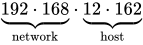
Different sets of IP ranges are allocated to particular networks, geographic areas, companies etc. The table below shows several examples of IP ranges and the uses that they have been put to:
| IP range | Description | Example |
|---|---|---|
| 192.168.___.___ 172.16.___.___ - 172.31.___.___ 10.___.___.___ |
Private networks, e.g. intranets | 192.168.1.23 |
| 41.___.___.___ 102.___.___.___ 105.___.___.___ |
AfriNIC allocations for IP addresses in Africa | 102.43.1.65 |
| 81.___.___.___ 217.___.___.___ 62.___.___.___ |
European allocations for IP addresses | 81.202.17.89 |
| 200.___.___.___ | Latin America and the Caribbean | 200.100.50.25 |
| 9.___.___.___ | IBM | 9.1.2.3 |
| 17.___.___.___ | Apple | 17.19.23.29 |
As you saw with packet switching, every request that gets sent over the internet is sent with the sender's IP address attached. This is useful for many different reasons. Firstly you can send a confirmation message to the sender to confirm that you received the data. Secondly websites can keep track of where their users come from. Thirdly websites can block requests from certain IP address ranges. For example if you were running a national television service such as the BBC, where your programming was paid for by your fellow countrymen, you wouldn't want people from other countries watching programmes that they hadn't paid for. If you try and access the BBC iPlayer from the USA it will say "Not available in your area". This is because an American's IP would be from a banned IP range. IP banning can also be used by governments to bar their populations from accessing websites on certain IP addresses.

The diagram above shows how two intranets can connect across the internet. If the computer in Intranet A with the IP address 192.168.1.2 wants to send a message to a computer in Intranet B, it will send its message through the Router connected to Intranet A (IP=172.8.18.100). This router will then route the message onto the internet, going from router to router until it reaches the router attached to Intranet B (IP=201.108.0.45). This router will then pass the message on to the correct machine in Intranet B. Notice that because each intranet is connected to the internet through a router, the computers on each intranet will appear as having the IP of their router when connected to the internet. If you share a house and someone commits a crime online, the finger might be pointed at the whole household! Using IP addresses this way was never the intention of the designers of TCP/IP, they would much prefer that each machine had a distinct IP address, however, with the shortage of IP addresses this isn't possible. What is needed is a system that has more addresses available.
|
Extension: IPv6 As you might have noticed, there is a limit to the number of IPv4 addresses we can have, this limit is well below the current population of the world. If we were in the future to have every inhabitant of the planet connected to the internet, there wouldn't be enough IP Addresses for them to use! This problem is very current and IPv6 is being introduced to try and resolve it. IPv6 uses 128 bits for each address, meaning we have theoretically addresses available = different possible addresses.  The IPv6 address has 128 bits split into:
Why would we ever need this many you may ask? With so many addresses this will allow each person to have multiple devices connected to the internet, currently driven by the demand for internet on mobile phones. We are also looking at connecting lots of other devices to the internet that might not currently be connected. For example we could have fridges telling us when we are low on milk, ovens telling us when they need cleaning, bikes telling us when they need a service. The future is coming, watch this IPv6 space! |


|
Exercise: IP Addresses What is an IP address, give an example? Answer: Numerical label assigned to each device (e.g., computer, printer) participating in a computer network that uses the Internet Protocol 192.168.7.1 What is the IP address range for an internal network? Answer: 192.168.___.___ OR What IP address would an internal network machine appear to have when connecting to the internet? Answer: The address of the router Convert the following IP address into binary: 123.45.67.89 Answer: 01111011.00101101.01000011.01011001 Convert the following IP address into decimal: 01011110.01100010.10011011.00010000 Answer: 94.98.155.16 Why has IPv6 been introduced? Answer: IPv4 only has 32 bits, this means as more and more machines connect to the internet we will eventually run out of IP Addresses. IPv6 allows for more addresses to be used. For the following IP address can be split into two parts, label each: 192.168.23.2 Answer:
|
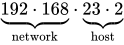
Domain names
Trying to remember IP addresses is as difficult as trying to remember people's phone numbers. Not many people do it well and you are far more likely to be using a domain name to access a website. A domain name allows us to link to servers and other computers using easily remembered names. The domain name also tells us a bit about the location we are visiting through the use of top level domain names.
| Top level domain | Description |
|---|---|
| .com | Commercial |
| .gov | US governmental organisations |
| .mil | US military |
| .org | Organisation |
| .uk | United Kingdom, country specific website |
| .so | Somalia, country specific website |
| .xxx | Adult entertainment |
| .onion | Deep Web Links |
Sometimes top level domain names might be joined by second level domains, chained together to tell you more detailed information:
bbc.com - there is a commercial organisation called bbc
bbc.co.uk - there is a United Kingdom commercial organisation called bbc.
tfl.gov.uk - there is a United Kingdom governmental organisation, called TFL.
Second level domain names typically tell you the person/company/organisation that owns the address. Finally you have the host or service name, which is the machine/service you are connecting to. For example:
en.wikipedia.org - an organisation, called Wikipedia, requesting the English language version
www.ibm.com - an commercial organisation, called IBM, connecting to the www (World Wide Web) host/service machine


In the example above a client sends a request to a Domain Name Server for www.debian.com, but after that domain name lookup is hierarchical:
- a request for .com is first sent to a known root server which provides the address of the name server for .com.
- This is then queried for debian.com giving the address of another name server
- which finally provides the address for www.debian.com.
Results are remembered for a period of time to reduce the work load.
Domain Name System (DNS)
If you have a modern mobile phone it is very unlikely that you will type in the number of your friends each time you want to call or text them. You are far more likely to use the address book, typing in their name, then letting the phone find the number. This is exactly the same principle behind the Domain Name System. A DNS server translates domain names meaningful to humans (such as www.google.com) into IP Addresses for the purpose of locating and addressing these devices worldwide.
Domain names are far easier for humans to remember than an IP address. To see a domain name in action you can use the ping command, where pinging google, uses the DNS server to find the IP address you want to send a ping packet to:
# ping www.google.com
Pinging www.l.google.com [209.85.229.99] with 32 bytes of data:
Or on Linux try dig
$ dig www.google.com
-- Snip --
;; ANSWER SECTION:
www.google.com.		246	IN	A	173.194.34.144
www.google.com.		246	IN	A	173.194.34.148
www.google.com.		246	IN	A	173.194.34.145
www.google.com.		246	IN	A	173.194.34.146
www.google.com.		246	IN	A	173.194.34.147
Internet registries and Internet registrars
Internet registrars are responsible for allocating internet domains to anyone who wants one. If someone wanted to own their own website with a domain name, they would have to go to an internet registrar in order to buy the website name. These services typically require payment in order to maintain control over the name of the website. If you do not renew your website, then the internet registrars may sell it to other buyers.
|
Extension: Travel back in domain name time In the early days of the World Wide Web, there were many instances of companies paying lots of money to buy their web domains from private individuals who were 'cyber-squatting'. Other organisations shared the same address and there were many legal fights and much cash exchanged to gain control of domain names. If you want to take a look at websites from the past take a look at http://web.archive.org and look at the following websites in the mid 1990s: |
You may ask why a company would want a domain to link to multiple IP addresses? If you think about a multinational company's website, if someone tries to load your homepage you don't necessarily want them to have to load this webpage from an server at an IP address on the other side of the world. So depending on their region you would point them at an IP address close to their current location. Typing in www.google.com in Europe and in Asia will send you to different IP addresses even though you have used the same domain name. Sometimes the content of the server won't be the same depending on your region.
Also big sites not only do geographic IP splitting but load balancing as well. This is when a domain name is undergoing heavy usage, and one particular IP address might be very busy, the domain name will then be pointed to other servers sitting at different IP addresses, balancing the 'load' of users accessing the site.
Internet Service Providers (ISP)
Getting a direct connection to the internet is quite costly involving specialist hardware. Most people and organisations pay ISPs to link them to the internet. Examples of Internet Service Providers are : AOL, BT, Sky, TalkTalk and Virgin Media.

|
Exercise: ISP and DNS Describe what a Domain Name Server does: Answer: Domain Name Servers translate domain names into IP addresses Describe what ISP stands for and what is does: Answer: ISP = Internet Service Provider = companies which offer customers access to the internet What is the difference between an Internet Registrar and an Internet Registry Answer: Internet Registrars allow people and companies to buy domain names. Internet Registries keep track of who owns what domain name and what IP addresses each domain name links to List 3 top level domain names: Answer:
Describe what the following domain names mean
Answer:
List the three parts that make up a domain name: Answer:
Give two reasons why a company might want to use a domain name instead of an IP Address for their website? Answer:
|
Resources such as documents, files and folders sitting on the internet need a method to identify them and access them. URIs provide a way to linking to these resources. There are two types of URI, but you only need to know URL for the exam:
- Uniform Resource Name (URN) - the name of a resource, but not its exact location.
e.g. urn:isbn:0486419266
The URN for R.U.R. (1921 play), identified by its book number.
- Uniform Resource Locator (URL) - the exact location of a resource.
e.g. http://www.gutenberg.org/catalog/world/readfile?fk_files=85821
The project gutenberg page for the R.U.R. book

Uniform Resource Locator (URL)
A URL is a URI that, "in addition to identifying a resource, provides a means of locating the resource by describing its primary access mechanism (e.g., its network location)".[1] URLs allow us to specify the domain name and exact location of a resource on the internet. For example, the following links to a picture on wikicommons:
http://commons.wikimedia.org/wiki/File:George_Clausen_WWI_poster.jpg
We can break this down into its constituent parts:

We can therefore summarise a URL as follows:

|
Exercise: Uniform Resource Identifiers Describe the difference between a URN and a URL Answer:
Give the 3 parts that make up a URL Answer:
For the following address: describe the parts:
Answer:
|
References
- ↑ Tim Berners-Lee, Roy T. Fielding, Larry Masinter. (January 2005). “Uniform Resource Identifier (URI): Generic Syntax”. Internet Society. RFC 3986; STD 66.
URIs
Resources such as documents, files and folders sitting on the internet need a method to identify them and access them. URIs provide a way to linking to these resources. There are two types of URI, but you only need to know URL for the exam:
- Uniform Resource Name (URN) - the name of a resource, but not its exact location.
e.g. urn:isbn:0486419266
The URN for R.U.R. (1921 play), identified by its book number.
- Uniform Resource Locator (URL) - the exact location of a resource.
e.g. http://www.gutenberg.org/catalog/world/readfile?fk_files=85821
The project gutenberg page for the R.U.R. book
Uniform Resource Locator (URL)
A URL is a URI that, "in addition to identifying a resource, provides a means of locating the resource by describing its primary access mechanism (e.g., its network location)".[1] URLs allow us to specify the domain name and exact location of a resource on the internet. For example, the following links to a picture on wikicommons:
http://commons.wikimedia.org/wiki/File:George_Clausen_WWI_poster.jpg
We can break this down into its constituent parts:
We can therefore summarise a URL as follows:
|
Exercise: Uniform Resource Identifiers Describe the difference between a URN and a URL Answer:
Give the 3 parts that make up a URL Answer:
For the following address: describe the parts:
Answer:
|
References
- ↑ Tim Berners-Lee, Roy T. Fielding, Larry Masinter. (January 2005). “Uniform Resource Identifier (URI): Generic Syntax”. Internet Society. RFC 3986; STD 66.
Client server model
The history of computing started off with centralised computers (in many cases mainframes) or servers performing all the calculations. Client computers were then attached to these centralised computers (servers) and if you wanted to calculate something, you would have to wait for the central computer to respond. As computing power got cheaper client nodes became more powerful and the central computer less important. However, with the growth of the internet, there has been a shift back to a client server model. Powerful central computers store information such as emails, documents, music and videos or offer services such as file hosting, printing, game hosting and internet access; client computers fetch information and use services from these central servers. In the next few years you are likely to see more and more software moving away from running on your desktop to running on remote servers and you accessing it as a client, this is called software as a service.

As an example of modern client server model consider a video sharing website. The website, let's call it mutube, has a server that stores all the videos that are uploaded to the site. The website is used by millions of clients a day and each of them connects to the server to watch videos. When a client connects to mutube the server and asks for a particular video, the server loads the video into RAM from a large array of hard disks and mutube sends the video to the client. The client on receiving the video, presses play and watches the video.
Other examples of servers might be a shared printing service in a college. The print server will be hosted on a single computer, and when anyone in the college wants to print, the request is sent to the server. In this case the server will keep track of how much printing credit each user has and make sure that the print queue is dealt with properly.
|
Extension: Cloud Computing The current client-server model is starting to change, with companies being less likely to offer services with a centralised server. Increasingly internet firms are reaching a global clientèle, it makes little sense to have a server or servers based in one location as if your servers are in America and some of your users in Armenia, these users will experience slow access to your services. Another problem is if a power cut affects your server or the connection to that one server or set of servers goes down then the service you are offering the internet will also stop.  With cloud computing the services may be distributed all over the globe, meaning that wherever you are, you'll have a server reasonably close to you offering access to the data and services you need. It also means that if one server goes down other servers in different locations can keep the service running. Keeping databases synchronised across the globe, so your mail client has the same mails in Switzerland as in Swaziland, is a complex task and firms such as amazon and rackspace offer services to help you handle this. One downside with cloud computing is you are never quite sure where your data is, and if you're not careful you might find data being stored in countries that have less stringent data protection laws than your own. |
Servers are software programs that in most cases run off normal computing hardware. Server software includes:
- Printing
- File sharing
- Game hosting
- Websites
- Other web services
Clients are software programs and processes that connect to servers, sending requests and receiving responses. Client examples include:
- Web browser page requests
- Chat systems on mobile phones
- Online games
|
Exercise: Client Servers Give an example of where a server might be used: Answer: Serving websites, hosting games, file sharing, printer sharing What is a server and what is a client? Answer:
Describe the process involved in a web server delivering a web page to a client: Answer:
Describe a situation where having a single server and many client model might not work too well: Answer:
|
Protocols
Common Standard Protocols
With networks and the internet, we need to allow computers to talk to each other. To make sure that a computer talks to another in a way that the other understands, there are sets of rules governing modes of communication. These rules are called protocols. There are many different protocols out there, each defining rules for specific communication types.
Port numbers
When you send and receive data from a client or server, you will be sending lots of different types of data. To make sure that the data is dealt with by the correct program, for example a website request is dealt with by the web server, you need to add a port number. Each application will have a port number associated with it. For example a web server is port 80 and a game of doom is port 666.
Combining an IP address with a port gives us a socket. This is a direct connection to a process or application on a machine. The following example is connecting to a webserver on 203.43.12.234.
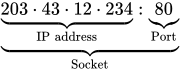
There are many well-known ports out there, here are a few of the ones you might need to know:
| Port number | Protocol that uses it |
|---|---|
| 20 | File Transfer Protocol (FTP) Data |
| 21 | File Transfer Protocol (FTP) Command |
| 25 | Simple Mail Transfer Protocol (SMTP) |
| 80 & 8080 | HyperText Transfer Protocol (HTTP) |
| 110 | Post Office Protocol v3 (POP3) |
| 143 | Internet Message Access Protocol (IMAP) |
| 443 | HyperText Transfer Protocol over SSL/TLS (HTTPS) |
| 666 | Doom Multiplayer game |
| 989 | Secure FTP (SFTP) |
| 22 | Secure Shell (SSH) |
| 23 | Telnet |
| 25565 | Minecraft Multiplayer Default Port |
| 27015 | Source Engine Multiplayer Default Port |
|
Exercise: Port Numbers What is a port number? Answer: A port number is an application or process specific communication endpoint attached to an IP address What is the port number that a web server would use? Answer: 80 & 8080 Combined, what is an IP and port number called? Answer: Socket What sort of servers are the following referencing:
Answer:
|
Non-secure protocols
Several of the protocols used to transmit data across networks (including the internet) are not secure. This means that if you are one of the routers that is used to get data from one host to another, you can read the data being sent, this technique is called packet sniffing. Normally this isn't a problem as the data being transmitted isn't secret but reading other people's packets without their permission is a crime in the UK.
FTP
File Transfer Protocol (FTP) is a standard network protocol used to copy a file from one host to another over a TCP/IP-based network, such as the Internet. FTP is built on a client-server architecture. FTP users may authenticate themselves using a clear-text (unencrypted) sign-in protocol but can connect anonymously if the server is configured to allow it. FTP works on port 21.

The first FTP client applications were interactive command-line tools, implementing standard commands and syntax. Graphical user interface clients have since been developed for many of the popular desktop operating systems in use today.
HTTP
The Hypertext Transfer Protocol (HTTP) is a networking protocol behind the World Wide Web. HTTP allows for transmission of Hypertext documents and web-pages. HTTP works on ports 80 and 8080.

Telnet
Telnet is a network protocol used on the Internet or a local area network to provide text-oriented communications between a server and remote clients. A client will connect to the server using a terminal (black and white command line console) and can then deliver commands to the server to perform things like remote software installation or system updates. Telnet works on several different ports.

Pros
You can telnet from simple clients with inexpensive hardwareCons
Telnet doesn't allow you to use graphics Telnet can be insecure, most remote connections are now handled by SSH (Secure Shell)
POP3, SMTP
Simple Mail Transfer Protocol (SMTP) is an Internet standard for sending electronic mail (e-mail) across Internet Protocol (IP) networks. SMTP is specified for outgoing mail transport and uses TCP port 25. The protocol for receiving mail is called the Post Office Protocol v3 and it uses port 110.

Secure protocols
Sometimes we need to send data securely over networks. There are several protocols that allow you to do this. You can normally tell if a protocol is secure if it has the letter 'S' in its name. Examples include SSH, SFTP and HTTPS (SMTP is NOT secure!)
HTTPS
Hypertext Transfer Protocol Secure (HTTPS) is a combination of the Hypertext Transfer Protocol with the SSL/TLS protocol to provide encrypted communication and secure identification with a network web server.
HTTPS is often used when sensitive information is being sent over the internet, for example on internet banking webpages.
|
Exercise: Protocols What is a protocol? Answer: a set of rules which computers use to allow them to communicate with each other
Name the protocols used for the following:
Answer:
What does Telnet do, and when might it be unsuitable? Answer:
|
TCP/IP protocol stack
MAC Address
IP addresses change, for example if you connect your laptop to the internet at home you get one IP address. If you were then to take it around a friends and connect there, you would be given another IP address. MAC addresses are unique to the device they are given to and every network interface has a MAC address, including mobile phones, games consoles and wireless cards. This is important when you consider that a computer can have more than one network interface. For example with a laptop you might have a cat-6 network card and a wireless card, one handling BitTorrent and the other web browsing. When you receive a message, which network interface should it be sent to? The MAC address would mean that messages can be directed to a particular network interface, namely the wireless card or the cat-6 card. In a moment you will see how we use MAC addresses with the TCP/IP stack.
|
Extension: Access your MAC Address
|

TCP/IP stack
The most common protocol on the internet is the Transmission Control Protocol/Internet Protocol (TCP/IP). To send data over a TCP/IP network requires four steps or layers:
| Layer Name | Description |
|---|---|
| Application | Encodes the data being sent |
| Transport | Splits the data into manageable chunks, adds port number information |
| Network/Internet | Adds IP addresses stating where the data is from and where it is going |
| Link | Adds MAC address information to specify which hardware device the message came from, and which hardware device the message is going to |

To show you how the TCP/IP stack works we going to use the following data as an example:
Matt, Mark, Luke, John
Application
The application layer makes sure that the data is sent in a format that will be understandable by the recipient. This will mean formatting data to be sent in a standard way applicable to that application, for example HTTP, FTP etc. In this case we are going to wrap each piece of data in XML tags.
<gospel>Matt</gospel><gospel>Mark</gospel><gospel>Luke</gospel><gospel>John</gospel>
Transport
The transport layer looks at the data to be sent and splits it into chunks that can fit into data packets. It then attaches a number to each, specifying that packet's order, this allows the recipient to place the data back together correctly at the other end. To each packet it then attaches a port number dependent on the application being used. For the example we'll send data to port 60
- Splits the data into chunks and adds order number
- Adds port numbers
| Transport Header | Data |
|---|---|
| :60 | 1/4 | <gospel>Matt</gospel> |
| :60 | 2/4 | <gospel>Mark</gospel> |
| :60 | 3/4 | <gospel>Luke</gospel> |
| :60 | 4/4 | <gospel>John</gospel> |
Network/Internet
The network layer attaches the IP address of the sender, so that the recipient will know who sent it and who to send a confirmation message to. It must also attach the IP address of the host that it is sending the data to so it doesn't get lost! In this case we are sending to 102.231.4.189 and sending from 98.1.232.99. Combined with the port number this creates a socket that data is being sent from and a socket that data is being sent to, namely 102.231.4.189:60
- Attaches sender IP address
- Attaches destination IP address to create a socket
| Network Header | Transport Header | Data |
|---|---|---|
| 102.231.4.189 98.1.232.99 |
:60 | 1/4 | <gospel>Matt</gospel> |
| 102.231.4.189 98.1.232.99 |
:60 | 2/4 | <gospel>Mark</gospel> |
| 102.231.4.189 98.1.232.99 |
:60 | 3/4 | <gospel>Luke</gospel> |
| 102.231.4.189 98.1.232.99 |
:60 | 4/4 | <gospel>John</gospel> |
Link
Finally the link layer attaches the MAC address of the sender and the recipient, allowing the packets to be directed to a specific network interface on the IP Address host machine. In this case the sender is using a wireless card with MAC address: 00-17-4F-08-5D-69 and the destination MAC address is: 11-22-33-44-55
- Attaches sender MAC address
- Attaches destination MAC address
| Link Header | Network Header | Transport Header | Data |
|---|---|---|---|
| 11-22-33-44-55 00-17-4F-08-5D-69 |
102.231.4.189 98.1.232.99 |
:60 | 1/4 | <gospel>Matt</gospel> |
| 11-22-33-44-55 00-17-4F-08-5D-69 |
102.231.4.189 98.1.232.99 |
:60 | 2/4 | <gospel>Mark</gospel> |
| 11-22-33-44-55 00-17-4F-08-5D-69 |
102.231.4.189 98.1.232.99 |
:60 | 3/4 | <gospel>Luke</gospel> |
| 11-22-33-44-55 00-17-4F-08-5D-69 |
102.231.4.189 98.1.232.99 |
:60 | 4/4 | <gospel>John</gospel> |
These four packets can then be sent across the internet holding enough information for them to:
- reach their destination (socket from the Network and Transport Layers)
- find the correct network interface (MAC address from the Link Layer)
- find the correct service(Port number from the Transport Layer)
- be reassembled in the correct order (Order information from the Transport Layer)
- deliver the intended message (data from the Application Layer)
|
Extension: UDP TCP/IP does a great job of ensuring that the data you request is sent correctly and the data you send is received. However, as you have seen, sometimes data can get lost on the internet or packets can arrive in an order differing to the one you sent them in. With something like a computer game or telecommunications you can't wait for a slow packet to find its way across the internet. This would result in voice messages slowing down and computer games becoming unresponsive. There is another protocol called UDP that doesn't ask for a confirmation that data packets have been received. This protocol is used heavily in networked computer games and voice over IP, as losing a packet here and there won't impact too badly on the overall game experience or voice conversation. When you play computer games, you might see something that says "lost packets = xyz" or when having a web meeting the quality of voice or video might briefly degrade. This is packet loss in action and a result of using UDP. |
|
Exercise TCP/IP Stack Name and describe the four levels of the TCP/IP stack: Answer:
Combined, the IP address and Port Number make up a what? Answer: Socket What is the MAC Address for in the TCP/IP stack? Answer: A MAC address is a unique identifier assigned to a network device. It is used by the Link layer to direct messages to a particular network interface at the designated IP address Show the steps involved in sending the following data:
Answer:
|
Webpage Design
|
Web design Web page construction
HTML & style sheets
|
Web page construction
Web pages are now an essential part of how many people live their lives and perform their jobs. More and more computer functions are now moving to web based applications and it is important that you are familiar with this technology.
Structure of a Web Page
You might have made some web sites at secondary school using WYSIWYG editors such as Front Page and Dreamweaver. For the A-Level Computing course we are going to take a look at the code that these editors produce, and how to structure webpages with code. Open this wikibook page in any browser and click CTRL+U in Firefox / Chrome or View -> Page Source in Internet Explorer, you should have the webpage code in front of you.
All web pages have the following basic structure:
- HTML - specifies that this is a web page
- Head - contains the title of the page with code and css includes
- Body - displays the main page content
Which can be represented in HTML code using the following Tags:
<html>
  <head>
    <title>...</title>
  </head>

  <body>...</body>
</html>
Tags
Web pages are built out of tags. These tags define what is on the page and how it should be structured. There are two types of tags that you can use, and all tags should be written in lower case.
<h1>A Book About Computing</h1>
<hr />
On line one you can see the first type, it has an opening tag <h1> something in the middle "A book About Computing" and a closing tag</h1>. This tells us that everything between these tags should be treated as a level one heading (h1).
On line two you can see the second type of tag, there is no closing tag, the tag is entirely self contained. The <hr /> stands for a horizontal rule, a line across the page.
Search Engine Optimisation
Some tags are supposed to be used in certain locations on a webpage and have special functions that may not result in any change to the content or layout of that page. There are special tags reserved to help a webpage get found and ranked by search engines. These tags live in the <head>...</head> section of a webpage.
- <title>Come to my site first</title> - this places a title on the top of the browser (NOT the top of a web page)
- <meta name="Description" content="Using the purest …."> - so that search engines can better categorise web pages, they know what the site is about
- <meta name="Keywords" content="premium …, bulk …., solid …, The …. Company"> - you used to be able to add keywords to tell search engines what a site was about. This was open to abuse as web site designers just chucked in all the words they could think of and this method isn't used much any more, however, you still need to know it.
|
Example: Drawing a website Draw a web-browser display for the following: <html>
<head>
<title>Kempoogle</title>
<meta name="Description" content="The best site in the world">
</head>
<body>hello world!</body>
</html>
Kempoogle

hello world! Notice that the |
|
Exercise: Web Site Basics What are the top most level tags on a website: Answer: <html> and </html> Write the code to create a webpage that has the banner title of "Moogle - shopping site" and has a meta description of "The best site in the world": Answer:
<html>
  <head>
    <title>Moogle - shopping site</title>
    <meta name="Description" content="The best site in the world">
  </head>
  <body>...</body>
</html>
How might you use the Answer:
Adjust the
<meta name=Description ...>
<meta name=Keywords ...>
|
|
Extension: Teach Yourself HTML The web is full of free resources to skill yourself up and there is nothing to stop you becoming a top notch web designer. The questions here are suitable to get you through this course with some added elements. If you want to get really good at the vaste array of web technologies out there you should be looking to teach yourself. A great place to get started is the w3schools website where you can take courses in:
If you want to learn about the code that builds dynamic webpages, including Facebook, check out: |
Block-level tags
Block tags allow you to give a tag attributes such as padding and margin. This allows you to insert tags into various parts of a page and rely on the other elements there to move to make space for it without worrying about overlap. The tags you need to know are:
<h#></h#>- headings<hr />- horizontal rules<p></p>- paragraphs<br />- make a new
line,<ol></ol>- ordered lists<ul></ul>- unordered lists<li></li>- list items<div></div>- div
Horizontal Rule
<hr /> - puts a horizontal line across the page where ever you are, useful for breaking up pages
<html>
  <head>
    <title>Examples of horizontal rule</title>
  </head>
  <body>
    Normal Text
    <hr />
    Normal Text
    <hr />
    Normal Text
  </body>
</html>
 |
 |
Address |  |
 |

|
Normal Text
Normal Text
Normal Text
Headings
<h#></h#> - heading tags make any text between the tags a heading, the higher the number (h#) the less significant the heading
<html>
  <head>
    <title>Examples of headings</title>
  </head>
  <body>
    <h1>Heading 1</h1>
    <h2>Heading 2</h2>
    <h3>Heading 3</h3>
    Normal Text
  </body>
</html>
The code above produces the following:
|
|
Address | |
|
|
Heading 1
Heading 2
Heading 3
Normal Text
For all following examples the html, body and head tags have been left out. This doesn't mean they don't exist and if you code it you must include them.
|
Exercise: Headings Draw out what the following codes would produce: <h1>Years</h1>
<h2>Year 12</h2><hr />
<h2>Year 13</h2>
<h1>Staff</h1>
Answer:
--
Years Year 13
  <h1>Introduction</h1>
  <h2>My Life</h2>
  <h2>My Cats</h2>
  <h2>My Dogs</h2>
  <h3>Barry</h3>
  <h3>Aubrey</h3>
  <h3>Rex</h3>
  <h1>Theories</h1>
  <h1>Conclusions</h1>
Answer:
--
Introduction
Write the code to produce the following headings:
--
Output Devices Answer:
  <h1>Output Devices</h1>
  <h2>Monitors</h2>
  <h2>Speakers</h2>
--
Team Answer:
  <h1>Team</h1>
  <h2>Goalies</h2>
  <h2>Defenders</h2>
  <h2>Midfield</h2>
  <h2>Strikers</h2>
  <h3>Rooney</h3>
  <h3>Socrates</h3>
  <h1>Stadia</h1>
  <h2>Old Trafford</h2>
|
Lists
There are 2 types of list that you need to know, ordered lists (<ol></ol>) and unordered lists (<ul></ul>). Each has individual list items (<li></li>) that hold all the data.
- Unordered Lists
<ul></ul> - give you a list made up of bullet points
  <ul>
    <li>apples</li>
    <li>oranges</li>
    <li>pears</li>
  </ul>
the code above would give you:
|
|
Address | |
|
|
- apples
- oranges
- pears
  <ol>
    <li>apples</li>
    <li>oranges</li>
    <li>pears</li>
  </ol>
the code above would give you:
|
|
Address | |
|
|
- apples
- oranges
- pears
As you can see above the individual list items are contained within the <li></li> brackets.
|
Exercise: HTML Lists Write HTML to create the following lists:
Answer:
<ul>
  <li>Geoffrey</li>
  <li>Bungle</li>
  <li>Zippy</li>
  <li>George</li>
</ul>
Answer:
<ol>
  <li>Wittgenstein</li>
  <li>Augustine</li>
  <li>Heidegger</li>
  <li>Marcel</li>
</ol>
What would the following code output: <ul>
<li>Kierkegaard</li>
<li>Jaspers</li>
<li>Frankl</li>
<li>Rand</li>
</ul>
Answer:
What is wrong with the following code to print an ordered list: <ul>
<li>Kierkegaard<li>
<li>Jaspers</li>
<li>Frankl</ul>
<li>Rand</li>
</ul>
Answer:
<ol> <!--this needs to be <ol> as it is an ordered list-->
  <li>Kierkegaard</li> <!--this needs a closing /-->
  <li>Jaspers</li>
  <li>Frankl</li> <!--this had the incorrect closing tag-->
  <li>Rand</li>
</ol> <!--this needs to be </ol> as it is an ordered list-->
|
Breaking pages up
A Div element is used to divide a web page into sections <div></div> - this takes up space on a page and the page will appear larger the more of them you place in.
A Paragraph <p></p>, allows you to structure your text like you would if you were writing an essay.
A Break <br />, creates a new line.
Inline tags
These don't take up any physical space on the page (they don't cause a new line) and can overlap each other. They are:
<span></span>- break the page into sections but don't create new lines,<strong></strong>- make text bold,<em></em>- make text itallic,<a></a>- create a link or an anchor,<a href="http://www.google.com"> link </a>produces the following:link
<img />- add an image<img src="http://en.wikipedia.org/wiki/File:Google 2011 logo.png" />
produces the following:

Let's take a look at a quick example:
|
Example: HTML worked example <h2>Ditty</h2>
I tell you naught for your comfort, <br /> Yea, naught for your
desire,<br /> Save that the sky grows <strong>darker</strong> yet <br /> And the sea rises <strong>higher</strong>
<hr />
- G.K.Chesterton, <em>The Ballad of the White Horse</em>(1911)
The output of the above is as follows:
Ditty
I tell you naught for your comfort, Yea, naught for your desire, Save that the sky grows darker yet And the sea rises higher - G.K.Chesterton, The Ballad of the White Horse (1911)
|
Now it's time to test your knowledge:
|
Exercise: Inline Tags Write the code to produce the following output:
Answer:
<em>Hello</em> <strong>how</strong> are <strong><em>you</em></strong>?
Answer:
<strong>I'm</strong> <em>fine</em><br />
thank you
Answer:
This is a <a href="http://www.bbc.co.uk">link</a> to the <em>bbc website</em>.
The Quick Brown Fox Jumped over the Lazy Dog Answer:
<p>The <strong>Quick Brown Fox</strong></p>
<p>Jumped over the <em>Lazy Dog</em></p>
Answer:
<ul>
  <li><em>Bold</em></li>
  <li><strong>Link to google</strong></li>
  <li><a href="http://www.google.com">Itallic</a></li>
</ul>
Write the code to create the following page linking an image called
Cat picture
This is a picture of a cat: Answer:
<html>
  <head>
    <title>Cat picture</title>
  </head>
  <body>
    This is a picture of a <em>cat</em>:<br/>
    <img src="cat.jpg"/>
  </body>
</html>
Write the code to create the following page linking an image called
Dog picture
This picture of a dog links to my college's website: Answer:
<html>
	<head>
		<title>Dog picture</title>
	</head>
	<body>
		This picture of a <strong>dog</strong> links to my college's website:<br/>
		<a href="http://college.ac.uk"><img src="dog.jpg"></a>
	</body>
</html>
What does the following code produce: The invention<br />
of <strong>weights</strong> and <strong>measures</strong><br />
Makes robbery easier<br /><hr />
<em>- Chuang Tzu</em>
Quoted from: Merton, Thomas. (1969). The Way of Chuang Tzu. New York: New Directions. Answer:
The invention - Chuang Tzu
<p><em>Modern art has taken the wrong turn in abandoning the
search for the <br /><strong>meaning of existence</strong></em>
<br /> in</p><p>order to affirm the value of the <strong>individual
</strong> for his own sake</p><p><em>- Andrei Tarkovsky</em></p>
Quoted from: Tarkovsky, Andrei (1989). Sculpting in Time. University of Texas Press Answer:
Modern art has taken the wrong turn in abandoning the search for the order to affirm the value of the individual for his own sake - Andrei Tarkovsky
Write the full html page code for the following webpage:
Car heaven
Car heaven Welcome to the car site
This week 30% discount Answer:
<html>
  <head>
    <title>Car heaven</title>
  </head>
  <body>
        <h1>Car heaven</h1>
        <p>Welcome to <em>the</em> car site</p>
        <ul>
                <li>Cars</li>
                <li>Vans</li>
                <li>Bikes</li>
        </ul>
        <p>This week <strong>30%</strong> discount</p>
  </body>
</html>
Write the full html page code for the following webpage, where the image address is:
Education
Contempt without a gentle contempt for education, Click here to learn more Answer:
<html>
  <head>
    <title>Education</title>
  </head>
  <body>
        <h1>Contempt</h1>
        <p>without a gentle <strong>contempt</strong> for education,<br /> no gentleman's education is complete</p>
        <img src="contempt.jpg" alt="contempt">
        <h2>Learn More</h2>
        <p>Click <a href="http://bbc.co.uk">here</a> to go to learn more</p>
  </body>
</html>
|


Comments
Sometimes you want to write something in the HTML code of a webpage to help you understand the code better. This is called a comment and is an ubiquitous feature in any computing language. Comments don't perform any computing function and don't display on a finished Web page, they are merely there for the web designer to use so that they can understand the page better. For HTML we use the following tags:
<html>
  <head>
    <title>Love</title>
  </head>
  <body>
        <h1>What Love is</h1>


"Love means to love that which is unlovable; or it is no virtue at all."


        <!--Quote from G. K. Chesterton (1874-1936)-->
  </body>
</html>
In the example above, the line starting with the <!−− and ending in −−> is a comment. A comment block start with <! and ends with > and you can have as many comments as you like between those tags, as long as they start and end with −−. Everything in between these comment tags will not be displayed on the screen, producing this:
|
|
Address | |
|
|
What Love is
"Love means to love that which is unlovable; or it is no virtue at all."
|
Exercise: Comments For the following code sketch what it outputs: <html>
<head>
<title>Friendship</title>
</head>
<body>
<h1>Hello</h1>
<p>Can I be your friend?</p>
<ol>
<li>Yes</li>
<li>No</li>
<!--<li>Maybe</li>-->
</ol>
<!--What a horrible question.-->
</body>
</html>
Answer:
Friendship
Hello Can I be your friend?
|
|
Extension: HTML 5  What we have been learning so far are the very basics of web design. If you like what you've been doing you better check out HTML5. HTML5 is starting to make websites fully interactive with the ability to quickly embed videos and interact with web pages. Over the next few years you'll increasingly see applications moving over to this new technology, so get with the program and start learning at w3schools. |
HTML & style sheets
In HTML it is possible to add colours, fonts and other styles to the web pages that you build, however this is not recommended and HTML should be used for structure only. To add colours, fonts, etc. we will use Cascading Style Sheets, also known as CSS.
Style rules
A style sheet is made up of Style Rules. Each Style Rule has three parts, a selector, a property and a value:
selector {property : value}
For multiple properties you separate them using a semicolon;
selector {property1 : value1; property2 : value2}
Selectors
selector {property : value}
You need to know three types of selector:
- type, selects all elements of a certain type on the page e.g.
h1 { color : green}selects all the heading 1s and turns them green - class, selects all elements of the class you have specified and applies the style to only those elements
.classname { color : red} - ID, selects the item with the single ID that you have specified
#idname { color : blue }. You can only apply an ID once in an HTML document
| CSS Property | Description | CSS Values | Example for Heading 1 | Output |
|---|---|---|---|---|
| font-style: | Changes the font style of text elements | normal, italic, oblique | h1 { font-style : italic } |
Hello |
| font-weight: | Define how bold text is | bold, normal, 400 | h1 { font-weight : bold } |
Hello |
| background-color: | Define page or item background colour | green, brown, yellow | h1 { background-color : yellow } |
Hello |
| text-align: | horizontal position of text | center, left, right | h1 { text-align : center } |
|
| font-family: | define the font of page text | "Times New Roman", Arial, Helvetica | h1 { font-family : "Times New Roman" } |
Hello |
| font-size: | define the size of page text | 100%, 250%, 50% | h1 { font-size : 250% } |
Hello |
| color: | changes the foreground colour of an element | green, brown, orange | h1 { color : green } |
Hello |
| (EXTENSION) text-decoration: | Allows for underlining, strikethrough etc. | overline, underline, line-through | h1 { text-decoration : underline } |
Hello |
|
Exercise: CSS rules Write CSS rules to do the following: Answer:
h3 { color : blue}
Turn all paragraphs red and itallic: Answer:
p { color : red; font-style : italic}
Turn all class=bbold: bold and blue Answer:
.bbold { color : blue; font-weight: bold}
Turn all class=uit: underlined and italic Answer:
.uit { text-decoration : underline; font-style : italic }
Name the three components of a CSS style rule: Answer:
selector {property: value}
Name the three different types of selector and describe each: Answer:
Describe the difference between HTML and CSS: Answer:
|
Type
h1 { color : green }
Take the HTML behind a simple website:
<html>
  <head>
    <title>My Website</title>
  </head>
  <body>
    <h1>Welcome</h1>


<p>This is my amazing website, look how great it is! </p>


<p>I doubt you could find a better one anywhere on the web.</p>


<p>Seriously!</p>


  </body>
</html>
As we probably know, this would build the following page:
|
|
Address | |
|
|
Welcome
This is my amazing website, look how great it is!
I doubt you could find a better one anywhere on the web.
Seriously!
You might think my claims are a little over the top, but we could try to make the site better by adding some colour to the title using the following CSS rules:
h1 { color : green }
p { color : red; font-style : italic }
We can't just place this directly into the page, we have to create a new section inside the <head> </head> tags, this is called embedding CSS, we'll look at another method, External Style Sheets later:
<html>
  <head>
    <title>My Website</title>
    <style TYPE="text/css">
    <!--
    h1 { color : green }
    p { color : red; font-style : italic }
    -->
    </style>
  </head>
  <body>
    <h1>Welcome</h1>


<p> This is my amazing website, look how great it is!</p>


<p>I doubt you could find a better one anywhere on the web.</p>


<p>Seriously!</p>


  </body>
</html>
What this will do is change the heading to green, and change each paragraph to red and italic:
|
|
Address | |
|
|
{{{2}}}
|
Exercise: CSS Type Selectors For the HTML code below, show what the output would be for each set of CSS rules: <html>
<head>
<title>My Website2</title>
</head>
<body>
<h1>Contact Details</h1>
<p>Please use the details below to get in contact</p>
<h2>Telephone</h2>
<p>Home: 0101010101010<br />
Mobile: 1010101010101<br />
</p>
<h2>Email</h2>
<p>1010101@10100101.com</p>
</body>
</html>
What would these two rules produce? h2 { color : red }
h1 { color : blue; text-decoration : underline }
Answer:
My Website2
{{{2}}}
What would these two rules produce? p { font-weight : bold }
h1 { font-style : italic }
Answer:
My Website2
Contact Details Email 1010101@10100101.com
Write rules to produce the following output:
My Website2
{{{2}}} Answer:
h1 { color : red; }
h2 { text-decoration : underline}
Write rules to produce the following output:
My Website2
Contact Details Email 1010101@10100101.com Answer:
h1 { background-color : yellow; }
h2 { text-decoration : underline }
p { background-color : red}
|
Class
.classname {property1 : value1; property2 : value2}
Take another look at the HTML behind a simple website:
<html>
  <head>
    <title>My Website</title>
  </head>
  <body>
    <h1 class="textb">Welcome</h1>
    <p class="textb">This is my amazing website, look how great it is!


    <p class="texts">I doubt you could find a better one anywhere on the web.


    <p class="textb">Seriously!


  </body>
</html>
As you can see there are classes attached to some of the HTML tags, namely the 'textb' and 'texts' classes. On their own they don't do anything, we need to write some CSS style rules to make them come to life, remember that a class selector starts with a (.).
.textb { color : red; text-decoration : underline }
.texts { font-style : italic }
|
|
Address | |
|
|
{{{2}}}
|
Exercise: CSS Class Selectors For the HTML code below, show what the output would be for each set of the CSS rules: <html>
<head>
<title>My Website3</title>
</head>
<body>
<h1 class="txtt">Contact Details</h1>
<p>Please use the details below to get in contact</p>
<h2 class="txtg">Telephone</h2>
<p class="txtt">Home: 0101010101010<br />
Mobile: 1010101010101<br />
</p>
<h2>Email</h2>
<p class="txtg">1010101@10100101.com</p>
</body>
</html>
What would these two rules produce? .txtg { color : blue }
Answer: note that class="txtt" does nothing as the CSS doesn't define it.
My Website3
{{{2}}}
.txtg { color : red }
.txtt { text-decoration : underline; color : green }
Answer:
My Website3
Contact Details Email 1010101@10100101.com
|
ID
#idname { color : blue }
Take yet another look at the HTML behind a simple website:
<html>
  <head>
    <title>A Website</title>
  </head>
  <body>
    <h1 class="textb">Welcome</h1>
    <p id="para1">This is my amazing website, look how great it is!


    <p id="para2">I doubt you could find a better one anywhere on the web.


    <p id="para3">Seriously!


  </body>
</html>
As you can see, I have assigned an id to each of the paragraphs, this means that I can now style them separately from each other. Remember that an ID selector starts with a #.
#para1 { color : red }
#para2 { color : white }
#para3 { color : blue }
|
|
Address | |
|
|
{{{2}}}
Each id rule applies to a different paragraph, unfortunately I set #para2 to white, so you can't see it!
|
Exercise: CSS ID Selectors For the HTML code below, show what the output would be for each set of the CSS rules: <html>
<head>
<title>My Website3</title>
</head>
<body>
<h1 id="main">Contact Details</h1>
<p>Please use the details below to get in contact</p>
<h2>Telephone</h2>
<p>Home: 0101010101010<br />
Mobile: 1010101010101<br />
</p>
<h2>Email</h2>
<p id="txthighlight">1010101@10100101.com</p>
</body>
</html>
What would these two rules produce? #main{ color : green }
#txthighlight{ background-color : yellow }
Answer:
My Website3
{{{2}}}
Write the CSS to produce the following:
My Website3
Contact Details Email Answer:
#main{ font-style : italic }
#txthighlight{ text-align : center }
|
Style sheets (Cascading Style Sheets or CSS)
You should be pretty comfortable with the use of CSS rules, we are now going to look how these rules are linked with the HTML. As we know the style (CSS) of a web page’s contents should to be separated from its structure (HTML), and when these two things come together, it creates the page that you see in your web browser. There are two methods of linking style to structure that you need to know:
- Embedded style, blocks of CSS information inside the HTML document
- External style sheets, i.e., a separate CSS file referenced from the HTML document
Embedded style
Blocks of CSS information inside the HTML document. You can see that inside the head tag we have a block of CSS that applies to the HTML below it:
<html>
  <head>
    <title>My Website</title>
    <style type="text/css">
    <!--
    h1 { font-weight : 900 }
    .highlight {color : yellow }
    -->
    </style>
  </head>
  <body>
    <h1>Welcome</h1>


This is my amazing website, look how great it is!


I doubt you could find a better one anywhere on the web.


Seriously!


  </body>
</html>
External style sheets
External style sheets use a separate file to store the style information (a .css file) and link the file from inside the HTML document.
<html>
  <head>
    <title>My Website</title>
    <link href="style.css" rel="stylesheet" type="text/css">
  </head>
  <body>
    <h1>Welcome</h1>


This is my amazing website, look how great it is!


I doubt you could find a better one anywhere on the web.


Seriously!


  </body>
</html>
h1 { font-weight : 900 }
.highlight {color : yellow }
As you can see above the HTML file links to the CSS file through the line:
<link href="style.css" rel="stylesheet" type="text/css">
. You could get an HTML page to link to multiple CSS files and link a CSS file from multiple HTML files.

External style sheets are a better way of linking CSS to HTML than embedding CSS in HTML as you can:
Link one CSS file to many HTML files to reuse the same style without needing to retype itWhen changing the style of a website you only need to change the style information in one location and it'll filter through to all pages
|
Exercise: Types of style sheet Name the two different style sheets: Answer:
Why might you prefer to use external style sheets on a large web site? Answer: You can link the same style sheet from multiple pages and changes to the site style would only require changes to that one style sheet |
|
Extension:CSS3
|


Design decisions
Web page design is an art and there is no way of guaranteeing your website will look fantastic, however there are some rules that you can stick to when attempting to make a professional looking website:
The rule of thirds
There is an artistic theory that states when you split an image into thirds aligning the main components in this format then it looks better.

This theory has been adopted into web design and many websites you use will utilise this rule of thirds, splitting the information into 3 columns, or 1 column and another column taking up two thirds.
Colour schemes
Three web page colour schemes you need to know are: monochromatic, analogous, complementary colour
Monochromomatic
Monochromatic color schemes are derived from a single base colour, and extended using its shades, tones and tints (that is, a hue modified by the addition of black, grey (black + white) and white. Monochromatic color schemes may be considered boring unless there is diversity within the design

Analogous
Analogous colors are colors that are adjacent to each other on a color wheel. Some examples are green, yellow green, and yellow or red, red violet and violet. Analogous color schemes are often found in nature and are pleasing to the eye.

Complementary
In color theory, two colors are called complementary if, when mixed in the proper proportion, they produce a neutral color (grey, white, or black). In the diagram below they are the colours that are opposite each other. Examples of complementary colours include:
- red and green
- blue and orange
- yellow and violet

|
Page Design Explain the rule of thirds: Answer: Separate the main components of your website into three columns and/or rows Name the three colour models that could be used on a webpage: Answer:
|
Legal and ethical issues
With the growth of Information Technology a host of legal and ethical issues have arisen. These range from the laws that protect the work people create using computers, to the ethical and legal problems brought about by the use of robots in modern warfare.
.jpg)
Legislation
The way you use data and computers is subject to the law of the country you are living in. Across the world different countries have different laws, for the exam you only need to learn about the laws that affect the United Kingdom.
You must be familiar with the following legislation:
Health and Safety (Display Screen Equipment) Regulations 1992
The Health and Safety Act was passed in 1992 and set out to promote excellence in managing health and safety in the work place. There are strict guidelines on how a desk is set up including provision for monitor positioning, adjustable chairs etc. Health and Safety is paramount when using computers for prolonged periods of time. Sitting in front of a computer screen typing and/or using a mouse is not a natural act for a human being and may result in health problems such as Repetitive Strain Injury (RSI), back and eye issues.

The Health and Safety (Display Screen Equipment) Regulations 1992 state that an employer must:
- make sure screens are adjustable and have anti glare filters
- provide supportive chairs that are adjustable
- provide foot supports
- provide breaks in computer work routine
- pay for eye treatment if necessary
Any employer failing to do this may be subject to a criminal investigation.
Copyright, Design and Patents Act 1988
The Copyright, Design and Patents Act 1988 affects how people can acquire, use and share ideas, software and media.
Patent
A patent is a form of intellectual property which an individual or organisation owns the right to for a fixed period of time, allowing them to charge people for the use of it. After that time has expired the idea is in the public domain. Patents include the design of the lightbulb (1841) and the ejector seat (1916).

Computing has seen patents in hardware and more recently in software. There are many people who believe that software patents are damaging to Computer Science, as they stop innovation and stifle creativity. A famous case was BT trying to patent the hyperlink. If this had been successful, then every time a hyperlink was used (every page on the World Wide Web), someone might have had to pay money to BT for the privilege. Other people see software patents as important in defending the intellectual property of inventors, if someone creates something new they should be rewarded for it. Other software patents include: the MP3 and GIF. Countries such as India do not have software patents.
Copyright
Software copyright refers to the law regarding the copying of computer software. Many companies and individuals write software and sell it for money, these products are copyrighted and you cannot copy the code or the program without the permission of the maker. This, they believe protects the work of the programmers, rewarding them for their efforts
 |
 |
 |
Other companies and individuals release software under Free and Open Source software (FOSS) licenses. These licenses allow users the right to use, study, change, and improve a program's design through the availability of its source code. Some adherents of FOSS believe it creates better software in the long term, and others believe that no software should be copyrighted. FOSS licensed products are heavily used in running the World Wide Web and in the creation of popular websites such as Facebook. Open Source licenses generally mean that if you create software that makes changes to open source code, and choose to release it, you must release your new code under the same Open Source license, this is called Copy-Left. Some free software is in the public domain, meaning that you can use it for whatever purpose you wish, if you make a software product involving changes to public domain sources code, you don't have to release your code into the public domain.
Copyright in most works lasts until 70 years after the death of the creator if known, otherwise 70 years after the work was created or published (fifty years for computer-generated works).
In summary the act specifies that users are not allowed to:
- use copyright material without permission
- use patented design without permission
- edit programs without permission
- copy or distribute software when you don't have permission
Computer Misuse Act 1990
The Computer Misuse Act 1990 deals with people who crack computer programs or systems. Crimes might include removing the Copyright protective measures from a commercial software product, breaking into a school database to change grades, hacking into a companies' website and stealing customer credit card details, creating viruses and trojans, and so on. It was recognised in the late 1980s that the increase in business and home use of computers required legislation in order to protect against their exploitation. To this end, in 1990 the Computer Misuse Act was established.
Under the act, three new offences were created:

It prohibits:
- unauthorised access to computer material
- It must be shown that the perpetrator accessed the data, that they were unauthorised, and that they knew they were unauthorised.
- unauthorised access with intent to commit or facilitate commission of further offences
- To prove ulterior intent, it must be shown that they wished to use the information in order to commit a further offence.
- unauthorised modification of computer material
- Unauthorised modification also includes deliberate introduction of a virus onto a computer system.
"Obtaining access" means; "Causing the computer to perform any action the results in it": Copying/moving data, Erasing/altering data, Using a program; or Causing the computer to output programs or data.
A difficulty with computer crime is that it can cross physical and national borders, the Computer Misuse Act recognises this fact and gives British Courts the jurisdiction where a "significant link" with Britain can be demonstrated in instances of computer-related crime. America has its own Computer Fraud and Abuse Act.
Data Protection Act 1998
The Data Protection Act 1998 controls the way that companies, organisations and individuals handle personal data. It states that:
- Data may only be used for the specific purposes for which it was collected.
- Data must not be disclosed to other parties without the consent of the individual whom it is about, unless there is legislation or other overriding legitimate reason to share the information (for example, the prevention or detection of crime). It is an offence for Other Parties to obtain this personal data without authorisation.
- Individuals have a right of access to the information held about them, subject to certain exceptions (for example, information held for the prevention or detection of crime).
- Personal information may be kept for no longer than is necessary and must be kept up to date.
- Personal information may not be sent outside the European Economic Area unless the individual whom it is about has consented or adequate protection is in place, for example by the use of a prescribed form of contract to govern the transmission of the data.
- Subject to some exceptions for organisations that only do very simple processing, and for domestic use, all entities that process personal information must register with the Information Commissioner's Office.
- The departments of a company that are holding personal information are required to have adequate security measures in place. Those include technical measures (such as firewalls) and organisational measures (such as staff training).
- Subjects have the right to have factually incorrect information corrected (note: this does not extend to matters of opinion)
Regulation of Investigatory Powers Act 2000
The Regulation of Investigatory Powers Act was passed in 2000, and introduces the power to intercept communications with the aim of taking into account the growth of the Internet. It regulates the manner in which certain public bodies may conduct surveillance and access a person's electronic communications. Supporters of the act claimed this was an excuse to introduce new measures, some of these included being able to force someone to reveal a cryptographic key for their data, with failure to do so resulting in up to 2 years imprisonment. As we have seen in packet switching, data can be read in transit between hosts. However, the act goes further than allowing this:
- enables certain public bodies to demand that an ISP provide access to a customer's communications in secret;
- enables mass surveillance of communications in transit;
- enables certain public bodies to demand ISPs fit equipment to facilitate surveillance;
- enables certain public bodies to demand that someone hand over keys to protected information;
- allows certain public bodies to monitor people's internet activities;
- prevents the existence of interception warrants and any data collected with them from being revealed in court.
|
Exercise: Legislation What is meant by personal data? Answer: Data that can be directly linked to a living individual, such as a telephone number, address or picture. If applicable, name the law(s) that impact on the following situations and what part of the law(s) they are affected by:
Answer: Data Protection Act: Data is not being used for appropriate reasons
Answer: Health and Safety Regulations: Companies must allow workers to take regular breaks.
Answer: Data Protection Act: Companies must provide information held about individuals when requested (though they may charge a fee).
Answer: Copyright, Design and Patents Act 1988: Logos and other copyright materials cannot be used without the permission of the copyright holder (fair use in educational settings does not apply to the UK).
Answer: Copyright, Design and Patents Act 1988: It is illegal to make copies of copyright material without permission from the copyright holder.
Answer: If the network is shared with other people and they aren't aware of this: Regulation of Investigatory Powers Act 2000: It is illegal to intercept or tamper with internet messages. Otherwise: This is not illegal. Name 3 things that the Health and Safety (Display Screen Equipment) Regulations 1992 asks you to do: Answer:
|
Code of conduct
A Code of Conduct is not law, but it is a set of rules that apply when you are in an organisation such as your college. Examples might include "Don't look at pornography at work". This would be legal at home, but if you did it at work you could be sacked. In addition, a code of conduct may contain laws such as "Don't install pirated software".
The British Computer Society has produced a list of standards for the training and development of Information Technology workers.
It covers the following issues:
- The Public Interest - safeguarding public health; respecting rights of 3rd parties, applying a knowledge of relevant regulation.
- Duty to employers and clients - carrying out work according to the requirements, and not abusing employers' or clients' trust in any way.
- Professional duty - uphold the reputation of the profession through good practice, support fellow members in professional development
- Professional Integrity and Competence - maintain standards of professional skill and practice, accepting responsibility for work done, avoiding conflicts of interest with clients.
An example of a code of conduct in use in an office is as follows:
- Don't play games
- Don't look at pornography
- Don't gamble
- Don't plug your own peripherals into your computer
- Don't install software on work machines without permission
Each of these might be perfectly legal at home, but they might get you sacked at work
|
Codes of Conduct may also include laws, as a way of reminding employees what is legal and what isn't legal |
|
Exercise: Laws and Codes of Conduct What is the difference between a Code of Conduct and a Law? Answer: A Law is applicable in all and every situation. A Code of Conduct is relevant only within the confines of an office, organisation or school. In a work place which of the following would be code of conduct rules only and which are laws. If a law name the law applicable:
Answer:
|
Hacking
The term hacking can have two meanings:
- The term might mean that you have taken some existing code and hacked it to do what you want it to. For example you take pre-existing open-source game code and use it to make your own game with. This is legal.
- The other meaning is the more common, this is the idea that you break through some security system, bypass a copy protection, get access to data you shouldn't have access to etc. All this is illegal and sometimes termed cracking. Online financial and identity thefts are growing massively around the world.
 |
 |
|
Hacking Hats Within the hacking community, in the second sense of the term, there are two main groups. The term white hat in Internet slang refers to an ethical hacker, or a computer security expert who specializes in ensuring the security of an organization's information systems.[1] White hats may flag up security vulnerabilities on corporate websites and bring them to the attention of companies or organisations before the bad guys can make use of them. Recently companies have recognised the use of white hats, with companies such as Facebook and Google offering bug bounty for people who can bring their attention to security flaws in their products A black hat is a hacker who "violates computer security for little reason beyond maliciousness or for personal gain"[2] Black Hat Hackers are what the media will often talk about when talking about 'hackers'. Black Hats break into secure networks to destroy data or make the network unusable for those who are authorized to use the network. Examples include the Lulzsec hacking group that hacked corporate websites for the 'lulz', releasing thousands of user account details of companies such as Sony. |
References
- ↑ What is white hat? - a definition from Whatis.com
- ↑ R. Moore, Cybercrime: Investigating High Technology Computer Crime, 2005, Matthew Bender & Company, p258
Digital rights management
With the emergence of digital technology and the internet, it has become easier than ever to make exact copies of data or use other peoples work in your own work. This might involve copying files, images, games, music and videos; it might involve using well known songs in videos you make; it might involve using images you find on the web in your own work. For all of this there are legal issues you must consider.
- Is it fair to give a copy of an MP3 to a friend when they haven't paid for it?
- Will piracy kill the film and music industries?
- Is taking images off the internet fair use, shouldn't we reward people for their work?
- If I bought something on one format (e.g. tape), shouldn't I automatically have access to it in other formats for free?
- Does Piracy actually aid some forms of media, as it increases the audience reach of that artist, making it more likely for them to buy it officially?[1]
A way that companies try to control the use of media and programs is through the use of digital rights management systems. These systems may do the following:
- Prevent playback on 'unauthorised' devices, using encryption keys
- Use a database of approved devices
- Prevent copying of files in some media managers (such as iTunes)
|
Exercise: Digital Rights Management Give the arguments for and against using Digital Rights Management: Answer:
Defends the intellectual property rights of creators Users are not able to use purchased products in the ways they might wish People who download illegally are more likely to buy a product in the long run
|
References
Robotics
Robots are becoming an increasingly important part of modern society. They work in factories, fight wars and might one day nurse you in your old age.
Artificial intelligence
A large and important field of computer science is Artificial Intelligence (AI), the study of making intelligent machines. Many robots and computer programs are said to have Artificial Intelligence (AI). AI can be summarised by the definition above, with explicit examples of it including:
Trying to get machines to perform very specific tasks, e.g.
- recognition of faces or other things in pictures
- automatic translation of written or spoken words from one language to another
- controlling processes like landing aeroplanes, optimising a chemical plant or power station
- vacuuming rooms
- computer opponents in video games
- building things in factories
You might even have some ideas for how AI can be used for your A2 project next year.

The 'thinky' AI can even learn from experience, meaning that you don't have to program them how to explicitly respond to each and every situation. This AI starts to pose some very big questions for humanity. Is there really a difference between the intelligence of a human being and that of a program? We'll look into this a little below:
What are machines good and bad at, in comparison to humans?
- Machines are good at doing tasks repeatedly (think about car manufacturing robots), as they don't get tired or make mistakes.
- Machines are seen to be bad at making judgements which they haven't been built to make, sympathy, inventing things. etc. But if we built machines smart enough, couldn't we build these capabilities in?
What can this tell us about the way that the human mind works?
There are many scientists and philosophers who believe that computers will one day become as intelligent as humans. But there is a question about what 'intelligence' really means. If it is just performing tasks well, then there are computers that can compose music, or sweep a road, or fly a plane, or solve maths equations better than most humans. We can even get computers to display emotions such as sympathy and anger. Does this mean that we can fully recreate how the mind works?
In 1950 Alan Turing, an early pioneer in computer science, proposed a test for machine intelligence. If you could have a conversation with a panel of human beings and with a computer AI program, and be unable to tell the difference between whether you were speaking to a human or a computer, then the computer could be seen to be as intelligent as a human. This is known as the Turing Test.

In 1980 the philosopher John Searle posed a thought experiment that some see as proving machines cannot understand what they are doing. The Chinese Room is a box in which a man sits. He does not speak Chinese at all, but is passed Chinese characters under the door. He has a book of Chinese characters and their matching responses. On receiving a character he looks for it in the book and sends the corresponding character in reply. At no point does he understand what he is doing, he just follows the instructions. AI can be considered to be just like this, however complex the code, all it is doing is responding to inputs with set outputs, there is no understanding present.
A similar argument was made by Stanley Jaki in 1969, where he proposed that AI is a little like a drain pipe, where two water droplets roll down, at the bottom they combine to form a larger droplet, but at no point does the drainpipe understand what has happened. He argues that human beings possess this understanding, whilst machines do not.
However, many philosophers and scientists see intelligence and understanding as nothing more than complex algorithms responding to stimuli. Is there really a 'me' that 'understands' and what exactly is it? Could our mind be reduced to a set of algorithms?
|
Extension:Philosophy of Mind See also: |
What can we learn from machines
As machines are expendable they allow us to experiment and simulate human beings without worrying about their safety. For example machines are used by the army to simulate the damage received by a human being from the detonation of an Improvised Explosive Device. This allows us to design vehicles and clothing better able to protect soldiers.

What are the limitations of using machines as tools?
If you create a machine without emotions and without the ability to acquire emotions, for example a car manufacturing robot, then there are some important limitations about how they can be used.
If you were to work next to a robot in a factory and you started not feeling very well, the machine would be very unlikely to be programmed to feel any sympathy, and would most probably not change its work routine to accommodate your changing circumstances. However, it could be possible that the robot might be programmed with these features.

Machines in most cases lack the ability to adapt to new situations, being stuck with the code they have been given, and unable to see safety problems when carrying out their routine. The first robot-caused death was in 1979 when a robotic arm struck Robert Williams, a worker at a metal casting plant in the USA.
There might also be problems on the horizon if AI produces machines as 'intelligent' as us. In this situation they would have no limitations, they would be just like us. Isaac Asimov saw this problem and defined three laws of robotics to make sure that robots and humans can live together in peace.
- A robot may not injure a human being or, through inaction, allow a human being to come to harm.
- A robot must obey the orders given to it by human beings, except where such orders would conflict with the First Law.
- A robot must protect its own existence as long as such protection does not conflict with the First or Second Laws
|
Exercise: Robotics Name a task that a robot would be suitable to do Answer:
NOT calculators, doing maths, hosting websites, etc. Why do you need a robot for that?! Surely a calculator or computer program would suffice? What are robots better at than humans, why? Answer: Repeated tasks, they don't get tired or make mistakes Do you believe that robots can ever be as intelligent as humans? Answer: This is an essay question that I'd like you to give some serious consideration to What limitations might a machine have when used to perform a task? Give an example of where something might go wrong Answer:
|
Emerging technologies
Technology impacts on many aspects of our lives, but the world hasn't always been this way. Over the course of the last 70 years the working practices of most professions have changed beyond belief. The rate of change shows no sign of stopping and the future looks like it will be ever more dominated by Information Technology. This section will be looking at a few of the issues around these emerging technologies and asking whether all this change is for the good.
Computing timeline
The history of computing is short and spectacular. Many of the technologies that you may take for granted today might not have existed ten years ago.
| Date | Place | Event |
|---|---|---|
| 1822 | UK | Charles Babbage designed his first mechanical computer, the Difference Engine |
| 1848 | UK | George Boole developed binary algebra (Boolean algebra) |
| 1938 | Germany | Konrad Zuse, completed the 'Z1', the first mechanical binary programmable computer. It was based on Boolean Algebra and had most of the basic ingredients of modern machines. |
| 1943 | UK | The Colossus was built, by Dr Thomas Flowers at The Post Office Research Laboratories in London, to crack the German Lorenz (SZ42) cipher. 10 Colossus machines were used at Bletchley Park during World War II, most were destroyed immediately after they had finished their work to maintain secrecy. |
| 1945 | Germany | Konrad Zuse developed Plankalkül, the first higher-level programming language |
| 1947 | USA | Invention of the transistor at Bell Laboratories |
| 1948 | UK | Academics at the Victoria University of Manchester created the first stored program computer, the SSEM. The first program it executed ran at roughly 1,000 Instructions per second. |
| 1949 | USA | "Computers in the future may weigh no more than 1.5 tons" - Popular Mechanics, forecasting the relentless march of science |
| 1950 | UK | Alan Turing published a paper describing the potential development of human and computer intelligence and communication. The paper would come later to be called the Turing Test |
| 1951 | UK | J Lyons, a food company famous for its tea, ran the first business application on an electronic computer. |
| 1951 | UK | The oldest known recordings of computer generated music were played by the Ferranti Mark 1 computer. |
| 1953 | World | Estimate that there are 100 computers in the world. |
| 1959 | USA | COBOL (COmmon Business-Oriented Language) developed by Grace Murray Hopper, finished in 1961. |
| 1962 | USA | Spacewar!, the first computer game is written by MIT student Steve Russell |
| 1963 | USA | Computer Mouse invented. It did not become popular until 1983 with Apple Computer's Macintosh |
| 1965 | USA | Packet switching, funded by ARPA was developed. This makes reliable computer networking possible. |
| 1969 | USA | Unix is released, its design has influenced many other operating systems including Linux, OS/X and Android |
| 1971 | USA | First microprocessor, the 4004. |
| 1972 | USA | The C programming language was developed by Dennis Ritchie. It is one of the most popular programming languages in history and along with its successor, C++, has been used to create system such as Unix, Linux and Windows. |
| 1973 | USA | Development of the TCP/IP protocol suite. |
| 1981 | USA | IBM announced their IBM Personal Computer. It becomes the basis for most of the modern personal computer industry. |
| 1983 | USA | DNS introduced |
| 1985 | Japan / Netherlands | CD-ROMs invented by Philips and produced in collaboration with Sony |
| 1985 | USA | The first version of Microsoft Windows |
| 1989 | Switzerland | World Wide Web, invented by Tim Berners-Lee |
| 1991 | Finland | Linux created by Linus Torvalds |
| 1993 | USA | Archie, the world's first search engine is released |
| 1992 | USA | "Windows NT addresses 2 Gigabytes of RAM which is more than any application will ever need" — Microsoft on the development of Windows NT. |
| 1993 | USA | Mosaic, the world's first web browser is released |
| 1993 | Worldwide | Businesses allowed to sell internet connections to consumers |
| 1994 | Japan | Sony releases its first PlayStation. This went on to become one of the most popular gaming consoles. |
| 1995 | Germany and Japan | DVD was developed by Phillips , Toshiba , Sony and Panasonic |
| 1996 | USA | Hotmail is launched by Sabeer Bhatia |
| 1996 | USA | Microsoft's Internet Explorer is released , and goes on to be one of the most popular browsers ever. |
| 1997 | Unknown | Wi-Fi was launched. This technology made it easier to access internet and revolutionised it by not requiring wires. |
| 1998 | USA | Google is founded by Sergey Brin and Larry Page. |
| 2001 | USA | Microsoft releases Windows XP. It goes on to be one of the most popular Windows OS's ever. |
| 2002 | Canada | RIM released the first BlackBerry smartphone. |
| 2004 | USA | Mark Zuckerberg launches the Facebook website(then not open to public) |
| 2004 | USA | Gmail is launched by Google. |
| 2010 | USA | Apple releases the iPad |
Remember that this is only a short list. There are many other inventions not covered here!
Hope
The internet has brought the world closer together, it is now possible to talk directly to friends, family, colleagues and strangers on the other side of the world for free. As the internet has no central controlling body it allows for free speech on a global scale and the prevalence of social networking technologies have been seen as a catalyst for uprisings in the Middle East, where the people used Facebook and Twitter to call for greater freedom and democracy.
.jpg)
Much of the information held on the internet is free, with projects such as Wikipedia bringing about global collaboration to give uninhibited access to information and education. With free access to knowledge people should be able to make more informed choices about how they live, and this information should help them take control of their own destinies. Collaboration over the internet has allowed computer experts to write software, scientists to share and discuss findings, artists to create shared works and it has even let teachers write textbooks.

Technology has impacted on health care massively, with computer systems assisting in the diagnosis of illness, computer programs modelling viruses and disease, and GPS helping ambulances reach their destinations faster. In countries possessing advanced technologies the life expectancy is above that of those that don't have this technology. The future of medicine could well see swarms of robots moving around the body helping to keep you healthy, surgery conducted by machines and gene therapy automated by computer programs.

Technologies have touched on almost every part of our lives, simplifying or automating much of what we do. Cars are more fuel efficient and safer, food is cheaper to produce, you can buy products from the other side of the world. To live without a mobile phone or the internet would be unthinkable for some. What the future holds and how our lives will change is an unknown, but it is likely our lives will become ever more intertwined with technology and we will see Artificial Intelligence coming to the fore.
Despair
George Orwell wrote the book 1984 about a dystopian world where people were constantly under surveillance. He wrote this book in 1949 and the real world of 1984 was very different to the one in the book, however, with surveillance becoming easier for governments to conduct his world no longer seems so far fetched. Governments now have the technology to read your digital correspondence without you even knowing, they have software that can recognise you just from a picture of your face. Several countries have punished free speech on the internet with prison. Throw away comments that would previously have been forgotten are now permanently remembered on the internet, and people find it harder and harder to escape their past indiscretions.

In 1984 a film called The Terminator was released. It talks of a world where the military have created robots to fight wars, in a fictional 2009 they rebel against their makers. This didn't happen in 2009, but many of the things that the film referenced are becoming a reality. Military organisations around the world are building Unmanned Aerial Vehicles, these 'planes' do not have a pilot inside them so are 'expendable' and can fly for far longer than a manned plane could.

They have been used heavily in the Afghan War and around the world, with human controllers often sat thousands of miles away, pressing buttons like a computer game to fire and kill targets. Software is being developed allowing the planes and their ground equivalent to pick and recommend their own targets, keeping the human controller to give the go-ahead. But what is to stop them being fully automatic, like in the Terminator?

Modern technology is powered by electricity, and the more we use technology, the more energy we require. This has resulted in an increase in the use of fossil fuels, but also companies like Google investing in renewable resources. The creation of new devices and the manufacturing processes involved have resulted in the use of dangerous chemicals, and rubbish dumps full of abandoned technology. The pursuit of rare metals needed for the production of mobile phones and laptops has led to conflicts in such countries as the Democratic Republic of the Congo.
With people's increasing reliance on using computers for financial transactions, criminals have adapted to the new technologies quickly, offering them the ability to steal money and identities remotely and anonymously. With business and Governmental activities being ever more interconnected it is now a very real threat that terrorists and foreign forces could bring down the infrastructure of a country through viruses and hacking, without ever having the need to fire a single bullet. However, police forces are also making use of new technologies such as GPS, CCTV and face recognition to help them solve crimes.
|
Exercise: Hope vs Despair Should we welcome free speech on the internet? Answer: Yes to those wanting democracy and freedom. No to those spreading hate and lies. Is tolerating one and not the other a sign of intolerance? Should we be grateful for the recent advances of technology? Answer:
No
|
Digital divide
With technology becoming more and more important to how we conduct our daily lives it must be noted that not all people have equal access to technologies for a variety of reasons. For example if you live in the countryside your internet connection probably won't be as fast as a person living in a city. If you live in sub-Saharan Africa it is far less likely that you'll have the same technologies as someone living in Europe. If you have more money than your friends you might have the latest software to complete your homework whilst your friends have to go without. If you are very old then you didn't grow up with smart phones and you may never have learned to use them. There are a variety of reasons for the digital divide:
- Age
- Wealth
- Education
- Culture
- Location
But why is a disparity of access to information and communication technologies an issue? It should be pretty obvious, a person who is well educated with the correct skill set is able to access modern society and a larger selection of jobs. Without a proper education and exposure to these technologies then a person will find themselves less employable and less able to engage with the society in which we live.
How can we fix it?
There are many schemes in place at the moment to try and help bridge the digital divide. As technology becomes cheaper, more people can access it, there are also schemes such as the One Laptop Per Child organisation, which aim to deliver cheap hardware to developing countries.

Free and Open Source Software (FOSS) is getting increasingly popular, offering industry standard technologies for free. Governments and charities are investing heavily in providing education to the elderly and technology to those in remote areas.
Is the Digital Divide bad?
You might be familiar with elderly relatives who know little about technology and maybe care even less, should we feel sorry for them?
There are some people who would argue that our constant striving for better technology is damaging the world around us. The manufacture of modern technology is very polluting adding to greenhouse gases and the destruction of natural habitats. Cobalt and other rare earths are used heavily in the manufacture of many of the phones and computer systems we take for granted. Unfortunately much of this metal is acquired through the use of questionable labour practice, and have the market for them has been seen to fuel ongoing conflicts in countries such as the Democratic Republic of Congo. Many products are manufactured in countries with looser employment laws than our own so we might be indirectly responsible for child or even slave labour. Should those without technology feel sorry for those with it as they could well be taking a more moral position? Can we make sure that all the technology we use is ethical?

Other groups such as the Amish don't see the benefits that modern technology brings. They reject things such as computers and the internet, some even reject electricity. Are their lives impoverished as a result? Should we force them to conform? Some might claim that we live far more efficient and longer lives due to technology, but others might respond that making everything easier doesn't necessarily make for happier people, we need struggle to find meaning in our lives and lives without struggle lose meaning:
| “ | And if we haven't had our misfortunes, we wouldn't have been better off. It would have been worse. Because in that case, there wouldn't have been any happiness. And there wouldn't have been any hope - Tarkovsky A. Stalker 1979 | ” |
In Amish culture it is also notable that the elders are not seen as useless, their experience is relevant to the youth as they have lived the same lives. In modern society many elderly are seen as useless (not necessarily correctly!) when measured against the skill set needed to live and the advice they can pass on.
|
Exercise: Digital Divide Explain what the Digital Divide is: Answer: the disparity between groups when accessing information and communication technologies Name 3 factors that cause the Digital Divide: Answer:
Give two ways that people are trying to address the Digital Divide: Answer:
Evaluate whether advancing technology is for the best: Answer:
Against:
|